


Employee engagement software gives your team the chance to check in, speak up, and stay connected so you can support them when it matters most.
When employees are motivated, they’re more productive and more likely to stay. But keeping that momentum going isn’t always easy.
The right employee engagement software helps you improve communication, gather feedback faster, and recognize great work in a meaningful way.
I’ve lined up the 5 best employee engagement software, including:
- Motivosity
- Officevibe
- TINYpulse
- Blink
- Energage
What’s New in This Update (May 2026)
- Updated Blink’s pricing, survey, recognition, and analytics details to reflect its latest product and plan information.
- Refreshed the Blink section with more specific details on surveys, Kudos, chat, newsfeed, and reporting so readers can better understand where Blink performs well and where it may feel limited.
Our Top Picks
-
1

Good for peer recognition and morale boosts
-
2

Good for quick pulse surveys and manager feedback loops
-
3

Good for lightweight, anonymous employee feedback
Why trust us?
Our team of unbiased software reviewers follows strict editorial guidelines, and our methodology is clear and open to everyone.
See our complete methodology
What to Look For in a Employee Engagement Software
Here are the features I focused on to find the best employee engagement software:
Must-have features:
- Customizable surveys: The software should let you tailor polls and surveys for quick pulse checks and instant feedback.
- Communication tools: Teams must be able to easily share and react to company updates, information, and announcements.
- Recognition features: Managers need to be able to give timely praise and highlight employee achievements.
- Goal and performance tracking: The platform should measure employee milestones, and track performance, priorities, and progress.
- Reporting and analytics: You should have access to clear dashboards with real-time data.
I also made sure the software is:
- Easy to use, so employees can share feedback seamlessly.
- Affordable, so it works for teams of all sizes and budgets.
Finally, I checked for these standout features:
- Mobile access so employees can check in from wherever they work.
- One-on-one messaging to support private, sensitive conversations.
- Anonymity options to encourage transparency and openness.
The 5 Best Employee Engagement Softwares
-
Motivosity — Good for peer recognition and morale boosts
Available on
- Web
- iOS
- Android
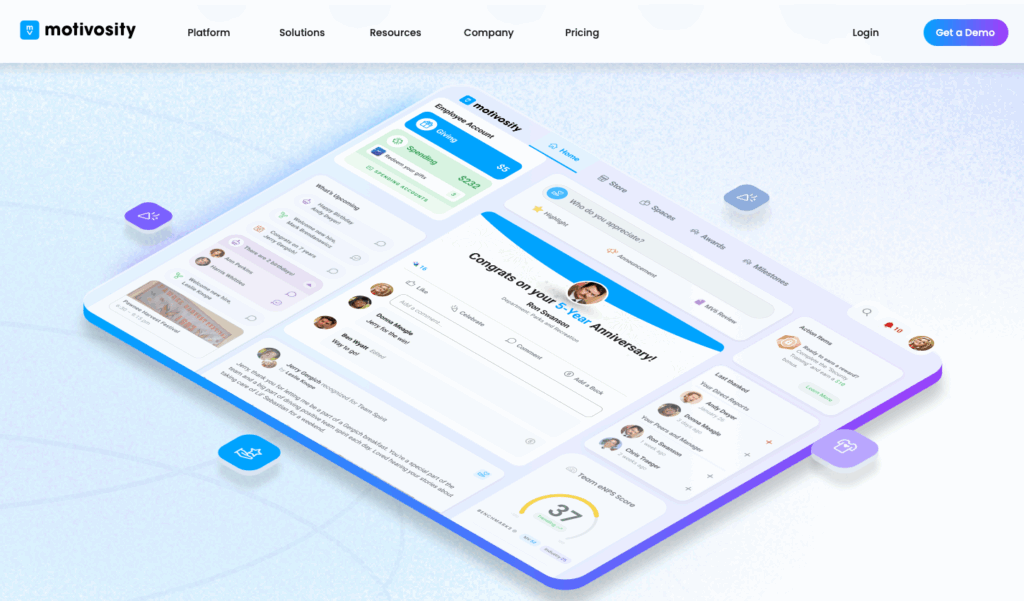
Motivosity is an employee engagement platform that offers tools for recognition, communication, surveys, and rewards.
Why I chose Motivosity: I liked Motivosity’s focus on building a social and appreciative workplace by allowing employees to recognize each other.
Recognition and rewards
I was really impressed by Motivosity’s recognition and rewards system. It supports both peer-to-peer and manager-to-employee recognition tied to “Motivosity Bucks.” Managers can also give out spot bonuses for outstanding work or create formal awards. You can view all this activity on a shared social feed, making recognition visible to your entire team.
Admins decide on a monthly budget for rewards, and employees can choose how to redeem them: gift cards, company swag, or a Visa card that can be used anywhere. There’s also a “Sweeneners” feature that rewards employees for engaging with the platform. The rewards catalog is easy to customize, and I liked that you have the option to create a set list of products or branded merchandise for your team.
Communication and surveys
Motivosity uses a social-style interface, complete with profiles, an update feed, and “Employee Spaces” for specific teams, projects, or interests. I liked that this helps employees connect across locations and departments. You can create focus areas for onboarding new hires, manager-only discussions, or community groups like book clubs or cycling channels.
While these tools may work well for public announcements and general information, the platform doesn’t support one-on-one messaging. This felt like a major feature gap, since businesses would need to rely on integrations like Google Chat, Microsoft Teams, or Slack to handle private conversations. Motivosity starts at $3,000 annually for small teams, so adding another tool only increases that already high cost.
When it comes to feedback, Motivosity offers customizable pulse surveys and a built-in eNPS survey to track sentiment over time, there’s anonymity options.
Reporting and dashboards
Motivosity isn’t a full performance management platform, but it does offer some tools to track progress through its “Achievements & Challenges” feature. You can create challenges linked to business goals, reward participation, and track results with real-time reporting. There are also dashboards that display recognition trends and engagement rates, which could be helpful for leadership.
While most features are accessible on the mobile app, the setup and insights features are only available on the desktop version. This could be a limitation for managers who want to access analytics on the go.
What users say about Motivosity
I love the platform and the opportunity it provides to give recognition to team members. It’s very simple to use, so the learning curve to use it very small.

What I liked least about Motivosity was the limited customization options for recognition categories. It would be helpful to tailor them more closely to our team’s unique goals and culture.
Key Features
- Peer-to-peer recognition
- Pulse surveys
- Achievement awards
- Rewards
Pros
- Strong mobile app
- Extensive rewards marketplace
Cons
- 30–60 day implementation
- No 1-on-1 messaging
Pricing
Starts at $3,000/year Trial: No Free Plan: No
-
Officevibe — Good for quick pulse surveys and manager feedback loops
Available on
- Web
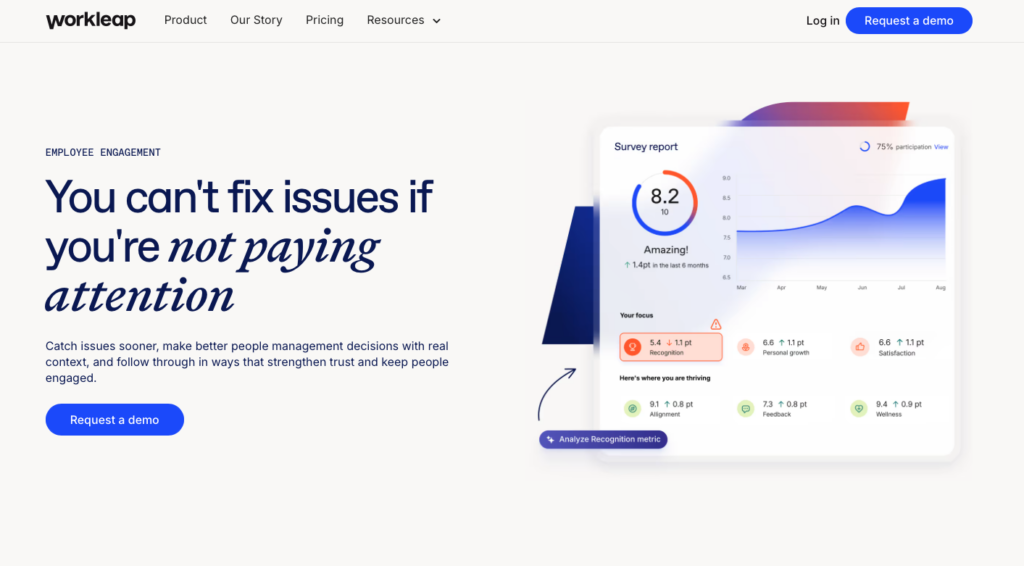
Workleap’s Officevibe is an employee engagement software that focuses on feedback, surveys, and recognition.
Why I chose Officevibe: I was interested in Officevibe’s use of AI to analyze survey data and how its recommendations could speed up the process of turning feedback into action.
Surveys and feedback
Officevibe has a strong set of survey tools. I liked that the automated pulse surveys use personalized questions for each employee, so feedback stays relevant. You can also create custom annual, quarterly, onboarding, or DEIB surveys.
Anonymity is a big part of the platform, which I really appreciated. I also liked how Officevibe’s AI analysis of survey results gives managers clear, actionable insights. The AI tools help managers react to feedback by suggesting responses.
Communication and recognition
Officevibe lets managers schedule 1-on-1 meetings. Once scheduled, both the manager and the employee receive a shared agenda, where they can add talking points and action items. There’s a one-way integration with Google Calendar, which is helpful, unless you make an update in Officevibe and forget to also schedule it in Google.
For recognition, there is a “Good Vibes” feature, which lets employees and managers send digital cards to acknowledge each other’s wins and contributions. Each person has their own profile with a Good Vibes tab, and you can choose whether the recognition is public or private. From what I could tell, there’s no feed, so even public recognition is basically hidden unless you visit a colleague’s profile.
Officevibe also promotes using Slack or Teams notifications to stay updated, which felt a bit odd to me. I think the platform itself should make recognition easy to discover without relying on external reminders to boost in-app engagement.
Performance and analytics
With Officevibe, you can access a wide range of reports, covering pulse surveys, engagement scores, feedback trends, 1-on-1 participation, goals, and recognition. All these metrics help give you an overview of team and business health. I liked that there’s an option to compare results with industry benchmarks, and you can export raw data if you need.
The platform includes basic goal setting, but full performance management is only available through the Performance module, which costs an extra $5 per employee each month. With a 10-user minimum, you’d be paying at least $100 per month to access the tool.
What users say about Officevibe
It improves the employee experience with engagement tools that provide recognition and better drive performance with an easy-to-use interface that we can all learn very quickly.
I wish there were more customization options for surveys and better integrations with the tools we already use. The analytics could also be more detailed

Key Features
- Anonymous feedback
- Pulse surveys
- Engagement reports
- Peer-to-peer recognition
Pros
- AI-powered insights
- Strong reporting
Cons
- No rewards system
- 10 user minimum
Pricing
Starts at $4,999/year Trial: Yes — 14-day Free Plan: Yes
-
TINYpulse — Good for lightweight, anonymous employee feedback
Available on
- Web
- iOS
- Android
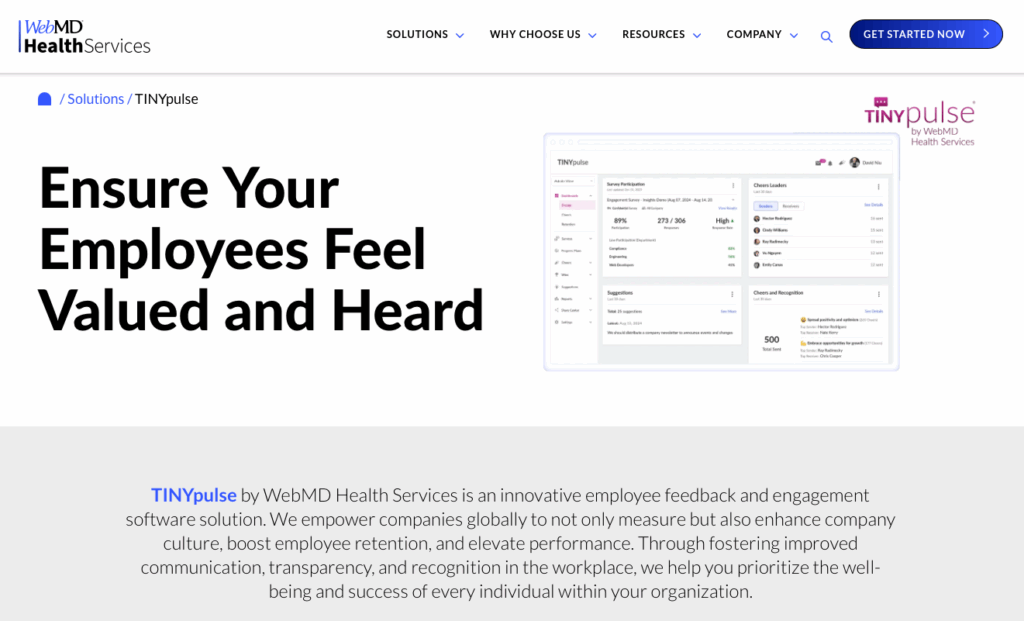
TINYpulse by WebMD Health Services is an engagement software built to collect employee sentiment through pulse surveys and support improvements in the workplace.
Why I chose TINYpulse: What I liked about TINYpulse is that because it’s backed by WebMD, it brings a strong focus to employee well-being and a research-backed engagement approach.
Feedback and analytics
TINYpulse has a pretty strong set of survey tools, including custom pulse surveys and specific surveys for key points in the employee journey, such as onboarding. I was surprised by the anonymous two-way communication feature. It lets employees submit honest feedback, and receive actual responses.
There are also reports and analytics that focus on the drivers of engagement, highlighting areas that may need attention.
Communication and recognition
Employees can recognize each other with TINYpulse’s “Cheers for Peers” feature. There’s also a “Suggestions” tool that lets employees share improvement ideas and a “Coach” feature that helps managers guide conversations more effectively with their teams.
There are no messaging tools on the platform, which was a major limitation for me. Without a way to connect privately or have group discussions, the system felt a bit empty. The engagement options that do exist feel more formal and geared toward collecting data rather than actually helping employees connect or build a stronger company culture.
What users say about TINYpulse
Happiness survey and happiness trends were quite useful to see the general morale in the organisation.We found that employees were not really using the peer-to-peer recognition tool as much as we’d hoped they would.

Responding to TinyPulse surveys is optional, so there may be some bias in our survey responses.
Key Features
- Pulse surveys
- Engagement reports
- Anonymous two-way communication
- Peer-to-peer recognition
Pros
- Focus on well-being
- Backed by established research group
Cons
- No internal messaging
- Product information is limited
Pricing
Contact vendor for price Trial: No Free Plan: No
-
Blink — Good for internal communication and engagement

Blink is an employee experience platform that offers tools for surveys, messaging, and updates.
Why I chose Blink: I chose Blink because it offers an intuitive, social media-like experience that supports employee engagement and provides helpful insights.
Surveys and recognition
Blink’s surveys are quick to make and easy to use. I liked that you can choose from pre-made engagement questions or add your own. There are a range of answer formats, including an agreement scale and a 0-10 option that makes it easy to collect data. All responses are anonymous, which has its benefits and drawbacks, depending on how your company operates.
In addition to surveys, Blink offers a “Kudos” tool that lets employees choose from five preset recognitions. I found the feature pretty limiting because you can’t create custom awards, attach rewards, or personalize them beyond a short message. It was actually easier to send more customized notes through Blink’s chat instead. That said, I liked that everyone can participate and that appreciation is visible in the company newsfeed.
Chat and newsfeed
Blink’s communication features are strong. You can send direct messages or start group chats and share images, documents, and reminders. There’s also voice and video calling, which is super helpful. While the chat works, there aren’t options to schedule messages or manage how media is handled once it’s shared, which could be challenging for larger companies in more regulated industries.
The newsfeed works like a social media feed, so you can share announcements, company updates, and important information. Employees can react, comment, and engage directly with posts. While the formatting options were a bit basic for me, you can still add attachments or tag specific teams, which is helpful.
Data and analytics
Blink’s reporting tools track employee engagement across the platform. I thought that the dashboard was really clean and easy to understand. Results are color-coded, and you can filter by employee group or export data to Excel for deeper analysis.
You can also see when your employees use Blink, view the reach, impressions, likes, and comments on posts, and use survey results to assess employee sentiment.
What users say about Blink
I find Blink to be user-friendly and easy to navigate, making the software intuitive for both newcomers and regular users without the need for extensive training.
It has very limited feature depth, and it is not very strong on productivity integrations, like collaboration tools
0Key Features
- Newsfeed with targeted updates
- Private, group, and public chat
- Employee content hub
- Pulse surveys and employee feedback
Pros
- Easy-to-use web and mobile apps
- Strong newsfeed with post types, scheduling, and audience targeting
- Supports private chats, group chats, and public channels
- Helpful content hub for company resources
- Simple surveys with color-coded results
Cons
- Preset kudos only, with no custom awards or attached rewards
- No built-in recurring survey trend charts
- Integrations require Blink’s support team to install
Pricing
Starts at $3.75/user/month Trial: Yes — 14 days Free Plan: No
-

Energage — Good for culture surveys and small-business engagement insights
Available on
- Web
- iOS
- Android
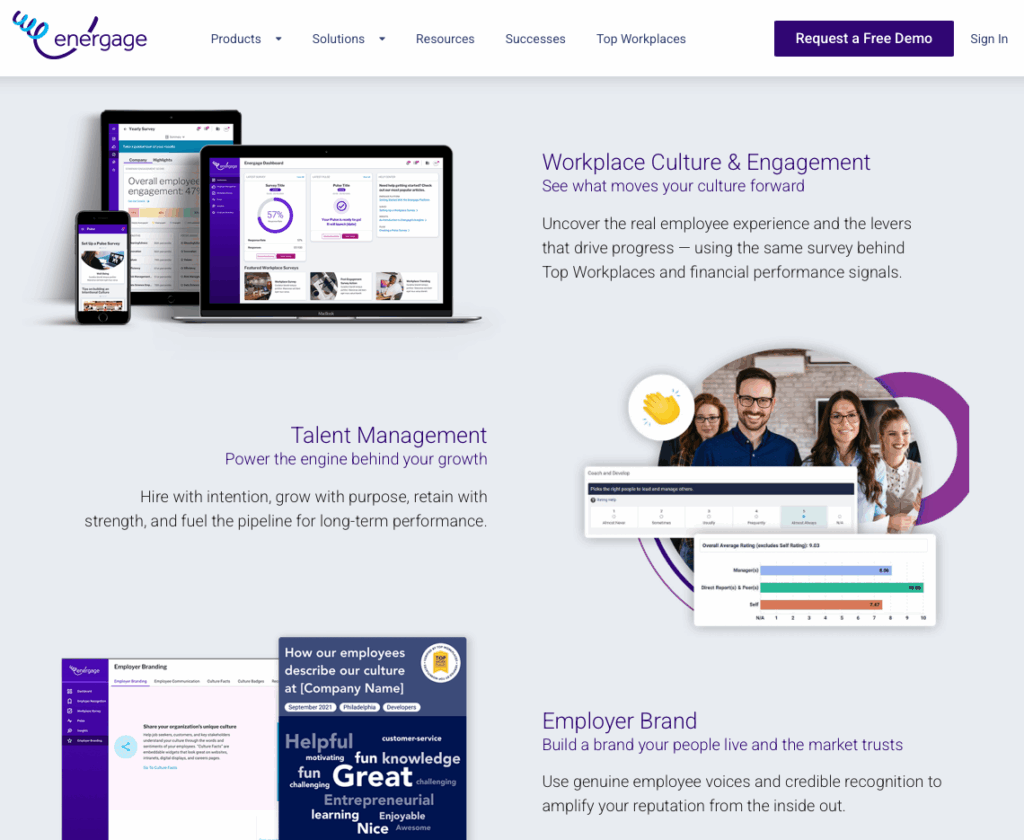
Energage is an engagement tool that helps businesses measure workplace culture through surveys, analytics, and industry benchmarks.
Why I chose Energage: Energage stood out to me because of its Top Workplaces awards, built directly on insights from its own employee surveys.
Surveys and feedback
Energage offers a strong suite of survey tools designed to collect deeper insights. Its main Workplace Survey is comprehensive and measures the workplace experience annually. Businesses that participate are also eligible for the Top Workplaces recognition program. If you need more frequent check-ins, there are also pulse surveys and eNPS tracking.
I liked how flexible it was to create surveys. You can use Energage’s research-backed templates, pull questions from the Item Bank, or create your own questions. There are also detailed demographic breakdowns. It’s important to mention that all of the survey responses are optional to encourage honest feedback, which means employees might not answer every question.
Reporting dashboards
Energage provides a wide range of reports and dashboards, including the Insights Highlights page. It displays the biggest changes since the last survey, key benchmark comparisons, and trends at the department level.
I liked that you can review a more high-level Workplace Experience summary and review employee comments by theme and sentiment. There’s even a slide deck you can download for team action planning. If you pay for an Insights subscription, you also get access to the Report Builder, which lets you create custom reports tailor to your business needs.
Employer branding and recognition
Instead of focusing on internal rewards, Energage uses survey results to inform its Top Workplaces awards program. This was an interesting approach, because it gives companies a way to build their employer brand based on actual employee feedback. There are also tools like the Survey Results Infographic to help you share findings internally or publicly.
While Energage is good at employer branding, it doesn’t offer a way to recognize or reward teams internally. The platform is clearly built around external perception and organization-wide achievements, with no space for connection or individual appreciation. I think that recognizing personal wins matters, and it’s difficult to retain employees when they don’t feel valued or engaged.
What users say about Energage
Setting up an employee survey through Energage is absolutely pain-free. I particularly appreciate the recommended reminder intervals and that they don’t go to those who have already completed the survey.
It would be of help to have a little more time ahead to communicate to the employees of the upcoming survey time to be engaged in the answer on a timely basis.
Key Features
- Custom surveys
- Performance management
- Recognition
- Mobile app
Pros
- Excellent benchmarking
- Employer branding
Cons
- Lacks transparent pricing
- No real-time communication
Pricing
Contact vendor for price Trial: No Free Plan: No
Workforce Management Software With Employee Engagement
-
Connecteam — Best for gathering employee feedback and improving day-to-day engagement
Connecteam is a mobile-first employee engagement and workforce management platform. It brings feedback, communication, recognition, messaging, and more into one easy-to-use app.
Why I chose Connecteam: Connecteam stands out because it centralizes all the tools you need into one place. I liked that employees can submit surveys, post updates, and send messages without switching apps.
Here’s what else Connecteam has to offer:
Custom surveys
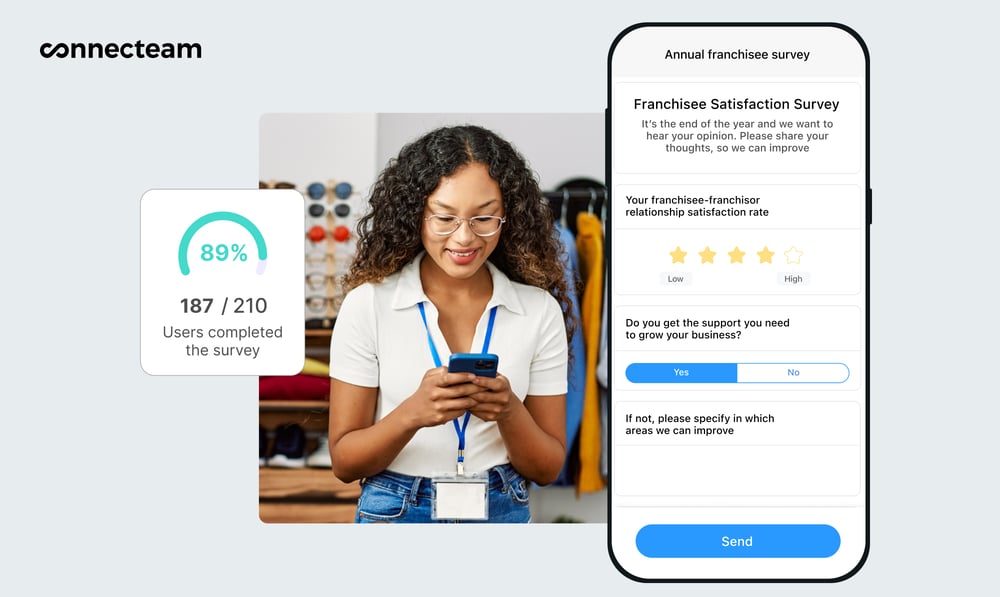
Setting up employee surveys in Connecteam is quick and flexible. You can use a template or build your own with different question types. I liked that there’s an option for anonymous responses, because it means employees can be honest without the added pressure. You can target specific groups, adjust the look and feel, and tailor each survey to really fit your team.
Connecteam stands out for how smoothly it turns feedback into actionable data. You can view responses in real-time and send out automatic reminders, plus employees can answer directly from their phones or desktop. I found it easy to track participation, follow up instantly, and export results to Excel for a deeper look. Overall, I was just really impressed by how simple it was to gather insights.
Clear communication
With Connecteam’s online team chat, you can message individual employees or create group chats. Teams can send pictures, videos, audio, or files, which I thought was fun. Managers can also access read receipts to check who’s seen what. The chat is searchable, so you can easily find the right conversation. I also appreciated that with the chat, you don’t have to switch between apps and can keep your personal messages separate.
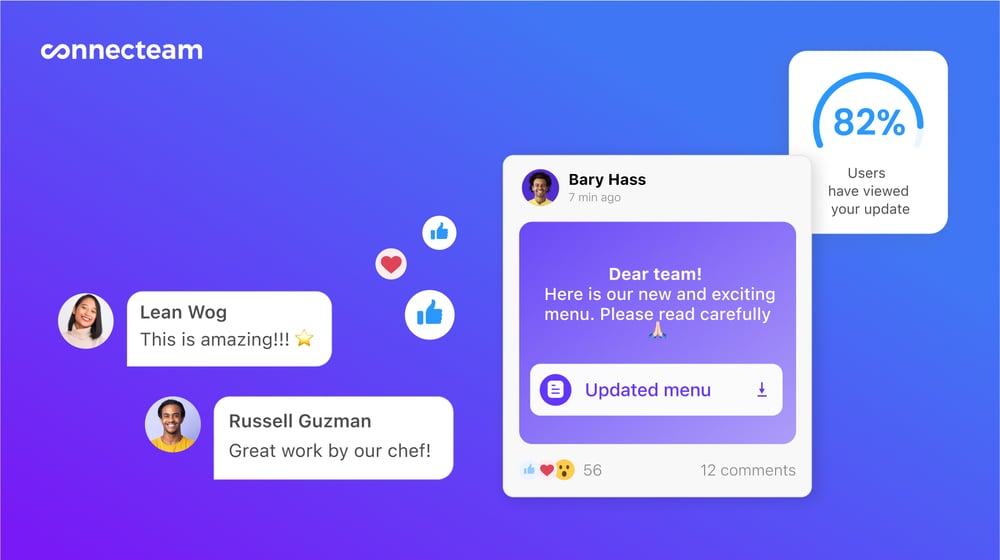
Connecteam also offers a company update feed, which is great for boosting employee engagement. You can post announcements, news, or updates, and staff can join the discussion by reacting and commenting. I also liked that managers can measure who has viewed each post, and even require confirmation for time-sensitive or important updates.
Recognition and rewards
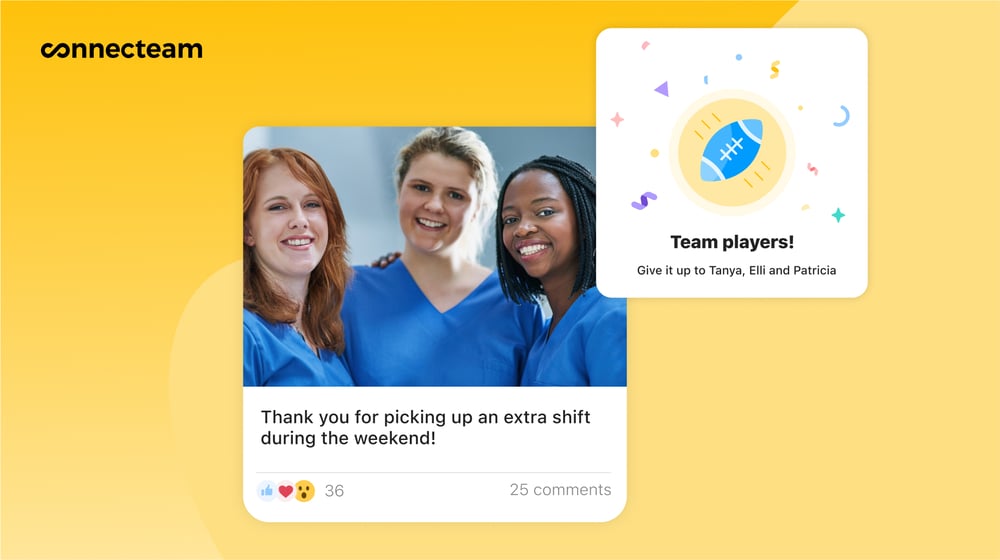
Show your employees their hard work matters with Connecteam’s recognition tool. You can create custom recognitions, add a personal message or badge, and decide to share it privately or with the entire team. They appear in the company newsfeed, so people can easily react and comment. I liked how this supports a positive workplace culture where wins are noticed and celebrated.
You can also use gift cards for employees as a reward. Staff receive digital tokens they can redeem, and managers have full control over how many to send, when to send them, and which gift cards are available. You can even automate rewards for events like holidays, anniversaries, or birthdays. It makes showing employee appreciation simple, without the hassle of deciding what to give.
Employee timeline
Connecteam’s employee timeline management is a useful way to view each employee’s journey at your company. It updates automatically with key milestones like promotions, training, and evaluations. You can also add custom events to track anything important to your business, such as salary changes or department moves.
Each update to the timeline is logged, creating a clear audit trail. With everything in one place, it’s easier to track progress against goals, spot performance patterns, and understand employee growth. I liked that this gives managers better tools for conversations about development and next steps. It supports smarter decisions and helps keep employees engaged.
Integrations
Connecteam offers an API integration and syncs with the tools you already use, including:
And so much more…
Beyond employee engagement, you can also create company events with Connecteam. Share invites with custom RSVPs, track attendance, and keep people engaged with comments and reactions. You can streamline employee training and onboarding with the AI Course Creator, which builds custom learning materials in minutes. With employee scheduling and the employee time clock, your core operations are covered. Connecteam brings all these tools together to help you manage your business with ease.
0Key Features
- Feedback surveys
- In-app team chat
- Company newsfeed
- Recognition & rewards
- Employee timeline
- Reporting and analytics
Pros
- All-in-one app
- Mobile accessible
- Intuitive interface
- Free up to 10 users
Cons
- Needs internet or Wi-Fi access to work
Pricing
Free-for-life plan availablePremium plans start at $29/month for 30 users
Empower Your Team with the Leading Employee Engagement Software
Join Connecteam Now
Compare the Best Employee Engagement Softwares
| Topic |
|
|
|
|
|
 Start for free
|
|---|---|---|---|---|---|---|
| Reviews |
|
|
|
|
|
|
| Pricing |
Starts at $3,000/year
|
Starts at $4,999/year
|
Contact vendor for price
|
Starts at $3.75/user/month
|
Contact vendor for price
|
Starts at just $29/month for the first 30 users
|
| Free Trial |
no
|
yes
14-day
|
no
|
yes
14 days
|
no
|
yes
14-day
|
| Free Plan |
no
|
yes
|
no
|
no
|
no
|
yes
Free Up to 10 users
|
| Use cases |
Good for peer recognition and morale boosts
|
Good for quick pulse surveys and manager feedback loops
|
Good for lightweight, anonymous employee feedback
|
Good for internal communication and engagement
|
Good for culture surveys and small-business engagement insights
|
Best for gathering employee feedback and improving day-to-day engagement
|
| Available on |
Web, iOS, Android
|
Web
|
Web, iOS, Android
|
Web, iOS, Android
|
What is Employee Engagement Software?
Employee engagement software is a digital tool that helps organizations and HR professionals understand how employees feel, stay connected, and share feedback. It gives teams a simple way to check in, communicate, and have important conversations.
The software helps managers identify what employees need, strengthen teamwork, and keep everyone on the same page. By tracking sentiment and recognizing workplace contributions, managers get a better understanding of how to support employees and improve their overall experience. When employees feel heard, productivity increases and turnover decreases.
How Does Employee Engagement Software Work?
Employee engagement software works by bringing several key processes into one place. The software usually includes features such as surveys, recognition, and communication channels. These tools let employees share their thoughts regularly instead of waiting for formal reviews.
When employees share updates and submit feedback, inputs are organized into dashboards that highlight trends in sentiment, participation, and engagement. Managers can quickly see what is working well and where there’s room for improvement and additional support.
Many platforms automate recurring tasks like reminders, which keeps feedback consistent without creating more work. These tools help managers offer timely support, develop a healthier workplace rhythm, and keep employees engaged throughout their daily work.
The Benefits of Employee Engagement Software
There are multiple ways employee engagement software can benefit your business, including:
Better visibility
Employee engagement software helps you catch the important details you might otherwise miss. Ongoing feedback takes out the guesswork and shows you exactly how people are doing and where motivation stands. This helps you step in early instead of responding after issues have already grown.
Stronger communication
Employees feel more connected to their work and to each other when communication is easy and consistent. Engagement platforms give employees a place to share updates, ask questions, and stay informed. This reduces confusion, cuts down on back-and-forth, and helps everyone feel more involved.
Improved culture
When you make recognition and check-ins a part of your team’s day-to-day, people feel noticed. Employees know that their work is seen and appreciated, so their motivation increases. Engagement tools help you build a culture of positive habits, where employees feel valued.
Higher retention
Employees who feel heard and supported are more likely to stay longer. Engagement software can help you spot early signs of burnout, understand workload pressure, and respond to problems before they grow. This improves employee satisfaction, while reducing the high cost and investment of turnover.
Increased productivity
People bring more energy and positivity to work when they feel connected. Creating a workplace with strong communication, regular recognition, and clear expectations contribute to a healthier team dynamic. The result? Higher productivity and a workplace where people feel motivated to do their best.
How Much Does Employee Engagement Software Cost?
Employee engagement software ranges in price depending on the features you need and the size of your team. Some platforms charge an upfront fee, while others price per user per month, starting around $4.50–$5.
Connecteam stands out not only for its pricing transparency, but also because its Small Business Plan is completely free for up to 10 users. Connecteam’s paid plans start at $29 per month for up to 30 users. Higher-tier plans start at $49/month for Advanced and $99/month for Expert, both also covering up to 30 users.
FAQs
Employee engagement software improves diversity and inclusion by giving employees a safe way to share feedback and identifying bias trends. It helps HR teams act on real data, create targeted programs, and ensure all employee voices are heard and valued.
Employee engagement software gives you real-time insights and continuous feedback, while traditional surveys only offer periodic snapshots. Tools like Connecteam help you spot trends faster, respond sooner, and support ongoing engagement efforts in ways traditional surveys can’t.
You can measure leadership effectiveness with engagement software by analyzing employee sentiment, team performance, and feedback tied to specific leaders. The software often highlights gaps in communication, trust, and motivation, indicating where leaders can improve their impact.
The Bottom Line On Employee Engagement Software
When you’re trying to manage daily operations and grow your business, it can be hard to keep track of how employees are feeling. Employee engagement software helps you find time to pay attention, connect, and understand what your team needs to stay motivated.
The right employee engagement tool makes it easier to collect feedback, improve communication, and gain clarity into how to best support your team. It can lead to stronger teamwork, better morale, and higher retention.
Connecteam stands out as the best software option, offering an excellent platform at an affordable price. With tools to communicate, gather feedback, track progress, and recognize employees for their work, Connecteam is the obvious choice for employee engagement software.