


Without a good way to manage vendors, your supply chain can quickly become disorganized, error-prone, and costly.
The right vendor management system can ensure your business receives critical components and services on time while keeping costs to a minimum.
In this guide, I’ll review the 5 best vendor management systems and help you choose the right platform to support your operations.
If you don’t have the time to read through our research, jump down to our quick comparison table.
| App | Best for | Starting Price | Key Considerations |
| Connecteam | Deskless companies with employees and vendors working together in the field | Just $29/month for the first 30 users | Mobile-first workforce management for deskless teams, but not ideal for office-based vendors |
| SAP Fieldglass | Enterprise companies managing large external workforces across multiple skillsets and industries | Contact vendor for price | Flexible management tools for vendors with multiple skillsets, but difficult to manage if you don’t already use SAP products |
| Beeline | Enterprise-level businesses that need to bid and manage ongoing vendor contracts | Contact vendor for price | Strong bidding and contract management tools, but limited support for administering vendors internationally |
| Coupa | Businesses in highly regulated industries that need advanced vendor risk management tools | Contact vendor for price | Advanced compliance management features, but very complex user interface |
| Oracle SCM Cloud | Enterprises that want an all-in-one platform for combined supply chain and procurement management | Contact vendor for price | Advanced procurement and supply chain management tools in one platform, but limited integrations for non-Oracle software |
Updated May 2026:
- Replaced outdated platforms with SAP Fieldglass, Beeline, Coupa, and Oracle SCM Cloud.
- Updated the Connecteam review to reflect who this platform is best for.
- Added details about how I chose the best vendor management systems.
- Added a new section about the benefits of vendor management systems.
- Added a new section on how much vendor management systems cost.
Our Top Picks
-
1

Deskless companies with employees and vendors working together in the field
-
2

Enterprise companies managing large external workforces across multiple skillsets and industries
-
3

Enterprise-level businesses that need to bid and manage ongoing vendor contracts
Why trust us?
Our team of unbiased software reviewers follows strict editorial guidelines, and our methodology is clear and open to everyone.
See our complete methodology
How I Chose the Best Vendor Management System (VMS)
Here are the most important things I looked for when comparing relevant companies’ vendor management software (VMS).
Must-have features
- Document management: Your VMS should have an integrated document management system and offer tools for e-signing contracts, tracking purchase orders, and storing delivery notices.
- Self-service portal: A self-service portal makes it easy for vendors to update their information, check their pay, and more. It improves the vendor experience and saves your team time.
- Advanced analytics: Your VMS needs to provide a detailed breakdown of vendor performance and cost so you can make decisions about who to work with in the future.
I also made sure the software has:
- Automations: VMS platforms should offer automations for both vendor onboarding and risk scoring at a minimum.
- Integrations: Your VMS should integrate with the rest of your tech stack, including your payroll software and enterprise resource planning (ERP) system.
- Alerts: Your software should alert you if a vendor falls out of compliance, a contract is about to expire, or an order is delayed. Platforms without alerts ranked significantly lower in my analysis.
Finally, I checked for features that make vendor management systems great:
- Vendor compliance and risk monitoring: A VMS should track vendors’ certifications, security measures, insurance, and creditworthiness. I downgraded platforms that don’t offer automated risk assessments for each vendor.
- Communication tools: Your VMS should enable you and your vendors to communicate securely. This provides control over sensitive information and helps you track all contact your company has with a vendor.
- Mobile app: A mobile app enables you to check vendor and contract details from anywhere. It’s especially important in industries like construction where you’re often meeting vendors at job sites. Platforms without a mobile app or with apps that didn’t feel user-friendly lost points in my analysis.
The 5 Best Vendor Management Systems of 2026
-
Connecteam — Deskless companies with employees and vendors working together in the field
Connecteam is the best choice for field service companies and deskless operations that rely on vendors. It offers all-in-one vendor management, communication, and task management tools in a mobile-friendly platform.
Why I chose Connecteam: While Connecteam isn’t specifically designed as a vendor management software, it’s my top pick because of its wide range of capabilities for managing vendor relationships. It has a built-in document management system, a mobile-enabled self-service portal for vendors working in the field, and communication tools so you can stay in constant touch with your team.
Here are some of Connecteam’s vendor management capabilities.
Self-service portal
Connecteam’s self-service portal enables vendors to create their own profile in your system, review their timesheets, check their paystubs, and more. For vendors who work on a regular basis, they can also use the self-service portal to set their scheduling availability and manage time off. I like this because it allows you to know exactly which vendors are available to work when you need extra resources.
Document management
Connecteam’s document management app allows you to digitize your file cabinet. You can manage, organize, and keep track of vendor contracts, certificates, and licenses—in one secure and organized location. Simply send users document requests, which they can upload to the app from their mobile phones. This way, you can skip time-consuming manual paperwork.
Onboarding
I love how easy Connecteam makes it to create and deliver onboarding courses right to your users’ mobile phones. You can divide courses into bite-sized sections for easier learning and include training material in any format. It’s a great way to ensure vendors are aligned with your organization’s workflows.
As an admin, you’ll have a clear overview of your users’ performance, progress, and course completion from your admin dashboard.
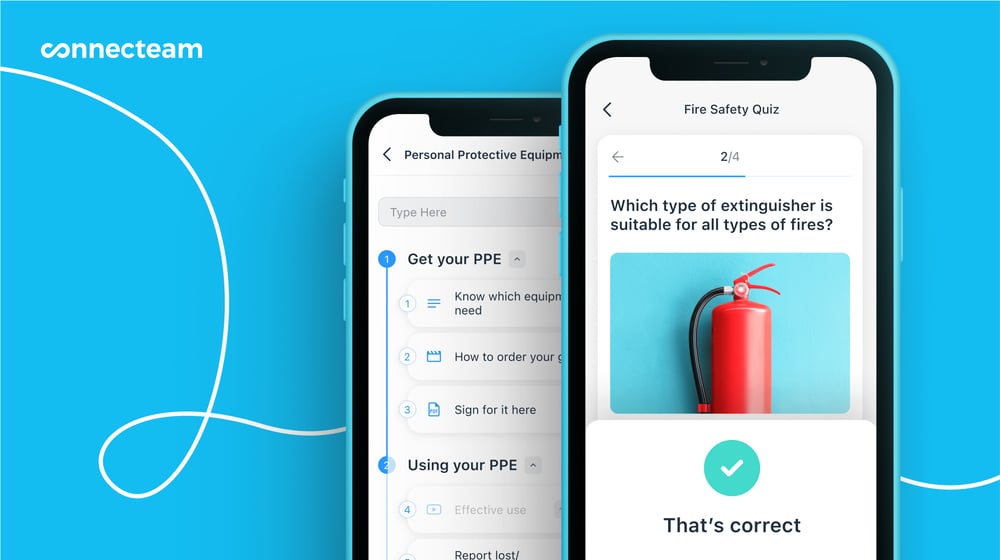
Connecteam enables you to create training courses complete with quizzes to ensure your vendors retain key information. Task management
I also like Connecteam’s task management features, which allow you to easily create and assign tasks to users to complete on the job. Attach relevant task information, digital forms, or checklists and maintain a clear real-time overview of progress on each task.
In-app chat
WIth the in-app chat, you maintain a direct line of communication with your vendors from anywhere. Simply access the chat from anywhere in the platform and instantly get in touch with all the right people.
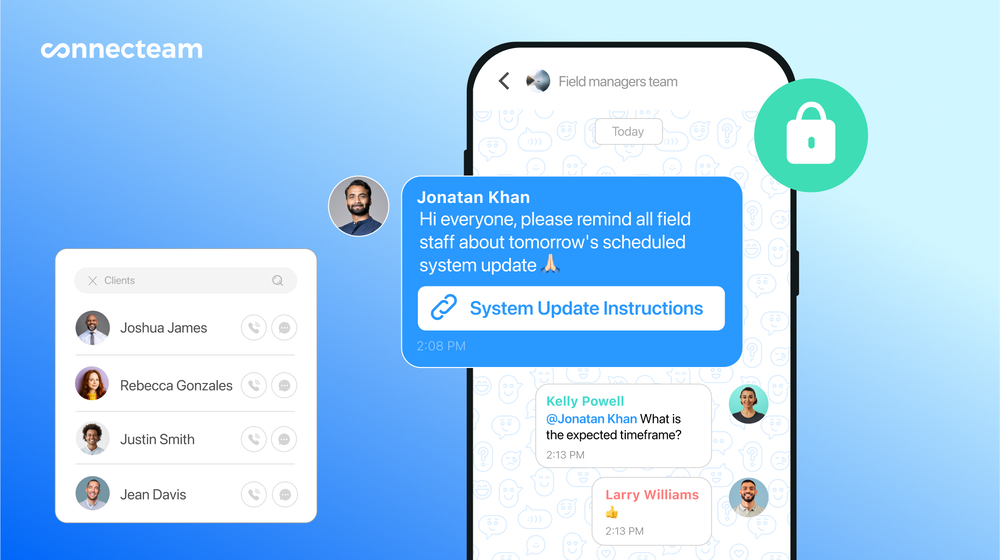
Connecteam’s in-app chat lets you quickly share important information, like scheduling changes, with vendors. Vendor analytics
I’m a big fan of Connecteam’s analytics tools, which enable you to closely monitor each vendor’s performance. You can see how much time they’ve spent on each task and where they were while clocked in. You can also compare pay rates across vendors, analyze overtime patterns, and monitor job costs to ensure your business isn’t overpaying for third-party services.
Automations and integrations
Another thing I like about Connecteam is that it works seamlessly with your existing workflows. You can set up alerts to find out when vendors are late for a job or get real-time reports from the field. A Zapier integration enables you to easily link Connecteam to all the software your business already uses. When it’s time to run payroll, Connecteam integrates with popular accounting platforms like Quickbooks, Gusto, and Xero so you can pay vendors in just a few clicks.
And so much more…
In addition, Connecteam offers exceptional customer support, an intuitive user experience, excellent employee management tools, and high customizability, allowing you to adjust the platform to suit your business needs.
How it works in practice
Say you want to assign a vendor to visit a location and complete a task. With Connecteam, you can create the task and describe exactly what the vendor needs to do, complete with images and even a digital checklist. You can communicate with the vendor throughout the job using Connecteam’s in-app chat. They can clock their hours using Connecteam and their timesheet will automatically be submitted to you for review.
When Connecteam may not be the best fit
Connecteam is built specifically for deskless teams. While you can use it to track time and assign tasks to in-office workers, there are other platforms better-suited for managing office-based vendors.
Connecteam also offers a free for life plan – Try Connecteam here!
0Key Features
Pros
- Clarify vendor work assignments
- Direct communication with vendors in the field
- Easily monitor spending on vendors
- All-in-one solution reduces platform switching
Cons
- Needs internet access, so it can’t be used in some remote field sites
Pricing
Free-for-life plan availablePremium plans start at $29/month for 30 users
14-day free trial, no credit card required
Start your free trial -
SAP Fieldglass — Enterprise companies managing large external workforces across multiple skillsets and industries
Available on
- Web
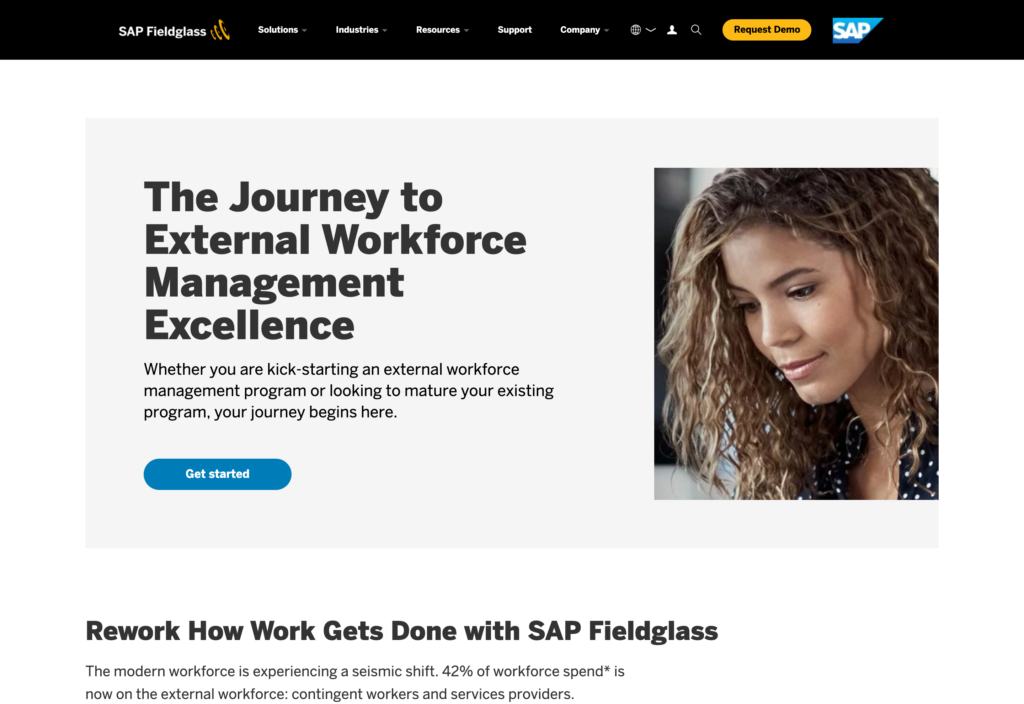
SAP Fieldglass is a streamlined vendor management system that allows users to manage every part of their vendor network.
Why I chose SAP Fieldglass: SAP Fieldglass offers advanced tools for managing contingent workers, including scheduling features, time tracking, and absence management.
SAP Fieldglass is a user-friendly platform that gives you tight control over vendors and contingent workers. You can onboard and offboard vendors automatically, assign them shifts or tasks, track their time and attendance, and even pay them directly from Fieldglass.
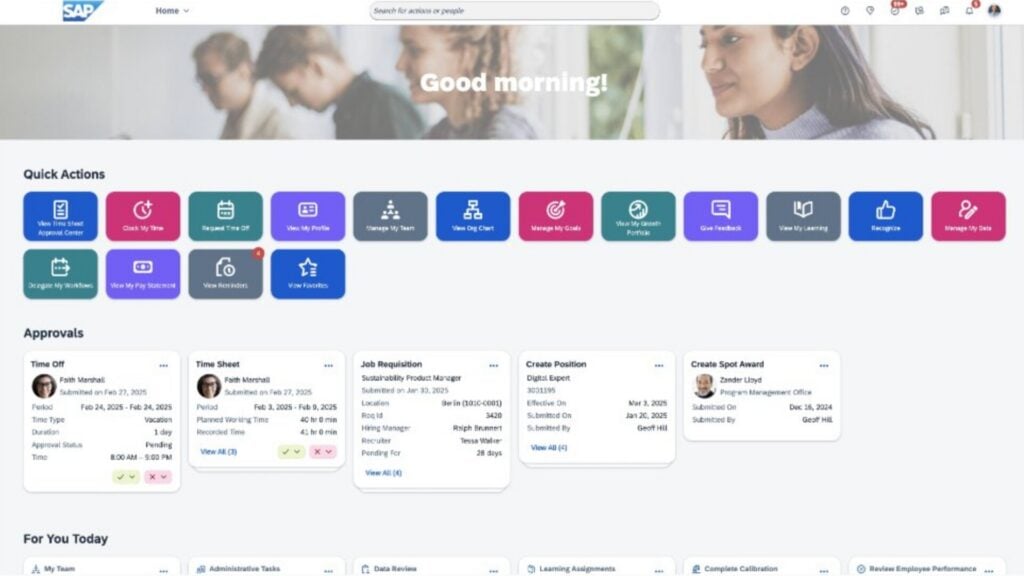
The SAP Fieldglass VMS dashboard lets you easily manage contingent workers, including assigning tasks and tracking time and attendance. Vendor network
Another thing I liked about Fieldglass is that it helps you hire the vendors you need. It has a built-in partner network where you can filter service providers based on specific skills. You can compare vendors side-by-side and hire them easily through the platform. This also makes it easier for large-scale enterprise companies to hire vendors across a range of industries.
Performance analytics
FieldGlass also provides in-depth analytics about each contingent worker’s performance and your spending on vendors across categories you define. It can also forecast demand for different roles, helping you proactively line up the workers you need.
Key limitation
Fieldglass is designed to work side-by-side with SAP’s SuccessFactors software, which manages your own employees. However, this separation of employees and third-party vendors can make it clunky to track and manage your entire workforce and requires a lot of switching between the two platforms.
What users say about SAP Fieldglass
I find SAP Fieldglass really beneficial for managing external workforces. The automation features, centralized worker profiles, and real-time analytics are great at providing visibility and ensuring compliance.

What I dislike about SAP Fieldglass is that the interface can feel unintuitive at times. Some tasks take more clicks than expected, and certain workflows feel more rigid than they need to be.


Key Features
- Automated onboarding and offboarding
- AI-powered candidate matching
- Real-time analytics dashboard
- Supports country-specific labor rates and compliance requirements
Pros
- Mobile apps support deskless teams
- Tight integration with other SAP software
Cons
- Clunky for managing employees and vendors together
- Mixed reviews about customer service quality
Pricing
Contact vendor for price Trial: No Free Plan: No
-
Beeline — Enterprise-level businesses that need to bid and manage ongoing vendor contracts
Available on
- Web

Beeline is an enterprise-scale VMS that supports both contingent staffing and services procurement.
Why I chose Beeline: I was impressed by Beeline’s tools for procuring third-party services, which include automated bidding processes and tools for managing Statements of Work.
Management dashboard
Beeline offers automations for all aspects of vendor management and provides a streamlined interface for both managers and vendors. It’s flexibly built for large and enterprise businesses and offers an intuitive dashboard for managing contingent workers and tracking resources across your workforce. The dashboard is also available on mobile, which is helpful for managers on the go.
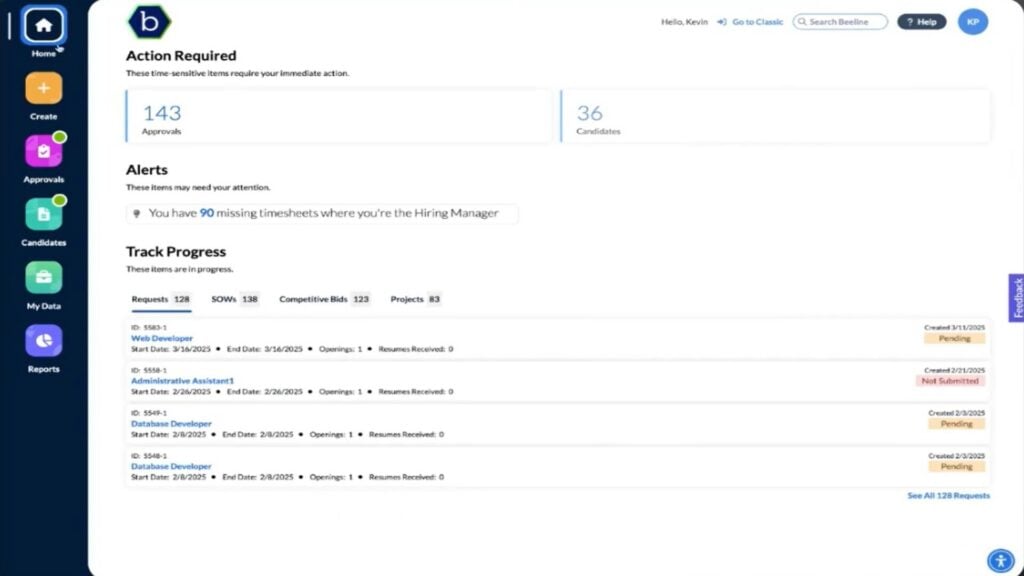
Beeline’s VMS offers automated approval workflows and progress tracking for your contracts in progress. Contracts and procurement
I especially liked Beeline’s tools for procuring services from third-party vendors. You can create complex contracts complete with milestones, deliverables, and performance metrics and host a competitive bidding process within the platform. Once you select a bid, you can use Beeline to create a Statement of Work using customizable templates and track changes to the document throughout the negotiation process.
Contingent worker management
Beeline also supports vendor onboarding, training, and compliance. A direct sourcing tool enables you to search for and recruit contingent workers, while a resource tracking module helps you monitor how your workforce is deployed so you can identify cost saving opportunities.
Key limitation
The only complaint I have with Beeline is that it doesn’t do a great job of helping you manage vendors and contingent employees across multiple countries. It’s not intuitive to set up different compliance requirements for different jurisdictions or to assign contingent workers to specific service areas.
What users say about Beeline
Beeline is one of the most UI friendly , elegant and simplest VMS I have used so far. Easy to spot features and simple to understand.
I would like to see Beeline become easier to implement and manage for independent contractors/freelancers and workers located in countries not already in scope for the VMS.
Key Features
- Automated bid management
- Automated onboarding and offboarding
- Version control for Statements of Work
- Direct sourcing of contingent workers
Pros
- Wide range of integrations to support your existing tech stack
- User-friendly interface with modest learning curve
Cons
- Not ideal for managing globally distributed teams
- Doesn’t offer a mobile app for managers
Pricing
Contact vendor for price Trial: No Free Plan: No
-
Coupa — Businesses in highly regulated industries that need advanced vendor risk management tools
Available on

Coupa is an all-in-one supply chain and procurement platform with advanced features for managing supplier relationships.
Why I chose Coupa: Coupa does a nice job of handling the entire vendor lifecycle, from onboarding and assignment to payment and offboarding.
Vendor administration
Coupa’s platform offers tight integration for your HR, finance, and operations needs. It automates the vendor onboarding process and provides a seamless system for managing contingent worker assignments. You can track vendors’ time and attendance through the platform, issue invoices automatically, and pay directly through Coupa.
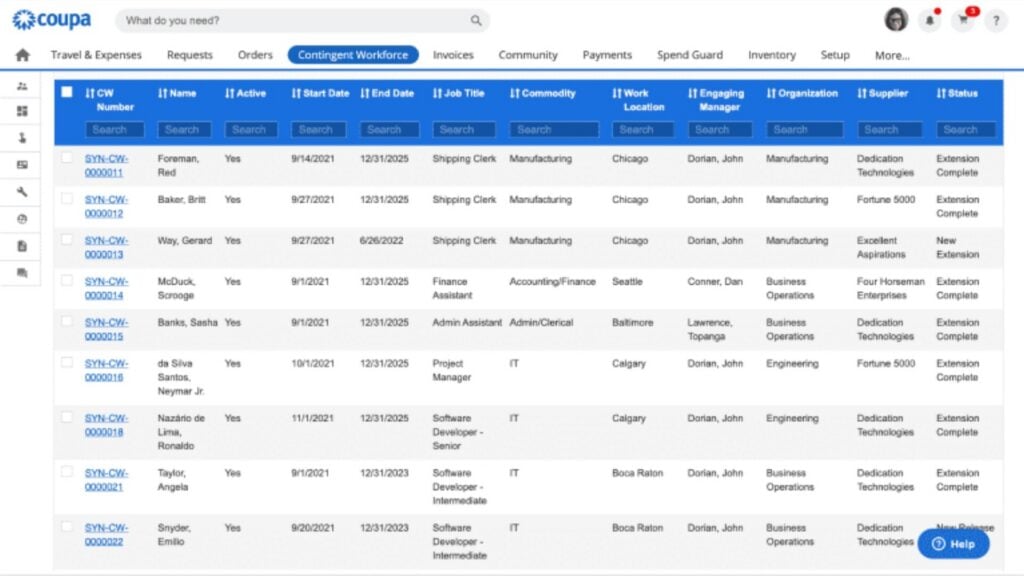
Coupa enables you to flexibly manage contingent workers and provides a summary table with key worker details. Reporting and risk management
All of these tools are tied together by an advanced reporting interface that allows you to monitor vendor performance, spending, and compliance. It even tracks vendor spending automatically, which makes it much easier to see where your money is going and keep projects on budget. Coupa automatically alerts you to compliance risks, which makes it a strong choice for businesses in highly regulated industries. I appreciated how its built-in optimization and forecasting tools help minimize costs.
Contingent worker sourcing
I also liked that you can directly source contingent workers through Coupa. It’s straightforward to define rates, issue contracts, and even train new third-party workers.
Key limitation
The drawback to all of this capability is that Coupa’s interface feels anything but intuitive. I encountered a steep learning curve in getting started with the platform. Vendors could also struggle with the self-service portal, slowing down onboarding.
What users say about Coupa
Coupa excels at…managing procurement, expenses, and invoicing. One of the best aspects is its ability to centralize and streamline spend-related processes, making it easier for teams to enforce compliance, track budgets, and make informed purchasing decisions.
It’s powerful but not always the most seamless experience. Also some suppliers find the portal confusing which sometimes delays transactions on their end.
Key Features
- Automated invoicing
- Vendor spend tracking
- Time and attendance tracking
- Direct sourcing of contingent workers
Pros
- Automated expense tracking reduces admin time
- Reports are very customizable to support decision-making
Cons
- Complex user interface, especially for vendors
- Approval workflows can be confusing
Pricing
Contact vendor for price Trial: No Free Plan: No
-
Oracle SCM Cloud — Enterprises that want an all-in-one platform for combined supply chain and procurement management
Available on
- Web
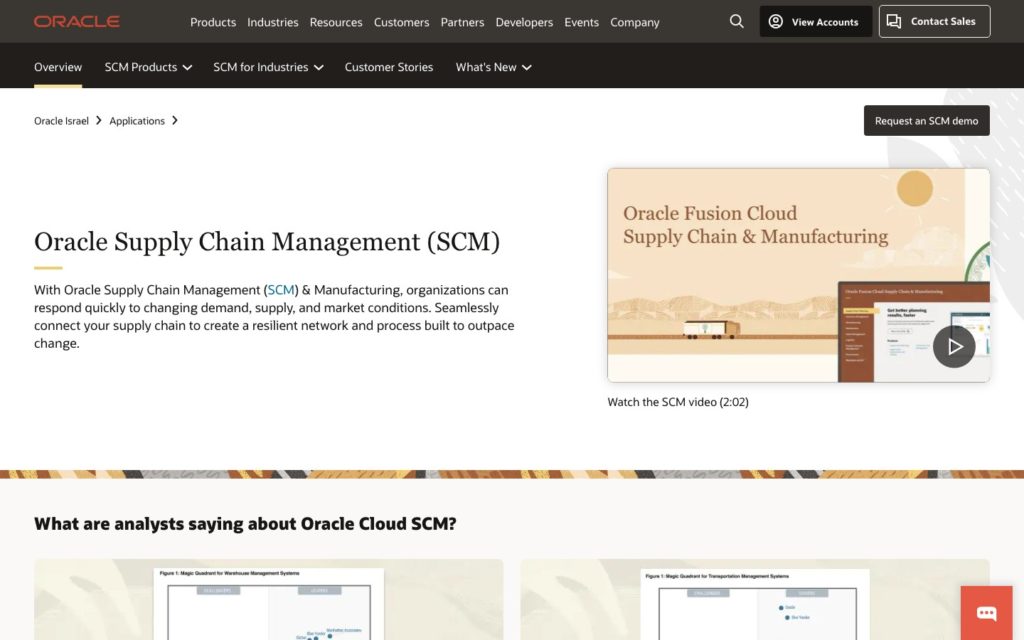
Oracle SCM Cloud is an all-in-one supply chain management platform that supports inventory management, procurement processes, and product lifecycle management.
Why I chose Oracle SCM Cloud: Oracle SCM Cloud is a multifaceted platform with vendor management tools, inventory management, supply chain planning, and more.
Holistic supply chain management
Oracle SCM Cloud stands out for businesses that want to manage every aspect of their supply chain—including both suppliers and vendors—in a single platform. It’s more complex than other VMS platforms I reviewed and has a correspondingly steep learning curve. But the added scope can be a plus for growing businesses in industries like manufacturing and logistics.
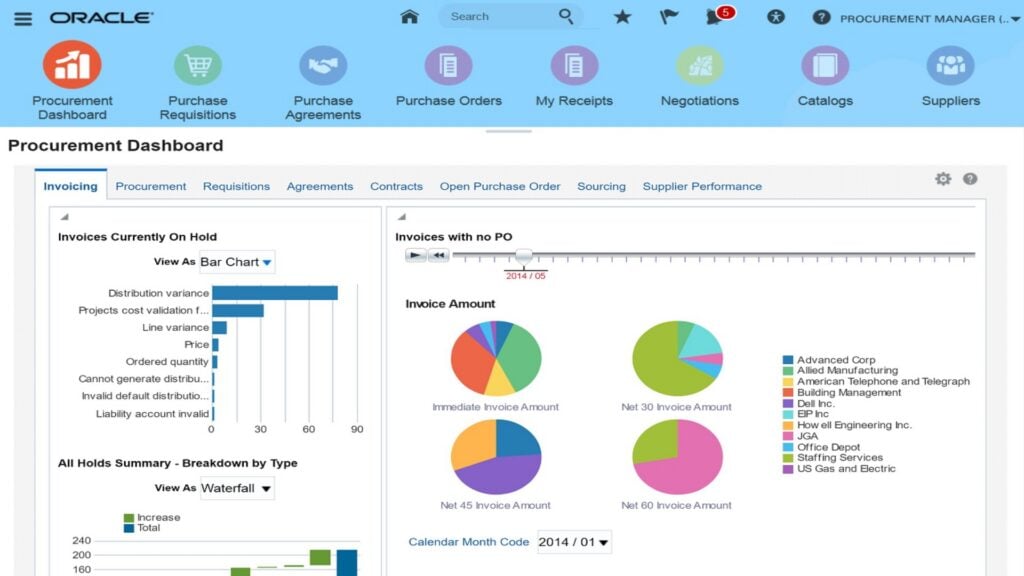
Oracle SCM Cloud includes an advanced procurement reporting dashboard with details about your outstanding invoices. Automated vendor administration
The software supports automated vendor onboarding and offboarding, direct sourcing of contingent workers, and real-time performance and compliance tracking. It also uses generative AI to speed up contracting and support your business in negotiation with new vendors.
Procurement analytics
I particularly liked Oracle SCM Cloud’s procurement analytics suite, which offers an extremely detailed look at your spending on third-party vendors and contingent workers. You can dive into custom performance metrics, break down spend across geographies and cost centers, and monitor how diversified your vendors are to reduce bottleneck risks.
Key limitation
Integrating Oracle SCM isn’t as easy as I’d like, though. The platform works well with Oracle Cloud ERP and Oracle Cloud HCM, but it doesn’t provide a lot of plug-and-play integrations for other business software.
What users say about Coupa
Awesome flexibility, accessibility, smart interaction and accurate reports.
There is no easy way to provide reports from a third-party reporting tools.
Key Features
- Contract templates with version controls
- AI-assisted contract negotiation
- Self-service vendor portal
- Automated vendor risk analysis
Pros
- Advanced and highly customizable reporting interface
- Directly supports payments to vendors
Cons
- Limited integration options
- Very steep learning curve
Pricing
Contact vendor for price Trial: No Free Plan: No
Compare the Best Vendor Management Systems
| Topic |
 Start for free
|
|
|
|
|
|---|---|---|---|---|---|
| Reviews |
|
|
|
|
|
| Pricing |
Starts at just $29/month for the first 30 users
|
Contact vendor for price
|
Contact vendor for price
|
Contact vendor for price
|
Contact vendor for price
|
| Free Trial |
yes
14-day
|
no
|
no
|
no
|
no
|
| Free Plan |
yes
Free Up to 10 users
|
no
|
no
|
no
|
no
|
| Use cases |
Deskless companies with employees and vendors working together in the field
|
Enterprise companies managing large external workforces across multiple skillsets and industries
|
Enterprise-level businesses that need to bid and manage ongoing vendor contracts
|
Businesses in highly regulated industries that need advanced vendor risk management tools
|
Enterprises that want an all-in-one platform for combined supply chain and procurement management
|
| Available on |
Web
|
Web
|
Web
|
What Are Vendor Management Systems?
A vendor management system (also referred to as a VMS system) is a web-based software solution that helps businesses manage and acquire external workforce services, whether on a permanent or temporary basis. With VMS tools, managers can oversee their entire vendor management process—from managing orders and contracts to deliveries and payments—in one place.
How Do Vendor Management Systems Work?
Vendor management systems track and automate processes for sourcing, acquiring, overseeing, and paying vendors and contingent workers.
For managers, vendor management systems help you find the right vendor for a job, create a contract, and assign work. Many include task management tools so you can share job details with contingent workers and messaging tools so you can communicate with them about work. Top platforms also include analytics dashboards so you can see how much you’re spending on vendors and keep costs under control.
For contingent workers, vendor management systems make it easy to sign contracts, onboard with a new company, and share details about certifications or credentials. They also enable a vendor to view their assigned work, track time when on a job, and submit timesheets for review and payment.
The Benefits of Vendor Management Systems
A vendor management system can benefit your business in a variety of ways. These include:
Reduced administrative overhead
Vendor management software automates a lot of administrative processes, including sharing contracts, onboarding new vendors, and sending invoices. That frees up employees to focus on other aspects of your business and directly reduces overhead costs.
Increased cost efficiency
A VMS can help you eliminate overlapping contracts and standardize billing rates so you don’t overpay for services. It also offers tools to track vendors’ price-per-unit or price-per-hour, enabling you to choose the most cost-efficient vendor for any service.
Better risk management
A VMS tracks vendors’ certifications, insurance, and other compliance requirements, helping you identify and reduce risks to your business when working with third-party providers. It can also alert you to issues that develop with current vendors, such as a lapsed certification, to ensure your business always remains compliant.
Stronger vendor relationships
Vendor management software can boost communication with vendors and improve vendors’ experience working with your company. That’s good for retention of your best vendors, and it encourages collaboration on projects.
Greater visibility for decision-making
Your VMS serves as a single source of information about your business’s vendors and offers insights into your contracts, vendor performance, and costs. This is crucial for making decisions about which vendors to work with in the future or to use for a specific project.
How Much Do Vendor Management Systems Cost?
Vendor management systems can vary widely in price and pricing structure. Some providers charge a flat license fee, some charge per user, and some take a percentage of vendor payments processed through the platform. Many providers require you to reach out directly for pricing information.
Platforms that charge a flat fee or per user often range in price from $500-$3,000 per month, although solutions like Connecteam are significantly cheaper. Connecteam offers a free plan for small businesses with up to 10 employees and premium plans starting at $29 for businesses with up to 30 employees. Platforms that charge a percentage-based fee often take around 0.5% of payments processed through your VMS.
FAQs
Some of the most prevalent forms of vendor management include:
- Procurement: Choosing vendors and acquiring their services.
- Vendor relationships management: Forming and maintaining positive working relationships with vendors.
- Onboarding: Helping vendors adjust to your business’s work processes and culture.
- Performance management: Overseeing and analyzing the performance of your contingent workforce.
- Contract management: Handling contract life cycles, as well as renewals, amendments, and terminations.
Third-party risk management: Controlling vendor risks attributed to areas such as financial stability, information security, and intellectual property.
This kind of software can be deployed in a variety of ways. These include:
- Shared management services: In some cases, a business collaborates with a VMS provider, creating a shared responsibility between both parties.
- In-house management: The client has full control over the vendor management system, allowing them to use features internally without collaborating with the provider.
- Manager service provider: Businesses may choose to fully outsource processes to the provider.
This is the start-to-finish process of managing a contingent workforce in an organized, transparent manner. It is used to monitor vendors and to optimize compliance and performance during their time in the supply chain.
The Bottom Line On Vendor Management System
Ultimately, the VMS platforms mentioned above are designed to build transparent collaboration and communication between businesses and vendors, while also making it easy to share all relevant files and information and provide complete oversight over contract lifecycles.
While Connecteam isn’t strictly a vendor management system like other solutions on this list, I believe it offers the best value for many businesses. This is because you are able to perform practically all vendor management processes while managing your in-house employees at the same time. Try out Connecteam for free today.