
When you don’t consider employee availability or business needs, even a fully staffed schedule can lead to missed shifts, high turnover, and unnecessary costs.
A flexible work schedule can ease that pressure, but only if it protects coverage, tracks actual hours, and sets clear rules for when people need to be available.
This guide helps you compare flexible schedule types, weigh the trade-offs, and build a policy your team can actually follow.
Key Takeaways
- Flexible scheduling changes when work happens, but it doesn’t automatically mean remote work, part-time work, extra PTO, or fewer total hours.
- The best model depends on coverage needs, job duties, handoffs, and how reliably you can measure results.
- Flexibility works better when employees have real control and enough notice.
- Start with a small pilot, measure coverage and customer service, then adjust before expanding.
- Use scheduling, time tracking, and clear team communication to keep flexibility from turning into confusion.
What’s New in This Update (September 2026)
- Added a comparison table to help you match schedule options to operational needs.
- Clarified the difference between flex time, compressed weeks, remote work, reduced hours, and leave.
- Expanded on wage-and-hour guardrails and practical ways to keep shifts, tasks, and handoffs visible.
Choose the Right Flex Model For Your Business
A flexible schedule isn’t one policy. The Department of Labor describes it as an alternative to a traditional 9-to-5, 40-hour week that lets employees adjust their arrival or departure times. Businesses can also offer more flexibility through shifts, locations, or workload arrangements.
But it’s important to understand what each option affects. Flex time changes when someone works. Remote work changes where they work. Part-time work changes how much they work. A clear policy can combine these options, but employees need to know what’s actually being offered.
| Type of flexibility | What it changes | Example | What to set before launch |
|---|---|---|---|
| Flex time with core hours | Start and end times | Employees choose a start time between 7:00 and 10:00 a.m. but are available from 11:00 a.m. to 3:00 p.m. | Core hours, response times, and timekeeping rules |
| Compressed workweek | The shape of the workweek | Four 10-hour days instead of five 8-hour days | Coverage, fatigue, breaks, overtime, and days off |
| Split shift | How work is divided within a day | A worker covers a morning rush, takes a long break, and returns for an evening rush | Paid versus unpaid time, minimum shift length, and local pay rules |
| Self-scheduling or shift choice | Who selects eligible shifts | Qualified employees share availability and claim open shifts | Qualifications, coverage floors, approval rules, and notice |
| Location flexibility | Where work happens | An employee works from home two days a week and on-site three days | Location, availability, data security, and output expectations |
| Reduced hours or job sharing | Total hours or ownership of a role | Two part-time employees share one full-time position | Handoffs, accountability, benefits, and overlap time |
Pro Tip
Start with the smallest change that solves the real problem. If a team mainly needs school-drop-off flexibility, core hours plus flexible start and end times may work better than a full compressed week.
Check Your Flexibility Readiness
The right schedule should improve your operation.
Use the same practical test: can your team protect coverage, quality, costs, and safety while giving people more control?
Take the quiz below to see if your business is ready for a change:
Answer five questions to see whether flex time, a structured shift pilot, or stronger scheduling foundations are the right next step for your team.
Please answer all five questions.
Your team may benefit from flexibility, but coverage, visibility, or compliance controls need work first. Begin with one small change and solve the biggest operational gap before expanding.
- Ask payroll or HR to review overtime, break, notice, and local requirements.
- Map your minimum coverage and identify roles with no qualified backup.
- Set simple work, handoff, and approval expectations before changing start or end times.
Your team needs reliable coverage, so start with controlled options such as approved shift swaps, advance availability, staggered start bands, or open shifts for qualified employees. Independent schedules may come later.
- Keep coverage floors and critical handoff times fixed.
- Use clear approval rules for swaps, availability changes, and open shifts.
- Pilot with one team for 30–60 days and track gaps, overtime, and customer response.
You have the building blocks for flexible start and end times: measurable work, coverage capacity, shared visibility, and a compliance review. Begin with core hours and clear response rules so collaboration stays predictable.
- Set a shared core-hours window for meetings, handoffs, and urgent questions.
- Document what employees can change, what stays fixed, and how exceptions work.
- Review coverage, actual hours, work quality, and employee feedback each week of the pilot.
Your team has a solid starting point, but a few controls should be tightened before you offer broad flexibility. A small pilot will show where collaboration or coverage rules need adjustment.
- Choose one team with clear work and manageable coverage needs.
- Use core hours plus flexible start and end bands rather than unlimited availability.
- Close visibility gaps by keeping approved schedules, actual hours, and changes together.
This free tool is web-based and separate from the Connecteam app. Check the requirements that apply to your workforce before launching a new policy.
9 Types of Flexible Work Schedules
Explore the flexible work schedule options below to understand how each one works, where it fits best, and what you need to set up before implementing it.
-
Flex Time With Core Hours
-
Daily Flexible Schedules and Staggered Hours
-
Compressed Workweeks
-
Split Shifts
-
Self-Scheduling, Availability-Based Shifts, and Shift Swaps
-
Alternative Shift Patterns
-
Location Flexibility: Remote, Hybrid, and Flexplace Arrangements
-
Part-Time Work and Reduced-Hours Arrangements
-
Job Sharing
Flex time lets employees adjust their start and end times while still meeting the business’s time, output, and availability requirements.
For example, one person may work 7:00 a.m. to 3:00 p.m., while another works 10:00 a.m. to 6:00 p.m. Both may need to be available during a shared core-hours window for meetings, handoffs, or customer questions.
The OPM uses the same basic distinction in its flexible-work-schedule guidance: flexible schedules include core hours and flexible arrival and departure windows. For most businesses, this is the easiest place to start because it gives people more control without leaving the whole day unstaffed.
Flex time works best when employees can do at least some of their work independently and managers can see completed work, not just who is online. It needs clear rules for core hours, meetings, response times, breaks, and how employees record the hours they actually work.
Best fit for: Back-office, professional, and knowledge-work teams that need regular collaboration but don’t need everyone to start and finish at the same time.
Watch out for: Missed handoffs, slow responses outside core hours, and employees working unrecorded time to stay available.
A daily flexible schedule is a more structured version of flex time. Instead of giving employees a wide open choice, you offer a few approved patterns that match business demand. Someone may start early and finish early, start later and finish later, or take a longer midday break and make up that time later.
Staggered hours can be especially useful when your work has predictable busy periods. A customer-service team may need early coverage, while a field team may need later coverage for final job updates. The goal isn’t to let everyone choose any hours they want. It’s to cover the work while giving people a few options.
Before using staggered schedules, identify the periods that need to be staffed and the periods when teams should overlap. Then show employees which options are available for their role instead of promising flexibility you can’t support.
Best fit for: Teams with predictable demand peaks, such as early-morning dispatches, opening and closing shifts, or busy customer-contact windows.
Watch out for: Leaving a busy period thinly staffed, making meetings hard to schedule, or giving some roles choices that others can’t reasonably have.
A compressed workweek keeps the same total work requirement but fits it into fewer days. The most common example is a four-day week with four 10-hour days. Other versions can work for specific roles, but the idea is the same: longer workdays in exchange for one or more full days off.
A compressed schedule isn’t the same as flex time. As the Office of Personnel Management explains, a compressed schedule places the basic work requirement into fewer days, while a flexible schedule changes arrival and departure times around core hours.
Check daily coverage, break practices, payroll rules, and backup staffing before you launch one. A 4×10 schedule can still create overtime issues if an employee works beyond the schedule or if state or local rules add daily overtime requirements.
Best fit for: Roles with steady workloads, manageable longer shifts, and enough qualified coverage on employees’ days off.
Watch out for: Fatigue, safety concerns, customer gaps, daily overtime rules, and a lack of backup when the team has a three-day weekend.
A split shift divides work into two or more blocks in the same day. For example, an employee could work from 7:00 a.m. to 11:00 a.m., take a long break, and return from 4:00 p.m. to 8:00 p.m.
Split shifts can give employees time for personal responsibilities in the middle of the day. But they can also make a workday feel very long, especially if the unpaid gap is too short to be useful or too long to make commuting worthwhile. Your policy should explain whether the break is paid, whether the employee is fully relieved from duties, and what state or local pay or split-shift premium rules apply.
Best fit for: Roles with clear morning and evening demand peaks, where the time between shifts is genuinely useful to the employee.
Watch out for: Unpaid gaps that feel unfair, employees working during an unpaid break, long total days, and applicable split-shift pay rules.
For shift-based teams, flexibility often means giving employees more say in which eligible shifts they work. Employees can share availability, request swaps, or claim open shifts when they meet the role, location, and qualification requirements.
Set a minimum notice period, define who can approve changes, and require only qualified employees to claim certain shifts. You should also make it easy to see approved availability, time off, qualifications, open shifts, and the final published schedule in one place.
Best fit for: Retail, hospitality, care, security, and field teams that have trained backups and a clear way to confirm who is actually covering each shift.
Watch out for: The least popular shifts going unclaimed, managers approving changes by text, qualification mismatches, and late swaps that leave a coverage gap.
Pro Tip
Use an employee scheduler like Connecteam to track employee availability, shift swaps, and open shifts in one app.
Some employees can’t work a standard Monday-to-Friday daytime pattern because of caregiving, school, health needs, transportation, or another job. Alternative work schedules can include regular weekend work, second shifts, night shifts, rotating days off, or other approved work patterns.
These options can create meaningful flexibility for employees who need nontraditional hours. They aren’t automatically fair or workable for every role. Managers still need to protect coverage, safety, communication, and access to training and advancement. If certain teams must cover nights or weekends, rotate those responsibilities fairly where possible and explain how schedules are assigned.
Best fit for: Operations that need evening, overnight, or weekend coverage and can publish predictable patterns well in advance.
Watch out for: Uneven access to desirable shifts, isolation on off-hours work, unsafe solo work, and employees being overlooked for training or advancement.
Location flexibility changes where an employee works. It can include remote work, hybrid work, telecommuting, client-site work, or shared desk arrangements. Some businesses also use hoteling, where employees reserve workspace when they need to be on-site.
Location flexibility often appears alongside flex time, but the two are different. A remote employee may still be required to work fixed hours. An on-site employee may have flexible start and end times. Treat them as separate policy decisions so your expectations stay clear.
If you offer remote or hybrid work, define approved work locations, expected availability, communication norms, data-security practices, equipment needs, and how managers will measure work. Don’t assume that work done away from the office is automatically flexible in time.
Best fit for: Work that can be completed securely without a fixed site and can be measured through outputs, deadlines, service levels, or completed tasks.
Watch out for: Treating remote work as automatic flex time, weak data security, unclear availability, and managers relying on online status instead of results.
Part-time work or a reduced-hours arrangement lowers the number of hours an employee is expected to work. This can support employees with caregiving, study, health, or personal commitments. It may also help a business retain a skilled employee who can’t maintain a full-time schedule.
This is a flexibility option, but it isn’t a flex-time schedule. The employee has a different workload or weekly-hours commitment, not simply more freedom to move the same hours around. Be clear about expected days and hours, workload, benefits eligibility, pay, coverage, and how reduced-hours employees stay connected to the team.
Best fit for: Retaining experienced employees who need a smaller, stable workload or helping employees balance long-term commitments outside work.
Watch out for: Full-time workloads being pushed into part-time hours, unclear benefits or pay treatment, and gaps in team communication or coverage.
Job sharing divides one full-time role between two or more part-time employees. The employees split responsibilities, hours, or days and coordinate so the business still has clear ownership of the full role.
Job sharing can work when tasks are easy to divide and employees have enough overlap to hand work over well. Define who owns which work, when the job sharers overlap, how urgent decisions are handled, and how information is recorded between shifts.
Best fit for: Roles with clear responsibilities, documented workflows, and regular overlap time for a clean handoff between job sharers.
Watch out for: Blurred ownership, duplicated work, customers repeating information, and no one being available when an urgent decision is needed.
What Isn’t a Flexible Schedule?
There are a few related policies that are often grouped under flexibility, but they should be handled separately:
- Extra paid time off gives employees more leave. It doesn’t change their regular schedule unless your policy says it does.
- Unlimited PTO is a leave policy, not a scheduling model.
- Last-minute schedule changes imposed by the employer aren’t employee flexibility. There’s a big difference between workers having control over their schedules and employers changing schedules unpredictably.
- Overtime or working off the clock isn’t flexibility. The DOL explains that work an employer allows or requires may be compensable even when it wasn’t planned.
Understanding the Business Impact of Flexible Work Schedules
Flexible scheduling can help employees manage personal demands, which may support attendance, engagement, and retention. Just know that a schedule policy isn’t a shortcut to higher performance. It works best when job expectations, coverage, and communication are already clear.
The cost side matters too. Poorly planned flexibility can create overtime, duplicate coverage, rushed handoffs, unplanned gaps, and customer wait times.
A good pilot tracks what changes in the real business, such as unfilled shifts, late arrivals, overtime, schedule changes, service response times, output quality, and voluntary turnover. If those aspects get worse, adjust the model before you scale it.
Flexible Work Schedule Pros and Cons for Employers
Employers get the most value from flexibility when it helps them staff the right work at the right time without making managers chase updates all day. The trade-off is that more choice needs more structure.
Here are some of the pros and cons to watch out for:
| Employer benefit | Business impact | Watch out for | What to do |
|---|---|---|---|
| More attractive roles | A clear, fair flexibility policy can strengthen hiring and retention conversations | Promising flexibility that certain roles can’t use | Publish role-based eligibility and explain the business reason for limits |
| Better availability match | Employees may select hours that fit their responsibilities and energy | A popular time slot can be overstaffed while another goes uncovered | Set coverage minimums and use qualified backup pools |
| Lower absence pressure | Workers may have more room for appointments or family responsibilities | Untracked changes can make payroll and coverage messy | Require requests, approvals, and schedule updates in one system |
| Stronger focus on outcomes | Managers can measure completed work, quality, and handoffs instead of desk time | Expectations may be vague or inconsistent | Set role-specific outputs, deadlines, and escalation paths |
| Broader service windows | Staggered shifts can cover more hours without asking every employee to work the same schedule | Customer contacts may fall through the cracks | Define ownership, shared inboxes, handoffs, and response standards |
Flexible Work Schedule Pros and Cons for Employees
For employees, the upside is usually more control over work time. But flexibility can become stressful when people don’t know their shifts, can’t reach teammates, or feel they have to stay available around the clock.
Here’s what to consider:
| Employee benefit | Employee impact | Watch out for | What to do |
|---|---|---|---|
| More control over start and end times | Better fit for commuting, caregiving, appointments, or study | Different schedules can make collaboration harder | Protect shared core time and document response expectations |
| Fewer commute-heavy days | Less travel may free up personal time and reduce travel costs | Remote or split work can blur the end of the workday | Set working hours and stop treating off-hours messages as urgent |
| More say in shifts | Employees can share availability or claim suitable shifts | Popular shifts may feel unfairly distributed | Use transparent qualification, rotation, and approval rules |
| Time for development or personal needs | Employees may schedule work around planned commitments | Work can spill into evenings or days off | Track actual time and set workload limits |
| Better work-life fit | A stable, employee-led schedule can reduce avoidable conflict | Unequal access can create resentment | Offer alternatives for roles that require fixed on-site coverage |
How to Implement a Flexible Work Schedule
Once you’ve chosen a flexible work schedule, set clear expectations for how it will work. A flexible policy should tell people what they can choose, what stays fixed, and what happens when something changes.
-
Decide Which Roles Can Flex (and How)
-
Set the Non-Negotiables First
Group roles by what the work needs: fixed customer coverage, on-site presence, equipment access, safety oversight, close teamwork, or independent output. Then set an option that fits each group.
A customer-facing counter team may need staggered fixed shifts, while a back-office team may work flexible times around shared core hours. Don’t promise identical flexibility when the work itself isn’t the same.
Write down the coverage floor, core hours, customer response targets, minimum notice for schedule changes, required meetings, break rules, and who approves exceptions.
Employees should be able to answer three questions quickly:
- “When should I be available?”
- “What can I change?”
- “Who do I ask when life happens?”
Make Availability and Qualifications Visible
Don’t build flexible schedules from memory, texts, or last-minute phone calls. Keep employee availability, qualifications, locations, and time-off requests current.
This is especially important for shift-based teams: an open shift isn’t covered until a qualified person accepts it and a manager confirms the change.
Protect the Handoffs That Keep Work Moving
Flexible hours can create blind spots at shift changes. Use a short handoff format: what was completed, what’s next, what’s blocked, who owns it, and when it needs attention.
For a field team, that may mean notes, photos, and client updates. For an office team, it may mean a task status and a clear owner.
Pilot, Measure, and Adjust
Run the new schedule with one team, location, or role group for 30 to 60 days. Compare the pilot period with a similar earlier period using a short scorecard: coverage gaps, overtime, late arrivals, schedule-change volume, customer response time, work quality, and employee feedback. Keep the model if it works, and change it if it doesn’t.
Pro Tip
Ask employees for feedback after the first two weeks and again at the end of the pilot. Ask about predictability, workload, fairness, handoffs, and whether the policy is actually easy to follow.
Keep Flexible Work Organized With Connecteam
A flexible policy only works when the schedule, the actual hours, and the work itself tell the same story. Connecteam keeps those parts connected without asking managers to rebuild the plan in spreadsheets and group texts.
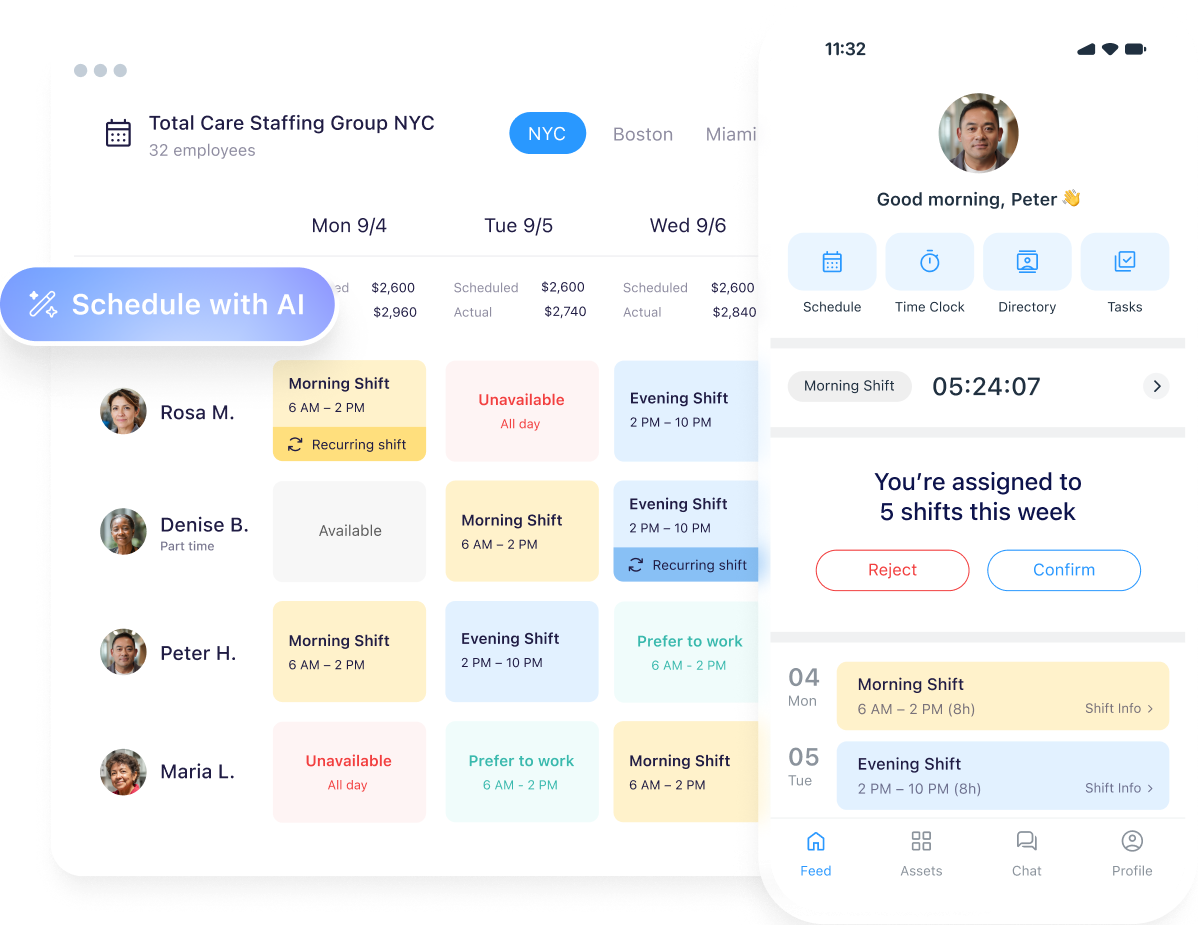
Build Coverage Around Real Availability
Use the employee scheduler to collect availability, publish shifts, set repeating schedules, post open shifts for qualified employees to claim with approval, and flag conflicts before they reach payroll. You can also add tasks, locations, and shift details so people know what they’re responsible for when they arrive.
Compare Planned Hours With Actual Work
When flexible schedules change, payroll risk can grow if approved shifts and real work time don’t match. The employee time clock supports clock-in/out records, live attendance visibility, timesheets, break and overtime alerts, and an audit trail. Use it to review discrepancies early rather than trying to fix them at the end of a pay period.
Keep Handoffs and Changes in One Place
Use online team chat for schedule changes and handoff questions during the workday, and use task management and digital forms to assign recurring work, due dates, notes, and status updates. That gives managers a clearer view of completed work without asking people to prove they’re online all day.
Try Connecteam for free today!
Review These U.S. Pay and Scheduling Rules
Flexible scheduling needs a payroll and compliance review before launch. The DOL notes that the federal Fair Labor Standards Act doesn’t create a flexible-schedule rule, but it still governs minimum wage, overtime, and recordkeeping for covered workers.
State and local rules, union agreements, employment contracts, and accommodation obligations can add requirements, so check the rules that apply to your workforce.
Here’s what to keep an eye on when planning your flexible work schedule:
| Check before | Why it matters | Action to take |
|---|---|---|
| Actual hours worked | Work an employer allows or requires may be compensable even if it wasn’t planned. | Train managers to record and address after-hours work instead of ignoring it. |
| Overtime | Covered, nonexempt employees generally earn overtime after 40 hours in a workweek, and hours can’t be averaged across weeks. | Review compressed weeks, shift swaps, and remote work against payroll rules before approval. |
| Meals and breaks | Short rest breaks usually count as paid work time, while actual meal periods generally require the employee to be fully relieved from duty. | Set clear break rules and make sure workers aren’t expected to answer calls or messages during unpaid meals. |
| Notice and predictability | Some jurisdictions set additional scheduling, reporting-time, or predictive-scheduling obligations. | Check applicable state and local rules before changing hours or cancellation practices. |
| Fair access and accommodations | A uniform policy can still affect groups differently, and individual requests may need an HR or legal review. | Document job-related reasons for limits and use a consistent exception process. |
This is general guidance, so consult a legal professional for advice specific to your business.
When Flexibility Fits (and When It Doesn’t)
Take a look at these two scenarios about when a flexible work schedule works well and when it doesn’t.
Fit: A field-services team with predictable morning dispatches.
Technicians need to be available for a 9:00 a.m. dispatch huddle and time-sensitive customer appointments. The company gives them flexible start times on non-dispatch days, uses an availability-based shift plan, and requires a short job handoff after every visit. Coverage remains steady because managers can see qualifications, locations, open shifts, and actual attendance.
Poor fit: A support desk with one person covering a critical queue.
Giving every employee independent start and end times could leave customers waiting and co-workers unable to transfer work. This team needs overlapping coverage blocks, a queue owner, and clear escalation rules first. Flexibility may still be possible, but the policy needs team-level coverage before individual preference.
The Bottom Line on Flexible Schedules
Flexible schedules work best when they give employees real choice and give the business reliable coverage, clear handoffs, accurate time records, and fair rules. Start with the model that fits your work, test it with a small pilot, and use connected scheduling and time data to improve it as you go.
Ready to build a flexible schedule that your team can see, understand, and follow? Try Connecteam for free to plan coverage, share changes, and keep actual hours tied to the work.
Flexible Work Schedule FAQs
The purpose is to give employees some control over when they work while the business still meets its coverage, service, safety, and payroll needs. A good policy is clear about what workers can change and what must stay fixed.
No. A flexible schedule changes the timing of work. Remote work changes where work happens. You can offer one without the other, or combine them if the role supports both.
It can be part of a flexible-work program, but it isn’t the same as flex time. A compressed schedule places the same work requirement into fewer days, such as four 10-hour days. It needs a separate review of coverage, fatigue, breaks, and overtime.
Start with the work, not job titles. Explain why some roles need fixed coverage, then offer the widest workable choice within those limits. That might mean shift-swapping rules, advance availability, fair rotation, predictable days off, or flexible start bands instead of full remote work.
Measure coverage gaps, overtime, late arrivals, schedule changes, customer response or wait time, work quality, handoff issues, and employee feedback. Keep the scorecard short enough that managers can review it every week.