



Learn how to handle employee schedule change requests consistently, protect coverage, and identify requests that may involve legal or contractual rights.
Employee schedule change requests are a normal part of managing hourly and shift-based teams. Employees may need time for childcare, appointments, religious observances, health needs, or unexpected personal situations. Some may simply prefer a different shift.
Without a clear process, managers can lose time searching for coverage and employees may receive inconsistent answers. Some requests can also involve protected leave, workplace accommodations, predictive scheduling laws, or collective bargaining agreements.
This guide explains how to manage schedule change requests fairly and efficiently while protecting your business’s operational needs.
Key Takeaways
- Use a separate review process when a request may involve protected leave, a workplace accommodation, a scheduling law, or contractual rights.
- Publish schedules early and collect employee availability before assigning shifts to reduce avoidable conflicts.
- Apply objective criteria such as coverage, qualifications, overtime, rest periods, and timing to comparable routine requests.
- Oregon and Seattle require 14 days’ advance notice for covered employers, while other jurisdictions have different rules.
- Digital scheduling, forms, and communication tools can centralize routine requests, approvals, replacements, and schedule updates.
What’s New in This Update (July 2026)
- Connected schedule flexibility directly to turnover costs, safety risks, and compliance penalties.
- Added a side-by-side comparison of different schedule change strategies to help managers choose the best approach.
- Added a Schedule Change Readiness Quiz to help assess and improve your current processes.
What Is an Employee Schedule Change Request?
An employee schedule change request is an employee’s request to change an existing or expected work schedule. It can involve a one-time adjustment, a recurring arrangement, or a permanent change.
An employee may ask to:
- Take a specific shift off.
- Start or finish a shift at a different time.
- Change the types of shifts they work, such as moving from second shift to first shift.
- Work a compressed or otherwise flexible schedule.
- Swap or release a shift.
- Change their regular availability.
- Work remotely when the role and circumstances allow it.
Employees may request a change because of childcare, transportation, appointments, education, religious observances, health needs, or personal preferences. The reason can affect how the employer must handle the request.
request connected to a disability, pregnancy, religion, protected leave, or another legal right should be taken out of the routine approval process and reviewed under the applicable procedure.
Download our free schedule change request template and shift change request form template.
Why Accommodating Schedule Change Requests Matters
Every request has to be weighed against staffing, skills, labor costs, safety, and customer needs. A blanket rule against schedule changes can still create avoidable problems.
Good reasons to establish a fair request process include:
- Retention: Schedule flexibility can influence whether hourly employees stay. In a 2022 US survey commissioned by Shiftboard, 42% of respondents said a lack of schedule flexibility made them more likely to leave their job. The survey included more than 2,000 working adults, including more than 1,600 shift or hourly workers.
- Safety: Fatigue can reduce alertness and impair decision-making. OSHA reports that accident and injury rates are 30% greater during night shifts than day shifts. It also cites research associating 12-hour workdays with a 37% increase in injury risk. A schedule change that prevents an overly long, irregular, or insufficiently rested shift may help reduce fatigue-related risk.
- Compliance: Oregon and several cities have predictive scheduling laws that apply to certain employers. Federal and state accommodation or leave laws may also affect how a request must be handled. A routine company policy cannot override those rights.
- Consistency: A written process gives managers common criteria and gives employees a clearer idea of what information to provide and when to expect an answer.
- Coverage planning: An early request gives managers more time to find a qualified replacement, offer an open shift, or adjust workloads.
Did You Know?
The annual cost of fatigue-related lost productive work time to employers is estimated at $136.4 billion.
Comparing Schedule Change Strategies
Different types of schedule flexibility solve different coverage problems. The right choice depends on the role, the employee’s qualifications, and how predictable demand is.
| Strategy | Advantages | Tradeoffs | Good fit |
|---|---|---|---|
| Shift swapping | Employees can help find qualified coverage | Swaps need controls for qualifications, overtime, rest periods, and manager approval | Teams whose employees can perform similar work |
| Flexible start and finish times | Gives employees some control while preserving scheduled hours | Can leave gaps during opening, closing, or peak periods | Roles with some flexibility around when work is completed |
| Voluntary coverage list | Gives managers a ready list of employees interested in extra shifts | Availability is not guaranteed, and applicable standby or on-call rules must be checked | Teams that frequently face unexpected absences |
| Open-shift pool | Lets eligible employees claim available work | Requires clear eligibility, priority, and approval rules | Larger or cross-trained teams |
How Can Employees Request Schedule Changes at Work?
Employees can make routine requests in person, by phone, through email or text, or with a digital form or scheduling app. A single request channel is usually easier to track, especially for larger teams.
For a routine request, ask for the operational information needed to make a decision:
- The employee’s name.
- The affected shift, date, or schedule.
- The change requested.
- Whether the change is one-time, recurring, or permanent.
- How long the requested arrangement is expected to last.
- Any proposed coverage or alternative, if relevant.
- A brief explanation when it is needed to assess the request.
Do not ask employees to disclose unnecessary medical or personal details. If a request suggests that protected leave or a workplace accommodation may apply, send it to the person responsible for handling those requests.
Under laws such as the Americans with Disabilities Act, the Pregnant Workers Fairness Act, and Title VII’s religious accommodation provisions, an employee may start the process without submitting a particular form or using legal terms.
Ask employees to submit foreseeable routine requests as early as possible. Your notice rules should allow for emergencies and must remain consistent with applicable leave, accommodation, scheduling, and labor laws.
10 Steps for Dealing With Employee Schedule Change Requests
Now that you understand the stakes, here’s how to build a process that works:
-
Check the Law, Contract, and Collective Bargaining Agreement
- The Americans with Disabilities Act, which may require a modified schedule or another effective accommodation for a qualified employee with a disability unless it would cause undue hardship.
- The Pregnant Workers Fairness Act, which may require schedule changes, leave for appointments, telework, or other reasonable accommodations for qualified workers with known limitations related to pregnancy, childbirth, or related medical conditions.
- Title VII’s religious accommodation requirements, which may require schedule changes for a sincerely held religious practice or observance unless the accommodation would create an undue hardship.
- The Family and Medical Leave Act, state or local leave laws, employment contracts, and collective bargaining agreements.
- Predictive scheduling laws that apply in some jurisdictions and industries.
-
Make It Easy for Employees to Share Their Availability
-
Publish דchedules asקarly as Possible
-
Create a clearly defined change request policy
- Situations where you receive multiple change requests for the same shift. How will you prioritize shift requests?
- The types of shift changes that will be considered. For example, some roles, such as waitstaff and front-line medical workers, can’t request to work from home.
- Timeframes for requests. How much advance notice must your employees give for a shift change request? Some requests are unavoidably last minute, like caring for a sick family member or dealing with an emergency. However, your policy should reinforce that change requests should be made as far in advance as possible.
-
Use schedule change request templates
- The requesting employee’s name and contact information, like their email address.
- The date of request.
- Details of the request, including the shift time and date.
- Reasons for the request.
- Details of the shift swap, if relevant.
- The employee’s signature.
- An approved/denied box, signed and dated by the manager.
-
Encourage employees to swap shifts
-
Create a list of employees for last-minute coverage
-
Consider alternatives
-
Communicate with your employees
-
Use a digital scheduling tool
Before applying your routine policy, check whether the request may involve a legal or contractual right. Relevant rules can include:
Predictive scheduling rules vary considerably. In Oregon, the law applies to retail, hospitality, and food-service employers with at least 500 employees worldwide. Covered employers generally must provide a written schedule at least 14 calendar days in advance. Covered employees may provide input about their availability and request not to work at certain times or locations. Oregon employers may not retaliate for such a request, although the law does not generally require them to grant it.
Seattle’s Secure Scheduling Ordinance covers hourly employees at retail and food-service establishments with at least 500 employees worldwide. Full-service restaurants must also be part of a business with at least 40 full-service locations worldwide. Covered employers must post schedules at least 14 days in advance and may owe additional pay for certain employer-requested changes after posting. Employee-requested changes generally do not trigger that premium pay, but another law may still require the request to be granted or considered.
Employment laws change, and coverage depends on the facts. Have HR or qualified counsel review any request that may involve protected rights or an unfamiliar scheduling rule.
Accurate availability information helps managers avoid preventable conflicts before publishing a schedule. Give employees a reliable way to submit unavailable times, preferred working hours, and recurring restrictions.
A scheduling app can keep availability with the schedule instead of scattering it across messages and paper notes. Managers should still distinguish an employee’s preferences from restrictions connected to protected leave or an accommodation.
Depending on where your business is located, predictive scheduling laws may require you to provide advance notice of schedules to your employees. But even if you’re not required by law, notifying employees of their schedules as early as possible may reduce schedule change requests.
There will always be emergencies that lead to last-minute requests. However, when employees have visibility of their work schedules, they can plan certain personal appointments and other commitments around them.
Did You Know?
Connecteam’s AI scheduler automatically matches employee availability and time off, so you can create schedules ahead of time with just a few clicks.
A shift change request policy helps employees understand how to request a schedule change at work, how it will be considered, and the circumstances in which it may be granted or denied. A clear policy helps you balance accommodating reasonable schedule change requests and ensuring your business runs smoothly.
It’s also useful for your policy to address potential issues that may arise, such as:
You may have a first-come, first-served rule or rely on managerial discretion. Alternatively, requests may be prioritized based on their reasons—a request to change a shift to attend a funeral may be given preference over one to attend a medical appointment that can be rescheduled. Some businesses use a seniority system, and the employee with the earliest start date is considered first.
Templates streamline the change request process. They ensure you have all the information you need to make a decision without going back and forth with your employees.
A schedule change request template should include:
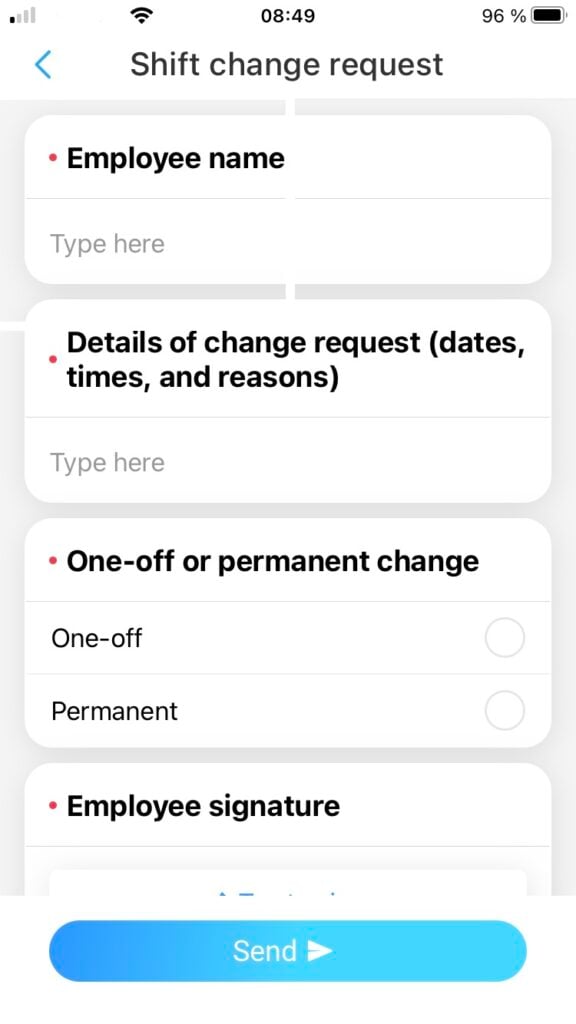
To further streamline the process, you can digitize change request forms using an app. Employees can complete and submit forms from anywhere on their mobile devices and add their electronic signatures. Managers can respond to requests via the app, creating an instant record of the request and its outcome.
Pro Tip
Use Connecteam’s digital forms to create your digital schedule change request form—or download our free schedule change request template.
Encourage your employees to organize their own schedule changes. Shift swapping involves 2 employees agreeing to swap their shifts with each other or 1 employee agreeing to cover another’s shift.
Shift swaps make it much easier to manage schedule changes. They save you time, as you don’t have to look for someone to cover those shifts.
To streamline shift swaps, use a shift change request form template. For 1-time shift swaps, consider using software that enables employees to swap shifts without paperwork.
If you allow shift swapping, outline the relevant rules and processes in your employee handbook or another easily accessible location. It’s key that shift swaps are mutually beneficial to both employees.
Having a pool of employees who can cover shifts at short notice makes it easier to find replacements and accommodate last-minute change requests.
Ask your employees if they’re happy to be contacted about last-minute shift openings. Those who have more flexible schedules or are eager to earn extra income may put their hands up.
If an employee submits a schedule change request you can’t accommodate, speak to them to see if there are any alternative solutions.
Say an employee asks to swap an entire shift to attend a doctor’s appointment. If you can’t find another employee to cover this shift, ask the employee whether they can make alternative arrangements.
If the appointment is early in the morning, the employee could adjust their work hours that day by starting an hour later. If the appointment is close to their home but far from work, the employee could work from home for the day and attend their appointment when it’s scheduled.
Flexible schedules—where employees work 40 hours a week but choose their hours—may be a good solution in some situations.
Depending on the reason for the change request, it may be more appropriate for the employee to take leave. For example, if they’re dealing with an ongoing health issue, they could access intermittent leave under the Family and Medical Leave Act.
Good communication is vital to managing schedule change requests.
Ensure your employees are aware of your schedule change policy and procedures. Include these documents in onboarding materials and store them in a central location where employees can easily access them, such as an employee handbook or employee management app.
Be open to discussing feedback from employees about your approach to schedule changes. They may highlight issues you’re not aware of or suggest new solutions.
Educate your employees by explaining the broader impacts of changing their schedules, including on other employees and the business. This may encourage them to avoid any unnecessary requests.
Did You Know?
With Connecteam’s company knowledge base, you can easily store schedule change policies and procedures…and so much more.
Scheduling software is one of the best ways to streamline and manage change requests. This software usually lets you share schedules with your team, accept and track change requests from employees, and store copies of original and updated schedules along with change requests.
By centralizing schedule management, you can minimize the time you spend dealing with schedule changes, allowing you to focus on more substantive management tasks.
Did You Know?
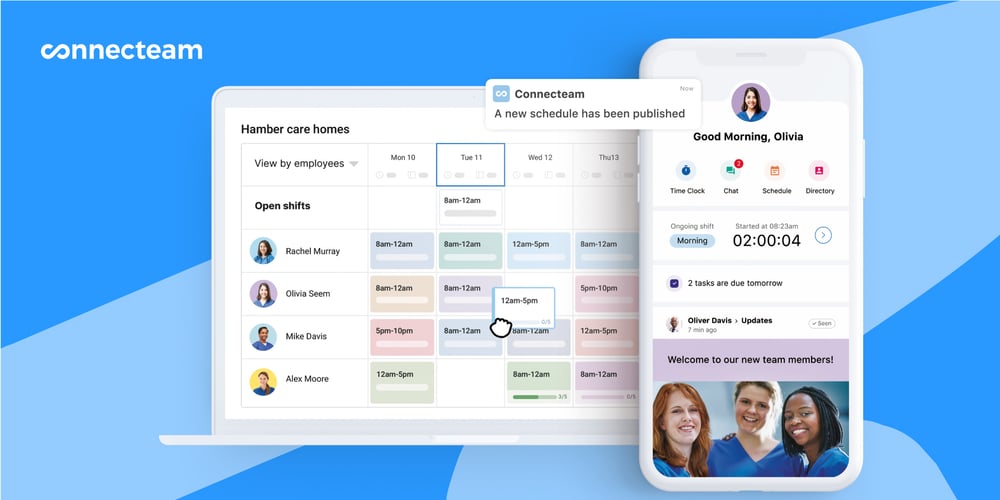
Connecteam’s employee scheduler is the ideal tool for managing schedule change requests. You can set rules for shift swapping and give employees access to updated schedules. Plus, with Connecteam’s online team chat, you can quickly notify specific employees or your entire workforce of shifts that are available at the last minute.
How To Refuse an Employee Schedule Change Request
On occasion, you may need to deny a schedule change request. Just be aware that refusals can lead to employee resentment or even employees quitting. For these and the above reasons, refusals should be kept to a minimum and done only where necessary.
When refusing change requests, be transparent with your employees. Explain the business reasons why the requests were denied and talk to your employees to find alternative solutions.
Keep records of change requests, approvals, and denials. These metrics help ensure you apply your schedule change policy fairly.
Not sure whether to approve a request? Use this tool to help you decide.
Should You Approve This Request?
Interactive decision tree
The Bottom Line
Schedule changes are inevitable, but they don’t have to be chaotic. A clear policy, good communication, and the right tools make all the difference.
Connecteam’s employee scheduler simplifies schedule creation and management. Employees can access their schedules 24/7 and receive automated shift reminders, ensuring shifts are always covered. Plus, Connecteam’s chat lets employees easily communicate change requests and shift swaps.
Want to learn how Connecteam can streamline your scheduling? Try it for free today!
FAQs
Generally speaking, managers aren’t under any obligation to approve employee schedule change requests. However, some local laws require employers to consider change requests at a minimum. And some federal laws impact employee scheduling practices, like the Americans with Disabilities Act—which requires accommodations, including schedule modifications. Industry regulations and union agreements might also influence managers’ decisions.
Whether a manager can change an employee’s schedule at the last minute depends on the business’s location. Some states and cities prohibit last-minute changes, while others require employers to pay employees extra for the inconvenience. Employment contracts and collective bargaining agreements may also prohibit short-notice schedule changes.