
When your day starts in a truck instead of at a desk, one missed job or a few hours you can’t verify can throw off the whole week. And when you’re juggling crews, job sites, and last-minute changes every day, it gets hard to know where your time (and your profit) is actually going.
I reviewed 6 apps for lawn care businesses and ranked them by how well they schedule crews, track hours by job site, and actually work in the field, even when the signal gets spotty.
Use these picks to fill your routes, prove the work got done, and get paid without chasing down paperwork.
| App | Best for | Starting Price | Key Considerations |
| Connecteam | Lawn care owners scheduling crews and tracking hours by job site | Just $29/month for the first 30 users | Handles crew scheduling, GPS-verified clock-ins with geofencing, and job checklists from one app. The free plan covers up to 10 users. Doesn’t have quoting and invoicing. |
| Jobber | Lawn care businesses quoting recurring mowing work and invoicing from the field | $29/user/month | Clean quote-to-invoice flow, plus routing, online booking, and client hub customers can pay through. Limited time tracking, and plans with job costing get expensive fast. |
| Yardbook | Solo operators and 2-person crews running on a free lawn care CRM | $34.99/month | Offers a free tier with client records, estimates, invoicing, routing, and built-in material calculators. The interface feels dated and there are no punch restrictions on the time clock. |
| LMN by Granum | Landscaping companies estimating jobs against budgeted labor and material costs | $297/month | Estimating tied to a real budget, so you can see whether a route is actually profitable. Assumes you have office admin support, and time tracking is in a separate interface. |
| QuickBooks Online | Lawn care owners tracking mileage and keeping books ready for tax time | $38/user/month | Automatic mileage capture, receipt scanning, and recurring invoices for seasonal contracts. It's accounting software, not job management, and payroll is separate. |
| CompanyCam | Crews documenting before-and-after photos to settle damage disputes | $63/month + $29/user/month | Timestamped, location-tagged photos organized by property give proof of work work, and works offline. Per-seat pricing adds up and lacks scheduling and billing. |
What’s New in This Update (August 2026)
Our Top Picks
-
1

Best for lawn care owners scheduling crews and tracking hours by job site
-
2
Jobber
Best for lawn care businesses quoting recurring mowing work and invoicing from the field
-
3

Best for solo operators and 2-person crews running on a free lawn care CRM
Why trust us?
Our team of unbiased software reviewers follows strict editorial guidelines, and our methodology is clear and open to everyone.
See our complete methodology
How I Ranked the Best Apps for Lawn Care Businesses
I ranked each app based on the management challenges that cost lawn care businesses the most time, payroll dollars, and client trust.
When rain, breakdowns, or callouts wreck the route
- Making up a week of work at once: The app should support recurring weekly or biweekly jobs and make it easy to reassign work when weather, vehicle trouble, or absences delay the schedule.
- Crews at the wrong property: Employees need mobile access to the correct address, route, and job details between stops.
- Inefficient routes that burn time and fuel: Supervisors should be able to view stops on a map and reorder them to reduce unnecessary driving.
- Schedule changes that don’t reach the crew: The app needs to keep cancellations, job updates, and new instructions in one place and confirm that employees have seen them.
When hours, proof, and paperwork don’t hold up
- Hours nobody can account for: Crews need to clock in at the job site, and the app should record where each punch happened so you aren’t paying for time you can’t verify.
- Jobs that quietly lose money: The app should track time by property or job, so you can compare estimated labor costs with what the work actually cost.
- Clients question whether the crew showed up: Employees should be able to take timestamped before-and-after photos and attach them to the correct property as proof of service.
- Paper timesheets make payroll a chore: Approved hours should flow into a payroll-ready export without manual calculations, data entry, or hard-to-read handwriting.
When field work gets missed, mispriced, or unsafe
- Crews lose service in the field: The app should record essential work offline and sync automatically once reconnected.
- Important property details get missed: Supervisors should be able to attach gate codes, pet warnings, instructions, and checklists to each property.
- Inaccurate measurements lead to bad quotes: The app should measure properties or store their dimensions, so estimates reflect the actual size of the lawn.
- Inspectors request application records: The software should keep searchable logs of products, application rates, and equipment when required.
The 6 Best Lawn Care Business Apps of 2026
-
Connecteam — Best for lawn care owners scheduling crews and tracking hours by job site
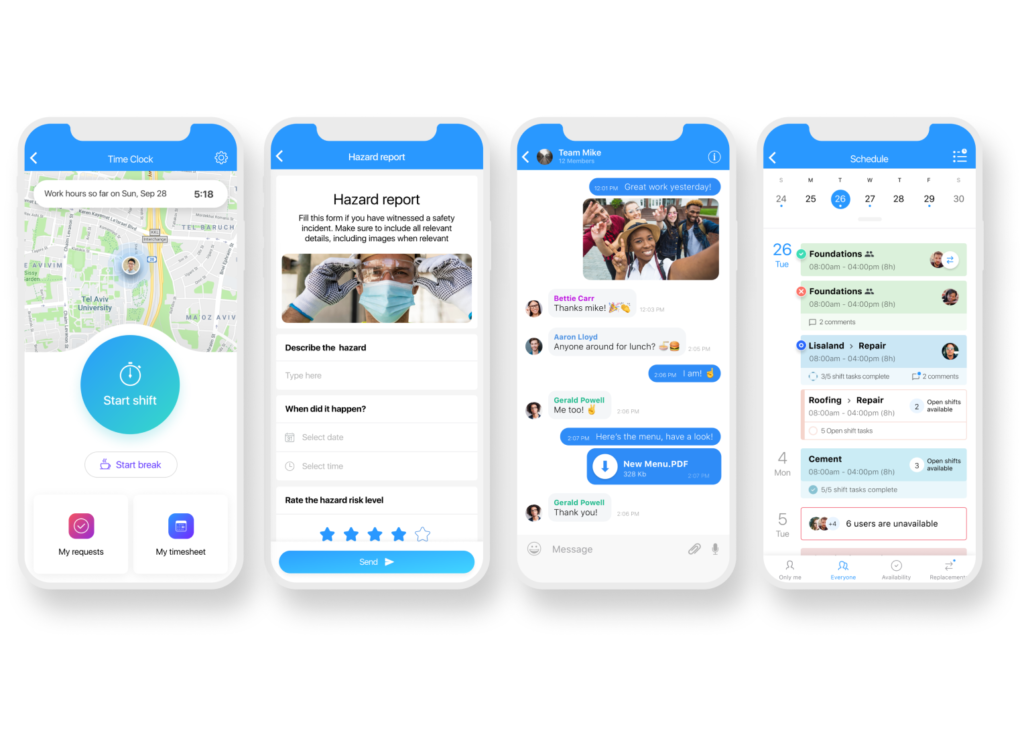
Connecteam is a workforce management app built for teams that work away from a desk, which describes just about everyone on a lawn care payroll. It’s designed for the owner who needs to know which crew is at which property, how long they were there, and whether the work got done to spec.
Why I chose Connecteam: It covers the part of the day most lawn care software treats as an afterthought, which is managing the people doing the mowing. Scheduling recurring routes, verifying clock-ins with GPS and geofencing, and collecting job checklists all happen in one app.
Recurring route scheduling
Connecteam’s employee scheduler lets you build a route once and set it to repeat, then drag jobs to new days when weather pushes the week back. You can save a full week as a template and copy it forward, which is how most maintenance schedules actually work.
Each shift carries the details a crew needs, so you can attach gate codes, pet warnings, and specific instructions right to the job. The auto-scheduling tool can also assign shifts based on rules you set, like requiring a licensed applicator on any treatment stop, and it flags conflicts before you publish rather than after.
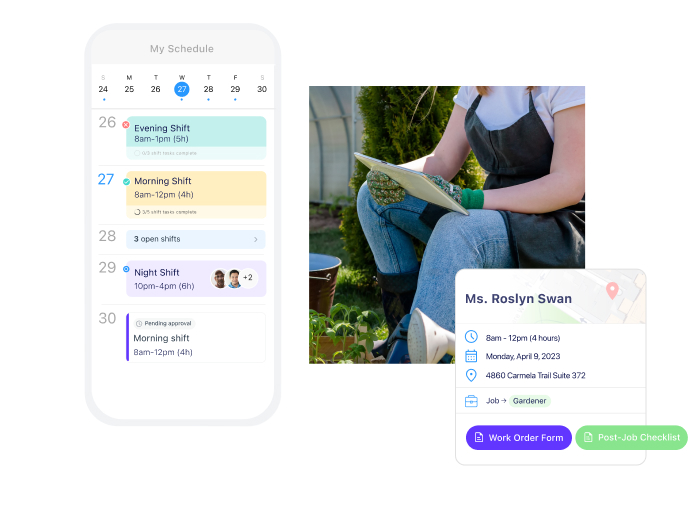
Crews can view their job schedules right from their phones. GPS-verified clock-ins with geofencing
Connecteam’s employee time clock records a GPS stamp with every punch, while Breadcrumbs tracking shows the route your crew took between stops. Managers can use this record to confirm a property visit or check a mileage claim against the actual route.
Crews can log start and end odometer readings, destinations, photos, and signatures during clock-out. Geofences can also prevent employees from clocking in outside the job site and automatically clock them out when they leave.
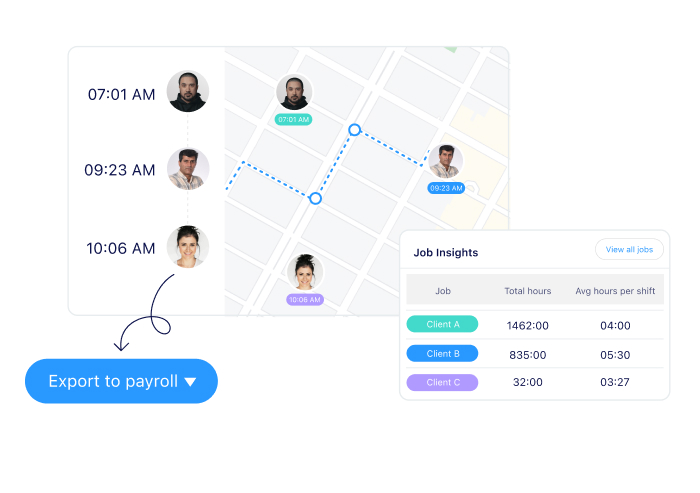
See where your crew is when they’re on the clock. Hours tracked by job site for real job costing
Each punch is tied to a specific client, property, or project. You can filter timesheets by job, task, break, or overtime to see, for example, when a four-hour job actually took the crew six.
Connecteam lets you set custom pay rates per employee or per job, and overtime calculates automatically with alerts as team members approach their hour limit. Every edit is tracked, so timesheets stay audit-ready, and approved hours export to payroll in one click.
Digital forms and checklists
Connecteam’s digital forms replace the paperwork that often gets lost in the back of the truck. Crews can complete pre-trip equipment checks, log chemical applications, upload photos of finished lawns, or collect client signatures. Every entry is timestamped and stored in the app.
You can also upload or take a picture of an existing paper form, and Connecteam will turn it into a digital version. Speech-to-text makes forms easier to complete in the field, with support for multiple languages.
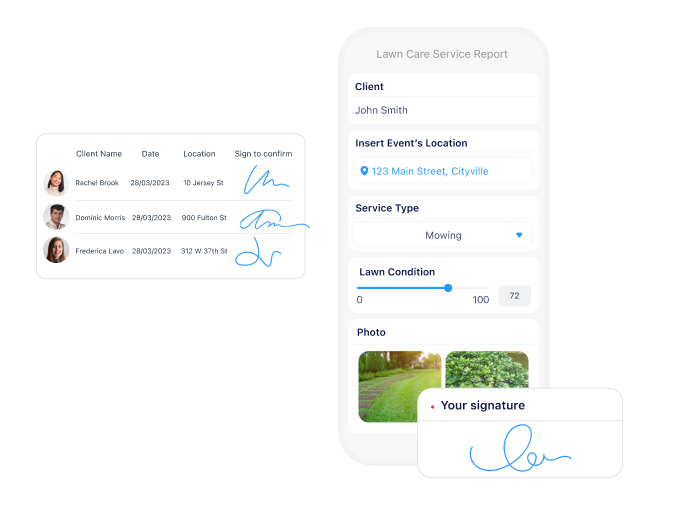
Track progress in real-time with Connecteam’s digital forms. Crew communication
Connecteam’s online team chat keeps job-related communication in one place. Managers can send direct messages, create group chats, or share announcements with the entire company, a specific crew, or one location. Read receipts and mandatory confirmations help you see who has seen important updates.
Auto-translate is especially helpful for multi-lingual crews, displaying messages in each employee’s preferred language. For example, an update written in English will appear in Spanish for an employee whose phone is set to Spanish.
The company employee directory also gives crews quick access to coworkers and vendor contacts. It updates automatically as employees join or leave the company.
And so much more…
Connecteam has so many other tools to help you run your lawn care business, including:
- Task management for one-off work like a mulch delivery or a shop cleanup, with photo attachments and recurring options.
- Time off requests with accrual balances to make planning around vacations in peak season less of a guessing game.
- Automatic attendance reports that show who’s late or absent, filtered by job site or crew.
- A kiosk mode that turns a tablet into a shared time clock for crews without smartphones.
- NFC tags you can mount at a property so crews tap to confirm they’re on site.
- User archiving for seasonal crews, so you can keep a returning employee’s records while freeing up the seat over winter.
When Connecteam isn’t a good fit
Connecteam can’t replace quoting and billing software because it lacks a client CRM, invoicing, estimates, and payment processing. Businesses focused on chemical treatments may also miss built-in lawn measurement and EPA applicator reporting. Connecteam also doesn’t work offline, so crews working in areas with poor or no reception may struggle to clock in, access job details, or submit forms.
Connecteam also offers a free for life plan – Get Started Now!
0Key Features
- Recurring shift scheduling with templates
- GPS time clock with geofencing
- Hours tracked by job site for costing
- Digital forms, checklists, and photo uploads
- Crew chat and targeted company updates
- One-click payroll exports
Pros
- Built for crews working off a phone all day
- Seasonal staff can be archived and restored
- Auto-translate supports multi-lingual teams
- Strong location-based controls to track field crews
Cons
- No client quoting, invoicing, or payments
- Lacks offline mode
Pricing
Free-for-life plan availablePremium plans start at $29/month for 30 users
Transform Your Lawn Care Business with Connecteam. Try It Now!
Let’s Get Started -
Jobber
Jobber — Best for lawn care businesses quoting recurring mowing work and invoicing from the field
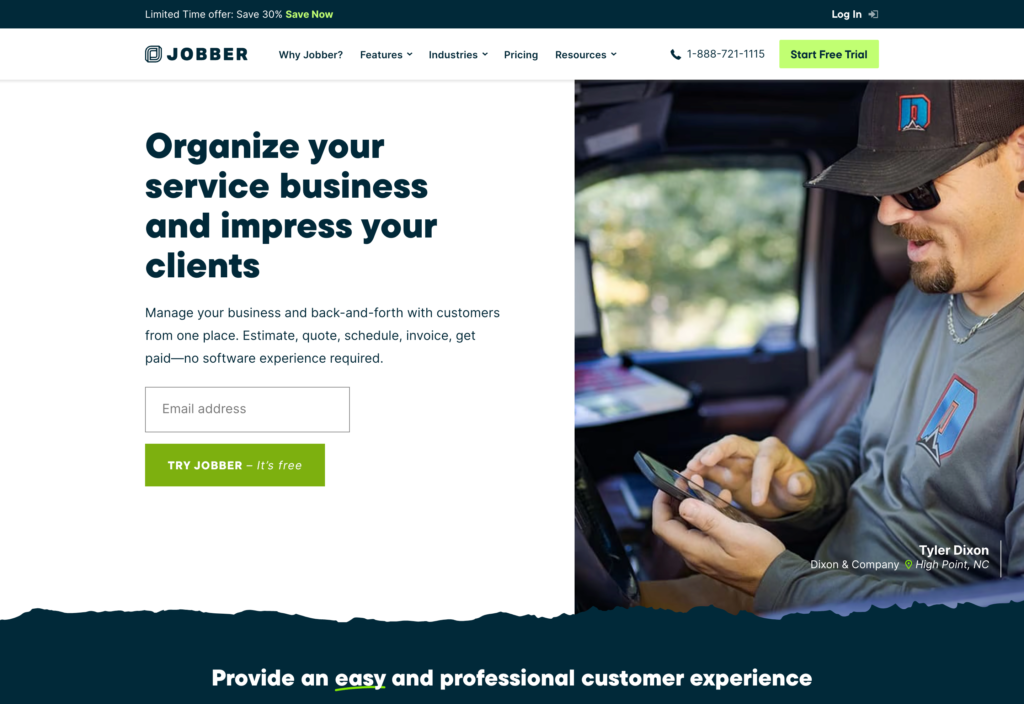
Jobber is field service software built for small home service businesses, including lawn care and landscaping crews.
Why I chose Jobber: Jobber has a smooth quote to paid invoice workflow. Approved quotes are turned into scheduled jobs, and you can collect payment through the client portal, no paperwork needed.
Quotes and estimates
With Jobber, you can build a quote from a saved template for work like a weekly mow or a spring cleanup, add optional line items a client can approve on their own, and attach photos of the property. Once a client approves, the quote converts straight into a job on the schedule, so nothing gets retyped.
Jobber’s client hub also gives customers one place to approve quotes, view service details, and pay invoices online, so you spend less time chasing signatures and overdue payments.
However, during testing we couldn’t apply different discounts and tax rates to individual line items, so quotes with mixed pricing require manual adjustment. There’s also no built-in change order feature for clients who add work after approving the original scope.
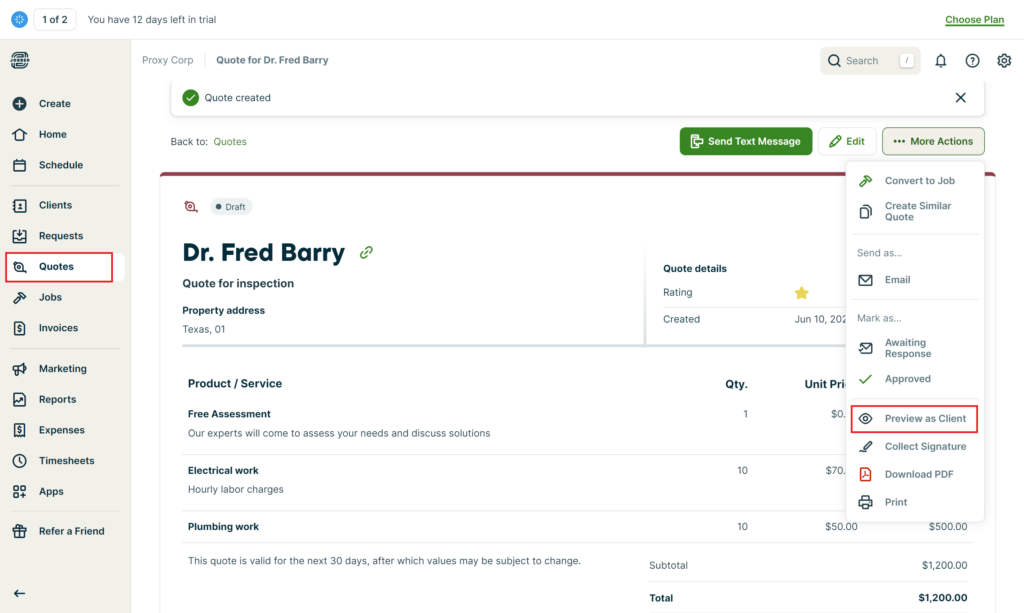
You can create quotes with Jobber and even preview them as a client. Scheduling and dispatching
Jobber’s scheduler offers five views: month, week, day, list, and map. The drag-and-drop tool helps shuffle a route around quickly, while color coding by employee and job type makes a full week readable at a glance. There’s also a strikethrough view that shows which jobs are done and invoiced.
Jobber plans routes around scheduled jobs and team availability, while GPS waypoint tracking shows where crews are and highlights any detours.
But its scheduling has limits. When we assigned one employee to overlapping jobs, Jobber marked them as unavailable but still allowed the assignment. That leaves spotting double-bookings up to the manager. The scheduler also focuses on when jobs need to be completed, not how many hours an employee has already worked.
Time tracking and job forms
Crews can track time against a specific job from Jobber’s mobile app or add hours manually. Managers can review daily or weekly timesheets, approve hours, and send them to payroll from one screen. GPS data also helps confirm that a crew was at the property if a time entry is disputed.
The compliance side is where it falls short. Jobber flags unusually long entries, but in testing that showed up as a visual alert, not true overtime tracking. There’s also no break tracking or geofence support.
Job checklists are also pretty basic. They can document completed work, but you can’t require photos at specific steps or trigger follow-up actions based on crew answers.
What users say about Jobber
Jobber has made it much easier to keep our tree service business organized. The scheduling, quoting, invoicing, and client communication tools all work well together, which saves our team time and reduces paperwork.

The routing feature needs improvement, and the app can struggle in areas with poor service, which makes it harder to stay efficient in the field.

Key Features
- Quote templates that convert to scheduled jobs
- Five scheduling views including a map view
- Route optimization and GPS waypoint tracking
- Job checklists with photo uploads and signatures
- Client hub for approvals and online payments
Pros
- Strongest quote-to-invoice flow on this list
- Highly rated mobile app for crews in the field
Cons
- No geofencing or built-in overtime rules
- Costs climb quickly as you add users
Pricing
Starts at $29/user/month Trial: Yes — for 14 days Free Plan: No
-
Yardbook — Best for solo operators and 2-person crews running on a free lawn care CRM
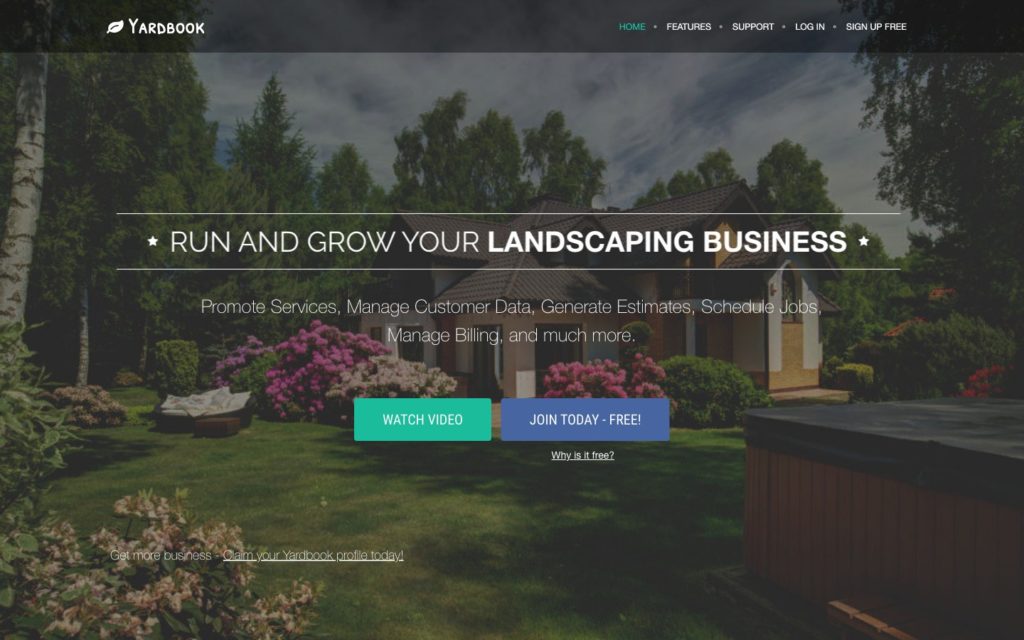
Yardbook is landscaping business software aimed at small operators in the US and Canada.
Why I chose Yardbook: Yardbook offers a permanent free plan built specifically for lawn care, covering client records, estimates, invoicing, routing, and time tracking.
Job scheduling and recurring visits
Yardbook’s scheduling lives under a tab called “jobs” rather than a dedicated calendar. Once you’re in, you get three views, including a list view for scanning upcoming work across crews and properties, an assignment view showing each worker’s day, and a calendar view with day, week, and month layouts plus drag-and-drop.
Recurring jobs help you create a job once and set it to repeat weekly, biweekly, or on a custom cycle. Route planning exists, but the route optimization didn’t work as expected during our testing.
We also found that Yardbook doesn’t notify crews when they’re assigned new jobs. Plus, managers can’t break a job into linked tasks, and there’s no auto-scheduling or shift swapping.
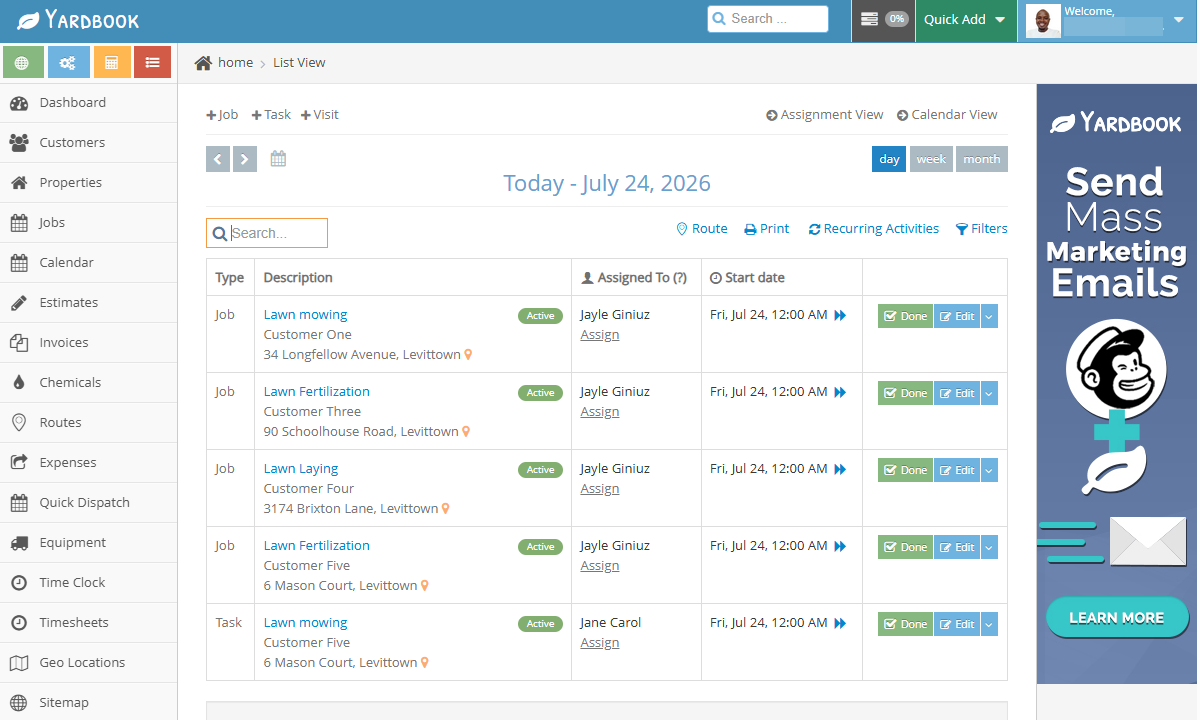
You can see jobs, tasks, and visits at a glance with Yardbook’s list view. You can see jobs, tasks, and visits at a glance with Yardbook’s list view.
Time tracking and timesheets
Employees can clock in from Yardbook’s web or mobile app. At clock-in, employees have to select a task, which helps keep hours attached to the right property for billing. Offline support on the Android app held up well in testing, and we were able to track time, add customers, and view assigned jobs without a connection. There’s no kiosk option, so shared-device clock-ins aren’t possible.
The controls around punches are loose. Yardbook let us clock in without a scheduled task just by picking a generic label. It also doesn’t restrict early clock-ins or late clock-outs, and lacks geofencing and reminders.
Break and lunch labels exist, but those minutes counted as paid time in our tests. There’s also no overtime tracker, which is a real gap for US-based businesses.
Job estimating and lot measurement
Yardbook lets you create a catalog of services and materials, measure properties, and build quotes based on the lawn’s actual size. Estimates can be converted into jobs or invoices, while mobile calculators for mulch, gravel, fertilizer, and plants reduce manual calculations in the field.
Just keep in mind that property measurements need to be added to estimates manually, creating extra work with each quote. The web interface also has promotional ads, and reports are tucked away in the sitemap rather than the main menu.
What users say about Yardbook
Free system that was a great way to start business. Really good at dispatching. Helped with route planning and maximizing efficiency
It’s a bit complicated to use. Takes a while to figure things out. The interface is a bit out dated but it’s free. Don’t expect it to look very pretty and modern.
Key Features
- Free plan with client records and invoicing
- Recurring jobs on weekly, biweekly, or custom cycles
- Built-in lot measurement for estimates
- Mulch, gravel, and fertilizer calculators
Pros
- Free plan built for lawn care
- Flat monthly pricing with no per-user fees
Cons
- No clock-in restrictions, geofencing, or overtime tracking
- Dated interface and no crew notifications
Pricing
Starts at $34.99/month Trial: Yes — 60 Free Plan: Yes
-

LMN by Granum — Best for landscaping companies estimating jobs against budgeted labor and material costs

LMN by Granum is a business management platform built for landscapers with a strong emphasis on budgeting.
Why I chose LMN by Granum: I included LMN because it makes you price work against a real budget. You build your labor, equipment, and overhead costs first, and every estimate then carries the markup you need to actually clear a profit on that route.
Budgeting and job estimates
LMN’s budgeting tools use your sales goals, labor, equipment, and overhead costs to forecast profit and loss. The platform then calculates the markup needed to cover your overhead on every job and flags costs or markups that fall far outside industry benchmarks.
You can use these figures to build custom price lists for labor, equipment, and materials. Labor rates can factor in average wages, non-billable time, and markup, while equipment rates can include financing, insurance, and fuel. You can combine these costs into reusable estimate templates and mix and match them for larger jobs.
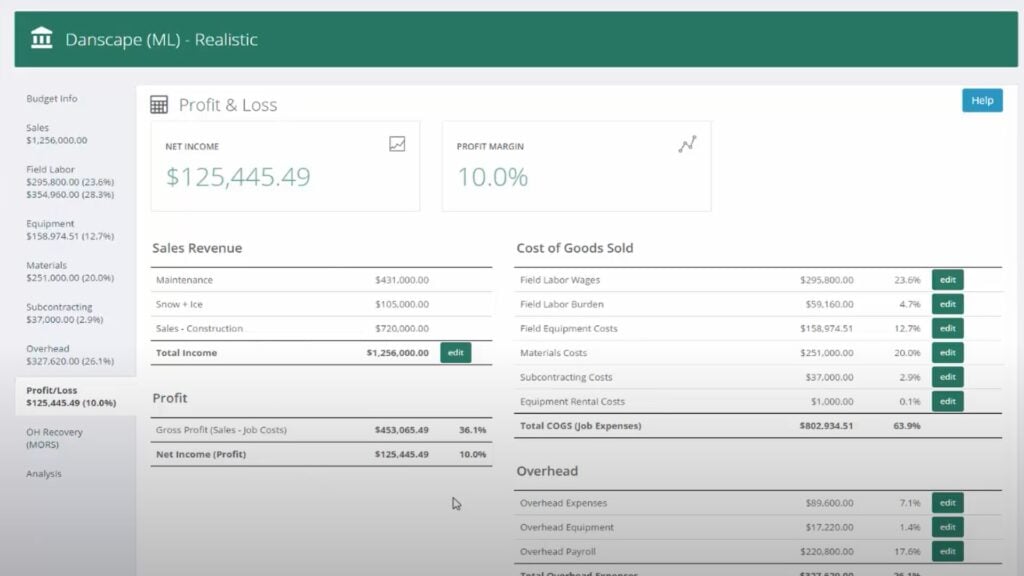
You can estimate your profitability and calculate markups with LMN. Invoicing and payments
LMN lets you send invoices monthly, after completing a job, or at custom project milestones, calculated automatically from your crew’s logged hours. Clients can pay by card or bank transfer through a portal branded with your logo, and LMN automatically follows up on overdue invoices.
The gap is that crews can’t collect payments through the mobile app. This prevents them from taking payment on-site after finishing a job, leading to a longer payment process.
Time tracking and scheduling in LMNTime
LMN handles time tracking and scheduling through LMNTime, a separate web interface from the main platform. Switching between platforms isn’t convenient, but it covers the basics. Managers can drag and drop jobs onto crew schedules, view clock-in and clock-out locations on a map, and export timesheets to QuickBooks or excel.
There’s also a scorecard that compares estimated and actual hours by task, so managers can check job performance against their budgets.
LMNTime offers limited oversight. The timesheet auditing tools don’t automatically flag suspicious or conflicting entries, and there’s no auto-scheduling, overtime alerts, or equipment scheduling. There’s also no mobile app for admins, so managers need to use the desktop version to approve hours and update schedules, which isn’t ideal.
What users say about LMN
It helps me to consider every cost that I have in my budget. There were many expenses that I was overlooking with my last budgeting system, but LMN fixed that.
It is extremely clicky. I can’t think of a better way to describe than clicky. It seems some of the workflows are almost too involved
Key Features
- Budgeting that builds a profit and loss forecast
- Custom labor and equipment price lists with markups
- Reusable estimate templates for common jobs
- Invoices calculated from logged crew hours
Pros
- Strong estimated versus actual hours scorecard
- White-labeled customer payment portal
Cons
- Time tracking sits in a separate, dated interface
- No admin mobile app and a buggy crew app
Pricing
Starts at $297/month Trial: No Free Plan: No
-

QuickBooks Online — Best for lawn care owners tracking mileage and keeping books ready for tax time
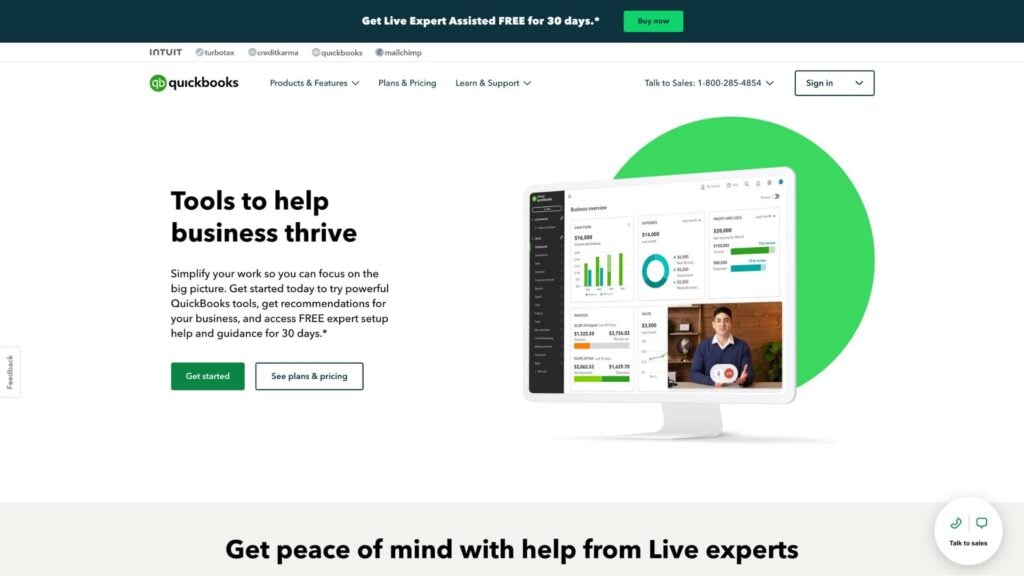
QuickBooks Online is accounting software that helps businesses manage income, expenses, invoices, payroll, and financial reports.
Why I chose QuickBooks Online: QuickBooks Online made the list because it automatically tracks mileage in the background using GPS, giving you a reliable trip record for tax deductions.
Mileage tracking and expense management
The QuickBooks Online mileage tool uses your phone’s GPS to track trips automatically. It runs in the background, and you can swipe to classify each trip as business or personal, creating a reliable mileage log for tax deduction.
The receipt capture tool is also impressive. It extracts and categorizes details from photos of receipts for expenses like fuel, blades, and fertilizer. It’s important to note that the free plan limits mileage tracking to five trips a month and doesn’t include mobile app access at all, so to get the most out of the tool you’ll need a paid plan.
Invoicing and cash flow management
You can build and send invoices with service details specific to each job, like a mow versus a fertilization visit, and set recurring invoices for maintenance customers on contract. Clients can pay right from the invoice.
The cash flow dashboard shows your outstanding invoices and recent payments in one view, giving you a clear picture of what’s coming in and what you’re still owed.
Integrations and accounting limits
QuickBooks Online works best as the accounting layer for your lawn care business. It integrates with plenty of field service, payment, payroll, and estimating tools, so office staff can balance the books while crews use separate apps for routes and jobs. But the integrations vary. Some transfer only invoices and payments, while others also sync approved time and job-cost data.
Despite these integrations, QuickBooks Online still can’t schedule crews, dispatch trucks, verify GPS clock-ins, or collect job site photos. Project profitability starts at the $115-per-month Plus plan, user limits depend on the plan, and payroll requires a separate subscription. Most lawn care businesses will likely need QuickBooks Online plus a dedicated crew-management software.
What users say about QuickBooks Online
QuickBooks Online is easy to use and provides a clear overview of our finances. I particularly appreciate the ability to access everything from anywhere, automate recurring accounting tasks, and integrate with other tools we use.
Frequent price increases and strict feature tiering make it expensive over time. Essential tools like inventory tracking, deeper job costing, and custom user permissions are locked behind the highest-tier plans.
Key Features
- Automatic GPS mileage tracking
- Receipt capture with auto-categorization
- Recurring invoices for maintenance contracts
- Cash flow dashboard
Pros
- Mileage and receipt records built for tax season
- Connects to most lawn care platforms
Cons
- No scheduling, dispatching, or crew time tracking
- Payroll requires a separate subscription
Pricing
Starts at $38/user/month Trial: Yes — 30-day Free Plan: No
-

CompanyCam — Best for crews documenting before-and-after photos to settle damage disputes
CompanyCam is a field documentation app that helps lawn care businesses capture, organize, and share job site photos, videos, reports, and project updates.
Why I chose CompanyCam: CompanyCam adds timestamps and location-tags to job-site photos, organizing them by property and giving lawn care businesses a clear record of completed work.
Photo capture and project organization
CompanyCam is designed to keep job-site photos out of employees’ personal camera rolls. It automatically timestamps and location-tags each photo, adds the employee’s name, and organizes it in the property’s project timeline. For lawn care teams visiting the same properties each week, this helps create a visual history that managers can access in seconds.
Crews can also annotate photos, add notes and comments, label images, and record videos. You can turn visit records into professional reports or share live progress updates with clients. Plus, the app works offline and syncs automatically when the phone reconnects.
Checklists, reports, and client access
CompanyCam’s standardized checklists help crews follow the same process at every property, while automatic job reports summarize completed work for clients or internal records. You can also use guest access, which lets subcontractors and property managers view projects without a full user seat. Beyond that, you can add project photos to a website gallery for marketing.
Several features require higher-priced plans. For example, team-wide checklists and automatic reports start with the $129-per-month Crew plan, while unlimited templates require the $199-per-month Scale plan. AI tools are also limited to Crew and above, and the marketing add-on costs extra on every plan.
Pricing and seat structure
CompanyCam charges a monthly plan fee, plus $29 a month for each additional user. Core includes one user, while Crew includes three. This means a five-person lawn care team would pay $187 per month.
Beyond that, Tap to Pay is only available to US companies, while LiDAR and dual-video capture require a recent iPhone or iPad Pro. CompanyCam also lacks scheduling, invoicing, and time tracking, so you’ll need to pair it with your main crew management platform.
What users say about CompanyCam
The website and app are both easy to navigate and user friendly. Easily stores all of our pictures of jobs so we are able to share with clients or other subcontractors.
Since it is Internet based, sometimes when I am out in an area with a low signal, it becomes difficult to use.
Key Features
- Timestamped, location-tagged job site photos
- Automatic sorting into property timelines
- Before-and-after photo pairs
- Client-ready photo reports
Pros
- Strongest photo proof and property history on this list
- Reliable offline capture in low-signal yards
Cons
- Every crew member needs a paid seat
- No scheduling, invoicing, or time tracking
Pricing
Starts at $63/month + $29/user/month Trial: Yes Free Plan: No
Compare the Best Lawn Care Business Apps
| Topic |
 Start for free
|
Jobber |
|
|
|
|
|---|---|---|---|---|---|---|
| Reviews |
 |
|
|
N/A
|
|
N/A
|
| Pricing |
Starts at just $29/month for the first 30 users
|
Starts at $29/user/month
|
Starts at $34.99/month
|
Starts at $297/month
|
Starts at $38/user/month
|
Starts at $63/month + $29/user/month
|
| Free Trial |
yes
14-day
|
yes
for 14 days
|
yes
60
|
no
|
yes
30-day
|
yes
|
| Free Plan |
yes
Free Up to 10 users
|
no
|
yes
|
no
|
no
|
no
|
| Use cases |
Best for lawn care owners scheduling crews and tracking hours by job site
|
Best for lawn care businesses quoting recurring mowing work and invoicing from the field
|
Best for solo operators and 2-person crews running on a free lawn care CRM
|
Best for landscaping companies estimating jobs against budgeted labor and material costs
|
Best for lawn care owners tracking mileage and keeping books ready for tax time
|
Best for crews documenting before-and-after photos to settle damage disputes
|
| Available on |
Other Lawn Care Business Apps Worth Keeping on Your Phone
These two didn’t make the main list, but they’re still worth the space on your crew’s phones.
OSHA-NIOSH Heat Safety Tool: A free app from OSHA and NIOSH that pulls local temperature and humidity using your phone’s location. It shows a color-coded heat risk level, along with recommended hydration and rest breaks. For crews working August afternoons, it turns “it’s hot out” into a number you can make a call on. Free on iOS and Android.
TurfTherapy: A $0.99 iOS calculator that works out granular and liquid fertilizer application rates so nobody’s doing nitrogen math on a tailgate. Its Therapy Journal also logs applications per property, which doubles as a rough maintenance record. iOS only.
How to Choose the Right Lawn Care Business App
Picking the right app comes down to what will help with your lawn care crew most. Ask yourself these questions to narrow down your search:
- Are you a solo operator, or are you dispatching two or more crews who need to be told where to go each morning?
- Does your headcount depend on the season?
- Can you absorb a setup or onboarding fee on top of a monthly subscription?
- Do you need something free to start, or are you ready to pay for automation that saves office hours?
- Is your work mostly recurring maintenance, or bigger one-off installs and cleanups?
- Do you get disputes about damage or skipped areas that photo proof would settle?
- Is your crew often working in areas with weak cell signal?
- Do you need crew clock-ins tied to a specific property, with GPS verification?
- Do you need hours attributed to each job so you can compare quoted time against actual time?
- Do you need quoting, invoicing, and card payments in the same tool, or do you already have accounting handled?
What Are Lawn Care Business Apps?
Lawn care business apps are mobile-first tools that help you run the operational side of a lawn care or landscaping company from a phone or tablet. They cover the work that used to live on clipboards and whiteboards: building recurring mowing routes, dispatching crews, tracking hours by property, quoting jobs, invoicing customers, and documenting what happened on site.
Most fall into one of a few lanes. Some manage your crews and their time, some manage your customers and money, and some do one specific thing extremely well, like photo documentation or chemical records. Very few businesses run on a single app, which is why it helps to know which lane you’re actually shopping in.
How Do Lawn Care Business Apps Work?
Most of these apps have two sides. There’s an admin view, usually on a laptop, where you build the job schedule, set up clients and pricing, and approve hours. Then there’s a crew-facing mobile app where your team sees their day, clocks in, follows job instructions, and uploads photos.
The connection between the two is what makes the whole thing work. When a crew leader clocks in at a property, that punch carries a timestamp and a GPS location back to the office in real time. When they finish a checklist or snap a before-and-after photo, it files itself against the right job. At the end of the week, those hours become timesheets you approve and export to payroll instead of retyping from paper.
Good apps also handle the messy parts of the trade. Recurring jobs repeat on their own so you’re not rebuilding the same route every Monday, offline modes keep working when signal drops, and route views let you reorder a day’s stops to cut driving time between properties.
The Benefits of Lawn Care Business Apps
Here are some of the benefits of lawn care business apps:
Routes that rebuild themselves
Recurring scheduling means you set up a mowing cycle once and it repeats. When rain pushes Tuesday’s route to Thursday, you drag the jobs instead of calling every crew leader and every client to explain.
Hours you can actually defend
GPS-stamped clock-ins tie every punch to a place and time. That solves two problems at once: you stop paying for time nobody can account for, and you have a record to show a client who swears the crew never came.
Job costing that shows you the truth
When hours attach to a specific property, you can compare what you quoted against what the work cost. Most owners find a few accounts that have quietly been losing money for a season or two, and that’s usually the fastest money the software finds.
Proof that ends disputes
Timestamped photos filed by property give you an answer when someone says a crew damaged a flower bed or skipped the back yard. It also protects your crews from claims that aren’t true.
Paperwork that stops riding around in the truck
Digital forms move equipment checks, chemical logs, and client signoffs into an app where they’re timestamped and searchable. When an inspector or an insurer asks for records, you’re not digging through a glovebox.
Payroll that takes an hour instead of an evening
Approved hours export straight to your payroll provider. No retyping, no deciphering handwriting, and far fewer corrections after checks go out.
How Much Do Lawn Care Business Apps Cost?
The cost of lawn care business apps depends on the pricing model. Some tools charge a flat monthly fee, while others charge per user or per seat. Plans often start around $29 to $65 a month, and can go up to $129 to $300 a month for more advanced features.
Connecteam’s Small Business Plan stands out. It’s free for life for teams of up to 10 users. Paid plans start at $29 per month for the first 30 users, making it an affordable option for large and seasonal crews.
The Bottom Line on Lawn Care Business Apps
The best app for your lawn care business depends on which problem is costing you the most. If you’re losing money on jobs you underquoted, you need estimating and job costing. If you’re losing it on unaccounted hours and missed stops, you need scheduling and verified time tracking. Almost no tool does both well, so the honest answer for most operators is two apps that each do their job well.
Connecteam is the best choice for field teams because it covers recurring route scheduling, GPS-verified clock-ins with geofencing, and hours attributed to each property. It also offers digital forms for equipment and chemical logs, and a chat that keeps job updates organized.
Get started with Connecteam for free today!
FAQs
Most lawn care businesses use software that stores each client as a record with their property details, service history, notes, and past invoices. The important part is that the client record connects to the schedule, so when a crew arrives, they see the gate code and the pet warning without calling the office. If your customer records live in a spreadsheet and your schedule lives on a whiteboard, that gap is usually where jobs get missed.
You need geofencing, which draws a virtual boundary around a job site and blocks clock-ins from outside it. Connecteam’s time clock supports geofenced clock-ins with automatic clock-outs when someone leaves the zone, and it records a GPS stamp on every punch.
Price from property size and your real costs, not from what the last guy charged. Measure the lot, know your per-man-hour labor rate including unbillable time, and add a markup that covers overhead. Our free lawn care cost calculator is a quick way to sanity-check a number, and our landscaping estimate guide walks through the math in more detail.
Usually two, sometimes three. Most owners end up with one app for crews and hours, one for clients and money, and occasionally a specialist tool for photo proof or chemical records.