

Purpose-built for restaurant teams, but mobile time tracking feels like an afterthought
Verdict: 8.2/10
7shifts is an employee scheduling and workforce management software built specifically for restaurants. What stood out to me during my testing was its ability to factor in labor forecasts and projected sales while building schedules. In practice, that means you can staff appropriately without losing control of labor costs to protect your margins and stay fully operational.
The machine-learning auto-scheduler is another strong feature. Restaurant scheduling is challenging because guest flow is unpredictable. The auto-scheduler learns from your past scheduling patterns and builds labor-optimized schedules that consider seasonality and demand shifts.
7shifts also tracks employee time, breaks, and overtime, with real-time labor analytics that give you a clear snapshot of costs as they happen. Features like geofencing and automatic punch-outs help prevent payroll leakage and buddy punching, while overtime alerts keep unplanned hours from draining your budget.
That said, 7shifts has its drawbacks. The time-tracking feature runs on a separate mobile app (7punches) or your POS system, so employees can’t clock in directly in the main 7shifts app. On the plus side, 7punches doesn’t cost extra, and time data syncs to the dashboard almost immediately.
7shifts Key Features:
- Staff scheduling: 7shifts lets you set labor targets based on projected sales, so schedules stay aligned with your budget. The machine-learning auto-scheduler factors in guest flow and seasonality to ensure proper coverage without overspending on labor.
- Shift swapping: Employees can offer up shifts, trade with coworkers, and request open shifts. Once the manager approves shift requests, changes are reflected in the schedule.
- Time tracking: 7shifts tracks regular hours, breaks, and overtime accurately. Geofencing helps prevent time theft, and break verification creates a record to help protect your business from compliance issues.
- Availability and time-off management: Employees submit availability and time-off requests directly from their phones. You can also enforce notice periods to prevent employees from submitting last-minute requests.
- Tips management: Built-in tip pooling automatically syncs tip data from your POS, reducing manual calculations and payout errors. It also supports tip credit calculations for tipped roles.
- Team communication: Send one-on-one or group messages, share company-wide announcements, and track who has seen them.
Pros
- Drag-and-drop scheduler
- Machine learning auto-scheduler
- Time tracking with geofencing and break enforcement
- Easy shift swapping and employee availability management
- Integrated payroll module with automatic tip and PTO calculations
- Advanced labor compliance with right-to-rest and predictability pay alerts
- Clair On-Demand Pay for employee retention (no cost to business)
Cons
- Requires separate 7punches app for mobile time clocking
- Advanced Labor Compliance features require higher-tier plans
- Mobile apps don’t work without internet
What’s new in this update? (July 2026)
This review was originally published in August 2024 and has been updated to reflect significant product changes, new features, and pricing updates through July 2026. We re-tested the software, verified all claims, and incorporated a few major updates, including:
- Added section about Employee Onboarding, including tax forms, I-9 verification, customizable packages, mobile completion, multi-location compliance, and US-only availability note.
- Completely restructured pricing section with new plan names (Comp, Essentials, Pro, Premium) replacing old names (Comp, Entrée, The Works, Gourmet).
- Restructured Add-On section to include 5 modules with individual pricing.
- Clarified two setup options: AI Schedule Importer for existing schedules and manual setup.
- Updated Breaks section to reflect that admins can configure enforcement, and employees receive alerts/reminders.
- Added section about Hiring and Recruitment, including details about custom screening questions, job posting distribution, candidate management pipeline, and email alerts.
7shifts Pricing
July 2026 Update: 7shifts updated its plan structure in July 2025, moving from the old names (Comp, Entrée, The Works, Gourmet) to new, simpler plan names. The pricing below reflects current July 2026 rates with promotional pricing for new customers.
7shifts now offers 3 paid plans and 1 free plan. You get a 14–day free trial of the Pro plan, which is what I used in this review to test the features firsthand. Higher-priced plans offer more features and allow restaurant operators to manage multiple locations and more employees.
Here’s a high-level comparison of the plans:
| Plan | Comp | Essentials | Pro | Premium |
|---|---|---|---|---|
| Monthly | Free | $44.99/month | $89.99/month | $149.99/month |
| Annual (10% off) | Free | $39.99/month (billed annually) | $79.99/month (billed annually) | $134.99/month (billed annually) |
| Locations | 1 location | Unlimited | Unlimited | Unlimited |
| Employees | 15 per location | 30 per location | 60 per location | Unlimited |
| Best for | Single-location restaurants getting started | Growing teams needing communication & basic time tracking | Teams needing advanced labor compliance & performance management | Large teams needing full-featured workforce management |
| Basic Scheduling | ✅ | ✅ | ✅ | ✅ |
| One-Way Announcements | ✅ | ✅ | ✅ | ✅ |
| Advanced Scheduling | ❌ | ✅ | ✅ | ✅ |
| Team Communication | ❌ | ✅ | ✅ | ✅ |
| Labor Cost Controls & Budgeting | ❌ | ✅ | ✅ | ✅ |
| Basic Time Clocking | ❌ | ✅ | ✅ | ✅ |
| Permissions | ❌ | ✅ | ✅ | ✅ |
| Advanced Time Clocking | ❌ | ❌ | ✅ | ✅ |
| Labor Compliance | ❌ | ❌ | ✅ | ✅ |
| Employee Management | ❌ | ❌ | ✅ | ✅ |
| Hiring | ❌ | ❌ | ✅ | ✅ |
| Tip & Task Management | ❌ | ❌ | ✅ | |
| Payroll Integration | ❌ | ❌ | ✅ | ✅ |
7shifts Add-Ons
7shifts offers 5 different modules as add-ons: 7shifts Payroll, Tip Management, Manager Log Book, Task Management, and Employee Onboarding. It’s important to note that 7shifts Payroll and Employee Onboarding are currently only available in the U.S. Here’s what each add-on includes:
7shifts Payroll
This feature costs a base fee of $39.99 per location per month, plus an additional $6 per paid employee per month. Consider this add-on if you need to sync employee timesheets, tips, and paid time off (PTO) straight to your payroll. It also automates tax payments and filings.
Tip Management
This add-on costs $49.99 per location per month and helps calculate and distribute your team’s tips automatically.
Manager Log Book
At $14.99 per location per month, this feature provides managers with a custom digital red book.
Task Management
For $12.99 per location per month, you can keep your team accountable by assigning digital task lists.
Employee Onboarding
This add-on is priced at $2.99 per onboarding package sent and allows you to securely send, collect, and store onboarding materials for new hires.
| Team size | 7shifts (Pro) | TimeCamp (Ultimate) | Hubstaff (Team) | Connecteam (Advanced) |
|---|---|---|---|---|
| View pricing | View pricing | View pricing | View pricing | |
| 10 Users | $79.99 | $79.90 | $100 | Free for life — All features and dashboards |
| 20 Users | $79.99 | $159.80 | $200 | $49.00 |
| 30 Users | $79.99 | $239.70 | $300 | $49.00 |
| 50 Users | $79.99 | $399.50 | $500 | $99.00 |
| Read our full TimeCamp Review. | Read our full Hubstaff review. | Learn more about Connecteam. | ||
| * All prices show the monthly cost when billed annually as of July 2026. | ||||
7shifts is priced roughly the same as competitors, offering the standard features restaurants expect. The free plan makes it accessible for smaller restaurants, while the tiered pricing structure allows you to scale as you grow.
Verdict: 6/10
7shifts Usability and Interface
Overall, the user interfaces of 7shifts’ web and mobile apps are intuitive and well-organized. I liked the app’s modern design and color palette that feels at home in a restaurant environment. Let’s dive into differences:
Setting Up 7shifts
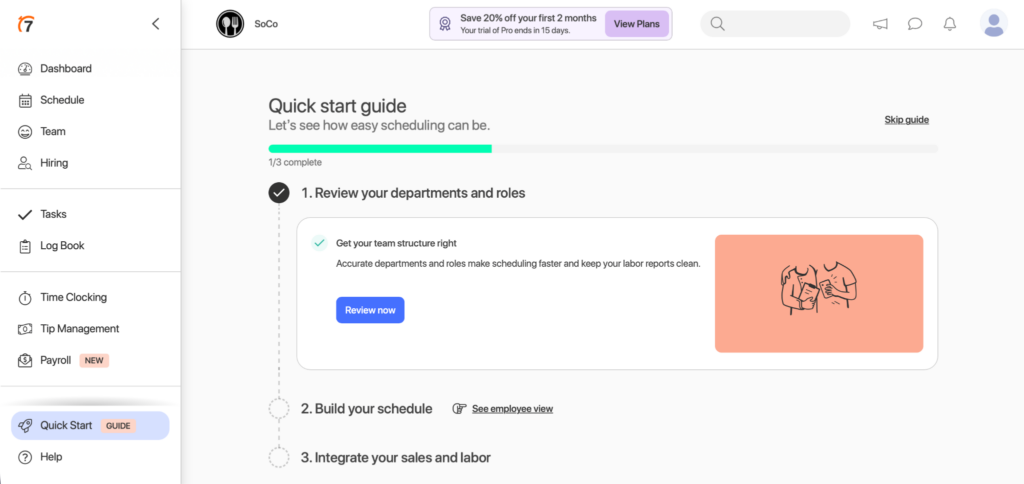
Every step, from signing up for the 7shifts plan to setting up your restaurant or location, is straightforward. 7shifts takes you through its quick start guide, where you can set up your account structure in one of two ways.
If you already have a schedule, 7shifts can automatically extract your departments, roles, and employee information from an existing schedule file. You can upload a JPG, PNG, XLSX, or CSV file, and the system analyzes it to create your account structure. You can review and edit the extracted data before finalizing. This feature is only available during your trial period and works best with single-sheet files.
Alternatively, you can manually enter your departments and roles. This approach gives you complete control over your account structure and is straightforward. You just add departments, define roles for each, and customize everything to match your restaurant’s organization.
7shifts Web App
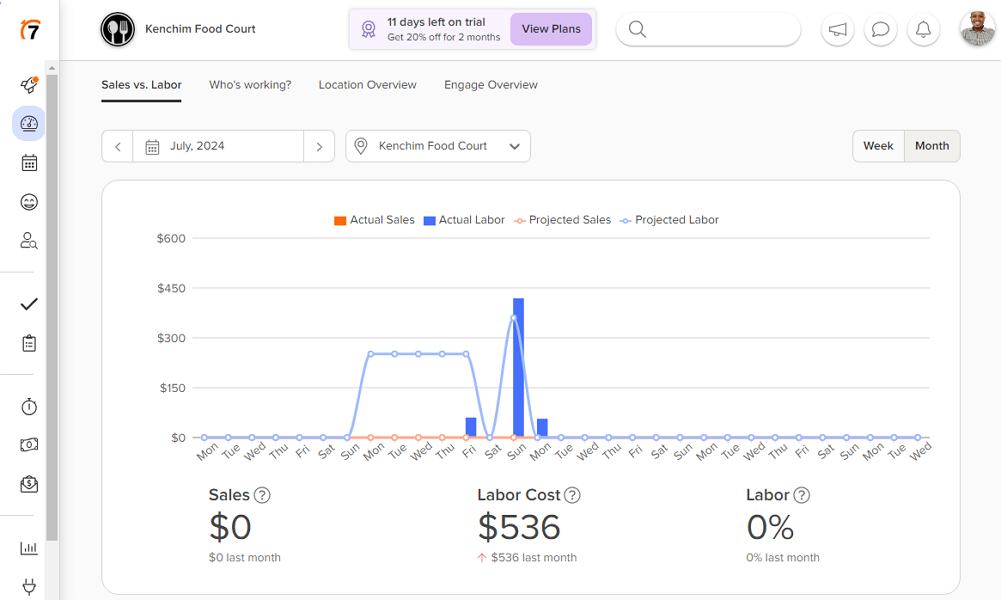
When you log into the web app as an admin or manager, you land on the well-organized sales versus labor dashboard. The dashboard gives you a snapshot of your team’s weekly sales and labor budget metrics. You can navigate to other sections of the dashboard to see clocked-in staff, location overview, and engagement overview.
The left menu is minimized by default, but when you hover the cursor on it, it expands automatically to display the features’ names—dashboard, schedule, team, hiring, tasks, log book, time clock, payroll, and tip management. The interface is clean and responsive, making navigation intuitive.
Non-techy people will find it easy to create schedules, add team members, create tasks, add tip pooling, and more. Configuring your company’s settings is pretty straightforward since each setting is accompanied by a description of what it does. If you hit a snag, use the help search bar on the top panel to find relevant guides without exiting the web app.
7shifts Mobile App
The easy-to-use mobile app works flawlessly on Android and iOS devices. Downloading the app from the Google Play Store or the Apple App Store is a breeze. When you log in as a manager or admin, you see your team’s dashboard with three views: overview, who’s working, and my shifts.
I found the manager version to be incredibly powerful and easy to use. The app is intuitive and well-organized, so managers won’t struggle to perform administrative duties. They can create shifts, approve time-off and availability requests, view and approve timesheets, chat with employees, and add team members while on the go.
The employee version is designed to help your staff perform the basic functions with ease. Employees can view current and upcoming shift schedules, bid on open shifts, view assigned tasks, set availability, request time off, and track weekly earnings. They can also sync 7shifts schedules with Google Calendars to get timely alerts and stay on top of their schedules, minimizing no-shows and lateness.
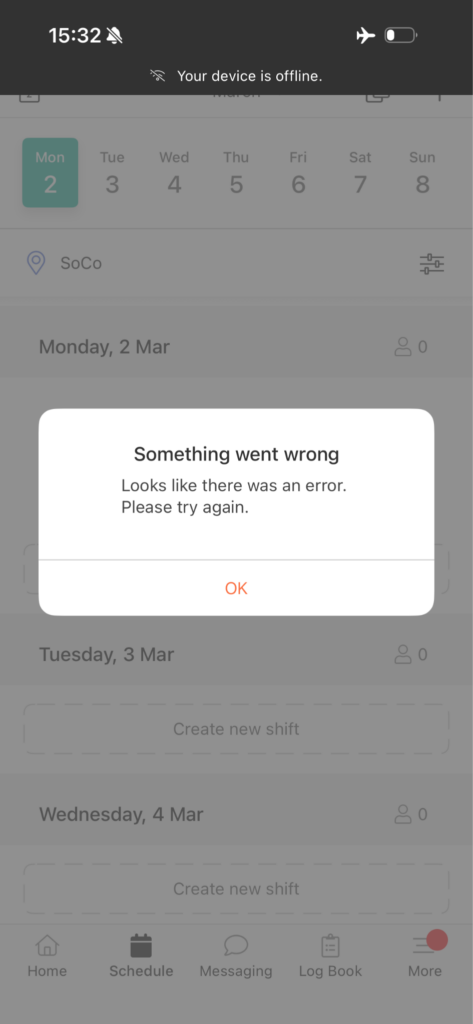
Sadly, 7shifts doesn’t work without the internet. The app returned a connection error when I turned off my internet connection. The lack of a functional offline mode will cause tracking issues when your restaurant’s internet connection is lost.
| Menu Item | Admin | Employee | ||
| Website | Mobile App | Website | Mobile App | |
| Feature (i.e., Time Tracking) | ||||
| Timesheet | ||||
| Time Tracker | ||||
| Calendar | ||||
| Schedule | ||||
| Expenses | ||||
| Time off | ||||
| Analysis | ||||
| Dashboard | ||||
| Reports | ||||
| Activity | ||||
| Management | ||||
| Kiosks | ||||
| Approvals | ||||
| Projects | ||||
| Team | ||||
| Clients | ||||
| Tags | ||||
| Invoices | ||||
| Settings | ||||
Verdict: 7.5/10
7shifts Core Functionalities
In the sections below, I will highlight the strengths and weaknesses of each feature based on my test results to help you make an informed decision.
7shifts Scheduling
7shifts scheduling tools simplify scheduling for managers and staff. The drag-and-drop scheduler enables managers to effectively assign shifts, ensuring proper staffing for each department and location.
Creating a shift is as easy as clicking the plus (+) sign on the employee’s available slots and adding the shift parameters. You can add shift time and a break (if needed), and leave a note to ensure the entire crew is pulling in the same direction.
I appreciate the “repeat” feature, which lets you auto-populate the shift to several days, saving you hours of tedious manual work. You can also set labor targets based on projected sales to ensure each schedule stays within budget.
7shifts notifies employees when you publish or update a schedule, keeping them in the loop so they know when they work. Employees also receive shift reminders to ensure they are never absent or late for work, ensuring each location is adequately staffed to deliver five-star service.
If an employee’s scheduled hours exceed their weekly limit, 7shifts flags the overtime hours, prompting the manager to adjust the shift to keep labor costs within budget. In addition, preventing unnecessary overtime ensures no staff member is overworked, averting potential physical and mental health issues.
Machine Learning Auto-Scheduler
I found the machine-learning auto-scheduler helpful for restaurants looking to create labor-optimal schedules. The scheduler analyzes 8-10 previous schedules to unearth staffing patterns. It then considers labor costs, sales forecasts, overtime, time off, availability, and labor compliance to create schedules that meet staffing needs while staying within the labor budget.
Shift Swapping
Moreover, managers don’t have to spend hours updating the schedule when employees call out sick or have emergencies. The Shift Pool is a central hub for managing employee shift change requests. Employees can offer, request, or trade shifts directly through the mobile or web app. The Shift Pool organizes requests into four key sections: Shift Pool Requests (pending requests), Up for Grabs (shifts offered for others to claim), Trade Requests (direct shift trades), and My Trades (your pending requests).
Managers receive notifications and can approve or decline requests with a single tap. Once approved, changes are reflected in the schedule and sent to the team instantly. Admins can control whether manager approval is required for shift changes and whether employees can offer partial shifts or shifts across multiple locations.
Availability and Time-Off Management
Factoring employee preferences into the intricate restaurant scheduling can be complicated and time-consuming, but not with 7shifts. Employees who can’t work due to other commitments can submit an availability or time-off request on the mobile or web app.
During my testing, the app notified me (the manager) immediately when an employee submitted a request, prompting me to review it. Once I approved the availability or time-off request, the app blocked off the unavailable days, preventing me from assigning the employee a shift during that time slot.
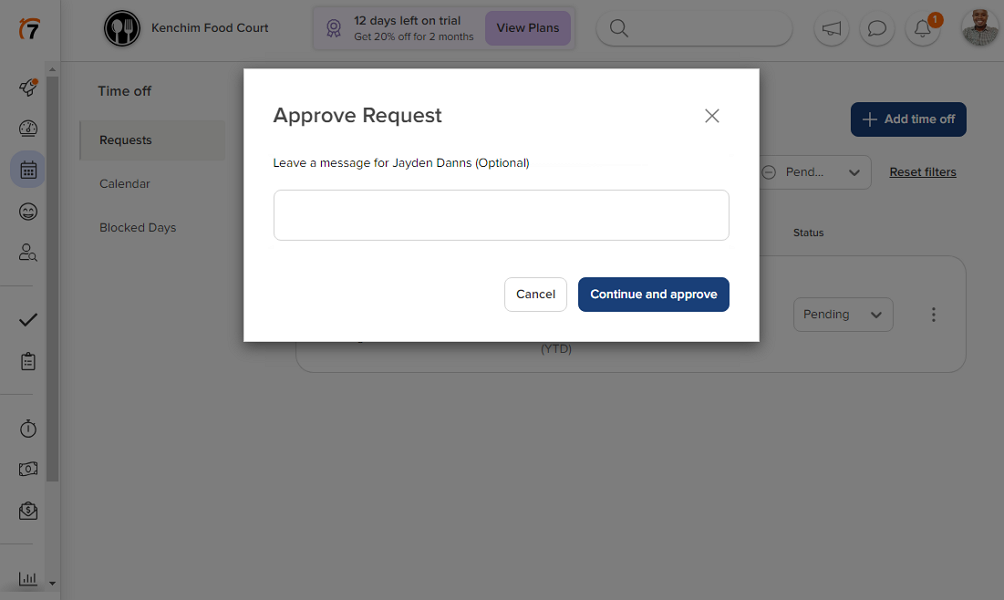
My favorite feature is the time-off notice, which requires employees to submit the time-off request X days before the requested date. The notice period gives the manager enough time to adjust the affected schedule or hire temporary staff to cover the shift. This way, they can prevent potential understaffing, ensuring the service levels and quality don’t deteriorate.
Time Tracking
7shifts tracks employees’ regular hours, overtime, and break time. However, the time tracker isn’t built into the 7shifts core. Employees can punch in/out via the POS system or download the 7Punches mobile app to track time on their iOS or Android smartphones.
I don’t like the idea of employees managing schedules on one app and tracking time on another. It complicates usability for employees and may lead to tracking issues, especially if the apps don’t sync properly. Luckily, the latter isn’t a problem your employees will have to grapple with.
During my testing, employees’ hours were reflected on 7shifts in near real-time, which was fantastic. 7Punches is stripped down to the absolute basics—it lets employees punch in/out, track breaks, and nothing more. I found this mobile app easy to use because of its limited capabilities, but there’s a trade-off.
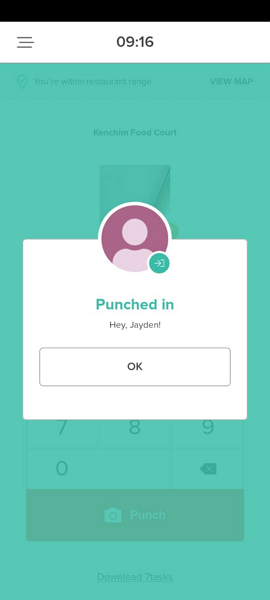
The app’s simplicity means that it omits certain essential features. For example, 7Punches doesn’t offer a timer widget, so employees can’t tell when they are clocked in. Another thing to note is that 7Punches doesn’t provide a “start break” button. Employees have to repeat the punch process to start a break, which isn’t as easy as with the best time tracking apps.
Geofencing and Facial Recognition
All settings meant to improve time tracking accuracy take place on the 7shifts web app. You can create a geofence around your restaurant and set 7Punches to restrict employees from clocking in or out outside their designated worksite. The geofence was quite effective, and it only let me punch in when I was inside the designated location.
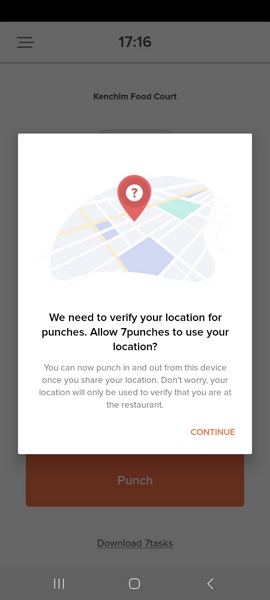
In addition, 7Punches uses facial recognition to prevent buddy punching, ensuring you pay employees for only the work they did. The app doesn’t use Artificial Intelligence (AI) to verify employees during clocking. Instead, it takes a photo and attaches it to the employee’s timesheet, allowing the manager to pinpoint potential buddy punch cases during timesheet approval.
7shifts Overtime Tracking
7shifts has pre-configured overtime settings for different states in the United States. When you select the state where your restaurant is located, the app automatically applies the relevant overtime thresholds. I selected California, and the app automatically set my daily and weekly overtime.
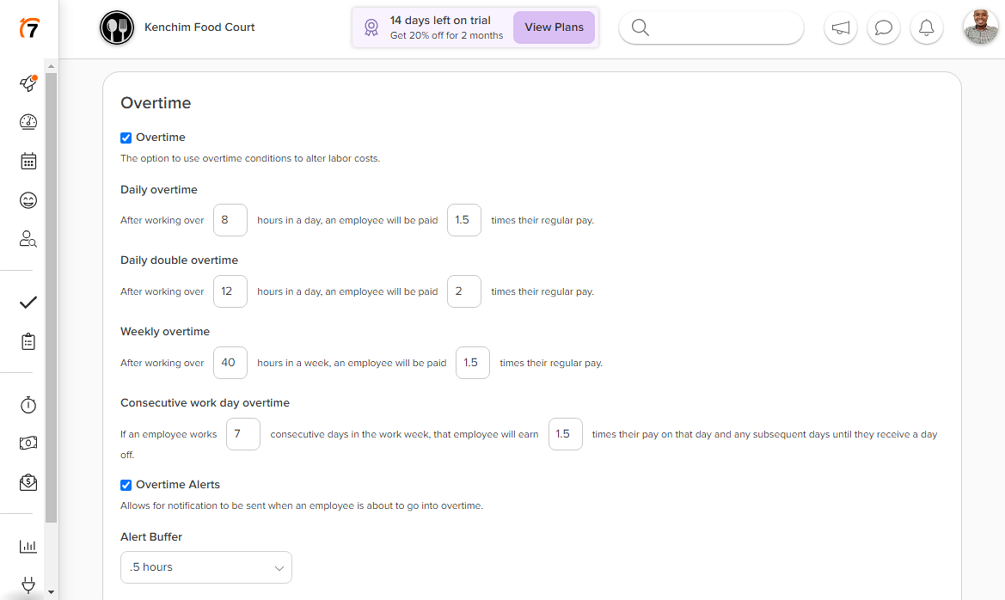
Labor laws in some states, like California, require employers to compensate employees for overtime and double-time even if they didn’t authorize it. 7shifts alerts you when an employee is about to go into overtime so you can prevent unnecessary overtime costs.
7shifts Break Tracking
You can customize the 7shifts break tracking policy to meet your business needs, such as adding manual or automatic breaks. I added a rest and meal break, which was easy. When you set an auto-break, 7shifts automatically deducts the time from the employee’s timesheet.
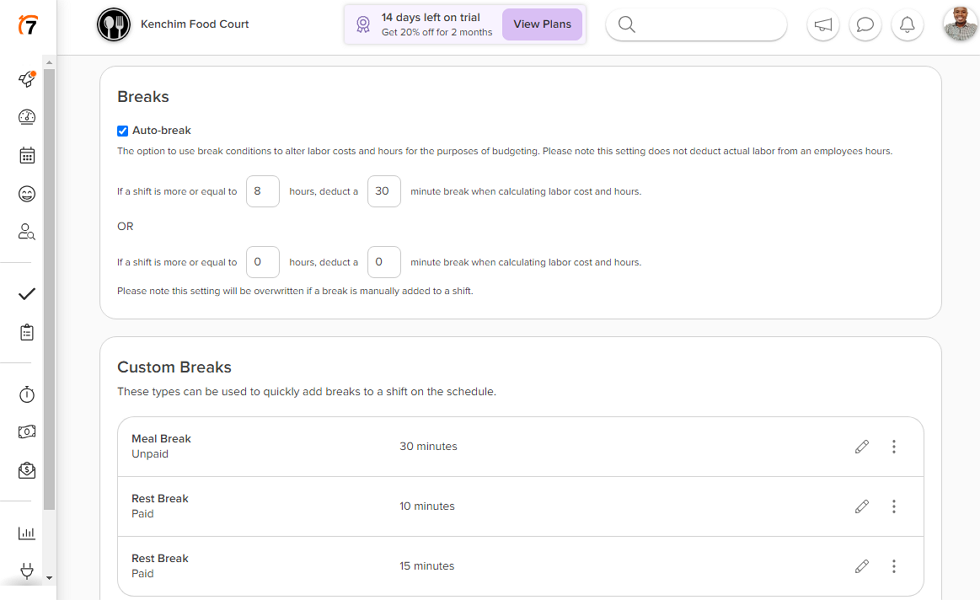
Setting manual breaks is also a walk in the park. Admins can configure time clocking settings to enforce rules around mandatory breaks and overtime thresholds. Employees receive alerts and reminders about upcoming breaks to ensure they stay compliant.
7shifts offers a break verification tool that is indispensable for protecting your restaurant from future litigation. During punch out, the app asks employees if they took their rest and meal breaks per the company’s policy.
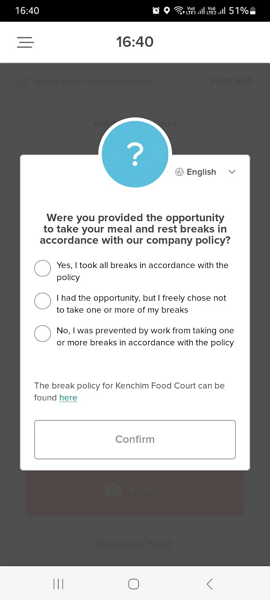
The employee’s response will inform your action. If you authenticate that an employee was prevented by work from taking any of the breaks, then you have to give them a premium pay. If they choose not to take the break, you can use the attestation to exonerate your company from blame in case of a future lawsuit.
Team Communication
7shifts enables you to message employees individually or in a group chat. It fosters clear communication to eliminate errors and misunderstandings between staff members, allowing your team to deliver quality service.
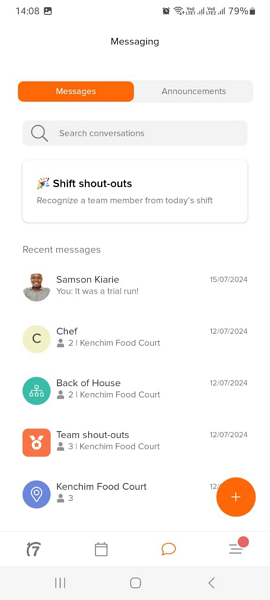
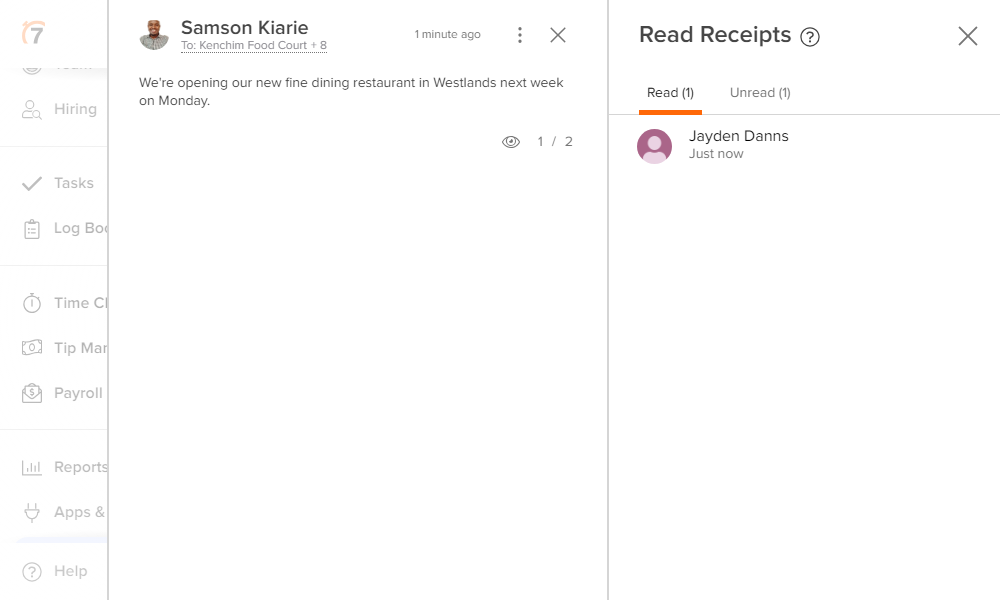
In addition, 7shifts allows you to send one-way announcements. My favorite part about the 7shifts announcement tool is that it gives managers and restaurant owners many filters to ensure they reach the target audience. You can send announcements to a specific location, department, or role and see how many people read it.
Manager Log Book
The Log Book allows managers to record shift notes, daily summaries, and task completion status. You can document important events, employee performance notes, and operational issues that occurred during the shift. The system can auto-send daily summaries to stakeholders, ensuring everyone stays informed.
The Log Book also integrates with task management, allowing you to track opening and closing checklists, maintenance items, and other recurring tasks. You can see which tasks were completed, which were missed, and follow up accordingly.
Tip Management
7Shift ensures everyone in the restaurant, from prep cooks to food runners and hosts, gets their fair share of tips. The tip pooling impressed me because it simplifies the calculation and sharing of tips. You can choose equal distribution, percentage, or points weighting to ensure fair distribution of tips to boost every staff member’s morale.
With the tip-sharing formula in place, 7shifts automatically computes each staff payout. It streamlines the tip workflow, allowing tips to be paid out fairly and on time. Even better, 7shifts adds transparency to the entire tip management process. Employees can see how much they contributed, collected, received, and expected payout from each pool.
Hiring and Recruitment
7shifts’ Hiring module allows you to create and publish job postings directly within the platform. You can specify the role, location, job type (full-time or part-time), and add a detailed job description. You can even include a set wage or range so candidates know what to expect.
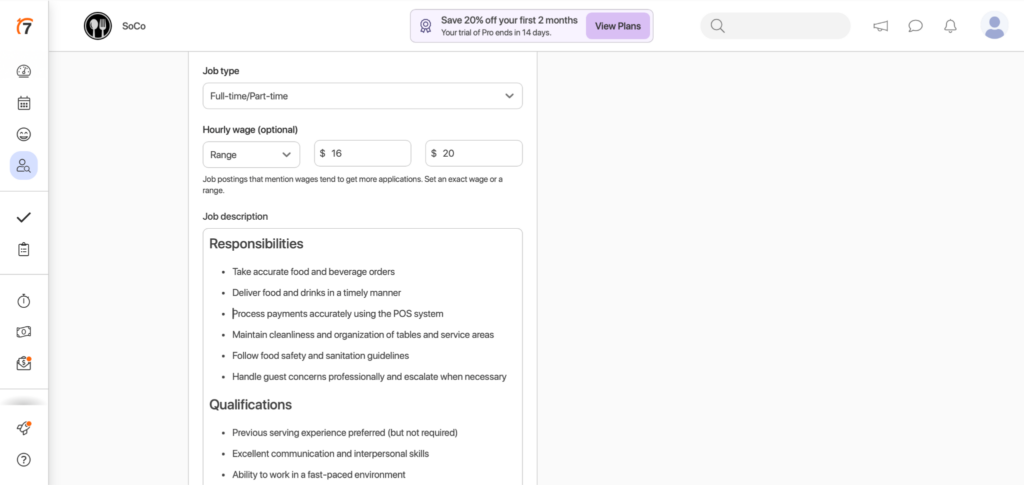
I found it especially useful that you can add custom screening questions with flexible answer options, such as text, yes/no, date, number, currency, or multiple choice.
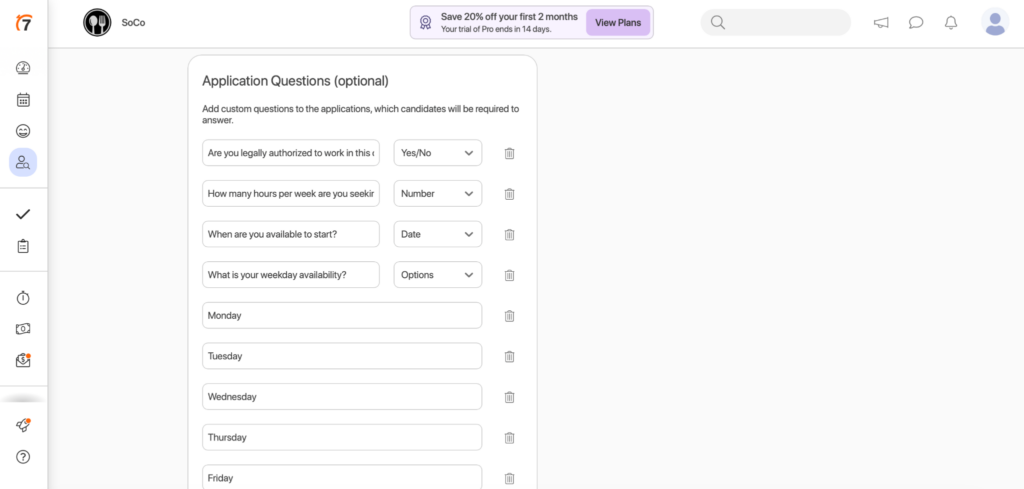
Once you publish a job posting, 7shifts automatically makes it available to Google’s search engine and Jobcase, so job seekers discover your positions organically. You can also share the posting directly on Facebook, Twitter, and LinkedIn, or send it to your team via an announcement to encourage employee referrals.
The candidate management interface is clean and organized. When job seekers apply, you can view their contact information, work experience, availability, and responses to your screening questions. You can add manager notes to track your thoughts on candidates, favorite promising candidates, and update their status through the hiring pipeline.
When you mark a candidate as Hired, you can create a new employee in 7shifts and immediately send them an onboarding package. You can also set up email alerts so you’re notified when qualified candidates apply, keeping you informed without having to check the system constantly.
Employee Onboarding
7shifts Employee Onboarding handles tax forms (W-4 and state income tax forms), I-9 employment eligibility verification, payment method information, and company policies.
As a manager, you can customize onboarding packages by selecting which forms and documents new employees need to complete. You can upload custom documents and company policies for employees to acknowledge, ensuring they understand your expectations from day one. The system tracks each employee’s progress through the onboarding process, so you know exactly which documents have been completed and which are still pending.
Employees complete their onboarding documents through their mobile devices, making it convenient for them to finish the process on their own time. Once submitted, you can review their responses and approve them. If you notice a mistake or need clarification, you can request edits directly through the system.
What I appreciate most about this feature is that it’s built specifically for restaurants and handles the complexity of multi-location operations. If you manage multiple locations, the system sends employees the correct tax documents based on their location, ensuring compliance with state and local regulations.
One important note: Employee Onboarding is currently available only to customers in the US (except Puerto Rico) and requires your account to have the country set to the United States and a US-based address on file.
Security Features
7shifts leaves nothing to chance when it comes to protecting user privacy and data. The vendor uses multi-factor authentication (MFA) and role-based access controls (RBAC) to prevent unauthorized access to data. It supports user roles with varying access and permission levels, such as employees, assistant managers, managers, and admin.
Regarding data protection, 7shifts protects data in transit using SSL/TLS 1.2 protocols. In addition, the provider uses the Advanced Encryption Standard (AES) 256-bit encryption to protect data at rest. AES 256-bit encryption is as secure as it gets — it’s virtually unbreakable even with brute-force technologies.
7shifts also adheres to industry standards, such as the Payment Card Industry Security Standard (PCI-DSS), the International Electrotechnical Commission (IEC) 27001, and the International Organization for Standardization (ISO). It has also achieved Service Organizations Controls (SOC) to enhance trust and security.
7shifts Reporting and Analytics
One thing I liked about 7shifts is its real-time analytics and dashboards. For example, the app gives you a real-time snapshot of sales versus labor, allowing you to adjust staffing levels to keep labor costs within budget.
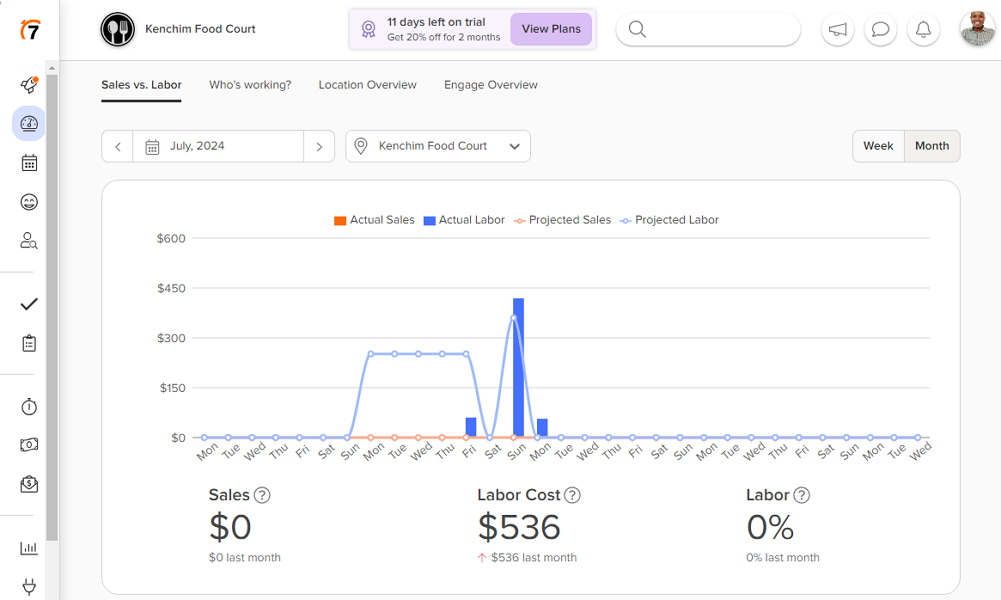
You can generate reports, such as worked hours versus wage or scheduled hours versus wage, to pinpoint labor gaps. The variance report shows the difference between scheduled versus worked hours, which can be vital in uncovering your overtime trends.
Another interesting report is employee certification. I found this to be helpful, especially for restaurants that want to avoid compliance issues. 7shifts allows you to upload and access staff certifications, such as food or liquor handling certificates, on their profile. The app reminds you when an employee certification is up for renewal.
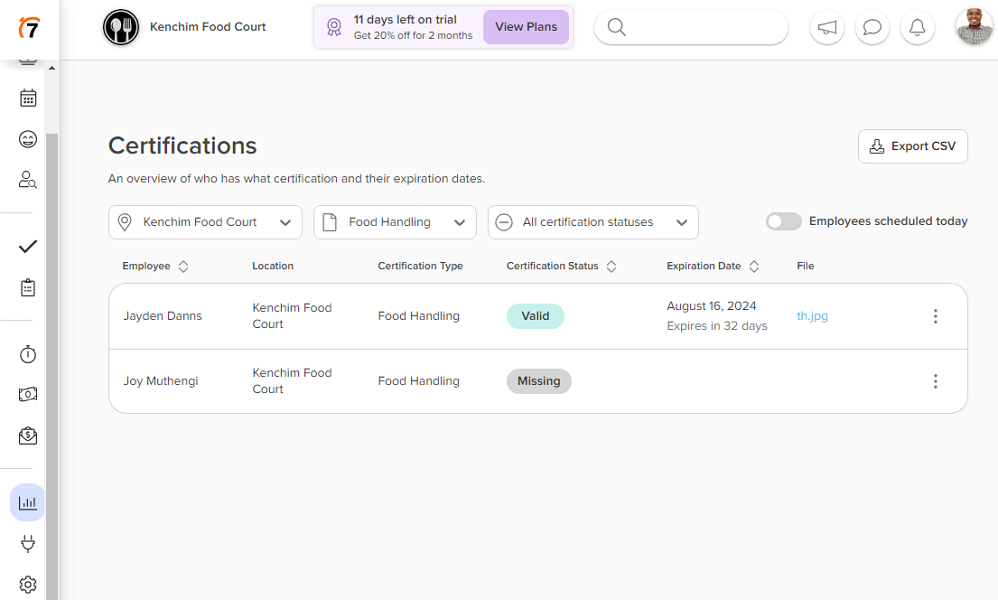
You can generate the certification report to get at-a-glance details about your team’s compliance. See who has what certification, who is missing a critical certification, and monitor the expiration dates of valid certifications. You can follow up with employees to ensure they renew or acquire the required certificate for unwavering compliance.
Overall, most 7shifts reports provide helpful insights that power data-backed decision-making. The reports are easy to generate, but the sharing options are limited to CSV exports only, which is annoying.
Integrations
7shifts supports integrations with major POS systems, including Clover, Lightspeed, Square, and Toast.
For payroll, 7shifts integrates with leading providers, including ADP, Gusto, Paychex, QuickBooks Online, and others. You can also use 7shifts Payroll as a fully integrated solution that works alongside your scheduling and time clocking tools, for an additional fee.
Customer Support
If you encounter a problem while using 7shifts, you can contact the support team via live chat, email ticket, or phone. Alternatively, you can turn to the knowledge base for quick self-serve answers. The knowledge base articles are grouped and neatly organized into various categories: getting started, product guides, troubleshooting, billing, etc.
You can open a category of interest to find guides relevant to your problem. If you dread the manual search, you can use the search function, which is effective. When you type a keyword, the search algorithm serves up relevant articles, allowing you to find a solution quickly.
Live chat support is available seven days a week, but only during specific support hours. When I started a chat during offline hours, the 7shifts chatbot asked me to submit a ticket. However, to create a ticket, you don’t fill out any form.
Instead, you answer a series of questions and upload files related to your request directly using the chat feature. The chatbot submits the support ticket on your behalf. I got a reply in about 26 hours, which isn’t the fastest ticket response rate, but I was glad to get my issue resolved.
During online hours, live agents respond in under two minutes, which is excellent.
What are 7shifts Review Ratings from Review Sites?
(As of July 2026)
7shifts App Review
7shifts hardly puts a foot wrong when scheduling and managing restaurant staff. It enables you to create schedules that optimize the available human resources while staying within the labor budgets. The machine learning auto-scheduler lets you create labor-optimal schedules, regardless of seasonality.
There are minor issues, but they don’t significantly impact usability. For example, employees can’t track time on 7shifts, which is annoying. However, the available time tracking app — 7Punches — syncs seamlessly with 7shifts and is free.
If you’re looking for employee scheduling software as powerful as 7shifts but without the flaws, get Connecteam. The software allows employees to manage schedules, request time-offs, track time, and communicate from the easy-to-use mobile app. It also offers advanced options to help you customize features and workflows to your specific needs and preferences.
Connecteam — The Better 7shifts Alternative
Connecteam is the best 7shifts alternative, offering scheduling, time tracking, availability management, team communication, and reporting.
Here’s where Connecteam shines:
One Mobile App
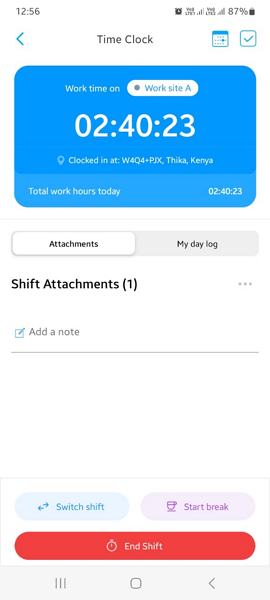
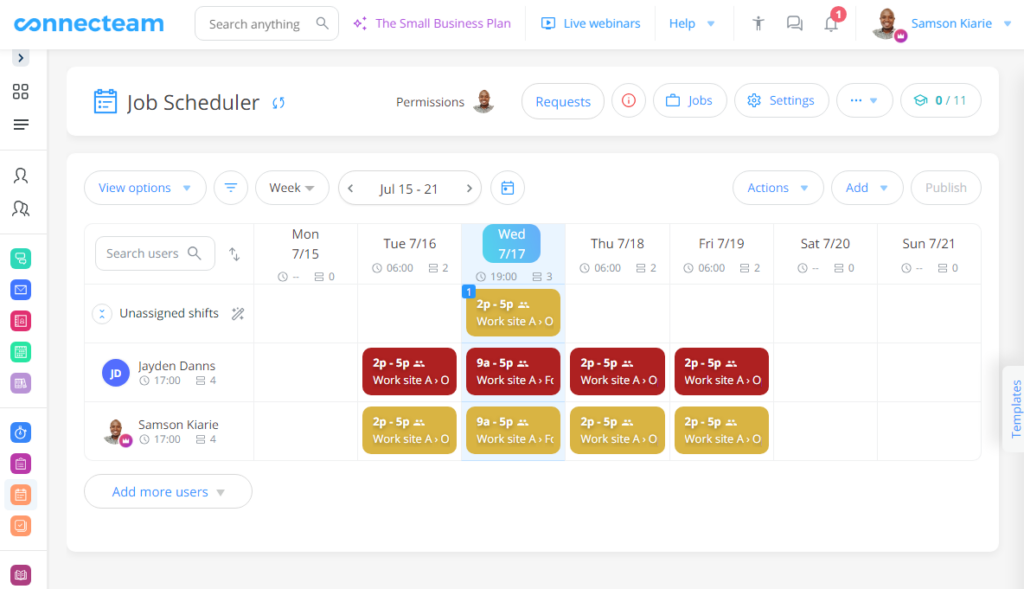
With Connecteam, everything lives in one app. Employees can manage schedules, clock in and out, switch shifts, start breaks, chat, and stay updated, all without downloading separate tools.
The mobile app works on both Android and iOS and is built for deskless teams. The time clock includes a clear clock-in indicator, so employees always know their status. Staff can add notes or attachments to timesheets, switch shifts directly from the app, and manage breaks in just a tap.
No extra apps. No fragmented workflows.
Advanced Customizability Options
Connecteam gives you more control over how you work. The drag-and-drop scheduler makes building and adjusting schedules fast and intuitive. You can color-code shifts by role, department, or location, or use one color for front-of-house and another for back-of-house, to make staff scheduling easier to read at a glance.
Use the online team chat to message by department, location, or specific employees. You can also control permissions, restrict message forwarding, prevent downloads, and keep communication secure.
Company-wide updates are customizable, too. Pick from ready-made templates for birthdays, new hires, open positions, or announcements, and see who viewed each update to ensure nothing gets missed.
Operations & Team Management
Connecteam goes beyond scheduling. With digital forms and checklists, you can standardize daily operations, like opening and closing procedures, so nothing slips through the cracks.
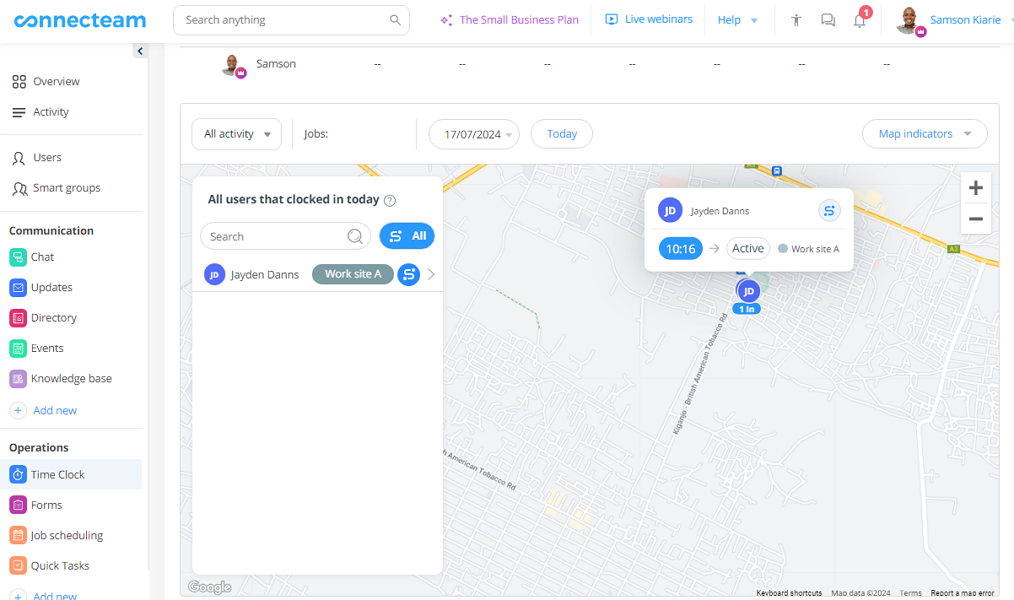
For businesses that need visibility, Connecteam offers real-time GPS tracking. Open the time clock to see where clocked-in employees are located on a live map. If someone is out picking up supplies, you can view their route with a single click.
Affordable for Teams of all Sizes
Connecteam is built to scale without inflating your costs. The Small Business Plan is completely free for up to 10 employees. Paid plans start at $29 per month for up to 30 employees.
See how Connecteam can help your business—start your 14-day free trial today!
