


Great productivity reporting for desk-based teams, but limited in time and task tracking
Verdict: 6/10
Time Doctor is a time tracking and productivity-monitoring software designed for hybrid desk-based teams.
Positives first: Time Doctor accurately tracks time spent on tasks and projects, so you get neat, automatic timesheets you can export and upload to third-party payroll software. Notably, its custom productivity reports really shine. You get detailed data on users’ digital workdays, including idle time, unusual keyboard and mouse activity, specific app use, office vs. remote productivity, and more.
But this strength also poses a risk. Its strict monitoring tools, like screenshots and activity tracking, might feel invasive to some employees, impacting morale. Also, the mobile and desktop apps are very basic. The time clock lacks GPS tracking, overtime alerts, and clock-in and clock-out reminders, and the platform also falls short in scheduling and task management. If you’re in the market for a full-featured time tracker, there are cheaper alternatives that can meet your needs.
Key Features:
- Time tracking: Accurately logs time spent on tasks and projects with a single click.
- Screenshot capture: Periodically captures screenshots of employees’ screens to verify work being done.
- Activity levels: Monitors keyboard and mouse activity to measure productivity levels and idle time.
- Web & app usage tracking: Tracks time spent on various websites and applications to identify productivity patterns and potential distractions.
- Payroll and timesheets: Generates timesheets for payroll based on tracked hours and pay rates.
- Scheduling: Offers basic scheduling with start and end times for shifts and leave.
- Integrations: Works with popular tools like Asana, Trello, Gusto, ADP, and more.
Pros
- Enhances accountability and reduces time-wasting
- Offers detailed team productivity reports
- Incredibly easy to use and set up
Cons
- Expensive compared with feature-rich time tracking alternatives
- Monitoring features may feel invasive to some employees
- Bare-bones desktop and mobile apps
How I Tested Time Doctor
I signed up for a free trial of Time Doctor’s Premium plan, customized my company settings, assigned roles to 5 team members, built an example schedule, and tested the time clock. I also stress-tested some functionality, for instance, adding leave during a scheduled shift and scheduling shifts longer than the set maximum hours.
Time Doctor Pricing
Time Doctor offers 4 pricing plans: Basic, Standard, Premium, and Enterprise.
| Basic | Standard | Premium | Enterprise | |
|---|---|---|---|---|
| Price/user/month (billed monthly) | $8 | $14 | $20 | Custom quote |
| Price/user/month (billed annually) | $6.70 | $11.70 | $16.70 | Custom quote |
| Main features |
| Basic plus:
| Standard plus:
| Premium plus:
|
As of May 2026
In addition, you can buy the following add-ons if they’re not already included in your plan:
- Benchmarks AI – $3/user/month
- Unusual activity report – $3/user/month
- Meeting insights – $2/user/month
- Office vs remote report – $2/user/month
- Video screen recording – $3/user/month
- HRIS integration – $200/integration/month
There’s a 14-day free trial for all plans, so you can test out the features comprehensively without any commitment. I also appreciate the 2-month-off discount for annual billing.
I’ll be upfront: Time Doctor’s pricing is high if you’re not exclusively looking for desk-based productivity reporting. It gets especially pricey for larger teams (50+). However, the Basic plan at $6.70 per month (billed annually) could suit freelancers or very small teams.
While the Standard and Premium plans add more features and integrations, I still don’t think these justify the higher-than-average costs.
Also, there’s no free plan, which isn’t very competitive, seeing as similar small-team-friendly trackers like Toggl Track, Clockify, and Connecteam offer one. And speaking of competitors, the latter vendors’ paid plans are less expensive than Time Doctor’s, with some offering more features, such as advanced scheduling, customizable task tracking, and feature-rich mobile apps.
Here’s an overview of Time Doctor and its close competitors. I’ve chosen plans that offer a similar level of features, making it easier to compare pricing fairly.
| Team size | Time Doctor(Standard) | Toggl Track(Starter) | Clockify(Pro) | Connecteam(Basic) |
|---|---|---|---|---|
| View pricing | View pricing | View pricing | View pricing | |
| 1 user | $11.70 | $9 | $7.99 | Free for life—all features and dashboards |
| 10 Users | $117 | $90 | $79.90 | Free for life—all features and dashboards |
| 20 Users | $234 | $180 | $159.80 | $29 |
| 30 Users | $351 | $270 | $239.70 | $29 |
| 50 Users | $585 | $450 | $399.50 | $45 |
| Read our in-depth Toggl Track review | Read our in-depth Clockify review | Learn more about Connecteam |
All prices per month, billed annually, as of May 2026.
Verdict: 4/10
Time Doctor Usability and Interface
Here are my honest thoughts on Time Doctor’s user experience.
Setup and settings
The Time Doctor signup process is very straightforward. I completed it in less than 5 minutes without pressing any “Skip” buttons. I clicked “Try it free” on the official website and entered my name, company, work email, and password (no credit card deets). I also answered a couple of questions about feature preferences. Overall, I’m pleased there’s no trial gatekeeping behind a sales form or demo.
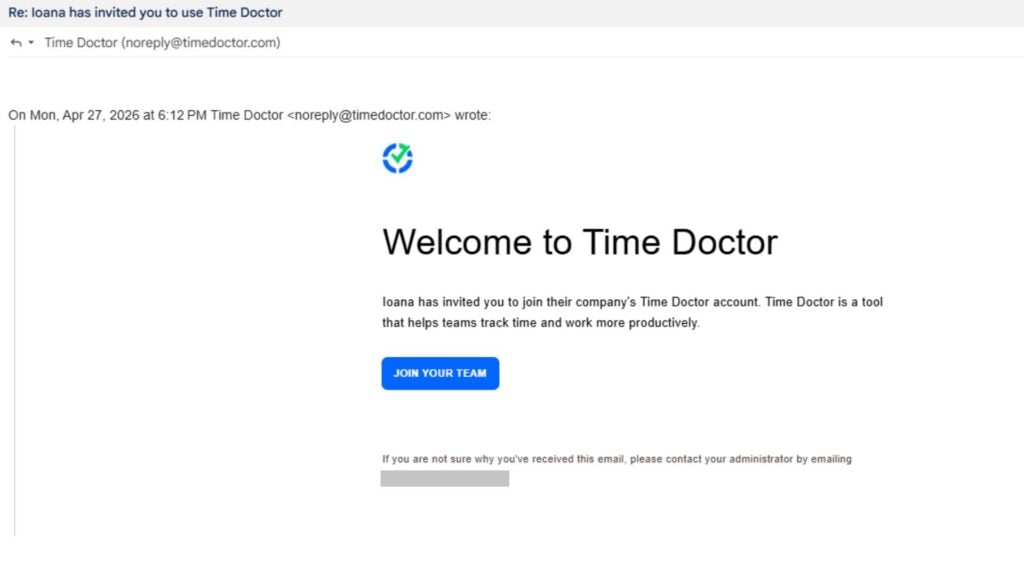
Next, I invited team members and assigned basic roles easily (regular user, manager, or admin). My invitees got the setup emails straight away. The invitee just adds their full name, job role, and a password, and they’re good to go. (By the way, you can also invite staff via email, link, or through a CSV file later on.)
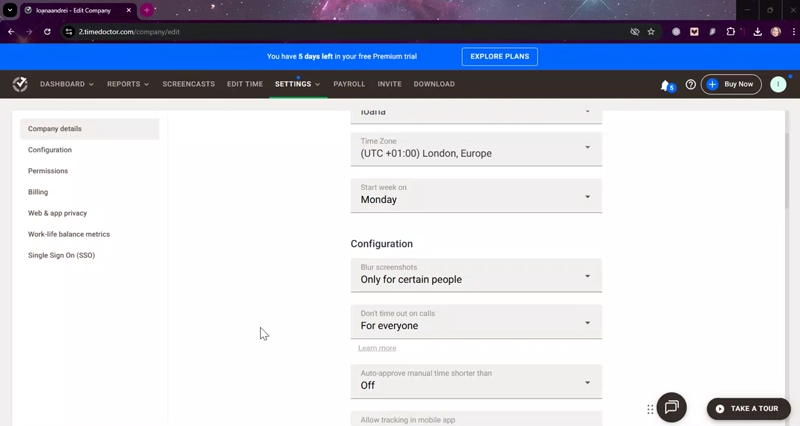
Time Doctor feels made for small, non-techy teams. I logged in as a regular user and a manager, and found it easy to use without any training. I could review and update company settings for permission levels, auto-approvals, and more, in under 5 minutes.
Design and general usability
I’m happy with the Time Doctor interface. It’s modern but not overwhelming, with sufficient color contrast and large-enough text. It also loads quickly and doesn’t require unnecessary clicks to accomplish tasks (a pet peeve of mine). Its user-friendliness extends to feature customization. You can, for instance, toggle settings on and off with 1 click (no “save” button) and easily select options from dropdowns.
For all its simplicity, however, some tool placements don’t make sense to me. For example, the web app nests scheduling and break management under the “Settings” tab, and you can only manage leave in the team schedule. Normally, I’d expect scheduling and leave tracking to feature prominently, and separately, in the toolbar, and for breaks to feature in the shift schedule.
The app makes a lot more sense in the reporting section. I could customize real-time, visual-first dashboards and switch between individual, team, and executive views. Separately, Time Doctor categorizes its reports into “Productivity and focus”, “Performance and collaboration”, and “Operations and cost management”.
The “Edit time” feature is user-friendly, too, with table cells that you can edit quickly. I find it inefficient, however, that you can’t bulk-edit multiple users’ time, or at least view team members in the same table.
Unfortunately, I didn’t notice any obvious accommodations on any of the apps for users with visual or mobility impairments, such as text-to-speech, keyboard navigation shortcuts, or font size adjustments.
Verdict: 4/10
Desktop app
You can install the Time Doctor desktop app as part of your setup. It’s pretty quick. I downloaded the Windows installation file from my Time Doctor web account, clicked “Next” a few times, and re-signed in.
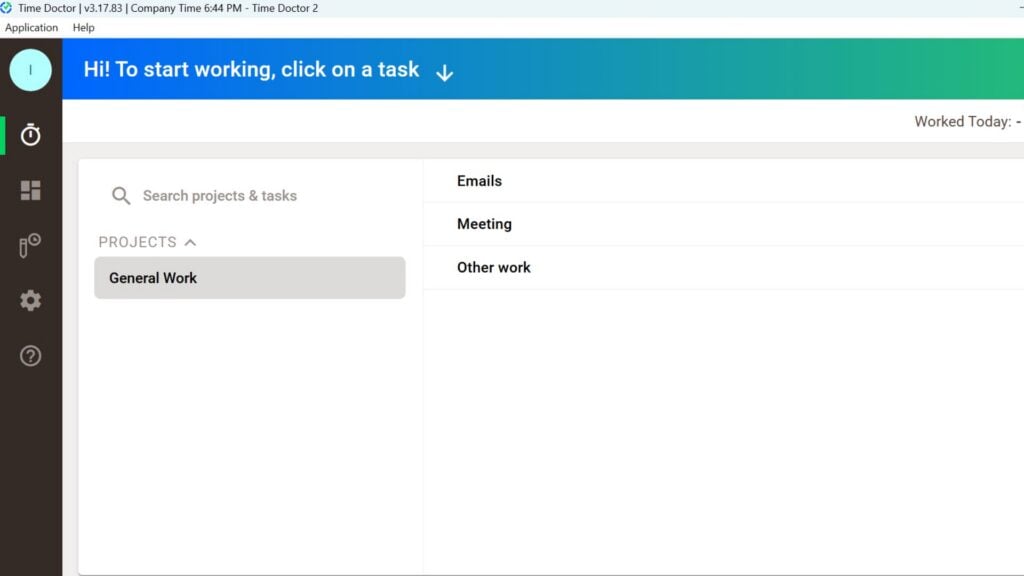
That said, the desktop app functionality was very limited. I wondered, “Why have a desktop app at all?” You can clock in and out of pre-existing tasks and change a handful of settings, including tracking reminders. It tracks and captures employees’ website and app use while they’re clocked in. Time Doctor could easily add that functionality to the web app, though.
Verdict: 5/10
Mobile App
Time Doctor offers both Android and iOS apps. I tested the Android one, and it’s quite bare-bones compared with its web app cousin. Similar to the desktop app, you can only track time against already-added tasks. A Time Doctor rep said you can also view schedules, but these didn’t appear for me when I tested the app.
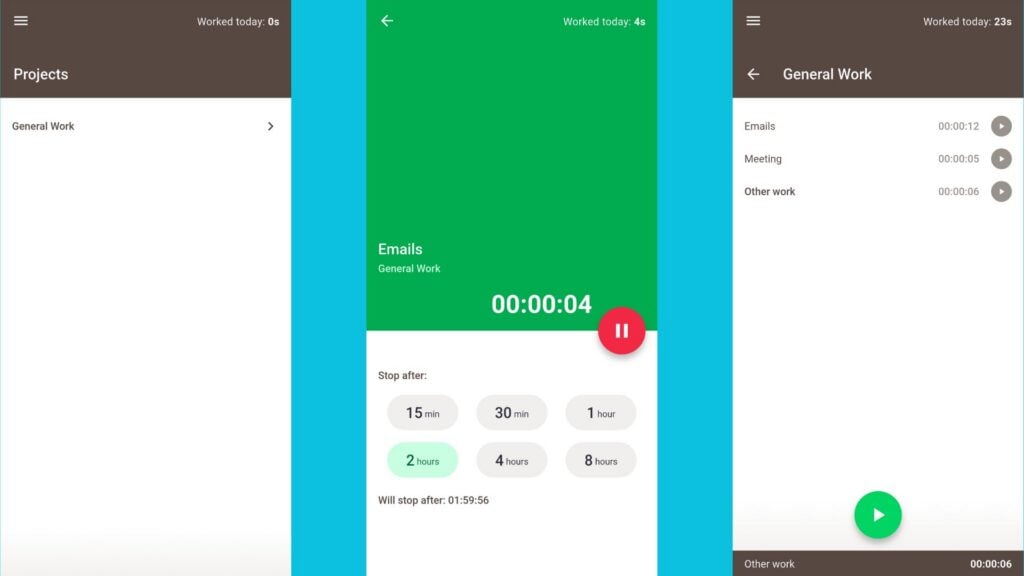
Here’s how Time Doctor’s mobile app compares to its web functionality.
| Menu Item | Admin | Employee | ||
| Website | Mobile App | Website | Mobile App | |
| Time and task tracking | ||||
| Time tracking | ❌ | ✅ | ❌ | ✅ |
| Edit time | ✅ | ✅ | ✅ | ✅ |
| Timesheets for payroll | ✅ | ❌ | ❌ | ❌ |
| Add projects and tasks | ✅ | ❌ | ✅ | ❌ |
| View time per task | ✅ | ✅ | ✅ | ✅ |
| Scheduling and leave tracking | ||||
| Create basic shifts | ✅ | ❌ | ❌ | ❌ |
| View schedule | ✅ | ❌ | ✅ | ❌ |
| Add and remove leave | ✅ | ❌ | ✅ | ❌ |
| Activity monitoring | ||||
| Record screencast (screenshot or video) | ✅ | ❌ | ✅ | ❌ |
| View employee screencast | ✅ | ❌ | ✅ | ❌ |
| Delete own screencast | ✅ | ❌ | ✅ | ❌ |
| Reporting | ||||
| User dashboard | ✅ | ❌ | ✅ | ❌ |
| Activity and productivity reports | ✅ | ❌ | ❌ | ❌ |
| Time and attendance reports | ✅ | ❌ | ❌ | ❌ |
| Management | ||||
| User management | ✅ | ❌ | ❌ | ❌ |
| Company settings and integrations | ✅ | ❌ | ❌ | ❌ |
| Activity and productivity settings | ✅ | ❌ | ❌ | ❌ |
If you ask me, Time Doctor isn’t the best solution for frontline employers. While it offers offline time tracking (which worked fine for me without an internet connection), the mobile app is very limited for managers. You can’t create or edit schedules, add new tasks, view live attendance, track leave, or manage user or company settings.
To me, this suggests Time Doctor caters primarily to desk-based teams. And indeed, a banner constantly pops up in both mobile and web informing me “Time Doctor is optimized for desktop. For the best experience, we recommend using a computer.” Noted!
Verdict: 4/10
Time Doctor Core Functionalities
Time tracking
I found Time Doctor’s time tracking very straightforward. With 1 click, I could start, pause, and stop the timer. As a regular user, I could choose to auto-stop my timer after 15 or 30 minutes, or 1, 2, 4, or 8 hours.
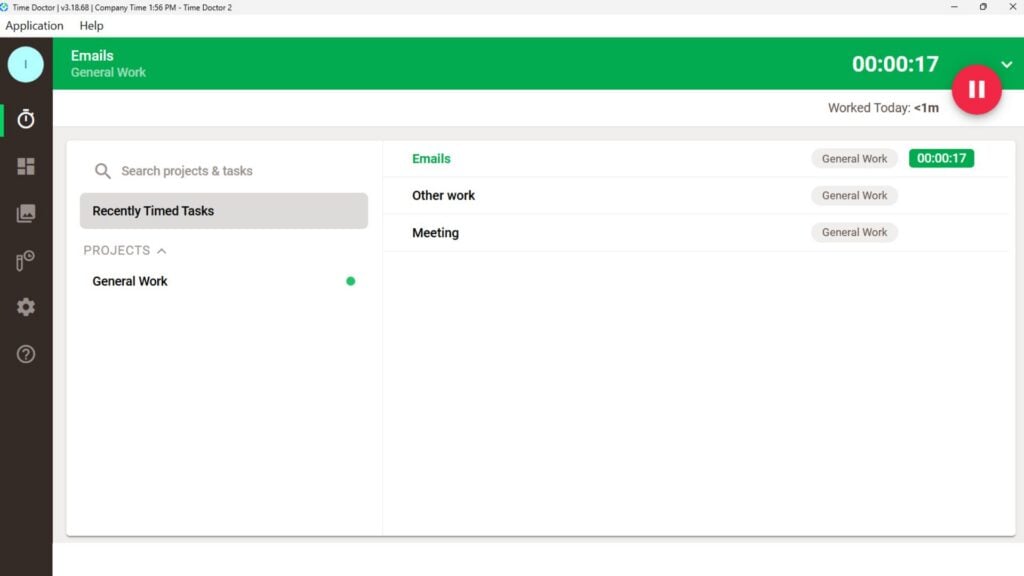
Surprisingly, though, you can’t clock in and out on the web app. You can, however, download and use Time Doctor’s Chrome extension to track time in a browser, and you can also manually edit time entries on the web app. These workarounds feel effortful, though.
On top of that, I’m disappointed that Time Doctor doesn’t let you set employee clock-in and out reminders. It also doesn’t automatically stop users’ time tracking when they go over the company’s custom “too many hours per day” number (I tried!)
But here’s what you can do.
- Offline tracking: The app tracks time even when users don’t have an internet connection. All time entries sync once back online.
- Manual time editing: You can view and edit team members’ start and end times, view total break time, and edit tracked projects and tasks.
- Attendance dashboard: View live time tracking at the team and individual level.
Sadly, Time Doctor doesn’t offer live GPS location tracking or geofencing-based restrictions. This is an issue if your workers must work from specific sites and you need to monitor their locations during working hours.
I’m also concerned that Time Doctor tells users to only track time using 1 device at a time. This means you can’t, for instance, clock in on mobile and clock out on desktop. I tested this, running 2 separate timers on my mobile and desktop apps. Indeed, the 2 apps were out of sync. In my experience, this issue doesn’t occur on other time trackers, and it could impact your timesheet and compliance trail accuracy.
Separately, the platform has a basic shift scheduling feature, but confusingly, I wasn’t able to track time against my scheduled shifts.
Verdict: 5.5/10
Timesheets and payroll
I like that Time Doctor automatically turns all team time entries into timesheets.
Timesheets are fairly detailed, showing total hours worked, adjustments (such as holiday pay), hourly rate, currency, hourly limit (per day, week, or pay period), total pay, and payment method for each employee. I could view timesheets for a specific week, month, or custom date range.
Time Doctor has a quirky interface, where you can configure payroll settings straight into the timesheet. I haven’t seen this while testing other time tracking platforms. This is very handy indeed, but prone to accidental errors depending on who you grant payroll permissions to.
Specifically, you can edit:
- Adjustment amount (for instance, to offer a performance bonus)
- Employee hourly rates
- Hourly limits and their range (e.g., daily, weekly limit)
- Currency
- Payment method
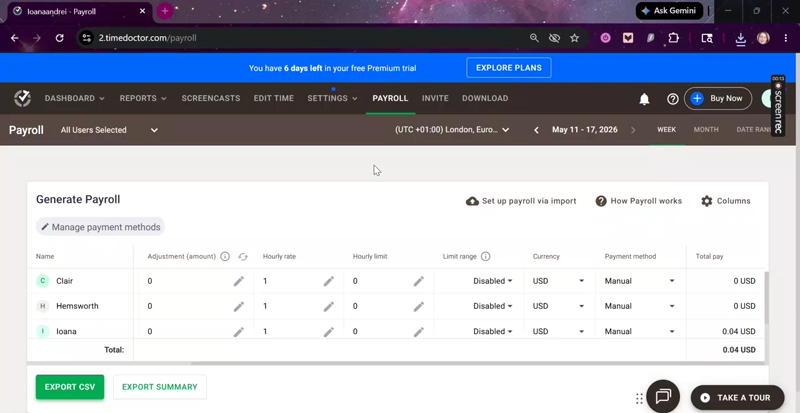
Export-wise, you can directly send your payroll reports to Deel only. Time Doctor integrates with several other payroll providers (ADP, Gusto, Payoneer, PayPal, and Wise), but you have to manually download and upload a CSV file to run your payroll.
Hats off, though, for being able to set different payout methods for team members. This could help if you hire contractors or freelancers.
That said, Time Doctor could raise the bar a bit for companies with complex payroll requirements. For example, it doesn’t allow you to track or set pay rates for overtime, set different paid leave rates, or vary hourly rates based on employee projects.
Verdict: 7/10
Task tracking
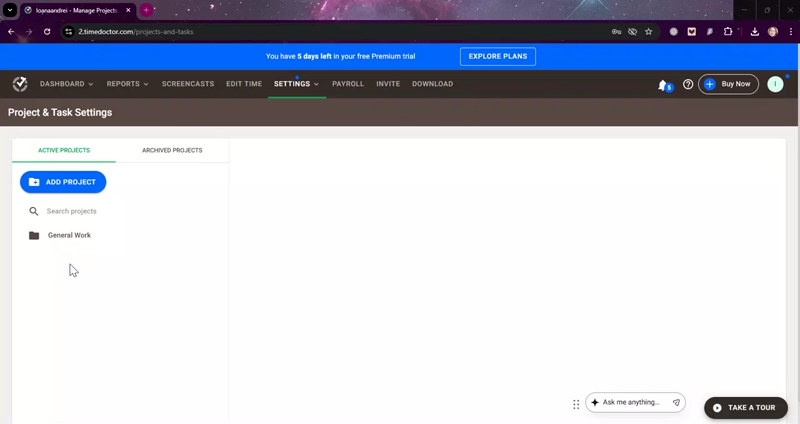
You can create projects and tasks in Time Doctor and track team members’ time against them. Unlike on some alternative platforms, you can’t track task deadlines, assign team members, or track task status.
That said, I appreciate that you can configure user permissions per task and project. This means only certain employees can track time against those items. Then, in the reporting section, you can analyze time per task alongside productivity and idle time metrics for individuals and groups. All of this felt quick and intuitive during my trial run.
Verdict: 5/10
Scheduling and leave tracking
Time Doctor’s scheduling and leave tracking feature is basic.
You have 2 choices: schedule team shifts and add leave in a calendar format. You simply add start and end times to either selection. You can also upload existing schedules via a CSV file.
I can’t say I’m swept off my feet. Here are some critical scheduling tools that Time Doctor doesn’t offer (but I’ve seen in other platforms like Connecteam):
❌AI auto-scheduling based on criteria such as availability and qualifications
❌Open shifts that employees can request
❌Shift swapping
❌Shift drag-and-drop across the scheduler
❌Copying or recurring shifts
❌Saving and editing shift templates
❌Shift color-coding (e.g., night shift vs. day shift)
❌Time clock integration
Given its limited capabilities, I can’t see Time Doctor serving frontline teams with complex, recurring schedules, especially when workers require shift details (such as client locations) and last-minute swapping.
I also had qualms with the default shift start and end times, 12:00 AM to 12:00 AM, which I had to keep resetting with each new shift. Time Doctor can easily change this default to, say, 9:00 AM – 5:00 PM and save managers some precious minutes.
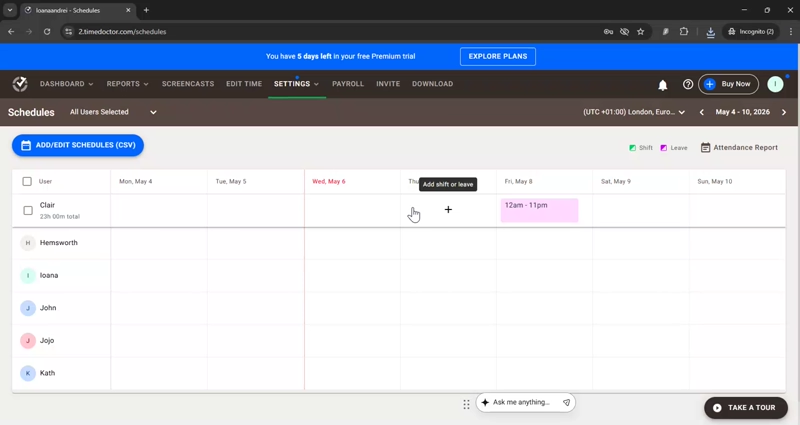
As for leave tracking, I appreciate that the feature exists at all. But I’d have appreciated some leave tools that are currently missing, like user leave requests, manager leave approvals (and notifications), and leave type settings (e.g., vacation, sick leave). Notably, though, Time Doctor lets you track paid and unpaid leave, which is useful for accurate labor cost tracking.
Verdict: 4.5/10
Employee activity monitoring
When enabled, Time Doctor discreetly takes screenshots of employees’ desktop screens at customizable intervals during active time tracking. There’s also a start-to-end-time screen recording offering, which allows you to view employees’ screen recordings in the Screencasts section.
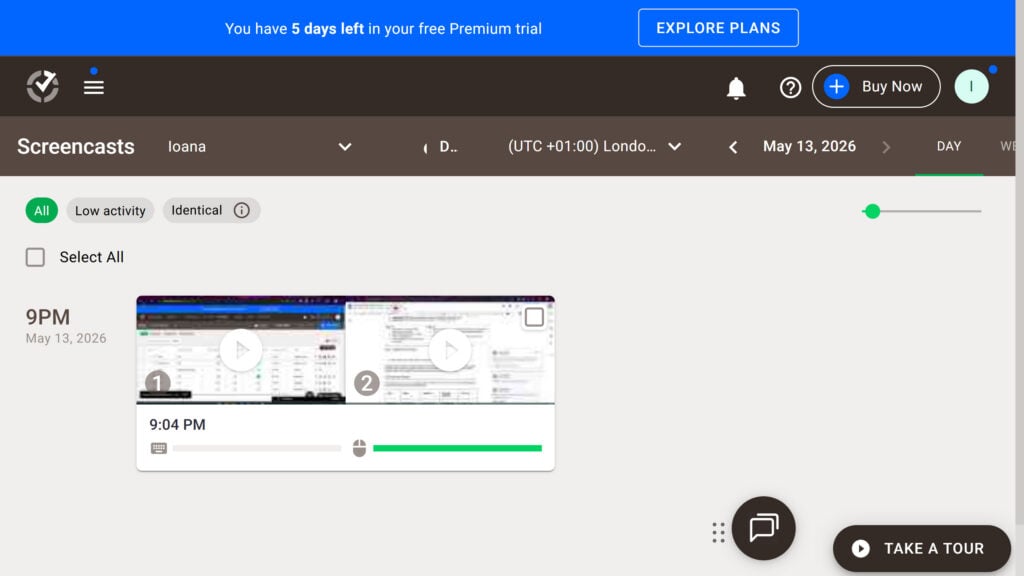
Beyond screenshots, Time Doctor tracks other data like keyboard/mouse activity levels, websites and apps used, and extended “idle” periods. If there’s no activity for a set period, it flags that time as inactive and even stops recording time. However, you can’t check if workers are using auto clickers to game the system and record their idle time as productive.
Luckily, Time Doctor reduces this risk with its productivity tracking (a gem in Time Doctor’s crown). I could set custom productivity ratings for specific websites and apps, including productive, unproductive, or neutral. For example, depending on the role, you could mark YouTube.com as “unproductive” and Microsoft 365 apps as “productive”.
You can analyze this data in the reports section to figure out where your team’s energy is going, which employees need extra coaching, and how you might redistribute tasks in your team.
Now, full disclosure: I think excessive monitoring can decrease trust and motivation within your team. That’s why I appreciate that Time Doctor lets you:
- Blur or disable screenshot captures for specific users and groups.
- Let users delete their screencasts (i.e., screenshots or video recordings), though this also deletes their respective time entries permanently.
- Personalize the “time out” period before users’ timers automatically stop (e.g., 15 minutes, 30 minutes).
Unfortunately, Time Doctor doesn’t offer any informational or consent-gathering tools (such as employee e-signatures), which would have made compliance with applicable laws easier.
Verdict: 8/10
Integrations
Time Doctor advertises 60+ third-party integrations. Pretty impressive for a time clock app, but there’s a catch. Most of these integrations allow you to use Time Doctor in the external app. You don’t get the other app’s data into Time Doctor except in a handful of exceptions.
Still, the list of apps where you can quickly connect to Time Doctor and start time tracking is impressive, including:
- Project management apps like GitHub, Jira, Trello, and Asana
- Helpdesk software like Freshservice and Intercom
- Customer relationship management (CRM) platforms like Salesforce and HubSpot
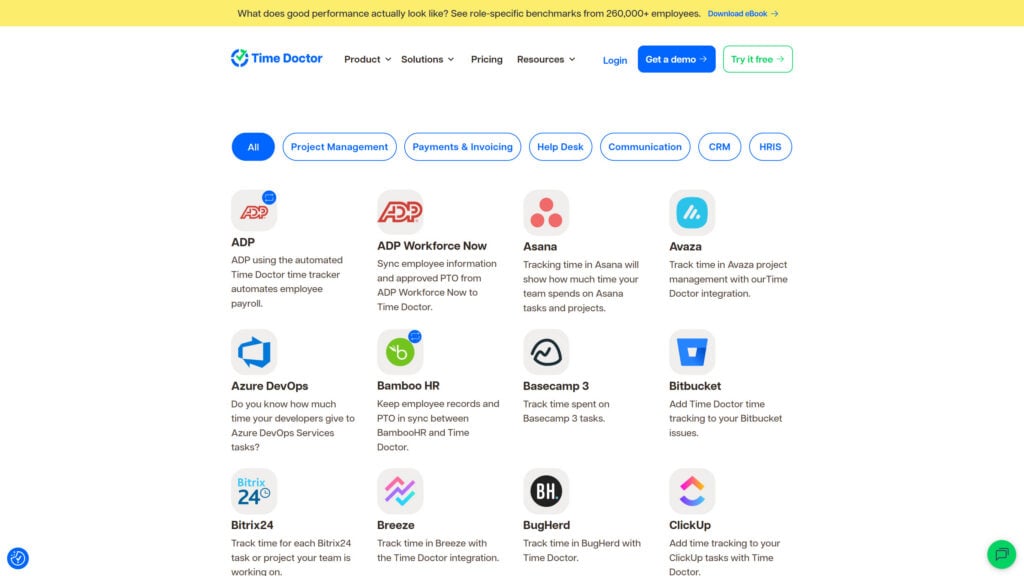
I’d have liked to see more 2-way integration between Time Doctor and some of these apps. Further, given Time Doctor’s extensive employee productivity reporting, I’d like it to offer some business intelligence integrations (e.g., Tableau, Microsoft Power BI).
Verdict: 6.5/10
Time Doctor Security Features
Time Doctor offers the following security and privacy features:
- Encryption: Encrypts data transmitted to and from Time Doctor servers using industry-standard protocols to ensure secure data handling.
- ISO/IEC 27001 certification: The company conforms to stringent international cybersecurity and privacy protection standards.
- 2-Factor Authentication (2FA): Requires a password and username and something only the user knows or has on them—like information, a physical token, or a smartphone app-based confirmation.
- Access controls: Lets administrators set varying access levels for users, ensuring employees can access data necessary for their roles only.
- User roles and permissions: Lets managers define what each user can see and do within the system.
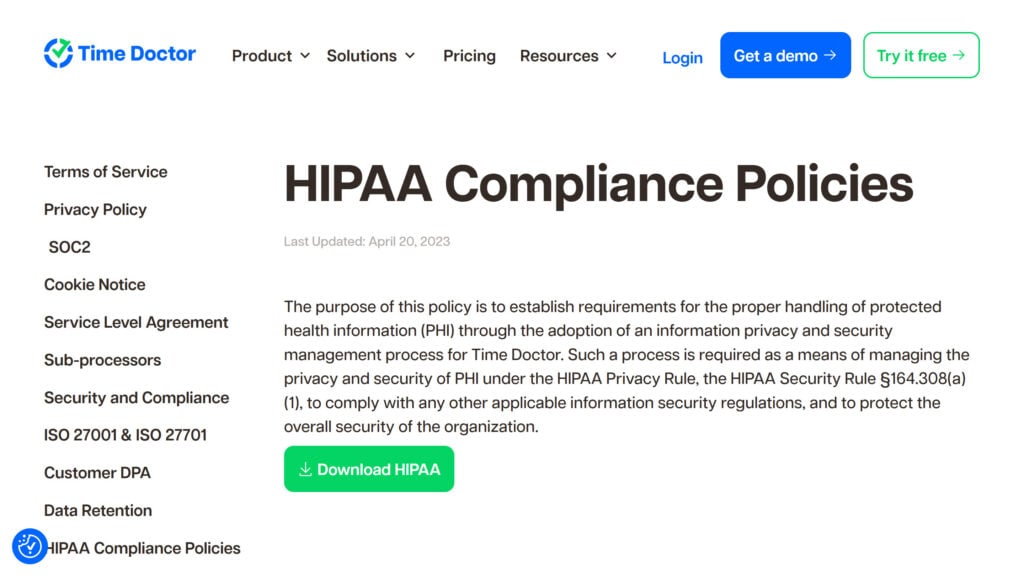
- Compliance: Time Doctor is compliant with major regulations such as GDPR and HIPAA, ensuring that data handling meets stringent legal standards. Its HIPAA compliance is especially noteworthy, as many competitors don’t offer this.
Time Doctor Reporting & Analytics
Time Doctor’s productivity reports are, I think, the top reason behind its premium-level pricing. Currently, it offers 13 reports and 3 dashboards, all customizable, exportable, and highly detailed.
I tested the reporting in my free trial and appreciated that it was visual-first and very easy to customize by users, time zone, date range, and views. In table reports, I could also add or remove columns, with options including Manual time, Paid break time, % Productive time, % Idle minutes, and more.
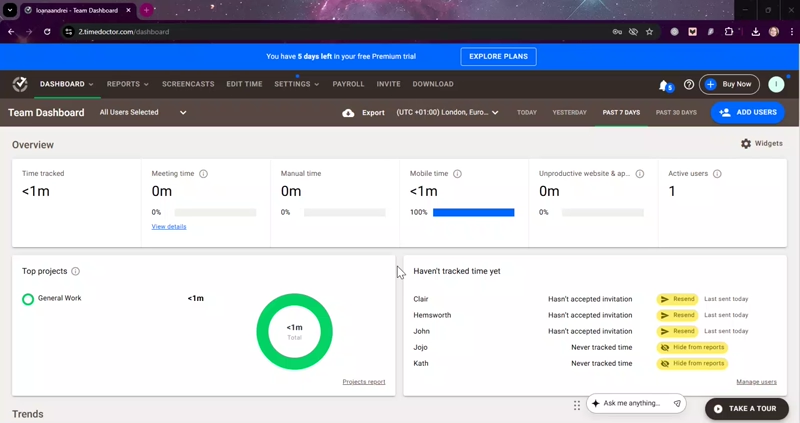
Time Doctor offers the following reports under 3 categories.
Productivity and focus:
- Activity summary: Digs into each employee’s active versus idle time, clearly showing productivity levels.
- Hours tracked report: Details total hours worked, including segmentation by mobile or manual entries. Helps with accurate billing and payroll.
- Projects and tasks report: Breaks downtime allocation across projects and tasks, ensuring alignment with business priorities.
- Timeline report: Visualizes an employee’s daily activities, providing insights into work patterns and potential time management issues.
- Web and app usage report: Analyzes the use of specific websites and apps to identify productivity enhancers or potential distractions.
Performance and collaboration:
- Attendance report: Monitors punctuality, schedule adherence, and absences, crucial for managing workforce reliability.
- Meeting insights: Tracks team members’ total meeting time (via apps including Zoom), time spent with the microphone on, idle time, and app and website use during work meetings. Time Doctor does not capture any meeting audio or video.
- Unusual activity: Pinpoints individual users’ unusual activity and its respective time, based on Time Doctor’s mouse and keyboard tracking.
- Benchmarks AI: Compares your team members’ metrics with similar employee profiles from Time Doctor’s anonymized user base, so you can identify productivity gaps in an industry context.
Operations and cost management:
- Internet connectivity report: Tracks offline working hours to pinpoint possible connectivity issues affecting productivity.
- Office vs. remote: Compares metrics between office and remote locations (based on your office’s IP address or Wifi name), including attendance and idle time metrics.
- Software cost insights:
- Custom export: Lets you tailor reports with 60+ metrics you can pick and mix, based on your operational needs.
I appreciated how easy it was to generate and export reports. I selected the type of report, specified the parameters, and downloaded them in various formats, including PDF, CSV, and XLS.
I was also impressed that the platform lets you set up email notifications when specific conditions are met in a report (for instance, when tracked hours or idle minutes exceed a certain value for a selected user or group).
Verdict: 8/10
Time Doctor Customer Support
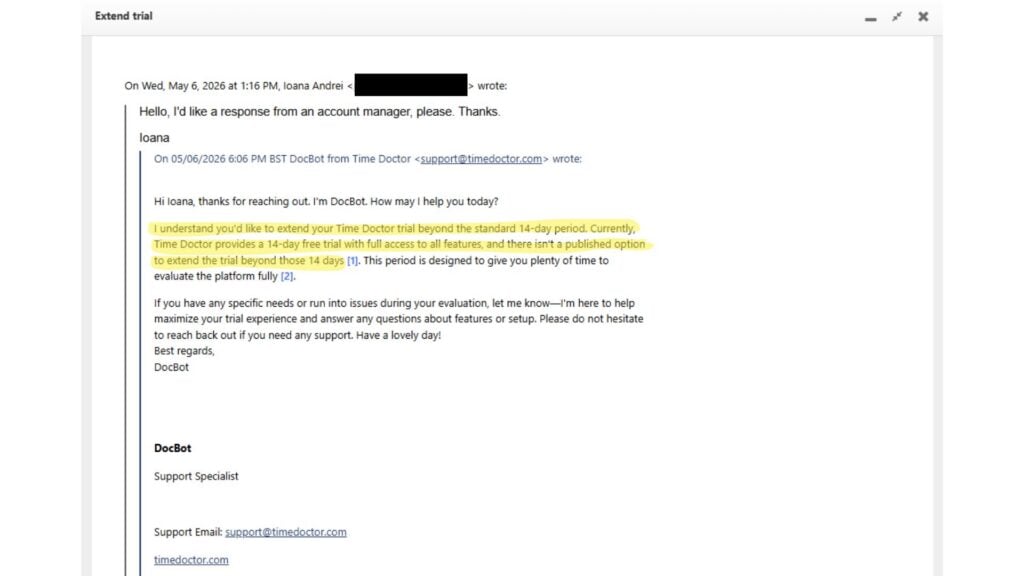
Time Doctor offers 24/7 email and live chat support, but no phone support. The company says its email response time is “within a few hours,” and I got mine in 10 minutes. Surprisingly, the email response was penned by “DocBot, Support Specialist,” an email AI agent.
I’m afraid this decision to robotify 1st-response email communication decreased Time Doctor’s support score. Email and ticket queries tend to be highly context-specific and action-oriented, whereas AI agents can’t make decisions or analyze detailed customer data.
By contrast, the live chat DocBot was more efficient at providing guidance and linking me to human support. I got a human response via live chat in 3 minutes, after a brief exchange with Docbot. Here, the bot understood my request immediately and connected me to an agent.
Concerningly, the chatbot window disclaims that “AI-generated content may be inaccurate.” While I appreciate the honesty, it’s not exactly reassuring when you’re a paying customer who needs quick, accurate instructions and strives toward labor compliance.
Finally, I appreciate that there is also a help center, regular live webinars, and even a self-guided Learning Academy at hand.
Verdict: 7/10
What Are Time Doctor’s Review Ratings from Review Sites?
(As of June 2026)
Capterra: 4.5/5
G2: 4.4/5
Software Advice: 4.5/5
TrustRadius: 7.9/10
GetApp: 4.5/5
Google Play Store: 2.4/5
Apple App Store: 2.8/5
Time Doctor App Review
Time Doctor best serves desk-based teams needing detailed tracking and oversight. For teams prioritizing productivity, it offers powerful reporting features like web and app usage tracking, activity ratings, screenshots or video recording, and idle time tracking. You can also easily export timesheet data and upload it to multiple payroll software, including Gusto and ADP.
If you’re not primarily desk-based, look elsewhere. Not only is it pricier than competitors, but it also has limited scheduling and task-tracking tools, a bare-bones mobile app, and no tools to obtain employee consent for screencasts. And, if you are desk-based and wish to supervise staff’s online movements, I think Time Doctor could do more to support user consent.
Connecteam: The Better Time Doctor Alternative
While Time Doctor leads with employee monitoring, Connecteam offers a collaborative platform with advanced scheduling, GPS time tracking, task management, and a fully functional mobile app.
Here’s how Connecteam compares to Time Doctor.
Time tracking and timesheets
Connecteam’s 1-click time clock includes GPS tracking, geofencing, and overtime alerts to prevent time theft and unnecessary costs. Setting and tracking overtime limits also helps you stay compliant.
Workers can categorize hours as billable or non-billable, and managers can quickly approve timesheets before syncing seamlessly with payroll providers, including Gusto, QuickBooks, and Paychex.
Scheduling and leave management
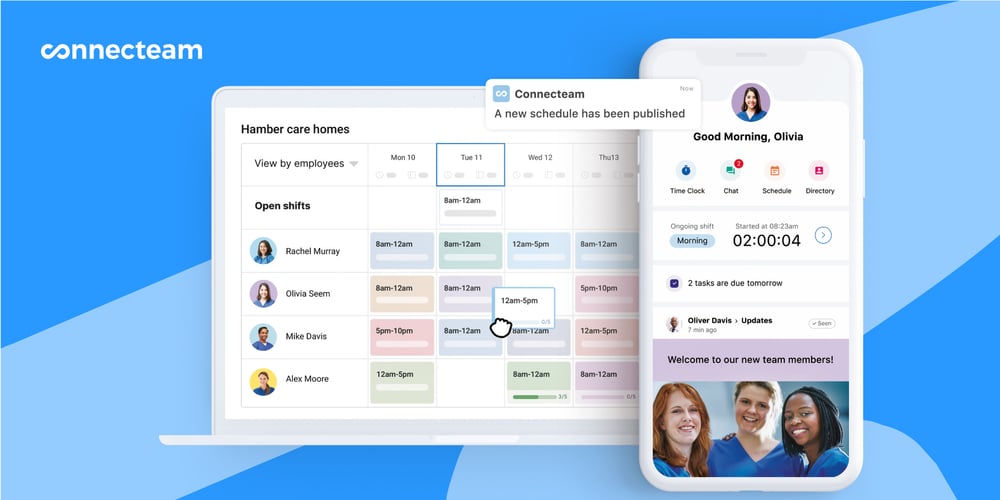
Time Doctor’s scheduling is limited to start and end times. Connecteam, however, is a feature-rich scheduler that allows you to drag-and-drop shifts, copy past schedules, and use AI to auto-assign shifts based on employee availability, location, and skills. You can also add shift location, tasks, files, checklists, and more.
Plus, workers can swap shifts, claim open shifts, and clock in for specific shifts. Notably, you can create detailed time-off policies, and users can request leave that managers can approve or deny with 1 click.
Task productivity and communication
Connecteam doesn’t offer screen and app monitoring as Time Doctor does. However, you track team productivity in a less invasive way. You create tasks and sub-tasks, set deadlines, assign team members, and update and track task status on live dashboards. You can also create digital checklists and track progress in real-time.
The in-app team chat also stands out, letting you contact individuals and teams securely without needing phone numbers.
Fully-featured mobile app
Finally, you get a mobile app with bells and whistles. The Connecteam app includes not only a 1-click GPS time clock, but also schedules, leave requests, task tracking, chat, automated notifications, and more. I tested it myself and can say that, even with its advanced functionality, it’s still very intuitive and beginner-friendly. Plus, it’s a great choice for frontline teams.
FAQs
Yes, Time Doctor offers a free 14-day trial of its Premium plan, where you can test its full functionality. However, there’s no free-forever Time Doctor plan.
Yes, Time Doctor is a HIPAA-compliant time tracking platform. That means that it meets HIPAA requirements for handling protected health information (PHI) in the United States.
