

When you don’t know when or where your crews are clocking in, small mistakes turn into payroll problems, leaving you wondering how much you’re paying for hours that weren’t really worked.
I reviewed 6 construction time tracking apps and ranked them by offline reliability, GPS and geofencing, job-costing workflows, crew usability, and payroll and export readiness.
Use these picks to track hours accurately, reduce payroll disputes, and keep your projects on schedule.
If you don’t have the time to read through our research, jump down to our quick comparison table.
What’s New in This Update (August 2026)
- Reordered all 6 apps based on construction-specific needs, including offline reliability, GPS and geofencing, job costing, crew usability, and payroll and export workflows.
- Moved Workyard to first place for its offline time and GPS capture, job-site location controls, and labor-cost workflows.
- Updated Workyard’s offline coverage to reflect that time and GPS data are stored on the device and uploaded after the worker reconnects.
Our Top Picks
-
1

Verifying job-site time and automating labor-cost tracking
-
2

Capturing time reliably on remote or rugged job sites
-
3

Tracking labor, equipment, and project progress in one app
Why trust us?
Our team of unbiased software reviewers follows strict editorial guidelines, and our methodology is clear and open to everyone.
See our complete methodology
How I Ranked the Best Construction Time Tracking Software
Here are the key features I looked for to rank construction time tracking software. I gave the most weight to offline field reliability, GPS and geofencing, and labor allocation by job or cost code.
Must-have time tracking features
These are the features that mattered the most. Tools that performed well ranked higher, but I still included tools with clear limitations if they offered strong overall value.
I prioritized:
- Mobile clock-in and clock-out: Workers need to be able to start and stop their shifts directly from their phones at the job site.
- Offline time tracking: Crews need to be able to clock in, track time, and retain job or location data without service, then sync it after reconnecting.
- GPS tracking: The app should verify where employees clock in and out to confirm workers are actually on-site and prevent inaccurate or fraudulent time entries.
- Geofencing: Managers should be able to set virtual job site boundaries so workers can only clock in when they’re physically at the location.
- Job and cost-code tracking: Workers need to be able to assign hours to the right job, phase, task, or cost code so contractors can compare labor usage across projects.
- Break and overtime tracking: The software should automatically log breaks and flag overtime so payroll stays accurate and compliant with labor laws.
- Payroll-ready timesheets and exports: Hours should be organized for approval and sent to payroll or construction accounting without manual re-entry.
Daily field use performance
Beyond the essentials, I looked at how each app performs in everyday construction workflows.
- Minimal training required: Field crews should be able to start using the app immediately without complicated onboarding.
- Fast clock-ins for field crews: Workers should be able to clock in within seconds, and supervisors should be able to handle group punches when crews start together.
- Role-based approvals: Supervisors or foremen should be able to review and approve crew hours before payroll runs.
Additional features to improve accuracy and efficiency
Finally, I looked at features that help reduce admin work and ensure you can trust your time records.
- Photo verification: Workers should be able to take a photo when clocking in to verify attendance.
- Time entry notifications: Alerts help remind workers to clock in, clock out, or submit timesheets on time.
- Audit logs: Managers can see when time entries were created or edited to reduce payroll disputes.
The 6 Best Construction Time Tracking Software of 2026
-
Workyard — Best for verifying job-site time and automating labor-cost tracking
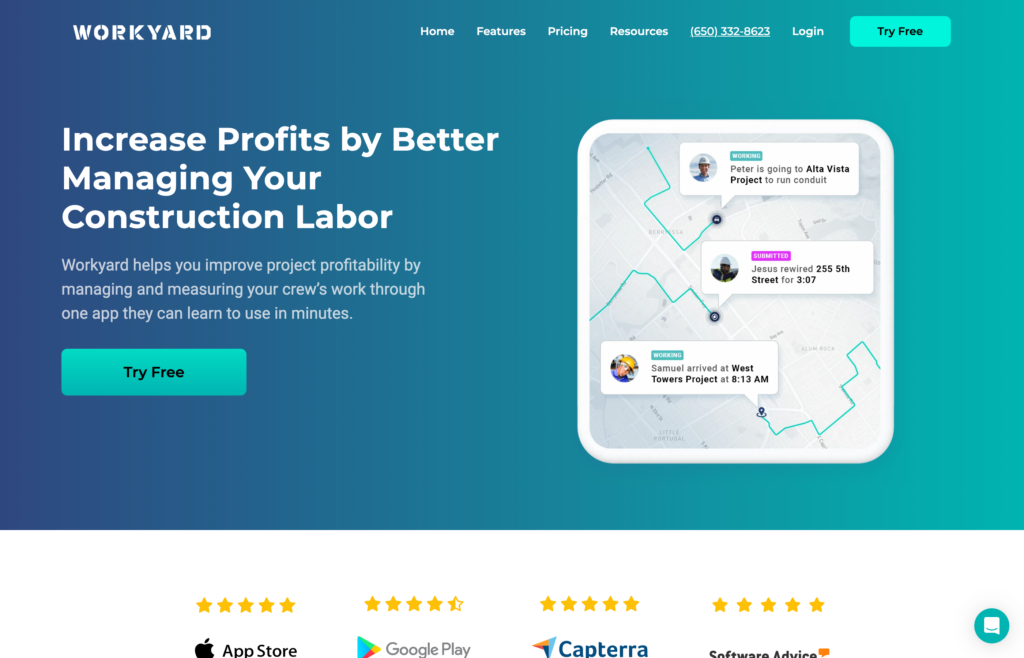
Workyard is a time tracking app that helps construction and field service companies track employee time, monitor job locations, and manage crews.
Why I chose Workyard: I ranked Workyard first because its offline mobile tracking stores time and GPS data until the worker reconnects, while its geofences and labor-cost workflows tie verified field hours to the right jobs.
Time tracking
In our full Workyard review, we tested the time clock, which works offline and online on both mobile and kiosk apps. Tracking time on the mobile app was simple: you just click a button to start the timer. The kiosk app lets multiple workers clock in from a shared device using a four-digit PIN. But we found that the kiosk app is only available on higher-tier plans and only works on iPads, which could be limiting for some teams.
The platform also supports photo ID verification, which prompts employees to take a selfie when clocking in. Instead of blocking mismatches automatically, the system attaches the photo to the timecard for managers to verify later. While this helps discourage buddy punching, it doesn’t prevent workers from clocking in and requires manual review, which could become time-consuming for larger teams.
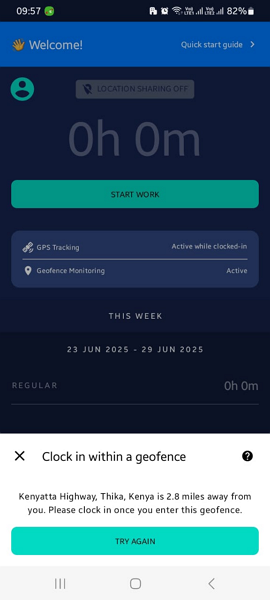
Workyard’s geofence only lets employees clock in once they’re at the job site. Location services
Workyard’s GPS tracking gives managers visibility into where crews are throughout the day. The system updates employee locations and records detailed activity logs showing clock-in locations, job site visits, and how long workers spent at each location. It also captures travel routes using breadcrumb tracking, which maps movement between stops.
The built-in drive detection automatically tracks mileage and separates driving time from idle time, so managers can see whether employees were traveling between jobs or working on site.
There’s also geofencing, which limits employee clock-ins to the job site. If someone tries to clock in outside the designated area, the app blocks the attempt and shows how far they are from the location. I liked that you can also automatically clock employees in or prompt them to start their shift upon arrival. During testing we found that you can’t adjust the geofence radius, which could be limiting for large job sites.
Breaks and overtime
Workyard offers built-in tools for tracking breaks and overtime. The platform sends employees reminders for standard rest breaks and meal breaks based on their hours worked. I also liked that it can automatically add meal breaks to timesheets once employees reach certain work limits.
For overtime, Workyard has preset rules that align with federal and state regulations, so construction companies can apply compliant overtime policies quickly. One limitation we found is that overtime rules must be assigned to employees individually rather than applied company-wide. This could be a major inconvenience for large companies with multiple crews and a universal overtime policy.
What users say about Workyard
The clock-in/out feature is very helpful, and the ability for employees to log and keep track of their own hours really gives a visual picture that our time and labor is really paying off.


When using the app, it would be nice if I could just click on the sites the guys have visited and allocate the time to the job it’s for or subtract from their time, like if it was lunchtime that could be subtracted. It should give options on how to allocate the time when you click on the site.
Key Features
- Kiosk and mobile time clock
- Photo ID verification
- Location and mileage tracking
- Task scheduling
Pros
- Highly accurate GPS tracking with route history
- Strong enforcement of job-site clock-ins
Cons
- Overtime rules must be assigned per employee
- Kiosk app limited to iPad and higher-tier plans
Pricing
$50/month + $6/user/month Trial: Yes — 14 days Free Plan: No
-
ExakTime — Best for capturing time reliably on remote or rugged job sites
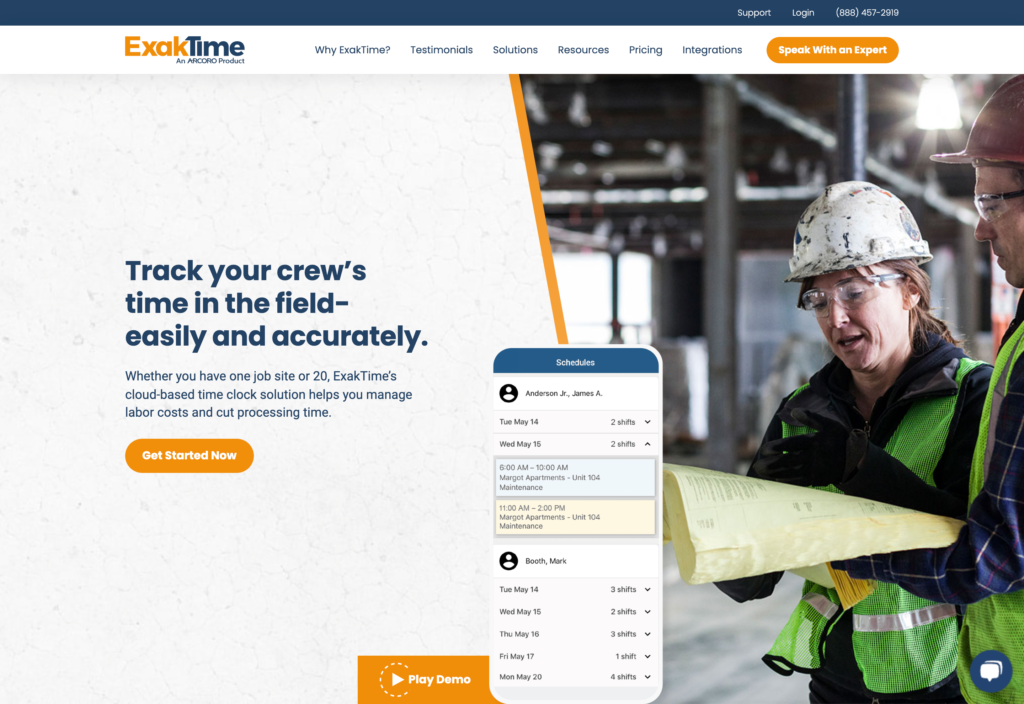
ExakTime is a time tracking and job site management solution designed for businesses managing remote and mobile workforces.
Why I chose ExakTime: I chose ExakTime because its offline mobile app and rugged JobClocks support remote sites, while its cost-code reporting gives established contractors detailed labor data by job.
Construction time clock
In our full ExakTime review, we found that there are several ways for crews to track their hours, including a mobile app, manual time entry, and a kiosk mode for shared devices. I liked that ExakTime uses FaceFront, a photo ID check that requires employees to take a selfie when they clock in to help prevent buddy punching. It isn’t true facial recognition, so it still requires manual manager review.
One feature that really stood out to me is ExakTime’s rugged hardware time clock, designed for harsh job-site environments. These waterproof time clocks can operate in extreme temperatures, which could be useful for construction companies where smartphones aren’t always practical.
The mobile app supports offline time tracking, which I appreciated for job sites with limited connectivity. But we found that some admin tools are only available on the web platform. This could be a drawback for managers working in the field who don’t want to wait until they’re back at the office to complete tasks.
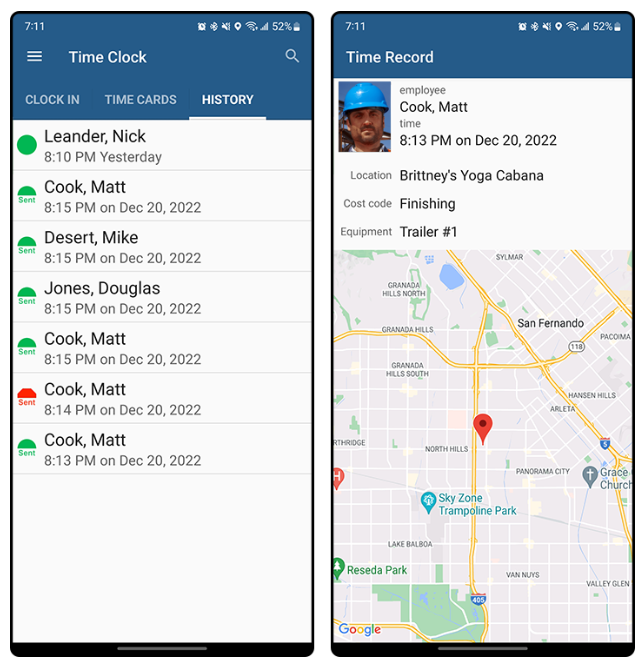
The ExakTime app shows time clock history and detailed time records with location tracking and job details. Location services
ExakTime offers a GeoTrakker feature that records clock-in and out locations and tracks employee movement during shifts. I especially liked the map views, which give managers more visibility into where crews worked throughout the day.
There’s also a geofencing feature, which lets you set up digital boundaries around job sites. Managers receive automatic alerts when workers enter or leave the borders so they can really stay on top of each job site.
Job cost tracking and timesheets
ExakTime lets workers switch between different jobs or tasks during the day, so companies can track labor time with more precision. I liked the platform’s cost-code tracking, which lets you assign time to specific job codes for detailed cost analysis. This can help contractors understand where labor hours are going and monitor project budgets better.
Logged hours are automatically sorted into timesheets that managers can review, approve, and track through a clear audit trail of edits or manual entries. There’s also a bulk time entry feature that lets administrators apply the same time records across multiple employees. I can see this being helpful when crews work identical shifts. The platform also generates reports comparing expected and actual meal breaks, flagging missed or shortened breaks to support compliance.
What users say about ExakTime
The system it self is pretty easy but a little bit dated. It was easy to use that was a big plus because not everyone is tech savy.
fairly easy to use, keep track of employees well if phone settings were correct. time sheet easy to read. made invoicing hourly jobs easy. clocking in and out very easy
Key Features
- Mobile time clock
- Custom geofences
- Break and time off management
- Job costing
Pros
- Detailed cost-code tracking for complex projects
- Strong GPS tracking with job-site visibility
Cons
- More complex to set up and manage
- Some admin tools limited to desktop
Pricing
$9/user/month + monthly base fee Trial: No Free Plan: No
-
busybusy — Best for tracking labor, equipment, and project progress in one app
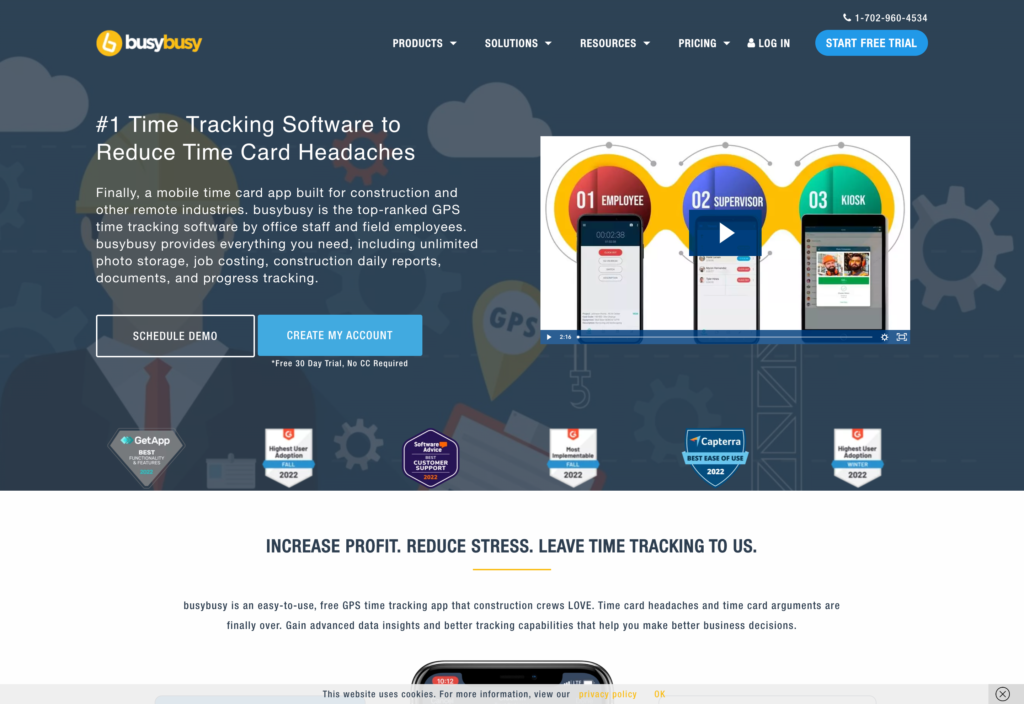
busybusy is a construction time tracking software that helps businesses track employee hours, equipment usage, job costs, and project progress.
Why I chose busybusy: I chose busybusy because it connects crew time with cost codes, equipment usage, and project progress, giving contractors a fuller view of what labor and equipment are doing on each job.
Construction time clock
In our full busybusy review, we tested the different time tracking options. Employees can clock in through the mobile app or kiosk mode, and I liked that supervisors can clock in workers individually or in bulk. The platform uses GPS time tracking and geofencing, requiring employees to be at a job site before clocking in.
During testing, the app blocked our attempt to clock in outside the job site and sent a reminder within five minutes of arriving on-site. But we found that if an employee forgets to select the assigned project when clocking in, the geofence restrictions don’t apply, which opens up the possibility for unapproved, off-site clock-ins.
busybusy also has selfie photo verification, but it relies on basic photo matching rather than advanced facial recognition. This means that mismatches aren’t automatically blocked or flagged, and managers need to manually review photos in order to spot potential buddy punching.
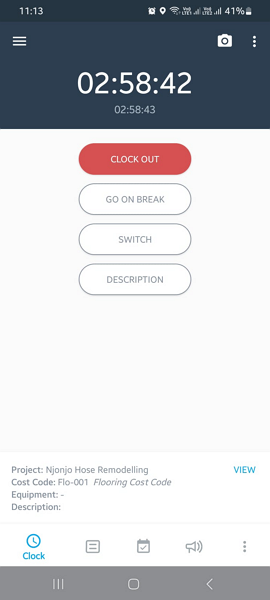
We could clock in and out, take breaks, and switch jobs with busybusy’s time clock. Break tracking and compliance
busybusy has several tools to help enforce break policies, which I appreciated. The app sends reminders five minutes before a scheduled break and another reminder when it’s time to return to work, so employees can stay on schedule. I also liked that there are minimum break duration settings, which prevent employees from ending breaks early.
At the end of each shift, employees need to complete a daily sign-off confirming whether they took their required breaks. One drawback we found is that busybusy doesn’t track paid breaks, which could be an issue for construction companies that need to document paid rest periods.
Overtime and job costing
With busybusy, you can easily apply standard overtime rules, including California overtime, or create custom rules to match local labor requirements. During testing, the platform separated regular hours, overtime, and double overtime without manual adjustments, automatically calculating overtime pay.
The job costing tools are also strong. Managers can create cost codes with different pay rates for specific tasks, such as roofing or flooring. When employees clock in, they select the relevant cost code, allowing the system to track time by task and calculate wages at the right rate.
What users say about busybusy
The ability to accurately track locations and times is essential, and it provides correct and accurate timekeeping. I also like that employees can switch and pick a project when they arrive, which helps us better keep track of their time on a particular project.
Sometimes the location says im 3 blocks somewhere else.
Key Features
- Mobile time clock
- Real-time GPS tracker
- Job costing
- Equipment tracking
Pros
- Affordable with a generous free plan
- Strong job costing and cost-code tracking
Cons
- Geofencing can be bypassed if no job is selected
- No paid break tracking
Pricing
Starts at $9.99/user/month Trial: Yes — 14-day trial Free Plan: Yes — unlimited users
-

ClockShark — Best for managing crew time across jobs and tasks
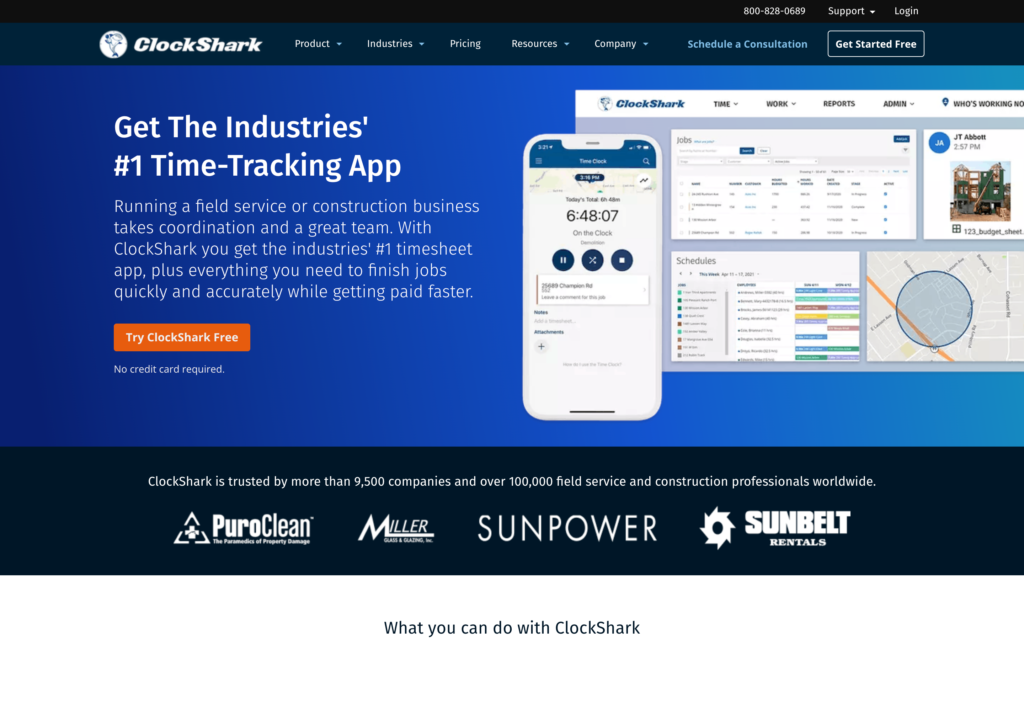
What’s new with ClockShark
As of mid-2026, a 3-year contract term applied to all ClockShark plans.
ClockShark is a time tracking software for construction and field service teams that also need job management.
Why I chose ClockShark: I included ClockShark because it lets supervisors handle crew time together, while workers can switch jobs and tasks without clocking out and send those labor records into job-cost and payroll workflows.
Construction time tracking
In our full ClockShark review, we tested the platform’s time tracking capabilities. Workers can clock in and out directly from their phones. Workers can clock in and out directly from their phones. I liked the built-in GPS tracking and geofencing features, which verify employee locations and mark out-of-bounds punches for review. The geofence adds accountability, but it doesn’t block a worker from clocking in outside the approved area.
There’s a KioskClock setup with facial recognition, which can work well for teams that start their shifts from a central location. But it was a bit of a letdown that the same option isn’t available for the desktop or mobile app.
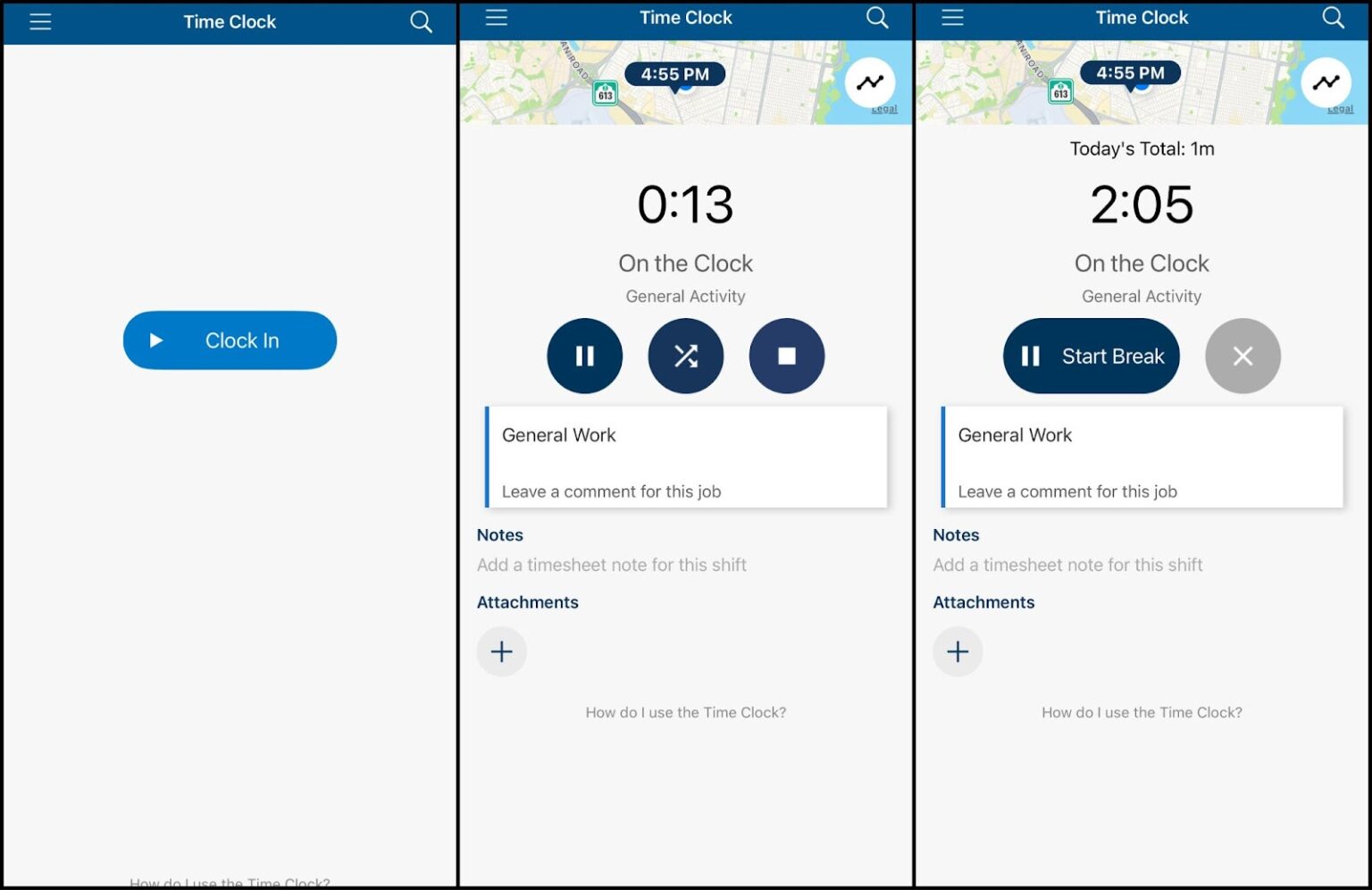
We were able to clock in to specific jobs and clock out for breaks when testing ClockShark. Job costing and reports
ClockShark’s biggest strength is job costing. Employees can clock in directly to a specific job or project, and the platform automatically assigns their hours and related expenses to that project. I liked that this gives managers a clear view of labor costs by job, which is especially helpful for contractors and teams that need to track profitability on a project-by-project basis.
The reporting tools detail total hours, attendance, overtime, and time tracked by job. During testing, we found that reporting options are pretty basic. ClockShark doesn’t provide deeper analytics or custom reports like productivity insights. This could be a limitation for construction companies that rely on data-driven performance metrics.
Timesheets and payroll
ClockShark automatically compiles employee hours into organized timesheets. If a worker clocks out without service, the punch stays in the mobile Sync Queue until the worker reconnects and taps Sync.
Supervisors can review and approve crew hours before payroll runs, either from the main dashboard or by opening individual entries to check the details. Employees can also edit their timesheets, with all changes logged in detailed audit records that show when entries were created or modified.
The platform also supports custom overtime rules. Managers can apply custom policies or use pre-built options, like California overtime regulations. Once configured, the system calculates overtime and flags any conflicts directly in the timesheet view, so managers have a clear overview of employee hours.
What users say about ClockShark
I like being able to see on a map where my team members are, and that they can clock in and out for different jobs.
Read review here.
It has some glitches and I am not able to assign pay rates per job. Time scheduling is based on employee and we work in crews so we do not use the scheduling feature.
Read review here.
0Key Features
- GPS time clock
- Project-based job costing
- Kiosk app with facial recognition
- Custom overtime rules
Pros
- Strong job and task-based time tracking
- Clear visibility into labor costs by project
Cons
- Reporting and analytics are limited
- Pricing adds up with base fee + per user
Pricing
Starts at $40/month + $9/user/month. Trial: Yes — a 14-day free trial is available. Free Plan: No
-

QuickBooks Time — Best for syncing field hours directly into QuickBooks payroll

QuickBooks Time is a time tracking app for contractors that need to track work hours and sync data directly with QuickBooks payroll and accounting software.
Why I chose QuickBooks Time: With QuickBooks Time, approved field hours flow directly into QuickBooks payroll, reducing the manual handoff between timecards, accounting, and pay runs.
Time tracking and geofencing
In our full QuickBooks Time review, we found that employees can track time through the web app, mobile app, or a shared kiosk (available as an add-on). To clock in, employees need to select an assigned task to keep hours tracked against the correct project for accurate labor costs.
There’s also geofencing, which helps reduce off-site punches by reminding workers when they enter or leave a job site and showing nearby job codes. A punch outside the geofence is flagged for manager review rather than blocked. For teams using the kiosk app, facial recognition adds a layer of protection against buddy punching.
It’s worth noting that geofencing, mileage tracking, and project tracking are only available on the Elite plan ($40/month + $10/user/month).
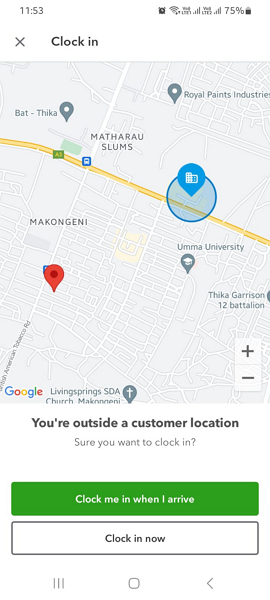
During testing, the QuickBooks Time geofence blocked clock-ins outside the approved area. GPS and mileage tracking
QuickBooks Time offers GPS tracking that displays the real-time location of clocked-in employees on a map. This level of visibility is helpful for managers that need to dispatch the nearest worker to urgent jobs. I also appreciated that location tracking only runs while employees are on the clock, to help protect employee privacy.
In addition to GPS tracking, QuickBooks Time also has a mileage tracker. It provides a breadcrumb trail, route replay, and turn-by-turn map, so it’s easier for businesses to verify trips and reimburse employees accurately for business mileage.
However, we found that the mileage tracker lacks a minimum speed threshold, which means it logs movement even when employees are walking. This can lead to inaccurate mileage logs for vehicle reimbursement. It’s also worth mentioning that geofencing, mileage tracking, and project tracking are all only available on the Elite plan ($40/month + $10/user/month).
Break and overtime tracking
For breaks, you can use the preconfigured 15-minute rest and 30-minute lunch breaks and adjust them for your local labor laws. Managers can control where automatic breaks appear on the timesheet, enforce minimum break durations, and send reminders or automatically end breaks to keep employees on schedule.
The platform also supports flexible overtime policies, including daily, weekly, and double-time rules, with built-in California overtime settings. In our latest testing, we found that the overtime tracker now correctly categorizes overtime and double-time hours, which is an improvement from earlier versions.
All hours are sorted into timesheets with overtime and breaks already applied. QuickBooks Time’s biggest advantage is its native integration with QuickBooks Online Payroll. This ensures that once hours are tracked and approved, they sync directly into payroll without exporting files or re-entering data, saving time and helping reduce payroll errors.
What users say about QuickBooks Time
What I like best about QuickBooks Time is how user-friendly it is. It makes tracking hours simple and quick, especially with the mobile app. I also like how easy it is to see time entries in real time, which helps with accuracy and keeps everything organized without feeling complicated.
I don’t like that QuickBooks Time does not automatically tally up the hours from a specific pay period, so we had to enter the daily amount of hours into a program when payroll hit and then add it up to actually pay the employees.
0Key Features
- Mobile and web time tracking
- Live GPS location map
- Geofencing
- Digital timesheets
Pros
- Seamless sync with QuickBooks payroll
- Good visibility into crew locations and mileage
Cons
- Mileage tracker lacks minimum speed threshold
- Some location tracking features require higher-tier plan
Pricing
Time Premium: $20/month + $8/user Time Elite: $40/month + $10/user Trial: Yes — 30 days Free Plan: No
-
Connecteam — Best for managing connected crews beyond time tracking
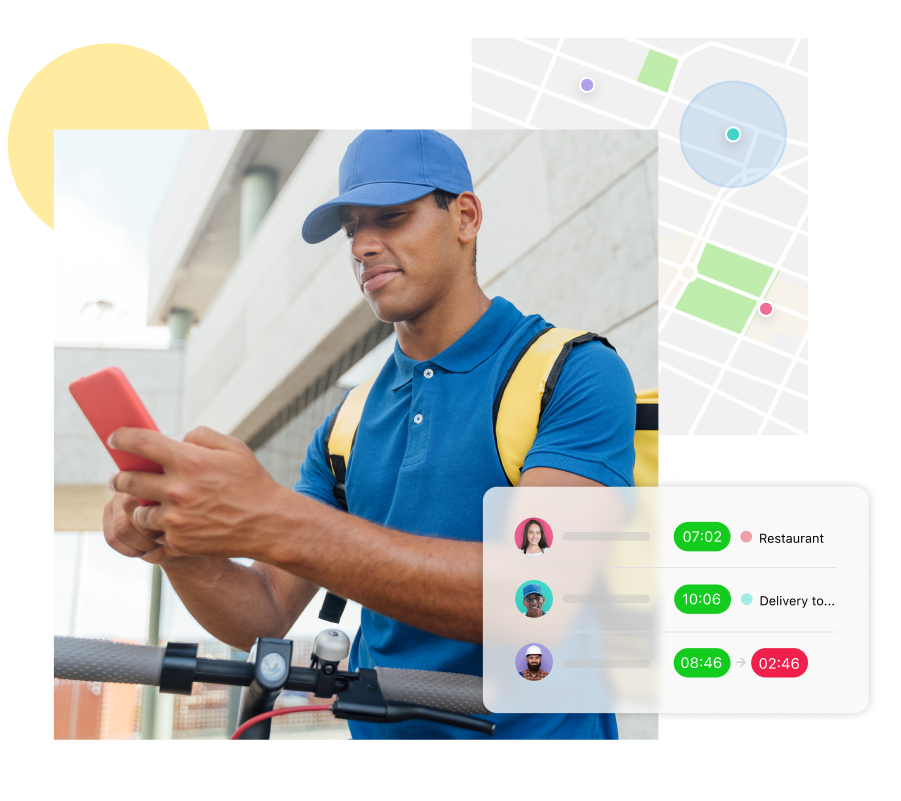
Connecteam is a strong choice for contractors managing connected crews across different job sites because it combines GPS time tracking with scheduling, communication, forms, and task management in one platform. It’s especially useful for teams that want broader workforce tools alongside payroll-ready time records.
Why Connecteam stands out: Connecteam earns a place on this list for connected job-site teams that want time tracking alongside scheduling, communication, digital forms, and task management.
GPS time clock
With Connecteam’s employee time clock, crews can clock in and out with a single tap from their phones. Teams can also clock in from a desktop or shared kiosk when starting their shift from a central location. For added security, the kiosk time clock can require employees to take a photo at clock-in, helping prevent buddy punching.
Each clock-in records GPS location and attaches it to the timesheet, so managers have a clear record of where and when work started or ended. For construction managers handling several projects at once, this helps confirm that crews actually arrived at the correct job site and started their shift on time.
Managers can control how strict the location tracking is. GPS can be optional, required to clock in, or disabled entirely depending on your company’s policies. Connecteam can also capture a location stamp if workers move between sites and switch jobs mid-shift. This makes it easier to track how labor hours are split across different projects.
Just keep in mind that GPS tracking laws vary by region. Before enabling it, make sure your crew is informed and that you’re complying with local privacy and state GPS tracking laws.
On-site geofencing
Connecteam’s geofence time clock lets managers set virtual boundaries around job sites, so employees can only clock in once they’re physically within the approved area. When workers enter the site, they receive a notification reminding them to clock in.
You can customize geofencing rules for different types of work. For example, you might set up a geofence for on-site construction jobs but leave travel time or supply runs unrestricted. If someone tries to clock out outside the geofence, you can require manager approval or automatically clock them out when they leave the job site.
NFC time tracking
Connecteam’s NFC time tracking helps contractors keep time records accurate across every job site. By placing NFC tags at project locations, workers need to physically scan a tag with their phone to clock in. This verifies they’re on-site before their shift starts, helping prevent buddy punching, reduce payroll errors, and ensure labor hours are tracked against the correct project.
For construction crews that regularly move between sites, NFC technology is a good way to add accountability without requiring managers to manually verify attendance.
Overtime and breaks
Connecteam offers built-in tools to help contractors with break and overtime tracking. The platform calculates overtime and can send real-time alerts to managers when workers near overtime limits. You can also automatically clock employees out once they hit their max hours. This helps control labor costs before overtime becomes a payroll problem.
Break management is just as flexible. You can set manual or automatic breaks, define if breaks are paid or unpaid, customize lengths, and schedule multiple breaks throughout a shift.
Timesheets and payroll
All hours are automatically logged into digital timesheets for payroll, so you can see exactly who worked, where they worked, and how long they spent on each job site. Instead of collecting handwritten time cards from foremen or chasing workers for their hours at the end of the week, everything is recorded instantly as crews clock in and out.
Project managers can break down hours by employee, crew, job site, or project, so it’s easier to track labor across multiple builds. Having this visibility helps contractors keep an eye on labor costs and quickly spot missing punches or mistakes before payroll is processed.
You can set different pay rates by role so wages are calculated correctly from the start. Crew members can review their hours and submit timesheets for approval in the app. All edits are tracked, so you always have an audit-ready log. Once approved, timesheet data syncs with payroll systems like RUN Powered by ADP, QuickBooks, and Xero.
And so much more…
Connecteam offers more tools to help you run your business, including:
- Employee scheduling: Build crew schedules with a drag-and-drop editor or use the AI auto-scheduler to assign workers to jobs based on availability, roles, and qualifications.
- Digital forms: Create custom forms or turn existing paperwork into digital forms using AI. Attach photos, voice-to-text notes, or attachments, and store submissions in the app.
- Employee task tracking: Assign daily job tasks to crew members, break work into subtasks, and track completion in real-time to see progress across job sites.
- Online team chat: Keep job-site communication organized. Share updates, plans, photos, and schedule changes with crews through one-on-one or group messages.
When Connecteam Isn’t a Good Fit
Connecteam isn’t the right fit for crews working in remote or low-connectivity environments where reliable internet access isn’t guaranteed. The standard mobile app, kiosk app, desktop time clock, and in-product NFC clocking require an active internet connection for every punch, so workers can’t clock in or out while offline. It’s also less suitable for teams that rely on rugged job-site clocks or fully offline field tracking.
Connecteam also offers a free for life plan – Get Started Now!
0Key Features
- Mobile and kiosk clock-ins
- Live GPS tracking and geofencing
- Overtime and break management
- Photo verification
- Automated timesheets
- Job-specific time tracking
Pros
- Strong control over where and how crews clock in
- Reliable GPS tracking and geofencing for job sites
- Clean, payroll-ready timesheets with minimal corrections
- Works well across multiple crews and job sites
Cons
- No offline time tracking
- More setup required than basic time trackers
Pricing
Free-for-life plan availablePremium plans start at $29/month for 30 users
14-day free trial, no credit card required
Start your free trial
Compare the Best Time Tracking App for Contractorss
| Topic |
|
|
|
|
|
 Start for free
|
|---|---|---|---|---|---|---|
| Reviews |
 |
|
|
|
|
|
| Pricing |
$50/month + $6/user/month
|
$9/user/month + monthly base fee
|
Starts at $9.99/user/month
|
Starts at $40/month + $9/user/month.
|
Time Premium: $20/month + $8/user Time Elite: $40/month + $10/user
|
Starts at just $29/month for the first 30 users
|
| Free Trial |
yes
14 days
|
no
|
yes
14-day trial
|
yes
a 14-day free trial is available.
|
yes
30 days
|
yes
14-day
|
| Free Plan |
no
|
no
|
yes
unlimited users
|
no
|
no
|
yes
Free Up to 10 users
|
| Use cases |
Best for verifying job-site time and automating labor-cost tracking
|
Best for capturing time reliably on remote or rugged job sites
|
Best for tracking labor, equipment, and project progress in one app
|
Best for managing crew time across jobs and tasks
|
Best for syncing field hours directly into QuickBooks payroll
|
Best for managing connected crews beyond time tracking
|
| Available on |
How to Choose the Right Construction Time Tracking Software
Choosing the right time tracking software depends on your team’s size, budget, and specific operational needs. To help you find the right fit, consider the following factors:
Team Size & Budget
Consider how the pricing model aligns with your crew size. Some platforms charge a flat monthly fee, which can be cost-effective for growing teams, while others charge a base fee plus a per-user rate. If you have a small crew, look for options that offer a free plan or an affordable per-user rate.
Job Site Connectivity
Think about where your crews typically work. If your job sites are in remote areas with poor cellular service, offline time tracking is essential. Confirm the app supports offline punches and check if it continues to track location data when disconnected.
Integration Requirements
Think about your current payroll and accounting systems. If you already use a specific platform, look for time tracking software that offers a native integration to speed up your workflow and reduce manual data entry.
Key Questions to Consider
- Does the software offer geofencing to ensure crews are on-site when they clock in?
- Can the app handle complex overtime rules and break compliance?
- Does the pricing model fit my budget as my team grows?
- Is the mobile app easy for field workers to use with minimal training?
- Do I need detailed cost-code tracking for job costing?
- Does the platform integrate seamlessly with my existing payroll software?
What is Construction Time Tracking Software?
Time tracking software for construction companies is a digital tool that helps contractors record and manage the hours employees work on job sites. Instead of relying on paper timesheets or manual reporting, workers clock in and out using a mobile app, tablet, or computer. The software then organizes those hours into timesheets that can be reviewed, approved, and used for payroll.
These tools are designed specifically for field-based industries like construction, where crews move between multiple projects and locations. By capturing when and where work happens, construction time tracking software helps companies maintain accurate records, monitor labor usage, and reduce disputes over hours worked.
How Does Construction Time Tracking Software Work?
Construction time tracking software works by allowing workers to record their work hours digitally, usually through a mobile app. At the start of a shift, employees clock in using their phone or a shared device. They can select the project or job site they’re working on so the software links their hours with the correct job.
Throughout the day, workers can switch tasks, log breaks, or move to different job sites within the app. When their shift ends, they clock out, and the system automatically records the total hours worked. Supervisors or office staff can then review the entries, make adjustments if needed, and approve timesheets.
Once hours are approved, the data is sorted into reports that can be exported for payroll or used to review labor usage across projects. Many systems also provide dashboards that show total hours worked, overtime trends, and labor distribution across job sites.
The Benefits of Construction Time Tracking Software
Time tracking software can benefit your construction company in multiple ways, including:
Streamlined payroll
When hours are recorded digitally, there’s less room for errors that come from handwritten timesheets or memory-based reporting. Clear records also reduce payroll disputes and make it easy to see when work started, ended, and how much time was spent on each job.
Enhanced visibility
Time tracking software gives contractors a better view of labor spending across projects. Managers can quickly compare actual labor hours with estimates and catch projects that are going over budget.
Less admin work
Manual timesheets involve collecting, reviewing, and re-entering hours into payroll systems. Construction time tracking software simplifies this process by automatically organizing work hours into digital timesheets. This reduces paperwork and frees up time to focus on growing your business.
Improved accountability
When work hours are recorded in real-time, managers gain better insight into job site activity. Supervisors can see which crews are working, when shifts begin, and how labor is distributed across projects. This ensures crews are where they need to be and keeps jobs running on schedule.
Better flexibility
Time tracking software allows employees to clock in, switch tasks, and record hours directly from the job site. This flexibility keeps time records accurate throughout the day and allows managers to stay connected with crews as projects move between locations.
How Much Does Construction Time Tracking Software Cost?
Construction time tracking software is typically priced as a monthly subscription, with costs based on the number of users plus a base platform fee. Most vendors charge a base fee starting at $20–$50 per month. On top of the base fee, per-user rates start around $5–$10 per employee per month. Costs increase as you add users or upgrade to higher-tier plans with more advanced features.
Connecteam stands out as a more affordable option. Its Small Business Plan is completely free for up to 10 users, and paid plans start at just $29 per month for up to 30 users. Higher-tier plans start at $49/month for Advanced and $99/month for Expert, both also covering up to 30 users.
FAQs
Yes. Many construction time tracking tools support multiple pay rates, overtime rules, and job or cost codes. Platforms like Connecteam allow managers to assign pay rates by role, project, or task to ensure payroll accuracy and proper job costing.
Most platforms use encrypted cloud storage, secure login authentication, and role-based permissions to protect data. Connecteam, for example, uses enterprise-grade security and access controls so only authorized users can view sensitive employee or project information.
Most construction time tracking platforms can be set up in a few hours to a few days, depending on team size. Tools like Connecteam are designed for quick onboarding, with mobile apps and simple interfaces that help crews start tracking time with minimal training.
The Bottom Line on Construction Time Tracking Software
Construction time tracking software should help contractors confirm where crews are working, assign time to the correct jobs or cost codes, organize payroll records, and track labor costs across projects.
The best fit depends on how your team works. Crews moving between remote job sites may need reliable offline tracking and location controls, while contractors managing detailed budgets may prioritize cost-code and labor-cost reporting. If you already use accounting software, look for an integration or export process that cuts down on manual entry.
Connecteam goes beyond time tracking by combining GPS-based records and payroll-ready timesheets with crew scheduling, job-site communication, digital forms, tasks, and document sharing. It’s a practical choice for construction teams that want to manage their people and daily work in one mobile app.
Manage your crew with Connecteam—start free today!