

Demand spikes, route delays, and no-shows are part of the deal for any logistics manager, but they can quickly become major problems, like missed deliveries, angry customers, and lower profits.
I reviewed 5 logistics staff scheduling software options that minimize these risks and evaluated their features, pricing, and usability.
These picks can help you dispatch workers efficiently, quickly address any disruptions, and keep operations running smoothly.
| App | Best for | Starting Price | Key Considerations |
| Connecteam | Best logistics staff scheduling software for shift-based, multi-location teams | Just $29/month for the first 30 users | Comprehensive scheduling tools and a full-featured free small business plan, but no advanced route optimization tools |
| Deputy | Logistics teams with fluctuating demand | $5/user/month | Auto-scheduler factors in labor budgets, but mobile interface is clunky and no free plan |
| Workforce.com | Large and enterprise logistics teams | Contact vendor for pricing | Strong time off and payroll features, but configured for UK laws |
| ZoomShift | Logistics teams with straightforward hourly scheduling needs Platforms: Web, iOS, Android | $2/active team member/month | Offers basic digital scheduling at low prices, but lacks AI scheduling tools |
| Homebase | Logistics teams operating from just a few locations | $24/location/month | Has built-in payroll but charges per location |
Changelog
Updated May 2026: Verified pricing for all 5 tools, rechecked scheduling, time tracking, GPS, AI scheduling, and payroll features, and added safety notes for GPS tracking, biometric clock-ins, AI scheduling, and auto clock-in/out.
Our Top Picks
-
1

Best logistics staff scheduling software for shift-based, multi-location teams
-
2

Good for logistics teams with fluctuating demand
-
3

Good for large and enterprise logistics teams
Why trust us?
Our team of unbiased software reviewers follows strict editorial guidelines, and our methodology is clear and open to everyone.
See our complete methodology
How I Ranked the Best Logistics Staff Scheduling Software
I evaluated a range of staff scheduling software for logistics teams, focusing on ease of dispatching workers and fleets, overall user experience, compliance support, and additional related features.
Must-have features
- Easy shift creation: I looked for solutions that let you create, assign, and move shifts easily so you waste no time in scheduling and dispatching workers. Complex platforms ranked lower.
- Shift templates: In my search, I also prioritized reusable templates for standard routes, locations, and logistics jobs. Platforms that make you start from scratch every time also ranked lower.
- Coverage self-service: I gave extra points to solutions that empower staff members to share their own job preferences, select from open shifts, and swap jobs as needed. This boosts employee satisfaction and solves for last-minute disruptions.
- Tasks and notes: Solutions that let you provide workers with details about their shifts, tasks, and client expectations ranked higher than the others.
I also looked for scheduling software that goes the extra mile with usability
- A minimal learning curve so everyone, from workers to management, can quickly get the hang of it. For me, complex and overwhelming designs were a no-go for logistics staff.
- A mobile app allowing logistics staff members to access their schedules and communicate with managers on the move. I immediately rejected platforms that didn’t offer scheduling apps.
- Smart alerts and notifications that instantly update workers when schedules are published or changed, reducing the risk of missed jobs.
- Compliance features like adding employee breaks and meal times to schedules, tracking overtime and legal driving limits, and always sticking to labor laws. The better the compliance support, the higher it ranked.
Finally, I found the best platforms had these next-level tools
- AI-scheduling: As AI improves day by day, I looked for solutions that can ease your administrative load by automatically assigning jobs based on workers’ preferences, routes, time off, and skills, in a single click.
- Time tracking: I prioritized solutions that let team members clock in and out of their jobs to ensure they’re paid fairly for their hours. Platforms without time tracking lost enough points to drop off my list altogether.
- Real-time location tracking: Since logistics teams often move between locations, I kept an eye out for live location-tracking tools to ensure everything runs on schedule. I also checked that these tools tracked workers only during their official work hours to avoid any privacy breaches.
- Time off management: Managing your team’s leave from your scheduling solution just makes sense. It helps you see who’s available and prevents rostering errors, giving it brownie points in my eyes.
- Internal communication tools: Finally, I discovered that some of the best software lets workers ask real-time questions and share live updates with you and other team members, reducing mistakes and misunderstandings.
The 5 Best Logistics Staff Scheduling Softwares
-
Connecteam — Best logistics staff scheduling software for shift-based, multi-location teams

A GIF showing how a manager can use Connecteam’s scheduler to create a new open shift, and add details like the shift title, date and time, location, shift tasks, and more. Overall, I ranked Connecteam as the best employee scheduling software for logistics businesses. It combines shift scheduling with live time and location tracking on a single platform. It’s especially useful if you don’t want the operational headache of managing multiple software.
Why I included Connecteam: Connecteam topped my list for its affordable pricing, AI scheduler tool, and its mobile app, available on both iOS and Android. While it offers fewer integrations than several peers, I found its full built-in features more than sufficient for most logistics teams.
Let’s take a closer look at Connecteam’s key features.
Scheduling tools
With Connecteam’s staff scheduling, I could create, assign, and re-assign shifts using drag-and-drop tools, copy-paste functionality, repeatable templates, and recurring shifts. These tools stood out to me because logistics companies often operate with contracted service agreements that involve fixed routes, predictable demand patterns, and recurring delivery windows. I also had the flexibility to build master schedules to manage logistics for multiple locations.
In addition to adding shift dates, times, and notes, I found it handy to include rest breaks and meal times within employee schedules. It supports compliance with labor laws but also prevents burnout, which can have catastrophic effects, especially when workers are driving.
AI scheduler
What I was most impressed by, though, was Connecteam’s smart scheduler, which uses AI to automatically assign shifts to workers in the most optimal way. It considers their preferences, availability, location, and even qualifications to reduce costs, minimize conflicts, and improve productivity.
That said, when I changed an employee’s availability to see what happens, Connecteam flagged the error, prompting me to make adjustments before dispatching workers.
Employee self-service tools
With Connecteam, I could empower team members to express shift preferences, pick from open shifts, and even trade jobs with each other with or without my approval. These self-service tools boost employee engagement while also relieving managers of the burden of finding proxies. They’re ideal if you’re constantly dealing with last-minute call-outs.
Integrated time clock
The employee time clock lets your team punch in and out of their shifts from desktops (for office staff), shared kiosks (great for warehouse or depot workers), or smartphones (handy for those on the road, like truck drivers or last-mile delivery agents). Additionally, it supports manual time entries if needed. For example, Connecteam flagged when someone forgot to clock in for their shift, so I could manually adjust their timesheet before running payroll.
Employees can also mark their hours as billable or non-billable, making it easier to approve timesheets and sync them with payroll integrations or export payroll-ready timesheets. Another feature I found extremely helpful was the ability to set limits, alerts, and require manager approval for overtime. I thought this was a clever way to comply with legal regulations and keep unwanted labor costs at bay.
Live location tracking and geofencing
Connecteam has a real-time GPS tracker that lets me monitor workers’ locations (during work hours only) and address delays that could affect the entire chain of operations. I could also set geofences that prevent workers from tracking time outside of designated work routes or zones.
Task management, time off tracking, in-app communication, and more
Beyond scheduling, Connecteam offers:
- Employee task tracking, where you can add tasks, subtasks, digital forms, and checklists to shifts. That said, if all your shifts have a single, simple task, a lightweight tool may be a better fit.
- Time off management to create custom leave policies, manage workers’ time off requests, and avoid assigning jobs to someone on leave.
- An online team chat so users can ask questions, discuss shift swapping, and more in 1-to-1 or group settings.
- Plus other workforce management tools for team document management, employee recognition, training, and more.
When Connecteam may not be the best fit
Connecteam may not be the best fit if you need advanced route optimization, fuel tracking, or vehicle diagnostics. In these cases, you may be better off with a dedicated fleet management platform.
0Key Features
- AI scheduling
- Integrated time tracking
- GPS tracking and geofencing
- Time off management
- Task management, customizable forms, and checklists
- In-app chat
Pros
- Fast AI-assisted shift coverage
- Built-in time and GPS tracking
- Overtime and break controls
- Shift notes, tasks, and chat in one app
Cons
- Lacks advanced route optimization software
- Limited integrations at present
Pricing
Free-for-life plan availablePremium plans start at $29/month for 30 users
14-day free trial, no credit card required
Start your free trial -
Deputy — Good for logistics teams with fluctuating demand
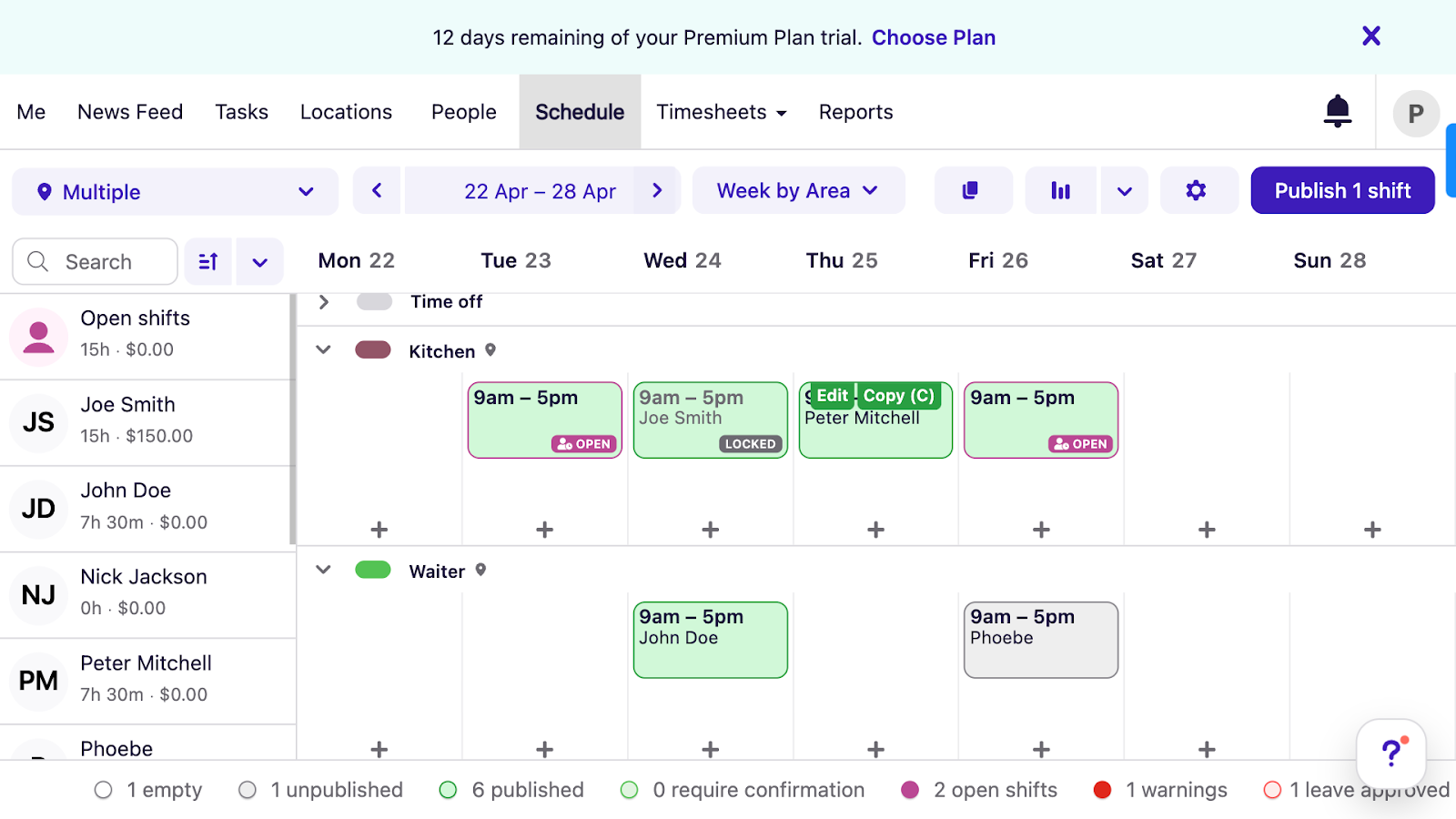
A screenshot of Deputy’s scheduling interface showing a daily roster organized by job (such as kitchen or waiter) and employees. You can also see color-coded symbols for published versus open shifts, approved leave, and conflict warnings. Deputy is a workforce management platform. I evaluated its scheduling tools, compliance features, and mobile experience based on my recent, comprehensive Deputy review, in which I explored the platform through its free trial.
Why I included Deputy: The platform offers AI scheduling, location tracking, and built-in labor compliance tools, helping you manage multi-location scheduling with less administrative effort.
Here are Deputy’s key logistics scheduling features.
Job scheduling and labor compliance
With Deputy, I could build schedules using its drag-and-drop tools, templates, or by copying shifts, which is useful for recurring jobs or delivery routes. I could assign shifts myself or leave them open for employees to claim, while still adding rest breaks, shift length restrictions, and overtime limits. Deputy also allows swapping shifts when shift plans change at short notice. And it lets team members share feedback at the end of the shift, which I haven’t seen in many other platforms.
The most impressive feature for me was the AI scheduler, which assigns shifts based on employees’ locations, qualifications, and availability, as well as external factors such as demand, seasonality, labor budgets, and labor laws. However, I felt the mobile scheduling interface was clunkier than the desktop version, which may slow down logistics managers and teams who primarily work on the move.
Time tracking and GPS monitoring
I like that Deputy turns almost any device into a time clock, whether it’s desktops, shared kiosks (with impressive biometric facial recognition), or even smartphones. And while Deputy doesn’t offer built-in payroll, I could view, edit, approve, and sync teamsheets with Deputy’s payroll partners or another payroll app.
GPS tracking and geofencing let me verify employees’ whereabouts, ensure they’re clocking in from permitted locations, and generate an audit trail for distributed logistics teams.
Communication and task management
Via Deputy’s newsfeed, I could send company-wide and private group updates about shifts and scheduling, but I was disappointed to see that private messaging is only available as an add-on.
I also appreciated its task-coordination features and integration with 50+ third-party systems.
Notable limitation
Since Deputy doesn’t offer a free plan, it’s not the best solution for small businesses or early logistics startups managing tight budgets.
What users say about Deputy
It makes scheduling, managing shifts, and tracking time super simple.


I dislike the issue with forgetting to clock out after my shift when far away from the building , which forces me to ask a colleague to log in during their night shift to correct it.
 0
0Key Features
- AI scheduling
- Time tracking
- GPS location tracking
- Company-wide newsfeed
Pros
- Shift feedback notes can help refine operations
- AI scheduling factors in budgets and demand
Cons
- Scheduling tool looks clunky on the mobile app
- No free plan is limiting for small teams and startups
Pricing
Starts at $5/user/month Trial: Yes — 30 days Free Plan: No
-
Workforce.com — Good for large and enterprise logistics teams
Available on
- Web
- iOS
- Android
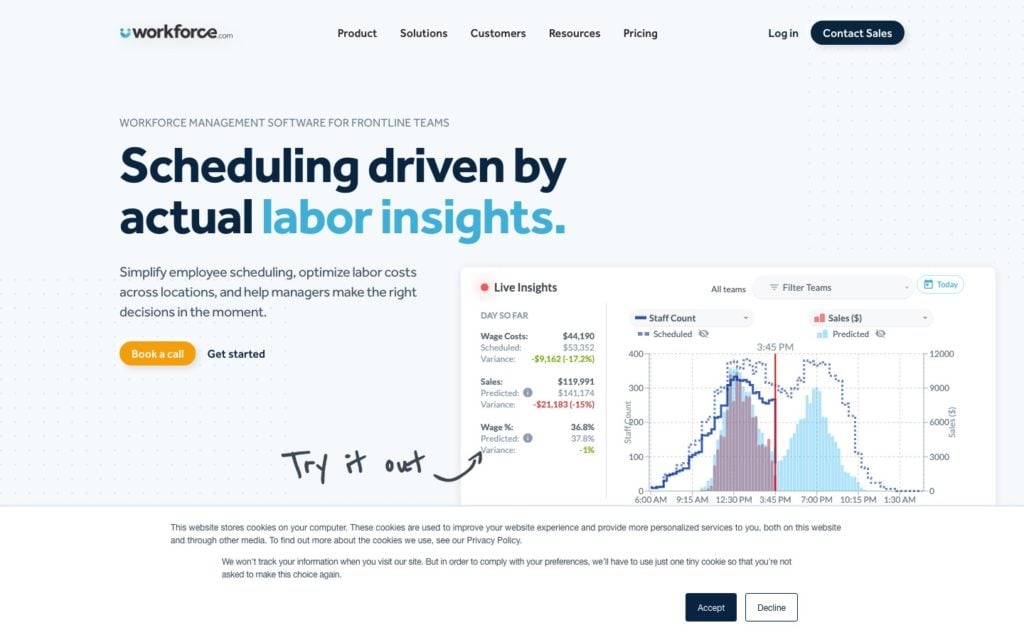
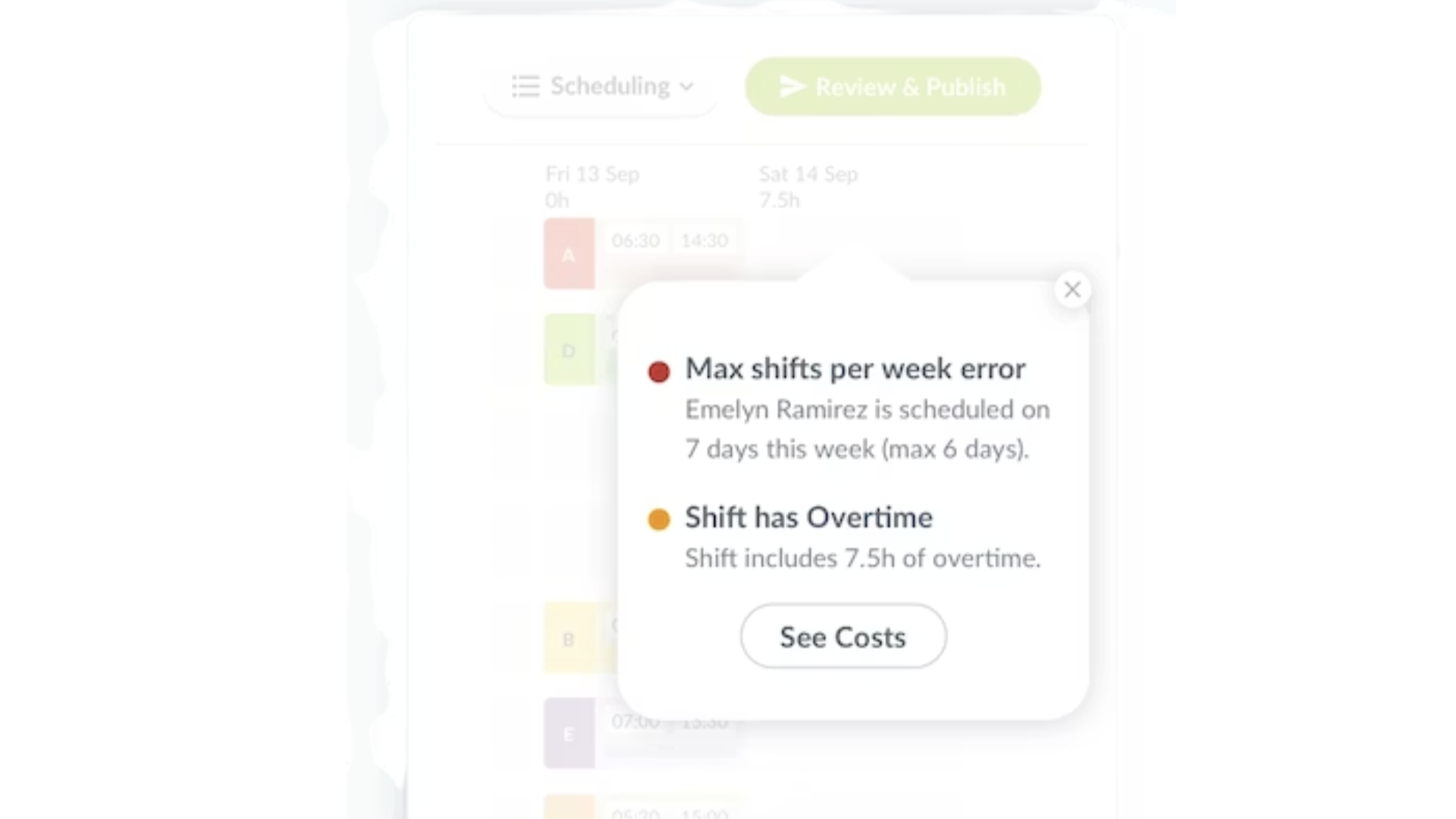
A Workforce.com screenshot showing a pop-up that highlights 2 potential scheduling errors, including an overtime warning and a maximum shift threshold error. Workforce.com is a scheduling and time tracking platform specifically designed for large, shift-based teams.
Why I included Workforce.com: Workforce.com’s offering is great for large multi-location logistics businesses that need additional features, like advanced demand-based forecasting, recruiting, and onboarding, and have deeper pockets, especially since there’s no free plan (and not everyone gets a free trial).
Below, I dive into Workforce.com’s main workforce management features.
Demand-driven scheduling
The platform offers drag-and-drop tools and reusable templates, but for me, the real value comes from its data. It predicts staffing needs based on historical insights, foot traffic, weather, and other demand signals, and uses AI to automatically assign shifts based on staff availability and preferences.
I also like that Workforce.com offers open shifts and swapping, so workers can step in and cover gaps without logistics managers getting bogged down with the admin.
Time clock, GPS functionality, and payroll
Employees can punch in and out of their shifts, or you can enable auto-clock-in and auto-clock-out based on scheduled shifts. While I think this can reduce missed punches, I worry it might track employee hours that weren’t actually worked—for instance, if an employee was late or left early.
On that note, Workforce.com also lacks geofencing, which helps prevent time theft. I was happy to see GPS tracking, but the tool only captures workers’ locations at clock-in and clock-out, rather than continuously throughout their shift. While this is safer from a compliance perspective, it’s a huge miss for logistics teams because workers are often paid for commute hours, too. Plus, you can’t cross-verify if things are running on schedule.
Unlike most of the other tools on this list, however, Workforce.com does have a native payroll system, although it appears to be designed for UK companies only.
Staff availability, task coordination, and more
Workforce.com offers a leave management system in which employees can request time off, and managers can view balances, regulatory allowances, and holiday pay calculations before responding. I liked how the platform also lets you create and assign tasks, including recurring tasks and checklists within schedules, which is great for repeat deliveries and work orders.
Notable limitation
Workforce.com’s native payroll and leave management tools appear to work with UK compliance and labor laws, so it might not be the best solution for non-UK businesses.
What users say about Workforce.com
From a management perspective it’s made operations smoother and more enjoyable.
Not the most intuitive system, many elements were awkward and difficult to setup despite many years of experience using similar systems.
Key Features
- Labor forecasting
- AI scheduling
- Time and GPS tracking at clock-in and clock-out
- Task coordination and staff availability tracking
Pros
- Demand-based scheduling boosts efficiency and cuts costs
- Open shifts and shift swapping reduce admin load
Cons
- No geofencing or live location tracking
- No free plan
Pricing
Contact vendor for pricing Trial: Yes — but only for approved users Free Plan: No
-

ZoomShift — Good for logistics teams with straightforward hourly scheduling needs
Platforms: Web, iOS, Android
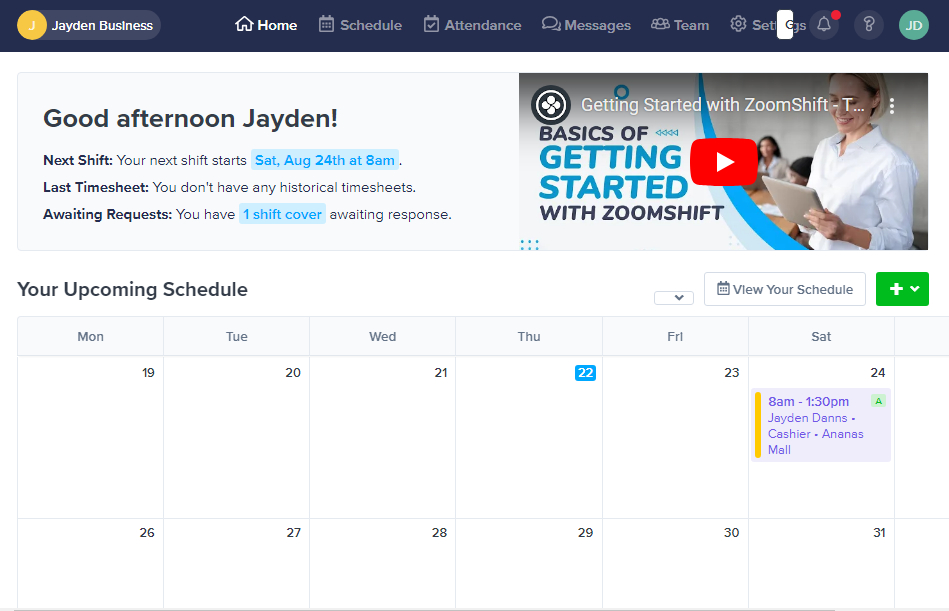
A screenshot of ZoomShift’s homepage showing an employee’s upcoming weekly shifts in calendar format, plus next shift details and a pending shift cover request. I assessed ZoomShift’s scheduling, time tracking, and time-off management features in our honest, detailed ZoomShift review, in which a member of our team tested the platform firsthand.
Why I included ZoomShift: The platform is the definition of basics done well. It’s suitable for smaller logistics teams that need straightforward shift management, time tracking, and payroll-ready timesheets without complex configuration.
Let’s dive into ZoomShift’s primary features.
Shift scheduling
ZoomShift lets you build schedules from scratch, with templates, or by copying and adjusting them using drag-and-drop tools. Moreover, I appreciated shift-swapping restrictions, such as only allowing swaps between staff qualified for that job or route, and requiring manager approvals.
Where ZoomShift really fell short, in my opinion, was in its lack of AI scheduling. Managers need to create and assign schedules manually, which may increase administrative burden (and mistakes) as operations grow. In 2026, AI is hardly a “nice-to-have.”
Time tracking, GPS controls, and overtime rules
Workers can track their hours on ZoomShift on both the web and mobile, and, like the other platforms, it also produces timesheets for payroll. I was particularly happy to see that you can configure the system to flag or block overtime entirely, which helps stay compliant and keep labor costs in check.
ZoomShift also has GPS tracking, though, like Workforce.com, it only captures workers’ locations at clock-in and clock-out, which could limit visibility for delivery-based logistics teams. Additionally, its geofencing capabilities are less advanced than those of some platforms. For example, it only lets you set distance thresholds from a defined location and blocks or flags clock-ins if employees are too far away, which again isn’t ideal for workers who need to track and bill you for their commutes.
Time off and team communication
ZoomShift lets you manage time off easily. Logistics workers can earn paid time off (PTO) through fixed allowances or accruals, depending on company preference and local regulations. They can request leave from any device and see their real-time balances clearly. ZoomShift also offers good communication tools, including 1-to-1 chats, group messages, and company-wide announcements.
Notable limitation
ZoomShift doesn’t offer AI scheduling or advanced workforce forecasting tools. As a result, it might be too lightweight for larger multi-location logistics companies managing fluctuating demand.
What users say about ZoomShift
The company’s responsive support made the initial setup process smooth, and the software has greatly simplified my scheduling tasks.
The problem is that after getting a notice of a new shift, the staff cannot find all the open shifts available in general, or if they missed a notification, there isn’t a place in the app to find all open shifts. We use the basic app, not the upgraded option, and still pay quite a bit!
Key Features
- Shift scheduling
- Time tracking
- GPS tracking
- Time off management
Pros
- Free plan and free trial available before committing or upgrading
- Controlled shift swapping based on qualifications and approvals
Cons
- No AI scheduling, so more manual work and potential errors
- Distance-based geofencing can be limiting
Pricing
Starts at $2/active team member/month Trial: Yes — 14-day Free Plan: Yes
-

Homebase — Good for logistics teams operating from just a few locations
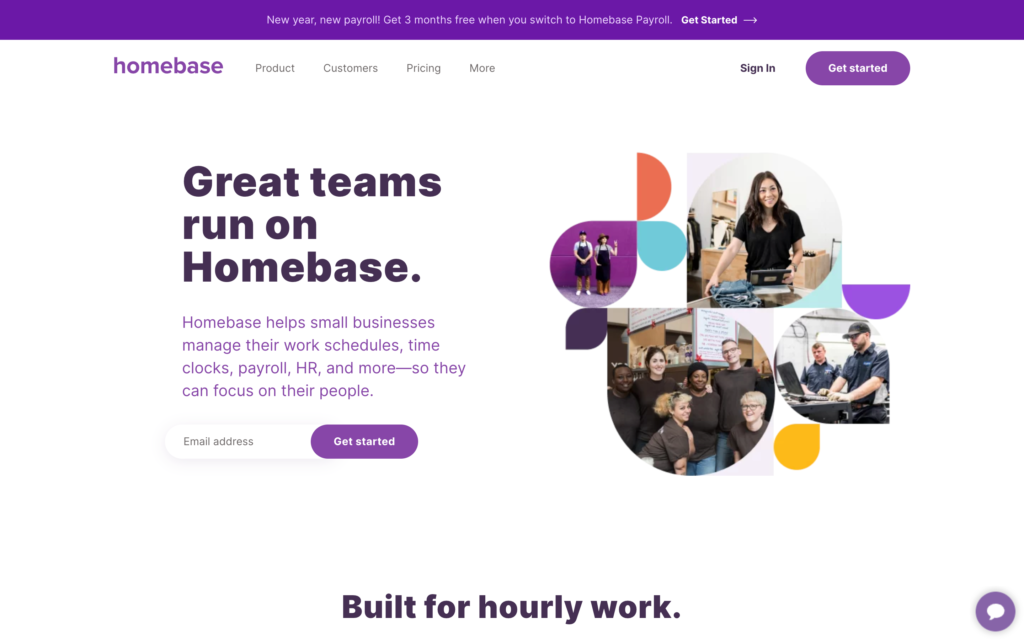
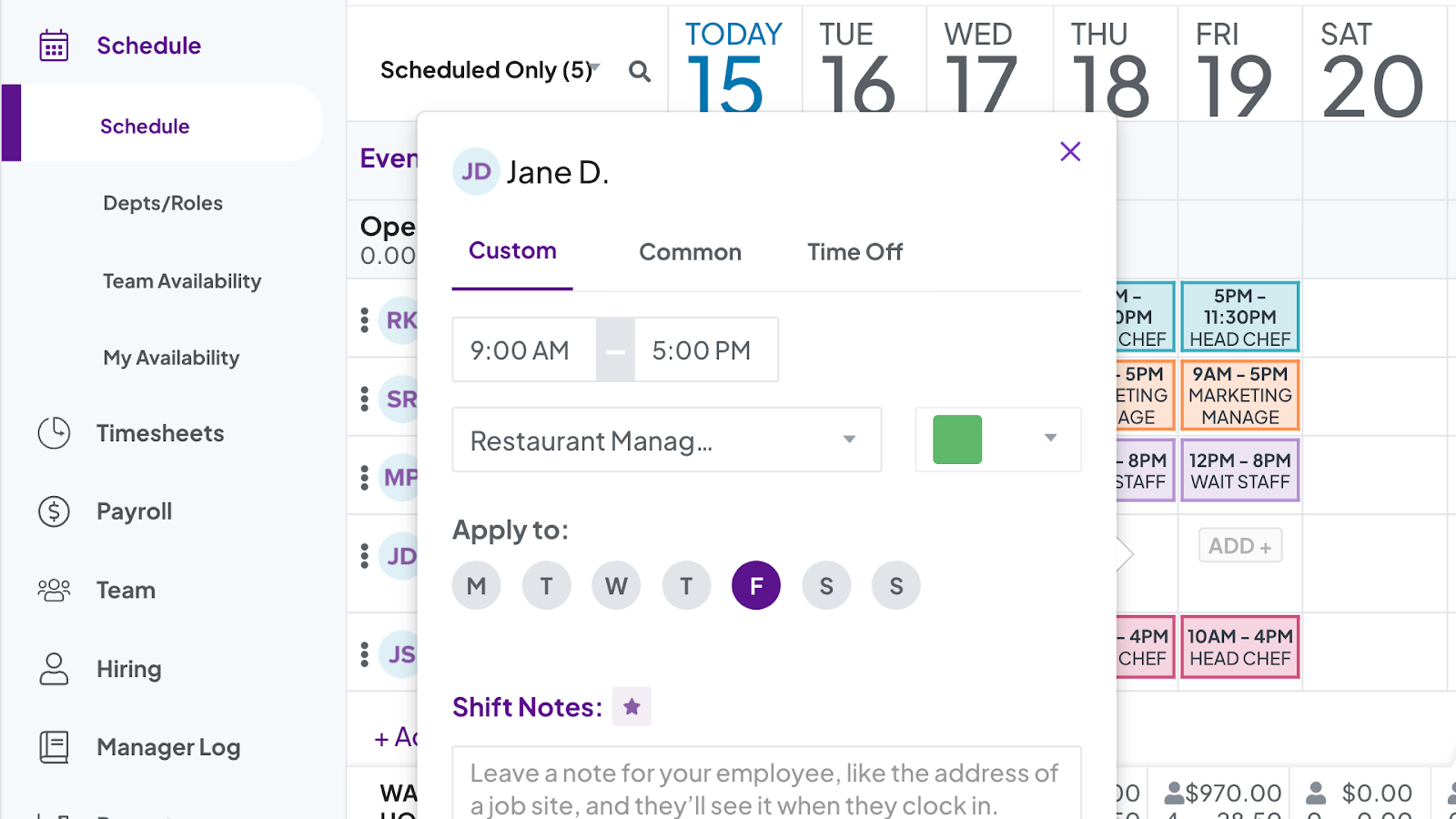
A screenshot of Homebase’s scheduler showing a weekly calendar with assigned shifts, with 1 shift opened in a pop-up editor where you can modify the time, date, role, or shift notes. Homebase is a time tracking, workforce scheduling, and payroll platform. I’ve summarized its features, pricing, and usability below based on my in-depth Homebase review.
Why I included Homebase: Despite its additional cost, Homebase’s in-house payroll system is great for companies that don’t want to use or learn multiple software systems and prefer to have everything in one place. That’s why I added it to my list.
Here are Homebase’s key features.
Shift scheduling and availability management
With Homebase, I could create shift schedules from scratch, copy past schedules, and even set up templates for recurring logistics jobs. I love that Homebase offers auto-scheduling based on employee availability, demand forecasts, and labor targets, helping to reduce over- or understaffing and save costs.
Employees can set availability, pick up open shifts, and trade shifts when needed. That said, I’ve previously tested the recurring availability feature and experienced app glitches, which Homebase has hopefully since resolved.
I also didn’t like that Homebase only offers its time off management feature on the more expensive plans. I think scheduling and time off go hand in hand, so I would have liked to see at least some basic time-off tools included in lower-tier plans.
Time clock, location tracking, payroll, and more
Employees can clock out of any device, including shared tablets, smartphones, and even point-of-sales systems, using their personal PIN. Their scheduled breaks, PTO, and overtime are automatically tracked and added to their timesheets, making payroll processing easier.
Once timesheets are approved, I can run payroll through Homebase, which automatically handles everything from payments to taxes and filings. If I wanted to, I could also use an integrated payroll solution.
Additionally, I appreciated Homebase’s built-in safeguards against time theft—for instance, it captures GPS locations or workers’ photos at clock-in, supports geofencing, and lets me set overtime alerts. Again, I wish it had live location tracking, which is better suited for logistics employees.
Finally, Homebase has an in-app messenger for 1-to-1, group, or company-wide chats, which is great for sharing scheduling updates.
Notable limitation
Homebase charges you per location, making it less suitable for teams working across multiple depots or service areas.
What users say about Homebase
The system is incredibly easy to use — everything from scheduling and time tracking to team communication runs smoothly and efficiently.
It’s hard for employees to get pay stubs/see their schedule/expense reporting isn’t in there etc.
0Key Features
- Auto-scheduling
- Time tracking
- GPS tracking and geofencing
- Payroll
Pros
- Offers in-house payroll as well as integrations
- Has a free plan for small, single-location businesses
Cons
- Per-location pricing expensive for multi-location teams
- No live location tracking means limited operational visibility
Pricing
Starts at $24/location/month Trial: Yes — (14-day) Free Plan: Yes — (one location and up to 10 employees)
Compare the Best Logistics Staff Scheduling Softwares
| Topic |
 Start for free
|
|
|
|
|
|---|---|---|---|---|---|
| Reviews |
|
|
N/A
|
|
|
| Pricing |
Starts at just $29/month for the first 30 users
|
Starts at $5/user/month
|
Contact vendor for pricing
|
Starts at $2/active team member/month
|
Starts at $24/location/month
|
| Free Trial |
yes
14-day
|
yes
30 days
|
yes
but only for approved users
|
yes
14-day
|
yes
(14-day)
|
| Free Plan |
yes
Free Up to 10 users
|
no
|
no
|
yes
|
yes
(one location and up to 10 employees)
|
| Use cases |
Best logistics staff scheduling software for shift-based, multi-location teams
|
Good for logistics teams with fluctuating demand
|
Good for large and enterprise logistics teams
|
Good for logistics teams with straightforward hourly scheduling needs
Platforms: Web, iOS, Android |
Good for logistics teams operating from just a few locations
|
| Available on |
Web, iOS, Android
|
Safety & Compliance Notes
Consider the following features that could create compliance or privacy risks.
- AI-based scheduling tools: All the platforms on my list, except ZoomShift, offer AI scheduling. While AI can save time and reduce errors, it’s not perfect. Conduct regular checks to ensure these tools comply with labor rules, such as maximum working hours.
- Biometric facial recognition: Deputy offers biometric clock-ins using its facial recognition software. Some regions may require explicit employee consent, secure handling, and compliance review before activating this feature.
- GPS tracking: Most platforms on my list, including Connecteam, offer location tracking, which can raise privacy concerns if not configured correctly. Check your local regulations, verify that location tracking is limited to work hours, and clearly disclose this feature to workers.
- Auto clock-in and clock-out: Offered by Workforce.com, this feature can sometimes lead to inaccurate time records that don’t reflect actual hours worked. Review timesheets properly before running payroll to prevent wage disputes.
What Is Logistics Staff Scheduling Software?
Staff scheduling software for logistics is a set of digital tools to help you plan, assign, dispatch, and manage your logistics team, including drivers, warehouse staff, office teams, and even field workers.
You no longer need to create manual paper-based or Excel rosters (which lead to errors) because these apps centralize everything, reducing conflicts, call-outs, and the heavy admin that comes with scheduling. The best logistics scheduling platforms even use AI to allocate routes and tasks based on workers’ locations, availability, skills, and labor demand.
How Does Logistics Staff Scheduling Software Work?
Logistics employee scheduling software uses tech and AI to simplify scheduling and shift management. At the start, managers set up basic details like roles, locations, routes, overtime limits, and labor budgets. They’ll also add information for staff members, including their names, skills, wages, and invite them to the platform.
When it’s time to schedule, managers use drag-and-drop tools, templates, or copy-and-paste to build schedules—and, in most cases, AI tools to assign jobs to workers based on their preferences, availability, locations, and qualifications.
When schedules are published, workers are instantly notified and can view their assignments right on their smartphones. From here, they can swap shifts, ask questions on the team chat, track their hours, and even update managers as they complete tasks throughout the day.
The Benefits of Logistics Staff Scheduling Software
Here are the main advantages of using logistics staff scheduling platforms.
Reduces time spent on admin and planning
These platforms cut down on hours of manual work, such as creating paper-based rosters, juggling spreadsheets, tracking availability via email, and more. This frees up time for higher-value work, such as managing employees, investing in client relationships, and improving service delivery.
Boosts profits
AI scheduling tools help to optimize tasks and routes so teams can complete more work within the same timeframe and with less fuel. Features like geofencing, GPS time clocks, and overtime rules also prevent unwanted labor costs. Higher productivity and lower costs mean more profit.
Improves employee engagement and client satisfaction
When employees can express preferences, pick from open shifts, and trade jobs themselves, it makes them feel empowered and engaged in their work. You’ll see higher productivity, fewer call-outs, and enhanced client satisfaction.
Supports compliance with labor laws
Logistics schedulers let you set rules for maximum hours, mandatory breaks, overtime limits, and driving limits. This not only prevents burnout but also reduces the risk of labor law violations. Moreover, clear records of employee schedules and timesheets can be useful during audits, inspections, or—in some cases—in court.
How Much Does Logistics Staff Scheduling Software Cost?
There’s no consistent pricing model for logistics staff scheduling solutions. Deputy, for instance, starts at $5/user/month for the Lite plan, which includes basic tools but doesn’t cover valuable features like AI scheduling. While per-user pricing is straightforward, costs can quickly ramp up as your team grows.
Homebase, on the other hand, prices per location, starting at $24/location/month, but this may not be ideal for logistics businesses with multiple locations. ZoomShift typically prices per user, though its free plan is restricted to a single job site.
Of my top picks, Connecteam offers the best value. It starts at $29/month for up to 30 users, and costs only $0.50 per additional user. It also offers a free plan for small teams with fewer than 10 users and unlimited locations.
The Bottom Line on Logistics Staff Scheduling Software
The best logistics staff scheduling platforms provide more than just shift-creating tools. They offer AI-optimized rostering, time tracking and payroll, leave management, task tracking, and other work management tools, so you don’t have to subscribe to and learn a million different pieces of software.
From the options I reviewed, Connecteam stood out as the best choice. You get a solid range of workforce management features, along with other HR and communication tools, all in one place. It takes the headache out of the everyday chaos of scheduling—errors, conflicts, last-minute call-outs, unnecessary costs, and more. And it’s very affordable.
FAQs
Scheduling in logistics is the process of planning, coordinating, and managing workers, vehicles, routes, and shifts to ensure products are stored properly, moved efficiently, and delivered on time.
Connecteam has the best AI scheduling tool. It assigns jobs and routes based on employees’ preferences, location, availability, skills, and labor laws so you can maximize productivity and minimize costs. It also offers automatic error-detection if a schedule has conflicts or mistakes.
It depends on your needs. Connecteam is the best employee scheduler for most businesses. It offers everything from AI scheduling and employee self-service tools to time tracking, communications, and task management. Larger corporations, however, might need a more complex solution like Workforce.com, Oracle, or SAP.
