
No-shows, call-outs, and midweek changes can turn scheduling into damage control, especially when your “free” tool hides key features behind paywalls.
I reviewed 6 free employee scheduling software options, testing how each handles shift swaps, open shifts, availability approvals, and multi-location planning on the free tier.
This guide shows which tools actually hold up in day-to-day scheduling and where they start to break down.
Heads up before you read: We’re Connecteam, and we’ve included ourselves in this list — because after testing all six apps, we’re convinced we’ve earned it. That said, we’ve called out real limitations for every tool on this list, including ours. If something else fits your team better, we’ll tell you. We’ve linked to in-depth reviews throughout so you can check our work and decide for yourself.
| App | Best for | Starting Price | Key Considerations |
| Connecteam | Frontline teams needing full scheduling control on a free plan | Just $29/month for the first 30 users | Full scheduling controls on free plan, capped at 10 users |
| Sling | Teams needing free shift scheduling with team messaging | $1.70/user/month | Time tracking and deeper reporting require paid plan |
| Homebase | One-Location Businesses Scheduling Hourly Teams for Free | $24/location/month | Shift trades and open shifts are paid features |
| 7shifts | Small Restaurants Needing Free Scheduling and Availability Tools | $39.99/month | Requires separate app for time tracking |
| Findmyshift | Teams of 5 or Fewer Needing Free Scheduling and Timesheets | $24/team/month | Cannot schedule beyond one week or use templates<br /> |
| Zoho Shifts | Zoho Users Needing Basic Free Shift Scheduling | $1/user/month (10-user minimum) | No swaps, recurring shifts, or advanced coverage tools on free |
What’s New in This Update (June 2026)
Our Top Picks
-
1

Best for Frontline teams needing full scheduling control on a free plan
-
2

Best for Teams needing free shift scheduling with team messaging
-
3

Best for One-Location Businesses Scheduling Hourly Teams for Free
Why trust us?
Our team of unbiased software reviewers follows strict editorial guidelines, and our methodology is clear and open to everyone.
See our complete methodology
How I Ranked the Best Free Employee Scheduling Software
To rank these tools, I focused on what you can actually do on the free plan, not what becomes available after upgrading.
Must-have scheduling features
At a minimum, a free scheduling app must let you build, publish, and adjust weekly schedules without workarounds or manual follow-ups.
I prioritized:
- Reliable schedule building: Drag-and-drop editing, templates, or copy-last-week tools must make it easy to reuse patterns. If building a basic schedule felt slow or repetitive, the tool ranked lower.
- Coverage flexibility: Open shifts, shift swaps, and manager approvals should work on the free plan. If employees had to rely on texts or external messages to handle call-outs, it wasn’t competitive.
- Availability and time off: Availability settings and time-off requests must sync directly with the schedule. If conflicts weren’t flagged before publishing, the tool lost points.
- Notifications and reminders: Employees should receive real-time alerts when schedules change. If updates required manual communication, it didn’t rank highly.
- Scheduling flexibility: Teams should be able to schedule across multiple roles or locations without duplicating schedules. If the free plan forced everything into a single grid or location, it ranked lower.
- Approvals and change history: Schedule edits must be clearly tracked, so avoid accountability gaps and compliance issues.
Free-plan limits screening
Free plans usually come with limits, so I looked for the ones that give you the most value with the fewest restrictions. I checked for:
- User limits: How many employees can you actually schedule before upgrading.
- Location limits: Whether multi-site businesses are restricted.
- Feature gating: Whether essential tools like swaps, templates, or approvals are paywalled.
A tool could still qualify with limits, but those limits had to be workable for a small team.
Workflow integration considerations
I also considered how each tool supports daily operations.
- Time clock integration: Scheduling and time tracking often overlap. I prioritized tools that also offer clock-ins, so shift plans and actual attendance stay aligned.
- Timesheets and payroll exports: I looked for simple timesheet review and approvals, plus payroll-ready exports.
- Reporting and analytics: On the free plan, managers should at least be able to see staffing patterns, with upgrades offering advanced tools like labor cost trends and overtime insights to make smarter scheduling decisions.
The 6 Best Free Employee Scheduling Software of 2026
-
Connecteam — Best for Frontline teams needing full scheduling control on a free plan
Connecteam works best for frontline and field teams that deal with constant shift changes and need scheduling, coverage, and time tracking connected in one place. Its free plan handles real coverage friction and doesn’t force an upgrade once things become complex.
Why I chose Connecteam: I ranked Connecteam #1 because its free plan includes the scheduling controls most teams rely on day to day. Shift swaps, open shifts with approval, templates, recurring shifts, scheduling rules, and the AI auto-scheduler are all available without upgrading. It was the most complete option for managing coverage changes while keeping attendance and payroll aligned.
Employee Scheduling and Coverage
Connecteam’s drag-and-drop employee scheduler makes building and editing shift schedules straightforward. You can attach notes, links, tasks, and files to each shift, so your team knows exactly what to do when they’re on the job.
I particularly liked that you can build custom scheduling rules, like requiring a licensed employee or manager to be on-site during certain shift types. This makes it easy to comply with state regulations. Once custom rules are set up, the AI-powered auto-scheduler can instantly assign open shifts to employees based on their availability, role, and qualifications.
Shift replacements are also handled smoothly. If someone can’t make their shift, they can release it through the app, and other qualified teammates can choose to pick it up. You can enable admin approval, so managers are still in control of the final schedule. This is a huge help for staying flexible without losing visibility.
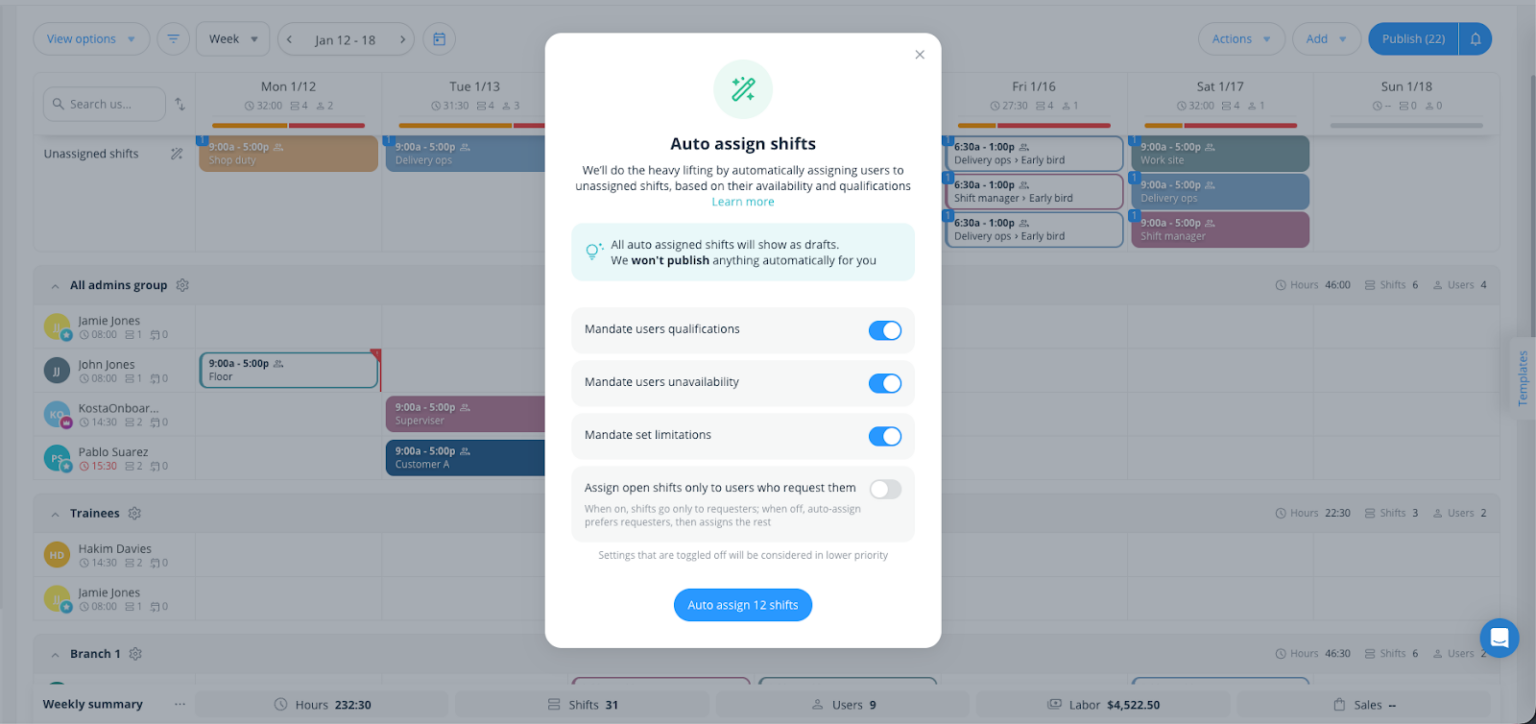
Connecteam’s auto-scheduler speeds up weekly planning. Availability and Time-Off Controls
Connecteam handles availability and time off management in one place. Employees can set when they’re available, mark preferred hours, and submit PTO requests right in the app. Setting up time off policies for vacation, sick leave, and personal days is easy, and balances update automatically as time accrues.
I appreciated that when an employee submits a request, managers are notified instantly and can approve or decline it from the mobile or desktop app. Approved time off shows on the schedule, so you can stay properly staffed. This makes it easier to plan coverage, track time off usage, stay compliant, and support your team.
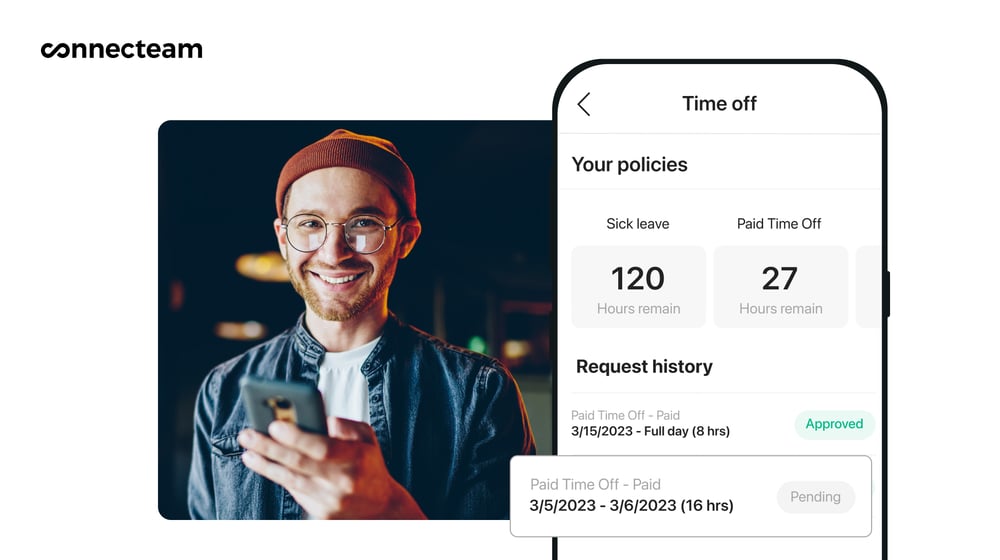
Connecteam’s auto-scheduler speeds up weekly planning. Time Tracking and Payroll Integration
Connecteam’s employee time clock is built for complex operations and works well for both field and on-site teams. Employees can clock in and out directly from the mobile app. For more visibility, you can use the optional geofence time clock, which automatically clocks out when employees leave the designated work zone.
You can set custom pay rules, breaks, and overtime policies to comply with local labor laws and industry-specific regulations. Connecteam applies these rules automatically to reduce payroll errors and help you stay compliant without the extra manual work. All work hours are logged into timesheets for payroll, which you can review, edit, and approve before sending them directly to your payroll provider.
And so much more…
Beyond scheduling, Connecteam includes additional tools to help you manage your team:
- Employee Training Software: AI Course Creator for quick onboarding and procedure rollouts.
- Digital Forms: AI-powered form conversion to eliminate paper-based processes.
- Employee Task Tracking: Real-time task monitoring for operational consistency.
- Online Team Chat: One place for all work communication to replace scattered messaging apps.
- Automatic Reports: Real-time insights into attendance, task completion, and form submissions.
When Connecteam isn’t a good fit
Connecteam’s free plan is capped at 10 users, which means if your team is already larger or growing quickly, you’ll hit that limit fast. You can also only set up one schedule on the free plan. If you manage more than one location, you won’t be able to create separate schedules without upgrading.
Also, if you only need basic shift scheduling without time tracking, payroll integration, or team communication, Connecteam’s platform might feel like more features than you need. In that case, a simpler, scheduling-only tool might be a better fit.
Connecteam also offers a free for life plan – Try Connecteam here!
0Key Features
- Drag-and-drop schedule builder
- Shift swaps and open shifts
- AI-powered auto-scheduler
- Custom scheduling rules and conflict detection
- Time tracking with GPS and geofencing
- Availability and time-off management
Pros
- Full scheduling controls on free plan
- Includes time tracking and payroll export on free plan
- Flat monthly fee model (not per-user or per-location)
- All-in-one platform reduces need for multiple apps
Cons
- Only 10 users allowed on free plan
- Setup can be complex for very small teams
Pricing
Free-for-life plan availablePremium plans start at $29/month for 30 users
14-day free trial, no credit card required
Start your free trial -
Sling — Best for Teams needing free shift scheduling with team messaging
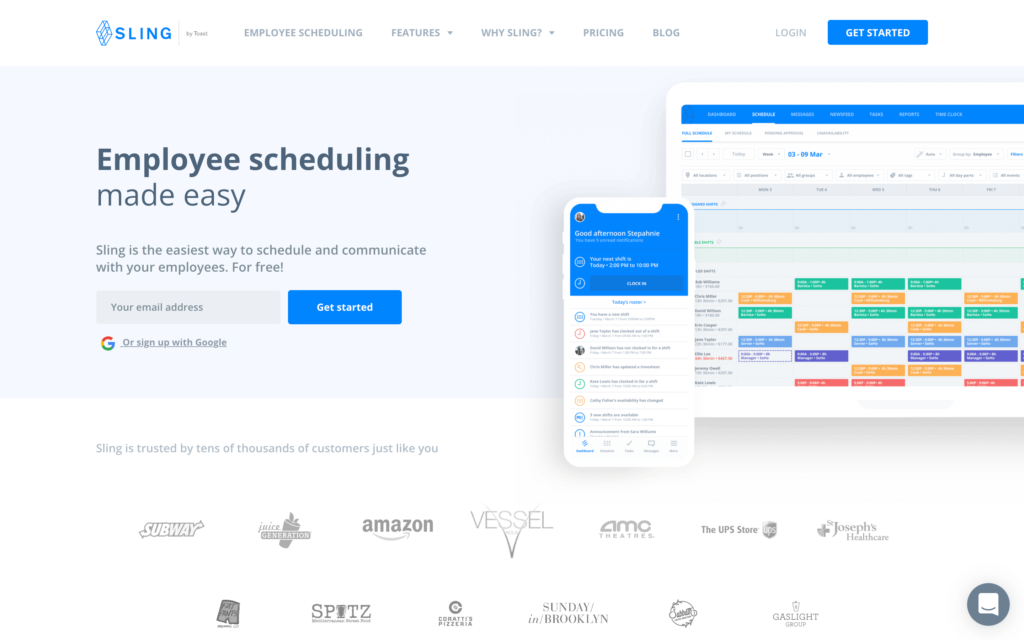
Sling is a scheduling and communication platform designed to simplify workforce management for small businesses, particularly in the restaurant and retail sectors.
Why I chose Sling: I chose Sling because of its generous free plan user limit (up to 30 employees) and its effective internal messaging tools, which keep team communication centralized and organized.
Simple Schedule Creation
In our full Sling review, we found its scheduling interface to be clean and straightforward. Creating a weekly schedule is fast, and the platform allows you to copy shifts or use templates to speed up the process. I appreciated that it alerts you to “clopening” conflicts, where an employee is scheduled to close late and open early the next morning. This helps you comply with basic labor standards. You can also set labor targets depending on projected sales to ensure each schedule is within budget.
However, during testing, we discovered that shift swaps and open shift claims are not available on the free plan, which limits coverage flexibility when employees need to request coverage changes.
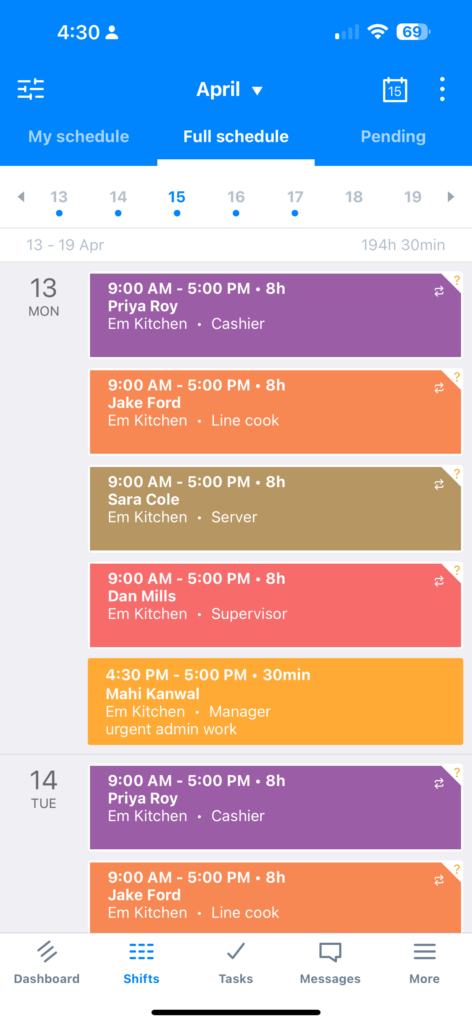
It was easy to access the shift schedule on the Sling mobile app. Built-In Communication Hub
Sling shines when it comes to keeping your team connected. The platform includes a dedicated newsfeed and private messaging system, allowing managers to share announcements and employees to chat in real time. I liked that it serves as a good option for small teams that want to eliminate chaotic group texts.
Free Plan Limitations
While Sling’s free plan is definitely accessible, it comes with clear restrictions. The most significant drawback we discovered during testing is that time tracking and mobile clock-ins are completely excluded from the free tier. If your business needs employees to clock in and out from their phones, you will have to upgrade to their paid plans.
Additionally, we found that the mobile app requires an active internet connection and doesn’t support offline mode, which could be an issues for teams working in areas with low connectivity.
What users say about Sling
Sling is easily accessible for all employees. The interface is clean and simple. Very easy to navigate schedules and clocking in/out.

New employees have a steep learning curve, and due to the bugs and the occasional failures of the notifications, it is possible to miss the shift alerts.
0Key Features
- Shift scheduling with templates and copy options
- Team newsfeed and private messaging
- Shift conflict warnings
- Multi-location scheduling support
Pros
- Clean, modern user interface
- Excellent for team communication
Cons
- Time tracking not included in the free plan
- No shift swaps and open shifts on free plan
Pricing
Starts at $1.70/user/month Trial: Yes — (15 days) Free Plan: Yes — (for up to 30 users)
-
Homebase — Best for One-Location Businesses Scheduling Hourly Teams for Free
Homebase is a team management app that combines scheduling, time tracking, and hiring tools.
Why I chose Homebase: I chose Homebase because it provides a comprehensive set of tools,including time tracking and basic hiring,for single-location businesses, all on a free plan.
Employee Scheduling and Time Clock
In our full Homebase review, we were able to create shifts, assign employees, and publish schedules. Employees can view their schedules and request time off through the mobile app, but on the free plan they can’t trade shifts or claim open ones, which was disappointing.
Homebase helps catch scheduling mistakes before shifts go live. Managers get alerts if they assign shifts to employees who are unavailable, already on leave, or scheduled for too many days in a row. There’s an auto-scheduler that can build schedules using employee availability, labor budgets, and projected sales, but it’s only available on paid plans.
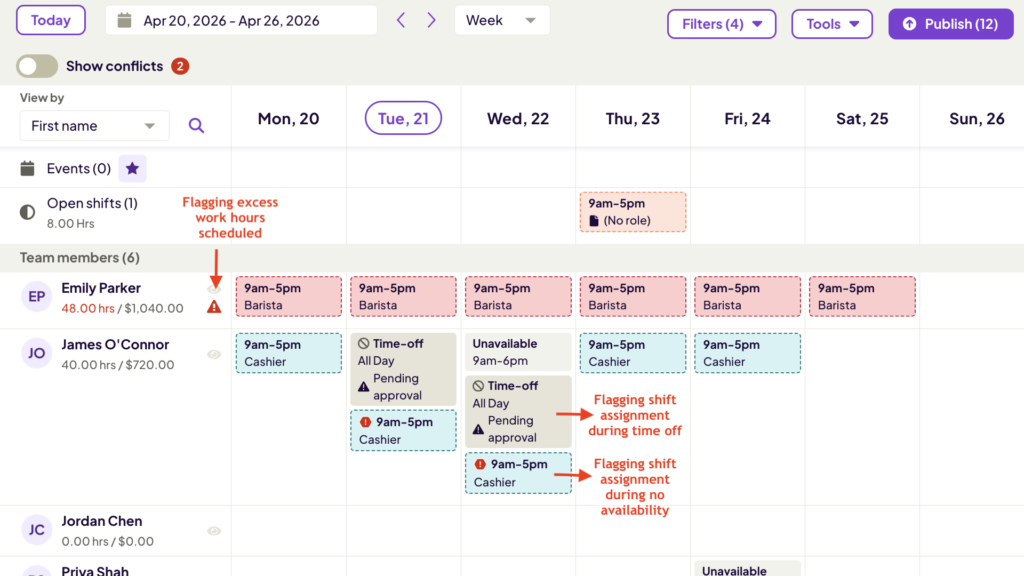
Homebase’s scheduler flagged scheduling errors for us. Availability Tracking and Time Off
Homebase includes tools for managing time off, employee availability, breaks, overtime, and blackout dates, though some of these features aren’t available on the free plan. Employees can update their availability and request time off directly from the app, while managers can approve requests, track balances, and quickly check who’s available when creating schedules.
We did notice a small issue while testing availability settings. After setting Monday availability to 9:00 am–6:00 pm, the change didn’t update immediately. Even after saving, the app still displayed availability as “all day.” This could be an issue for managers that need reliable availability when planning or adjusting staff schedules.
Time Clock
Homebase’s time clock is pretty flexible. You can turn any smartphone, tablet, or computer into a time clock, and employees can punch in via personal PIN codes or GPS verification. On paid plans, you can set up geofences to prevent employees from clocking in before they arrive at your physical location.
The system tracks time accurately and provides managers with real-time visibility into who’s working and who’s absent. I appreciated that timesheets can be reviewed and approved before exporting the data to payroll-ready data.
What users say about Homebase
It was easy to use and navigate the app. It allowed me to easily schedule my employees and alert them of any changes to their or the whole team’s schedule.

Notifications not coming through consistently remains an issue periodically but has significantly reduced compared to before.
0Key Features
- Basic employee scheduling
- Employee availability and time off
- Open shifts and shift swaps
- GPS time tracking
Pros
- Free plan includes scheduling
- POS and payroll integrations
Cons
- Free plan limited to 1 location
- Shift trades and open shifts are paid features
Pricing
Starts at $24/location/month Trial: Yes — (14-day) Free Plan: Yes — (one location and up to 10 employees)
-

7shifts — Best for Small Restaurants Needing Free Scheduling and Availability Tools
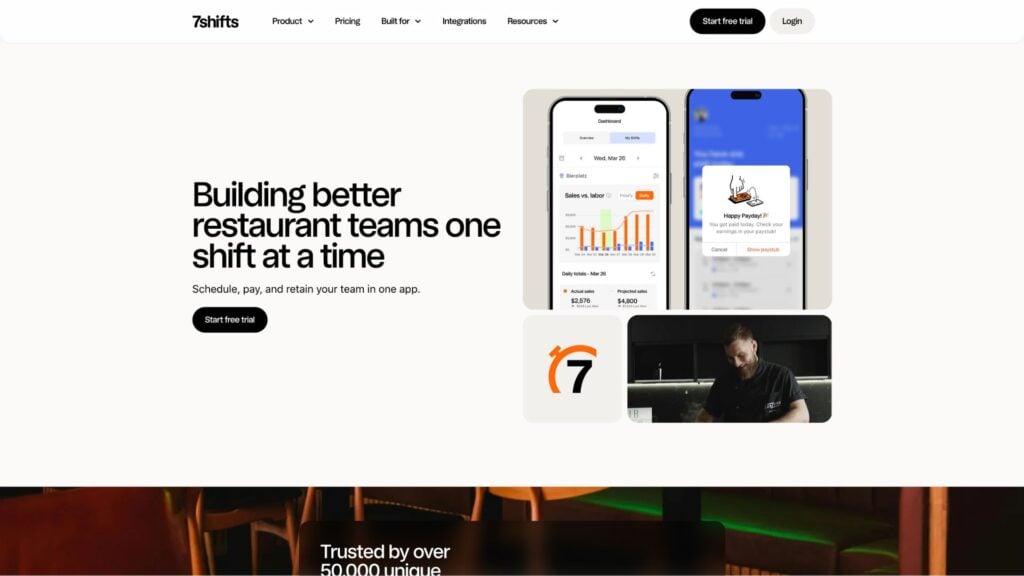
7shifts is a scheduling platform for restaurants that helps shift-based teams stay on top of coverage and labor.
Why I chose 7shifts: I chose 7shifts because the free plan covers the day-to-day scheduling workflow that matters most in restaurants: you can build and publish schedules, and employees can offer up shifts, trade shifts, and claim open shifts without everything happening in texts.
Employee Scheduling and Coverage
In our full 7shifts review, we used the drag-and-drop scheduler to assign shifts to employees. Creating a shift was easy, and I liked that you can set the shift length, break (if needed), and leave a note so the whole crew is on the same page.
I especially liked the “repeat” feature, which lets you copy the same shift across multiple days in seconds instead of adding each one manually..
Employees can offer shifts, trade with coworkers, and claim open shifts right in the mobile app. The Shift Pool provides a central place for employees to offer, trade, or claim open shifts. Once a manager approves a swap, the schedule is instantly updated and the team is notified, reducing last-minute call-outs. Managers receive notifications and can approve or decline requests with a single tap.
On paid tiers, 7shifts offers more advanced labor planning tools like sales-based labor targets, hourly forecasts, and staffing recommendations.
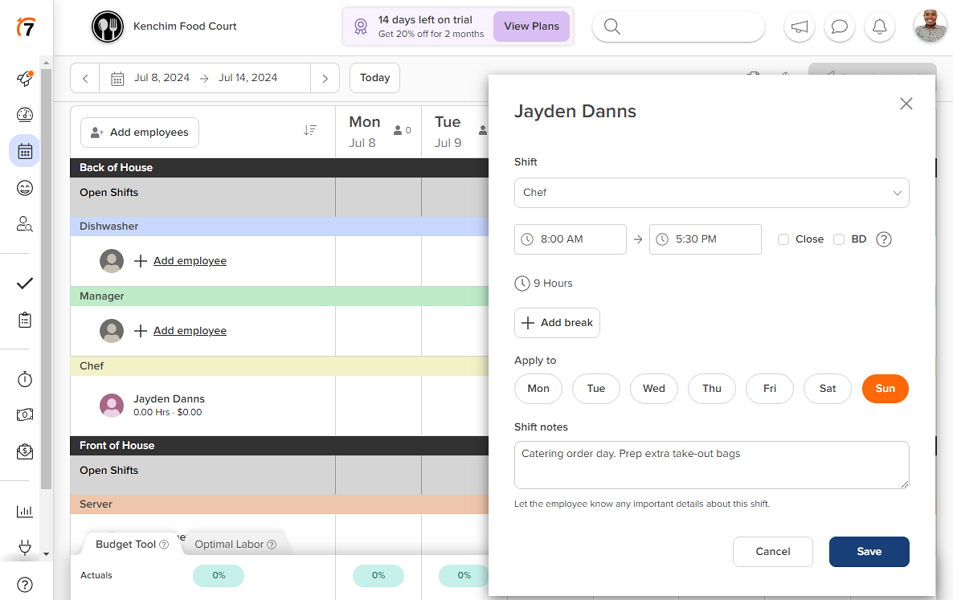
It was easy to add detailed shifts to the schedule with 7shifts. Availability and Time-Off Management
Employees can submit availability or time-off requests on the mobile or web app. I appreciated that managers can set notice periods to require employees to submit time-off requests X days before the requested date. This gives the manager enough time to adjust the affected schedule or hire temporary staff to cover the shift, preventing potential under-staffing.
Once approved, the app blocks off the unavailable days, preventing the manager from assigning the employee a shift during that time slot. In our testing, notifications alerted the manager immediately when an employee submitted a request..
Time Tracking
7shifts offers time tracking, but it requires a paid plan, which seems a bit strange to me for such a basic feature. Beyond that, the time tracking setup wasn’t as smooth as expected. Instead of clocking from the main 7shifts app, employees have to download a completely separate app called 7punches. 7punches is free and syncs data quickly, but having employees switch between two separate apps feels like an extra hassle. We also noticed during testing that 7shifts doesn’t work without an active internet connection.
What users say about 7shifts
I like how 7shifts makes it easy to schedule every employee correctly for the manpower and labor hours needed. I love that I can find employees easily and instantly see their availability.
Unfortunately, the schedule view is only one week at a time. It would be helpful to view multiple weeks, especially when we’re closing payroll for the period.
0Key Features
- Drag-and-drop schedule
- Shift swaps, trades, and open shift claims
- Availability and time-off management
- Time tracking
Pros
- Strong restaurant-specific tools
- Free plan with shift swaps and open shifts
Cons
- Separate 7punches app for mobile time clock
- No advanced labor features on free plan
Pricing
Starts at $39.99/month Trial: Yes — 14 days Free Plan: Yes — up to 15 users, 1 location
-

Findmyshift — Best for Teams of 5 or Fewer Needing Free Scheduling and Timesheets
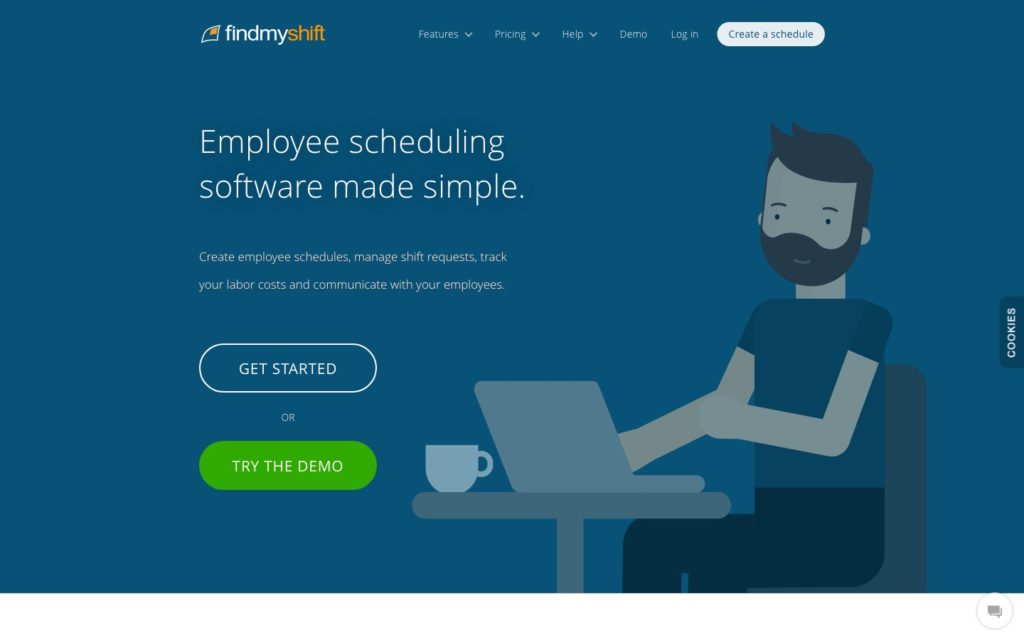
Findmyshift is a scheduling tool that uses a familiar, spreadsheet-style interface to manage employee hours and time-off requests.
Why I chose Findmyshift: I chose Findmyshift because of its unique flat-rate pricing model, which charges per team rather than per user, making it a cost-effective option for larger workforces if you outgrow the free plan.
Shift Scheduling
In our full Findmyshift review, we could point, click, and type directly into cells to assign shifts. It supports multi-cell editing and drag-and-drop functionality, and you can build schedules for up to 140 days with just a few clicks. However, the free plan is limited to 1 week of forward planning, which is definitely a major drawback.
It also supports shift requests and changes, including employees asking to cancel shifts or swap with coworkers (with manager approval), which can save a lot of back-and-forth when plans change. Findmyshift also sends automated shift reminders and change notifications to help keep everyone in the loop.
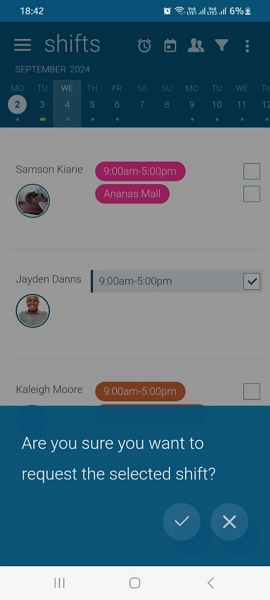
Employees can request shift swaps in the Findmyshift mobile app. Time Off Management
Even though it’s a paid feature, we tested Findmyshift’s time off management, which makes it easy to assign annual leave hours and track employee PTO balances. I liked the built-in notifications,which make it easier for employees to submit requests and for managers to approve them quickly.
Another strong area is the ability to delegate time-off management to another employee. Depending on your team’s structure, it could be a good way to free up time for managers.
Time Tracking and Mobile App Limitations
Findmyshift’s time-tracking feature is pretty basic. The free plan lets employees clock in and out, record hours, and submit timesheets for approval. Location services like geofencing and GPS functions are only available on paid plans.
During testing, we discovered that the manager’s mobile app is pretty stripped down, meaning you can’t perform core admin tasks like creating schedules or approving timesheets from your phone.
What users say about Findmyshift
The layout is very easy to navigate making it user friendly. With all the features available, it’s very handy to be able to have the one platform to cover all business logistical needs.
no editing log, depending on who has access, shifts could easily be deleted without noticing, the editing log would help
Key Features
- Spreadsheet-style scheduling
- Time-off management
- Notifications for shift reminders
- Basic time clock
Pros
- Predictable flat-rate pricing
- Familiar interface with low learning curve
Cons
- Manager’s mobile app very limited
- Short planning window on free plan
Pricing
Starts at $24/team/month Trial: Yes — 90 days Free Plan: Yes — 5 employees, 1 manager, and 5 facilities
-

Zoho Shifts — Best for Zoho Users Needing Basic Free Shift Scheduling
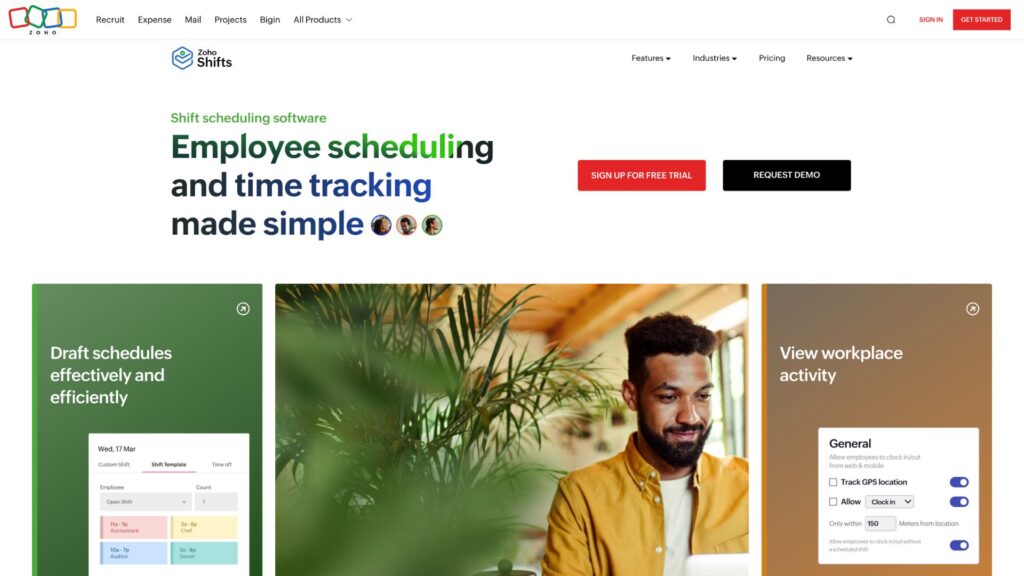
Zoho Shifts is Zoho’s workforce scheduling solution, designed to integrate with other Zoho applications.
Why I chose Zoho Shifts: Zoho Shifts offers the most generous free plan in terms of users (up to 25) and unlimited locations, making it a good fit for multi-location teams with simple scheduling needs.
Basic Schedule Building
In our full Zoho Shifts review, we could create shifts, assign employees, and publish schedules. The platform supports multi-location scheduling, so you can manage teams across different sites from a single dashboard.
On the free plan, you can also plan breaks, use shift templates, message the team, and send email or push notifications when schedules are published or updated. I appreciated how clean the interface was and that you can quickly build schedules without too much complexity.
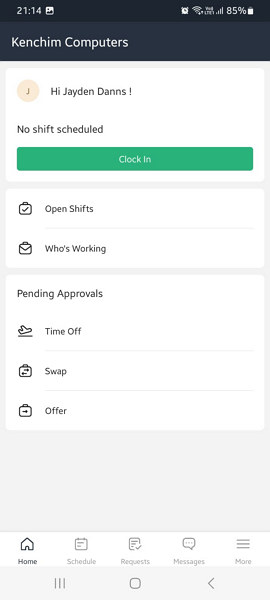
In the Zoho Shifts mobile app, employees can see their schedule, who’s working, open shifts, and request time off, swaps, or offer shifts up. However, many advanced features like shift swaps, recurring shifts, and manager approvals are locked behind paid tiers. This definitely limits the tool’s usefulness for teams that need flexibility for handling last-minute changes or employee requests. Job sites, skills, and custom access levels are also locked behind paid tiers.
Availability and Time Off
Availability and time-off management features are limited on the free plan. Employees can submit time-off requests, but they can’t mark their availability or work preferences. During testing, we were able to block out specific days (like times during peak seasons), so employees can’t request time off when you need all hands on deck, which is helpful.
Time Tracking
On the higher tiered paid plan, employees can clock in from the web, mobile, or kiosk app. The platform includes useful tools like shift reminders, clock-in restrictions, overtime tracking, and geofencing to help improve timesheet accuracy and prevent offsite punching.
That said, break tracking is entirely manual. Employees have to remember to start and end breaks themselves, and there are no reminders or safeguards to prevent short breaks that could create compliance issues. While Zoho Shifts handles overtime rules well, the lack of features like facial recognition for buddy punch prevention makes the time-tracking tools feel a bit incomplete.
What users say about Zoho Shifts
Managing attendance, leave, and employee data is very straightforward, and the self-service feature reduces a lot of manual work for HR. It keeps everything organized without being complicated.
One small downside is that some features are a bit hidden in the system and require some time to explore and fully understand—but once you get familiar with it, everything becomes much smoother.
Key Features
- Multi-location scheduling
- Drag-and-drop scheduler
- Employee mobile app for schedule access
- Time-off request management
Pros
- Free plan supports up to 25 users
- Unlimited locations on free plan
Cons
- Shift swaps and open shifts are paid features
- No time tracking on free plan
Pricing
Starts at $1/user/month (10-user minimum) Trial: Yes — 14 days Free Plan: Yes — up to 25 users, unlimited locations
Compare the Best Free Employee Scheduling Softwares
| Topic |
 Start for free
|
|
|
|
|
|
|---|---|---|---|---|---|---|
| Reviews |
 |
|
|
|
|
|
| Pricing |
Starts at just $29/month for the first 30 users
|
Starts at $1.70/user/month
|
Starts at $24/location/month
|
Starts at $39.99/month
|
Starts at $24/team/month
|
Starts at $1/user/month (10-user minimum)
|
| Free Trial |
yes
14-day
|
yes
(15 days)
|
yes
(14-day)
|
yes
14 days
|
yes
90 days
|
yes
14 days
|
| Free Plan |
yes
Free Up to 10 users
|
yes
(for up to 30 users)
|
yes
(one location and up to 10 employees)
|
yes
up to 15 users, 1 location
|
yes
5 employees, 1 manager, and 5 facilities
|
yes
up to 25 users, unlimited locations
|
| Use cases |
Best for Frontline teams needing full scheduling control on a free plan
|
Best for Teams needing free shift scheduling with team messaging
|
Best for One-Location Businesses Scheduling Hourly Teams for Free
|
Best for Small Restaurants Needing Free Scheduling and Availability Tools
|
Best for Teams of 5 or Fewer Needing Free Scheduling and Timesheets
|
Best for Zoho Users Needing Basic Free Shift Scheduling
|
| Available on |
How to Choose the Right Free Employee Scheduling Software
Choosing the right free employee scheduling software depends on your team’s unique needs. Here are a few things to consider when deciding on the right tool:
Scope of Use
- Full-featured free plans let you build schedules, manage shift swaps, approvals, and time tracking without upgrading.
- Limited free plans include basic scheduling but may gate shift swaps, approvals, or time tracking behind paywalls. Fine for small, stable teams with predictable schedules.
- Restricted free plans cap forward planning, locations, or users heavily. Best for micro-teams or as a trial before committing.
Your Team Size
Consider your current team size and growth trajectory:
- Under 10 employees: Most free plans work fine
- 10–25 employees: Ensure the free plan supports your headcount
- 25+ employees: Look for tools with higher free user limits
- Multiple locations: Check if the free plan supports multi-location scheduling
Rage of Features
Think about what you actually need:
- Basic scheduling: Just need to build and publish shifts? A simple, focused tool works.
- Scheduling + time tracking: Need to track hours for payroll? Look for tools that include time clocking on the free plan.
- Scheduling + coverage flexibility: Need shift swaps and approvals so employees can request changes? This is important for high-turnover industries but may be locked behind paid tiers in many cases.
- Industry-specific features: Running a restaurant? Look for tools built for hospitality. Using other software? Check for integrations.
Key Questions
- Can I do everything I need on the free plan, or will I hit a paywall quickly?
- Does the free plan support my current team size?
- Do I need shift swaps and approvals, or is basic scheduling enough?
- Is time tracking included on the free plan?
- Do I need multi-location support?
- Will I need to integrate with payroll or other tools?
What is Free Employee Scheduling Software?
Free employee scheduling software lets managers build, publish, and update work schedules without paying a monthly subscription. Most free plans include a basic schedule builder, availability tracking, shift swaps, and limited time tracking.
The difference is in the limits. Some free tools cap users or locations. Others lock approvals, recurring shifts, or coverage controls behind paid tiers. The core question is not whether the software is free, but whether the free plan can handle real scheduling friction once the week gets messy.
FAQs
Connecteam is the best free scheduling software and all-in-one work management solution. The platform offers HR management features, PTO tracking features, and automatic shift scheduling tools. It also has one-click clock-in and clock-out, absence management tools, streamlined payroll processing, and much more.
You can make a work schedule for employees free using a spreadsheet or a free employee scheduling app like Connecteam. Add your employees, set availability, build shifts, publish the schedule, and let the app send notifications and shift reminders. If someone calls out, use open shifts or shift swaps to fill coverage without rebuilding the whole week.
Yes, you can. However, making an employee schedule in Excel requires a lot of time and effort. Plus, it’s difficult to maintain. It’s better to choose specialist software, such as Connecteam, that takes the hassle out of scheduling.
You can use a general-purpose AI like ChatGPT to draft a schedule template, but it won’t automatically apply your staffing rules, labor rules, and availability in a reliable way. A dedicated AI scheduler inside employee scheduling software is usually the better choice, like Connecteam’s AI Auto Scheduler, which drafts schedules based on availability and the rules you set.
Connecteam is a strong choice for rotating shift schedules because it supports recurring shifts, shift templates, and copy-last-week scheduling. It also keeps availability, time off requests, and shift reminders in the same workflow, which helps prevent conflicts when rotations change.
Yes, there are free work schedule apps, but most free plans cap users/locations or lock key scheduling workflows behind paid tiers. If you want a free employee scheduling app that still covers the day-to-day basics like templates, shift reminders, open shifts, and shift swaps with approvals, Connecteam’s free plan is one of the more complete options for small teams.
Yes, all six platforms offer free plans that don’t expire. However, they all come with limits on users, locations, or features. As your team grows, you’ll eventually need to upgrade.
The Bottom Line on Free Employee Scheduling Software
Free employee scheduling software can take pressure off managers, but only if the free plan includes the controls you actually use during the week. Shift swaps, approvals, availability tracking, and overtime safeguards are what keep schedules accurate once call-outs and last-minute changes start happening.
Most free tools work until you hit a limit. Connecteam stands out because its free plan includes full scheduling controls, built-in time tracking, and payroll-ready exports for up to 10 users. For frontline teams that need flexibility without losing oversight, it’s the strongest free option available.