

Basic landscaping business software for users in the U.S. and Canada
What’s New in This Update (August 2026)
- Retested Yardbook to discover what has changed since my last review and verify whether the vendor has resolved the issues identified in my previous round of testing.
- Rewrote sections and adjusted the score to reflect the results of my latest round of testing.
- Added a summary at the start of each section to highlight Yardbook’s overall performance and key takeaways.
Verdict: 6.35/10
Yardbook is a landscaping business software solution built primarily for small landscaping and lawn care teams in the United States and Canada. Its biggest strength is the generous free plan, which lets businesses schedule jobs, track time, generate estimates, manage customers, and send invoices without paying a dime.
I like its estimating tool, which, when combined with the lot measurement feature, enables businesses to create quotes based on a property’s actual lawn size. This eliminates guesswork that often leads to underestimating or overestimating. Yardbook also lets you convert estimates into jobs or invoices once the tasks are completed.
When it comes to workforce management, Yardbook handles the basics well. It lets you assign one-off jobs or set up recurring schedules for regular tasks like trimming and hedging. Its built-in weather-forecasting tool helps plan work around expected conditions, reducing weather-related disruptions. Still, Yardbook falls short for businesses that need advanced workforce management tools like task dependencies, shift swaps, or availability management.
Yardbook suffices for simple time-tracking needs, but it isn’t designed for businesses that require precise location verification or compliance with labor laws. It doesn’t provide dedicated break- or overtime-tracking tools. This is particularly disappointing considering Yardbook is geared toward businesses in the U.S., where federal law and many state labor laws require employers to track break and overtime in full compliance.
Yardbook Key Features
- Job scheduling: Create jobs or convert estimates into jobs and assign them to crew members. View jobs in a list, assignment, or calendar view. Employees can mark jobs as complete, making it easier for managers to track progress.
- Time tracking: Employees can clock in and out using the mobile app — even without an internet connection. That said, Yardbook doesn’t support break or overtime tracking, which limits its usefulness for teams that need to comply with labor laws.
- Job estimating: Generate estimates in just a few clicks using a built-in catalog of products and services. You can also use the lot measurement tool to create accurate quotes based on the size of a property’s outdoor space.
- Route planning: Create routes based on an employee’s assigned jobs. Yardbook failed to optimize routes during testing, though, suggesting the feature may be unreliable.
- Invoicing: Convert estimates into invoices, generate invoices manually, or auto-generate invoices based on completed jobs. You can send invoices directly via email and accept credit card payments to streamline your cash flow.
Pros
- Generous free plan
- Easy-to-use mobile app
- Functional offline mode on Android app
- Built-in lot measurement
Cons
- Limited integrations
- No break or overtime tracker
Yardbook Pricing
Verdict: 8/10
Overall, Yardbook’s free plan is quite generous, giving small lawn care businesses everything they need to track time, schedule jobs, track expenses, and manage field crews – all without spending a dime. While its paid plans are competitively priced, they provide a limited set of features that make upgrading difficult to justify.
| Plan — Per Month | Features |
|---|---|
| Free – Free forever |
|
| Business – $34.99 | Everything in Free, plus:
|
| Enterprise – $49.99 | Everything in Business, plus:
|
Yardbook began as a free solution for solopreneurs and small landscaping businesses. It’s not surprising, therefore, that its free plan offers practically every feature you’d need to automate core processes. With the free plan, you can manage unlimited jobs, track time, create estimates, manage invoices, and manage equipment.
Beyond the free plan, Yardbook has two paid plans — Business and Enterprise – available for a fixed monthly fee and with no usage limits. By avoiding the standard per-user pricing model, Yardbook makes its plans affordable for small teams on tight budgets. However, the paid tiers add only a few premium features, making it difficult to justify upgrading.
Yardbook didn’t offer a free trial for its premium features during my last round of testing. Thankfully, the vendor has since introduced a 60-day free trial for its paid plans. This is a nice move meant to enable teams to test the paid features before making a buying decision.
My main gripe is that Yardbook offers only monthly billing, with no discounts for long-term commitments. Additionally, the vendor doesn’t provide pricing details on its website. You have to be logged in to the app and navigate to the billing page to view the paid plans. Even then, the billing page is buried deep within the sitemap, making it unnecessarily difficult to find.
Yardbook vs. Top Competitors
As the table below shows, Yardbook is more affordable than many similar software solutions. However, its limited premium functionality means the overall value for money is only average:
| Plan | Yardbook (Business) | Jobber (Grow) | Hubstaff (Team) | Connecteam (Advanced) |
|---|---|---|---|---|
| View pricing | View pricing | View pricing | View pricing | |
| 10 users | $34.99 | $240 | $100 | Free for life—all features and dashboards |
| 20 users | $34.99 | $280 + ($29*5) = $425 | $200 | $49 |
| 30 users | $34.99 | $280 + ($29*15) = $715 | $300 | $49 |
| 50 users | $34.99 | $280 + ($29*35) = $1,295 | $500 | $99 |
| Read our in-depth Jobber review | Read our in-depth Hubstaff review | Learn more about Connecteam |
Yardbook Sign-Up and Onboarding
Verdict: 6/10
While creating an account is straightforward, getting your team up and running can be a hassle. The combination of clunky navigation, missing crew setup options, and lack of automated email invitations can slow down onboarding.
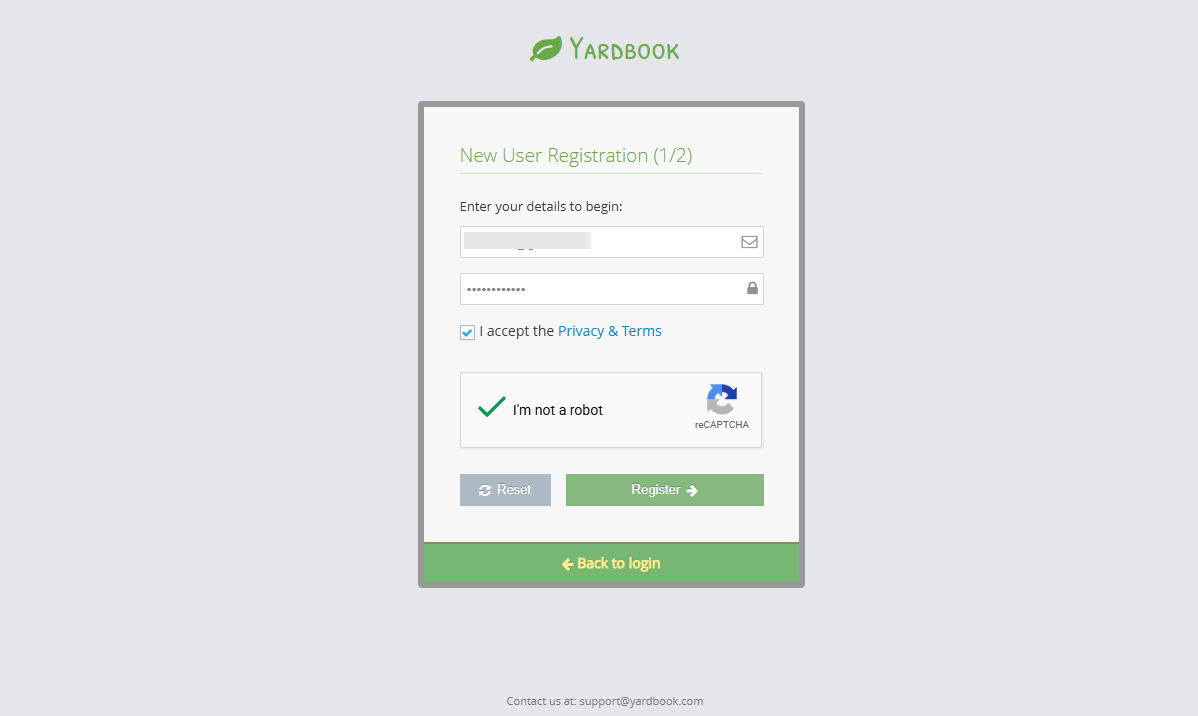
Signing up and creating an account on Yardbook is pretty straightforward. All I needed to do was click “sign up free” on the website header, enter my email and password, and click “register.” I then entered my name and business’ details — name, country, address, city, phone number, and zip code — and clicked “save.”
Yardbook Onboarding
Yardbook doesn’t offer a guided setup or welcome video to streamline onboarding. Instead, it lets users explore the product on their own, which can make it difficult for beginners to get started and configure the platform.
Additionally, the settings page lacks a dedicated navigational panel, which forced me to repeatedly click the back button to return to the settings menu. The constant back-and-forth added unnecessary friction, making the platform configuration feel more cumbersome than it should be.
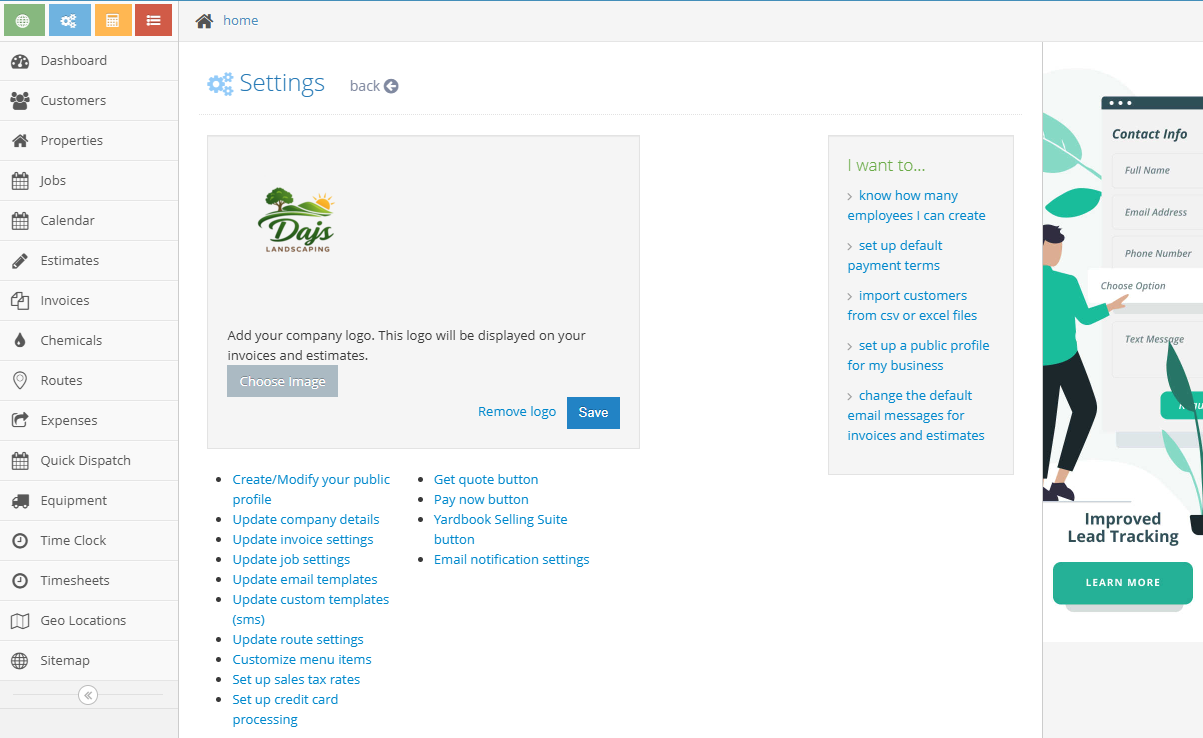
Navigation issues aside, most of the configuration tasks are pretty straightforward. I didn’t need to read any guides to learn how to configure the company, route, invoice, email, or job settings. Overall, I needed about 20 minutes to set up my account, but the process would’ve been quicker were it not for the clunky navigation.
Setting Up Your Team, Customers, and Equipment
Employees, customers, equipment, and chemicals are core to your lawn care operations. I’m glad Yardbook lets managers add them early to streamline workflows down the road. However, I wish the employee tab were accessible from the main navigation menu. As it stands, the tab can be difficult to locate, as it’s situated under the manager’s profile icon.
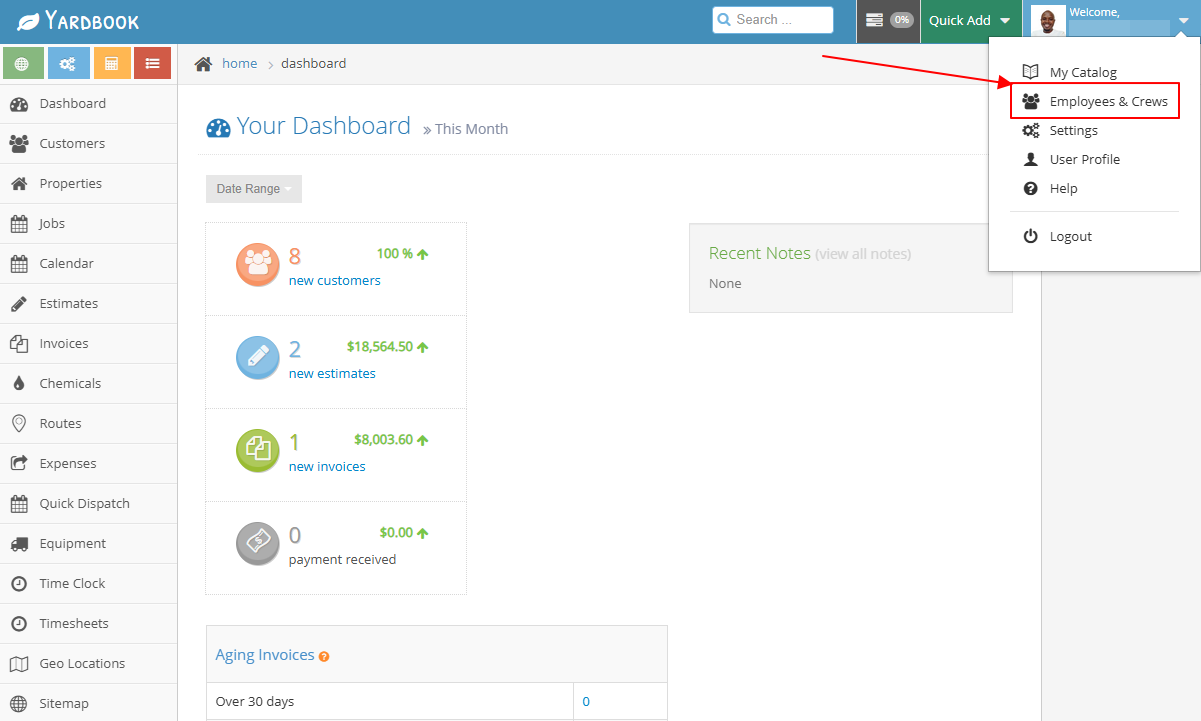
Yardbook doesn’t offer a bulk-add option, such as invitation links or file imports. As a result, managers can add employees only one by one, which can be tedious for large workforces. Even worse, Yardbook doesn’t automatically send email invites. Instead, the manager has to create an employee’s login credentials and share them manually.
Despite all its limitations, Yardbook has built a really helpful crew management feature. I was able to group employees by trade, such as lawn care technicians, landscapers, and arborists. Having established crews simplifies group assignments and employee management down the road.
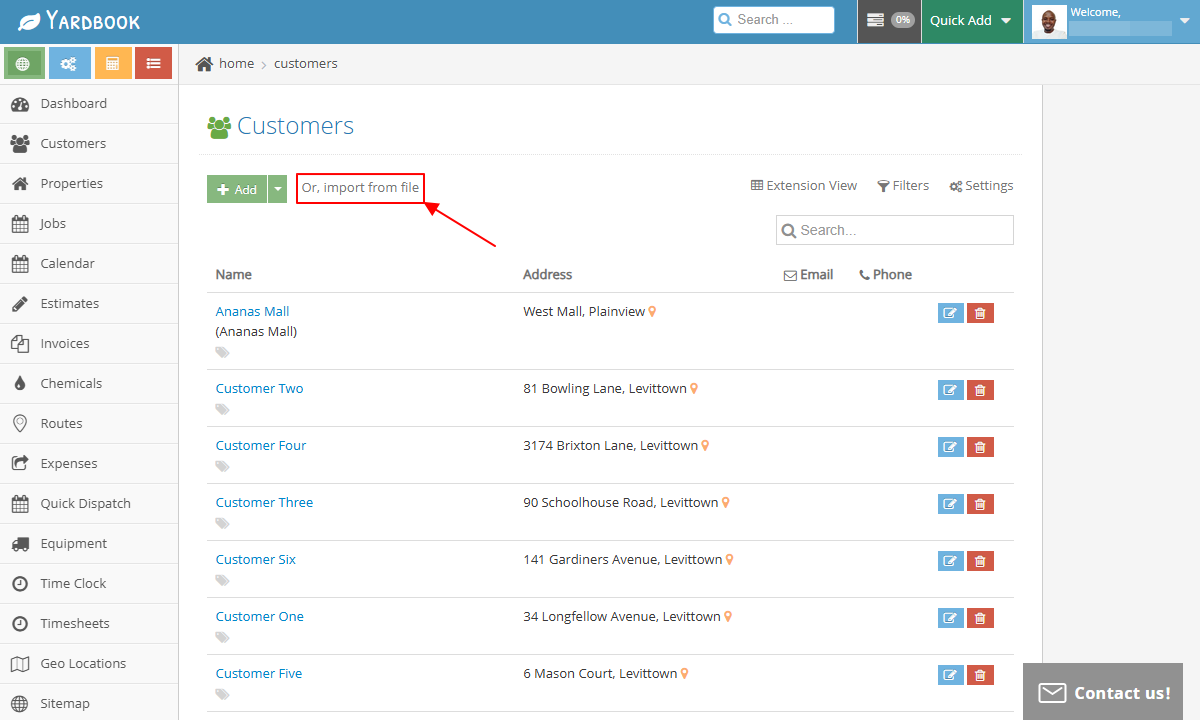
I also appreciated being able to access customers, equipment, and chemical tabs from the main menu, which simplified setup. All I had to do was open either tab and click “add” to start creating the relevant component. In addition, I liked having the option to bulk-import customers from Excel or CSV files to speed up configuration.
Yardbook Usability and Interface
Verdict: 6.5/10
Overall, Yardbook offers a disjointed user experience across its web and mobile app. The mobile app is generally easy to use, thanks to its modern interface and limited feature set. The web app, on the other hand, has a clunky interface and dense menus that can make it difficult for users to navigate.
Yardbook Web App
During my testing, I used the Yardbook web app on a Windows computer. While the user interface is functional, it lacks the sleek and polished design you’ll find with modern web apps. The UI has three action areas: the navigation panel to the left, the top bar, and the details area.
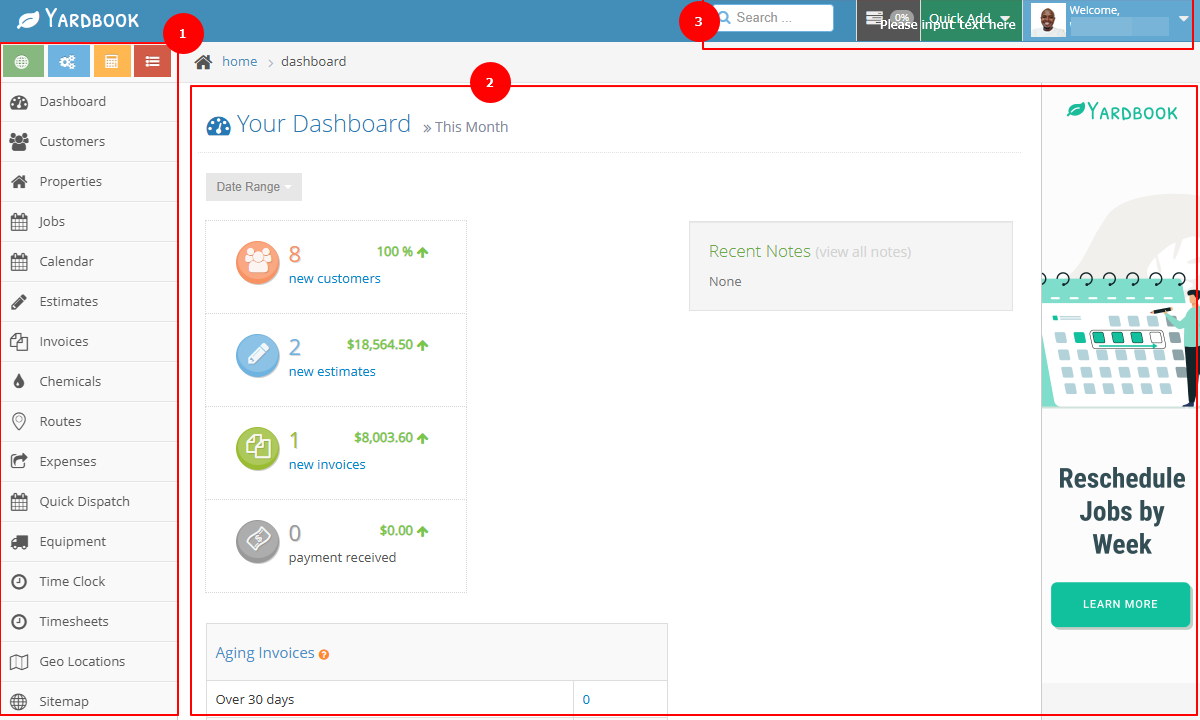
The main menu displays the dashboard, customers, jobs, estimates, and chemicals tabs by default. Thankfully, the menu is customizable. I was able to show additional items or hide those I didn’t need to keep the menu neat. However, having the option to reorder items and place frequently used tabs at the top could help simplify navigation.
Beyond the menu items, Yardbook displays additional options — sitemap, settings, calculator, and to-dos – that are visible only when the menu is expanded. I can’t fathom why Yardbook chose to bury important features like reports in the sitemap and not the main menu. It makes these features hard to find and takes away from the overall usability.
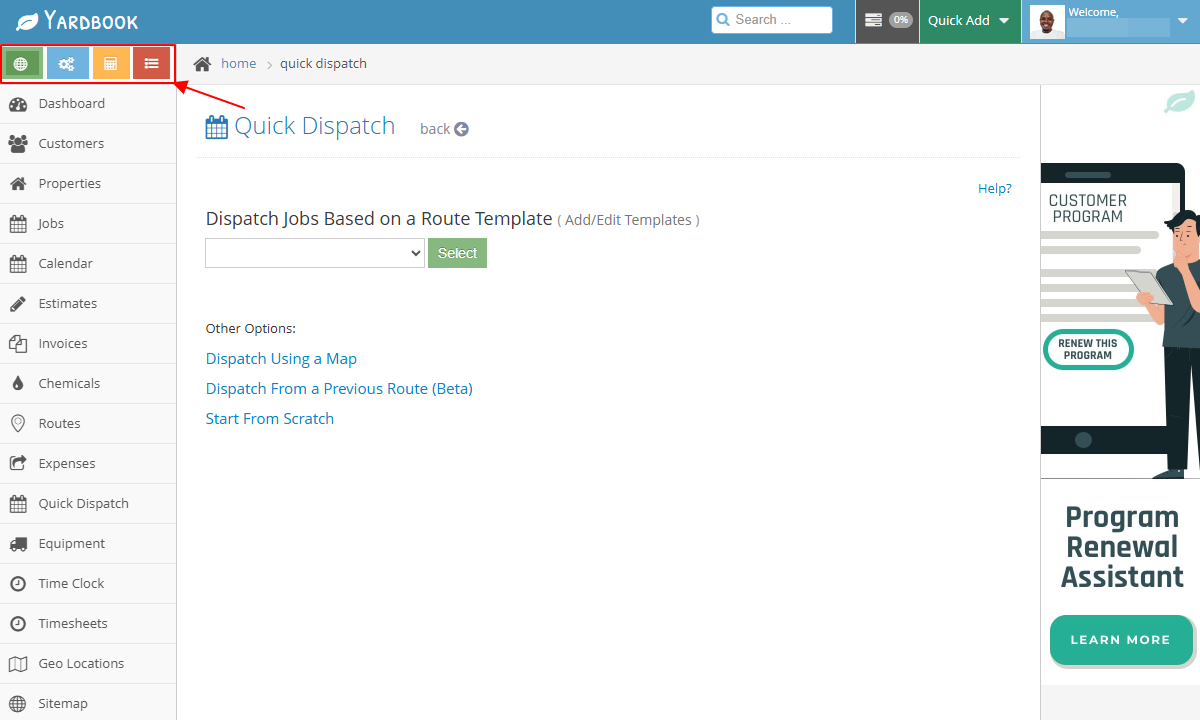
I also didn’t like seeing promotional feature ads on Yardbook’s web UI. The ads clutter the interface and may distract users from core tasks. In addition, I encountered endless captchas even when I was on a secure network. In one instance, I couldn’t solve the captcha, which ruined the login experience.
Additionally, the UI lacks design features for users with visual or hearing impairment. In fairness, though, it would be harsh to judge Yardbook for these design frailties, especially considering it runs primarily on a freemium model.
Yardbook Mobile App
Yardbook’s mobile app is available for both Android and iOS users. However, the iOS app is still in the beta-testing phase, as was the case during my last round of testing. Because of this, I used the Android app for this review.
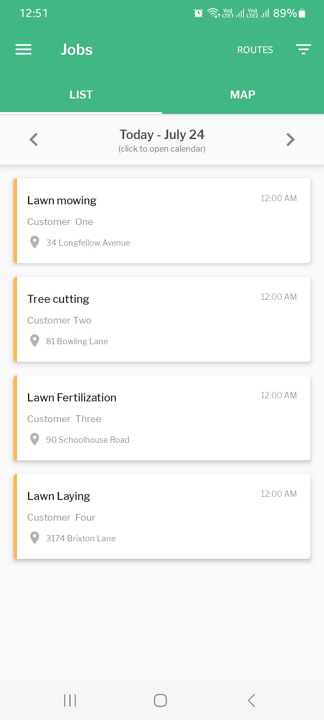
I appreciate that Yardbook walks you through vital tips when you log in to the mobile app. In all honesty, it isn’t the most detailed walkthrough, but it can help get rid of the unease newbies feel when faced with a new app.
Design-wise, the mobile app has a well-organized layout with two action areas: the navigation panel at the top and the details area. However, the menu is situated to the left instead of at the bottom, where modern users expect it. On the bright side, the menu is minimized into a hamburger icon by default, so the UI feels clean and clutter-free.
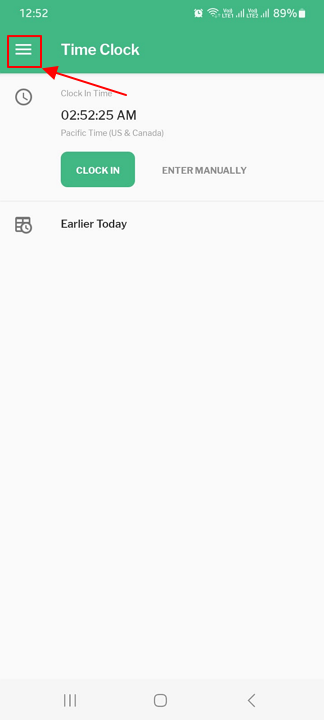
One minor issue I should highlight is that the mobile app’s color palette differs from that of the web version. Rather than adopting Yardbook’s standard branding, it adopts a green-and-white theme. While this doesn’t impact functionality, the inconsistent branding creates a disjointed user experience across the web and mobile apps.
Manager Version
The manager version provides the key features — jobs, time clock, customers, weather, routes, and properties. However, its administrative capabilities are limited to adding customers and properties. Managers can’t manage teams, add jobs, create routes, or dispatch crews while in the field, which is disappointing considering the app is built for field crews.
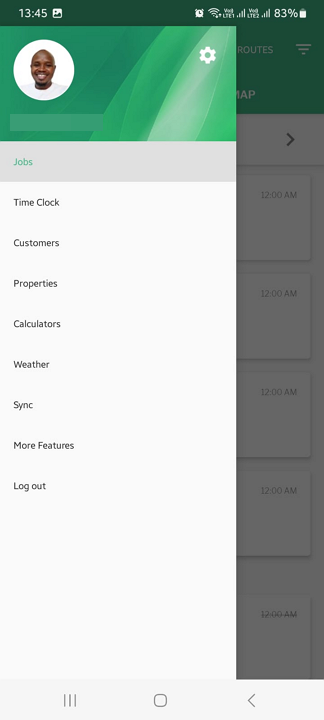
However, the app has a “more features” button, which opens the web app on mobile. This one-click access enables managers to handle admin tasks while in the field, although it does require an active internet connection.
Employee Version
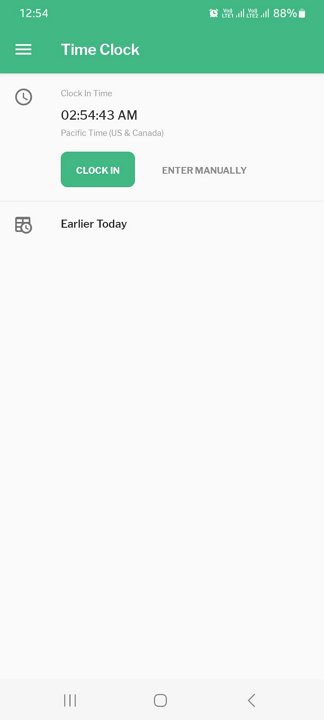
The employee version, on the other hand, has the features users need to manage day-to-day operations. Employees can track time, view jobs, see weather predictions, and calculate the amounts of mulch, gravel, fertilizer, and plants required for a certain property.
I like the mobile app’s functional offline mode. When I turned off my internet connection, I could track time, add customers, add properties, and view assigned jobs without a hitch. This is especially helpful for crews working in rural areas and neighborhoods with poor connectivity.
| Menu Item | Admin | Employee | ||
|---|---|---|---|---|
| Website | Mobile App | Website | Mobile App | |
| Feature | ||||
| Timesheet | ✅ | ✅ | ✅ | ✅ |
| Time tracker | ✅ | ✅ | ✅ | ✅ |
| Calendar | ✅ | ❌ | ❌ | ❌ |
| Schedule | ✅ | ❌ | ❌ | ❌ |
| Expenses | ✅ | ❌ | ❌ | ❌ |
| Time off | ❌ | ❌ | ❌ | ❌ |
| Analysis | ||||
| Dashboard | ✅ | ❌ | ❌ | ❌ |
| Reports | ✅ | ❌ | ❌ | ❌ |
| Activity | ❌ | ❌ | ❌ | ❌ |
| Management | ||||
| Kiosks | ❌ | ❌ | ❌ | ❌ |
| Approvals | ✅ | ❌ | ❌ | ❌ |
| Jobs | ✅ | ✅ | ✅ | ✅ |
| Team | ✅ | ❌ | ❌ | ❌ |
| Clients | ✅ | ✅ | ❌ | ❌ |
| Locations | ✅ | ✅ | ✅ | ✅ |
| Routes | ✅ | ✅ | ❌ | ✅ |
| Invoices | ✅ | ❌ | ❌ | ❌ |
Yardbook Core Functionalities
Yardbook’s features are tailored to solve the day-to-day challenges landscaping businesses face. I tested its core capabilities, paying close attention to how well it handles essential field-service workflows, and detailed my experience in the sections below. Keep reading for a full breakdown.
-
Job Scheduling
-
Time Tracking
-
Job Estimating
-
GPS Location Tracking
-
Invoices and Payments
-
Yardbook Integrations
Verdict: 6/10
Yardbook offers basic scheduling features, and for the most part, they worked exactly as I expected. The platform suffices for small businesses, but limitations such as the lack of notifications make it less effective in fast-paced environments. My biggest concern, however, is the lack of automation and compliance tools, which makes Yardbook unsuitable for companies with strict regulatory requirements.
Yardbook’s job-scheduling workflow can be confusing at first, especially for first-time users. For starters, most job-scheduling apps take you straight to a calendar with daily, weekly, or monthly views where you can create and assign tasks. Yardbook, on the other hand, works differently.
To begin with, Yardbook doesn’t have a dedicated scheduling tab in the menu. Instead, it tucks away all scheduling-related tasks under “jobs.” Unfortunately, the jobs page is crammed with so many options that it feels overwhelming and confusing at first. It took me several minutes to learn the platform, and beginners will likely need even longer.
Job Views
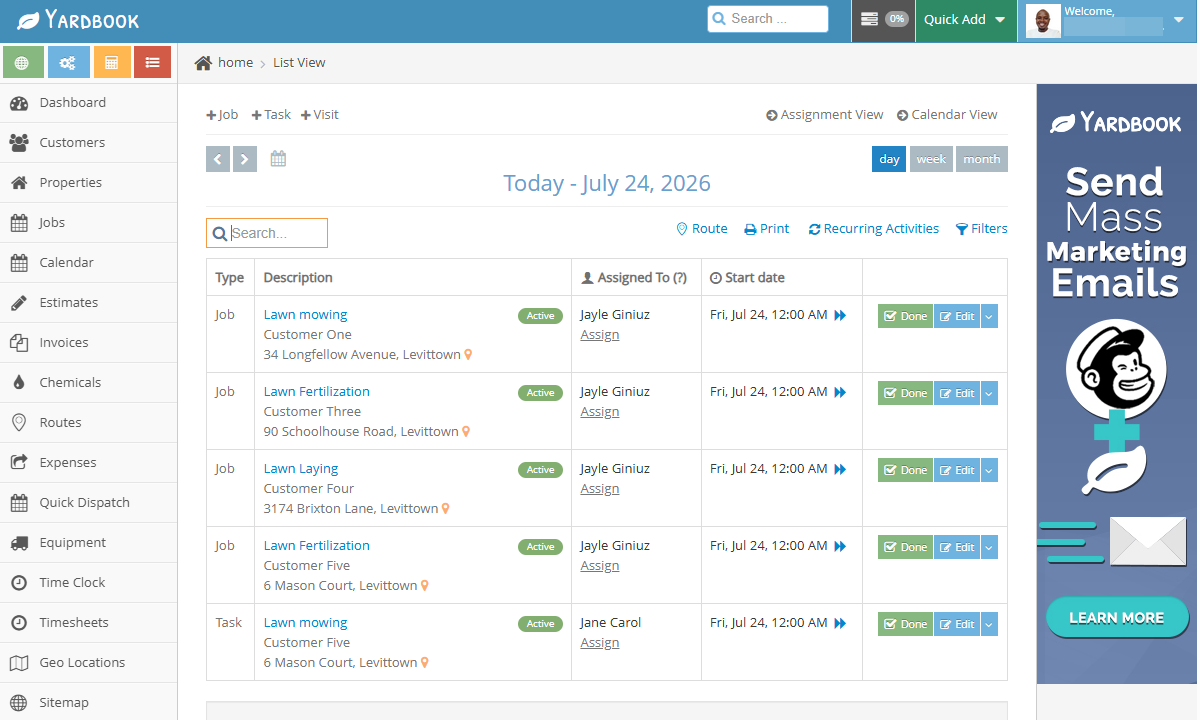
The jobs page lists jobs, tasks, and visits in a list view by default. The list view is especially useful if you need to review upcoming work, quickly search specific assignments, or track job status across multiple crews or properties.
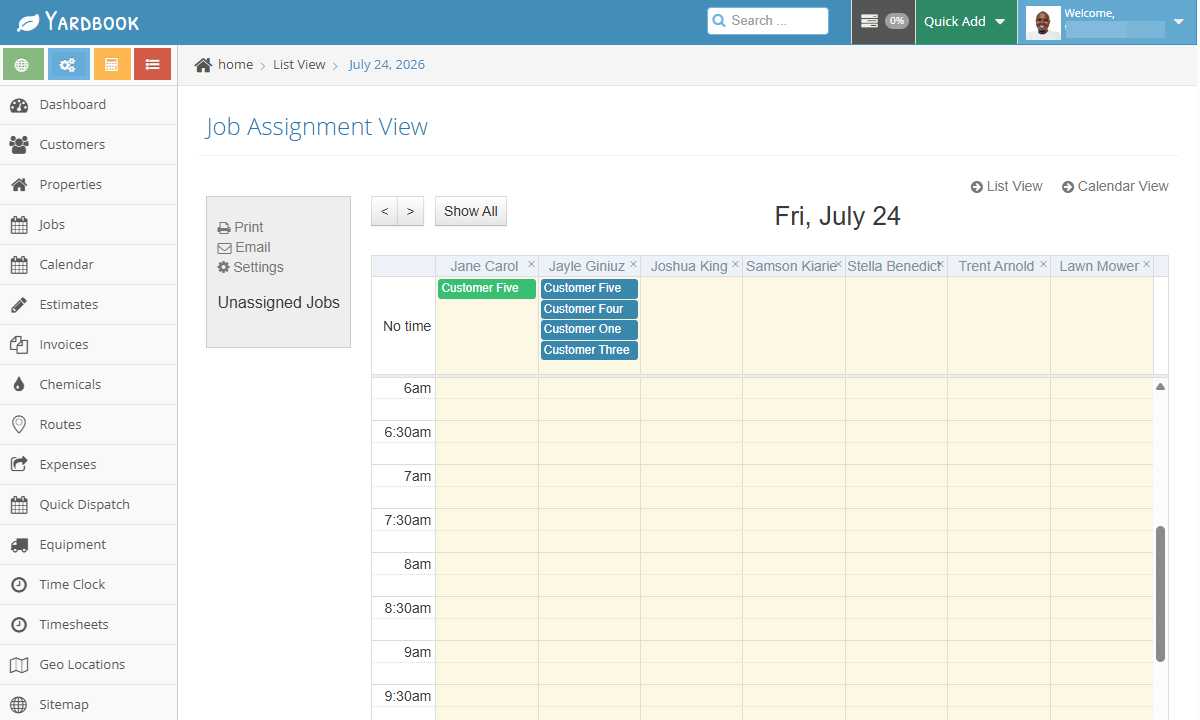
However, if you prefer a more standard scheduling view, you can switch to either assignment or calendar view. The assignment view displays each worker alongside their assigned jobs, tasks, and visits, and is useful for quickly tracking who’s working on what. My main gripe is that the assignment view displays only daily availability and assignments.
The calendar view, on the other hand, allows you to visualize assignments by day, week, or month. I like the monthly view, as it gives managers a broader perspective of upcoming workloads. It’s the closest Yardbook comes to emulating top-tier employee-scheduling solutions, and is particularly useful when you need to use the drag-and-drop scheduler.
Regardless of the view, assigning a job, task, or visit is a breeze. If you’re on the assignment or calendar view, click any tile and select the preferred option from the pop-up. Next, add the job description (name), details (instructions), property address, and service/product.
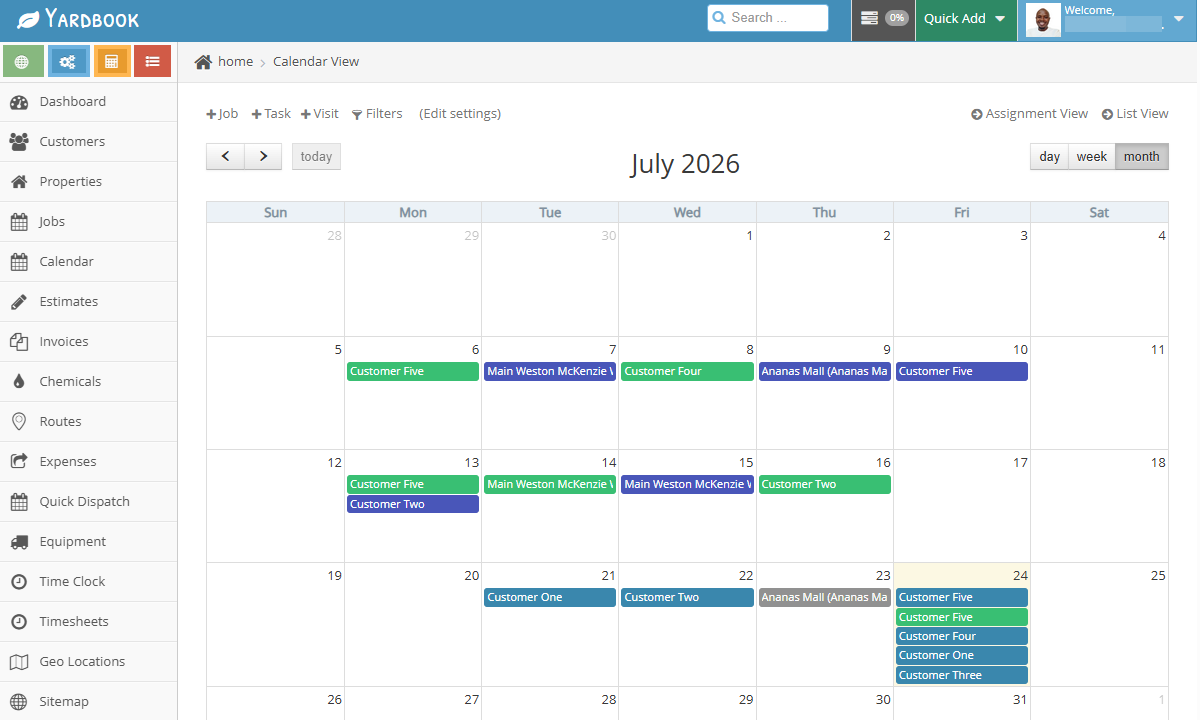
I like the recurring job feature as well, which lets you create a job once and set it to recur weekly, biweekly, or at a custom frequency. This saves you the manual effort of assigning tasks daily or weekly, making it incredibly helpful in the landscaping industry, where many tasks–such as hedge trimming and lawn mowing–are performed on a recurring schedule.
Yardbook’s Jobs and Scheduling Shortcomings
Yardbook’s core scheduling features worked exactly as advertised. Even so, I noticed several glaring shortcomings that make the platform less effective, even for small businesses. First, managers can’t break jobs down into manageable tasks. The task creation feature could’ve helped in this regard, but it doesn’t allow managers to link tasks to jobs.
Second, Yardbook doesn’t notify crew members when you assign them jobs. The lack of a notification system makes Yardbook less effective in busy environments. Employees are likely to miss assignments if they don’t constantly check the app to see new jobs.
Lastly, Yardbook lacks automatic scheduling, compliance, and employee self-service tools like shift swap and shift trades. The lack of advanced capabilities is somewhat understandable given Yardbook’s freemium model. Even so, the missing features makes it less suitable for large businesses and companies operating in jurisdictions with strict labor laws.
Did You Know?
Connecteam’s employee scheduling app automatically notifies workers of new assignments and allows employees to request shift swaps or trades directly from their phones.
Verdict: 5.5/10
Overall, Yardbook handles the basics of time tracking well, allowing solopreneurs and small businesses to log regular work hours. However, businesses that need tighter controls and stronger compliance safeguards will find the lack of clock-in restrictions and dedicated break and overtime tracking hard to overlook.
When it comes to time tracking, Yardbook’s time tracker enables employees to clock in and out through the web and mobile apps. As I mentioned earlier, the mobile app has robust offline functionality that proves especially useful for teams in regions with unreliable cellular coverage.
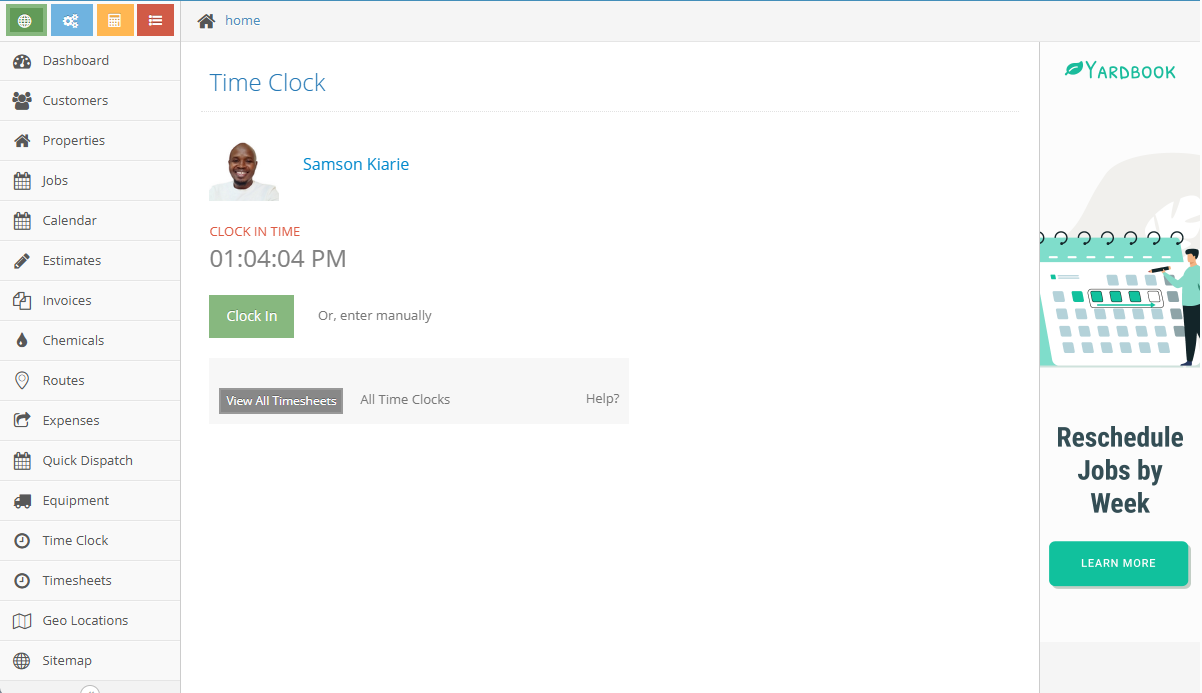
The web and mobile apps work well, especially for small businesses that want employees to clock in and out from their devices. However, businesses that require employees to clock in and out from a shared device will be disappointed to learn that Yardbook doesn’t have a kiosk option.
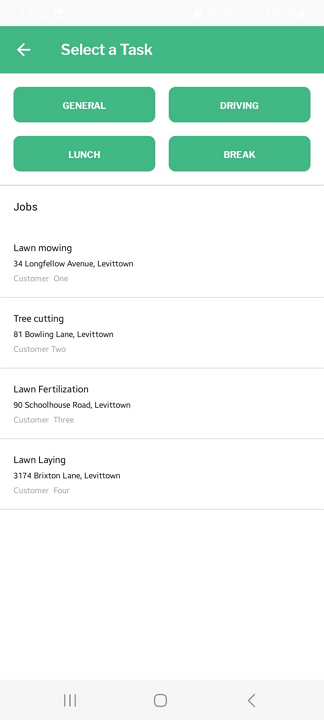
That aside, I appreciate that Yardbook requires employees to select a task when clocking in. This helps ensure that every minute is attributed to the right task, which goes a long way towards improving billing and cost tracking. Still, the clock-in rule could be stricter.
For example, Yardbook let me clock in without a scheduled task during testing. All I needed to do was select a default timesheet label–either general, lunch, break, or driving–and I could clock in without any warning. While these labels serve a purpose, I wish there were an option to disable them to ensure employees can clock in only for assigned jobs.
Missing Clock-In Restrictions
Another major issue is that Yardbook doesn’t have the punch restrictions you’ll find with the best time-tracking apps. For example, it doesn’t restrict early clock-ins or late clock-outs, which leaves room for unscrupulous employees to pad their timesheets. Moreover, without clock-in/out reminders, field crew could inadvertently forget to track time, leading to inaccurate payroll records.
Yardbook also lacks geofencing capabilities, which are especially helpful for landscaping businesses that want to ensure employees clock in only once they’ve arrived at the assigned property. Additionally, the app doesn’t support facial recognition, making it a poor fit for businesses looking to thwart buddy punching.
No Overtime or Break Tracking
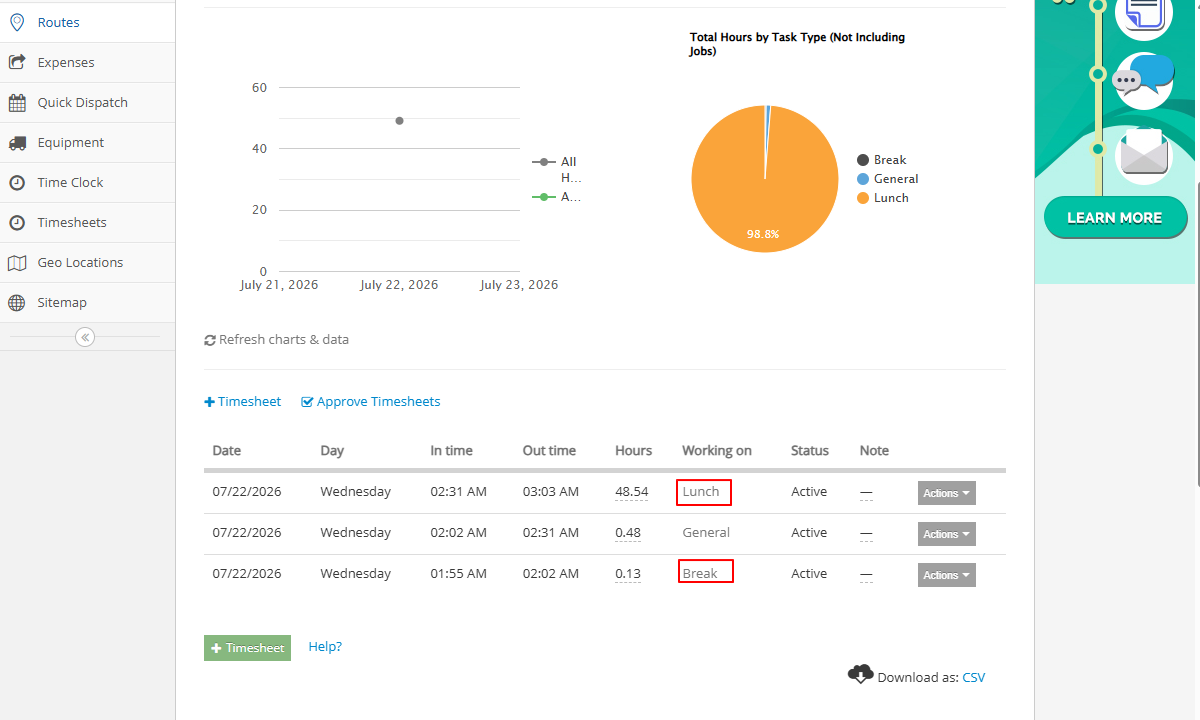
Yardbook doesn’t have a designated break tracker. However, it offers the “break” and “lunch” labels as workarounds.
When I selected the “break” or “lunch” label during clock-in, the app correctly labelled these sessions on the timesheet. However, it still treated the entries as regular working hours and included them in payroll. The failure to exclude meal time from employees’ payable hours proves Yardbook’s break workarounds are ineffective.
Similarly, the lack of a dedicated overtime tracker is offputting, especially considering Yardbook is geared towards industries dominated by non-exempt employees. Remember that federal law and some state laws in the United States (Yardbook’s target market) mandate overtime pay for non-exempt workers.
Without this vital tool, Yardbook doesn’t suffice for businesses that prioritize compliance. Luckily, there are numerous Yardbook alternatives with powerful break and overtime trackers, such as Connecteam. Connecteam’s time tracker lets you create break and overtime rules to help enforce your compliance with labor laws in your area, whether you’re in Canada or the United States.
Verdict: 8.5/10
Overall, job estimating is Yardbook’s forte. Built with landscapers in mind, the tool includes a customizable list of lawn care services and a handy lot measurement feature. Combined, these tools help businesses create accurate estimates based on actual property size and material costs. However, managers have to apply lot measurements manually, which adds extra admin work.
Job estimating is arguably Yardbook’s standout feature. I spent some time testing this tool and found it particularly helpful for businesses looking to create professional quotes and price jobs accurately. However, before you can create estimates, you’ll first need to add the products and services you offer to Yardbook’s catalog.
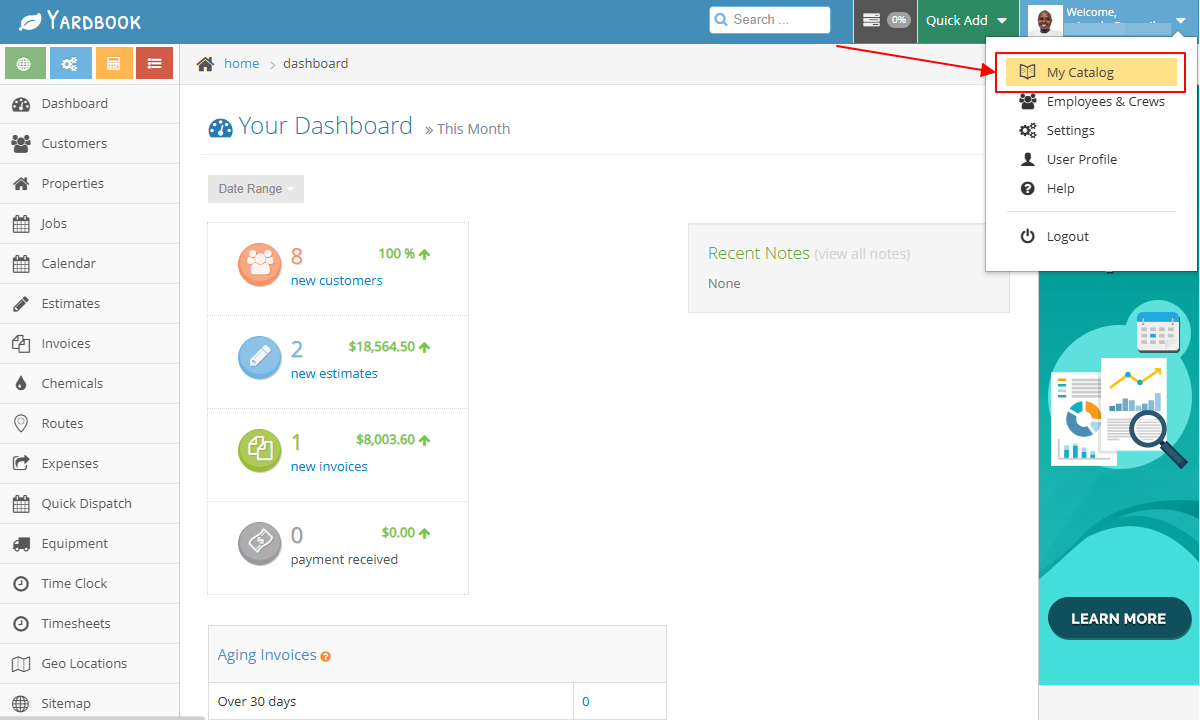
The only minor issue is that the products and services catalog is tucked away in the manager’s profile, not the main menu. As a result, some beginners may struggle to locate it. However, once you’re on the right page, managing your products and services is straightforward.
The catalog includes the most common lawn care and landscaping products and services by default, albeit without a price and tax rate. This gives you the flexibility to set rates that match your business’ pricing structure and local tax requirements. Adding a new product or service to the catalog is easy: just click the green “add” button and fill out the relevant details.
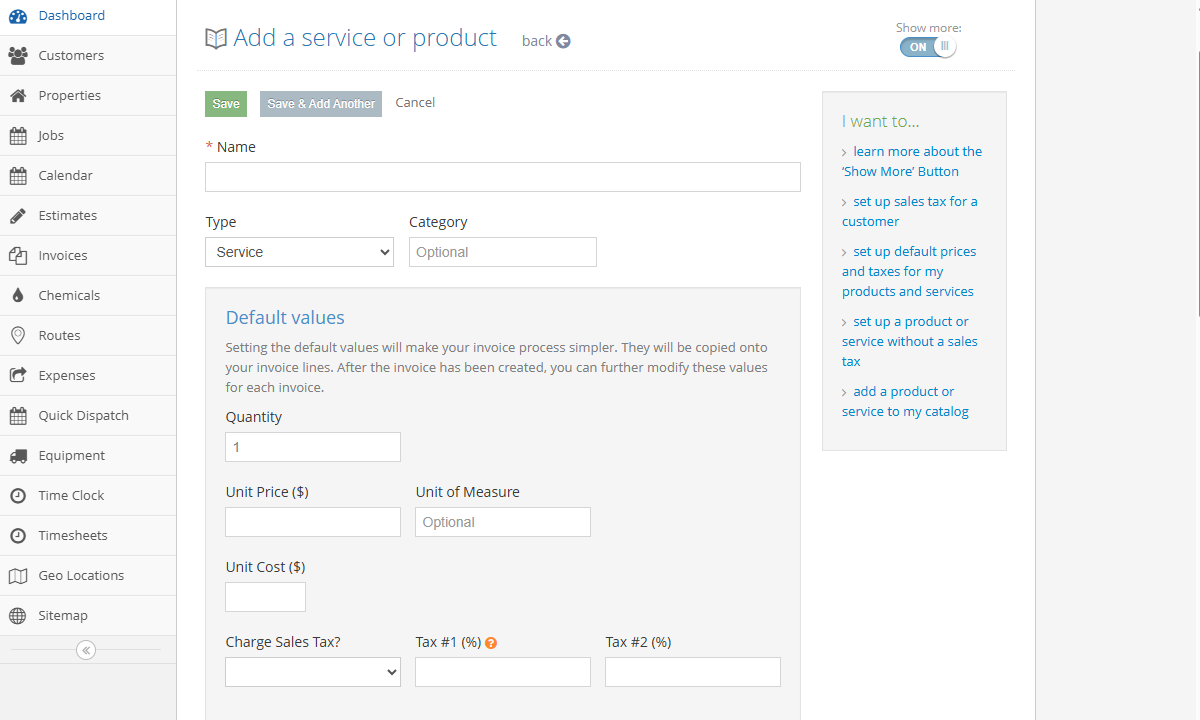
I also found it easy to assign chemicals to a service, and set the default amount and lawn size multiplier. This helps automatically calculate the amount to be applied based on lawn size, simplifying estimation even further.
Lot Measurement
Another feature that simplifies estimating is lot measurement, which lets users measure the square footage of lawns, gardens, and outdoor spaces using satellite images. This helps estimate how long tasks will take, determine the amount of chemicals needed, and, more importantly, create more consistent estimates.
I found it easy to take measurements on a client’s property page. I just needed to scroll to the measurement field and click “add” to access the satellite map. I then located the client’s property on the map and drew a polygonal boundary over the lawn or outdoor space. Yardbook calculated the property’s area and fence length automatically.
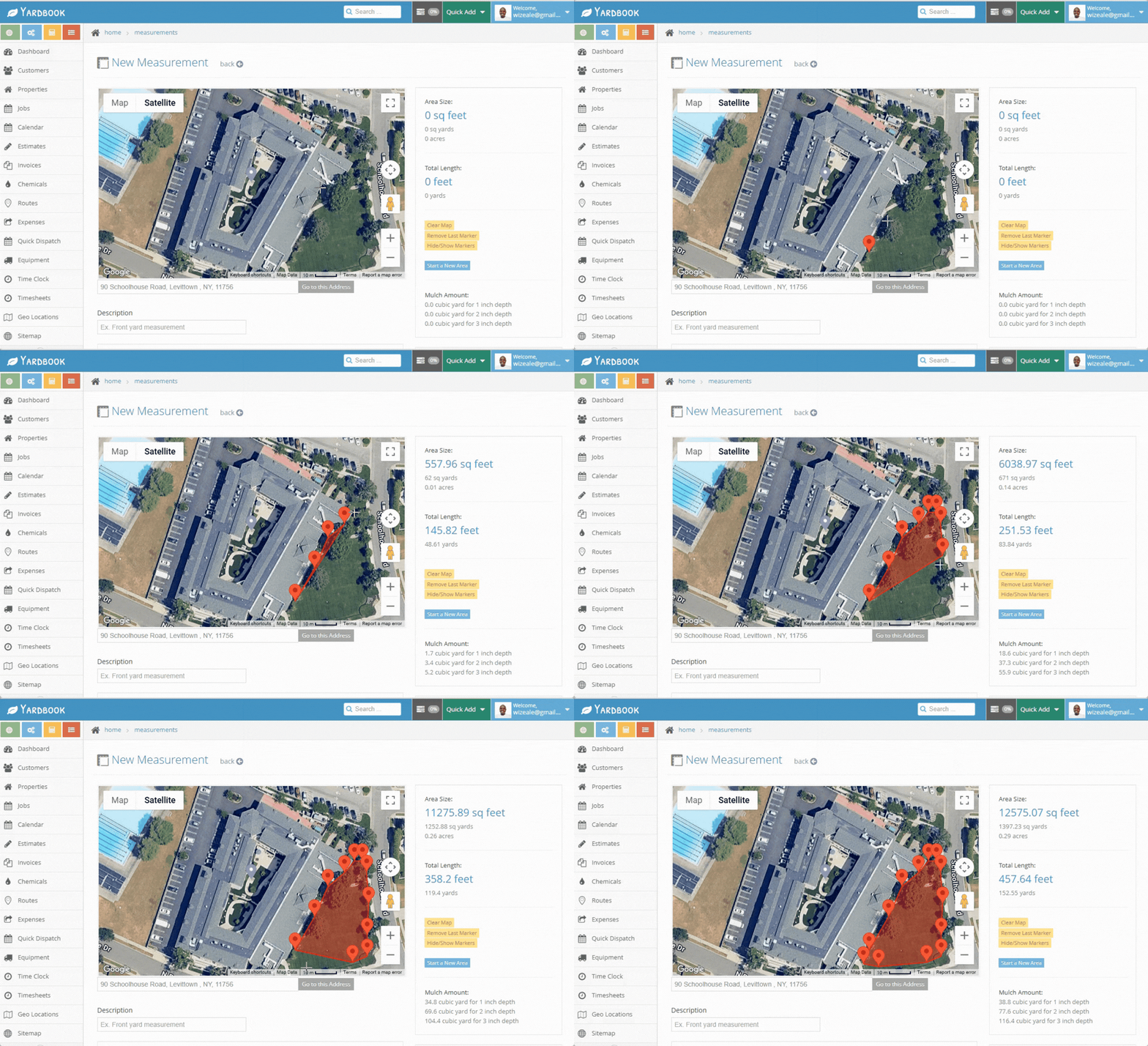
One aspect I don’t like is that Yardbook doesn’t automatically apply lot measurements to services when creating estimates. For example, even after measuring the client’s property, I still had to manually enter the lawn size to calculate the mowing cost, which felt cumbersome. That said, having access to the actual lawn size helped price services accurately.
Creating and Sending Estimates
Once you’ve set the price for your products and services, creating an estimate takes only a few clicks. Simply open the estimates page, click “add estimate,” and select the customer. Click “add an item,” select the products and services, adjust the quantity, and click “add items to estimate.”
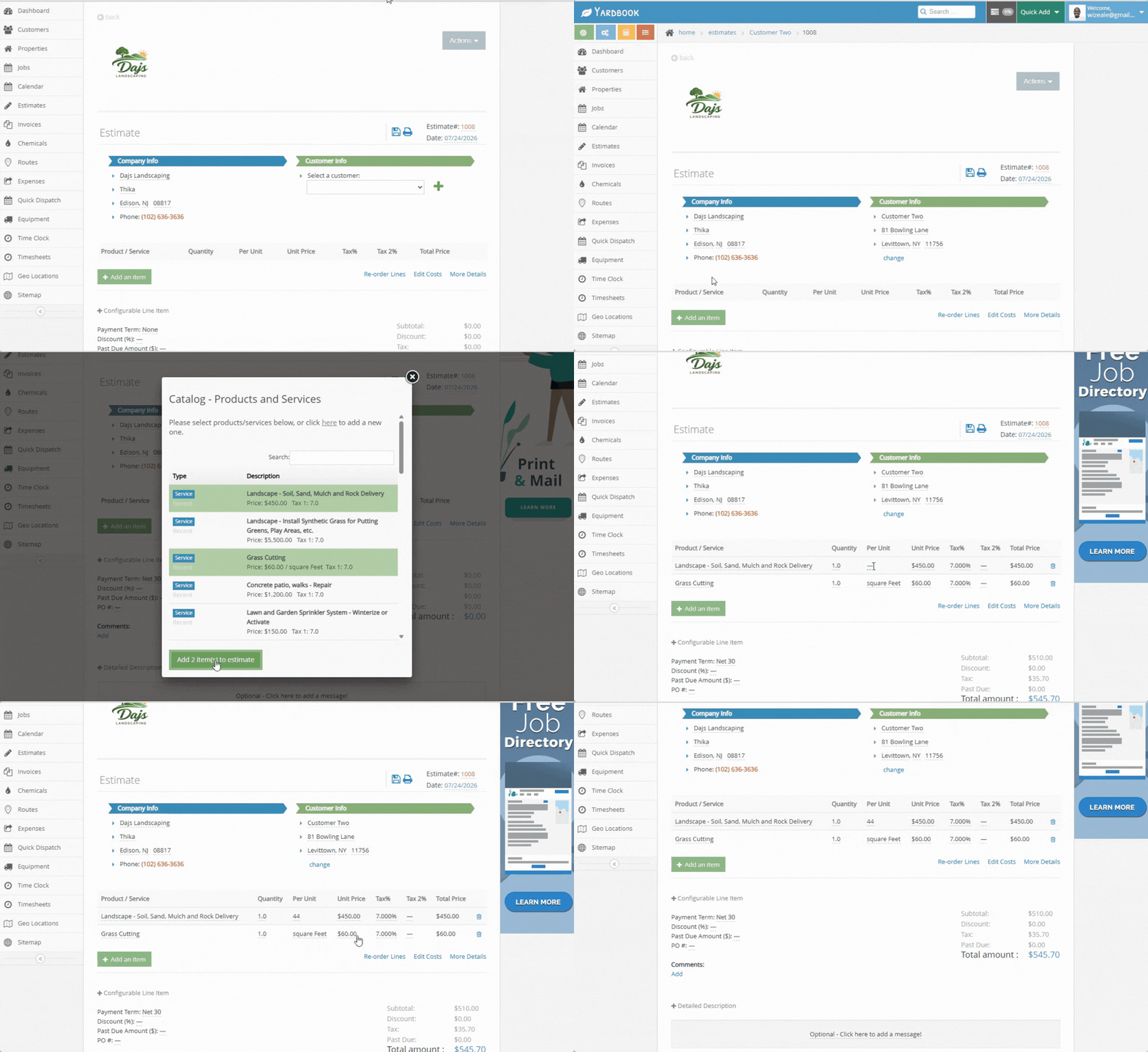
Yardbook also lets you add descriptions and photos to estimates to give clients the scope of work so they can approve the proposal with confidence. You can also add notes and attachments, but these won’t be displayed on printed or emailed estimates. Once the estimate is ready, you can either download it, email it to the client, or share it via QR code or URL.
If you’ve enabled online approval, the customer can approve the estimate without having to create a Yardbook account. You’ll receive an instant email notification when the customer gives the estimate the thumb of approval.
Verdict: 4/10
Overall, Yardbook’s GPS tracker is simply mediocre, as it can record only employees’ clock-in and clock-out locations. Since the app can’t continuously track crew movements, it’s ineffective for businesses that rely on real-time location tracking to coordinate operations. Its route planner works, but the optimizer is unreliable.
Yardbook’s GPS location tracking is fairly basic. During testing, the app captured my location when I clocked in and out, and marked each event with a pin on a map. However, because both clock-in and clock-out locations are marked with red pins, it can be difficult for managers to distinguish between them, especially when numerous events are displayed on the map.
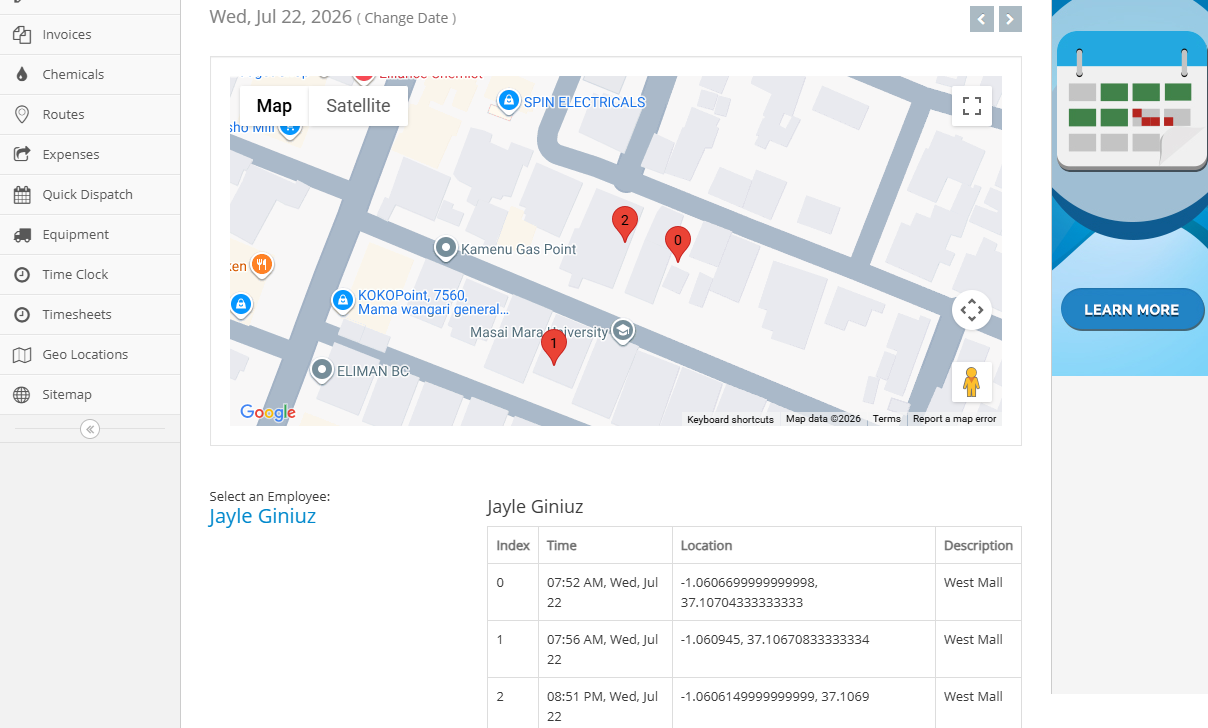
Regardless, Yardbook creates a verifiable record of where each task begins and ends. I find this functionality particularly useful for landscaping businesses, where field employees often travel between multiple properties throughout the day. The audit trail can help managers confirm that employees were actually at their assigned properties during the day.
Unfortunately, Yardbook doesn’t track employee movement after they’ve clocked in, unlike the best location-tracking apps. For example, once a field employee clocks in, managers can’t confirm whether they’re still at the property. The lack of real-time tracking makes Yardbook ineffective for enhancing field crew security, dispatching the nearest crew based on proximity, or giving customers accurate ETAs.
Route Optimization
Creating a route is straightforward: all I needed to do was to open the route planner and select the assigned jobs. Yardbook automatically generated the route, as shown in the GIF below. Keep in mind that the route planner and optimizer are admin features available only on the web app.
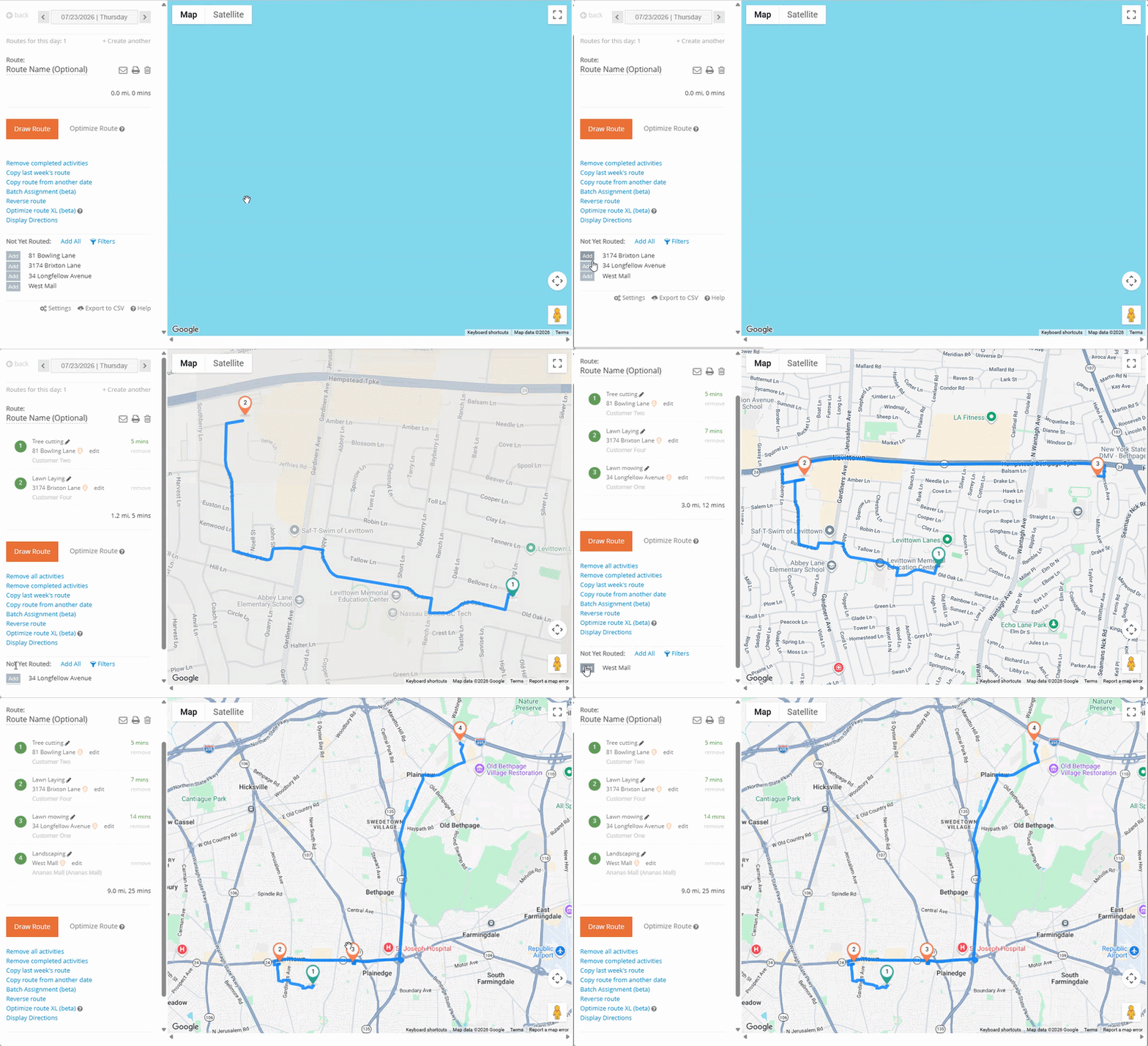
However, I did notice that the route planner generated the route in the order I added the assigned jobs. As a result, the first route was not optimal: it was nine miles long and required 25 minutes to navigate.
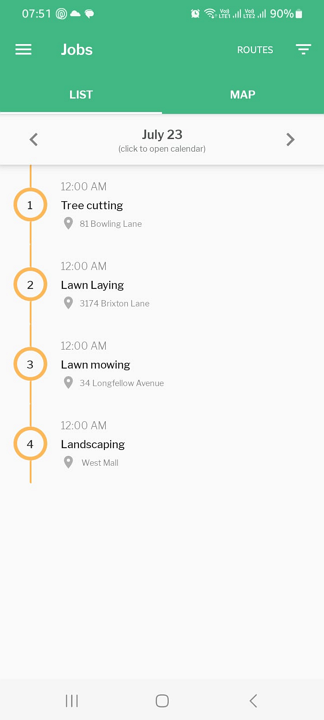
Ideally, the route optimizer should optimize the route by shortest distance, but it didn’t work during testing. I had to rearrange the jobs manually to achieve the shortest distance. That issue aside, employees can instantly view the routes on mobile and use them to navigate to their assignments for the day.
Verdict: 7/10
Overall, Yardbook’s invoicing handles the basics well, but it has some glaring issues. The invoice creation options are all over the place, which makes some features, like the auto-generator, difficult to locate. In addition, invoice generation isn’t fully automated. For example, when you select a customer, Yardbook doesn’t automatically reveal all their billable items, such as hours, products, and expenses.
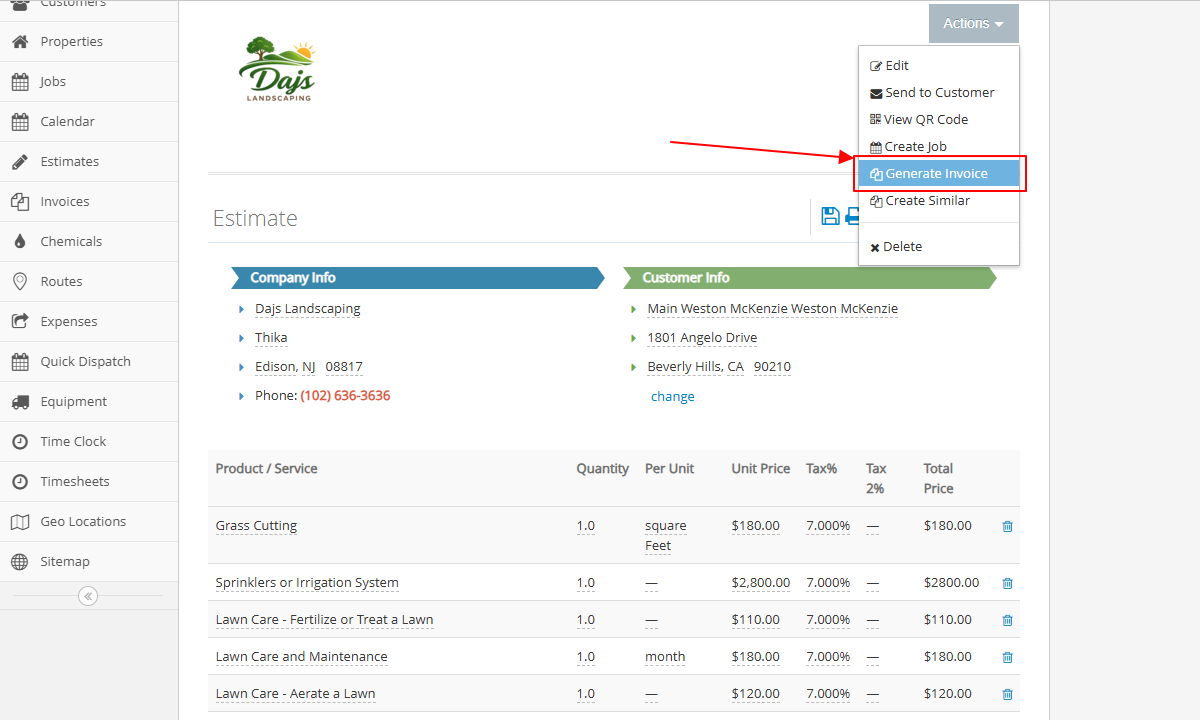
Yardbook provides three ways to generate invoices: convert estimates into invoices, generate invoices manually, or auto-generate invoices based on billable hours. Converting estimates into invoices is straightforward. Simply open the estimate, click “actions,” and select “generate invoice.” You can edit the line items, if need be, to finalize the invoice.
You can also generate invoices the standard way on the invoices page, which is good for services you didn’t include in the estimate. Simply open the invoices page, click “+ invoice,” select the customer, and add the service. I was also able to create recurring invoices, which I found useful for ongoing services.
My only gripe is that users have to add billable items manually. I’d like to see more automation here. For example, when I select a customer, Yardbook should automatically surface all billable items, including labor hours, completed jobs, materials, products, and expenses. This way, I can generate accurate invoices faster and with less manual work.
Auto-Generating Invoices
Lastly, you can auto-generate invoices based on a client’s billable hours. However, this option isn’t available on the invoices page; it’s tucked away under the invoices section in the sitemap, which makes it difficult to locate.
Nonetheless, this feature makes invoicing a breeze. All I needed to do was click “auto-generate invoice,” select the date range, and hit “generate invoices.” Yardbook auto-generated the invoices based on the jobs completed within the date range I had selected.
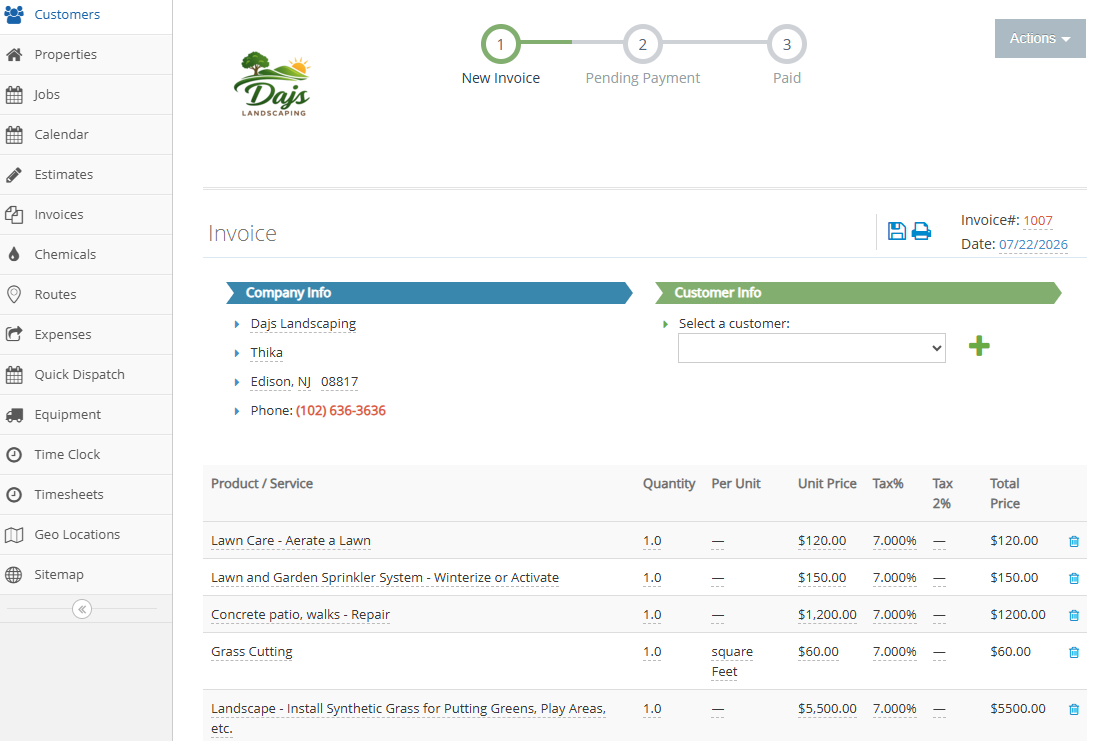
While there’s an option to invoice for active jobs, I wouldn’t recommend activating it, as that would mean billing customers for work that hasn’t been completed yet. If additional work is required or employees are unable to finish a job due to unforeseen circumstances, you may have to issue refunds.
I like that Yardbook lets managers send invoices directly via email or as URLs. The app also centralizes all invoices on a single dashboard regardless of how you created them, which makes it easy to track pending payments. However, the app requires you to record payments manually once a client makes the payment.
Verdict: 5/10
Overall, the addition of Zapier integration has greatly improved Yardbook’s connectivity. However, the vendor still has a long way to go when it comes to native integrations, which remain fairly limited.
The last time I tested Yardbook, its integration with QuickBooks was still in beta. I’m glad to see the vendor has since refined the integration to resolve any potential synchronization issues and rolled it out fully.
Even better, Yardbook has added MailChimp and Zapier integration. The latter is a particularly welcome addition, as it allows businesses to connect Yardbook with virtually any platform in their tech stack. Unfortunately, Yardbook has yet to roll out application interface program (API) integrations.
Reporting and Analytics
Verdict: 6/10
Overall, Yardbook does a good job of helping users analyze their business’ financial performance. Still, it lacks the depth and flexibility you’ll get with more advanced field service management solutions. For example, it doesn’t provide insights into workforce productivity or data visualizations such as charts and graphs, and its report-sharing options are limited.
At first glance, I assumed Yardbook didn’t offer reporting features, because I couldn’t find a reports tab in the main navigation. After digging through the web app, I discovered that reports are accessible only from the sitemap. Many first-time users will likely struggle to locate the feature.
This accessibility issue aside, Yardbook offers 17 reports that are primarily designed to help users analyze their business’ financial performance. Popular reports include:
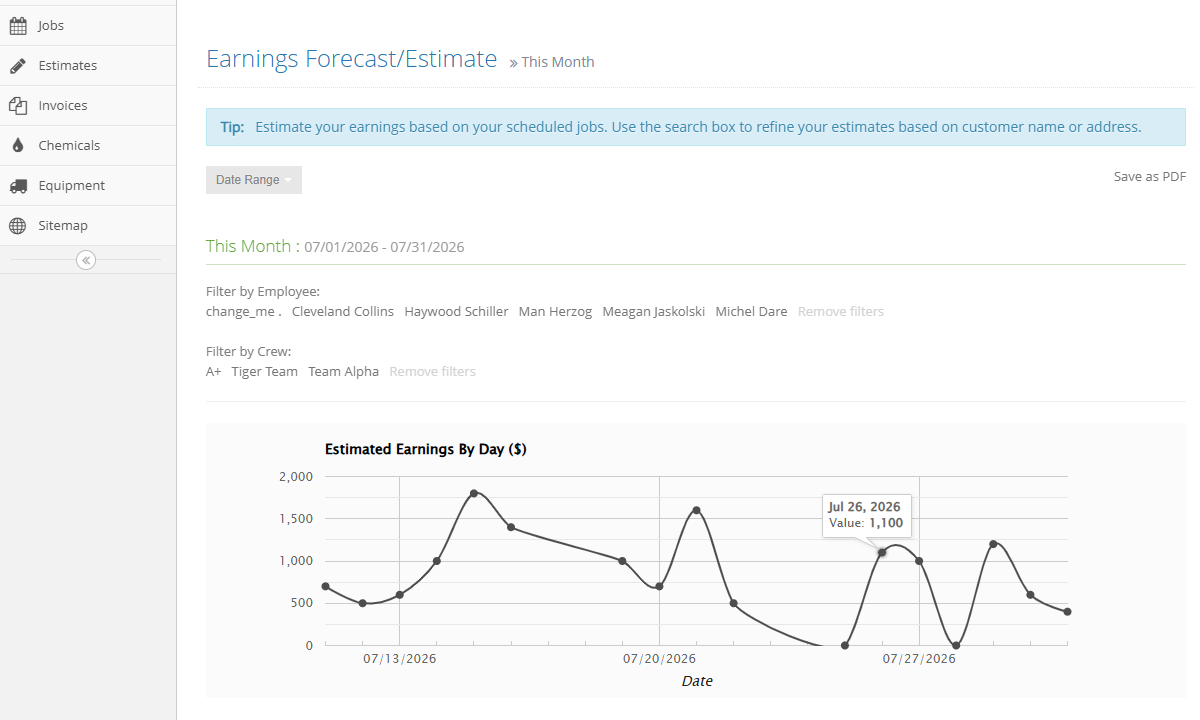
- Earning forecast and estimates: This report helps you analyze estimated revenue or future earnings based on historical jobs. Forecasting your cashflow can help you plan resources more effectively to improve profit margins.
- Customer report: This report gives you a 360-degree view of your pipeline. It provides a breakdown on the number of active clients versus potential customers during a certain period.
- Job-costing report: This report pulls costing data across different jobs. It helps compare the total costs for each job versus the price estimate to validate your pricing strategy.
- Dashboard: Though not a report, per se, the dashboard provides a quick overview of your business health. It presents data about new customers, estimates, invoices, and payment received in an easy-to-digest format.
- Opportunity: This report offers a clear visualization of your sales funnel, displaying how each opportunity is progressing. It helps you determine where to channel your efforts to close more deals with less spending.
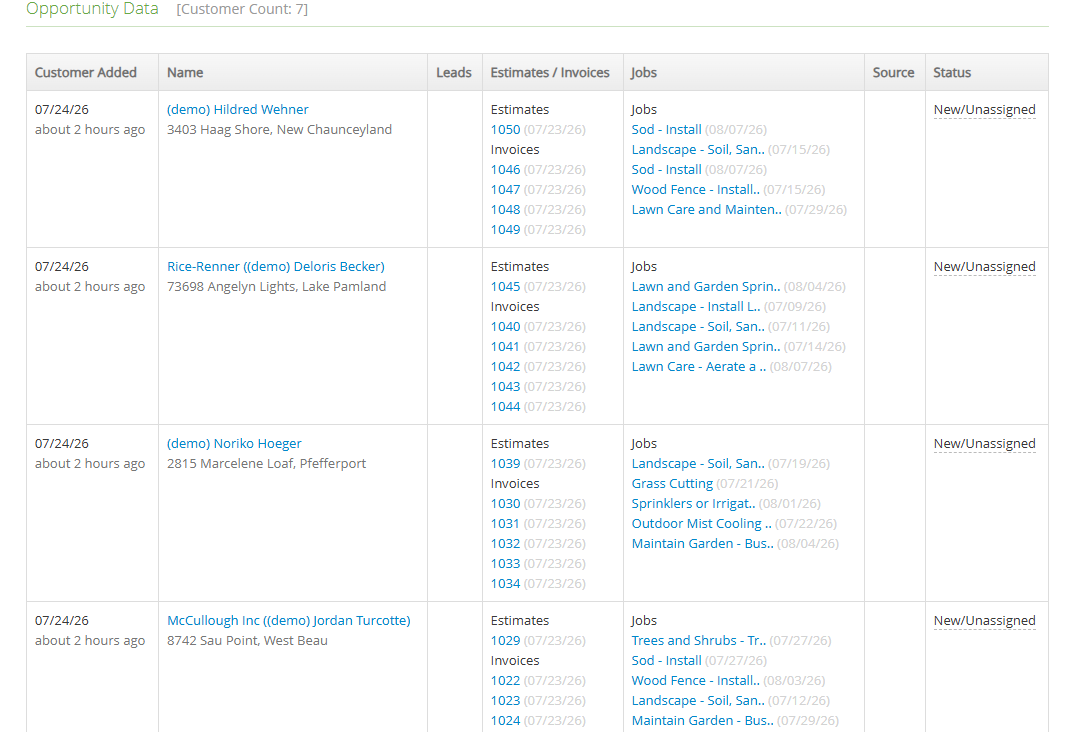
Yardbook doesn’t leverage artificial intelligence (AI) or any other advanced technology to streamline reporting and analytics. While its straightforward approach makes generating reports quick and easy, it also means Yardbook presents data almost exclusively in tables. Without detailed visualizations, beginners may find it difficult to uncover patterns or draw meaningful conclusions from reports.
Moreover, report-sharing options are limited to PDF downloads. You can’t download reports in Excel or CSV format, email them directly to stakeholders, or schedule them to be delivered to your inbox on a recurring basis. Without these capabilities, sharing performance updates with stakeholders can be a hassle.
Yardbook Security and Privacy
Verdict: 7/10
Overall, while Yardbook has the security and privacy features most small businesses need, it lacks the advanced controls and measures large organizations require. For this reason, it doesn’t suffice for businesses with strict security, governance, and regulatory requirements.
| Feature | Availability |
|---|---|
| Data encryption | ✅ SSL |
| GDPR compliant | ❌ |
| HIPAA compliant | ❌ |
| Certification | ❌ |
| MFA/2FA | ❌ |
| Admin controls | ✅ Role-based access control |
| Hosting region | Not specified |
From a security and privacy standpoint, Yardbook is adequate but not enterprise-ready. It provides the essential security measures, such as SSL encryption and different user permission levels, and complies with the California Online Privacy Protection Act. All that sounds promising, considering the platform runs on a freemium model and is geared towards small businesses.
However, it falls short of the advanced controls and transparency large organizations expect. For example, while it protects data in transit, it doesn’t disclose whether it encrypts data at rest. In addition, Yardbook lacks single sign-on (SSO), two-factor authentication (2FA), and widely recognized certifications such as SOC 2 Type II and ISO 27001.
Yardbook Customer Support
Verdict: 6.5/10
Overall, Yardbook’s support options are limited compared to similar apps. The lack of live chat and phone support hurts, and can be a constant source of frustration for field teams that need instant support when they run into issues.
| Support Type | Availability |
|---|---|
| Live chat | ❌ |
| Phone support | ❌ |
| Email support | ✅ |
| Community forum | ❌ |
| Ticket submission | ✅ |
| Help center | ✅ |
The lack of live chat support, a feature that has become a must-have these days, really holds Yardbook back. This, combined with the absence of phone support, means users have no reliable way to find instant assistance when urgent technical issues arise.
On the bright side, I like the “I want to” questions Yardbook displays on each feature page. The list addresses the most common concerns users may have when using a certain feature. When I clicked on the questions, Yardbook provided clear instructions on how to use a feature or perform an action, flattening the learning curve.
Additionally, Yardbook is quite responsive through the email channel. The providers responded to my questions in under 24 hours, which is fast by email support standards. In some cases, particularly during U.S. business hours, I received a response in less than 10 minutes.
Yardbook’s help center and general FAQs are comprehensive, covering nearly every issue users are likely to encounter. I especially appreciate that the articles include step-by-step guides with screenshots that make the instructions easy to follow. However, while the help guides are organized by feature, a simple search didn’t always surface the most relevant articles for my queries during testing.
What Are Yardbook’s Review Ratings From Review Sites?
(As of August 2026)
Yardbook App Review
Yardbook provides virtually all the essential features you need to streamline your workflows and maximize the profitability of your landscaping business. It lets you schedule jobs, track time, manage customers, and invoice clients for faster payments. Moreover, while Yardbook’s dense menus can make some features difficult to find, the features themselves are fairly easy to use.
That said, Yardbook isn’t without flaws. While it accurately tracks regular work hours, it lacks designated break- and overtime-tracking tools. This makes it unsuitable for businesses that must comply with strict labor laws. Moreover, most of its features are pretty basic and lack the advanced controls and automation needed for managing complex operations in large companies.
Connecteam: The Better Yardbook Alternative
Yardbook provides basic tools that small landscaping businesses need to get started. It’s functional, but lacks the advanced workforce controls and operational flexibility that businesses with large crews and more complex workflows usually require.
If you need advanced scheduling, compliant time tracking, efficient crew dispatch, real-time location tracking, and labor law compliance, I recommend using Connecteam. Some of the benefits of using Connecteam include:
Automated Job Scheduling
With Yardbook, managers create and assign jobs manually, which can be tedious and time-consuming for multi-location businesses. Connecteam’s auto-scheduler takes away the manual hassle, enabling you to assign hundreds of shifts in minutes, not hours. It assigns jobs based on employee skills and availability: no more assigning turf care jobs to concrete workers.
For simple job scheduling, Connecteam’s manual scheduler is much faster and more efficient than Yardbook. Like Yardbook, Connecteam provides a drag-and-drop scheduler and recurring jobs tool to speed up scheduling. The shift-copying tools and shift templates give it an edge: managers can get a headstart and create schedules with minimal effort.
Moreover, Connecteam offers an array of helpful employee self-service tools. You can allow crew members to claim open shifts when they have availability and swap shifts with colleagues when life happens – all without involving the manager. Giving employees greater flexibility over their schedules can improve job satisfaction and cut down on the manager’s admin work.
Accurate and Compliant Time Tracking
Connecteam’s powerful yet easy-to-use Android and iOS mobile apps enable field employees to track time anytime, anywhere. The Connecteam time tracker uses a range of clock-in restrictions and reminders that make it difficult for employees working on labor-intensive jobs to forget to clock in or clock out.
Unlike Yardbook, Connecteam has a kiosk app, which allows multiple employees to clock in and out from a shared device. This is particularly useful for landscaping businesses where not every crew member owns a smartphone.
Moreover, Connecteam’s geofence helps ensure employees clock in or out only when physically at the assigned property. It also notifies managers when field employees leave an assigned property, making it useful for verifying job completion and monitoring crew movement during the workday.
Connecteam also lets you track break and overtime in full compliance with labor laws. You can assign manual and automatic breaks, set break reminders, and prevent employees from ending breaks early. What’s more, Connecteam tracks daily, daily double-time, weekly, holiday, and seventh-consecutive-day overtime, and automatically calculates employee overtime pay, saving managers manual hassle.
And So Much More
Beyond scheduling and time tracking, Connecteam offers a wide range of workforce management features, including:
- Task management
- Real-time location tracking
- Document management
- PTO management
- Forms and checklists
- Employee onboarding and training
- Employee recognition and reward
- Knowledge base
The icing on the cake? Connecteam is free for solopreneurs and small landscaping businesses with fewer than 10 employees. Moreover, Connecteam’s pricing starts at $29 per month for 30 employees, which works out to less than $1 per user.
Despite its affordable pricing, Connecteam offers significantly more functionality than many field service management solutions, making it an excellent value for fast-growing landscaping businesses. Start a 14-day free trial today to learn firsthand how Connecteam works.
FAQs
Yardbook doesn’t help businesses comply with labor laws because it lacks dedicated break- and overtime-tracking tools. It treats break and lunch hours as regular paid work time, making it a poor fit for U.S. and Canadian businesses with strict labor requirements.
Yardbook offers a generous free-forever plan with no usage limits. Paid plans cost $34.99 per month for Business and $49.99 per month for Enterprise, with no per-user fees. A 60-day free trial is available for paid plans, but Yardbook only offers monthly billing.
Switching to Yardbook is fairly easy for customer data, but setting up employees takes manual work since bulk invites aren’t supported. Leaving Yardbook is difficult and manual because you can only export reports as PDF files, not CSV or Excel spreadsheets.
Yardbook integrates with QuickBooks for financial and payroll sync, but this feature is gated to the $49.99 Enterprise plan. Yardbook doesn’t offer native integrations with other dedicated payroll providers, though you can connect additional tools using Zapier.
Yardbook offers native integrations for QuickBooks, Mailchimp, and Zapier. The Zapier integration lets you connect Yardbook to third-party accounting, communication, and CRM tools. Integration availability depends on your plan, with QuickBooks sync reserved strictly for the Enterprise tier.
Yardbook protects data using SSL encryption and role-based access controls. However, it lacks two-factor authentication, single sign-on, and SOC 2 Type II or GDPR compliance, making it unsuitable for businesses with strict governance and security requirements.
Yardbook’s mobile app is easy for field employees to use day to day, even without an internet connection. However, the web app feels clunky with dense menus, and the mobile manager version can’t assign jobs or dispatch crews without redirecting to the web browser.
Yardbook captures GPS coordinates only when workers clock in and clock out. It doesn’t prevent time theft effectively because it lacks geofencing, real-time location tracking, facial recognition, time-clock kiosks, and clock-in punch restrictions.
