

Great rostering solution, but time tracking feature is restrictive
Verdict: 7/10
RosterElf is a rostering and time tracking platform. It offers tools for creating and assigning schedules, managing leave, and tracking employee hours, labor costs, and more.
The app primarily caters to Australian businesses but can also be used internationally. However, some features, such as employee tax document management, are tailored to Australian laws. RosterElf’s privacy policy also documents UK GDPR measures, including data-subject rights and an Article 27 UK representative.
Finally, while its pricing is generally affordable, RosterElf doesn’t offer a free plan, making it less suitable for small businesses.
Key Features:
- Rostering. Create and assign shifts to team members based on their availability. Plus, offer open shifts and shift swapping to ensure your jobs and projects are always covered.
- Time tracking and geofencing. Let employees clock in and out of shifts from their smartphones—and only when they’re within their work zones.
- Leave management. View and approve or deny employees’ leave requests from your dashboard.
- Payroll integrations. Integrate with Xero and MYOB, with payroll-ready export options for other payroll solutions.
- Sites, positions, and staff members: Add and manage staff members, roles, and job sites.
Pros
- Multiple payroll integrations
- User-friendly mobile app
- Reasonably priced
- Impressive AI chatbot support
Cons
- Limited leave management features
- Limited third-party integrations
- No free plan
RosterElf Pricing
RosterElf has three standard paid plans: Core, Full Suite, and HR. Core covers rostering, time and attendance, and payroll-ready timesheets; Full Suite adds HR tools; and the HR plan is available for businesses that only need HR features.
For companies with more than 250 employees, RosterElf also offers custom enterprise pricing.
| Core | Full Suite | HR |
|---|---|---|
| AUD $6/employee/month + GST | AUD $7/employee/month + GST | AUD $3/employee/month + GST |
| Everything in Core, plus:
|
|
Though RosterElf uses Australian-dollar pricing, businesses worldwide can use the app. International businesses should account for exchange-rate changes when comparing its pricing with products charged in other currencies.
Here’s how RosterElf’s price stacks up against competitors—some of which also offer universal pricing plans.
| Team size | RosterElf (Core) | Tanda (Workforce Management) | Deputy (Core) | Connecteam (Advanced) |
|---|---|---|---|---|
| View pricing | View pricing | View pricing | View pricing | |
| 10 Users | $60 AUD/mo | $67.50 AUD | $87.50 AUD | Free for life—All features and dashboards |
| 20 Users | $120 AUD/mo | $135 AUD | $175 AUD | $49 USD (~74 AUD) |
| 30 Users | $180 AUD/mo | $202.50 AUD | $262.50 AUD | $49 USD (~74 AUD) |
| 50 Users | $300 AUD/mo | $337.50 AUD | $437.50 AUD | $79 USD (~119 AUD) |
| Read our full Tanda review | Read our full Deputy review | Learn more about Connecteam |
RosterElf offers a free 15-day trial, which I really appreciated.
However, I was disappointed by the lack of a free plan. Without this, RosterElf might not be the best solution for small businesses and early-stage startups with tight budgets.
Verdict: 8/10
RosterElf Usability and Interface
Signing up for RosterElf’s free trial was straightforward. I input my name, email address, and mobile number and was immediately redirected to my new RosterElf account. I really appreciated how quick and easy this process was.
Once in, I had mixed emotions about RosterElf’s interface and user experience. I wasn’t a fan of the overall look and feel—especially the overwhelmingly bright green color theme. Additionally, the design felt dated compared with more modern-looking platforms like Replicon.
However, I appreciated RosterElf’s web layout and easy navigation. All key features—from roster and payroll to staff, positions, and sites—were listed in the top bar. This is also where I could find my calendar, settings, reporting, and dashboard tools.
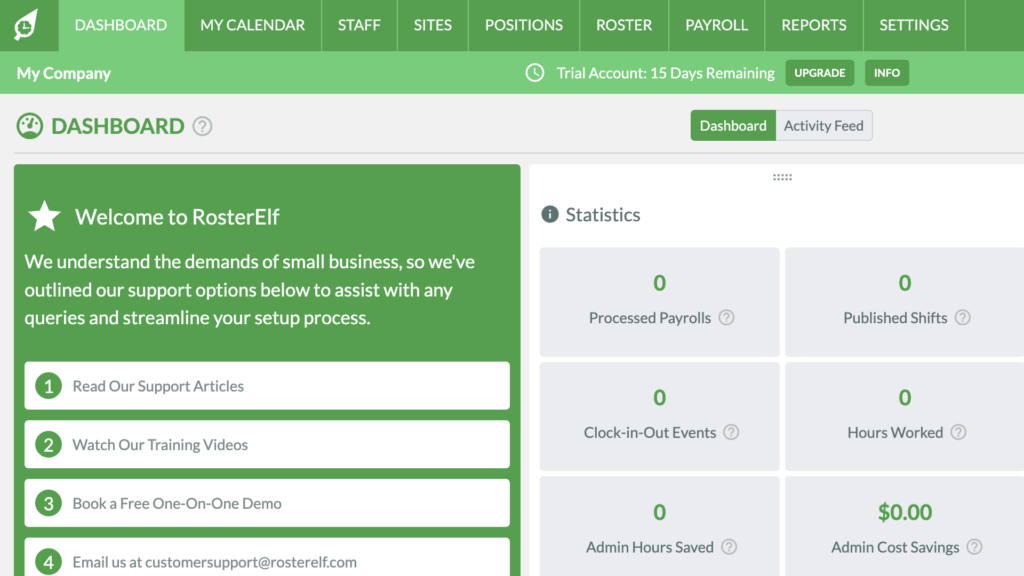
Individual features were also easy to use and navigate. For instance, I tested the position feature to add a new role, and the process was very intuitive.
However, RosterElf doesn’t currently offer any accessibility features—such as a screen reader, or dark mode—so it’s not the most inclusive solution for users with visual, motor, or other impairments.
Verdict: 7/10
Mobile app
RosterElf has mobile apps on iOS and Android. I downloaded the iOS app easily from the App Store and signed in using my email address and password.
Despite being the same green color, the mobile interface was far more appealing and less overwhelming than the web portal. It has fewer features but provides all the essential tools users need.
| Menu Item | Employees | Admins | ||
| Web | Mobile | Web | Mobile | |
| Core features | ||||
| Rostering | ✅ | ✅ | ✅ | ✅ |
| Time tracking | ✅ | ✅ | ✅ | ✅ |
| GPS and geofencing | ❌ | ✅ | ❌ | ✅ |
| Photo verification | ❌ | ✅ | ❌ | ✅ |
| My calendar | ✅ | ✅ | ✅ | ✅ |
| Manage availability | ✅ | ✅ | ✅ | ✅ |
| Request leave | ✅ | ✅ | ✅ | ✅ |
| Payroll integrations | ❌ | ❌ | ✅ | ❌ |
| Analysis features | ||||
| Reports | ❌ | ❌ | ✅ | ❌ |
| Dashboard | ❌ | ❌ | ✅ | ✅ |
| Management features | ||||
| Manage staff | ❌ | ❌ | ✅ | ✅ |
| Manage positions | ❌ | ❌ | ✅ | ❌ |
| Manage sites | ❌ | ❌ | ✅ | ❌ |
| Account management | ❌ | ❌ | ✅ | ❌ |
| Settings and customizations | ❌ | ❌ | ✅ | ❌ |
The mobile app lets employees and admins track their time, see their schedules, and manage their shifts and leave. Recent app updates have introduced more manager tools—like roster publishing and basic labor insights—directly in mobile, though deeper administrative tasks still require the desktop dashboard.
RosterElf’s mobile app offers several manager tools, including roster editing and publishing, basic staff and site management, and access to labor insights. However, more advanced tasks—such as account management, payroll sync, and detailed reporting—remain limited or are more easily handled in the desktop dashboard.
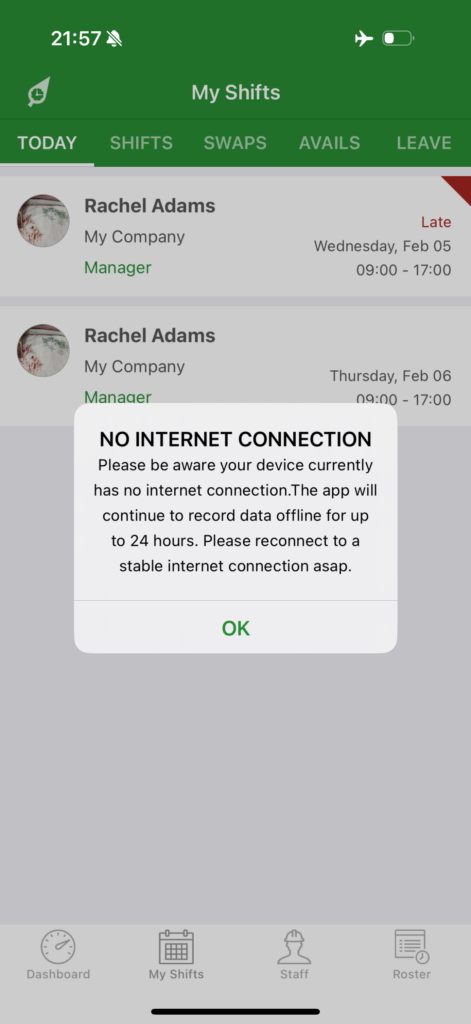
That said, I was impressed that RosterElf’s mobile app works offline.
Verdict: 8/10
RosterElf Core Functionalities
Here are RosterElf’s key features and functionalities.
Rostering
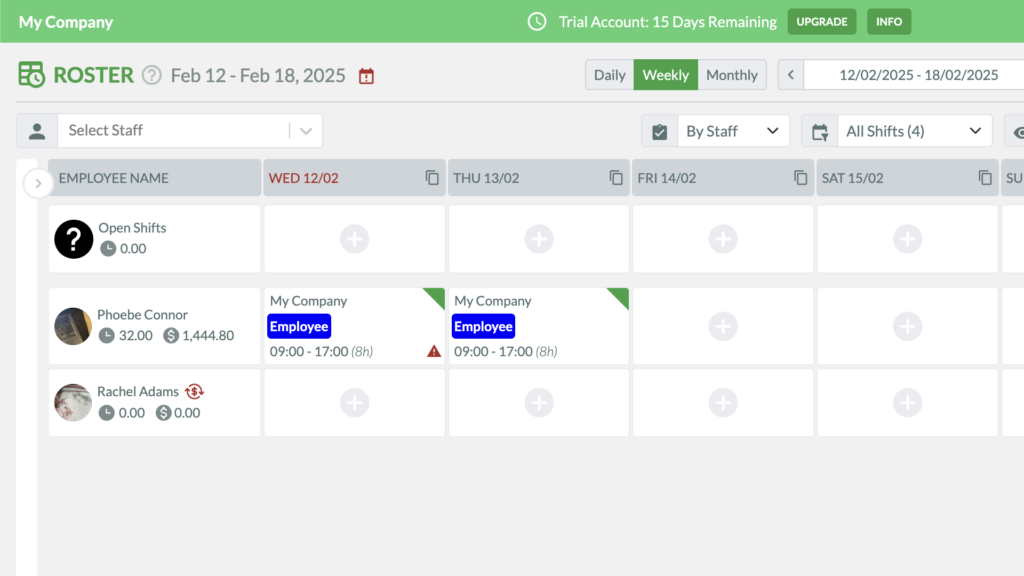
To create a shift, you simply click on the plus sign in the roster and fill in details, including shift length, rest breaks, and the site and position it links to. Drag-and-drop tools let you move shifts around easily.
You can also add notes and leave a shift open for anyone to claim. Plus, you can copy previous rosters, save them as templates for future use, and repeat shifts. I like this because it means I don’t have to create shifts from scratch every time.
Before publishing, you can see the estimated labor cost for the shift to ensure you’re sticking to your budget.
Admins and managers can edit past published shifts, including shift times and roles, although you can’t change the assigned employee after a shift has been published. Past shifts with clock-in/out data also can’t be deleted.
Admins can see the company’s weekly schedule in daily, weekly, or monthly calendar formats. I liked that I could customize the date range and view the roster by staff member, site, or position.
What’s more, caution symbols are displayed on shifts that must be reviewed—for instance, for cases where someone has requested a swap, the employee isn’t available, or there are overtime issues. I appreciate how this prevents scheduling errors and conflicts.
Verdict: 9/10
My calendar and shift swaps
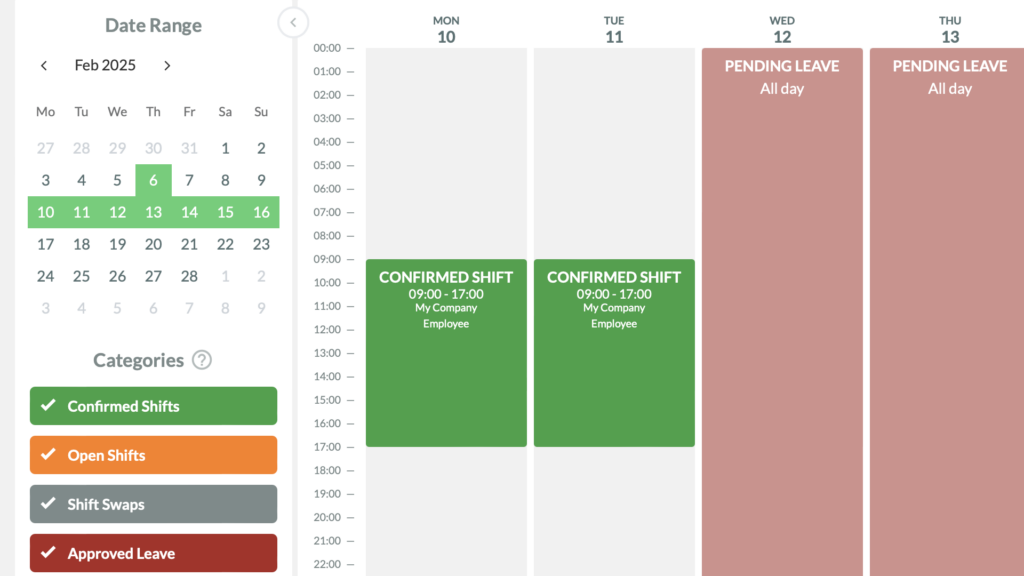
Employees get a different view of the roster. They see the “my calendar” feature, which shows them their own assigned shifts, open shifts, and approved or pending leave. This is also where employees can update their work availability, which helps you ensure you don’t assign shifts to team members who can’t work.
Users can also request shift swaps, which puts RosterElf a notch above competitors like ShiftCare. Admins or managers are immediately notified of swap requests via email and can see a shift swap request warning on the shift.
Admins and managers can approve or deny swap requests from either the web dashboard or RosterElf’s mobile apps. I like that managers can handle these requests on the go instead of needing to return to the desktop dashboard.
I wish RosterElf had the option to let employees swap shifts without manager intervention—an option I’ve seen with apps like Connecteam.
Verdict: 7/10
Time tracking
RosterElf gives employees several ways to clock in and out, including the mobile apps, tablet Time Clock, and a web-based Time Clock that works on computers. I like the flexibility, although the desktop option sits in a separate Time Clock interface rather than the main web portal.
I appreciate RosterElf’s geofencing capabilities, especially because you can adjust the GPS tolerance for each site instead of using a fixed radius.
When I tested the platform first in early 2025, there was no way to switch off geofencing. Since then, RosterElf has released a number of updates to its software, including the ability to turn off geofencing. That’s great for companies like home cleaning services, for instance, who have employees constantly on the move, and don’t want to create a new job site for each client’s home.
You can also add time manually from the web portal through the payroll feature. I found this workflow less obvious than using the dedicated Time Clock because you have to add a shift with details like hours worked and breaks.
Also, although the app distinguishes between overtime, regular hours, and breaks, RosterElf doesn’t let you mark hours as billable or non-billable, which I think is a miss.
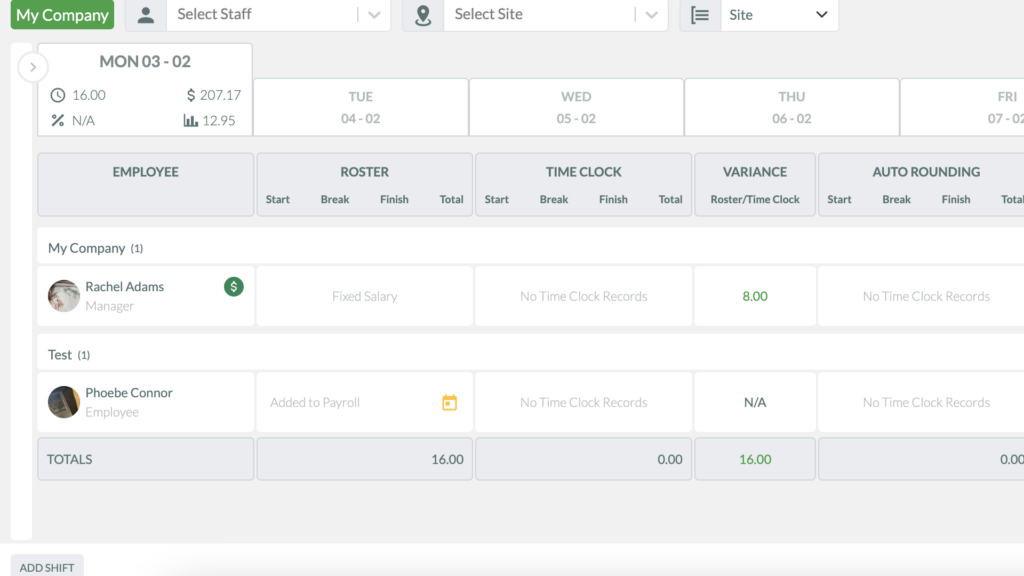
That said, I like that admins can choose whether employees are allowed to add unscheduled shifts. RosterElf’s current smartphone and tablet Time Clock apps let employees add extra shifts when the setting is enabled, which is useful for overtime, emergency cover, and last-minute work.
However, despite permitting unscheduled clock-ins from an admin account, I couldn’t clock into an unscheduled shift as an employee if that employee had already been assigned a shift that day. I imagine this would be problematic in situations where users need to cover last-minute additional shifts before or after their own shifts.
Verdict: 5.5/10
Payroll and overtime templates
RosterElf doesn’t have a built-in payroll solution but lets you set wages and hourly rates, create custom pay rules, and integrate payroll reports with other payroll providers (more on this in integrations).
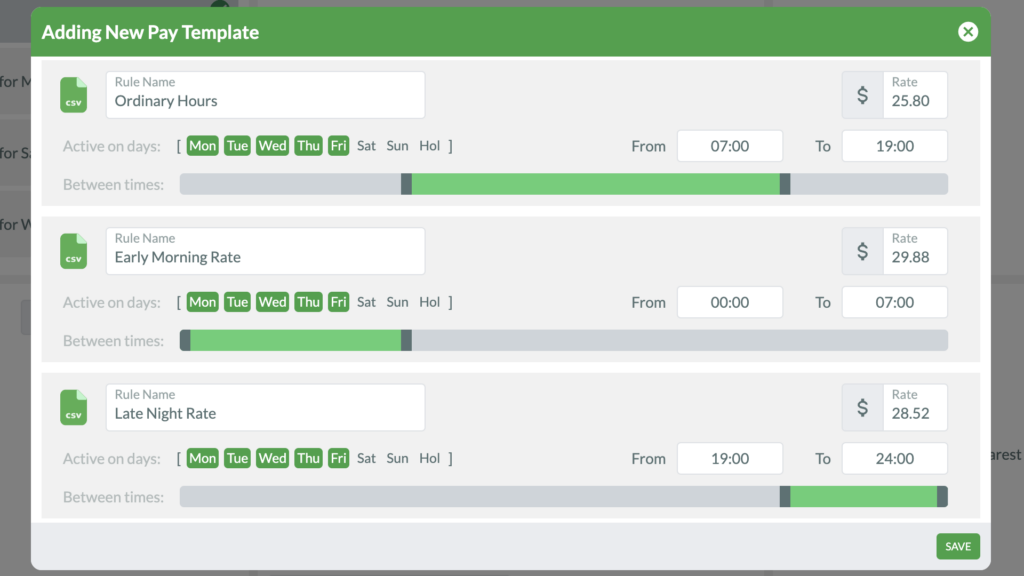
You can create customizable payroll templates, including different standard pay, overtime, and public holiday rates—and even rates that depend on the time of day or day of the week.
While RosterElf’s default overtime rates are aligned with Australian labor laws, you can create your own pay rules for your location.
I wish I could add multipliers like I saw with TrakTik—for instance, x2 for overtime or x3 for holidays—instead of absolute rates for these different categories. This would’ve let me use the same pay template across employees, regardless of their base pay.
Finally, I like that the payroll feature lets you adjust your pay frequency for reporting and scheduling, including a monthly pay cycle.
Verdict: 6.5/10
Leave management
RosterElf’s leave management feature is basic but functional. Employees can request leave from their calendars by choosing dates, adding a leave type, and providing a written note. They can’t see their current leave balance before submitting their request, though—which users can do with apps like Connecteam.
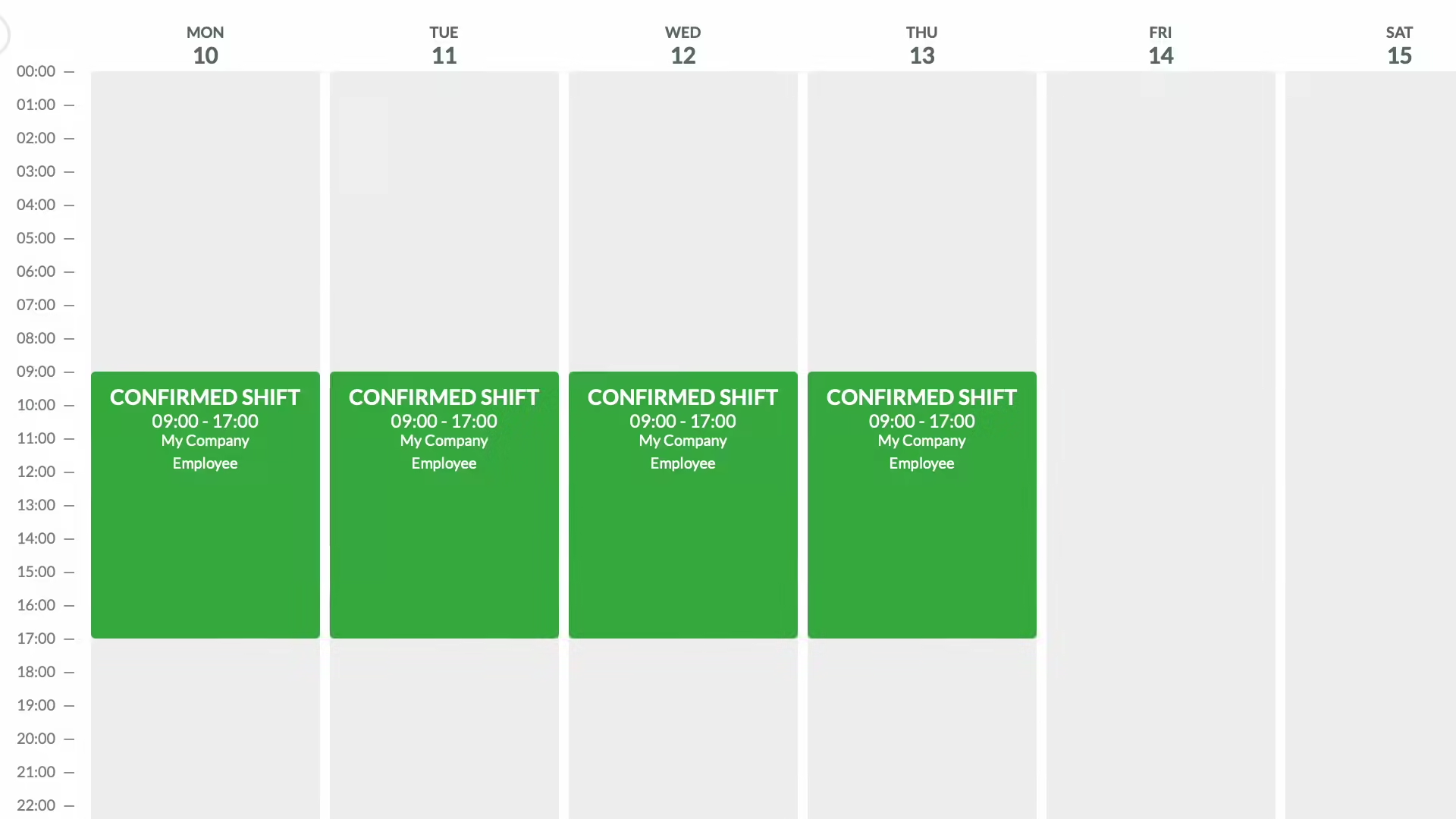
Managers or admins can view and either approve or deny leave requests in their dashboards. I appreciate that employees are immediately notified by email when there’s an update on their request.
That said, RosterElf’s leave management tool wasn’t as comprehensive as apps like Timetastic. For example, you can’t create custom leave types or see leave balances before making decisions. Further, employees can’t attach documents, such as medical reports, when requesting leave, and you can’t explain your reason for rejecting leave.
/
Verdict: 6.5/10
Staff, sites, and positions
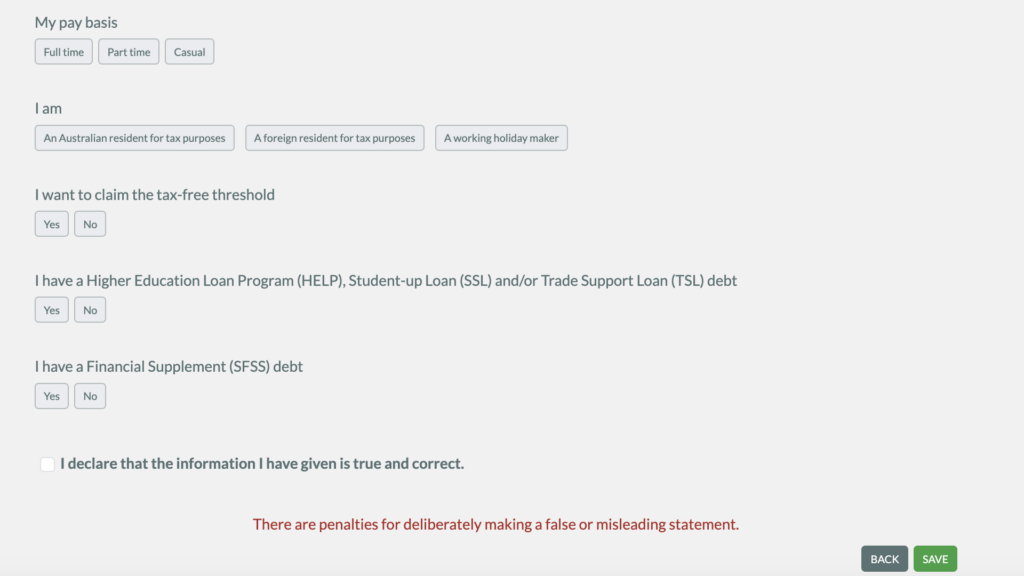
With RosterElf, adding and managing staff members is a breeze. Head to the staff feature and add new joiner details, including their personal and bank account information, site and position, the payroll template you want to use for them, their availability, and HR and tax data.
While the HR and tax information can be added under “documents,” I found it was specific to Australia and not customizable. This was disappointing, especially since the tax part of the documents feature is unusable for companies based in other countries.
In addition to staff, RosterElf also lets you create as many sites and positions as you want within your company. This makes it easier to organize rosters and reports, update site addresses for geofences, and customize public holidays for different sites. Using both features was straightforward.
My only complaint was the lack of 2-way feedback between features. For instance, while I could add staff members when creating new positions, I couldn’t create a new position for a staff member within the staff feature.
Verdict: 7/10
Integrations
RosterElf supports payroll integrations with Xero and MYOB. When I tested the platform, Xero was the clearest direct integration in the interface, but RosterElf’s current documentation also supports MYOB Business and AccountRight. Approved timesheets can be sent directly to MYOB Business, while AccountRight uses an MYOB-ready file that you import into MYOB.
I would’ve liked to see more third-party integrations outside payroll, such as project management platforms. This still feels limiting for larger businesses that rely on a broader software stack.
That said, I could export payroll files that were compatible with MYOB, Sage, and WageEasy.
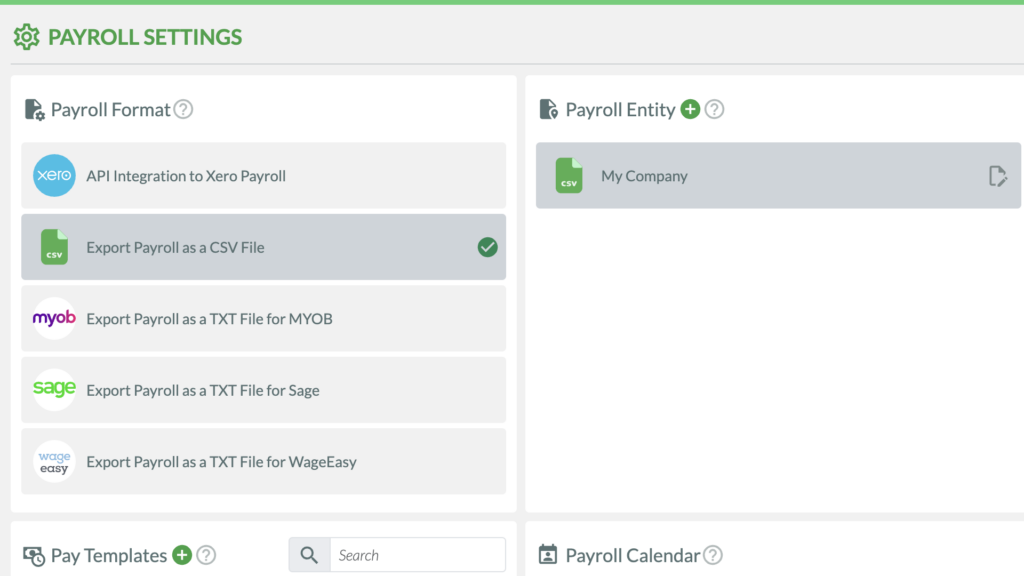
While this isn’t ideal, it’s better than apps with no payroll integrations—like Timely and RescueTime.
I would’ve liked to see more third-party integrations, such as with project management and communication platforms—especially since RosterElf isn’t an all-in-one work management solution. Without these, it’s less suitable for large businesses because it increases data silos and hampers scalability.
Verdict: 4/10
RosterElf Security Features
RosterElf offers basic privacy and security measures.
- Encryption: All data—in transit and at rest—is encrypted to prevent unauthorized access.
- Secure cloud storage: Data is stored in secure cloud servers that are regularly backed up and protected against data breaches or loss.
- Regular audits: RosterElf conducts regular security audits to identify and address potential vulnerabilities.
- Custom roles and permissions: You can create different positions and provide custom permissions to ensure only authorized users can access and control your company’s data.
- Multi-factor authentication: This requires users to log in using their password and another form of authentication, such as a code sent to their phones or email addresses, a QR code, or an authenticator app.
- Detailed activity log: This shows you every action users and managers have taken so you can track information easily when needed.
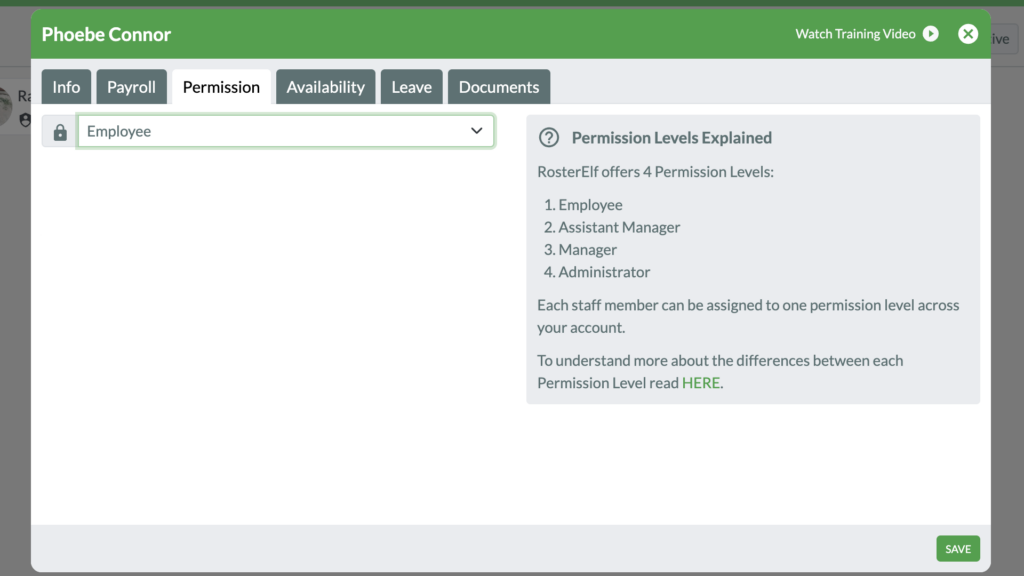
Overall, I was satisfied with RosterElf’s security tools. But, non-Australian companies should consider its privacy features.
RosterElf complies with the Australian Privacy Principles (APPs) contained in the Privacy Act 1988. Its privacy policy also includes a dedicated UK GDPR section covering data-subject rights, international transfers, breach notifications, and an Article 27 UK representative.
Verdict: 7/10
RosterElf Reporting & Analytics
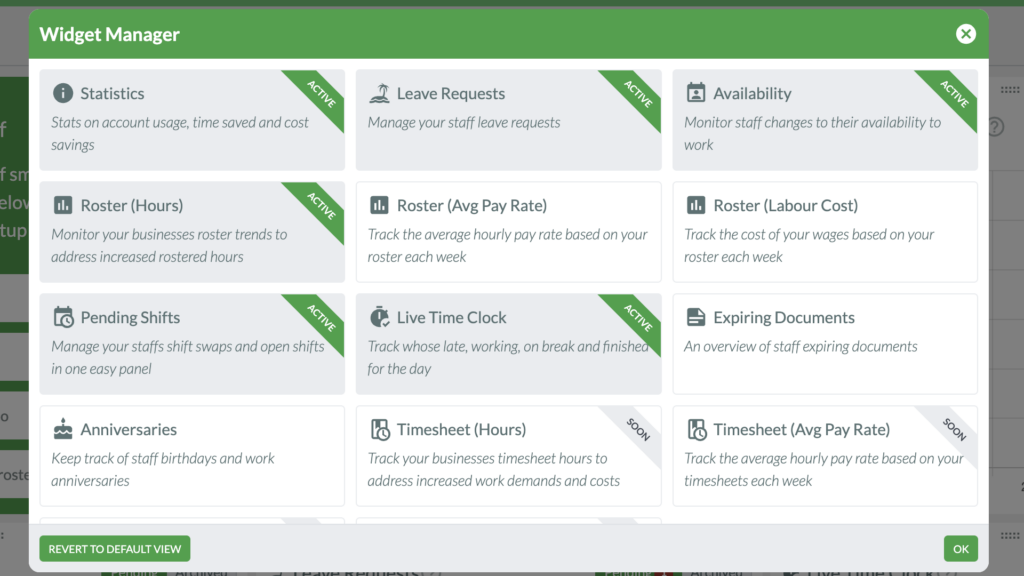
With RosterElf, you get a customizable dashboard and a range of reports covering scheduling, attendance, staff, leave, and labor costs.
The dashboard gives you a view of account statistics, pending leave requests, live clock-in statuses, average pay rates and labor costs for rosters, timesheets, employee birthdays and work anniversaries, and more.
I like that you can customize the widgets depending on what’s important to you.
RosterElf’s reporting tools cover shifts, staff details, approved leave, shift notes, attendance, and labor costs. You can filter reports by date range, site, staff member, and position, then export them as CSV or PDF files.
I especially like the Timesheet Cost Report, which breaks down approved hours and labor costs by employee and includes the relevant site, role, and shift date. Most custom reports are limited to a 3-month date range at a time, though, so longer analyses require running multiple reports.
- Complete shift report: Shows scheduled shifts, assignees, dates and times, clock-in and clock-out data, timesheets, and variances between scheduled and actual hours. The key thing missing for me is location data, which could help you double-check that employees were at their designated locations during work hours.
- Staff details report: Includes employees’ photos, personal details, employment type, ID, and employment status. I like how this serves as an employee database.
- Shift notes report: Gives you detailed insights into each shift, including who was assigned, dates, and any relevant notes.
- Approved leave report: Provides you with an overview of employee leave that’s been approved.
While these reports are all useful, RosterElf doesn’t let you customize reports based on the information you need—for instance, you can’t create a cost analysis report with a breakdown of labor costs (including overtime costs) by site or position.
Verdict: 6.5/10
RosterElf Customer Support
You can contact RosterElf in the following ways.
| Knowledge base | Anytime |
| 9:30 am-7:00 pm AEST | |
| Request form | 9:30 am-7:00 pm AEST |
| Live AI chatbot | Anytime |
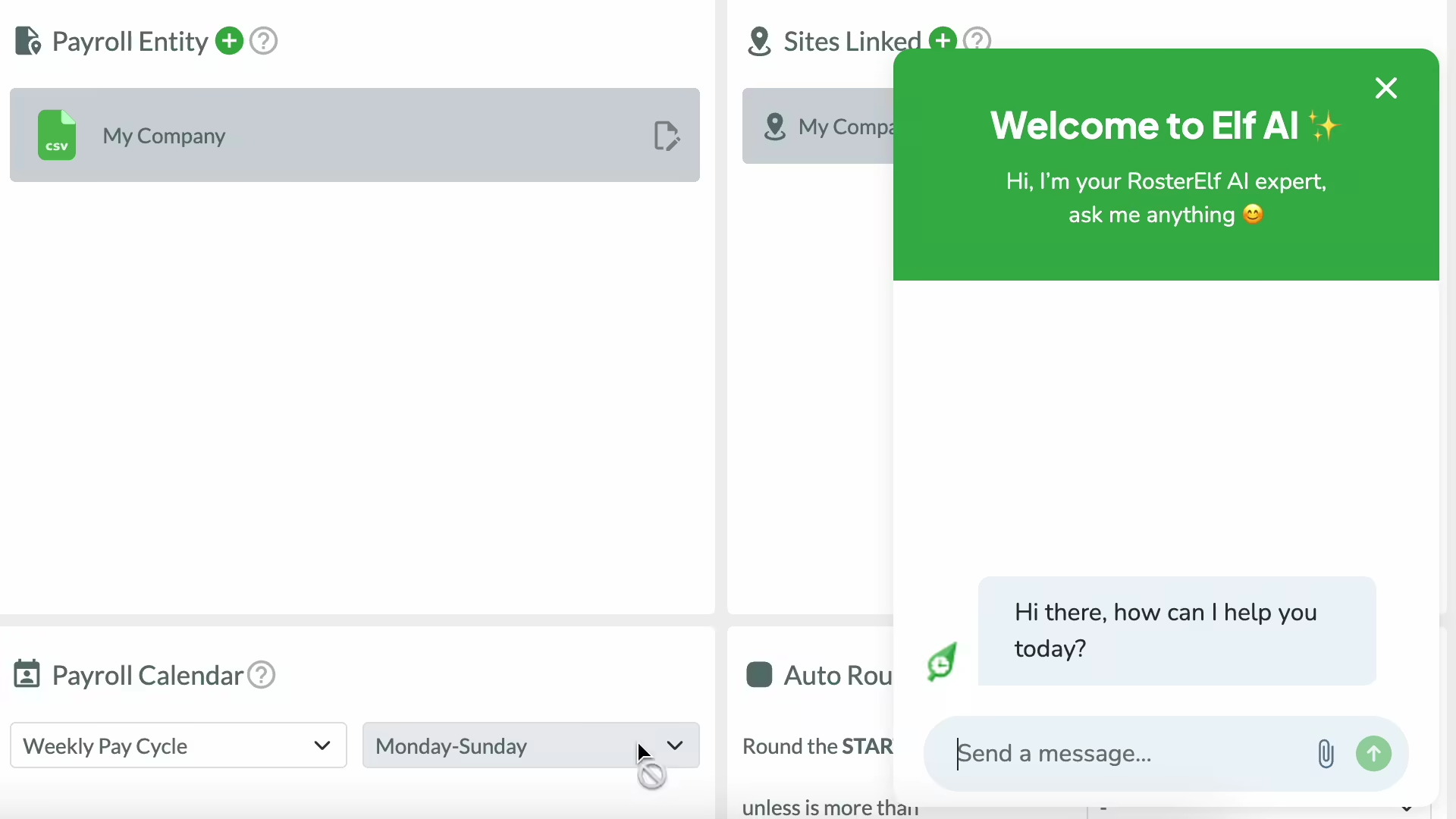
Typically, I don’t like platforms that don’t provide either a phone or human chat agent option. However, I found RosterElf’s AI chatbot very helpful, especially compared with bots on apps like 7Shifts, which often require you to escalate your query to an agent.
The bot answered my questions with precise step-by-step guidance, including screenshots. It also created a ticket for questions it was unable to answer, and I received a response within the hour.
I wish the customer support hours weren’t limited to the Australian timezone. While this works for countries in Asia, it’s not ideal for US and Europe-based businesses.
Verdict: 8/10
What Are RosterElf Review Ratings from Review Sites?
(As of August 2026)
RosterElf App Review
RosterElf is a rostering and time tracking software with features like a mobile time clock, shift scheduling, and leave management.
I was impressed by the app’s rostering capabilities and customizable admin dashboard. I think its price point is best suited to small and medium-sized businesses, although I would’ve liked to see a free plan.
Additionally, I thought the time tracking feature was restrictive and not a good fit for companies on the move. I also wish there were better leave management capabilities and more third-party integrations.
Connecteam: The Better RosterElf Alternative
Connecteam is the best RosterElf alternative for so many reasons. Its clean and modern design, full-featured mobile app, and powerful suite of features are game-changing for companies of any size. Let’s explore its key features.
Smart scheduling
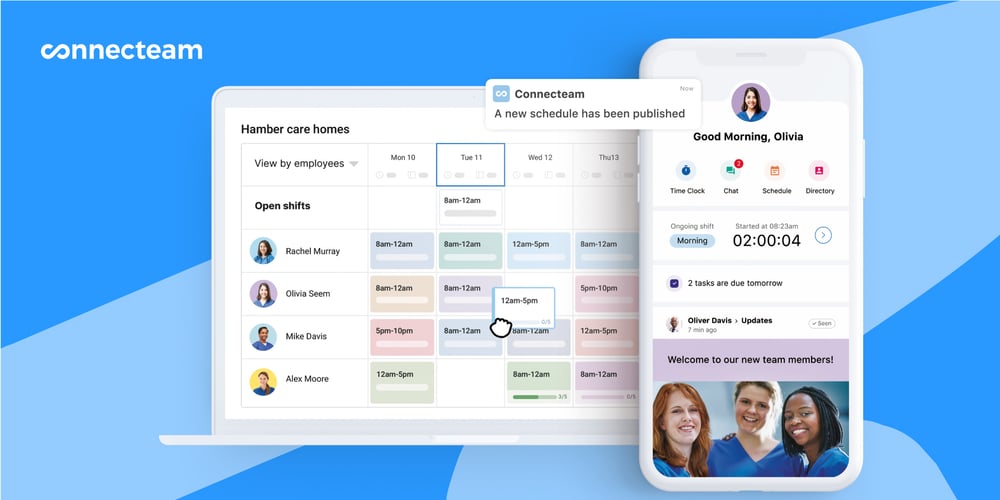
The Connecteam rostering app lets you create and assign shifts using easy drag-and-drop functionality. You can also copy previous shifts and schedules, use repeat shifts, or import schedules from Excel to save time.
Another great feature? You can assign shifts based on employees’ location, preferences, and availability. I love that the 1-click auto-scheduler can do this for you.
Connecteam also offers open shifts and shift swapping. But unlike RosterElf, Connecteam lets you enable shift swapping without your permission. I like how this eliminates unnecessary effort and bureaucracy and reduces the chances of vacant shifts.
Time tracking and payroll
Connecteam’s employee time clock lets users punch in and out of shifts in a single click from their smartphones, tablets, desktops, or shared kiosks. Both users and admins can also add time manually when needed. Moreover, there’s GPS tracking and geofencing to prevent time theft. Unlike RosterElf, Connecteam lets you turn these on and off as preferred.
Time entries are converted to digital timesheets that you can view, edit, and approve from your dashboard. You can sync these with multiple payroll providers like Gusto, Xero, Paychex, and more—a wider range than RosterElf.
Time off and document management
With Connecteam’s time off management, workers can request leave, and you can view leave balances and approve or deny leave from your app. I like how you can create custom leave types and set rules.
The team documents solution is less restrictive than RosterElf. You can upload documents of any type and even set expiration dates to stay compliant.
Reasonable pricing and a free plan
Connecteam offers many other tools, including task management, an in-app chat and newsfeed, surveys and polls, training, and more. It’s an all-in-one solution that starts at just $29/month for up to 30 users. The best part? Small businesses can use it completely free.
FAQs
Yes, RosterElf offers a free 15-day trial but no free plan.
RosterElf’s privacy policy includes UK GDPR provisions covering data-subject rights, international transfers, breach notifications, and an Article 27 UK representative.
