


Improper fleet management can lead to inefficient routes, excessive fuel costs, and delayed deliveries, leaving fleet managers and owners confused about what’s eating into their profits.
But the right fleet management software tools can help reduce these risks. Below, I’ve reviewed 5 fleet management software based on route optimization, vehicle tracking, reporting capabilities, and ease of use.
Any of these picks can help you improve delivery times, scale operations, and run a more profitable business.
| App | Best for | Starting Price | Key Considerations |
| Samsara | Large fleets needing advanced telematics | Contact vendor for price | Good for large fleets needing advanced telematics |
| Fleetio | Fleets with heavy maintenance needs | $4/vehicle/month | Good for fleets with heavy maintenance needs<br /> |
| Whip Around | Fleets prioritizing inspections and compliance | $5/asset/month | Custom inspections, but limited native telematics |
| Motive | Fleets needing Electronic Logging Device (ELD) compliance | Contact the vendor for the price | AI safety tools, but no free trial or plan |
| Azuga | Businesses with a strong focus on driver safety | $25/vehicle/month | Driver safety training, GPS, and route planning, but pricing is steep |
| Connecteam | Best all-in-one workforce management for small-to-medium fleets | Just $29/month for the first 30 users | Best all-in-one workforce management for small-to-medium fleets |
What’s New in This Update (May 2026)
- Removed a few tools from the list, and added Whip Around, Motive, and Azuga.
- Refined my ranking criteria, with a deeper focus on usability, security, and customizability.
- Reviewed fleet management, maintenance, and reporting features across all platforms.
- Reverified pricing structures and costs for Connecteam, Samsara, and Fleetio.
- Added new product screenshots for each tool to keep them up to date.
- Included real-life customer testimonials for each tool.
How I Ranked the Best Fleet Management Software
When creating my list, I focused on fleet management solutions that genuinely help managers run smooth and cost-effective operations. Here’s how I picked the top 5 software.
First, I looked for the non-negotiables:
- Reliable GPS tracking: I prioritized fleet management software with real-time vehicle and employee tracking through clear maps and geofencing capabilities. Platforms that only offered these via integration weren’t eliminated from my list, but they scored lower.
- Proactive vehicle management and maintenance tracking: Solutions that provided some way to store vehicle documents, track repairs and maintenance, and create incident reports, through digital forms or special diagnostic tools, earned extra points. This is especially important for maintaining driver safety and avoiding fines.
- Clear work order management: I only chose software that offers built-in work order or task management tools so workers always know what’s expected of them on the job. Tools with real-time progress tracking ranked higher in my list.
I also made sure the software was straightforward to set up and use
- Easy enough for the whole team: I favored tools that were easy to use for everyone, from fleet managers to dispatchers, drivers, and other team members, including those who aren’t the most tech-savvy.
- Strong data security and privacy controls: I immediately rejected any software without reliable data protection measures, especially since storing employees’ licenses, tracking locations, recording emergency contacts, and so on, can pose privacy risks.
- Customization options to fit different fleet setups: Tools with rigid, inflexible interfaces that don’t let you personalize workflows, dashboards, and reports scored lower.
Finally, I checked for supporting features that added even more value to fleet operations
- Accurate time tracking: I gave extra weight to solutions that included a mobile time clock to let drivers clock in and out on their jobs and avoid wage and hour disputes.
- Route optimization: I included some fleet management software tools that automatically optimized routes and driver assignments based on location.
- Real-time alerts: Whether it’s about potential work delays, people leaving your set geofence, or vehicle maintenance, I looked for platforms that sent instant alerts, providing more visibility into day-to-day fleet operations.
- Managing breaks and time off: I gave brownie points to platforms that let you schedule rest breaks and offer drivers and other workers the downtime they need. This is critical to staying compliant with labor laws and preventing burnout or even accidents.
The 5 Best Fleet Management Software Tools of 2026
-

Samsara — Good for large fleets needing advanced telematics
Available on
- Web
- iOS
- Android
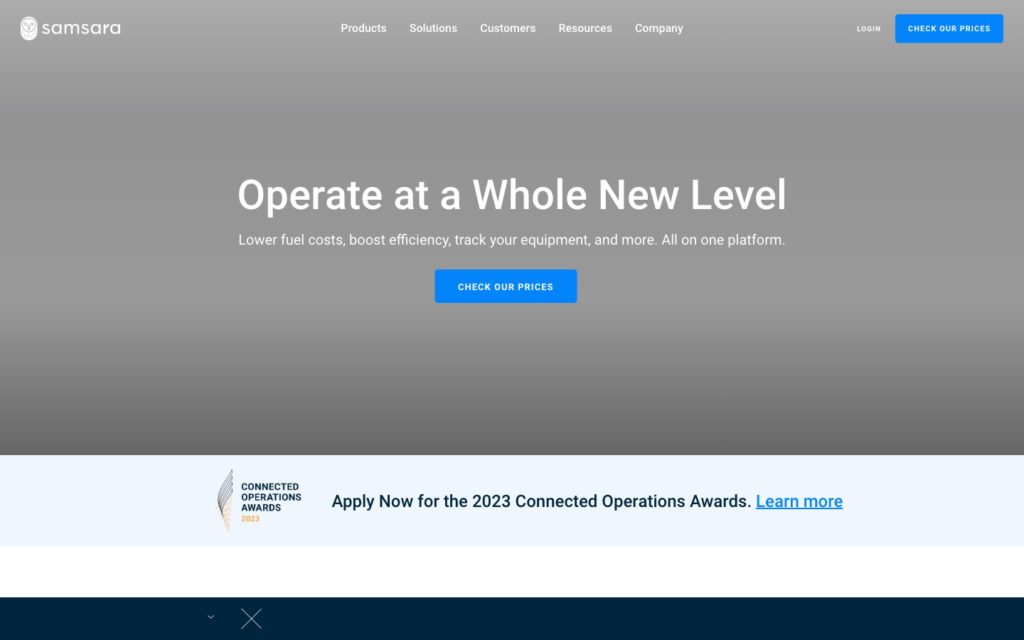
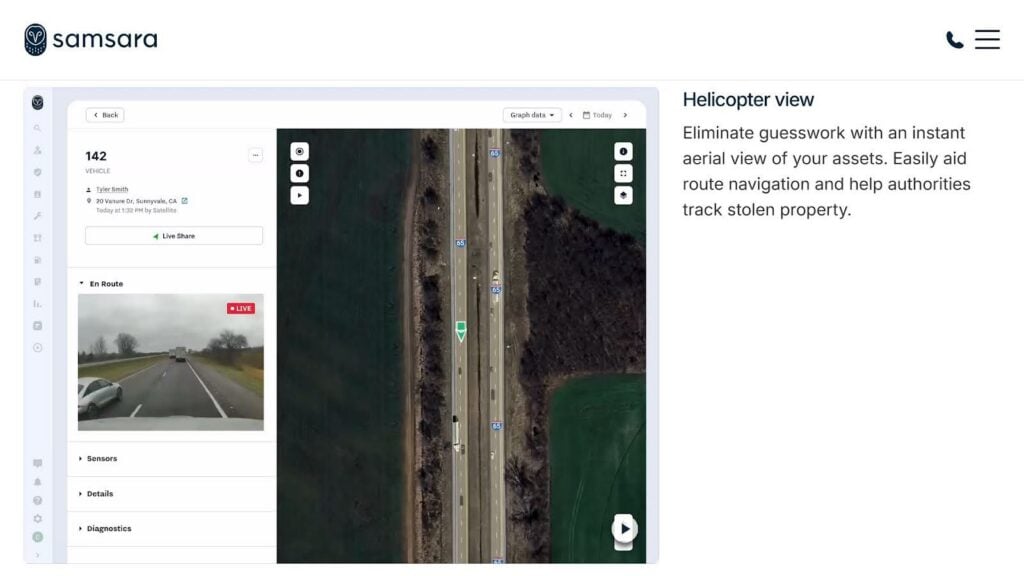
Easily view fleet locations, check dash cams, and monitor a variety of details and diagnostics. Samsara is a powerful fleet management platform that helps teams track vehicles, improve driver safety, optimize routes, monitor fuel consumption, and stay ahead of maintenance needs.
Why I chose Samsara: I picked Samsara as the best fleet management software because it offers one of the most complete telematics systems I’ve seen. It lets you track fleet locations in real time with tools like geofencing, helicopter view, smart map overlays, and live location sharing.
This makes it a strong fit for larger fleets managing vehicles across multiple locations, especially when managers need a clear, real-time view of vehicles, drivers, safety events, and diagnostics.
Here are a few of Samsara’s notable features.
Fleet telematics
The platform gives you complete visibility of vehicle location through real-time fleet tracking and vehicle condition through real-time diagnostics. It also helps to minimize risk and boost safety with security insights. For instance, if a vehicle shows signs of an engine fault, you can catch the issue early and schedule maintenance before it breaks down and disrupts operations. I also liked that Samsara can aid in creating optimized routes to minimize fuel costs and mileage.
Cameras and video
The platform provides AI dash cams and videos to protect drivers, reduce costs, and improve performance. These let you flag risky driver behavior and coach at scale. Plus, I was impressed that you can gamify the experience to incentivize drivers to be safer.
You can easily access video footage, get real-time alerts, and use AI-powered safety detections to keep your drivers and vehicles safe. If you frequently deal with safety incidents, video evidence and insights on what caused an accident or mistake can help you take corrective action quickly. With that being said, storing employee video footage for extended periods can pose data privacy risks, so check your local regulations to manage this data accordingly.
Fuel and energy efficiency
Samsara helps you operate a more efficient fleet, as it lets you not only evaluate how efficient your fleet is, but also helps you develop an idling program that works for your team. Speaking of idling, I like how the software gives you real-time visibility into idling events as it provides the duration of the event, where it took place, and how much fuel was consumed, so you can coach drivers to reduce wastage over time.
When Samsara may not be the best fit
I found that setting up workflows on Samsara can be time-consuming and may require additional IT support. Combined with the lack of a free plan, this makes it less ideal for smaller operations with fewer technical resources or tighter budgets.
What users say about Samsara
Overall I have had a great experience with Samsara and the various service and technical teams I have worked with. The platform is user friendly and has great offerings for training on the system. I look forward to what future developments come out and how Samsara can make my fleet safe and fuel efficient in the future.

Company is impossible to communicate with… It took them a week to respond to phone calls and emails and when we had further questions it took even longer to get responses. The Lack of professionalism is astonishing…

Key Features
- Automated workflows for drivers
- Route optimization
- Vehicle maintenance tracking
- AI dash cams
Pros
- Improves fuel usage with real-time visibility into idling events
- Custom reports and live alerts help with fleet safety
Cons
- No free plan makes it less suitable for smaller operations
- Without IT support, setting up workflows can be time-consuming
Pricing
Contact vendor for price Trial: Yes — No Free Plan: No
-

Fleetio — Good for fleets with heavy maintenance needs
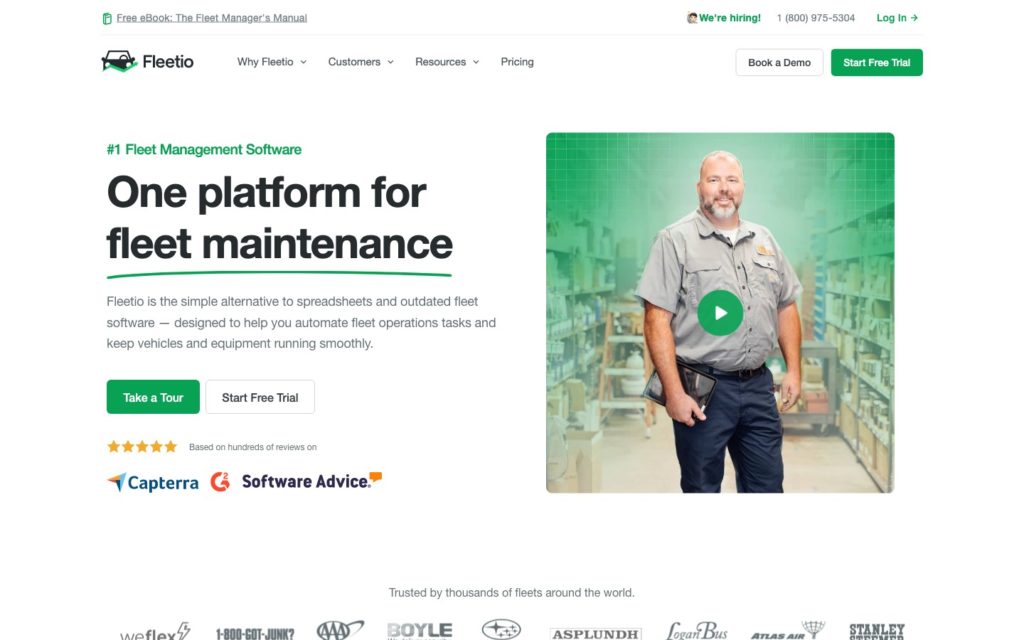
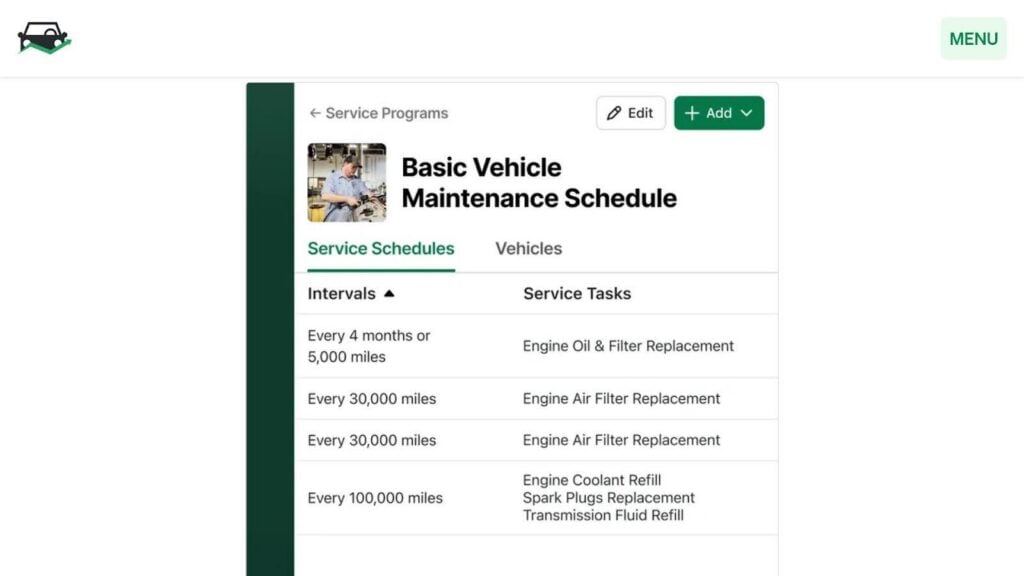
Create, edit, and view vehicle maintenance schedules in Fleetio. Fleetio is a fleet management tracking platform that specializes in fuel tracking and vehicle maintenance, which are among the biggest cost drivers in fleet operations.
Why I chose Fleetio: The platform integrates with most fuel card systems, making it a good choice for optimizing fuel consumption. The user-friendly reporting dashboard makes it easy to break down fuel efficiency by vehicle, location, driver, timeframe, and more, pinpointing where fuel costs are rising so you can take targeted action.
Let’s take a closer look at some of Fleetio’s features:
Fuel management
The platform lets you easily track all of your fuel transactions, understand more deeply how fuel plays into your operating costs, and lets drivers log fuel receipts on the go. I really liked how easy it was to monitor fuel consumption and address inefficiencies. For instance, if fuel costs suddenly spike for one driver or vehicle, you’ll receive an alert, and can investigate the situation before it gets out of hand.
Fleet maintenance
Whether your maintenance is performed in-house, by a third-party company, or a blend of the two, Fleetio helps you manage work orders, set maintenance reminders, and approve repairs with a click. That means you can automatically plan and schedule maintenance, track parts inventory, and even access the complete service history for your assets. I think this is particularly useful for managers who want to prioritize preventative maintenance.
Fleet management
Overall, I found the platform good for asset utilization, uncovering cost-saving opportunities, and creating dashboards to track performance and identify trends. Fleetio also made it easy to track warranty info and loan data, set license and registration renewals reminders, and keep a record of various other important documents and notes. Having all this in one place made it easy to stay organized and ahead of critical deadlines.
Integrations
Fleetio offers these native integrations with fuel card systems:
- WEX
- COMDATA
- Fleetcor
- EFS
It also links with AtoB, CarIQ, Coast, and Intevacon via API, but this option is not available on the Essential plan.
When Fleetio may not be the best fit
Unfortunately, the software lacks some management features that other solutions include, such as GPS tracking and geofencing (though you can integrate with third-party tools), route optimization, and deep workflow customization. To that end, I wouldn’t recommend it for teams looking for real-time driver tracking or smart routing built into their fleet management platform.
What users say about Fleetio:
We were able to customize the maintenance schedules to fit our needs. The vehicle inspections are key to saving time and having instant reporting on file. We love Fleetio it’s so user friendly and easy to use.
I don’t have any dislike about Fleetio but some users may find that Fleetio’s customization options are limited, which could impact their ability to tailor the platform to their specific needs.
Key Features
- Integrates with most fuel card systems
- Automatic transaction imports
- Fuel analytics dashboard
- Maintenance logging
Pros
- Reduces fuel wastage with detailed consumption tracking
- Prevents unexpected breakdowns with preventative maintenance
Cons
- Not ideal for businesses needing route optimization
- GPS tracking requires third-party integrations, adding to costs
Pricing
Starts at $4/vehicle/month Trial: Yes — 14-day Free Plan: No
-

Whip Around — Good for fleets prioritizing inspections and compliance
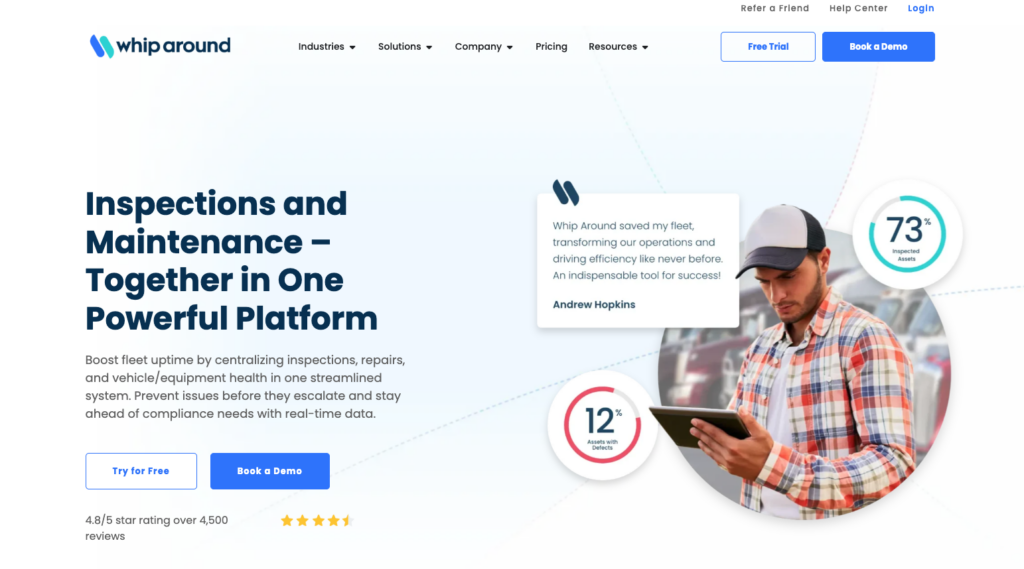
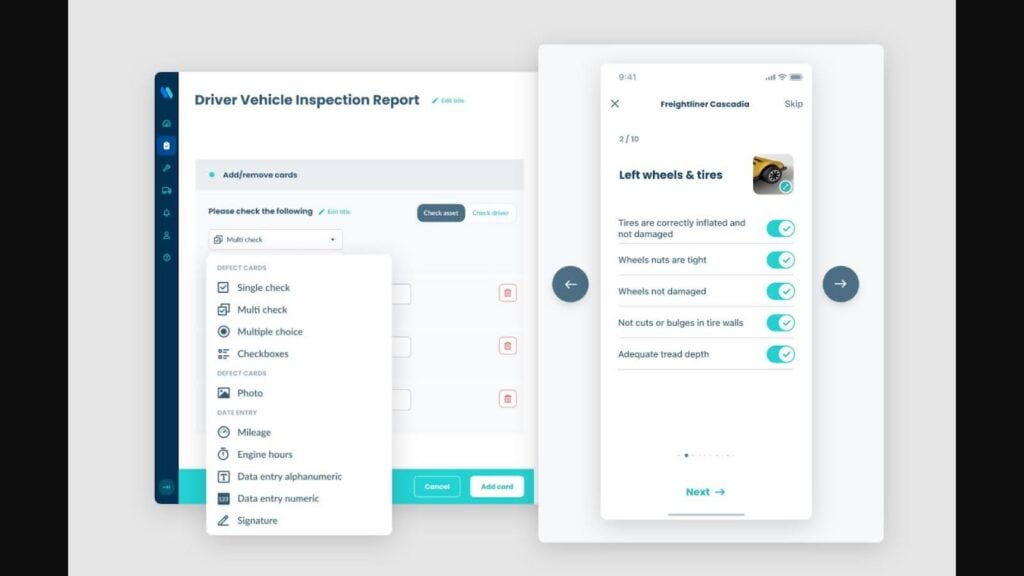
Whip Around offers customizable vehicle inspections with detailed checklists for drivers. Whip Around is a fleet software management solution that’s great for inspection-heavy fleets and operators prioritizing vehicle and driver safety.
Why I chose Whip Around: Whip Around stood out for how well it centralizes all of your inspections, repairs, and equipment health data in one place, reducing reliance on messy and disjointed paperwork or systems. I thought it was a good platform for keeping your fleet in great shape, and it can help minimize costly equipment downtime.
Here are a couple of features that Whip Around provides:
Digital inspections
The platform lets you manage all pre- and post-trip inspections and ensure you always know the condition of your assets, in real time. Drivers are able to complete Department of Transportation (DOT)-compliant fleet inspections remotely, which are stored in the cloud for easy access. It has a library of digital inspection forms and lets you include photos for better documentation.
For example, if a driver detects a defect during a routine inspection, they can instantly log it. You can see photos in real time and provide quick guidance to reduce safety risks.
Maintenance tracking
Whip Around helps you monitor the health of your fleet and aids in setting up service schedules for every asset based on time in service, distance traveled, or hours run. I like that it tells you when your vehicles are ready for service, taking a lot of the work and mental load off your plate. This is so handy for owners who run fleets solo or with a smaller team.
Whip Around also helps monitor your parts inventory and lets you know when it’s time to order more. It also automatically updates service histories when work is completed, and mechanics need to digitally sign off on the work they do. I found this particularly useful not just for keeping maintenance records but also for being audit-ready if the need arises.
Reporting
With Whip Around, I could get up-to-the-minute insights, spot trends, and identify risk with dashboards and reports. The platform gives you plenty of visibility across all aspects of your fleet, which may help with fuel usage and optimization, defect reporting, maintenance planning, and several other aspects of proper fleet management. This works especially well for recurring issues, which become easier to spot and address the root cause.
When Whip Around may not be the best fit
Despite claiming customizable reporting, I found the customization options weren’t as deep as some of the other solutions I’ve explored. More importantly, Whip Around is heavily focused on inspections and maintenance but lacks native telematics capabilities like optimized routing, GPS tracking, and driver monitoring. I wouldn’t recommend it for managing day-to-day fleet operations, unless you’re happy to integrate it with platforms like Motive or Azuga.
What users say about Whip Around
We feel that Whip Around is an indispensable service with an excellent support team to back it up. We highly recommend it to anyone with a fleet to maintain, especially to any FedEx Ground contractors.
We used Whip Around for 2+ years to good effect even though it was a bit expensive for our smaller company. They recently doubled our price and charged us for 2 months due to a convoluted cancellation process that is not well laid out in their Terms of Use.
Key Features
- Custom or original digital inspection forms
- Preventive maintenance scheduling
- Defect reporting
- Inventory tracking
Pros
- Reduces downtime with faster detection of issues
- Digital inspection records improve compliance
Cons
- Not ideal for route planning or teams with complex dispatch needs
- Limited native telematics; relies on integrations
Pricing
Starts at $5/asset/month Trial: Yes — 7 days Free Plan: Yes
-
Motive — Good for fleets needing Electronic Logging Device (ELD) compliance
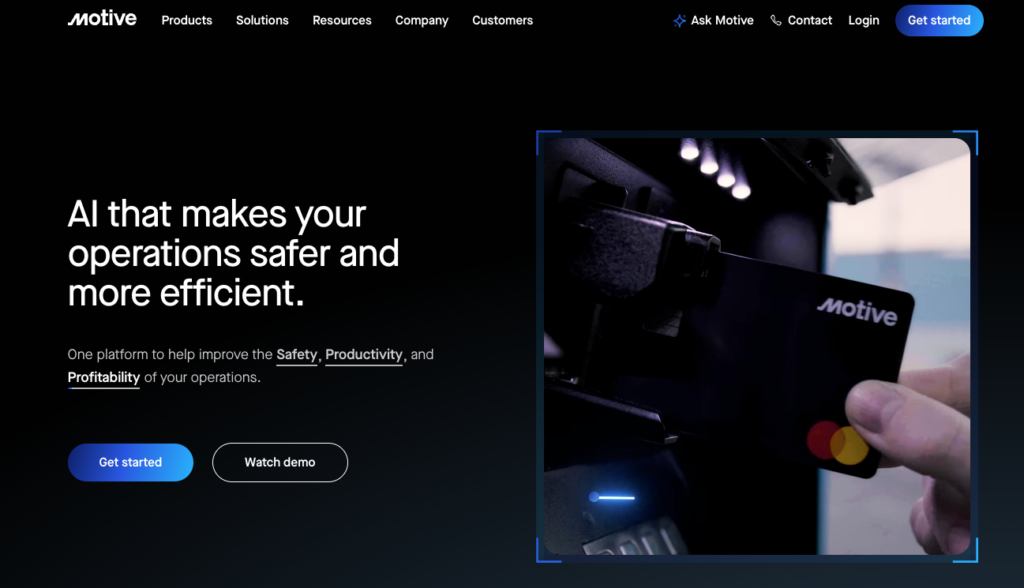
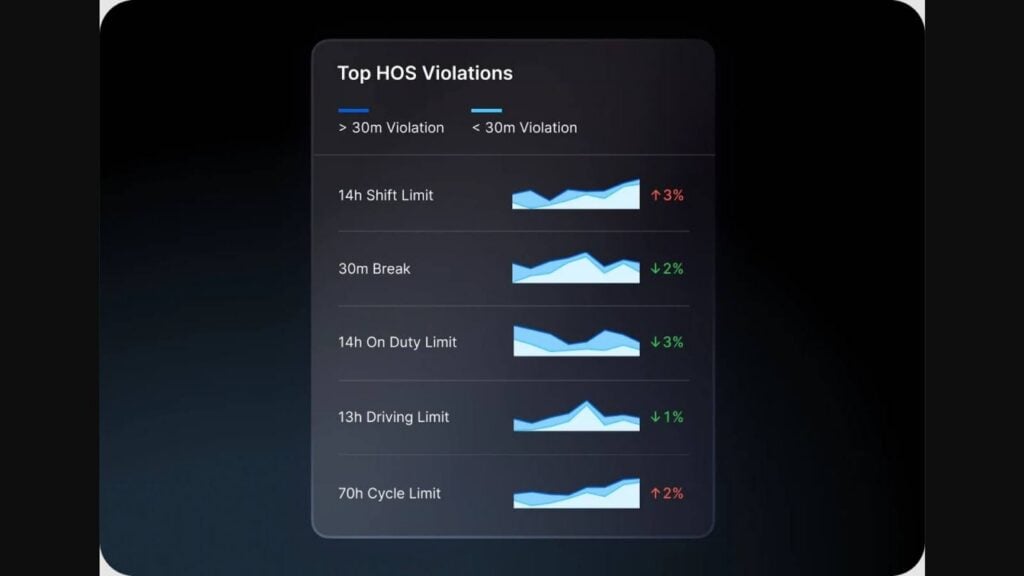
Motive lets you stay updated on your top Hours of Service (HOS) violations and see whether they’re trending in the right or wrong direction. Motive is a fleet monitoring app that combines ELD compliance, GPS tracking, equipment monitoring, and AI-powered driver safety tools.
Why I chose Motive: The platform made it to my list because I was impressed with how it uses AI to enhance driver safety, support compliance, and provide real-time and complete visibility into your operations.
Motive provides a variety of features, including:
Equipment monitoring
The platform provides tracking and utilization insights. Built-in GPS tracking ensures you always know the locations of your assets, and utilization monitoring keeps you informed about how (and how often) equipment is being used. For instance, it’ll help you spot if a vehicle is being underutilized or sitting dormant for too long, so you can investigate why and reallocate it if necessary.
I also found it handy to get alerts on upcoming maintenance, out-of-tolerance operating conditions, and if equipment leaves a geofence. That means fleet managers can rest assured they’ll be notified if something is amiss with their assets.
Additionally, Motive includes ELD (electronic logging device) functionality. This automatically records drivers’ hours, so you can comply with hours-of-service regulations without relying on manual logs. If you’re managing long-haul drivers, this feature makes it much easier to ensure no one exceeds legal driving limits.
Driver safety and coaching
Using AI, Motive helps you identify unsafe driving behavior to help prevent accidents and keep insurance costs low. The platform detects more than 15 safety events, such as cell phone usage or close following, to ensure you always know when a driver is putting themselves and your vehicles at risk. It also lets you identify and reward positive driving, automate driver coaching with AI, and detect collisions in seconds.
In my opinion, this is one of Motive’s most standout features, and it provides you with a great way to prevent unwanted incidents before they cause damage.
Workforce management
The platform also improves your workforce management. It lets you identify workers with outstanding issues, ensures everyone is properly qualified and compliant, and keeps you updated about any upcoming document expirations, cutting the need for any manual tracking.
You can also share training content, measure how well workers understand your training efforts, and ensure workers don’t skip any steps during their daily routines.
When Motive may not be the best fit
Unfortunately, Motive doesn’t offer a free trial or provide pricing information upfront. This makes it harder to budget for hardware like ELD and dashcams, which could be expensive. I wouldn’t recommend it for new businesses that may not have the time or money to experiment.
What users say about Motive
Our overall experience with Motive has been very positive. The platform has streamlined our fleet operations, improved safety, and given us much better visibility into day-to-day performance. It has become an essential tool for both management and drivers.
Terrible customer service. I was sent wrong plug for my freightliner. They told me I had to pay for proper plug after they changed my account. Please go elsewhere don’t go with motive.
Key Features
- GPS tracking
- ELD functionality
- Driver safety alerts
- Document management
Pros
- AI-powered equipment and driver monitoring reduce manual work
- Strong safety and compliance support
Cons
- Pricing isn’t public, making it hard to plan
- Poor customer service reviews
Pricing
Contact the vendor for the price Trial: No Free Plan: No
-
Azuga — Good for businesses with a strong focus on driver safety
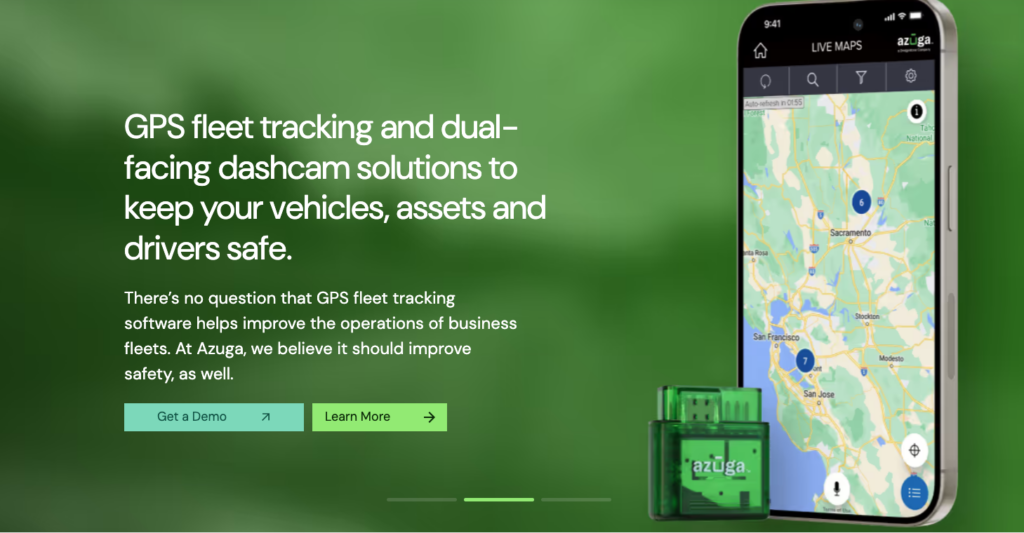
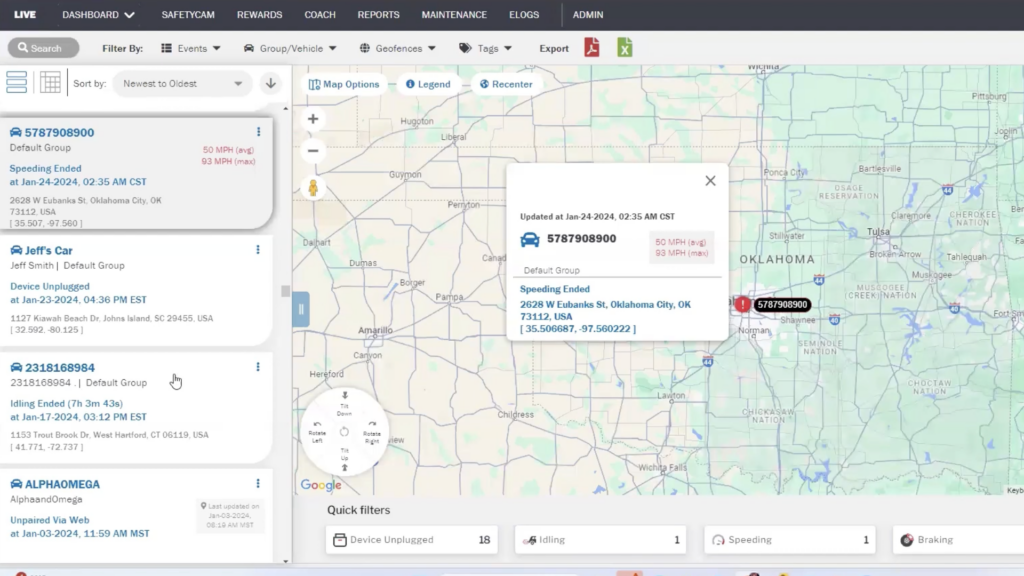
Azuga supports real-time vehicle tracking with alerts for speeding, idling, and other events. Azuga is a fleet management and fleet tracking solution that aims to help you keep your vehicles, assets, and drivers safe.
Why I chose Azuga: I added Azuga to my list because it offers a strong mix of fleet tracking, driver safety, route planning, and maintenance tools without feeling overly complex. I liked its driver scoring and gamification approach, which can help improve driver behavior in the long term rather than just short-term monitoring and firefighting.
Here are a few features that Azuga offers:
GPS fleet tracking
The platform offers instant insights and visibility into your fleet, and you can learn about driving speeds, driver cell phone usage, service warnings, and even hard braking. This is especially useful if you’re often dealing with problems related to unsafe driving.
You can log and tag trips, monitor tire pressure, and streamline the dispatch process by scheduling calls, assigning team members, and sending automated dispatch notifications.
Driver safety scores
Azuga provides advanced driver safety scores that give you plenty of insights into how the various drivers in your fleet are performing. The score takes into account things like braking, acceleration, speed, and idling to determine how safe they’re driving, and drivers are incentivized to score better via Azuga’s reward program.
Scores show which drivers may need additional education to improve safety, and let drivers see what they need to work on. I like that this creates accountability while also giving drivers a clear path to improving over time.
Fleet maintenance
The platform includes a scheduled maintenance feature that lets you set service intervals based on mileage, engine hours, or time. And, it automatically alerts you when maintenance is due. It also keeps a record of each vehicle’s service history, so you don’t need to store manual copies of maintenance records.
Route optimization
The tool also helps you automatically optimize routes and can factor in tight time windows, volume, and other considerations in its decisions. You can optimize single or multiple routes, get predictive ETAs for the routes, and send real-time route changes to drivers if conditions change.
It lets you monitor, view, and change multiple routes on one screen, schedule routes in advance, and notify customers about ETAs, delivery status, route delays, and other updates to better manage their expectations.
When Azuga may not be the best fit
I found that Azuga’s GPS can feel sluggish at times compared to some other solutions. This could be challenging for managers who rely heavily on precise location tracking for dispatching or other time-sensitive ops. It’s also on the expensive side, so it may not be the right fit for small-to-medium-sized businesses on a budget.
What users say about Azuga
It does the job we want it to do. It’s a big help to know where our vehicles are at all time. I’m happy with the service provides.
I would recommend it to everyone if I didn’t experience issues like odometer readings being inaccurate and not being able to generate a speeding report. But I do experience those issues. So I don’t recommend it.
Key Features
- GPS tracking
- Driver safety insights
- Scheduled maintenance
- Driver rewards program
Pros
- Mobile app can be accessed from anywhere
- Gamification system helps drivers improve performance over time
Cons
- No free trial or free plan, and relatively expensive
- Sluggish GPS tool can be a drawback for precise location tracking
Pricing
$25/vehicle/month Trial: No Free Plan: No
Workforce Management Software for Fleet Teams
-
Connecteam — Best all-in-one workforce management for small-to-medium fleets
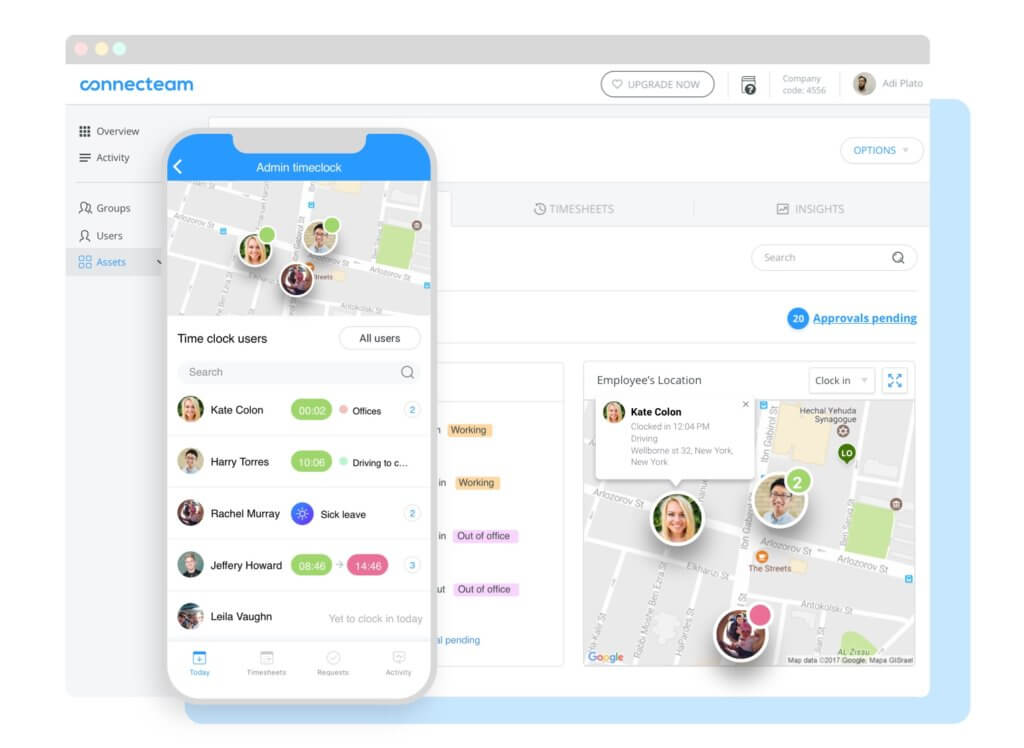
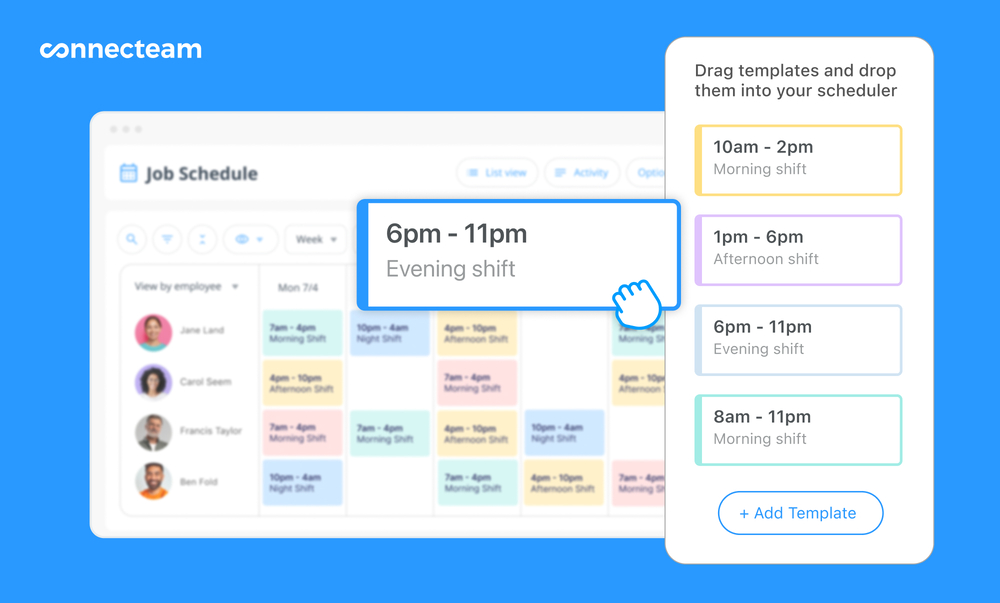
Use Connecteam’s drag-and-drop tools to build schedules with shift templates or from scratch. Of the tools on my list, Connecteam was the best workforce management software for fleet teams because it brought scheduling, time tracking, tasks, forms, documents, and team communication into one mobile app.
Why I chose Connecteam: I chose Connecteam because it gives fleet teams an easy way to manage the people side of daily operations. It’s user-friendly, affordable, and mobile-first, so drivers and field staff can check schedules, clock in, complete forms, view tasks, and stay updated from their phones.
Let’s take a look at some of Connecteam’s workforce management features.
Time clock with GPS tracking
The first thing I noticed about Connecteam was its employee time clock that lets staff members clock in and out of shifts from their phones. This way, you can track work hours accurately, support payroll, and keep better records of driver time. If you find it hard to keep track of your drivers’ hours, this feature is worth prioritizing.
What’s more, the time clock is enabled with live GPS tracking, so you can see exactly where your employees are while they’re working. This is especially important for tracking fleets and ensuring they’re running on schedule. I also found it easy to set up geofencing, which prevents workers from tracking time outside of designated zones and saves you from unwarranted labor costs.
Most critically, there was no way to monitor employee locations when they were clocked out, which was a relief from a compliance and privacy POV.
Employee scheduling tools
With Connecteam’s employee scheduling, I could easily create employee schedules, either from scratch or with ready templates. I was also able to build breaks right into schedules. This ensures compliance with labor laws and also prioritizes driver safety by giving employees the rest they need.
With Connecteam’s employee scheduling, I could easily create schedules from scratch or with ready templates. I was also able to build breaks right into schedules, which helps teams plan driver coverage and rest time more clearly. Connecteam’s auto-scheduling tool, which uses AI to allocate work to drivers and other staff members based on their availability, location, preferences, and qualifications.
Digital forms and checklists
Another thing I found incredibly helpful was the digital forms and checklist tools. You can create custom forms to document incidents, vehicle inspections, maintenance requests, and other field updates. This helps fleet teams keep better records, improve follow-up, and support safer daily operations. I was even able to add these directly into shifts, prompting workers to fill them out.
Task and project management
With Connecteam’s employee task tracking tools, I could create and assign tasks and subtasks to team members, attach images, files, and due dates, and track progress in real time. I’m a fan of this feature because it means fleet teams know what’s required, whether that’s just deliveries or even servicing, installations, and maintenance jobs. And as a fleet manager, you can keep things on schedule and nudge employees when tasks are delayed.
Employee license tracking, in-app communications, and so much more
Connecteam’s team documents tool lets you store important employee files, such as their driver’s licenses and professional certifications. What I found most handy was the ability to set expiry dates for any doc and get timely renewal reminders, so businesses can stay ahead of renewals and reduce compliance gaps.
Beyond fleet management, Connecteam offered an online team chat, time off management, company newsfeed, payroll integrations, HR tools, and more. You can manage your entire workforce from a single place without needing to pay for or manage multiple software.
Join Connecteam — Manage Your Fleet Team From One App
0Key Features
Pros
- Live GPS tracking keeps teams on schedule
- Customizable, trackable forms and checklists boost safety
- Fully mobile: workers can access everything on the move
- All-in-one workforce management, no need for multiple platforms
Cons
- Needs internet or Wi-Fi access to work
- No advanced route optimization
Pricing
Free-for-life plan availablePremium plans start at $29/month for 30 users
14-day free trial, no credit card required
Start your free trial
Compare the Best Fleet Management Softwares
| Topic |
|
|
|
|
|
 Start for free
|
|---|---|---|---|---|---|---|
| Reviews |
 |
|
|
|
|
|
| Pricing |
Contact vendor for price
|
Starts at $4/vehicle/month
|
Starts at $5/asset/month
|
Contact the vendor for the price
|
$25/vehicle/month
|
Starts at just $29/month for the first 30 users
|
| Free Trial |
yes
No
|
yes
14-day
|
yes
7 days
|
no
|
no
|
yes
14-day
|
| Free Plan |
no
|
no
|
yes
|
no
|
no
|
yes
Free Up to 10 users
|
| Use cases |
Good for large fleets needing advanced telematics
|
Good for fleets with heavy maintenance needs
|
Good for fleets prioritizing inspections and compliance
|
Good for fleets needing Electronic Logging Device (ELD) compliance
|
Good for businesses with a strong focus on driver safety
|
Best all-in-one workforce management for small-to-medium fleets
|
| Available on |
Web, iOS, Android
|
What Is Fleet Management Software?
Fleet management software is designed to help you manage a fleet of business vehicles. With the right fleet management platform, you can track your vehicles when they’re out in the field, keep track of each vehicle’s maintenance requirements, monitor your fuel costs, and more.
The goal of vehicle fleet management software is to help businesses save money by reducing the costs of operating business vehicles. It also plays an important role in ensuring your products are delivered on time and that your drivers stay safe on the job.
How Does Fleet Management Software Work?
Fleet management software works by providing drivers and fleet managers or owners with a shared system that tracks jobs, vehicles, and performance in real time.
Managers can start the day with a vehicle tracking dashboard that shows them where their fleet is and provides them with live alerts for delays, idling, and more, so they can act to keep things moving. Some software for fleet management also tracks fuel usage, driver behavior, and maintenance needs, helping to improve operations in the long run.
Drivers and employees can log into their system from their mobile apps. They can view assigned jobs and routes, track their hours, share progress updates, and send incident reports to managers in real time.
Benefits of Fleet Management Software
Here are some of the main benefits of using fleet management software solutions.
Improved efficiency
Fleet management software optimizes routes and provides real-time tracking, reducing travel time and enhancing overall fleet visibility.
Cost savings
Through fuel efficiency measures and proactive maintenance scheduling, businesses can significantly reduce costs in fuel and maintenance expenses.
Enhanced safety
By monitoring driver behavior and providing alerts for potential issues, fleet management software promotes safer driving practices and reduces the risk of accidents.
Asset security
Real-time vehicle tracking and geofencing features help in quickly locating stolen vehicles and enhancing overall asset security.
Optimized scheduling and dispatch
Automated scheduling and improved communication between dispatchers and drivers streamline task assignments and enhance overall workflow efficiency.
Compliance management
Fleet management software ensures regulatory compliance by monitoring and recording adherence to legal requirements, such as hours of service and environmental standards.
Data-driven decision making
Analytics and reporting features provide valuable insights into fleet performance, enabling informed decision-making for continuous improvement.
Customer satisfaction
Real-time updates and improved service efficiency contribute to higher customer satisfaction through accurate and timely information on deliveries or services.
Scalability and integration
The software is adaptable to the growing needs of a business, accommodating an increasing number of vehicles, and can integrate with other business software for improved efficiency and data exchange.
How Much Does Fleet Management Software Cost?
Fleet management software can be priced on a per-vehicle, per-user, or per-company basis. Fleetio starts at $4/vehicle, while Azuga is more expensive, starting at $25/vehicle. Samsara and Motive don’t publicly share prices online, making it challenging to assess how they rank from a cost POV.
Costs can also rise if you need hardware like GPS devices, electronic logging devices (ELDs), or dash cams. If you also need workforce tools for scheduling, time tracking, forms, and team communication, Connecteam offers a free plan that supports up to 10 users, and pricing for paid plans starts at just $29 per month for up to 30 users. Connecteam also offers a 14-day free trial, so you can try out paid plans before committing.
The Bottom Line on Fleet Management Software
Fleet management software is essential if your business has more than a few vehicles to keep track of. With the best fleet management software, you can track your drivers in the field, plan routes as efficiently as possible to save on fuel costs, and stay one step ahead of maintenance tasks.
For teams that also need to manage drivers and field staff, Connecteam is a strong workforce management add-on. It helps with scheduling, time tracking, tasks, forms, documents, and team communication from one mobile app. Plus, your business can use Connecteam for free for up to 30 users.
Get started with Connecteam for free today!
FAQs
Which fleet manager software is right for you depends on the features your business needs. For a comprehensive all-in-one fleet management tracking solution, check out Connecteam, which offers a free plan for up to 30 users and a 14-day free trial.
Fleet management software helps you track your business’s vehicles in real time. That includes its location, fuel usage, and more. It can also keep track of vehicle maintenance requirements, plan out routes, and help you communicate with drivers.
If you manage a transportation or logistics company, fleet management software is important to streamline and digitize all business operations. The software allows you to create schedules, distribute them to your team on their mobile devices, manage HR and payroll, optimize trucking routes, and more.