


Choosing the right workforce management platform can make or break your day-to-day operations.
Connecteam and Deputy are two popular tools in this space, but they offer very different experiences. Below, I break down their pros and cons to help you determine which one suits your team best.
A note about our method: Product comparisons and verdicts in this guide are based on hands-on testing by our expert team. All screenshots of Deputy were taken from real use during our evaluation.
At a Glance: Quick Summary
Connecteam is best known for its all-in-one mobile experience for deskless teams, covering scheduling, time tracking, checklists, and communication in one place. Its Small Business Plan is free for up to 10 users, and its built-in compliance and operations tools make it a strong fit for growing teams that want more structure without adding another system.
Deputy stands out for scheduling depth, including demand-based planning tools and labor cost controls that help optimize coverage across locations. It’s a strong option for operations that depend on shift optimization, real-time availability handling, and configurable compliance rules.
Pricing and Plans
Both Connecteam and Deputy offer subscription-based pricing models, but they have distinct approaches to their tiers.
| Connecteam | Deputy |
|---|---|
Free plan for up to 10 users
| No free plan |
| Basic $29/month for 30 users
| Lite $5/month/user
|
| Advanced $49/month for 30 users Everything in Basic, plus:
| Core $6.50/month/user Everything in Lite, plus:
|
| Expert $99/month for 30 users Everything in Advanced, plus:
| Pro $9/month/user Everything in Core, plus:
|
| Enterprise Custom pricing Everything in Expert, plus:
| Enterprise Custom pricing |
Connecteam offers three hubs: Operations, Communications, and HR & Skills. Each hub has its own feature set and plan tiers. The pricing is flat for the first 30 users per hub, and the additional per-user rate after 30 varies by hub and tier. The features and pricing in the table above reflect the Operations Hub.
Instead of a per-user price from the first seat, Connecteam charges a flat fee for the first 30 users (per hub), then adds a per-user rate after that. This pricing model can be especially cost-effective for teams that want predictable costs as headcount grows.
Since October 2025, Deputy’s pricing is organized into Lite, Core, and Pro plans, with optional add-ons such as Messaging+ and Analytics+ (and additional add-ons depending on what your team needs). In practice, most teams choose Core or Pro for the deeper scheduling, labor optimization, and admin controls, then add capabilities as required.
Deputy’s add-ons can meaningfully raise your real monthly cost. As of August 2026, HR costs an extra $2/user/month, Messaging+ is $1.95/user/month, and Analytics+ is $1.50/user/month if you buy them separately (Pro bundles Messaging+ and Analytics+ in). Deputy Payroll starts at $8/user/month plus a $49 monthly base fee, and it’s only available on annual Core and Pro plans in the US. There’s also a minimum monthly spend of $30/month per invoice on Deputy’s monthly plans.
Keep in mind that add-ons raise the real cost of the Lite and Core plans, and that features like Analytics+ are surfaced so heavily in Deputy’s interface that many businesses will feel the Pro plan is the only sensible option.
When choosing between the two, the decision often comes down to what you want to pay for and how you plan to scale. Connecteam’s flat pricing for the first 30 users (per hub) can be a strong value for midsize teams that want one mobile platform for day-to-day operations.
Deputy’s Lite, Core, and Pro structure is better suited to organizations that want deeper scheduling optimization and labor controls, with add-ons available when collaboration or analytics needs grow. Deputy doesn’t offer a free plan, but it does offer a 31-day free trial with no credit card required, and you can extend it by completing onboarding tasks inside the product.
Grow Your Team — Not Your Costs
Connecteam’s flat pricing scales with you. Get more features for less.
Pros and Cons
Both platforms are feature-rich, but no tool is flawless.
Connecteam pros ✅
- All-in-one experience for deskless teams: Time tracking, task management, and team communication live in one app. You can activate the tools you need through Connecteam’s hubs, so teams are not forced into a bloated setup.
- Free plan for up to 10 users, plus flat pricing for the first 30 users on paid tiers: This keeps budgeting predictable, especially compared with tools that start charging per user from the first seat.
Connecteam cons ❌
- Setup depends on your team’s tech comfort: Getting everything dialed in properly depends on how familiar your team is with customizing workflows.
- Limited third-party integrations: While Connecteam offers a wide range of built-in tools, external integrations are currently somewhat limited.
Deputy pros ✅
- AI-powered scheduling and shift forecasting: These tools eliminate manual work by creating schedules for you based on sales, demand, and more.
- Built-in compliance templates: Deputy includes ready-made rules for labor laws like Fair Workweek laws. It’s especially useful for multi-location teams that need region-specific enforcement without manual setup.
Deputy cons ❌
- Key features locked behind add-ons or the Pro plan: Messaging+, Analytics+, and advanced admin controls all cost extra unless you’re on Pro. HR always paid.
- Many features don’t work offline: When your team loses internet, Deputy’s mobile apps essentially become read-only.
Use Cases
Connecteam is best for:
- Centralizing shift-based workflows: Connecteam makes it easy to manage scheduling, time tracking, task assignments, and team communication all in 1 place.
- Mobile-first task management: Employees can check off tasks, upload photos, and complete custom forms directly from their phones, even during site visits or deliveries.
Deputy is best for:
- Smart, demand-based scheduling: Deputy’s AI-powered auto-scheduler and labor forecasting tools are excellent for building efficient weekly rosters.
- Enforcing labor law compliance: With built-in rules for breaks, shift caps, and certification checks, Deputy automates compliance.
Connecteam vs. Deputy: Side-by-Side Feature Overview
Both Connecteam and Deputy promise to simplify time tracking, scheduling, and team management. But how they deliver those features makes a big difference on the ground.
Employee scheduling & availability management – Winner: Tie
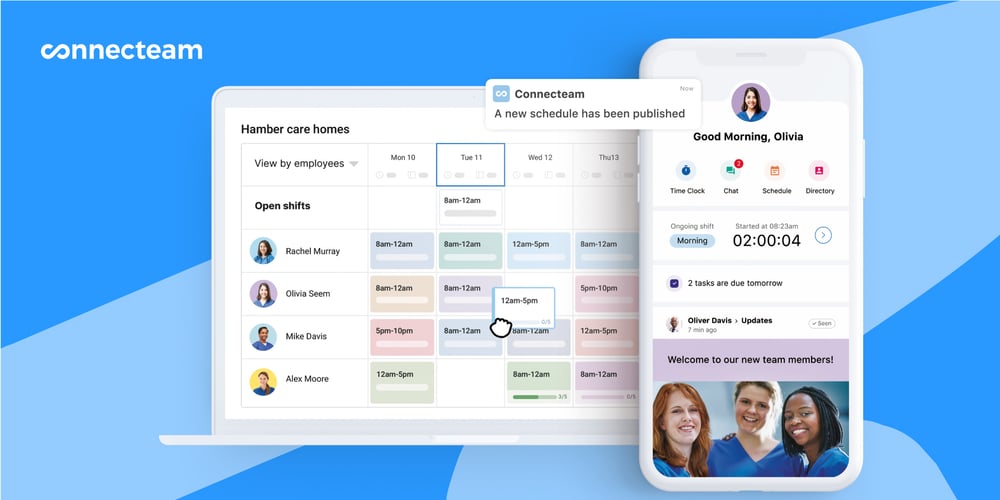
Connecteam functions as a scheduling app, making it easy to build and manage recurring and custom shifts with visual drag-and-drop tools. I love how you can assign shifts based on role, location, or tag, and the app supports templates for recurring weekly schedules. You can color-code by job type, filter by availability, and include shift-specific notes or attachments like checklists or training guides.
A standout is Connecteam’s auto-scheduling feature, which can pre-fill shifts based on qualifications, previous assignments, or availability, saving time during weekly planning. Employees can mark availability, request time off, claim open shifts, or swap shifts directly in the app, with customizable rules for manager approvals.
I appreciated how real-time alerts are triggered when someone’s a no-show, and how you can reassign shifts with 1 tap. Connecteam also flags double-bookings, so you can’t accidentally schedule someone into overlapping shifts without a warning. For companies with rotating schedules or last-minute changes (like cleaning, security, or delivery crews), this helps avoid panicked phone calls and missed work.
Employees can access their schedules from the mobile app and sync them with their calendars to stay on top of their shifts without needing to bother their managers.
Deputy brings equally strong scheduling tools, especially for businesses managing large hourly workforces. The AI-powered smart scheduler suggests optimal shift assignments based on availability, labor costs, fatigue rules, and sales forecasts.
When we rebuilt a weekly roster in Deputy during our latest testing, publishing felt well-considered: Deputy walked us through choosing which work areas to publish and how to notify staff, which is helpful if you only want to push out part of the schedule at a time. Deputy can also check employees’ certifications or qualifications before you assign them a shift, so you don’t accidentally put an unqualified person on the roster.
That said, our testing surfaced a real gap in Deputy’s guardrails: when we deliberately created overlapping shifts for the same team member across 2 areas, Deputy didn’t flag a conflict, and the schedule footer showed 0 warnings. For a scheduling-first product, we’d expect overlap detection to be tighter.
Deputy also offers shift swaps, offers, and self-service availability management, allowing team members to negotiate coverage without needing a manager to intervene each time. Employees can even claim shifts during their marked “unavailable” hours (if enabled by the manager), which is useful for part-timers who want to volunteer for last-minute coverage.
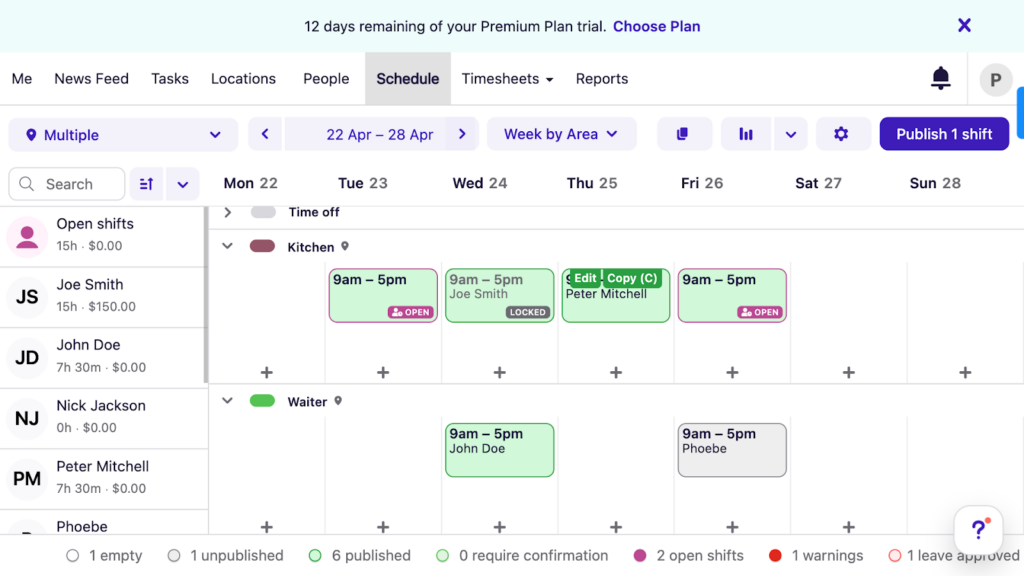
The verdict: This is a tie, but the trade-off is clear. Deputy wins on demand-based scheduling depth (forecasting, labor optimization, and flexible publishing), while Connecteam wins on scheduling guardrails and everyday simplicity. Pick based on which of those matters more to your operation.
Time tracking & location enforcement – Winner: Connecteam
Connecteam supports time tracking through mobile, web, and kiosk modes, so employees can clock in from the mobile app, a browser, or a shared tablet. When you have employees clock in through a shared device, you can require them to input personalized PIN codes or take selfies so they can’t clock in for each other.
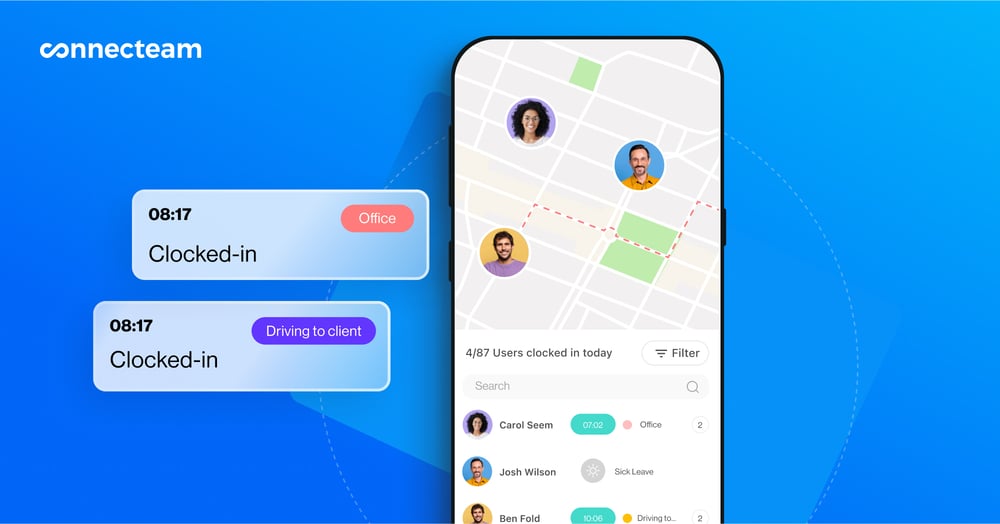
Connecteam features a real-time GPS tracker, so you can verify clock-in locations, restrict clock-ins to specific geofenced areas, and track workers’ real-time locations with GPS breadcrumb tracking. I found this feature especially useful for seeing movement history during shifts.
You can also use “shift attachments” to collect information (like shift feedback, mileage, or equipment used) during clock-outs.
Deputy also does a solid job tracking time through multiple devices, including shared kiosks and mobile apps with GPS. The shared kiosk captures photos of workers during clock-ins, and you can set it up with touchless biometric facial recognition to prevent buddy punching.
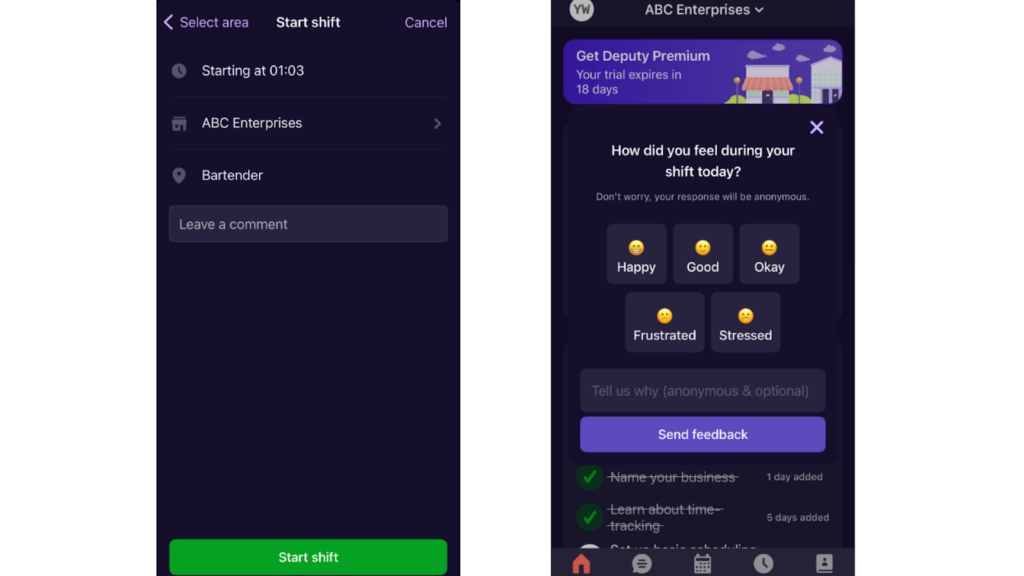
In our latest testing, we also liked Deputy’s timesheet guardrails: when we ended a test shift too early, the mobile app clearly explained that a shift under 15 minutes would be deleted upon submission, and scheduled staff who didn’t clock in showed up as “Absent” right in the timesheets table.
However, Deputy provides only static location snapshots but not live GPS breadcrumbs. We could keep tabs on workers’ GPS locations at clock-in and clock-out, but that’s a moment-in-time view rather than a full understanding of where employees move during their shifts. I think this might be fine for static job sites, but for mobile teams like cleaners, event crews, or delivery staff, it means less visibility and fewer accountability tools.
The verdict: Connecteam wins on location visibility. Both platforms nail the basics of multi-device time tracking and buddy-punch prevention, but Connecteam’s live GPS breadcrumbs give managers of mobile crews a level of accountability that Deputy’s clock-in/out snapshots can’t match.
PTO & leave management – Winner: Connecteam
I find Connecteam’s time off management features extremely smooth. Employees can submit leave requests directly through the mobile app, whether for vacation, sick leave, or unpaid time off. Managers receive instant alerts, and approvals can be done in just a few taps.
What I really like? The system syncs those approvals with the schedule and timesheets, so you’re not manually cross-checking leave records later.
Connecteam lets you customize leave types, assign policies to the right employees, and control approval flow so requests land with the right manager.
Deputy’s leave management system handles the basics well. Employees can submit requests and view remaining balances from the web app, and managers can approve or deny them with notes.
But when we tested this feature, we noticed an issue: Deputy’s scheduler doesn’t warn you when you assign shifts to employees who have requested leave that hasn’t been reviewed or approved yet. So if a manager doesn’t act on a leave request promptly, nothing stops them from scheduling a shift on top of that pending request. In Connecteam, you can view and act on time off requests directly from the schedule view, which makes it easier to catch conflicts while planning coverage.
It’s also worth noting that in our latest testing, leave and unavailability management wasn’t available in Deputy’s mobile app for either admins or employees, because it’s a web-only workflow.
The verdict: Connecteam takes this one. Both tools handle requests and approvals fine, but Connecteam syncs time off with the schedule and timesheets and works from mobile, while Deputy keeps leave management web-only and lets pending requests slip through the scheduling cracks.
Compliance – Winner: Tie
The Connecteam break management software allows managers to enforce break rules based on shift length and set alerts for missed breaks. Overtime rules can be customized according to your state laws (by day or week), and the system warns when employees are approaching limits.
You can even prevent clock-ins that would push someone into unauthorized overtime. One thing I found especially useful was how these rules show up in the scheduler and make it easier to catch issues before they happen.
I also liked the automatic break deduction feature. If someone forgets to clock out for a meal break, the system adjusts the timesheet automatically, reducing payroll corrections.
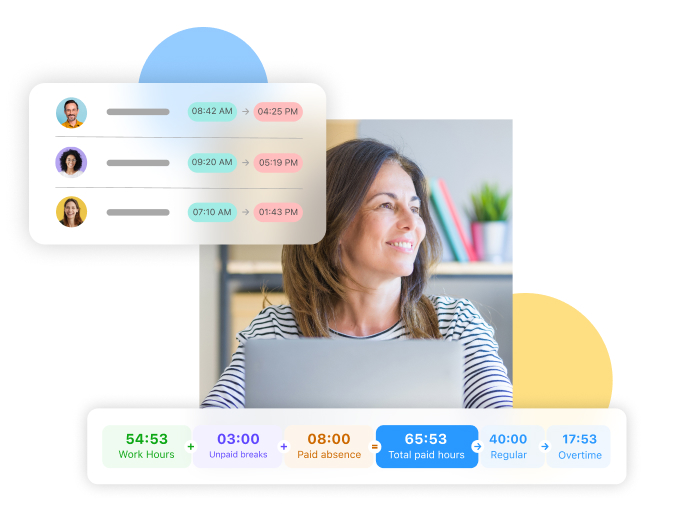
Deputy’s compliance features include break rules, fatigue management, and overtime alerts. These tools work well, but configuring them takes time. That said, the fatigue management settings, which let you set limits on hours, days, and rest periods, are pretty unique for workforce management software.
It also includes built-in compliance templates for laws like Fair Workweek, New York City scheduling rules, and California break requirements, which is a big advantage for teams operating across strict labor jurisdictions.
Deputy’s break planning tools allow you to set automatic unpaid break deductions based on shift length.
We appreciated the alerts Deputy sends when a shift assignment risks triggering overtime or violating scheduling limits.
The verdict: A genuine tie. Connecteam makes compliance rules easier to set up and enforce day to day, while Deputy’s built-in labor law templates and fatigue management are hard to beat for multi-location teams in strict jurisdictions. Choose based on whether you need custom control or ready-made rules.
Task management & checklists – Winner: Connecteam
I used the Connecteam task management app to assign jobs across locations, attach photos or forms, and set deadlines. What really stood out was the ability to track task completion in real time, which helps you stay on top of recurring operational processes without micro-managing.
Even better, Connecteam lets you create customizable checklists for everything from opening procedures to safety inspections. You can add time stamps and required signatures, or even make completion mandatory before clocking out. I think that’s a big win for industries like hospitality, security, or cleaning, where missed steps can lead to costly oversights.
Deputy’s task tool handles simple operational jobs well enough. You can create and assign tasks and subtasks, add due dates and start times, and set tasks to repeat daily, weekly, or monthly. But its limits show when you need more.
In our latest testing, we wished they could add detailed notes and attach images, videos, and audio files to tasks to make sure employees know exactly what to do, and found the recurring-task options too rigid for real operational routines. Where Connecteam still wins is operational enforcement and visibility, especially when you want tasks tied to specific workflows, attachments, and completion expectations inside the daily mobile experience.
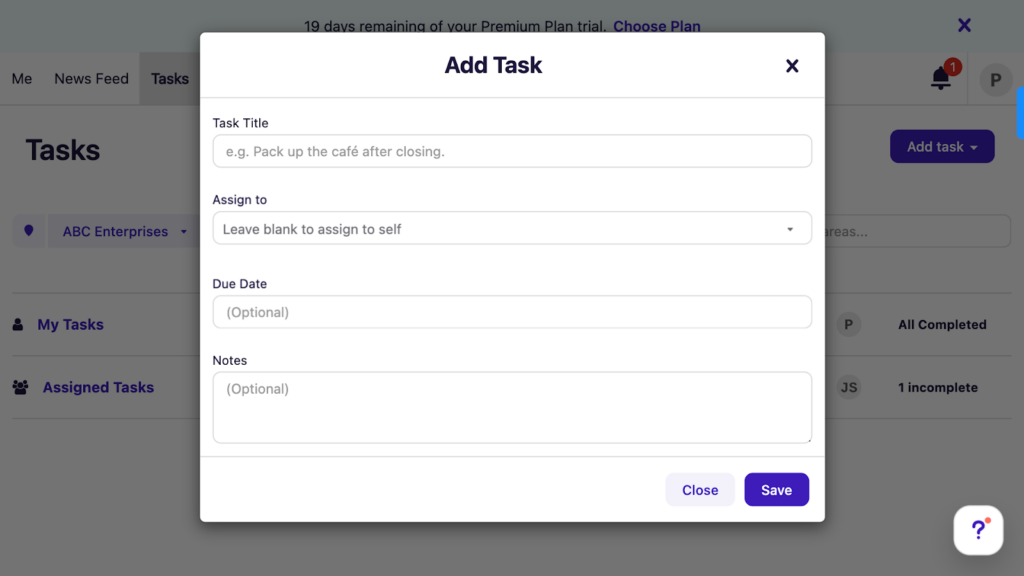
The verdict: Connecteam wins. Deputy covers simple to-do lists, but Connecteam’s attachments, forms, mandatory completion rules, and real-time tracking make it a stronger fit for running daily operations.
Shift Into Action With Built-In Tasks and Checklists
Stay on track and on schedule with Connecteam’s task lists and forms.
Communication tools – Winner: Connecteam
Connecteam makes internal communication feel intentional with a central hub that blends real-time updates with structured knowledge sharing.
- The updates feature lets you post announcements and track who saw them, which is great for accountability.
- The online team chat supports both 1:1 and group conversations, creating a business-only space that doesn’t bleed into personal WhatsApp threads.
- The directory helps team members quickly find contacts without needing to message a manager.
Deputy includes a News Feed for updates and also offers built-in Messaging, with Messaging+ available as an add-on for teams that want more advanced collaboration features. In our latest testing, the News Feed worked well for announcements: you can post to an individual, location, or department, attach PDFs, images, and videos, and let staff comment, react, and confirm they’ve read the message.
But during testing we were missing the ability to send messages to a custom group of people, which most in-app communication tools support, and found there’s very little formatting you can add to your News Feed posts, so they tend to look bland, if functional. Richer messaging sits behind the Messaging+ add-on ($1.95/user/month) unless you’re on Pro.
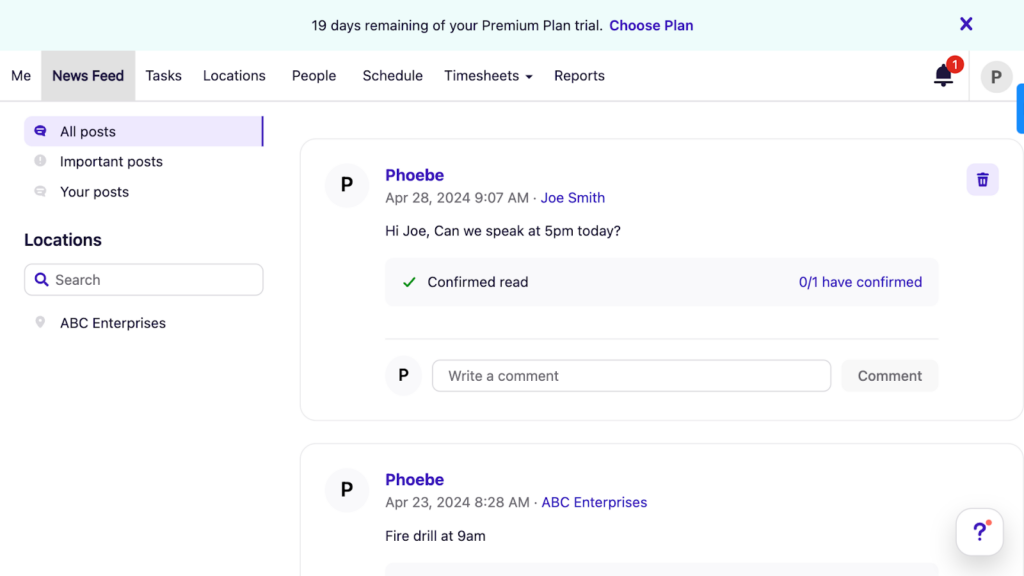
The verdict: Connecteam takes it. The chat, updates, and directory are built-in on every plan, while Deputy’s News Feed lacks custom groups and formatting, and its richer messaging costs extra unless you’re on Pro.
HR & training tools – Winner: Connecteam
Connecteam delivers a fully integrated HR and employee training experience through its HR & Skills hub. You can build structured onboarding flows with interactive lessons, assign quizzes to confirm understanding, and track employee progress in real time. Everything lives in the same app your team already uses for scheduling and time tracking, which makes adoption simple for deskless employees.
Connecteam has also expanded its hiring and onboarding tools, so you can now take someone from applicant to fully onboarded employee without leaving the platform.
With Connecteam’s Hiring feature, you create a position, build the application form with the exact fields you want (like text fields, links, or file uploads for a CV), and design your own hiring pipeline with custom stages (screening call, in-person interview, reference check, home test, etc.). You then share an application link on whatever channels you use, and candidates enter a position page where you can see how long each person has been sitting at a stage, add notes, and advance or reject them with a click.
My favorite part: when you hire someone, the fields from their application (like their CV or license) map automatically to their new user profile and Documents, so nothing gets re-typed.
The Onboarding feature picks up from there. You build onboarding “packs” that bundle everything a new hire needs to complete before or during their first days: personal details, document uploads (including forms like the W-4, W-9, and I-9), policy assignments for pay rates, overtime, scheduling rules, and time off, plus quick tasks with deadlines for both the employee and their admin.
New hires see that they need to complete their onboarding right in their mobile app feed and work through it at their own pace, while managers track everyone’s progress from a central dashboard, filter to see only incomplete items, and formally review and approve each person once everything’s submitted. For frontline businesses juggling seasonal hires or high turnover, having this in the same app employees already use for shifts and chat removes a lot of first-week chaos.
Beyond hiring, onboarding, and training, Connecteam includes secure document storage, digital ID cards, surveys, recognition and rewards, and visual org charts. These tools help managers keep teams aligned while giving employees clear visibility into policies, expectations, and growth paths.
Deputy has strengthened its HR and engagement capabilities since we first reviewed the software. Features like Shift Pulse and Kudos allow teams to capture end-of-shift feedback and encourage peer recognition. For businesses that want a more structured HR layer, Deputy offers the Deputy HR add-on that expands onboarding workflows, document management, and engagement reporting.
In our latest testing, Deputy HR showed real promise for hiring: we could open a candidate video, screening answers, an attached PDF, and interview scheduling without leaving the applicant view, which beats tracking candidates in email threads. But the workflows felt inflexible in places.
Adding a video question isn’t optional when publishing a job listing, which won’t suit every candidate pool, and the Documents feature didn’t work sequentially, so we couldn’t set up an employee signature followed by a manager signature in the same workflow. It’s these decisions that can make Deputy feel restrictive.
If your goal is to run the full employee lifecycle (hiring, onboarding, training, and documents) directly inside your workforce platform, Connecteam remains the stronger choice, and its hiring and onboarding tools are built in rather than bolted on. If you want scheduling tightly paired with engagement signals and hiring workflows, Deputy now covers more ground than it once did (just remember HR is an add-on, not included).
The verdict: Connecteam wins. It covers the full employee lifecycle (hiring, onboarding, training, and documents) natively in one app, while Deputy’s comparable tools require the HR add-on and showed workflow friction in our testing.
Reporting & analytics – Winner: Deputy
Connecteam gives managers practical reporting where it counts for day-to-day operations. You can view time clocks and forms auto-reports, track task completion and training progress in real time, and export timesheets and custom reports for payroll. For most frontline teams, that covers the essentials without extra configuration.
Deputy goes deeper on workforce analytics. You can compare scheduled hours against actual hours worked and sales data, view attendance by employee or location, monitor leave balances, and check workers’ clock-in locations. We also liked that you can use Deputy’s report builder to create custom reports, such as comparing pay across locations, which some competing platforms lack.
There are two catches, though. In our testing, most of the reports are locked behind an add-on, and most reports are plain tables you export to spreadsheets rather than visual dashboards. Deputy’s AI assistant can’t create reports for you either; in our testing, it could only point to where a report lives, making it more of a glorified help system for now.
The verdict: Deputy wins on reporting depth and customization, which matters for operations that live and breathe labor-cost data. Just budget for Analytics+ (or Pro) to unlock most of it.
Integrations – Winner: Deputy
Connecteam has built out a solid native integration ecosystem. It connects with major payroll and accounting platforms, including Gusto, Paychex, ADP, QuickBooks, Xero, and HR tools like BambooHR and PrismHR. On the POS front, Connecteam integrates with Lightspeed, Square, Shopify, and Clover, making it handy for retail and hospitality teams that want to sync schedules and labor costs with live sales data.
Connecteam also offers Wix Bookings for service businesses and Zapier for custom automation workflows. For long-tail integrations, the Connecteam API is available on higher-tier plans.
Deputy has a broader integration ecosystem overall. It connects with multiple payroll platforms (including region-specific options for New Zealand and Australia/New Zealand), several HR and recruitment tools, learning management systems, POS systems, and file storage and device management integrations.
Deputy’s ecosystem spans more categories and includes integrations Connecteam doesn’t offer natively, such as dedicated HR platforms, ATS and recruitment tools, learning systems, and device management.
The verdict: Deputy wins on breadth. Connecteam’s POS coverage is strong and competitive, but Deputy’s ecosystem is significantly larger overall, particularly for HR, recruitment, and payroll. If your team relies on dedicated HR integrations, region-specific payroll options, or learning management platforms, Deputy’s ecosystem is more comprehensive. For teams focused primarily on scheduling and POS sync, Connecteam’s integrations are solid and increasingly competitive.
Mobile experience – Winner: Connecteam
Connecteam’s mobile app is one of the most polished workforce apps I’ve tested. The interface is clean, fast, and clearly built for real-world use. Employees can clock in/out, view schedules, chat with teammates, complete checklists or forms, and access training from their phones. Meanwhile, admins can assign shifts, review logs, approve time off, send announcements, and more, even while offsite.
Deputy’s mobile experience is solid for everyday scheduling tasks: employees can view shifts, claim open ones, swap with coworkers, and get push alerts for last-minute changes. But our latest round of testing turned up more friction than before.
Deputy splits its mobile experience across 2 apps: the main Deputy Scheduling app and a stripped-down Time Clock app. The Time Clock app refused to start up on a Huawei device during testing, which could be a problem when staff use their own phones. Some web features, like drag-and-drop functionality, are missing on mobile, and leave management isn’t available in the mobile app at all.
The verdict: Connecteam takes this one. Deputy’s app is responsive and easy to navigate for scheduling basics, but the two-app split, missing mobile features, and read-only offline mode add up for frontline teams that live on their phones.
Overall usability – Winner: Connecteam
Connecteam puts usability front and center. The interface is clean, with navigation built around real workflows like scheduling, forms, and communication. The UI avoids jargon and keeps tasks logically grouped. Employees get the same simplicity through a widget-style home screen showing only what matters: shifts, tasks, forms, and unread chats.
Deputy also offers a sleek experience, especially for shift tasks like clocking in, checking schedules, or requesting time off. Its interface uses a big font and well-spaced text that’s easy on the eyes, and the manager dashboard surfaces pending timesheets and approvals in one place.
But a few things slowed us down when we tested it: Some admin tools were hard to locate, and in our most recent testing, the Locations tab kept redirecting me to a full-screen setup wizard to recreate locations that already existed. This bug persisted over multiple days and logins. We also didn’t find accessibility features like screen reader compatibility, though the touchless biometric clock-in is friendly for individuals with certain impairments.
User Ratings
Both Connecteam and Deputy earn strong ratings across major review sites, but Connecteam’s scores come from a significantly larger user base.
Connecteam
- ⭐ 4.6/5 on Capterra (5,302 reviews)
- ⭐ 4.6/5 on G2 (3,505 reviews)
Deputy
- ⭐ 4.6/5 on Capterra (773 reviews)
- ⭐ 4.6/5 on G2 (666 reviews)
Ratings verified as of August 2026.
Security & Compliance
| Category | Connecteam | Deputy |
|---|---|---|
| Encryption | ✅ TLS/SSL in transit Encrypted at rest | ✅ TLS 1.2+ in transit AES-256 at rest |
| GDPR | ✅ | ✅ |
| HIPAA | ✅ | ❌ |
| Data hosting | Germany, Netherlands, Ireland | Australia, UK, US |
| Admin controls | ✅ Role-based permissions | ✅ Custom permissions |
| 2FA | ✅ | ✅ |
| SSO | ✅ | ✅ |
| Certifications | ✅ SOC 2 Type 2 ISO/IEC 27001 | ✅ SOC 2 Type II ISO 27001 |
Both platforms publish security and compliance information through vendor documentation, and each takes a serious approach to protecting workforce data. Connecteam publicly lists SOC 2 Type 2 and ISO/IEC 27001 in its Trust Center, and it offers HIPAA support for designated customers who enter a BAA (additional fees may apply).
Deputy publicly lists ISO 27001, SOC 2 Type II, and PCI DSS, runs annual security reviews with external auditors, and supports 2-factor authentication. But two things are worth flagging for regulated teams. First, Deputy isn’t HIPAA-compliant, which is a dealbreaker for many healthcare operations. Second, some of Deputy’s stronger security controls, like SSO and custom role-based permissions, are only available on the Pro plan.
If your business operates in a regulated industry, you should verify compliance requirements directly through each vendor’s Trust Center before deployment.
Setup and Onboarding
I had no trouble getting started with Connecteam. The setup was smooth and well-guided, with a checklist that walked me through adding users, roles, and modules like time tracking or scheduling. I liked how modular it felt: It let me focus only on what I needed without the rest getting in the way.
There’s also a built-in training center with short, useful videos for admins and employees to onboard at their own pace.
Deputy’s signup is genuinely quick. In our latest testing, it took us about 5 minutes to set up an account, and we liked that you can add team members without entering their email addresses right away. Deputy also extends your free trial as you complete setup steps, which is a nice touch.
However, signing up with Google meant no password was created, and the Deputy time tracking app later asked for one, forcing us through the “Forgot your password?” routine just to log in. And after setting up business locations, the Locations tab kept relaunching its setup wizard over multiple days and logins. Small things, but they add up during a rollout.
Support and Customer Service
Connecteam and Deputy both offer multi-channel support, but the depth you get from each depends heavily on the plan you’re on.
| Support Type | Connecteam | Deputy |
|---|---|---|
| 24/7 Chat | ✅ 24/7 | ✅ Pro Lite and Core: 90 days only |
| Phone Support | ✅ Paid tiers via Connecteam Pros | ❌ No inbound calls; outbound callbacks only on Core and Pro |
| Email Support | ✅ | ✅ |
| Help Center & Docs | ✅ | ✅ |
| Live Onboarding Help | ✅ Paid service | ✅ Paid service |
| Customer Success Manager | ✅ Enterprise | ✅ Core: 50+ users Pro: 250+ users |
Support details verified as of August 2026.
Connecteam makes support feel accessible and dependable, even on the free plan. I’ve consistently gotten helpful responses via live chat and email, often within minutes. The help center includes step-by-step guides, videos, and templates for everything from scheduling to form setup.
What truly stands out is the Connecteam Pros service. For an hourly rate, you’re connected to certified experts for hands-on onboarding and tailored guidance—something I’d recommend if you’re switching from spreadsheets or scaling fast.
Deputy’s support quality was also impressive during our tests. We raised 3 customer support tickets and received helpful responses within an hour every time. Live chat begins with a bot, but reaching a real agent is easy. The help and learning centers cover common issues well.
Unfortunately, there’s no way to call Deputy support on any plan, live chat is only available 24/7 on Pro (Lite and Core get it for the first 90 days only), and customer success managers come with 50- and 250-user minimums. If accessible, human support matters to your team, factor that into your plan choice.
🏆 Who Wins: Connecteam or Deputy?
| Choose Connecteam if you… | Choose Deputy if you… |
|---|---|
| Want strong day-to-day operations in one app, including time tracking, scheduling, tasks, and team communication. | Want demand-based scheduling depth with forecasting and labor-cost optimization. |
| Prefer a free plan for up to 10 users and flat pricing for the first 30 users on paid tiers. | Prefer per-user pricing with Lite, Core, and Pro plans, plus add-ons depending on needs. |
| Need real-time GPS breadcrumbs for more visibility into mobile teams, not just clock-in/out location stamps. | Work mainly at static job sites where location stamps at clock-in/out can be enough. |
| Want time-off visibility that is easy to manage from the schedule while planning coverage. | Want built-in labor compliance templates and scheduling rule enforcement across locations. |
| Need strong compliance & PTO controls with blackout days, custom break rules, and automatic overtime tracking. | Want built-in labor law templates to quickly apply pre-set rules across locations. |
| Value exceptional support and guided onboarding, even on the free plan. | Have an internal admin team that can configure deeper scheduling rules and optimization settings. |
| Work in healthcare or another regulated field where HIPAA support is a must. | Need deep, customizable workforce analytics and are willing to pay for Analytics+ or Pro. |
| Learn more about Connecteam | Read our in-depth Deputy review |
Both Connecteam and Deputy are excellent workforce management platforms, but they serve slightly different priorities.
Deputy is particularly strong in environments where scheduling complexity is the primary challenge. Organizations that rely heavily on demand-based planning, labor cost visibility, and configurable compliance rules may appreciate its forecasting tools and structured rostering engine, especially in industries like retail and hospitality, where shift optimization is central to performance.
Just go in knowing that Deputy is at its best building schedules, clocking staff in, and reviewing timesheets, while communication, tasks, HR, and analytics either feel lighter or sit behind paid add-ons.
Connecteam focuses on centralizing day-to-day workforce operations into one unified platform. Its all-in-one structure brings scheduling, time tracking, task management, communication, HR tools, and training into a single mobile app. For teams that want operational clarity without stitching together multiple systems, this consolidated approach can simplify both admin work and employee experience.
Employees can clock in, view shifts, complete tasks, submit forms, chat with teammates, and access training from one interface. For growing businesses, the free plan for up to 10 users and flat pricing for the first 30 users per hub offer predictable scaling without immediate per-seat pressure. Built-in compliance controls, GPS-based clock-in verification, and structured workflows further support teams that need accountability in the field.
👉 The verdict:
Choose Deputy if scheduling optimization, forecasting depth, and advanced labor controls are your top priorities across large or multi-location operations, and you’re comfortable paying for add-ons as your needs grow.
Choose Connecteam if you want a cost-conscious, mobile-friendly platform that unifies scheduling, time tracking, compliance, communication, and operational workflows in one place, with everything built in rather than bolted on.
Get started with Connecteam for free today!
FAQs
No, Deputy isn’t a CRM. It’s a workforce management tool focused on employee scheduling and time tracking. It doesn’t include sales or customer relationship management features.
Yes, Deputy publishes its security posture through its security resources and Trust Center, including information about encryption, access controls, and compliance standards like ISO 27001 and SOC 2 Type II. Note that Deputy isn’t HIPAA compliant, so if you operate in healthcare or another regulated environment, review the Trust Center documents with your compliance team and confirm whether Deputy’s published compliance scope matches your requirements.
Connecteam includes several HRIS-like features, such as onboarding, documents, time off, and training, but it’s not a full-scale HRIS. It’s better suited for teams that need practical, mobile-friendly HR tools without complex payroll or benefits admin.
Yes, Connecteam offers a comprehensive free plan for up to 10 users.
Yes, Deputy offers a 31-day free trial with no credit card required. New accounts start on a Core trial, and you can unlock extra trial days by completing onboarding tasks inside the product.
Changelog
(Last updated: August 2026)
- Re-verified Connecteam and Deputy pricing against official pricing pages and added Deputy add-on costs (HR, Messaging+, Analytics+, Deputy Payroll) and minimum monthly spend.
- Updated scheduling, time tracking, PTO, task management, communication, and HR sections with hands-on findings from our August 2026 Deputy review.
- Changed the Mobile Experience winner from Tie to Connecteam based on new testing of Deputy’s two-app setup, offline limitations, and device compatibility.
- Added a new Reporting & Analytics comparison section.
- Corrected the Support table: Deputy offers no inbound phone support, and 24/7 live chat is Pro-only.
- Updated the Security & Compliance table to note Deputy isn’t HIPAA compliant and gated Pro-plan controls.
- Refreshed user ratings and Setup and Onboarding findings; updated the final verdict.
Previous update (February 2026):
- Updated pricing and plan structure for both Connecteam and Deputy.
- Refreshed feature comparisons to reflect current capabilities and add-ons.
- Revised Security & Compliance details to match latest published information.
- Updated support and HR feature coverage based on current plans.
