


Dispensary management software helps you keep your team on track, your business compliant, and your operations running smoothly.
When you have staff to manage, tasks to tackle, and customers to help, compliance can feel like a buzzkill.
The right dispensary management software automates compliance and simplifies your daily workflows.
In this article, I compared the key features of the 5 best dispensary management software, including:
- Connecteam
- KayaPush
- Meadow
- BLAZE
- Acumatica
Our Top Picks
-
1

Best all-in-one Dispensary Management Software
-
2

Good for integrated payroll and labor compliance
-
3

Good for managing inventory across different locations
Why trust us?
Our team of unbiased software reviewers follows strict editorial guidelines, and our methodology is clear and open to everyone.
See our complete methodology
What to Look For in a Dispensary Management Software
Here are the key features I looked for to find the best dispensary management software:
Must-have features:
- Staff scheduling: Managers should be able to build, adjust, and publish schedules, updating employees in real-time.
- Time tracking: Staff must be able to clock in and out, track breaks and overtime, and log hours.
- Compliance tools: The software needs to support granular permissions, automated reporting, and audit-ready recordkeeping.
- In-app communication: Teams should be able to send private, group, or company-wide messages, updates, and announcements.
- Forms and checklists: The software should let you create custom checklists and forms with flexible fields, including images, documents, and signatures.
- Inventory management: You should be able to track products and monitor stock levels.
I also made sure the software is:
- Fast to onboard, so staff can learn how to use the software quickly.
- Mobile friendly, so teams can access the tools they need from anywhere, on any device.
Finally, I looked for these features that make software great for managing dispensaries:
- Real-time reporting, to track staff performance and business growth in one dashboard.
- Document management, to quickly access important files like SOPs, licenses, and safety protocols.
- Task tracking, to delegate responsibilities, monitor progress, and assess staff performance.
The 5 Best Dispensary Management Softwares of 2026
-
Connecteam — Best all-in-one Dispensary Management Software
Connecteam is an all-in-one workforce management platform that helps dispensary owners schedule staff, track time, streamline communication, and stay compliant.
Why I chose Connecteam: What I loved about Connecteam is how versatile it is; you can track employee hours with the GPS time clock and create custom forms for just about any workflow. I was also really impressed by how easy it is to stay compliant and organized across multiple locations, all from one app.
Smarter scheduling
I really liked how Connecteam handles employee scheduling. The drag-and-drop builder makes it easy to create and edit shift schedules in minutes. Staff can request time off, set their availability, and even mark preferred work days, which eliminates a lot of the back-and-forth. Once a schedule is published or updated, employees are notified instantly and can access the latest version right from the mobile app.
If your state law requires a certified budtender or manager to be on-site during specific hours, Connecteam makes it easy to build that into your schedule. You can create custom scheduling rules and then use the AI-powered auto-scheduler to instantly assign open shifts to employees based on their availability, role, and qualifications.
I also thought that shift notes and file attachments were super helpful, especially if you need to remind staff about ID checks or make sure they get a new SOP. Everything is attached right to the shift, so you can’t miss it.
Accurate time tracking
Connecteam’s employee time clock feels thought-out for everyday work. Employees can clock in and out on the mobile app, right from their mobile devices. You can also enable the geofence time clock, which automatically clocks out employees if they leave the set work zone. There’s a real time GPS tracker, which uses Breadcrumb technology to track employees when they’re on the move. If delivery is a large part of your business, this feature is especially helpful to gain visibility into a driver’s route and progress.
You can also add custom rules to automate overtime and breaks, which is a great way to ensure you stay compliant with labor laws.
All work hours are organized into timesheets for payroll, and you can easily see who was working when (and where). Connecteam automatically calculates breaks, overtime, and custom pay rules, so you don’t have to apply them manually. Managers can approve, edit, and submit timesheets directly to their payroll provider or export them as a CSV file. I liked that every change to a timesheet is recorded, so you always have audit-ready logs on hand.
Custom forms and task tracking
Connecteam’s digital forms and checklists make it simple to digitize any SOP or process. You can build forms for opening and closing procedures, product intake, and even compliance checklists. Each form is completely customizable, so you can add text fields, dropdowns, file uploads, signatures, and photos. For a more hands-free option, I liked using Connecteam’s speech-to-text, which uses AI to capture, summarize, and sort inputs.
If you already have a form that works, just upload or take a picture of it and Connecteam’s AI will instantly convert it into a structured, digital version. All form submissions are time-stamped and stored in the app, so you can easily find the details you need.
You can also attach a form or checklist directly to a shift or include it as part of a task. With Connecteam’s employee task tracking, assign daily, weekly, or one-off tasks to individual teams members or specific roles. I liked that you can add notes, checklists, photos, or even subtasks, and track progress in real-time to make sure everything gets done.
Centralized communication
I was really impressed by Connecteam’s employee updates and team instant messaging. You can send announcements, schedule changes, or policy updates in the app, and get read receipts to confirm who’s seen them. All updates are sent in a familiar-looking feed, and employees can react, comment, or ask questions directly on each post.
The team chat is also a great way to keep communication organized and focused. Managers can message individual employees or create group chats for specific roles, like budtenders or inventory staff. You can send photos, videos, and files, making it easy to share whatever your team needs to stay on track. The chat is fully searchable, nothing gets lost. I really liked having a dedicated work chat, without switching apps or mixing business messages with personal ones.
Integrated tools
Connecteam offers API integrations and connects with popular POS systems, like Lightspeed, Clover, Square, and Shopify POS. You can automatically sync employee hours with live sales data to track labor as a percentage of revenue. This helps you plan more efficiently, control labor costs, and protect your margins.
Connecteam also integrates with payroll and other systems, including:
And so much more…
Connecteam has many other features to help scale and unify your business. Gain insights into attendance, track form submissions, and monitor incidents with automatic reports. Store important staff documents in the app, such as licenses, certifications, and signed policies. Use the built-in employee training and onboarding to quickly get new hires up to speed. You can build your own course or instantly generate one with the AI course creator. Connecteam offers all this and more so you can manage your dispensary with ease.
0Key Features
- Drag-and-drop scheduling
- Custom forms & checklists
- GPS time clock
- Digital timesheets
- In-app chat
- POS integrations
Pros
- All-in-one platform
- Mobile-first design
- Easy to use
- AI-powered automations
Cons
- Needs Internet or Wi-Fi access to work
Pricing
Free-for-life plan availablePremium plans start at $29/month for 30 users
14-day free trial, no credit card required
Start your free trial -
KayaPush — Good for integrated payroll and labor compliance
Available on
- Web
- Windows
- Mac
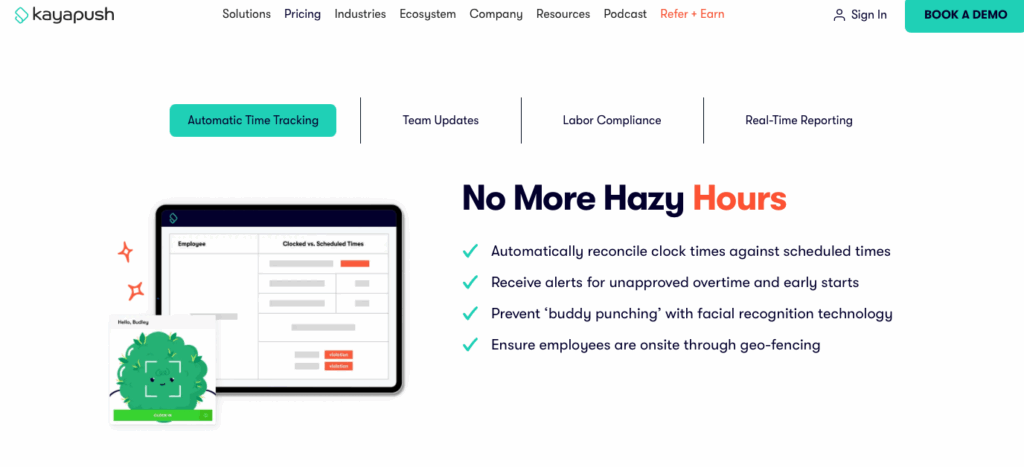
KayaPush is an HR and payroll software for cannabis businesses, focusing on tools for scheduling, payroll, HR, and compliance.
Why I chose KayaPush: I was impressed with KayaPush’s suite of tools for managing teams that need a high level of compliance.
Scheduling and coordination
KayaPush’s scheduling tool is pretty strong. I liked that it integrates with POS systems to pull live and historical sales data to inform your staffing decisions. There’s an auto-scheduler, which I was excited about, however it seems like you need to first set custom rules and create a template in order for it to work. To me, that kind of defeats the purpose of an “automatic” scheduler, especially if it still involves manual set up.
The platform supports in-app shift swaps and time off requests, which managers can review with insight into the cost implications of each change. Managers and employees can access the schedule on both the desktop and mobile app.
Time tracking and compliance
I liked KayaPush’s time tracking system; it syncs with the schedule, payroll, and POS system. Employees can clock in and out from the app, and managers receive alerts if someone starts early, misses a punch, or goes into unapproved overtime. There are biometric and geofencing features, which I appreciated.
In addition, I liked that the platform flags potential issues like split shift premiums, missed breaks, or unapproved overtime. There’s a break tracker and break waiver forms, plus the system tracks sick leave and PTO accruals. If an employee forgets to clock in or out, you can adjust the entry and the system will record who made the change and when.
Communication and documentation
KayaPush has a chat function that lets employees and managers send text, photos, videos, and attachments. I liked that you can send one-on-one messages or create channels for specific groups of people. The chat is pretty intuitive, and I also liked that you can create a one-way channel for announcements.
In addition to messaging, KayaPush also has a forms feature, which is only available through the HR add-on. You can upload files and add text, signature, and checkbox fields. From what I could tell, you basically just add these elements to an existing form, as if you’re placing them on top of a PDF. So while you can, technically, fill out forms, it’s not as dynamic as creating a fully digital workflow. That said, I did appreciate that all files are stored in the system, so they’re easy to find when you need them.
What users say about KayaPush
KayaPush makes scheduling easy, especially for someone who manages two different stores. By using two monitors, I can easily work through both schedules.


A few things could be better. I can do more on the desk top then the phone app. Would be nice if it was the same.
Key Features
- Scheduling
- Time tracking
- In-app chat
- Time off management
Pros
- Easy to use
- Built-in compliance tools
Cons
- No inventory management
- Lacks native POS
Pricing
Starts at $349/location/month Trial: No Free Plan: No
-
Meadow — Good for managing inventory across different locations
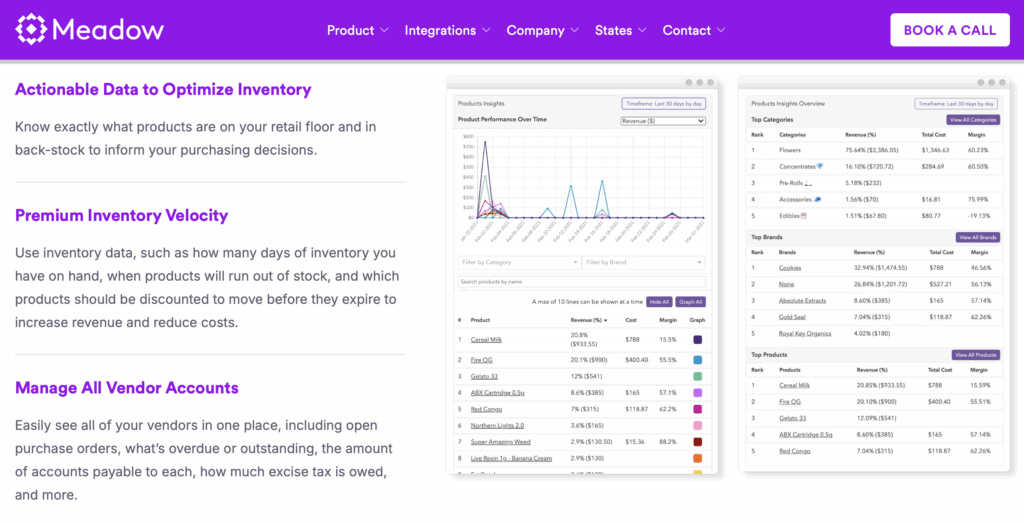
Meadow is a cannabis retail platform that offers POS, inventory management, e-commerce, and compliance tools for US-based dispensaries.
Why I chose Meadow: I liked Meadow’s clean and simple interface and was interested in its detailed audit log.
Inventory management
Meadow’s inventory management system is built for functionality. I liked that you can track products in real-time, set alerts when items are low in stock, and manage inventory transfers between different locations. The system offers per-dispensary pricing and has inventory forecasting, which I thought was helpful for planning ahead and avoiding stockouts.
While Meadow doesn’t offer the same complexity as a full inventory ERP, it covers the basic needs of most dispensaries. I also liked that it supports a hub-and-spoke model, so you can have a central inventory hub and distribute to multiple locations. Overall, it seems like a system that works for daily dispensary operations.
Compliance and reporting
I was really impressed with Meadow’s compliance and reporting tools. The platform integrates with Metrc for state-specific traceability and automatically reports daily. I liked that the system also runs compliance checks and flags any issues it comes across.
What I liked most about how Meadow handles compliance is the audit log. It’s super detailed and logs every action with a timestamp, admin ID, type, and IP address. It was nice being able to filter by date, admin, or action category. There’s also access control, restricted to only high-level admins. Meadow is designed to meet regulatory requirements in California, Massachusetts, Michigan, Minnesota, New York, New Jersey, and Washington D.C. While it offers localized compliance tools, I would have hoped to see a wider range of states featured.
Delivery and communication
Meadow’s website lists delivery as one of its features, however from what I could tell the offering is only available through the Onfleet integration. In order to access the integration, you need an Onfleet account. Onfleet plans start at $599 per month, which is separate from what you would pay for Meadow.
That being said, it seems like you can do a lot with the Onfleet integration. It offers route planning, driver tracking, and lets managers set up delivery tasks. You can add notes and send updates in each task, and you can send delivery-specific messages. While it doesn’t replace a full communication system, I appreciated that you can contact drivers from the field.
What users say about Meadow
Meadow is easy to learn, use and is constantly improving. Customer support is quick and real.
Some of the reports are not as robust as our previous provider and could be streamlined a bit more.
Key Features
- POS system
- Inventory management
- Analytics
- Automatic reporting
Pros
- Detailed audit log
- Compliance tools
Cons
- Needs integration for delivery features
- Pricing not publicly available
Pricing
Contact vendor for price Trial: No Free Plan: No
-

BLAZE — Good for deep analytics and dispatcher visibility
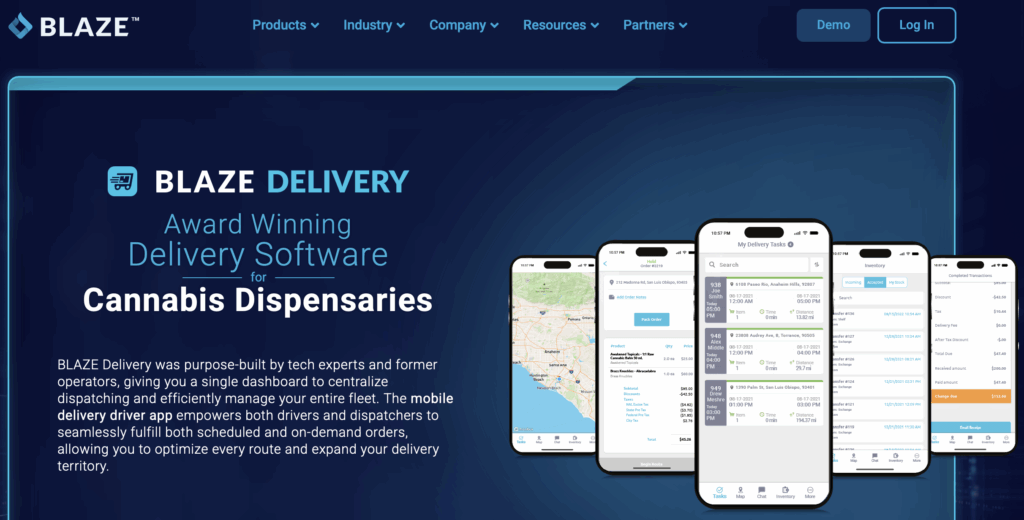
BLAZE is a cannabis retail platform that offers POS, inventory management, e-commerce solutions for dispensaries and industry operators.
Why I chose BLAZE: I chose BLAZE because of its focus on enterprise-level retailers and multi-state operators that need a multi-functional platform for their businesses.
POS and time tracking
BLAZE offers a web-based POS system that connects to a range of hardware setups. I liked that you have the flexibility to access it from a laptop, tablets, or standard registers. The interface looks sleek and simple to learn for new employees.
Employees can clock in out through BLAZE’s POS, on the web, retail app, or delivery app. I liked that having a native system saves you from needing a separate time tracking tool. Logged hours are automatically added to the Time Clock report. Managers can access the report, and adjust entries if someone forgets to clock in or out.
I liked that time tracking connects to payroll functions, which I can see making compensation easier to manage, especially across roles and shifts.
Delivery and driver communication
I was really impressed by BLAZE’s delivery management app. It basically turns a driver’s phone into a mobile POS. This lets them see custom details, accept cashless payments, process transactions, and send receipts. It’s a smart way to handle deliveries without switching between multiple systems.
Another feature that stood out to me was the chat. I liked that drivers can communicate with dispatchers in real-time to share live updates. Drivers can clock in and out from the app, view their hours, and manage their cash drawer. In addition, dispatchers have full visibility into driver locations, inventory levels, and active orders.
While I appreciate that the chat function exists, I wish that communication extended beyond just dispatchers and drivers. It would be nice to see a more versatile messenger that lets teams interact with each other, so they don’t have to rely on external tools.
Reporting and analytics
BLAZE has a strong business intelligence platform. There’s a central dashboard that puts data front and center. You can create detailed reports covering product sales, inventory turnover, and even budtender performance.
The platform helps you identify upsell opportunities, spot buying trends, and analyze customer behavior. On their website, BLAZE says that you can use sales data to inform scheduling decisions, which may be true. However, it felt a bit disjointed to me since BLAZE doesn’t offer a scheduling solution. Regardless, I did like that you can automate reports to be sent out daily, weekly, monthly, or annually.
What users say about BLAZE
The system has many avenues for completing the same tasks and doing product entry and POS integration with multiple platforms.
The platform achieves 70% of what you need done and easy to use for those that 70% of tasks needed.

Key Features
- Time tracking
- POS system
- Payment processing
- Reporting tools
Pros
- Powerful delivery management app
- Automated reports
Cons
- Chat limited to drivers and dispatchers
- No in-app scheduling
Pricing
Contact vendor for price Trial: No Free Plan: No
-

Acumatica — Good for cannabis businesses with complex supply chains
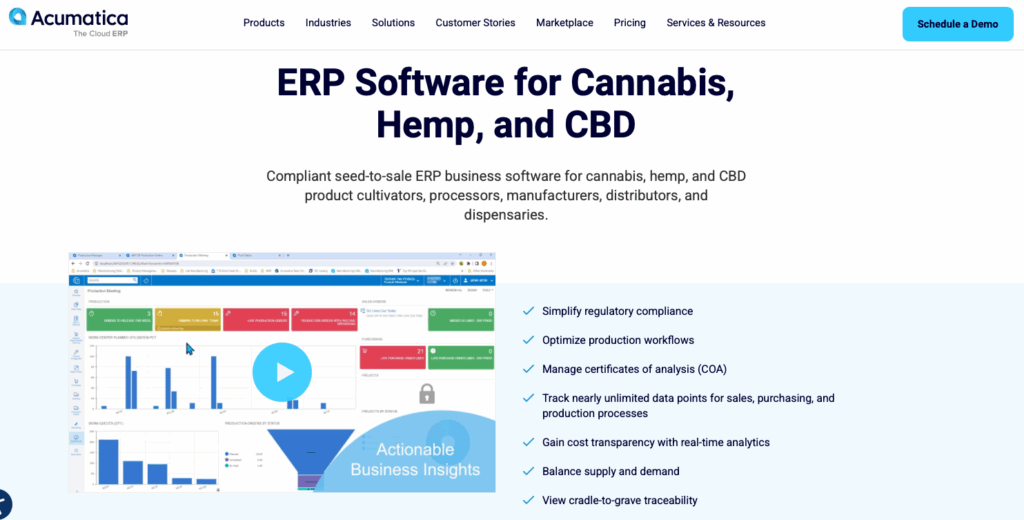
Acumatica is a cloud-based ERP system with custom business management tools, including finance, inventory, CRM, and compliance features.
Why I chose Acumatica: I liked Acumatica because of its focus on the supply chain, providing solutions to handle cultivation, manufacturing, distribution, and retail.
Enterprise resource planning
Acumatica’s strength is in its enterprise resource planning (ERP) platform, built for businesses that need a highly customizable system, advanced financial controls, and visibility across multiple departments. I liked that it offers such a wide range of tools to help with financial and inventory management, manufacturing, and order processing. There are tools to build automations and custom workflows.
I really liked how flexible the system is, since you can adapt it to fit complicated cannabis operations. You can access Acumatica on any device, and it supports unlimited users without extra fees. However, it’s not as intuitive as other dispensary management software. You really need to go deep in order to learn it and configure the system to work for your dispensary. While it’s powerful, I think it might be a little too complex for dispensaries that need something they can start using from day one.
Time management and projects
Acumatica ties time tracking to project-based work. Employees can log time on the browser or mobile app, and field or manufacturing teams can clock in and out for specific tasks. Work hours are organized into timesheets, which I thought was helpful.
I also appreciated that managers can log time for an entire crew at once. The platform supports flexible approval processes with alerts and mobile approvals. I can see this being especially useful if you manage large teams across multiple departments. However, it seems like the time tracking is built for billable projects, rather than real-time clock-ins for dispensary staff.
Where it falls short
Even though Acumatica is a strong ERP platform for supply chain management, I thought that it was missing some key features essential for daily dispensary operations. For example, it doesn’t have a POS system that works for fast retail transactions. While Acumatica offers appointment scheduling for service providers, you still can’t create or manage true shift schedules for retail employees.
It’s also missing in-app communication, so you can’t quickly send the team an update or message an employee directly within the platform. To me, Acumatica seems like a powerful solution for cannabis business operators, but not necessarily dispensaries. Retail teams need reliable tools that can support employee management, not complex systems that are geared more toward backend operations.
What users say about Acumatica
I like how customizable the data views are. Using easy to use table joins, our financial reporting has never been easier.
At times, the simplistic design doesn’t work in favor of faster and more efficient record keeping. The ability to go back in and update previously entered items can take longer than just creating a complete new entry.
Key Features
- ERP
- Time tracking
- Financial tools
- Inventory management
Pros
- Highly customizable
- Unlimited users
Cons
- No POS system
- Lacks shift scheduling
Pricing
Contact vendor for price Trial: No Free Plan: No
The 5 Best Dispensary Management Software of 2026
| Topic |
 Start for free
|
|
|
|
|
|---|---|---|---|---|---|
| Reviews |
|
N/A
|
N/A
|
N/A
|
N/A
|
| Pricing |
Starts at just $29/month for the first 30 users
|
Starts at $349/location/month
|
Contact vendor for price
|
Contact vendor for price
|
Contact vendor for price
|
| Free Trial |
yes
14-day
|
no
|
no
|
no
|
no
|
| Free Plan |
yes
Free Up to 10 users
|
no
|
no
|
no
|
no
|
| Use cases |
Best all-in-one Dispensary Management Software
|
Good for integrated payroll and labor compliance
|
Good for managing inventory across different locations
|
Good for deep analytics and dispatcher visibility
|
Good for cannabis businesses with complex supply chains
|
| Available on |
Web, Windows, Mac
|
What is Dispensary Management Software?
Dispensary management software is a digital tool that helps cannabis retailers manage their daily operations and stay compliant with state regulations. It unifies important business functions, including employee management, sales, and inventory, into one system.
These platforms often cater to the cannabis industry’s unique workflows, integrating with POS hardware, track-and-trace compliance systems, and financial reporting tools. Dispensaries rely on this type of software to stay organized and effectively run their businesses, while meeting regulatory requirements and custom expectations.
How Does Dispensary Management Software Work?
Dispensary management software works by linking different business tools into one, centralized system. Dispensary owners and staff use the software to manage their retail operations more efficiently. Platforms usually include a POS system integration for transactions, inventory management, and reporting features to monitor stock, employee performance, and sales.
Most dispensary management apps are cloud-based, so users can access the platform from both desktops and mobile devices. Apps often integrate with state compliance trackers, automatically reporting sales and product data in real-time to avoid manual errors and violations. Some platforms also cover scheduling and time tracking tools, digital forms, task management, and communication features to keep teams aligned.
The Benefits of Dispensary Management Software
Dispensary management software helps cannabis businesses enhance their operations in multiple ways. Benefits include:
More consistent compliance
Dispensaries need to maintain detailed records of every action. The right dispensary management software helps automate reporting, identifies potential compliance issues, and stores audit-ready logs. When compliance is baked into your software, you can reduce the risk of fines or violations.
Increased efficiency
Dispensary software reduces the amount of manual processes and systems you use by centralizing sales, inventory, and employee tools into one platform. As a result, staff spend less time switching between multiple apps and more time working, while managers gain quicker access to performance data and reports.
Improved accuracy
By having real-time inventory information, low-stock updates, and multi-location tracking, it’s easier to prevent out-of-stock or overselling situations. This live, accurate data helps dispensaries make smarter decisions, avoid compliance issues, and maintain healthy inventory levels.
Better team alignment
When teams can access their schedules, tasks, and important updates, they work more efficiently. Managers can confidently assign shifts, post announcements, and track task progress, trusting that their staff has the information they need. This minimizes confusion and creates a more cohesive team.
Enhanced customer experience
If your staff doesn’t have to juggle multiple tools or outdated systems, they can focus more on serving customers. Dispensary management software helps centralize key tools so that employees can work faster, stay informed, and provide a better experience to customers.
How Much Does Dispensary Management Software Cost?
Many dispensary management software providers don’t publicly share their pricing, but some do. KayaPush lists its starting price at $349 per location per month, which suggests that similar platforms may be priced in the same range.
Connecteam stands out for its Small Business Plan, which is completely free for up to 10 users. Paid plans start at $29 per month for up to 30 users. Higher tiered plans starting at $49/month for Advanced and $99/month for Expert, both also supporting up to 30 users.
FAQs
The ROI of dispensary management software comes from reduced manual errors, faster transactions, and automated reporting. Improved inventory accuracy and customer retention usually cover costs within the first year.
A potential challenge is staff adoption. Employees can be resistant to new systems due to unfamiliarity or training gaps. Simplify adoption with clear onboarding, ongoing support, and user-friendly platforms like Connecteam that make communication, training, and daily operations easy for all staff levels.
Legal considerations include compliance with state cannabis regulations, data privacy laws like GDPR or HIPAA, and secure recordkeeping. Choose software with encryption and audit logs to protect sensitive information, and set strict user permissions.
The Bottom Line On Dispensary Management Software
Dispensary management software helps you balance complex regulations, team logistics, and daily operations, without getting overwhelmed or slacking on compliance.
The right solution streamlines your workflows, simplifies staff management, and keeps your records audit-ready. It reduces your admin work, freeing up time to serve customers and grow your business.
Connecteam is the best option for dispensary management software. It’s high-functioning, user-friendly, and ready to roll with your cannabis business as it grows. For teams that need to stay organized, compliant, and connected, it always delivers.
So what are you waiting for? Try Connecteam for free today!