

A Simple Job-Scheduling and Time-Tracking App for Cleaning Businesses.
Verdict: 6.30/10
Automaid (formerly Launch27) is a maid service software solution designed to help cleaning businesses manage online bookings, schedule appointments, track time, and manage cleaner availability. It has the essential features most solo cleaners and small teams need to run day-to-day operations.
However, some of the features feel rough around the edges, and others lack advanced options. For example, Automaid tracks time for fair employee compensation and accurate billing, but lacks break and overtime features. These shortcomings limit how effective Automaid can be, especially for large teams that need more control and flexibility.
In addition, Automaid doesn’t let business owners set employee hourly limits, track break and overtime, or define scheduling rules to comply with labor laws. Using Automaid could put your business at risk of non-compliance, potentially resulting in legal issues or hefty fines. The lack of vital controls also makes it difficult for managers to distribute workload fairly.
Key Features:
- Online booking: Automaid lets you embed a booking page on your website and customize it for brand consistency. This enables customers to book services on your website while allowing you to manage all bookings from a centralized Automaid dashboard.
- Booking scheduling: You can assign bookings to a single cleaner or a team based on the nature of the job. Automaid has a drag-and-drop function that lets you reschedule bookings and distribute workload to ensure no cleaner is overworked.
- Time tracking: Using its geofencing capability, Automaid ensures employees check in and out only when they are at the client’s home. This helps accurately track the time spent on the job, simplifying payroll processing and client billing.
- Mileage tracking: Automaid can also track the distance field employees travel between clients’ homes for accurate mileage reimbursement and tax reporting.
Pros
- Customizable booking form
- Accurate time tracking
- Easy-to-use booking scheduler
Cons
- No free plan
- Geofence radius not adjustable
- No labor compliance features
Automaid Pricing
Automaid uses a flat-rate pricing model, where business owners pay a consistent monthly fee, regardless of the number of users or bookings received. However, the subscription cost may vary depending on the features your business needs. Automaid has three subscription plans — Base, Pro, and Plus — with the higher-tier plans offering more advanced features.
| Plan — Per Month | Features |
|---|---|
| No free plan | |
| Base — $75 |
|
| Pro — $150 | Everything in Base, plus:
|
| Plus — $299 | Everything in Pro, plus:
|
| As of July 2026 |
The unmetered usage makes Automaid suitable for large housecleaning businesses that handle hundreds of bookings. However, small businesses, especially those with seasonal or part-time cleaners, may find the flat-rate pricing inflexible.
Automaid’s subscription structure doesn’t include a free plan, which can be a dealbreaker for small businesses on a tight budget. Even worse, mobile app access is available only on the most expensive plan. The mobile app is a must-have tool for field workers and should be available to all subscribers.
Automaid Free Trial
Automaid offers a 14-day free trial of all its plans. No credit card is required to start the trial, which will be appealing to users who want to test Automaid’s features without the fear of an automatic charge to their card.
| Plan | Automaid (Plus) | Housecall Pro (Essentials) | Jobber (Grow) | Connecteam (Advanced) |
|---|---|---|---|---|
| View pricing | View pricing | View pricing | View pricing | |
| 10 users (per month) | $299 | $299 + ($35*2) = $369 | $200 | Free for life — all features and dashboards |
| 20 users (per month) | $299 | $299 + ($35*12) = $719 | $200 + ($29*10) = $490 | $49 |
| 30 users (per month) | $299 | $299 + ($35*22) = $1069 | $200 + (29*20) = $780 | $49 |
| 50 users (per month) | $299 | $299 + ($35*42) = $1769 | $200 + (29*40) = $1360 | $79 |
| Read our full Housecall Pro review. | Read our full Jobber review. | Learn more about Connecteam. |
Automaid is cheaper compared to other field service management software, such as Jobber and Housecall Pro. However, Connecteam beats them all in terms of affordability and value for money.
Connecteam’s Advanced plan is affordable, at $49 per month for 30 employees, or less than $2 per cleaner per month. This pricing applies to both large companies and small teams with seasonal and part-time cleaners. You get all the advanced features with a subscription, including time tracking, booking scheduling, real-time location tracking, and team communication.
Verdict: 7/10
Automaid Usability and Interface
I tested Automaid to determine how easy it is to set up a team and use the web and mobile apps. Although signing up was quick and straightforward, the setup process took longer than I initially anticipated. Keep reading for all the details.
Setting Up Automaid
To sign up, you’ll just need to answer some basic questions and enter your company information. During testing, it took me less than five minutes to get my account ready.
Once I landed on the team dashboard, Automaid presented a case-study video that gave me a glimpse of the benefits I could enjoy. However, a product walkthrough video would have been far more helpful at this stage to ease the learning curve.
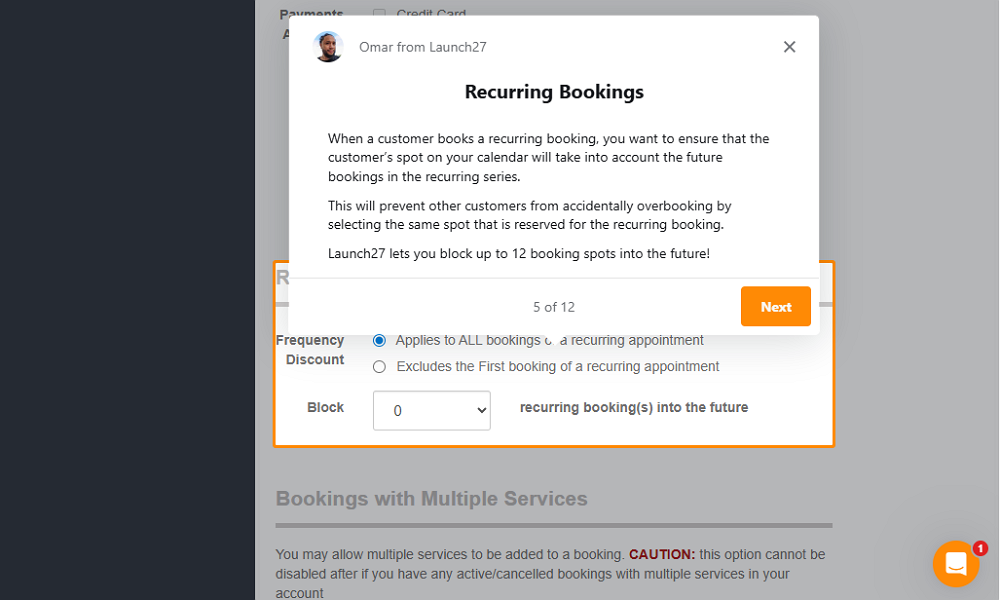
After the case-study video, Automaid offers a 12-step text walkthrough to show users around the product and speed up onboarding. However, several hours of configuration are required before Automaid becomes functional, especially for large businesses providing multiple services.
For example, creating a booking page and customizing services with unique pricing and discounts can take quite a bit of time. However, it’s worth taking your time here – getting everything right at this stage is crucial for smoother booking later.
Adding Team Members
Automaid provides no way to add multiple employees at once or to import them directly from HR software, so you can add users only manually. When you’re managing dozens of employees, adding each person manually can significantly slow down the team setup process.
That issue aside, Automaid lets you assign permissions to your entire team all at once. This makes it easier to control the customer information that cleaners and field technicians can see when they receive email notifications or log in to their accounts.
Verdict: 6/10
Automaid Web App
Automaid hasn’t streamlined anything since rebranding from Launch27, which has led to an inconsistent experience in the web app. Moreover, Automaid’s website looks unfinished, and some options are tucked in unusual places. For example, the login option appears only at the footer, which can be hard for new users to find.
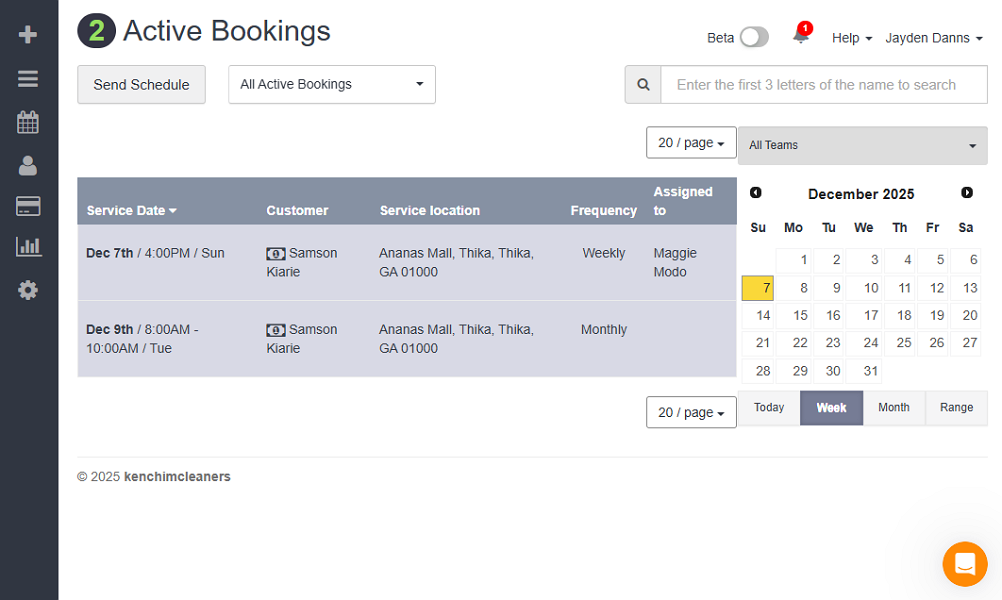
The vendor still allows users to log in from either Automaid or Launch27 using the same credentials. While this can ease the transition for existing users, it may confuse new users – an issue I experienced firsthand.
When I clicked “login” on the Automaid site, it took me to Launch27’s login page. Once I had logged in, the app changed back to Automaid branding. Switching users between the two versions with different visuals disrupts their sense of familiarity and can leave them feeling lost.
Even worse, the new web app is still in the beta testing phase, so Automaid automatically sends new users to the old version. The old web app has uneven alignments, unpolished visuals, and elements that don’t seem to flow well together.
I caught a sneak peek of the new version of the app, and it looks sleek and modern. Once it’s fully released, it could transform the user experience for the better.
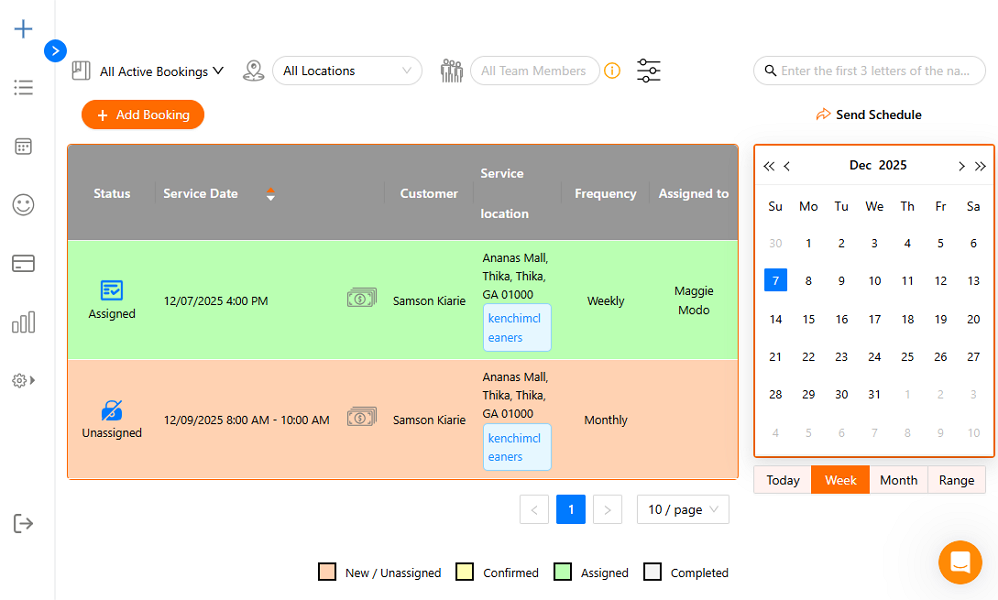
Automaid’s web app has a well-organized layout, with a menu on the left and a content area on the right. When you hover over a menu item, the app displays additional options, allowing you to jump straight to what you need without scrolling through menus.
Moreover, different pages offer multiple filters, which let you drill down to specific bookings, schedules, customers, or reports, speeding up admin tasks.
Verdict: 6/10
Automaid Mobile App
Automaid provides two mobile apps — Automaid Teams for employees and Automaid Staff for managers and admins. Both apps work well on Android and iOS smartphones.
Employee App
The Teams app is trimmed down to booking management features. It’s designed to enable cleaners to check in and out, view job details, and complete checklists without the overwhelm of irrelevant management features. The app is so simple that its menu has just two items: “home” and “bookings.”
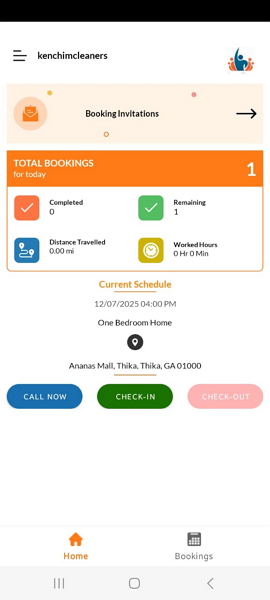
The home page displays the cleaner’s booking details, such as completed and remaining tasks, distance traveled, and hours worked that day. The next booking to complete is listed at the bottom, with an option to call the customer or activate “on way” mode with a single click.
Staff App
The Staff app is packed with scheduling, oversight, and tracking tools that enable managers to run operations, even when in the field.
Like the Teams app, it features a well-organized layout and a modern design that simplifies navigation and delivers an excellent user experience. However, it has a broader set of features, and the menu includes “home,” “bookings,” “quick add,” “message,” and “charges” options.
The home page displays details such as revenue, team progress, and time logs. This gives managers a quick overview of operations, allowing them to spot issues early and make informed decisions faster. Managers can also monitor field employees’ movement, a feature the web version lacks.
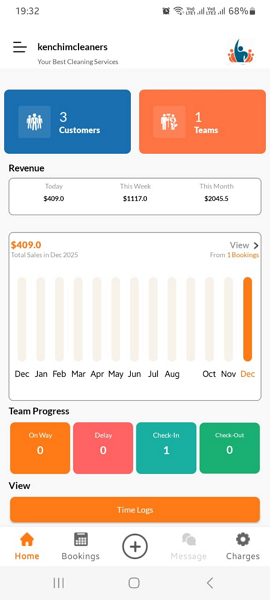
The Teams and Staff apps both worked just fine during testing, and I didn’t encounter any glitches or usability issues. My only bone to pick is that both apps are available only to Plus plan subscribers. Moreover, they don’t work without an internet connection, which can lead to complications for teams in low-connectivity areas.
| Menu Item | Admin | Employee | ||
|---|---|---|---|---|
| Website | Mobile App | Website | Mobile App | |
| Feature | ||||
| Timesheet | ✅ | ✅ | ❌ | ✅ |
| Time tracker | ✅ | ✅ | ❌ | ✅ |
| Calendar | ✅ | ✅ | ✅ | ✅ |
| Schedule | ✅ | ✅ | ✅ | ✅ |
| Expenses | ❌ | ❌ | ❌ | ❌ |
| Time off | ❌ | ❌ | ❌ | ❌ |
| Analysis | ||||
| Dashboard | ✅ | ✅ | ❌ | ✅ |
| Reports | ✅ | ❌ | ❌ | ❌ |
| Activity | ❌ | ✅ | ❌ | ❌ |
| Management | ||||
| Kiosks | ❌ | ❌ | ❌ | ❌ |
| Approvals | ❌ | ❌ | ❌ | ❌ |
| Projects | ❌ | ❌ | ❌ | ❌ |
| Team | ✅ | ❌ | ❌ | ❌ |
| Clients | ✅ | ❌ | ❌ | ❌ |
| Locations | ✅ | ❌ | ❌ | ✅ |
| Tags | ✅ | ❌ | ❌ | ❌ |
| Invoices | ✅ | ❌ | ❌ | ❌ |
| Settings | ✅ | ✅ | ✅ | ✅ |
Verdict: 7.5/10
Automaid Core Functionalities
Automaid claims to streamline the core aspects of a cleaning business, from online booking to cleaner management and mileage tracking. Does it truly deliver on this promise, though? I tested the platform’s main features to discover its strengths and weaknesses. Keep reading for my take on how well Automaid works:
-
Online Booking
-
Booking Scheduling
-
Time Tracking
-
Employee Availability
-
Mileage and Location Tracking
Automaid provides seven service templates that allow business owners to create a booking page in minutes. I appreciated having the ability to customize the details of each service, such as pricing, discounts, and extras. This helps create booking forms that genuinely reflect the services your business offers.
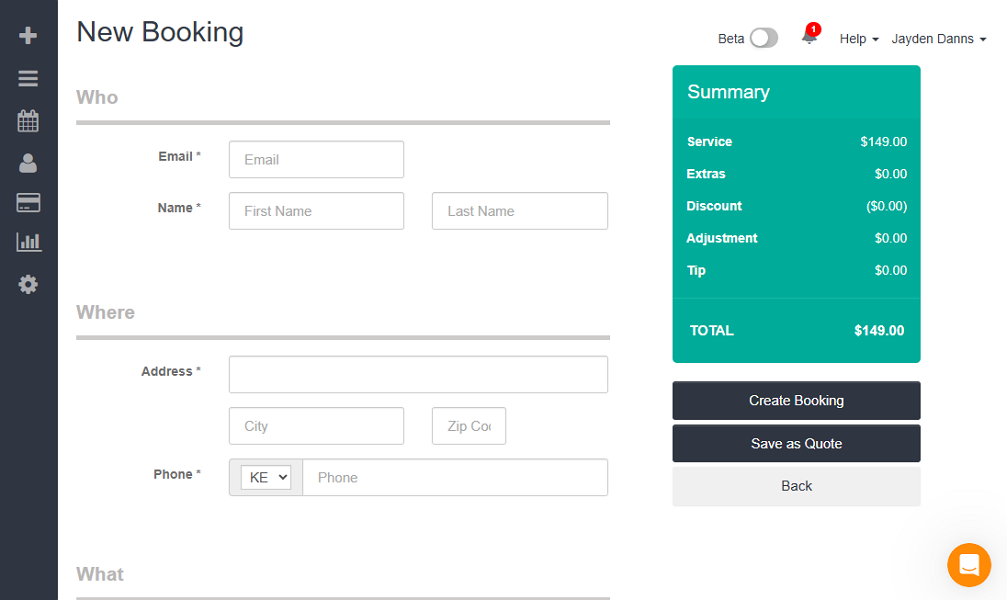
The platform’s integration with popular CMS systems makes it easy to link or embed the booking forms on websites. However, while it was easy to tailor the form’s color to match my brand’s color, I couldn’t customize the form’s basic designs and styles. As a result, the booking page can look out of place when embedded on a modern website.
That issue aside, I was impressed with the ease with which managers can customize booking availability. The system lets you set availability by arrival time, specific time windows, or both. You can also block off bookings on certain days of the week, such as on weekends, crew training days, or days reserved for maintenance tasks.
Automaid displays available booking slots on the form, ensuring customers book appointments only when your team is available. The system also automatically updates availability as bookings come in, preventing double booking or confusion that can delay service delivery.
That said, you’ll need a Pro or Plus plan to create custom booking forms. Businesses on the Base plan can create basic booking forms, but the forms will have the Launch27 watermark, which can make them look unprofessional.
Verdict: 7.5/10
Without scheduling automation, managers have to manually assign bookings either in the bookings tab or on the scheduler page. Manual scheduling works for small teams, but it can be time-consuming for large cleaning businesses that handle hundreds of bookings every day.
Automaid automatically turns each customer booking into a job card, complete with job requirements and location. It then drops the card onto the scheduler page as an unassigned task for the date the client selected. This significantly reduces admin workload, leaving managers the simple task of choosing an assignee to complete the schedule.
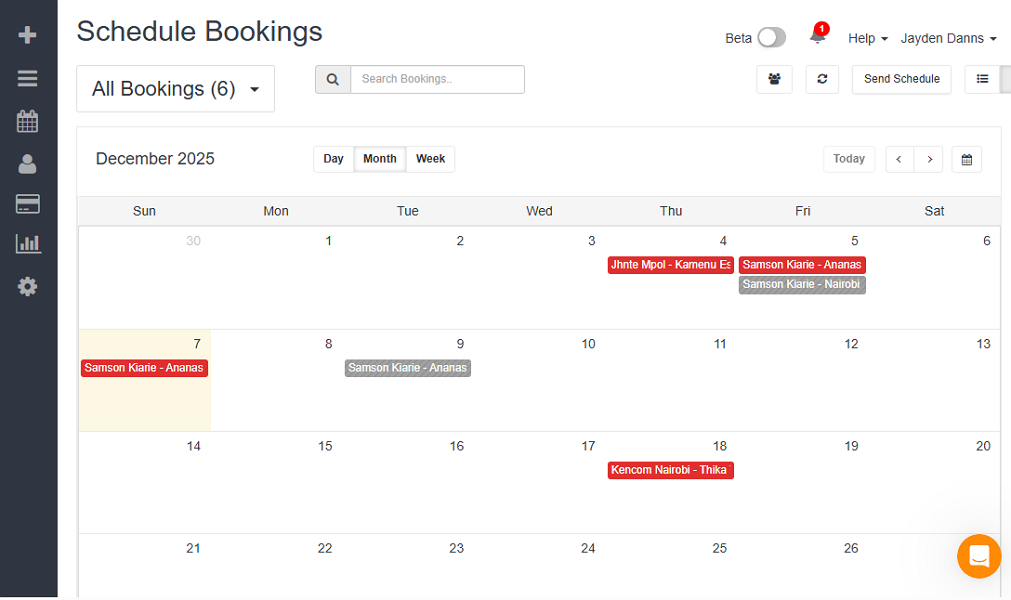
The scheduler provides handy tools such as a drag-and-drop scheduler, and it offers the flexibility to schedule bookings in list, calendar, or map views. The map view shows the locations of bookings, which is beneficial when you want to assign a cleaner to bookings in the same general area to reduce travel time.
Moreover, Automaid’s built-in conflict detector automatically prevents overlapping shifts, which helps avoid missed or delayed jobs that can frustrate clients. However, I wasn’t able to set employee hourly limits or add any controls to enforce labor laws. Keep this in mind if you’re in a tightly regulated jurisdiction.
Another issue is that Automaid’s recurring booking feature doesn’t work as expected. Ideally, if a customer books a weekly service, Automaid will mark the service dates on the schedule so the manager doesn’t have to create a new entry for the service every week. However, when I tested the tool, it scheduled only the first appointment and ignored the other appointments in the recurring sequence.
Verdict: 6.5/10
Automaid’s time-tracking module is pretty basic, so don’t expect the bells and whistles you get with top-tier apps like Connecteam. It works well for businesses that want to track how long cleaners spend on each job to ensure fair pay and accurate client billing. If you need to track breaks and overtime for compliance with labor laws, though, look elsewhere.
Another quirk to note is that the time tracker works only on the Automaid Teams app – it’s not available on the web app or on the Staff mobile app. This is not a big deal if you just want to track field employees’ time. However, companies that wish to centralize time tracking for the entire team, including back office staff, are better off using another app.
Automaid places the check-in button (its version of the clock-in button) inside the job card. While this means checking in takes a few more taps, it helps prevent employees from checking in to more than one job at a time. This prevents unscheduled clock-ins, which create chaos during payroll processing.
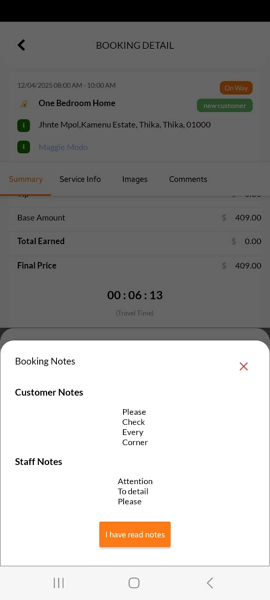
When an employee taps the check-in button, Automaid requires them to confirm that they have read the comments on the booking card. This ensures they understand the client’s needs before they step inside the home, helping them deliver exactly what the client expects. Moreover, Automaid won’t let a cleaner check out if there is an incomplete item on the checklist.
Geofence Restrictions
Automaid’s geofencing feature ensures employees can check in and out of a job only when they’re in the client’s home. Doing so improves timecard accuracy so you can pay employees fairly and bill clients for the actual hours cleaners spend on-site.
One downside is that Automaid uses a fixed geofence radius of a quarter mile, which you can’t adjust. A radius this wide reduces the effectiveness of the geofences. If clients’ homes are close together, the geofence radius can make it difficult to confirm whether the cleaner was actually on-site when they checked in or out.
Verdict: 6/10
Employee availability is yet another half-baked feature in Automaid’s arsenal. The best housecleaning apps let field employees mark their availability from any device, rather than wait until they have access to a computer. However, during testing, my mock employees could mark their availability only on the web app.
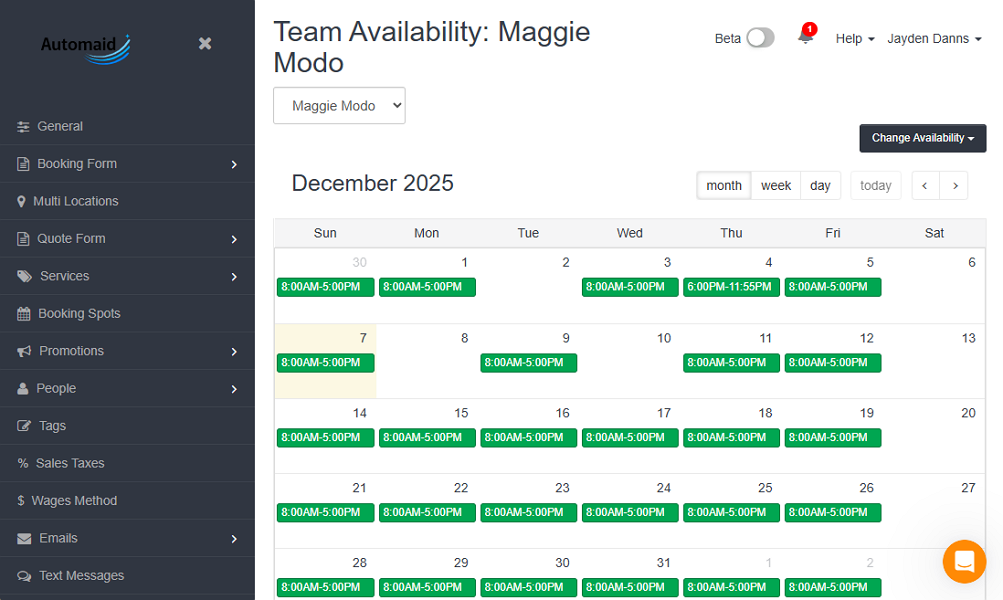
The app notifies the manager when an employee marks availability on the team’s calendar, but there is a caveat: Automaid lacks an approval system, so all requests are automatically approved when employees submit them.
As a result, there’s no option to prevent multiple employees from being unavailable on the same day. If such a scenario unfolds during your busiest period, you could end up with too few cleaners, making it hard to meet service demands.
On a positive note, Automaid automatically syncs employee availability with the team scheduler, so managers can clearly see who is available and who isn’t when assigning jobs. This makes it easier to assign bookings to available cleaners, reducing conflicts that lead to delayed services.
Verdict: 5.5/10
Automaid’s Team app provides an “on way” option, which is essential not just for tracking drive time and distance but also for monitoring employee location.
Take the example of a cleaner who has been assigned to clients A and B. When the cleaner check out of client A’s job, they can activate “on way” mode so the manager knows that they’re en route to client B’s home.
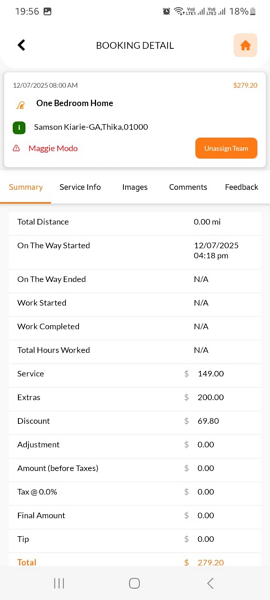
If they encounter traffic or weather conditions that are likely to cause lateness, the employee can activate “running late” mode and leave a note. The client will receive a notification of the adjusted arrival time so they can plan their day around it.
One gripe I have is that Automaid doesn’t track the cleaner’s location in real time. Instead, it provides only an approximate location, making it difficult to give clients accurate ETAs. Another issue is that location tracking is available only on the Staff app, which is restricted to Plus plan subscribers.
When an employee activates “on way” mode, Automaid begins logging their mileage and stops when they check in. I tested the mileage-tracking capability, and it worked just as expected.
Verdict: 6/10
Reporting and Analytics
The Automaid reporting module is helpful for standard operational oversight, but it lacks the depth for advanced analytics. The system doesn’t leverage AI or provide the comprehensive charts and bar graphs you often find in top-tier applications.
However, while the module looks basic, it provides several reports that help track workforce activity and your business’s overall performance. The standout feature is the dashboard, which provides an overview of your bookings, revenue, and customers. Other notable reports include:
- New bookings earned by promotion
- Declined charges
- Time-tracking logs
- Customer feedback
Verdict: 6/10
Automaid Security Features
I scoured the web with the help of AI and found no public reports linking Launch27 or Automaid to any data breaches or security incidents. More often than not, this is a clear sign that a vendor has robust security measures.
I also combed through Automaid’s privacy policy to understand how the vendor protects user information. I was disappointed in how cagey Automaid is about its security measures. The vendor claims to follow “generally accepted industry standards” to protect customer data, but it does not explicitly state the encryption method used.
Regarding account-side protection, Automaid doesn’t support multi-factor authentication (MFA) or single sign-on (SSO). However, the system requires users to select their company before logging in. This extra step can add a layer of security, but it’s not as foolproof as standard MFA verification.
As I mentioned earlier, Automaid lets you set user permissions to control the data users have access to when logged in. For example, you can restrict users’ access to customers’ email addresses and phone numbers to prevent exposure.
Verdict: 7/10
Automaid Customer Support
Generally, the range of support options is just as important as the speed at which agents respond. More options and faster replies make for better customer support. In my view, Automaid falls short on both ends.
Support is available through the help center, email, and live chat. I was surprised to discover that the help center is hosted on a different domain, though, so it’s not available on either the Launch27 or the Automaid website. I found the help center by chance; most users probably won’t be so lucky.
Admittedly, the help center is home to an impressive collection of how-to guides, grouped by feature names and topics to help users find them with ease. There’s also a search function that makes it easy to find relevant guides by keyword. The guides offer step-by-step instructions and include the latest product images, making them easy to follow.
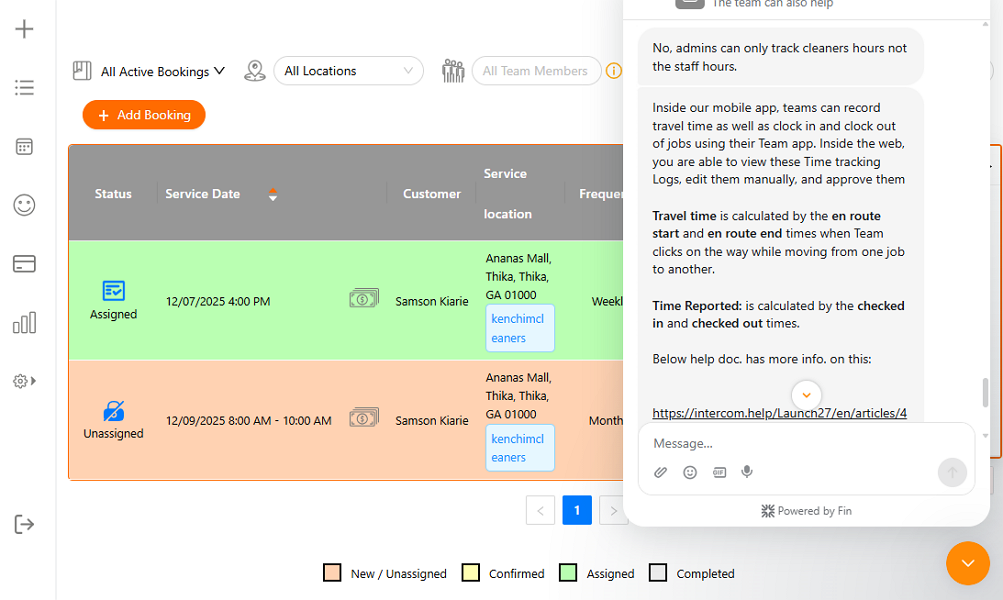
The live chat is available during business hours in Eastern Standard Time (EST). When the agents were online, they responded to my questions within a minute. They also responded to offline questions within 24 hours via email, which is just OK by email support standards.
Verdict: 6.5/10
What Are Automaid’s Review Ratings From Review Sites?
(As of July 2026)
Capterra: 4.7/5 (209 reviews)
G2: 4.6/5 (65 reviews)
Google Play Store Staff: 4.2/5 (10 reviews)
Google Play Store (Teams): 3.9/5 (38 reviews)
Apple App Store (Staff): 3.6/5 (7 reviews)
Apple App Store (Teams): 2.8/5 (25 reviews)
Automaid App Review
Automaid has the features you need to streamline operations in a housecleaning business. With any Automaid pricing plan, businesses can embed a custom bookings page on their websites and receive unlimited bookings.
The platform also turns bookings into jobs, complete with all the crucial details, and places them on the schedule grid to simplify cleaner dispatch. Moreover, it facilitates drive time and work hour tracking, with geofencing to enhance time card accuracy.
That said, Automaid has a few weaknesses that deny it a spot in the top echelon of field service management solutions. To begin with, it has no compliance tools such as break and overtime controls. What’s more, it lacks vital workforce management features such as time-off management, and some of the available tools feel subpar.
All things considered, Automaid is a solid choice for solo cleaners or small teams that want simple booking, time tracking, and client management. However, it feels light for managing operations in a fast-paced environment and lacks the firepower to support businesses subject to strict labor laws.
Connecteam: The Better Automaid Alternative
Connecteam is a powerful workforce management software that works just as well for solo cleaners as it does for large cleaning businesses in tightly regulated jurisdictions. It handles everything from scheduling and time tracking to location tracking and employee onboarding, which is why many cleaning businesses love it.
Some of the benefits of using Connecteam include:
Compliant Time Tracking
Connecteam lets housecleaning teams track time without the drawbacks that make Automaid ineffective. To begin with, employees can track time on web and mobile apps, so you don’t have to invest in a separate app for your back office staff. You can even require office staff to clock in from a single device using Connecteam’s terminal kiosk.
The best part about Connecteam is that it tracks breaks and overtime in compliance with labor laws. It even provides advanced features like recurring breaks, so you can schedule multiple breaks based on the length of cleaners’ shifts. This is required in some states, such as California, where employees must take two meal breaks during 10-hour shifts.
Automated Geofencing
Connecteam uses geofencing to ensure employees clock in only once they’ve arrived at the client’s home, as with Automaid. What sets it apart are the timely reminders and advanced automation that improve timesheet accuracy, cut field workers’ manual effort, and simplify job tracking.
When cleaners juggle several bookings in a day, it can be easy for them to forget to clock in and out at each stop. Connecteam addresses this challenge by reminding employees to clock in when they arrive at the client’s home and automatically clocking them out when they leave. This ensures accurate time cards without relying on employee memory.
Automatic Booking Scheduling
Picture this: Your cleaning business is booming, and bookings are rolling in by the hundreds. However, with increased bookings comes the chaos of deciding who should get which job. This is where Connecteam’s AI auto-scheduler comes in handy.
Instead of manually sorting through the mountain of tasks, you just need to turn bookings into open shifts. Then, with a click of a button, you can assign these shifts to available cleaners without worrying about bookings slipping through the cracks. Most importantly, Connecteam assigns shifts based on cleaner availability, so you don’t have to deal with schedule conflicts.
And So Much More
In addition to time tracking and scheduling, Connecteam has other workforce management features, including:
- Real-time location tracking
- Team communication
- Employee onboarding and training
- Employee recognition and reward
Connecteam packs in more features than Automaid, yet it costs much less. Its Advanced plan costs $49 per month for 30 employees, making it a solid choice for businesses that want access to advanced features for a lower price. Solo cleaners and small businesses with up to 10 workers can use all Connecteam features for free, thanks to the Small Business plan.
