


When you’re running a restaurant and your scheduling tool doesn’t match how your team actually works, you end up with coverage gaps, payroll friction, or a system too complex for your managers to use consistently.
HotSchedules is built for large, multi-location operations that need labor forecasting and centralized control. 7Shifts is designed for small to mid-sized restaurants that want faster scheduling and a more intuitive experience at a lower price.
I compared both platforms by testing scheduling, time tracking, time-off management, team communication, payroll tools, support, and setup. Use this guide to decide which platform better fits your restaurant’s size, scheduling complexity, and budget — and to know when neither is the right fit.
At a Glance: Quick Summary
HotSchedules is a powerful staff scheduling platform built for multi-location restaurants with complex labor demands. Its standout feature, labor forecasting, helps large restaurants predict staffing needs based on historical sales data, eliminating overstaffing and understaffing during the ebbs and flows of guest visits.
However, HotSchedules’ outdated interface steepens the learning curve, and the $2.99 fee per mobile app download adds to the overall software cost. Learn more in our HotSchedules review.
7Shifts, on the other hand, lets you create labor-optimized schedules, regardless of seasonal demand, without the complexity that makes HotSchedules difficult to use. It’s easy for new users to learn, and it doesn’t charge for mobile app downloads. 7Shifts’ affordable, per-location pricing makes it a better choice for small to mid-sized restaurants.
That said, 7Shifts isn’t without faults. Unlike HotSchedules, it lacks advanced forecasting and customization options that larger operations may need. Learn more in our full 7Shifts review.
Pricing and Plans
| HotSchedules | 7Shifts |
|---|---|
| No free plan | Comp – $0/ user/month
|
Essentials – $2/employee/month
| Essentials – $39.99/location Everything in Comp, plus:
|
| Plus – $4/employee/month Everything in Essentials, plus:
| Pro – $79.99/location Everything in Essentials, plus:
|
| Quote-Based – Custom pricing Everything in Plus, plus:
| Premium – $134.99/location Everything in Pro, plus:
|
| * All prices show the monthly cost when billed annually as of June 2026. | |
HotSchedules uses quote-based pricing, charged per user. This makes it ideal for large, multi-location restaurants looking to manage their entire workforce from a centralized place while retaining the autonomy to manage each location separately.
HotSchedules’ per-user pricing gives restaurants the flexibility to buy only the seats they need and scale without changing plans. The problem is that HotSchedules doesn’t offer a free plan, which can be a limitation for small, budget-conscious restaurants. Moreover, HotSchedules has no annual subscriptions, so it doesn’t offer any discounts for long-term commitment.
7Shifts, on the other hand, has a tiered pricing model priced per location per month, and is ideal for small and mid-sized locations. In addition, it offers both monthly and annual subscriptions, with the latter offering cost-cutting discounts for businesses. 7Shifts also has a free plan for up to 15 employees, giving small restaurants with no budget the tools they need to smoothly run operations.
Hidden Costs
A major drawback with HotSchedules is the hidden costs, such as the $2.99 fee for mobile app downloads on the Google Play Store and the Apple App Store. These costs can add up quickly, especially for businesses that require employees to clock in and out and view shift updates on their mobile devices.
What’s more, both HotSchedules and 7Shifts require users to purchase add-ons or extended modules from their parents companies for essential features like task management, employee onboarding, and time tracking. These add-ons increase the subscription costs, especially if you need all of their firepower.
For comparison, Connecteam offers all of these features, including scheduling, employee onboarding, time tracking, and task management, in its standard pricing. In fact, these features are available in the free plan as well, albeit with some usage limits.
Pros and Cons
I compiled the pros and cons below to give you a sneak peek into the strengths and weaknesses of HotSchedules and 7Shifts:
HotSchedules Pros:
- Powerful labor forecasting for multi-location coverage planning
- Efficient scheduling with auto pickup and release feature
HotSchedules Cons:
- Dated, cluttered interface creates a steep learning curve
- Payroll and advanced HR require separate subscriptions
7Shifts Pros:
- Machine learning auto-scheduler reduces manual work
- Break attestation and overtime rules reduce compliance risk
7Shifts Cons:
- No advanced labor forecasting for demand-based staffing
- Time tracking requires a separate app (7Punches)
Use Cases
HotSchedules and 7Shifts are both built for hospitality, but they fit different restaurant sizes and scheduling priorities.
HotSchedules is best for:
- Demand-based staffing at multi-location restaurants: HotSchedules’ labor forecasting analyzes historical sales and POS data to predict staffing needs, helping large operations avoid over- and understaffing during variable guest flow.
- Labor compliance with configurable break and overtime rules: HotSchedules lets managers set overtime thresholds and break policies that flag violations as schedules are built, making it useful for multi-location operators managing compliance across states.
7Shifts is best for:
- Automated schedule building for small and mid-sized restaurants: 7Shifts’ machine learning auto-scheduler creates optimized schedules based on past patterns, employee availability, and sales forecasts, removing most manual scheduling work.
- Reducing compliance risk with break attestation and state-preset overtime: 7Shifts prevents employees from clocking back in early, requires break attestation on clock-out, and offers preconfigured overtime settings for U.S. states — useful for restaurants in high-risk compliance environments.
Side-by-Side Feature Overview
One of the most striking differences between HotSchedules and 7Shifts is their interface designs. While 7Shifts looks modern and intuitive, HotSchedules feels a bit dated – a theme that plays out across all of its features. Let’s dive in to compare the differences and similarities between the two platforms:
Shift Scheduling — Winner: HotSchedules
Shift scheduling is HotSchedules’ and 7Shifts’ primary feature, and as you’d expect, both deliver excellent performance on this front. Although the interface designs differ, I found it quick and easy to create schedules with either platform, thanks to handy tools such as drag-and-drop scheduling and recurring shift tools.
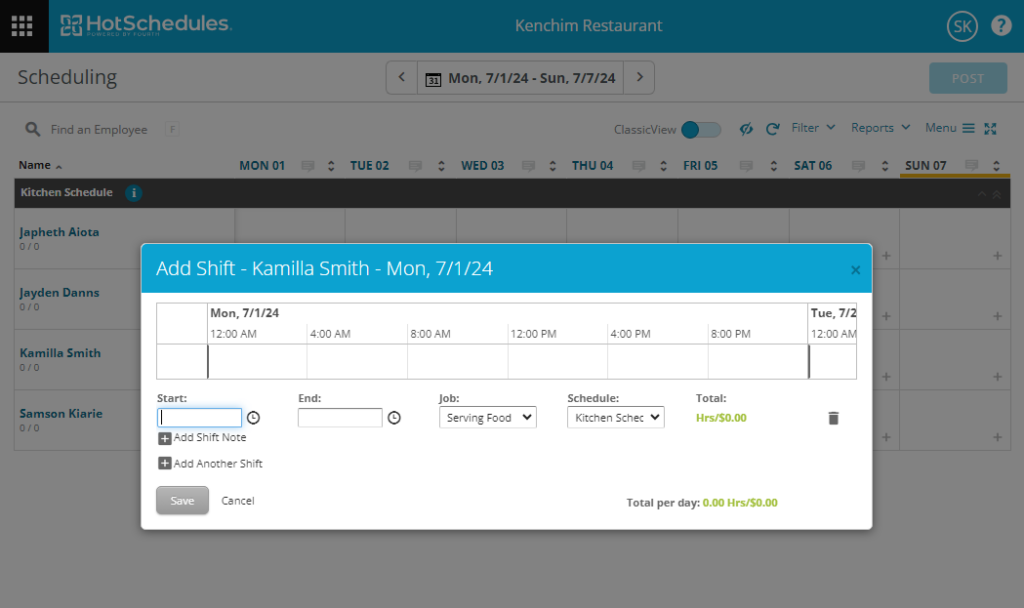
Additionally, both platforms allow employees to swap shifts when life happens, preventing absences that could cripple service delivery. However, there’s no built-in rule that prevents last-minute swaps, unlike the best employee scheduling app. The good news is that shift swaps require approval, so managers can reject swaps that could disrupt coverage.
Besides coordinating staff, both HotSchedules and 7Shifts let you configure labor settings, including overtime, breaks, rest periods between shifts, and employee hourly limits. As you create schedules, both platforms flag overlapping shifts or shifts that exceed configured limits, ensuring all schedules comply with local labor laws. From an admin perspective, our HotSchedules review found that advanced features like break tracking are tucked away in unintuitive places, making them difficult to find — worth noting for multi-location operators managing complex configurations.
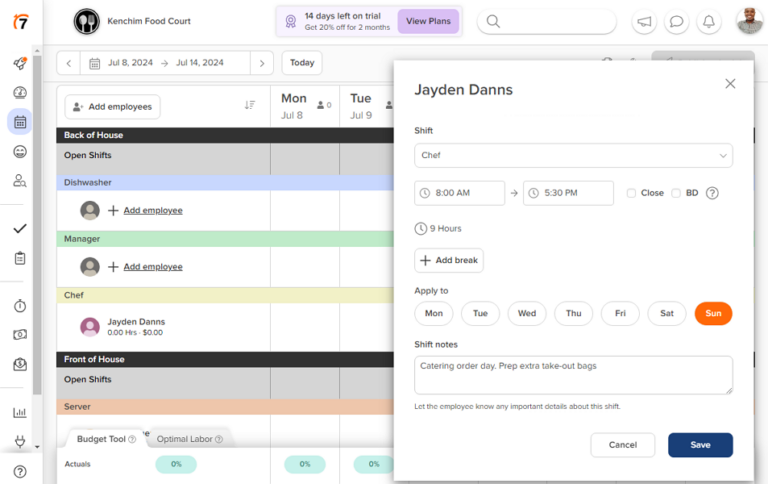
The only minor issue is that neither platform allows employees to accept or reject assigned shifts, which is a huge downside for hospitality businesses where last-minute shift changes are common. Without this feature, you run the risk of last-minute changes violating employees’ right to decline shifts, which is mandated in states like Oregon.
Did You Know?
Scheduling Automation
HotSchedules has a powerful labor forecasting tool that analyzes historical sales and demand data to predict staffing needs. This helps avoid understaffing and overstaffing, which is especially important for large hotel chains, where a minor staffing error could sap profitability or ruin the guest experience.
Despite providing helpful insights, HotSchedules doesn’t offer automated scheduling. As a result, managers have to manually translate staffing predictions into labor-optimal schedules, which can be a headache in large restaurants.
7Shifts, on the other hand, has no labor forecast tools, but it does have an advantage of its own. Using the machine learning auto-scheduler, it queries the previous schedule to unearth staffing patterns. It then creates optimal schedules that take into account employee availability, labor costs, and historical sales data.
However, the auto-scheduler might not work for new businesses, as it needs to analyze eight to 10 previous schedules to deliver accurate staffing patterns.
Verdict: Both platforms handle shift scheduling well, but HotSchedules wins with its powerful labor forecasting, making it ideal for large hospitality businesses. Still, 7Shifts is a reliable tool, especially for small and mid-sized restaurants looking for automated scheduling.
Availability and Time-Off Management — Winner: 7Shifts
In the hospitality industry, where demand is unpredictable, managing employee availability can mean the difference between smooth operations and service chaos. While both platforms help manage availability, 7Shifts stands out with support for both hourly and lump-sum accruals. These options give you the flexibility to create time-off accruals that align with your internal policies and diverse staffing models.
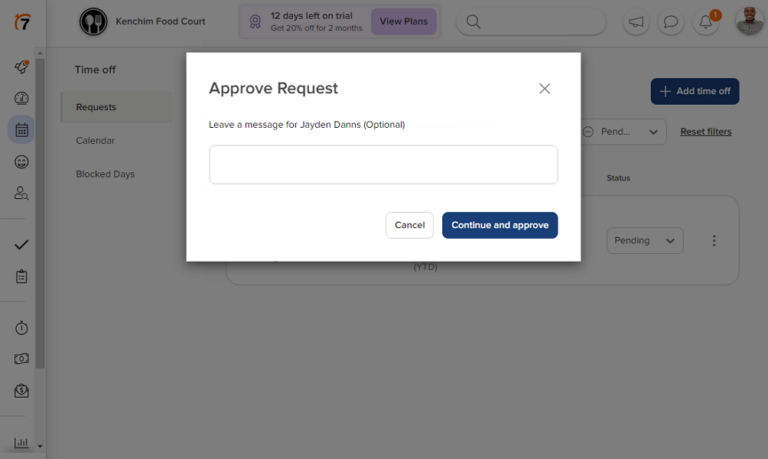
Even better, 7Shifts’ blackout dates let you prevent employees from taking time off during holidays, peak service time, and special events when you need maximum availability. Managers can also set a minimum notice period for requests so they have enough lead time to fill affected shifts and close coverage gaps.
HotSchedules, by contrast, automates standard time-off management but doesn’t provide built-in features for complex accrual formulas. This option is available only through integration with the full HR systems provided by Fourth, HotSchedules’ parent company, which requires an additional subscription.
Verdict: 7Shifts is the clear winner in this category, thanks to its advanced PTO accrual options and powerful notification systems.
Time Tracking — Winner: 7Shifts
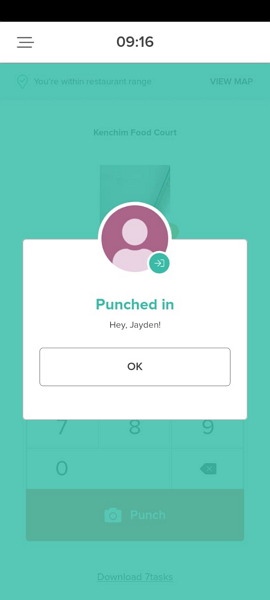
Neither HotSchedules nor 7Shifts offers built-in time-tracking features; both rely on separate time-clock apps from their parent companies. 7Shifts uses 7Punches, while HotSchedules uses the WebClock and eClock apps. This means that employees must install two separate apps to track time and view schedules, which can hurt usability.
Pro Tip
Regardless, 7Punches has an edge over HotSchedules because it works fine as either a mobile punch or a kiosk app. As a mobile punch, it allows employees to track time and breaks on their smartphones, making it suitable for outside catering and other field teams. As a kiosk app, it lets restaurant staff clock in and out on a shared tablet.
HotSchedules claims that its native mobile app has a built-in time tracker, but I couldn’t find it during testing. This left me only with the options to track time on WebClock, a web-based kiosk app, or eClock, a mobile-based kiosk app. Both options are suitable for on-site employees, but do not suffice for restaurants that require employees to clock in/out on their devices. In our HotSchedules review, the tester hit the same wall: the mobile time tracker simply couldn’t be found, leaving WebClock and eClock as the only options — both kiosk-based, and neither suited for employees clocking in from off-site.
Employees can also clock in and out directly on an integrated POS terminal with both platforms, provided the POS terminal has built-in time-tracking features. However, 7Shifts has a slight advantage in that it makes POS integration available on all plans, including the free version. HotSchedules allows POS integrations only on its highest-tier plan.
Clock-In Restrictions
Both 7Shifts and HotSchedules support geofencing, ensuring employees clock in only once they’ve arrived at the restaurant or event site. In addition, the platforms require employees to take a selfie during clock-in, which is attached to their timecard to help managers pinpoint buddy punchers.
That said, each platform implements these restrictions differently. 7Punches applies both restrictions across the board, making it ideal for stopping off-site clock-ins and buddy punching. HotSchedules, on the other hand, applies geofencing on WebClock and selfie clock-in on eClock, so you can choose which app to use depending on which time-theft tactic you seek to address.
Overtime and Break Tracking
Both HotSchedules and 7Shifts allow you to set overtime policies with thresholds and rates that comply with local labor laws. However, 7Shifts has a slight edge because it offers preconfigured overtime settings for different U.S. states. This enables businesses in the U.S. to apply overtime rules with a single click, without guesswork.
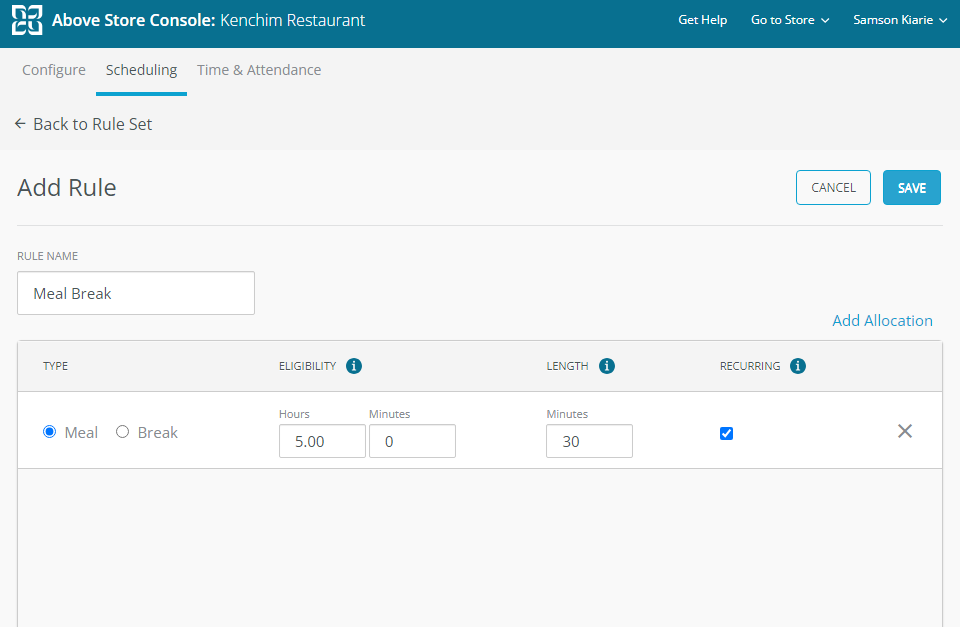
You can also track manual and automatic breaks with either platform. However, if compliance is a top priority, you’re better off using 7Shifts than HotSchedules. With its enforced break tool, 7Shifts prevents employees from clocking back in early, ensuring they take the full, mandated meal break.
With 7Shifts, employees must also attest to taking their mandated break in full when clocking out. This is an essential tool, especially for hotels and restaurants in states like California, where a break violation can lead to a lawsuit even when it isn’t your fault. Sadly, HotSchedules doesn’t have a break attestation tool.
Verdict: While both platforms handle the basics well, 7Shifts has an edge because of its preset overtime rules, break attestation, and mobile time tracking.
Team Communication — Winner: 7Shifts
While both apps have the communication features most teams need to stay connected, 7Shifts stands out with its real-time chat and intuitive interface. HotSchedules, on the other hand, feels outdated, mainly because of its email-style messaging and clunky menus.
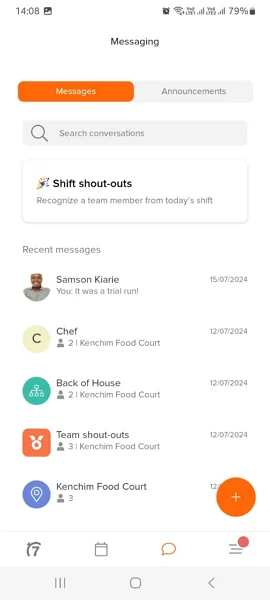
In terms of messaging functionality, 7Shifts once again has the edge. While both apps support 1:1 messaging, 7Shifts lets you create chat groups by location, department, or role, which you can’t do with HotSchedules. 7Shifts also lets you create a custom private group and invite team members from different locations, departments, and roles.
Additionally, while both support file attachment, 7Shifts makes messaging interactive, engaging, and easy to follow with emojis, GIFs, and threaded replies. HotSchedules doesn’t offer these handy tools, and it’s no surprise that its chat feels flat and outdated.
Lastly, both platforms allow managers to send one-way company-wide announcements to share updates about policy, leadership, or strategy direction. The only minor difference is that 7Shifts offers a read receipt feature to ensure important messages reach the intended recipient, while HotSchedules doesn’t.
Verdict: 7Shifts is the clear winner, thanks to its intuitive interface and real-time chat capabilities.
Payroll Processing — Winner: HotSchedules
Accurate payroll processing begins with accurate labor cost calculations, and HotSchedules and 7Shifts perform well on this front. As I mentioned earlier, HotSchedules and 7Shifts accurately track standard work hours and overtime, allowing restaurants to determine employees’ actual earnings with precision.
In addition, they both allow you to implement timesheet approval workflows to check for missing punches, errors, and break and overtime violations. This oversight ensures each timesheet reflects actual work time, setting the stage for accurate payroll processing. Once a manager approves a timesheet, the app locks in the hours, preventing further editing.
However, HotSchedules has an edge because it offers built-in payroll processing, allowing restaurants to run payroll and handle taxes on the same platform. This results in fewer manual steps, leading to more accurate payroll and compliance. Keep in mind that HotSchedules’ payroll capability is delivered through Fourth’s payroll module, which requires an additional subscription rather than being bundled into the standard plan. 7Shifts doesn’t have a built-in payroll tool, but it works seamlessly with popular payroll systems such as ADP, Gusto, and Toast.
Earned Wage Access
HotSchedules and 7Shifts allow employees to draw up a portion of their earnings before payday to cover emergency expenses. This alleviates financial stress and can significantly boost employee morale and productivity. HotSchedules allows employees to access 50% of earned wages through the Fuego on-demand pay app, which is part of the Fourth suite.
7Shifts, on the other hand, offers earned wage access via Clair on-demand pay, a third-party partner. The provider allows employees to advance between $100 and $200, but the limit can increase up to $800 if the employees repay advances consistently.
Verdict: While both platforms offer similar features, HotSchedules has a slight edge because of its payroll integration depth and ecosystem. It also uses its parent company’s on-demand payment app for earned wage access, whereas 7Shifts uses a partner service.
User Ratings
7Shifts garners a higher rating score than HotSchedules on popular review sites. This isn’t surprising, considering 7Shifts is more intuitive and affordable. As a result, it appeals to small and mid-sized restaurants, which make up the majority of businesses in the hospitality industry.
HotSchedules
- ⭐ 4.4/5 on Capterra (461 reviews)
- ⭐ 4.3/5 on G2 Crowd (105 reviews)
7Shifts
- ⭐ 4.7/5 on Capterra (1211 reviews)
- ⭐4.5/5 on G2 Crowd (125 reviews)
* Reviews were last checked in June 2026.
Security & Compliance
I found no publicly reported security breaches or incidents linked to either HotSchedules or 7Shifts, indicating that their security measures hold up well. The table below highlights how their security features compare:
| Category | HotSchedules | 7Shifts |
| Data encryption | ✅(TLS 1.2 in transit) | ✅(TLS 1.2 in transit and AES 256-bit at rest) |
| GDPR compliant | ✅ | ✅ |
| HIPAA compliant | ❌ | ❌ |
| Certification | ✅SOC 2 Type 2 | ✅ ISO/IEC 27001:2022, SOC 2 Type 2 |
| MFA/2FA | ✅ 2FA | ✅ 2FA |
| Admin controls | ✅ Role-based access control | ✅ Role-based access control |
| Hosting region | U.S., EMEA, and APAC | U.S. and Canada |
HotSchedules and 7Shifts put strong emphasis on data protection. Both providers use solid encryption for data in transit and comply with regulatory requirements such as the GDPR. Even better, they have attained SOC 2 Type 2 compliance, meaning their systems and processes have been independently audited.
Beyond these similarities, 7Shifts holds a slight edge over HotSchedules because it uses AES-256 encryption to protect data at rest. Moreover, 7Shifts has ISO/IEC 27001:2022 certification, demonstrating its adherence to globally recognized best practices for data protection.
Setup and Onboarding
During testing, I found it easier to set up 7Shifts than HotSchedules. 7Shifts has an intuitive interface that makes setting up your restaurant a breeze. I loved its SmartBuild tool, which lets you upload a recent Excel schedule to import existing departments and roles, saving you the hassle of manually setting them up.
HotSchedules offers a quick setup wizard that’s designed to speed up the initial setup, but it falls short. During testing, I could easily create workspaces and add jobs using the wizard. However, adding staff members was more complicated than necessary. Moreover, I had to manually add departments and roles, which can take time for large multi-location restaurants.
Another issue is that HotSchedules doesn’t provide a text or video walkthrough when you sign up. As a result, new users have to explore the product on their own, which can be intimidating for non-tech-savvy users. When trying to get help with advanced setup, our reviewer found that expert customization support costs $99 extra — a cost most competing platforms absorb into onboarding at no charge. 7Shifts, on the other hand, offers walkthroughs to help users quickly learn its features.
Support and Customer Service
| Support Type | HotSchedules | 7Shifts |
| Live chat | ✅24/7 | ✅ (Business hours) |
| Phone support | ✅ | ✅ |
| Email support | ✅ | ✅ |
| Community forum | ✅(Through Fourth Customer Success Portal) | ✅ |
| Ticket support | ✅ | ✅ |
| Help center | ✅ | ✅ |
I have to give credit to both HotSchedules and 7Shifts for providing a nice range of self-service and guided support options. However, having multiple channels is an advantage only if the responses are quick and reliable. This is where 7Shifts really pulls ahead.
During testing, 7Shifts agents responded to my live chat questions within two minutes, helping me resolve urgent issues without delay. However, live chat support is available only during business hours. When agents were offline, the system automatically created tickets for my queries, which the agents resolved within 26 hours.
HotSchedules, on the other hand, fell short of expectations. Despite claims of 24/7 live chat for general queries, I received no response during the week of testing. Attempts to find help through its ticket system were equally unfruitful, which was disappointing.
🏆 Who Wins: HotSchedules or 7Shifts?
When you weigh affordability, ease of use, and how well the platforms solve common pain points for hospitality businesses, 7Shifts wins. While it doesn’t have the advanced labor forecasting tools that HotSchedules provides, it does offer a robust machine learning auto-scheduler.
Beyond that, 7Shifts has other handy tools that you won’t find with HotSchedules, such as break attestation, PTO accruals, blackout dates for time-off requests, and a real-time chat app. These tools, combined with 7Shifts’ intuitive interface and transparent pricing, make it ideal for small and mid-sized restaurants.
However, this was a close matchup decided mainly by 7Shifts’ additional tools and HotSchedules’ dated interface. As such, HotSchedules is still a robust platform for large, multi-location restaurants with complex scheduling needs. Its advanced labor forecasting tool lets you predict staffing needs to ensure optimal coverage, regardless of guest flow.
👉 The verdict: Choose 7Shifts if you need an easy scheduling and communication platform for a small or mid-sized restaurant. However, if you need advanced labor forecasting, complex scheduling, and compliance controls for multi-location operations, HotSchedules checks the right boxes.
Connecteam vs HotSchedules vs 7Shifts
If neither HotSchedules nor 7Shifts fits your needs, Connecteam is worth considering for various reasons, including:
All-in-One Workforce Management
7Shifts and HotSchedules are powerful in their own right. They are especially useful for restaurants looking to schedule staff, track time, process payroll, keep teams connected, and manage time off in one place.
However, effective workforce management requires more than just these tools. You still need to onboard new staff, train existing employees, track employee location, and manage tasks. If you go with either 7Shifts or HotSchedules, you’ll have to rely on third-party solutions to cover all the bases. This means more setup friction, a steep learning curve, and an inflated software bill.
To sidestep these issues, choose Connecteam. Connecteam combines scheduling, time tracking, location tracking, HR management, and task management in an easy-to-use app. This enables you to run all restaurant workflows in one place, eliminating the need to juggle multiple apps or pay extra for add-ons.
Some of Connecteam’s most notable features include:
- AI auto-scheduler: Assign hundreds of open shifts in minutes based on employee qualifications and availability.
- Compliant time tracking: Track regular work hours, overtime, and breaks with a mobile-friendly platform. Unlike 7Shifts, Connecteam lets you track even the most complex overtime, such as holiday and seventh-consecutive-day overtime.
- Real-time location tracking: Stay on top of where your outside catering staff are, and even monitor the route they take.
- Effective PTO management: Like 7Shifts, Connecteam PTO management supports hourly and lump-sum accruals. You can also set blackout dates and minimum leave notice to control when employees can or cannot request time off.
- Robust task management: Create and assign tasks with due dates and reminders so nothing slips through the cracks. Get reminders when a task is overdue and send follow-up messages without leaving the task management dashboard.
- Employee onboarding and training: Create an onboarding workflow for new hires to ensure everyone has a positive experience. Use the AI course creator to build multi-section training programs in minutes, not hours.
- Payroll integrations: Connecteam integrates with popular payroll solutions like Gusto, Paychex, and ADP.
Excellent Customer Support
When it comes to customer support, Connecteam excels where it matters most: fast responses on all channels. First, unlike 7Shifts or HotSchedules, its live chat is available 24/7, ensuring users get instant help regardless of their time zone. Every time I test the live chat, agents respond in less than a minute and provide satisfactory answers.
Users can also find help via phone, email, the help center, and the community forum on all plans. The excellent range of support options lets all users access guided, real-time help, or rely on self-service resources at their convenience.
In addition, Connecteam offers a paid support option called Connecteam Pros for restaurants without internal IT resources. With this option, restaurants are connected with an onboarding expert to set up Connecteam on their behalf. This speeds up the initial setup process, allowing restaurants to make the most of every feature from day one.
Affordable Pricing
When it comes to pricing, Connecteam beats both 7Shifts and HotSchedules with its hybrid, tiered, user-based pricing.
For comparison, 7Shifts’ most affordable plan costs $39.99 for 30 employees, with no option to add more users. If you outgrow the user cap, you have to upgrade to the next plan, and may end up paying for features you don’t need.
Connecteam’s Basic plan, on the other hand, costs $29 per month for 30 employees. When you hit the user cap, you can add more seats for only $0.50 per seat per month, without changing plans. This way, you can continue using the same tools that power your operations and avoid paying for anything you don’t need.
Additionally, Connecteam’s Small Business plan lets small hotels with up to 10 employees use all Connecteam features free of charge.
FAQs
The main difference between HotSchedules and 7shifts is that HotSchedules is stronger for advanced labor forecasting, while 7shifts is easier to use for scheduling, time tracking, time off, and team communication. HotSchedules fits larger hospitality teams, while 7shifts is better for small and mid-sized restaurants.
Connecteam is the best 7Shifts alternative for small and mid-sized restaurants seeking a more affordable, feature-rich scheduling solution. Connecteam goes beyond scheduling and time tracking, giving restaurants a mobile-friendly solution to track real-time location, onboard new staff, and train employees.
Yes, you can use 7Shifts for free, but its free plan has a 15-user cap and offers only basic scheduling tools. If you need a free app with advanced scheduling tools, use Connecteam.
7shifts is better for restaurants that want faster, easier schedule building with less manual work. HotSchedules is better for larger teams that need advanced labor forecasting and more complex scheduling controls across multiple locations.
HotSchedules and 7shifts both support payroll workflows, but their payroll tools and integrations should be checked by plan before buying. If payroll is a key need, confirm whether payroll is native, an add-on, or handled through an integration.
7shifts is easier to use for most restaurant managers and employees. Its interface feels more modern, and its scheduling, chat, time-off, and time-tracking workflows are easier to learn. HotSchedules is powerful, but its dated interface can create a steeper learning curve.
7Shifts is easier to set up. Its SmartBuild tool lets you import existing departments and roles from an Excel schedule, and a quickstart guide walks you through key features. HotSchedules has a setup wizard, but adding employees through it skips the invite email, and there’s no guided walkthrough — expert setup help costs $99 extra.
Both platforms let managers set overtime thresholds and break policies. 7Shifts has an edge: it offers state-preset overtime settings for U.S. restaurants, an enforced break tool that prevents employees from clocking back in early, and a break attestation feature that records whether employees took their required breaks — useful protection in states like California. HotSchedules does not have break attestation.
HotSchedules
- ⭐ 4.4/5 on Capterra (461 reviews)
- ⭐ 4.3/5 on G2 Crowd (105 reviews)
7Shifts
- ⭐ 4.7/5 on Capterra (1211 reviews)
- ⭐4.5/5 on G2 Crowd (125 reviews)
7Shifts is easier to use. Its web and mobile apps have a modern, intuitive interface, and employees can access most features from their phones. HotSchedules has a dated interface that steepens the learning curve, and its mobile app can’t create schedules, generate reports, or invite new employees — those tasks require the web app.
Both platforms use geofencing to restrict clock-ins to the worksite and take a selfie photo at clock-in that attaches to the timesheet for manager review. 7Shifts applies both controls through 7Punches. HotSchedules splits them across two apps: geofencing on WebClock and selfie capture on eClock, so you choose which method to deploy depending on which risk you’re addressing.
