


Homebase and 7shifts both combine scheduling, time tracking, payroll, and other workforce management tools into a single platform.
But while Homebase is designed for a wide range of small businesses, 7shifts is built specifically for restaurants, with features tailored to the industry’s day-to-day operations.
The right choice depends on your business, budget, and day-to-day needs. In this comparison, we’ll break down each platform’s pricing, features, strengths, and limitations to help you decide which one fits your business better.
At a Glance: Quick Summary
Homebase gives small businesses scheduling, time tracking, employee communication, hiring, and HR tools in one place. Payroll costs extra on every plan. Support started with an AI chatbot in our test, and our requested handoff to a human agent never happened.
7shifts is designed for the restaurant industry and offers more versatile features, including automatic scheduling and tip management. Hiring is available on Pro and Premium. Employee Onboarding is US-only and costs $2.99 per package unless it’s included with your plan or 7shifts Payroll. It’s especially good for restaurant chains and franchises with multiple locations.
Pricing and Plans
Both Homebase and 7shifts offer pricing based on the number of locations your business has. For single-location businesses, both platforms provide attractive free plans.
| Plan Type | Homebase | 7shifts |
|---|---|---|
| Free Plan | ✅ Basic 1 location, up to 10 employees Includes:
| ✅ Comp 1 location, up to 15 employees Includes:
|
| Starter | Essentials $24/location/month, unlimited employees Everything in Basic, plus:
| Essentials $39.99/location/month, up to 30 employees per location Everything in Comp, plus:
|
| Pro/Premium | Plus $56/location/month, unlimited employees Everything in Essentials, plus:
| Pro $79.99/location/month, unlimited employees Everything in Essentials, plus:
|
| Advanced | All-in-One $96/location/month, unlimited employees Everything in Plus, plus:
| Premium $134.99/location/month, unlimited employees Everything in Pro, plus:
|
| * Prices show the monthly cost when billed annually as of July 2026. The displayed 7shifts rates are new-customer prices and may change. | ||
Both platforms offer payroll as an add-on. Homebase Payroll costs $39/month plus $6/employee/month and can be added to any plan, including Basic. 7shifts Payroll costs $39.99/month per location plus $6/employee/month and can be added to any paid plan. Premium doesn’t waive the $39.99 base fee.
7shifts includes some restaurant tools on its higher plans. Manager Log Book comes with Pro and Premium, while Premium also includes Tip Management and Task Management. On lower tiers, those three tools cost $14.99, $49.99, and $12.99 per location per month. Employee Onboarding is US-only and costs $2.99 per package unless it’s included with your plan or 7shifts Payroll.
Homebase now offers Tip Manager for $25/location/month. It imports tips from supported POS systems, splits the pool by hours worked, adds the results to timesheets, and shows employees their tips in the mobile app.
Homebase is clearly cheaper at the paid tiers shown here. Essentials, Plus, and All-in-One cost $24, $56, and $96 per location per month, compared with $39.99, $79.99, and $134.99 for the closest 7shifts plans. 7shifts gives restaurants more industry-specific tools, but its Essentials plan is capped at 30 employees per location. Pro and Premium support unlimited employees.
Pros and Cons
Homebase pros ✅
- It has an uncluttered user interface that’s easy to learn and doesn’t require staff to have any advanced technical knowledge.
- Its hiring tools help you post jobs and manage applicants. All-in-One adds employee onboarding, employee documents, live HR advisors, and policy support.
Homebase cons ❌
- Customer support is now AI-chatbot-first, and when we asked to speak with a human agent during testing, we never heard back.
- Homebase’s advertised offline mode didn’t work in our testing, and task management costs extra.
7shifts pros ✅
- 7shifts’s auto-scheduler uses patterns in customer traffic to build a draft around the times your restaurant is busiest.
- Tip Management supports several ways to split pooled tips and is included with Premium.
7shifts cons ❌
- Time tracking requires a separate app, which increases the platform’s overall complexity for employees.
- Several key features are paid add-ons or gated to higher plans, including tip management, task management, and payroll.
Use Cases and Ideal Fit
Homebase is best for:
- Growing businesses that need hiring tools. Homebase helps you post jobs and track applicants, and its AI assistant wrote a complete, editable job description from a brief outline in our testing. Employee onboarding and live HR support require the All-in-One plan.
- Businesses with non-technical employees. Homebase had the cleaner interface in our testing, and the main scheduling and time-tracking workflows were easy to learn. That makes it a good fit when employees need to start using the app with little training.
7shifts is best for:
- Businesses that want auto-scheduling. 7shifts uses past schedules, labor costs, sales forecasts, overtime, time off, and compliance rules to build a draft around the times your restaurant is busiest.
- Restaurants that need industry-specific features. 7shifts has tip management, a manager log book, and integrations with popular restaurant POS systems. Check the plan before you buy, since some of these tools are included only on Pro or Premium.
Homebase vs. 7shifts: Side-by-Side Feature Overview
Homebase and 7shifts both cover scheduling, time tracking, and team communication, but the workflows and plan limits differ. Below, we’ll compare the features that matter most day to day.
Employee scheduling – Winner: 7shifts
Homebase and 7shifts offer drag-and-drop scheduling so you can easily assign employees to shifts. We found it straightforward to create a schedule from scratch in both apps, although Homebase has a slight usability edge thanks to its reusable schedule templates.
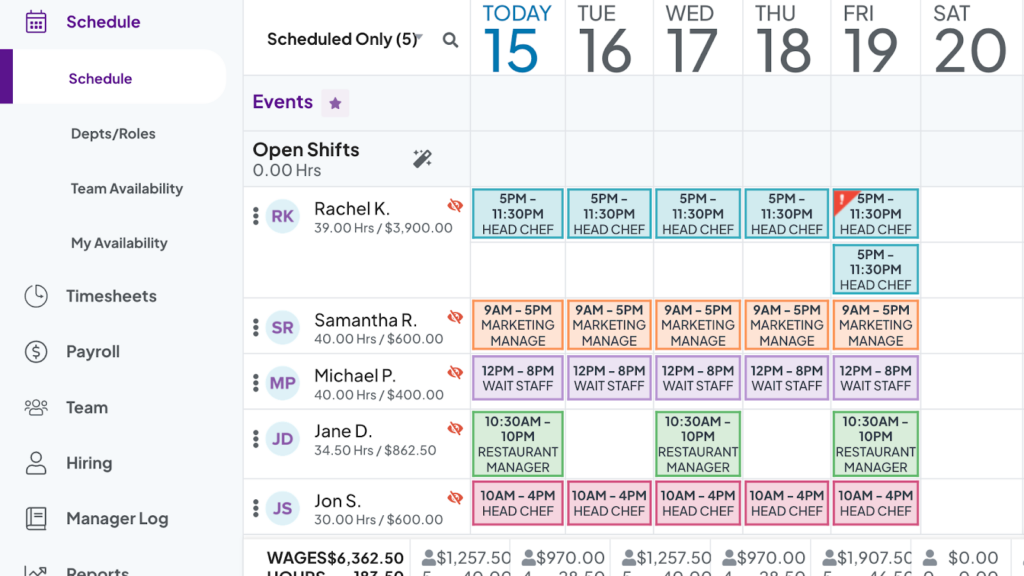
Homebase also did well on conflict detection. When we deliberately built a broken schedule, by assigning shifts to a worker who was off sick, scheduling someone with no availability that day, and booking an employee for more than 6 days in a row, Homebase caught and flagged every error before the schedule was published.
Both platforms enable you to publish schedules on their mobile apps and send employees push notifications or text messages about upcoming shifts. With either platform, your employees can trade shifts with one another with manager approval. 7shifts organizes all of this through its Shift Pool, a central hub where employees can offer up shifts, claim shifts that are up for grabs, and request direct trades; managers approve or decline with a single tap.
The biggest difference in scheduling lies in the more advanced features. Homebase and 7shifts each support auto-scheduling, but the tool in 7shifts is much more advanced and reliable. Its auto-scheduler analyzes 8-10 previous schedules to find staffing patterns, then factors in labor costs, sales forecasts, overtime, time off, and compliance to build a labor-optimized schedule. Homebase markets similar functionality, but in our June 2026 test account, we couldn’t access the AI scheduler at all, even after several rounds of troubleshooting with Homebase’s support.
The verdict: 7shifts wins on auto-scheduling. Both platforms make manual schedule-building easy and flag conflicts before publishing. We couldn’t access Homebase’s AI scheduler in our June 2026 test account, even after troubleshooting with support, so availability may depend on the plan, account, or rollout.
Time tracking and timesheets – Winner: Homebase
Time tracking in Homebase and 7shifts works pretty similarly. Both platforms enable employees to clock in and out on their mobile device or an integrated POS. They can also take a photo at clock-in to prevent buddy punching, but it’s important to note that Homebase’s photo ID feature is limited to tablet and POS devices.
Additionally, Homebase and 7shifts both support geofences, so employees can only clock in when they’re at your business location. During our 7shifts test, we confirmed the geofence works as intended: the app only allowed a punch-in inside the designated location.
However, there’s a major flaw with time tracking in 7shifts: It requires employees to use a separate mobile app called 7punches. This app is streamlined and easy to use, but employees must check their schedules in one app and clock in and out in another. It’s a recipe for mistakes.
The app is also stripped down to the basics: it doesn’t offer a timer widget, so employees can’t tell at a glance whether they’re clocked in, but it does give employees “Go on break” and “End break” buttons when break tracking is enabled. On the plus side, 7punches is free, and we found that employees’ hours appeared on the 7shifts dashboard in near real-time.
Homebase isn’t flawless here either. We found that time is tracked only to the nearest minute, and when we deliberately left a shift running into overtime, no alert reached the manager and the timesheet didn’t flag the issue. Homebase also advertises an offline mode, but when we tried clocking in without internet access, the time clock didn’t work. 7shifts has no functional offline mode either, so neither platform is a good fit for businesses in areas with unreliable connectivity.
Both Homebase and 7shifts create timesheets from employees’ time entries, which you can review and edit before payroll. They also track breaks and overtime, helping managers keep cleaner records. For example, both can automatically deduct unpaid breaks from timesheets.
The verdict: Homebase wins on convenience, narrowly. Both platforms cover the fundamentals of clock-ins, geofencing, and automatic timesheets, but Homebase lets employees track time inside the same app they use for everything else, on almost any device, while 7shifts forces staff to juggle a second app. Just be aware of Homebase’s failed overtime alerts and non-functional offline mode in our testing.
Time off management – Winner: Tie
Homebase and 7shifts are closely matched on time off, and we couldn’t separate them enough to name a winner.
Employees can request paid time off (PTO) through the Homebase or 7shifts mobile apps. Once managers approve the time off, they won’t be able to add employees to schedules on those days, preventing mixups around who’s available to work. While testing 7shifts, we confirmed this works in practice: after approving a request, the app blocked off the unavailable days so no shift could be assigned in that window.
Both platforms also support more complex time off rules, such as blackout dates and customizable PTO limits. You can also require employees to submit PTO requests a minimum of X days out from the first requested day off in both Homebase and 7shifts. This is nice for ensuring you have enough time to adjust your schedule when an employee wants time off.
One caution on the Homebase side: we found that pending time-off requests don’t display any notification badge in the manager app, so requests are easy to miss unless you know to check. We also hit a glitch where an updated availability preference continued to show as “all day” even after saving.
The verdict: it’s a tie. Both platforms handle PTO requests, blackout dates, and advance-notice rules equally well. Homebase’s minor notification and availability glitches are balanced out by 7shifts’ gating PTO accrual tracking to its Pro plan and above.
Team communication – Winner: 7shifts
Homebase and 7shifts each have built-in employee chat features that enable you to send one-on-one or group messages instantly.
You can build groups around locations or departments, or create any custom groups you need. Beyond messages, you can send team announcements, which are in a separate tab from messages in both apps.
Both platforms offer read receipts for announcements, so managers can see who has read an important update. 7shifts adds targeting filters that let you send an announcement to a specific location, department, or role and track how many people opened it.
7shifts has an edge here because it supports richer communication. Homebase’s messenger lets you attach files and even build quick polls, but we found that the tool is limited to text-based content, so you can’t send images, audio, or video, and there are no emojis. Another mark against Homebase: when we sent a company-wide fire drill announcement, it appeared halfway down employees’ dashboard feeds rather than as a flagged notification, making important updates easy to miss.
7shifts can also connect task management with team chat. You can start a group with the employees assigned to a task, and tagged employees receive task comments as messages. Task-linked messaging requires Task Management, which is included with Premium and sold as an add-on on lower tiers.
The verdict: 7shifts wins on communication. Both platforms cover chat, groups, announcements, and read receipts. 7shifts adds better announcement targeting and task-linked messaging, although the latter requires Task Management.
HR and labor compliance – Winner: Homebase
Homebase and 7shifts can both store employee documents and remind you when a certification or document is about to expire. Access depends on the plan: Homebase’s employee document storage and onboarding tools are tied to All-in-One, while unlimited storage in 7shifts may require an upgrade.
The two platforms also help you maintain compliance with labor laws in similar ways. For example, Homebase and 7shifts are both designed to alert you when an employee is about to go into overtime without prior approval or when employees are scheduled for shifts that start and end only a few hours apart. Just note that in our testing, Homebase’s overtime alert failed to fire when a shift ran long, so don’t rely on it as your only safety net.
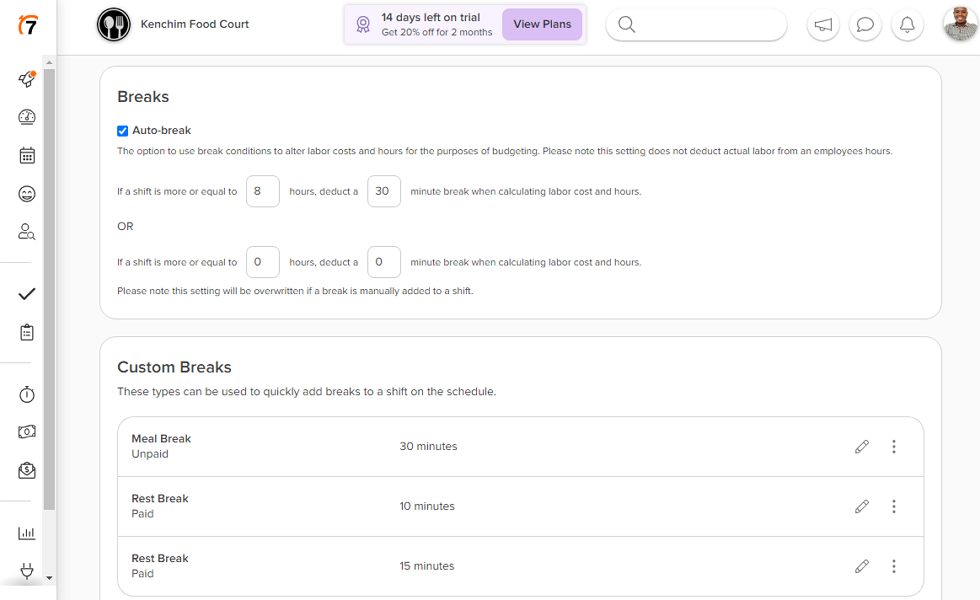
7shifts also comes with pre-configured overtime settings for each US state. We selected California and the app automatically applied the correct daily and weekly overtime thresholds. You can also schedule mandatory breaks and require employees to clock out for them.
7shifts even asks employees to certify that they took breaks: at punch-out, the app asks whether they took their rest and meal breaks per company policy, giving managers a record to review if an employee reports a missed break. This doesn’t remove the employer’s responsibility to follow labor laws or pay any required premiums.
Homebase goes a few steps further on the HR side if you’re on All-in-One. That plan includes access to certified HR advisors who can answer questions and help you build workplace policies, plus a library of policy templates and training documents.
Both platforms now include hiring and onboarding tools. With Homebase, you can create and post job ads online through platforms like ZipRecruiter and Indeed, and its AI assistant even wrote an entire job description from a brief outline in our testing. You can track applicants through the hiring process and schedule candidate interviews. On the All-in-One plan, new hires can e-sign their W-4s, W-9s, and I-9s right in the app. One gap: you can’t post roles on LinkedIn.
Available on Pro and Premium, 7shifts’s hiring module lets you create job postings with wage ranges, add custom screening questions with flexible answer formats, and manage candidates through a pipeline with notes and status updates. Postings are distributed to Google’s job search and Jobcase automatically.
Its employee onboarding add-on handles tax forms and I-9 verification, and for multi-location operators, it sends employees the correct tax documents based on their location. Payroll and Employee Onboarding are US-only. Onboarding costs $2.99 per package unless it’s included with your plan or 7shifts Payroll.
The verdict: Homebase wins on HR support, provided you’re willing to pay for All-in-One. Both platforms cover hiring, onboarding, and compliance workflows, but Homebase’s certified HR advisors and policy library give small businesses without an HR department a level of guidance 7shifts doesn’t offer.
Employee engagement – Winner: 7shifts
Homebase and 7shifts both include tools for employee feedback and recognition, but 7shifts gives managers a clearer way to track engagement.
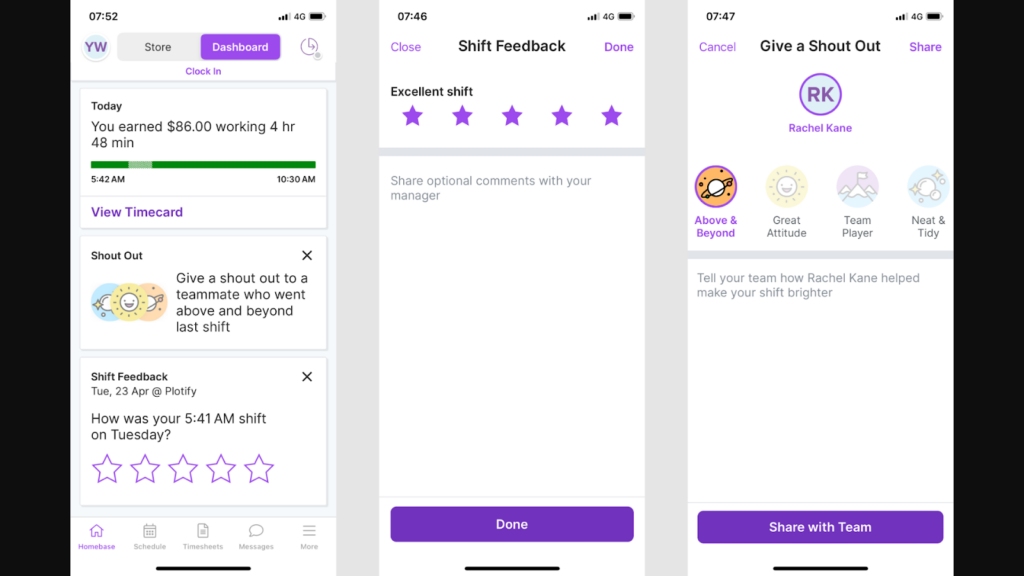
Both platforms advertise shift feedback tools that let employees rate their experience and leave comments for managers. This makes it easy to track how employees are feeling and act quickly if morale is low. One honest caveat: when testing Homebase, we clocked out from the mobile app, and the advertised shift-rating prompt never appeared, so we couldn’t verify this feature works as advertised on Homebase.
In addition, the two apps enable employees and managers to send kudos or shout-outs to their colleagues. These can be sent privately to an individual employee or shared in the announcement feed for everyone to see.
7shifts’s Engage dashboard calculates an employee engagement score over 4 weeks using factors such as punctuality, shift bids, and dropped shifts. We couldn’t verify an equivalent engagement score in Homebase, so these analytics shouldn’t be treated as the same feature.
Homebase adds one genuinely employee-friendly perk here: its Cash Out feature lets eligible employees access up to 50% of earned wages, with limits reaching $600. Standard delivery is free, while instant delivery costs $4.99. 7shifts counters with Clair On-Demand Pay, which similarly gives employees early access to earnings at no cost to your business.
The verdict: 7shifts wins on engagement tracking. Its Engage dashboard uses documented work patterns to calculate a score, and its shift-feedback tools worked in our testing. Homebase supports recognition and earned wage access, but we couldn’t verify its shift-rating prompt or a comparable engagement score.
Payroll – Winner: Tie
Homebase and 7shifts each offer payroll as a paid add-on to their standard plans.
Both payroll systems sit inside the main Homebase and 7shifts dashboards, so managers don’t need to move time data into a separate system. Employees can check paystubs and download W-2 forms from the same apps they use for work.
Both payroll systems calculate wages from hours worked, including breaks, PTO, and overtime. They file payroll taxes and support direct deposit or printed checks. You can run payroll as often as needed each month, which works for different pay schedules.
Pricing is close: Homebase charges $39/month plus $6/employee/month, while 7shifts charges $39.99/month per location plus $6/employee/month. Both payroll products are US-only.
Tip management is no longer unique to 7shifts. Homebase’s $25/location/month Tip Manager imports tips from supported POS systems, splits the pool by hours worked, adds the results to timesheets, and shows employees their tips. 7shifts still has an edge if you need more ways to divide a tip pool.
The software helps you divide up tips equally, by percentage, or using a weighted points system to ensure employees are paid fairly. Plus, transparency is built in: employees can see how much they contributed, collected, and received from each tip pool. Keep in mind that tip management is a $49.99/location/month add-on unless you’re on the Premium plan.
Another benefit to 7shifts is its built-in benefits marketplace, where you can find partners offering 401(k) plans, workers’ compensation plans, and health benefit plans. If you sign your employees up for benefits through the marketplace, 7shifts will automatically deduct the cost of these plans from each paycheck. Homebase doesn’t offer anything similar, leaving you on your own to find and pay for employee benefits.
The verdict: It’s a tie. Homebase has the lower-cost tip add-on and may cost less for multi-location payroll. 7shifts supports more tip-pooling methods, works with more restaurant POS systems, and includes a benefits marketplace. Your best fit depends on price and how complex your tip rules are.
Integrations
Both platforms connect with POS systems, payroll services, and back-office tools. Homebase supports general small-business tools such as GoDaddy, Shopify, Rippling, and Gusto. 7shifts focuses more heavily on restaurant systems, including Clover, Lightspeed, Square, Toast, ADP, Gusto, Paychex, and QuickBooks Online. The required plan and the direction of the data sync can vary by integration.
However, 7shifts makes up for its shorter general-purpose list by offering helpful integrations for restaurants, including for delivery apps DoorDash and Skip. It also connects to employee training apps like Typsy and Wisetail.
We aren’t naming an overall winner here. Homebase covers a broader mix of small-business tools, while 7shifts goes deeper on restaurant POS, delivery, and training systems. Check that your exact integration supports the data flow you need before choosing.
User Ratings
Users have rated both Homebase and 7shifts highly. The scores below come from the June 2026 checks completed for our full reviews.
Homebase
7shifts
Ratings checked July 2026.
Security & Compliance
Homebase and 7shifts offer strong security measures to protect your employees’ sensitive data.
| Category | Homebase | 7shifts |
|---|---|---|
| Data Encryption | ✅ Encrypted in transit and at rest | ✅ TLS 1.2 in transit, AES-256 at rest |
| GDPR-Compliant | Not publicly stated | ✅ Stated GDPR-compliant |
| Certifications | SOC 2 Type 2, SOC 3, PCI DSS, NIST CSF, CCPA, PIPEDA | States adherence to SOC, ISO/IEC 27001, and PCI DSS |
| HIPAA-Compliant | Not publicly stated | Not publicly stated |
| Admin Controls | Role-based permissions | Role-based access controls |
| 2FA | ✅ Two-step account verification | ✅ Multi-factor authentication |
Homebase’s Trust Center lists SOC 2 Type 2, SOC 3, PCI DSS, NIST CSF, CCPA, and PIPEDA. 7shifts says it follows SOC, ISO/IEC 27001, and PCI DSS standards, but its public documentation doesn’t identify the exact SOC report or say that it holds ISO/IEC 27001 certification.
It’s also noteworthy that 7shifts complies with the General Data Protection Regulation (GDPR). This can be important if your business has plans to open a location in Europe in the future.
Neither company publicly states that its platform is HIPAA compliant. Healthcare businesses should confirm their requirements with the vendor before relying on either product.
Setup and Onboarding
Homebase is quick to set up, and you can start scheduling in about an hour. Signing up took us just 7 steps with no credit card required, and the platform even pre-populated role dropdowns (like barista and waitstaff) based on the business type they entered. The bulk-invite tool was a highlight: we added 5 team members’ names, emails, roles, and permissions in one go. The main workflows were easy to learn in our testing, and most small teams shouldn’t need dedicated IT help to get started.
7shifts is also fairly straightforward to get started with, but it takes a bit longer than Homebase. This is mostly due to the fact that there are more permissions and settings to navigate. We liked the AI Schedule Importer, which automatically extracts your departments, roles, and employee information from an existing schedule file you upload (JPG, PNG, XLSX, or CSV). Just note that this feature is only available during your trial period and works best with single-sheet files.
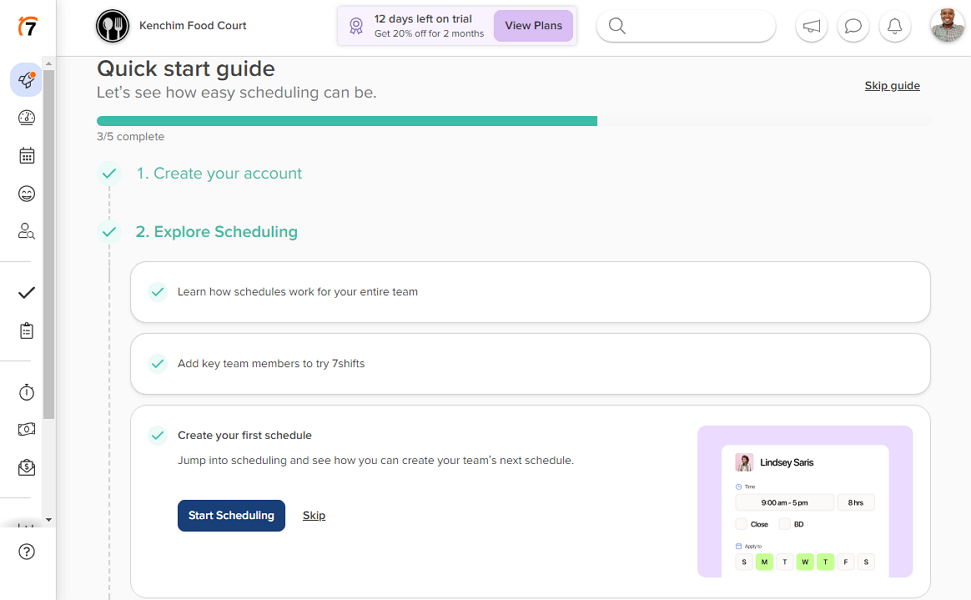
7shifts also has a quick-start guide to help you learn the platform. It’s useful because 7shifts has more permissions and settings to work through than Homebase.
Support and Customer Service
Customer support can have a big impact on your experience when something goes wrong or you need a helping hand. Here’s how you can get support from Homebase and 7shifts:
| Support Type | Homebase | 7shifts |
|---|---|---|
| 24/7 Chat | ✅ AI chatbot only | ❌ Human chat isn’t 24/7 |
| Live/Human Chat | Advertised; chatbot handoff in our test | ✅ Posted hours, 7 days a week |
| Phone Support | Advertised; verify by plan/account | Not listed on current contact page |
| Email Support | Ticketing via chatbot in our test | Tickets submitted through chat |
| Help Center | ✅ | ✅ |
Homebase currently advertises live chat and phone support, but our June 2026 test started with an AI chatbot. The bot answered routine questions and accepted screenshots, but the requested handoff to a human agent never happened. Since the advertised channels didn’t match our test experience, check what’s available for your plan and account.
7shifts’s current Contact Us page centers support on 7helps chat. Human chat is listed from 8 AM to 6 PM Central on weekdays and 10 AM to 6 PM Central on weekends. In our June 2026 testing, an agent replied in under 2 minutes during support hours, while an after-hours ticket received a reply in about 26 hours. The current page doesn’t list phone or standalone email support for ordinary scheduling accounts.
7shifts’ weekend chat hours are useful for restaurants and retailers that are busiest on weekends. We aren’t naming an overall support winner until Homebase’s advertised human support is retested at the account level.
🏆 Who Wins: Homebase or 7shifts?
| Choose Homebase if you… | Choose 7shifts if you… |
|---|---|
| Prefer the interface we found easier to learn | Need flexible restaurant tip pooling and broad POS support |
| Want hiring tools and All-in-One access to live HR advisors | Prefer automatic scheduling tools or task management features |
| Can verify live support options for your plan | Want human chat during posted weekday and weekend hours |
| Read our in-depth Homebase review | Read our in-depth 7shifts review |
Our take
Go with Homebase if you want the interface we found easier to learn, lower base-plan prices, and a $25/location/month tip-pooling option. Hiring is available across the product, while employee onboarding and certified HR advisors require All-in-One. Check live support availability for your account, since our human handoff failed in testing.
Go with 7shifts if you want restaurant-focused auto-scheduling, flexible tip-pooling methods, and deeper restaurant POS integrations. Pro and Premium support unlimited employees. Tip Management and Task Management come with Premium, while lower tiers may require add-ons. Human chat is available during posted weekday and weekend hours.
Neither platform worked offline in our testing, and both charge extra for payroll. Homebase is mainly built for US businesses. 7shifts supports restaurants in the US and Canada, including Canadian labor-compliance settings, although 7shifts Payroll and Employee Onboarding remain US-only. Businesses elsewhere should confirm that the available compliance tools cover their location.
Connecteam vs. Homebase vs. 7shifts
Connecteam is another option if you want scheduling, time tracking, communication, tasks, and HR in one mobile app. Its features are split across three hubs, so the price depends on which parts of the product you need.
The Operations Hub contains scheduling, time tracking, forms, and task management. Its auto-scheduler requires Operations Expert, which starts at $99/month when billed annually for the first 30 users. Unlike 7shifts, employees use one app to check schedules, clock in, and manage breaks.
Managers can create schedules, review timesheets, and assign tasks through the Operations Hub. Employees use the mobile app to check schedules and clock in. Time-off management belongs to the HR & Skills Hub.
The Communications Hub includes chat, updates, surveys, and a company news feed. Chat supports images, videos, and audio notes, which Homebase’s messenger didn’t support in our testing.
The HR & Skills Hub includes hiring, onboarding, employee documents, recognition, training, and time off. You can create job postings, customize application forms, track candidates through each stage, and transfer successful applicants into employee profiles. Hiring isn’t included when a paid customer subscribes only to the Operations or Communications Hub.
Within the HR & Skills Hub, you can store employee documents, recognize employees, train and onboard new hires, and track key events on an employee timeline.
Connecteam lists live support across its plans, including the Small Business plan. The optional Connecteam Pros service adds hands-on help with setup, customization, and training.
A single Basic hub costs $29/month when billed annually for the first 30 users. All three Basic hubs cost $87/month. Here’s how Connecteam compares with Homebase and 7shifts:
| Feature | Connecteam | Homebase | 7shifts |
|---|---|---|---|
| Scheduling | ✅ Operations Hub | ✅ | ✅ |
| Time tracking | ✅ In one app | ✅ | ✅ Separate 7punches app |
| Time off Management | ✅ HR & Skills Hub | ✅ | ✅ |
| Team communication | ✅ Communications Hub | ✅ Text and files only | ✅ |
| Task management | ✅ Operations Hub | ❌ Paid add-on | ❌ Paid add-on |
| HR and labor compliance | ✅ HR & Skills Hub | ✅ | ✅ |
| Employee engagement | ✅ HR & Skills Hub | ✅ | ✅ |
| Payroll | ✅ (Integrations) | ✅ (Paid Add-on) | ✅ (Paid Add-on) |
| Free Plan | ✅ Up to 10 users; plan limits apply | ✅ Up to 10 users, 1 location | ✅ Up to 15 users, 1 location |
| Support | ✅ Live chat on all plans | Advertised; failed handoff in our test | Human chat during posted hours |
| Security | ✅ SOC 2, ISO 27001 | ✅ SOC 2 Type 2, SOC 3 | Follows SOC and ISO/IEC 27001 standards |
Want to give it a go? Try Connecteam for free today.
FAQs
Homebase and 7shifts are workforce management platforms for location-based businesses. Homebase had the easier interface in our testing and offers certified HR advisors on All-in-One. 7shifts has more flexible auto-scheduling and deeper restaurant features. Both offer hiring tools, although onboarding terms depend on the plan.
Homebase is mainly designed for US businesses. 7shifts supports restaurants across the US and Canada and includes Canadian labor-compliance settings. Some scheduling and communication features may work elsewhere, but 7shifts Payroll and Employee Onboarding remain US-only, and both platforms’ compliance coverage depends on the location.
Homebase offers its own payroll service with unlimited monthly payroll runs. However, if you prefer to use your own third-party payroll provider, Homebase integrates with Paychex, ADP, Gusto, Rippling, QuickBooks, Square Payroll, SurePayroll, Millennium Payroll Solutions, Heartland, Bank of America, and Wells Fargo.
7shifts is designed for restaurants, but it can be used by other types of businesses including retailers. Retail businesses may not need all of 7shifts’s features, like tip management, and may find that the software doesn’t integrate with retail-focused software like inventory management platforms.
Changelog
July 2026
- Re-tested both platforms and updated the comparison with our latest findings.
- Updated 7shifts pricing, including the Premium plan increase to $134.99/location/month and the new $39.99/month payroll base fee.
- Revised 7shifts plan details, including employee limits and new hiring and onboarding features.
- Corrected previous assessment to reflect that 7shifts now includes hiring tools.
- Updated the Support section after Homebase moved to an AI-first support experience. No overall support winner was named pending another account-level retest.
- Refreshed the security comparison, user ratings, and hands-on testing results throughout the article.
