


Connecteam and Timely are both popular time tracking apps, but they serve different needs. Connecteam is an all-in-one platform for managing deskless crews, while Timely tracks time and computer activity for office-based work.
Which one makes sense for you comes down to how your team works and what you need the app to handle. Below, I’ll compare them on the stuff that matters most: time tracking, scheduling, location tracking, project management and task tools, integrations (including payroll), ease of use, and price. Read on so you can see the tradeoffs and decide for yourself.
A note about our method: All product comparisons and verdicts in this guide are based on hands-on testing by our expert team. Every screenshot was taken from real use during our evaluation.
At a Glance: Quick Summary
Connecteam is a workforce management platform built primarily for businesses with field, mobile, and deskless workforces. It automates time tracking, employee scheduling, team communication, location tracking, HR tasks, onboarding & training, and more. These features are available on all plans, including the free plan. This flexibility lets you grow your business without paying high fees when you hire new staff or open a new location.
Timely, on the other hand, works best for knowledge workers and project-based teams that juggle multiple tasks throughout the day. Its AI-powered Memory tracker automatically tracks time and all the apps and websites users visit during the workday. This automation reduces manual effort, but can pose a privacy risk. It also lacks some essential features for employee management and payroll. Learn more in our full Timely review.
Pricing and Plans
| Connecteam – Monthly/User | Timely – Monthly/User |
Free plan
| ❌ |
Basic-$29/month for up to 30 users** and $0.80 for each additional user
| Starter-$9/user/month
|
| Advanced-$49/month for up to 30 users and $2.5 for each additional user Everything in Basic, plus:
| Premium-$16/user/month Everything in Starter, plus:
|
| Expert-$99/month for up to 30 users and $4.2 for each additional user Everything in Advanced, plus:
| Unlimited-$22/user/month Everything in Premium, plus:
|
| Enterprise-Custom pricing Everything in Expert, plus:
| Enterprise-Custom pricing Everything in Unlimited, plus:
|
| * All prices show the monthly cost when billed annually as of December 2025.** That’s $0.96/user/month if you take advantage of all 30 users in the plan. | |
Clearly, Connecteam’s pricing plans are more affordable and offer a broader feature set than Timely’s. This can only mean one thing: Connecteam provides better value for money. Even better, it is built with scalability in mind and is a great fit for small and fast-growing teams.
For example, small businesses with up to 10 employees can use the Small Business Plan for free, which gives you access to all premium features. I also like Connecteam’s hybrid pricing model, which lets you add more users without changing plans, helping you keep your costs down.
Timely, by contrast, doesn’t offer a free plan, and that’s not the only problem. The user caps on its paid plans limit scalability and can be deal-breakers for growing teams. Even worse, its paid plans are relatively expensive compared to the market, which can be off-putting for businesses on tight budgets.
Pros and Cons
The pros and cons below give you a sneak peek into the strengths and weaknesses of each software:
Connecteam Pros ✅
- Affordable, all-in-one workforce management solutions
- Has advanced controls for compliance with labor laws
Connecteam Cons ❌
- Feature-richness can steepen the learning curve
- Doesn’t monitor computer activity
Timely Pros✅
- Automatic time tracking
- Detailed reports on time spent on apps and websites
Timely Cons ❌
- Automatic time tracking can pose privacy concerns
- Lacks advanced controls for labor compliance
Use Cases
There are big differences between the feature sets offered by Connecteam and Timely, so each app is best suited for a different use case:
Connecteam is best for:
- Accurate, compliant time tracking: Connecteam’s excellent mobile app and features like GPS-stamped clock-ins and geofencing make it the best app for tracking time for teams that don’t work at a desk. It also tracks breaks and overtime in line with labor laws, so you’re covered in states with stricter requirements.
- Complex job scheduling: Connecteam is great for complex shift scheduling thanks to scheduling rules, shift templates, conflict detection, and an Auto-Scheduler that fills shifts only with qualified employees.
Timely is best for:
- Effortless time tracking: Timely’s AI Memory tracker feature automatically tracks time in the background, so you’re not stuck starting/stopping timers or fixing missed hours later. It’s a strong fit for office and project teams that want less busywork and cleaner time logs.
- Activity tracking: Timely shows how much time you spend in different apps and websites during the day. That’s useful for seeing where your time goes, though it doesn’t turn that into productivity insights the way tools like Hubstaff or Harvest do.
Side-by-Side Feature Overview
To see how Connecteam and Timely actually feel day to day, I tested both with a real-life scenario. In this section, I’ll compare them side by side and walk through where they’re similar, where they’re different, and what that means in practice. Keep reading for all the details:
Employee Time Tracking — Winner: Connecteam
Connecteam and Timely take very different approaches to time tracking. Connecteam’s time tracker focuses on deskless teams with powerful and intuitive Android and iOS apps.
Employees can also track time on a web or kiosk app, which lets multiple users clock in/out on a shared device. It’s helpful in environments where not all employees have smartphones or where mobile devices aren’t allowed in the workplace.

Because Connecteam is designed for mobile workforces, it doesn’t support automatic time tracking. Instead, it focuses on making manual tracking as simple and automatic as possible, so that timesheet accuracy doesn’t depend on employees remembering when they started or ended their shifts.
In contrast, Timely automatically tracks everything employees do on a computer, so they don’t need to manually start or stop a time clock. Hands-free tracking can appeal to employees juggling multiple tasks, but users who care about privacy may not love it.
Another difference is that Timely tracks project time only, while Connecteam tracks regular hours, overtime, and breaks. I especially liked Connecteam’s break tracker. It reminds employees to take manual breaks and stops them from returning early, which is useful for complying with labor laws. It even computes overtime pay, saving you from wasting time on manual calculations.
Verdict: Connecteam and Timely serve their intended purposes well. Even so, Connecteam is the undisputed winner thanks to its advanced features, such as the break tracker, overtime tracker, and break reminders.
Geofencing and Clock-In Restrictions — Winner: Connecteam
Connecteam doesn’t just let employees log hours. It only lets users clock in/out when they meet certain conditions. For example, it prevents employees from clocking in when they don’t have an assigned shift. Better yet, you can restrict early clock-ins to prevent inflated hours that eat into your profits.
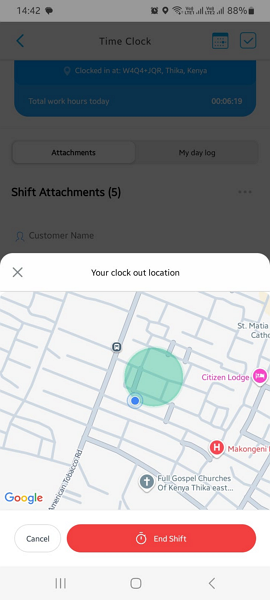
Connecteam’s geofencing is my favorite clock-in restriction. It makes sure employees clock in/out only when they’re at the job site, by setting up a virtual “fence” around it. This prevents late-comers from clocking in a few blocks away to avoid losing attendance points. This lets you accurately track who’s late and only pay workers for hours spent on the job, not commuting.
Even better, Connecteam has automation tools to simplify attendance tracking. For example, when an employee leaves the job site, Connecteam clocks them out automatically and notifies you immediately. This is helpful when workers have to stay at the job site for legal or contractual reasons, like a caregiver watching a high-risk patient.
Timely, by comparison, doesn’t support geofencing or any clock-in restrictions.
Verdict: There can only be one winner in this category: Connecteam. Whether you’re trying to stop off-site clock-ins or just make sure people are on location when they punch in, Connecteam’s geofencing is a reliable choice.
Shift Scheduling — Winner: Connecteam
Connecteam is one of the best employee scheduling apps on the market. It has all the features you need to easily create schedules that meet your business’s unique demands and industry’s compliance requirements. Whether you’re in healthcare, manufacturing, construction, retail, hospitality, or any other shift-based sector, you can’t go wrong with Connecteam.
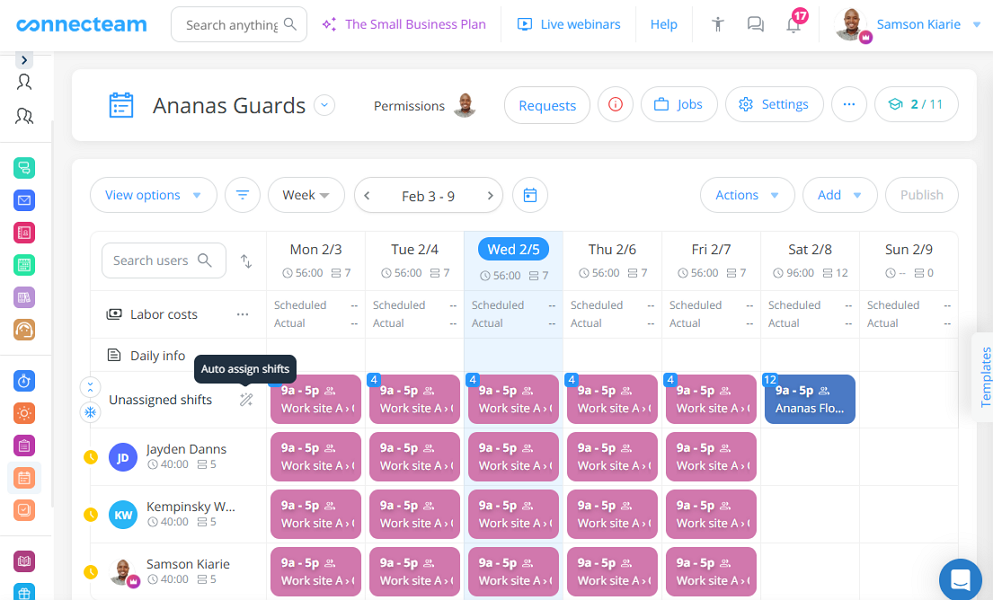
What sets Connecteam apart is the ability to configure scheduling rules, like maximum shifts per time period, maximum hours per week, and rest periods between shifts. This is especially useful when you need to comply with labor laws or prevent worker fatigue. For example, you can set how many hours need to pass between shifts to prevent employees from opening in the morning after working late the night before.
Connecteam also offers handy tools such as shift templates, recurring shifts, drag-and-drop scheduling, and shift copying. What stands out to me is Connecteam’s AI-powered Auto-Scheduler, which lets you assign hundreds of shifts in minutes. What’s more, the auto-scheduler assigns shifts based on your scheduling rules and employee qualifications, so each task is handled by an employee with the right skills.
Other notable Connecteam scheduling features include:
- Automatic conflict detection
- Employee unavailability
- Shift swaps
- Open shifts
Timely, on the other hand, doesn’t offer scheduling features.
Verdict: Connecteam is the winner on the scheduling front. It checks all the boxes for companies that want to schedule employees in compliance with labor laws, industry standards, and company rules.
GPS Location Tracking — Winner:
The Connecteam GPS location tracker is your set of eyes on every job site. It gives you a complete view of not just the locations of your workers, but also their activities. When you open the map, you can see who’s clocked in, where and when they clocked in, and the job they are currently working on.
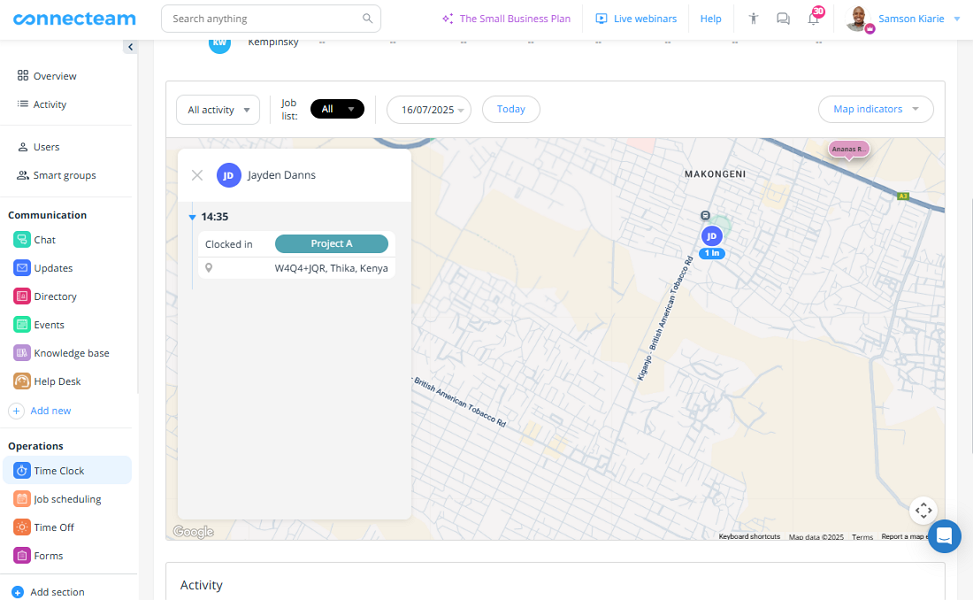
Real-time visibility can help you keep an eye out for field employees and improve their safety. It can also help make sure that service technicians get to appointments on time, or update customers if they’re running a little late. The result: better safety, more trust, and happier employees and customers.
What’s more, Connecteam helps make sure that your sales reps, delivery drivers, and other mobile workers take the route you assign them. When mobile employees follow assigned routes, their arrival times improve and travel costs decrease significantly.
Connecteam also has a breadcrumbs feature, which can show you the exact route an employee took during the shift. For example, breadcrumbs can show you whether a delivery driver drove the most efficient way from the warehouse to a customer’s house.
Timely, by contrast, doesn’t track employee location, and that’s by design. The app is built for knowledge workers, who usually work in offices, and not out in the field.
Verdict: Connecteam takes the crown in this category, thanks to real-time location tracking. It gives you a bird’s-eye view of your field teams, letting you monitor activities from the comfort of your office.
Project and Task Management — Winner: Tie
Both Connecteam and Timely support project and task management, but they take very different approaches.
In Connecteam, the Jobs feature is designed to simplify assigning work in shift-based teams. You can set up jobs as the roles you need on a worksite and link them to specific shifts.
I liked that you can add the required skills to each job. That way, only qualified employees get scheduled into that role, which helps prevent mistakes and rework. For example, you can add a “supervisor” job to a shift that only trained supervisors can fill.
Connecteam also lets you assign shift tasks or quick tasks and track progress either in the schedule or on a central dashboard, so nothing gets missed.
Overall, Connecteam’s task manager is ideal for teams where work happens on-site and during shifts — clear roles, clear tasks, and quick visibility on what’s getting done.
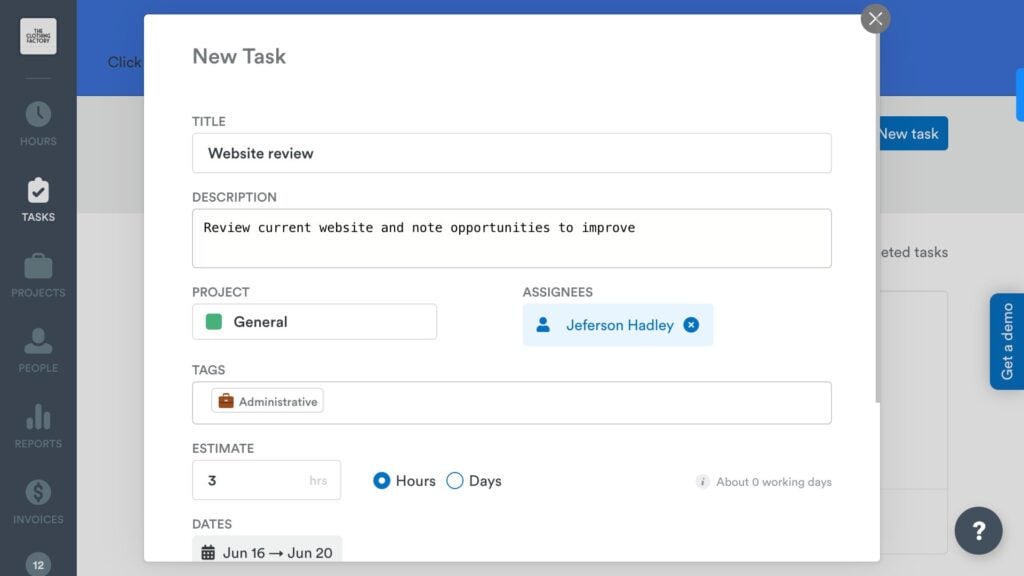
On the other hand, Timely is built to help knowledge and project-based teams monitor costs and track billable hours. I found it easy to create projects, set budgets, and assign tasks. I did have to bounce between tabs to create tasks and link them to jobs, which added to the admin load.
That issue aside, Timely notifies you when spending approaches 50%, 80%, and 100%. I think the budget notifications would have been more effective if they were a bit more flexible. But even with their current design, these notifications can really help spot cost overruns early.
Verdict: In my view, both Connecteam and Timely are solid choices for project and task management, but for different use cases. While they lack the advanced features of standalone project management software, they serve their intended purposes well.
Paid Time-Off Management — Winner: Connecteam
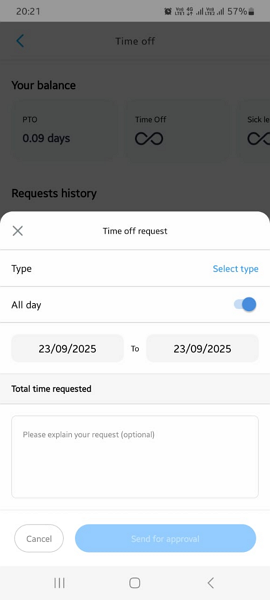
Connecteam automates PTO management to maintain fairness, accuracy, and efficiency. It supports both lump-sum and accrual PTO, so you can choose the option that best suits your needs.
I really love how Connecteam automatically resets and calculates employee leave balances, without the manager lifting a finger. It also gives employees clear visibility into their available balances, enabling them to plan vacations and personal time more effectively.
Two features give Connecteam an edge over other PTO tracking apps. One is blackout dates, which let you restrict time-off requests during busy days to maintain adequate staffing levels. The other is a minimum leave notice, which defines how many days in advance employees need to submit time-off requests. This gives you enough lead time to review requests and adjust schedules.
Unlike Connecteam, Timely doesn’t include a dedicated time-off tracker. You can track employee time-off by creating non-billable projects for various types of leave, but this approach won’t work for companies with complex PTO tracking needs.
Verdict: Connecteam lets you create PTO policies, whether lump-sum or accrual, to meet your company’s needs. It also helps you enforce these policies using tools such as blackout dates and leave notice periods to maintain a well-rested and satisfied workforce without disrupting operations.
Team Communication — Winner: Connecteam
Connecteam has some of the most powerful built-in communication tools I have seen in any time-tracking software. Its chat tool has all the features you expect in a modern messaging app. It supports 1:1 and group channels and provides rich chat tools like emojis, mentions, threads, voice messages, and file attachments.
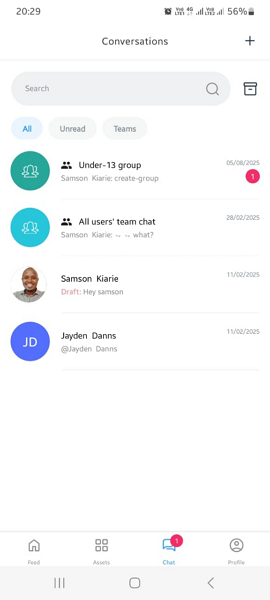
Connecteam also has an Updates feed that’ll feel familiar if you’ve ever used social media. It’s great for company-wide posts, like celebrating employee achievements and milestones, sharing important announcements, or sending quick emergency alerts. The best part is that it lets you track who read and reacted to your update, so you can make sure that it reaches all intended employees.
Unlike Connecteam, Timely doesn’t have a built-in team communication feature. It does integrate with Slack and Microsoft Teams, which is especially appealing if you already use Microsoft 365. But the lack of a built-in chat feature is a deal-breaker if you want to keep everything on one platform.
Verdict: Connecteam easily wins this category, thanks to its advanced communication features.
Integrations — Winner: Tie
Judging by the sheer number of available native integrations, Timely has a slight edge. It natively integrates with 18 third-party solutions, compared to Connecteam’s 10. But when you look closer at which tools they integrate with, it evens things out.
Timely’s integrations lean more toward project management, communication, and other office tools. It even integrates with QuickBooks for invoicing, which leads me to my main complaint. Timely doesn’t support payroll integrations. In my view, a good time tracking app should integrate with payroll solutions to make paying employees faster and less manual. Timely misses the mark on that front.
Compare this to Connecteam, which integrates with popular payroll and accounting apps like Gusto, Paychex, and Xero. This lets you sync timesheets without human error or manual hassle, improving accuracy and speed.
The issue aside, both Connecteam and Timely support Zapier integrations, enabling you to integrate virtually any software. They also support API integrations if you want to streamline data flow between systems.
Verdict: There’s no doubt that Timely has a bigger list of native integrations than Connecteam — and on numbers alone, that should’ve given it the win in this category. But the lack of payroll integrations is a real gap, and that’s where Connecteam has a strong hand.
Simplify your payroll
User Ratings
Connecteam and Timely have garnered impressive review ratings online, which mirror customer satisfaction with their offerings:
Connecteam
- ⭐ 4.6/5 on Capterra (4,610 reviews)
- ⭐ 4.6/5 on G2 Crowd (3,294 reviews)
Timely
- ⭐ 4.7/5 on Capterra (217 reviews)
- ⭐ 4.8/5 on G2 (470 reviews)
*As of December 2025.
Security & Compliance
| Category | Connecteam | Timely |
| Data Encryption | ✅ | ✅ |
| GDPR Compliant | ✅ | ✅ |
| HIPAA-Compliant | ✅ | ❌ |
| Certification | SOC 2 Type 2, ISO/IEC 27001 | ❌ |
| 2FA | ✅ | ❌ |
| Admin controls | ✅ Role-based access | ✅ Role-based access |
| Hosting Region | US/EU/Australia/Asia | EU |
When it comes to security, both Connecteam and Timely handle the basics well. Where Connecteam stands out is the extra layer of third-party validation: it’s SOC 2 Type II compliant and conforms to ISO/IEC 27001. That means an outside auditor has checked their security controls and processes, not just the product features.
I also think compliance-focused teams will lean toward Connecteam. Unlike Timely, it’s HIPAA compliant, which makes it a solid pick for U.S. healthcare orgs that deal with patient info.
Setup and Onboarding
Setting up Connecteam is pretty straightforward. First-time users usually need less than 10 minutes to get their team up and running. But to get the most out of all of Connecteam’s many features, some users may need a helping hand to find their way around. Luckily, Connecteam provides onboarding videos and guided tours to flatten the learning curve.
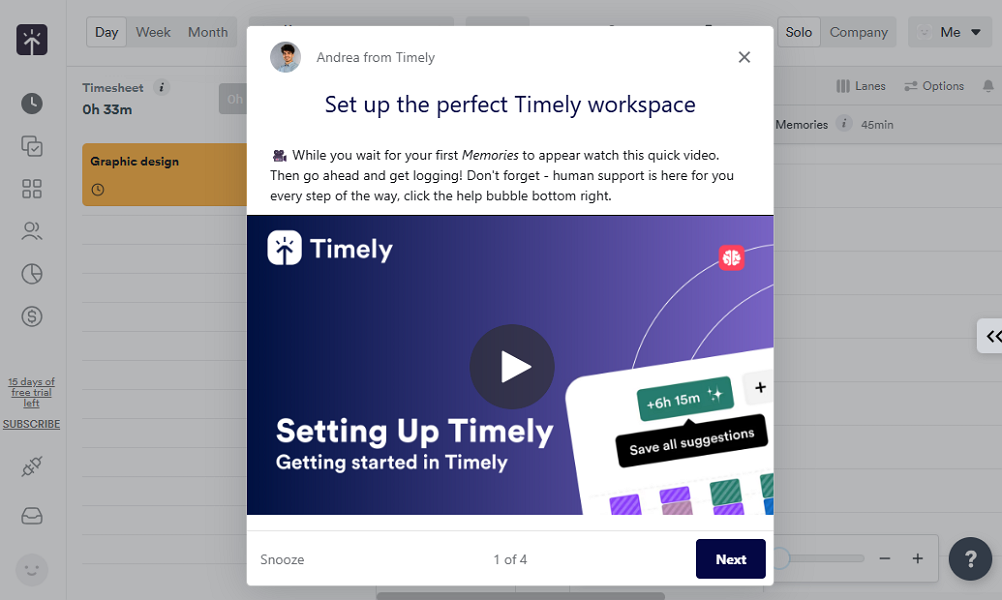
Timely was also quick to get started, with account setup taking less than a minute. Unfortunately, that was the only easy part. I ran into an issue installing the Memory Tracker — an indispensable app for automatic tracking. Once I got past that, everything else went on smoothly, and I didn’t need to read guides to use the app.
Support and Customer Service
| Support Type | Connecteam | Timely |
| Live Chat | ✅ 24/7 | ✅ 24/7 (Bot) |
| Phone Support | ✅ | ❌ |
| Email Support | ✅ | ✅ |
| Community forum | ✅ | ❌ |
| Help Center | ✅ | ✅ |
Connecteam has the edge on Timely because it offers support across a wide array of channels to all users, including users on the free plan. Even better, support is available 24/7, which means that users get instant help regardless of their time zone. Timely, by contrast, lacks phone support, and users don’t get human support on its live chat.
In addition to the free options, Connecteam offers a paid support feature called Connecteam Pros. With this option, you get paired with an installation and onboarding expert to speed up the initial setup. This helps you get the most out of every feature right from day one.
Who Wins: Connecteam or Timely?
| Choose Connecteam if you… | Choose Timely if you… |
| Have a deskless workforceNeed to comply with various labor lawsNeed scheduling and payroll | Have a desk-based workforceNeed to track what websites they visitWant automatic tracking |
| Learn more about Connecteam | Read our in-depth Timely review |
When you weigh scalability, price, and how well it works for deskless teams, Connecteam is the clear winner.
Timely is powerful in its own right and is particularly useful for knowledge workers and project teams who switch between tasks during the day. I liked its Memory tracker, which tracks time in the background to help managers see what apps and websites workers use during the day. But its automatic tracking mode can pose a privacy risk. Not to mention that Timely’s pricing limits scalability — a dealbreaker for growing teams.
On the other hand, Connecteam offers a lot of bang for your buck, appealing to small and growing deskless teams. Unlike Timely, it lets you do more than track time. It enables you to schedule shifts and jobs, track employee locations in real-time, manage PTO, and more. All this while helping you comply with labor laws.
👉 The verdict: If you want to track project time and see the apps and websites employees visit during the day, Timely’s right for you. However, if you want to schedule deskless teams, accurately track time spent on various jobs, and enforce location compliance, pick Connecteam.
Simplify your payroll
Turn tracked hours into payroll-ready timesheets.
FAQs
Yes, Connecteam is entirely free for small teams with up to 10 employees. With the free plan, you get all premium features, including time tracking, scheduling, and real-time location tracking.
Connecteam. It’s designed for people working on sites and moving around, with scheduling, tasks, and location-aware time tracking.
It can track time, but it’s not really made for shift coverage, job-site work, or managing big deskless crews.
Connecteam is usually the most affordable option for managing deskless teams since you get time tracking, scheduling, tasks, and team tools in one package.
Yes, Connecteam lets you track employee work hours your way through its intuitive web, iOS, Android, and kiosk apps.
Yes, Timely is a good time-tracking app for freelancers and project teams looking for a hands-free way to log time spent across various apps and websites.
No. Timely doesn’t offer payroll integrations, so you’ll need to export hours and move them into payroll yourself.