
When your company grows faster than your spreadsheets can handle, tracking who reports to whom becomes a mess, and soon miscommunication, duplicated work, and frustrated employees start costing you real money.
I reviewed 6 organizational chart software tools and ranked them by data import automation, customization options, and ease of use.
Use these picks to visualize your team structure, streamline onboarding, and keep reporting lines clear.
If you don’t have the time to read through our research, jump down to our quick comparison table.
What’s New in This Update (August 2026)
- Expanded the list from 5 to 6 tools, adding Sift for HR teams that need rich employee profiles and skills-based search.
- Repositioned Connecteam as the operations platform for deskless teams that also need org charts.
- Re-verified pricing for every tool against official pricing pages (Lucidchart, Sift, Pingboard, SmartDraw, and Organimi all changed since the last update in February 2025).
- Replaced generic pros and cons with specific limitations pulled from each vendor’s documentation.
Our Top Picks
-
1

Best for teams creating org charts within a broader diagramming workflow
-
2

Best for deskless and field teams managing org charts alongside operations
-
3

Best for HR teams needing org charts with rich employee profiles and search
Why trust us?
Our team of unbiased software reviewers follows strict editorial guidelines, and our methodology is clear and open to everyone.
See our complete methodology
How I Ranked the Best Organizational Chart Software
Here are the day-to-day problems I focused on when evaluating each organizational chart software:
Core Org Chart Requirements
- Avoiding manual chart rebuilds: I looked for tools that generate the chart automatically from CSV, Excel, or HRIS data, because building a chart box by box wastes hours you don’t have.
- Keeping the chart accurate as people come and go: The chart should update itself when someone is hired, promoted, or leaves, instead of waiting for an admin to remember.
- Making quick fixes without redrawing everything: Admins need to be able to move roles and change reporting lines with a simple drag-and-drop, not a full redesign.
- Finding the right person fast: Employees must be able to search by name, role, or department and jump straight to that person on the chart.
Day-to-Day Usability
- Answering questions without digging through HR files: Employee cards should surface the details teams actually need, like title, location, photo, and direct reports.
- Sharing without version chaos: Secure share links, embeds, and PDF or PNG exports should keep everyone looking at the same chart, with clear permissions for who can view or edit.
- Staying readable as the company grows: Large teams need to collapse departments, focus on specific branches, or split complex charts into sub-charts without losing the big picture.
Structure & Planning Protection
- Planning reorgs without leaks: Execs should be able to build private “what-if” charts to model changes before anything goes public.
- Stopping the chart from becoming shelfware: Tools scored higher when the chart connects to daily operations, like messaging, onboarding, and document storage, so employees actually open it.
- Reaching people the moment you find them: Managers should be able to message an employee directly from their card on the chart instead of hopping to another app.
The 6 Best Organizational Chart Software of 2026
-
Lucidchart — Best for teams creating org charts within a broader diagramming workflow
Available on
- Web
- iOS
- Android
- Windows
- Mac
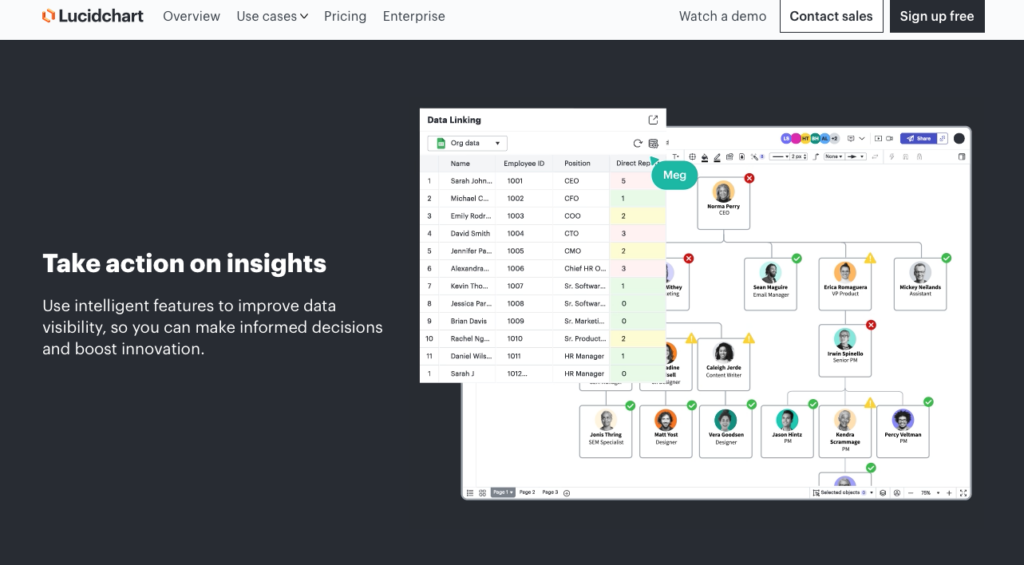
Lucidchart is a cloud-based diagramming application with a dedicated org chart shape library alongside its flowchart and process-mapping tools.
Why I chose Lucidchart: I picked Lucidchart because its real-time collaboration features let multiple managers build and refine the company structure together, and its template library covers nearly every org structure a company might use.
Visual collaboration and templates
With Lucidchart, multiple users can edit the same org chart at once, leave comments, and track revision history. My favorite part is that you can revert the chart back to a previous version. The template library covers hierarchical, flat, matrix, and project-based structures, and you can customize shape styles, add employee photos, and use conditional formatting to highlight patterns in your data.
While the feature is strong, I noticed that the free plan only includes 3 editable documents with up to 60 shapes each, which probably isn’t enough for most real-world org charts.
Data import and automation
You can auto-generate an org chart by importing data from CSV or Excel files. Lucidchart also supports dynamic linking to Google Sheets and Microsoft 365 Excel workbooks so the chart updates when the source data changes.
That said, I noticed that direct HRIS integration (with BambooHR) and automated data refresh are gated behind the custom-priced Enterprise plan, so lower-tier users need to rely on manual uploads to keep charts current.
Export and sharing
Completed org charts can be exported as PDF, PNG, or SVG files. You can also generate published links or embed codes to display the live chart in Slack, Confluence, or your internal wiki. I also appreciated that advanced sharing lets you share with people who don’t have a Lucidchart license.
What users say about Lucidchart
The drag-and-drop interface is intuitive, and collaboration in real time works smoothly. Diagrams are clear and easy to share with stakeholders.

What we liked least is that some advanced features and integrations are locked behind higher-tier licenses, which can limit access for broader teams.
Key Features
- Drag-and-drop org chart shape library
- Real-time collaborative editing
- CSV, Excel, and Google Sheets data import
- Conditional formatting and group views
Pros
- Wide template library for different structures
- Strong real-time collaboration tools
Cons
- HRIS sync requires the Enterprise plan
- Free plan capped at 60 shapes per document
Pricing
Starts at $9/user/month Trial: Yes — 7 days Free Plan: Yes — (limited to 3 documents)
-
Connecteam — Best for deskless and field teams managing org charts alongside operations
Connecteam is the best choice for deskless and field teams because it combines an automated org chart with the daily operational tools those teams already need, like scheduling, time tracking, and team chat, in one platform. It works best for businesses that need everyone to know who reports to whom without paying for a separate diagramming tool their frontline staff would never open.
Why I chose Connecteam: I ranked Connecteam #2 because it’s the strongest option for businesses that need to visualize reporting lines while managing the day-to-day work of a mobile workforce, especially in areas like automated chart generation, in-chart messaging, and mobile access.
Automated org chart builder
Connecteam’s organizational chart software builds out your business structure for you. You can upload employee data by importing a CSV file or entering it directly into user profiles, including names, departments, roles, and manager relationships, and the software auto-generates a professional-looking chart.
Adding, editing, and removing employees is quick, and you can bulk edit profiles with changes applied to the chart automatically.
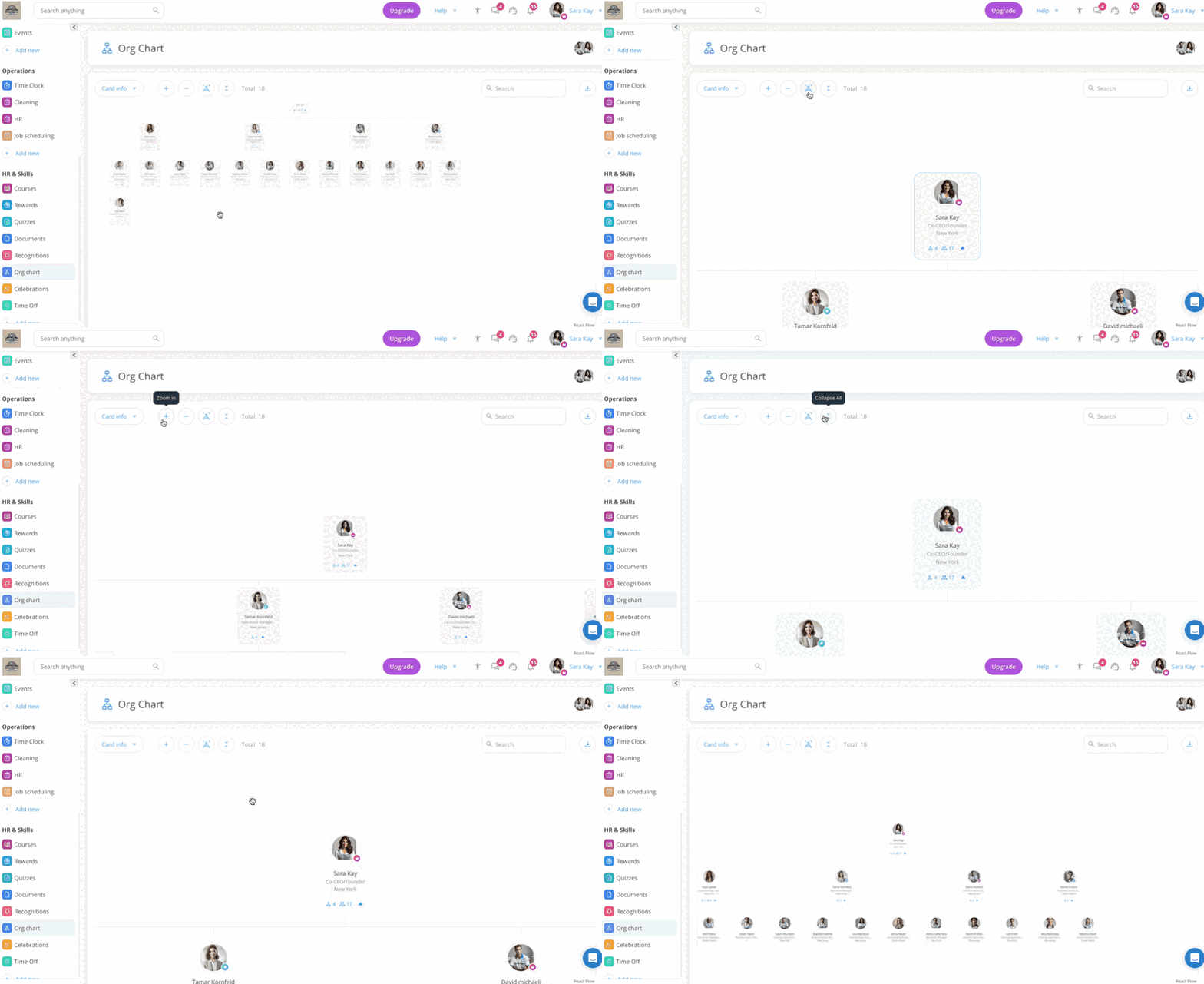
Connecteam makes it easy to navigate your org chart, whether you need to view your entire team Customizable employee cards
The chart is made up of employee ID cards, which are useful for getting quick information. By default, each card shows the employee’s name, photo, title, and number of direct reports. You can customize the cards to pull in details like role or location, so the chart fits how your business actually works.
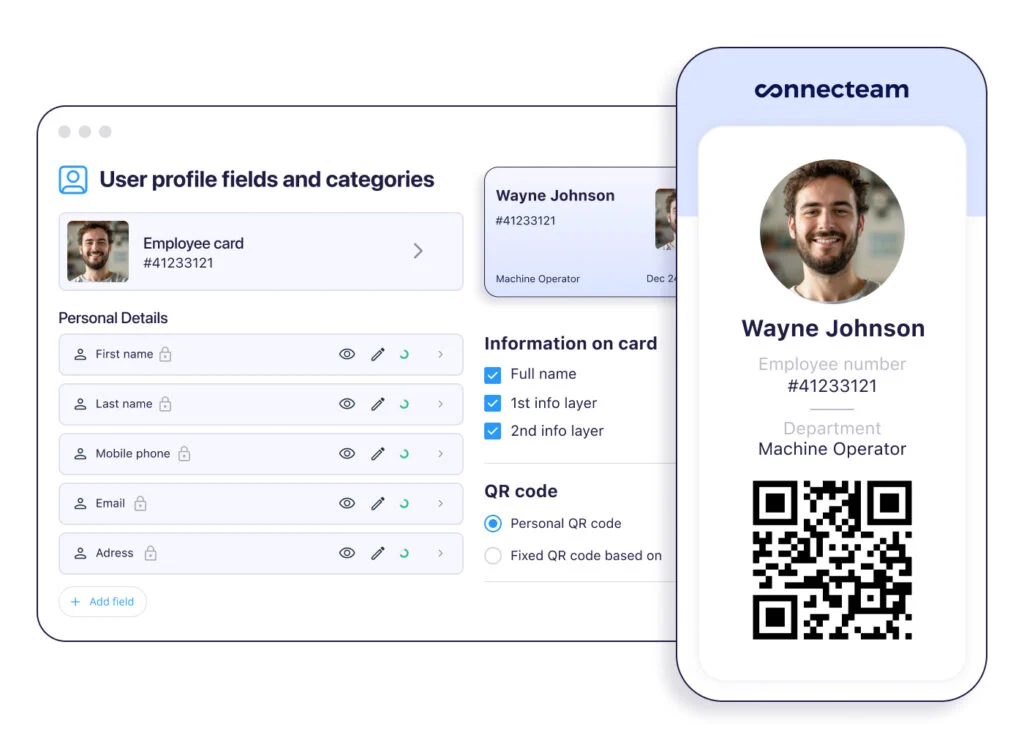
With Connecteam, you can customize digital employee cards. Org chart navigation and search
Finding the right person is fast with built-in filtering and search. The “Focus on Me” button zooms the chart into your own employee card. This simple navigation tool keeps new employees from getting lost in the chart and helps them understand their role in context of the overall team structure. You can also export the chart as a PNG for presentations or printouts.
In-chart messaging and employee data
You can message employees directly from the org chart using Connecteam’s built-in online team chat, without hopping onto another platform. This makes it easy to find and reach peers in other departments, because the chart isn’t just a picture, it’s a live directory connected to your communication tools.
Plus, because the org chart pulls from the same user profiles that power the rest of the platform, it stays accurate as your team changes. The company employee directory, staff documents, and employee timeline (which tracks events like promotions and reviews) all use the same records, so you’re never maintaining a chart in one tool and employee data in another.
And so much more…
Beyond org charts, Connecteam gives you a full toolkit for managing frontline teams: drag-and-drop employee scheduling, an employee time clock, digital forms and checklists, employee training, and so much more. There’s also a free online org chart maker you can use to build a basic downloadable chart.
When Connecteam isn’t a good fit
Connecteam is a workforce management platform, not a standalone diagramming specialist. It doesn’t offer advanced enterprise workforce-planning modules for modeling complex reorganization scenarios. Organizations that only want a deep, standalone charting tool for executive planning may prefer a specialist platform.
Connecteam also offers a free for life plan – Get Started Now!
0Key Features
Automated org chart builder and updates
Real-time sync with employee data
Chart exporting and sharing
Drag-and-drop chart editor
Org chart navigation, search, and filtering
Integration capabilities with HR systems and other tools
Pros
All-in-one solution for operations, communications, and HR
Fully mobile
Easy-to-use org chart builder and designer
Free plan for companies with 10 or fewer employees
Cons
Limited org chart templates for now
Pricing
Free-for-life plan availablePremium plans start at $29/month for 30 users
14-day free trial, no credit card required
Start your free trial -
Sift — Best for HR teams needing org charts with rich employee profiles and search
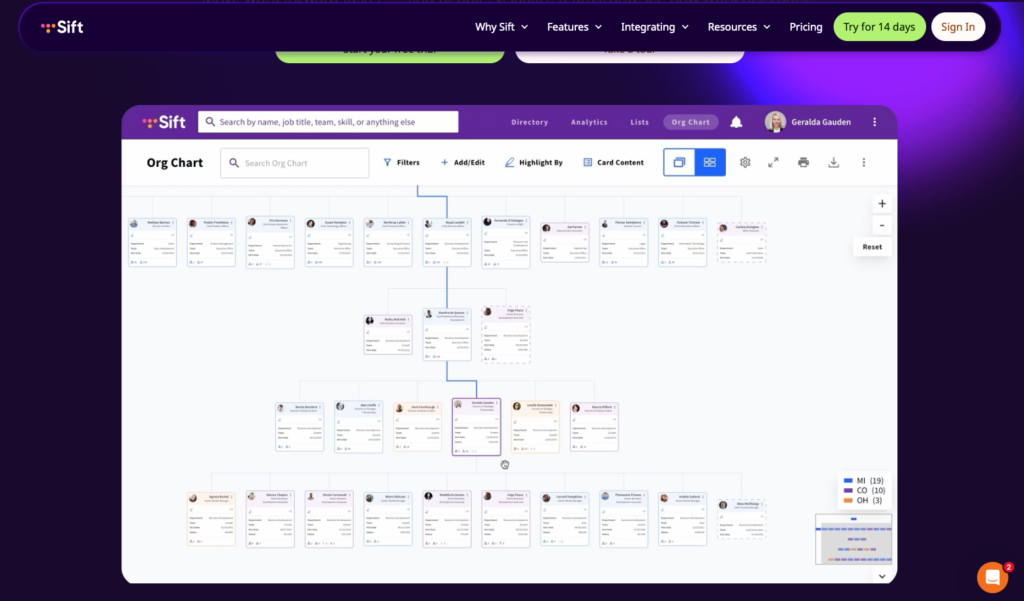
Sift is a dedicated org chart and employee directory platform built to help growing companies visualize their structure and connect their people.
Why I chose Sift: I selected Sift because it turns a static org chart into an interactive, searchable directory where employees can find colleagues based on specific skills, attributes, or team membership.
Automated sync and navigation
Sift generates its org chart automatically by syncing with HR systems like Workday and UKG, IT systems like Microsoft Entra ID, Google Workspace, and Okta, or CSV and SFTP uploads for everything else. The chart offers a Simple View for clean, single-level visibility and an Advanced View that lets you pan or zoom into the canvas. You can also search for a specific person or use “Start From Here” to highlight a department.
That said, I found that mobile app access for iOS and Android isn’t included in the base Org Chart plan. Instead, you need a higher tier for on-the-go access.
Customization and profiles
Admins can customize how information displays using Classic or Extended cards and choose which attributes appear. The “Highlight By” feature color-codes the chart by attributes like department, office location, or remote status. Sift also supports dotted-line reports and displays open roles directly on the chart, which seems helpful.
Export and reporting
You can export the full chart canvas as an image, PDF, or SVG, and generate multi-page PDFs starting from multiple leaders for large-scale reporting. Yet, I noticed that multi-leader printing and high-capacity exports only work in Simple View, not the Advanced View most users navigate day to day.
What users say about Sift
Its easy to see organization structures and identifying who reports to who. It’s helpful in recruiting

A couple things that could be added/made more visible might be a “Find Me” button and a “Collapse All”
Key Features
- Automated sync with HRIS and IT systems
- Simple and Advanced chart viewing modes
- Skills-based employee search
- Color-coded attribute highlighting
Pros
- Rich, searchable employee profiles
- Reliable automated data sync
Cons
- Mobile app requires a higher-tier plan
- Large exports limited to Simple View
Pricing
Starts at $150/month + $1.50/user/month Trial: Yes — 14 days Free Plan: No
-

Pingboard — Best for mid-market teams prioritizing ease of use and employee engagement
Available on
- Web
- iOS
- Android
- Windows
- Mac
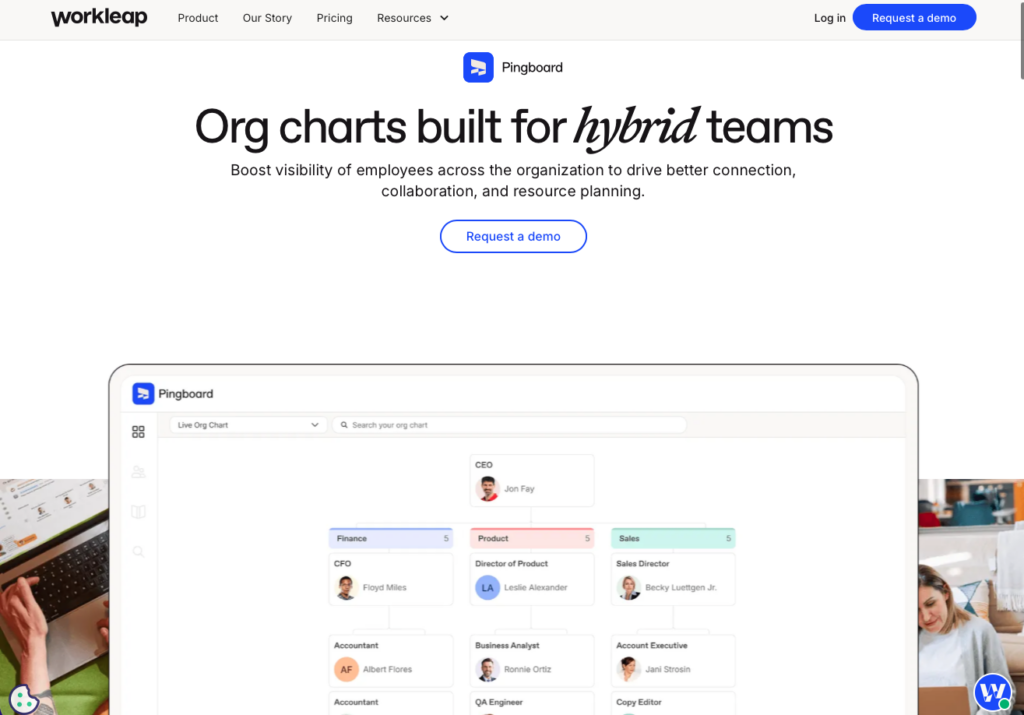
Pingboard (now Workleap Pingboard) is an interactive org chart and directory software focused on improving visibility and connection across hybrid teams.
Why I chose Pingboard: Pingboard’s drag-and-drop builder is easy to pick up, and its private planning charts give mid-market companies a secure space to model reorganizations.
Chart creation and planning
With Pingboard, admins can build charts from scratch by dragging employee or role cards onto a manager’s card, adding assistants, departments, or “To Be Hired” placeholders for open roles. The standout for me is the private Planning Org Charts feature, which lets executives explore reorganization ideas or hiring plans without touching the live chart. Once a plan is final, you can make it live for the whole organization to view.
HRIS integration
Pingboard supports automated daily syncs with major HRIS platforms, including ADP Workforce Now, BambooHR, Workday, and SAP SuccessFactors, plus identity providers like Okta, Google Workspace, and Microsoft 365. Once connected, it pulls added and removed users and updates assigned fields every 24 hours. Manual Excel or CSV imports are also available.
Directory and engagement
The employee directory includes custom profiles highlighting skills and interests, and the “Who’s Who” face-to-name matching game helps employees learn about their colleagues.
Two things to be aware of: the directory is automatically visible to everyone invited to the account with no option to hide specific profiles. In addition, the platform requires a minimum of 25 users, which makes it unfit for very small teams.
What users say about Pingboard
I often utilize the org chart, the survey tool, the onboarding tool, and the company page. For new and existing employees, this is a useful tool in helping them to understand the structure & function of our company and to understand the vision and the culture of our business.
Honestly, the org chart can be a little clunky. Deleting an employee there doesn’t delete them from the system, and editing the chart takes a lot of getting used to.
Key Features
- Drag-and-drop chart builder
- Private planning charts for reorganizations
- Automated daily HRIS syncing
- Interactive employee directory
Pros
- Practical tools for modeling future structures
- Engaging profiles and team discovery features
Cons
- Requires a minimum of 25 users
- Dotted lines missing from chart exports
Pricing
Starts at $4,999/year Trial: Yes — 14 days Free Plan: No
-

SmartDraw — Best for teams needing automatic org chart generation from data
Available on
- Web
- iOS
- Android
- Windows
- Mac
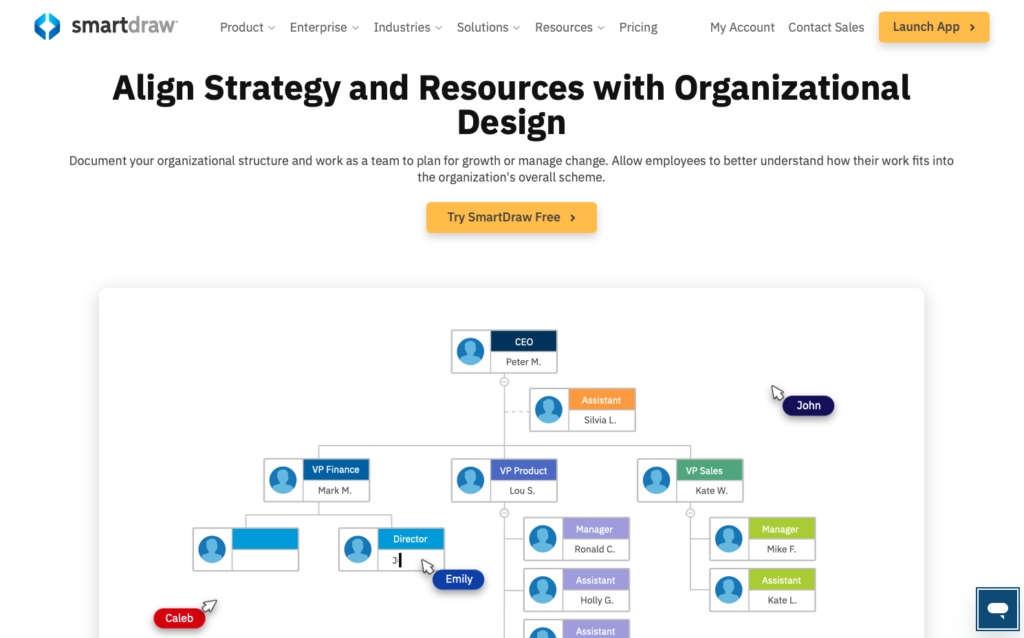
SmartDraw is an enterprise-grade diagramming software with a data visualizer built specifically for generating organizational charts from existing employee data.
Why I chose SmartDraw: I included SmartDraw because its automated generation removes manual drawing entirely, turning a spreadsheet or directory export into a finished chart in minutes.
Automated generation and formatting
SmartDraw lets you import employee lists via CSV or XLSX files, connect directly to Microsoft Entra, or pull lists from SharePoint. The software generates the chart and automatically realigns elements whenever employees are added, moved, or removed.
You also get granular control over what displays: data can appear inside the shape, hide in a hover tooltip, or be excluded entirely. The trade-off I noticed is that SmartDraw is web-based only with no offline mode, so you can’t work on charts without an internet connection.
Customization and layout
You can apply pre-designed color themes or build custom ones to match your branding. I liked that a single click can switch the entire layout orientation, say, from top-down to left-to-right. For large organizations, complex charts can be broken into smaller, more manageable sub-charts.
Sharing and storage
SmartDraw integrates with Microsoft Teams, Slack, and Confluence, and charts can be shared via link with people who don’t own a license. Unlike many competitors, it saves files directly to your existing cloud storage, including SharePoint, OneDrive, Google Drive, Dropbox, and Box.
It’s worth mentioning that there are no monthly plan options, so all subscriptions are billed annually. The Team plan also requires a minimum of three users, bringing the starting cost to $26.85 per month (or $322.20 billed annually).
What users say about SmartDraw
I really enjoy the interface, and having the program browser-based instead of application only. The ability to utilize layers and various templates has been helpful with the extra benefit of existing icon libraries for various project types.
I think the only thing I don’t like about SmartDraw is I don’t actually require it for a year and would’ve preferred a month to month subscription
Key Features
- Auto-generation from CSV, Entra, or SharePoint
- One-click layout orientation changes
- Saves directly to your own cloud storage
- Sub-charts for large organizations
Pros
- Strong data import automation
- No proprietary cloud storage lock-in
Cons
- Web-based only, no offline mode
- Annual billing only, no monthly option
Pricing
Starts at $8.95/month (billed annually) Trial: No Free Plan: No
-

Organimi — Best for small to mid-market teams wanting a dedicated, affordable org chart platform
Available on
- Web
- Windows
- Mac
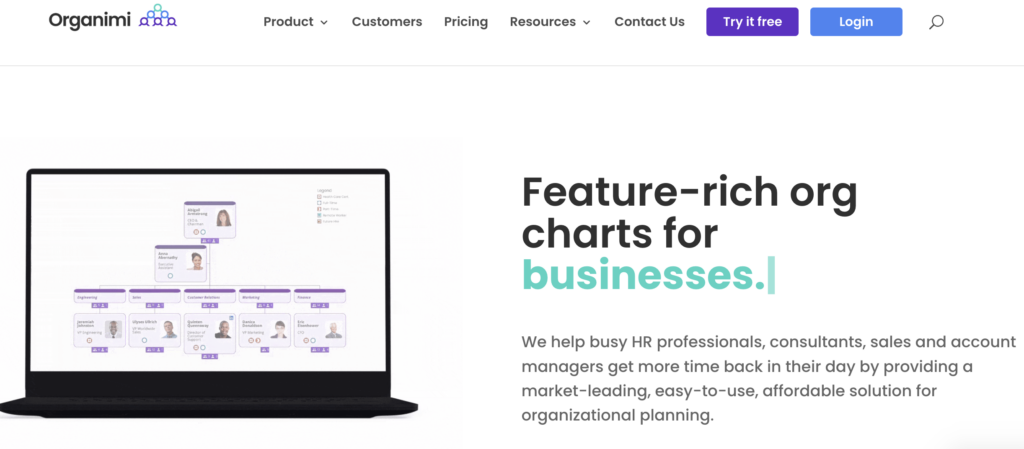
Organimi is a cloud-based org chart platform built to make creating, updating, and sharing company structures as straightforward as possible.
Why I chose Organimi: Organimi delivers a purpose-built org chart experience that’s easy for beginners, without the clutter of a general diagramming tool.
Data import and customization
You can create charts quickly with Organimi by importing CSV or Excel files. Organimi uses email addresses as unique identifiers to prevent duplicate entries during import. The Smart Chart Legends feature applies conditional colors, badges, and tags to role cards so you can distinguish departments or statuses at a glance.
One limitation I noticed is that matrix and governance charts are only available on the Premium plan, leaving Basic users with standard hierarchical org charts.
Integrations
Organimi connects with a long list of HRIS and directory tools, including BambooHR, Rippling, Okta, Personio, and Salesforce. The catch I noticed is that these integrations, along with SSO and Active Directory sync, are gated behind the Premium plan, and API access requires the custom-priced Enterprise tier. Basic plan users are limited to manual CSV and Excel imports.
Sharing and export
Sharing is flexible: public links, iFrame embeds for your intranet or website, and direct sharing with edit or view-only permissions. You can hide specific custom fields from public view, which is helpful for keeping emails or salary bands private. Charts export to PDF, PNG, or PPT, though some user reviews mention historical trouble printing very large organizational structures.
What users say about Organimi
It’s great for seeing the whole company or team in one place, whether you want a high-level view or to drill down into details. I can easily see who’s in which departments/teams and where people are located.
When I add notes to a contact, they aren’t separated into paragraphs and instead show up as one big chunk of text, which makes them harder to read.
Key Features
- CSV and Excel data import
- Smart Chart Legends for conditional styling
- iFrame embedding and public link sharing
- Custom fields with privacy controls
Pros
- Easy for beginners to pick up
- Flexible sharing and permission options
Cons
- Matrix charts and SSO require Premium
- Integrations gated behind higher tiers
Pricing
Starts at $13/month Trial: Yes — 14 days Free Plan: No
Compare the Best Organizational Chart Softwares
| Topic |
|
Start for free
|
|
|
|
|
|---|---|---|---|---|---|---|
| Reviews |
 |
|
N/A
|
|
|
N/A
|
| Pricing |
Starts at $9/user/month
|
Starts at just $29/month for the first 30 users
|
Starts at $150/month + $1.50/user/month
|
Starts at $4,999/year
|
Starts at $8.95/month (billed annually)
|
Starts at $13/month
|
| Free Trial |
yes
7 days
|
yes
14-day
|
yes
14 days
|
yes
14 days
|
no
|
yes
14 days
|
| Free Plan |
yes
(limited to 3 documents)
|
yes
Free Up to 10 users
|
no
|
no
|
no
|
no
|
| Use cases |
Best for teams creating org charts within a broader diagramming workflow
|
Best for deskless and field teams managing org charts alongside operations
|
Best for HR teams needing org charts with rich employee profiles and search
|
Best for mid-market teams prioritizing ease of use and employee engagement
|
Best for teams needing automatic org chart generation from data
|
Best for small to mid-market teams wanting a dedicated, affordable org chart platform
|
| Available on |
Web, iOS, Android, Windows, Mac
|
Web, iOS, Android, Windows, Mac
|
Web, iOS, Android, Windows, Mac
|
Web, Windows, Mac
|
How to Choose the Right Organizational Chart Software
Before you commit to a tool, it helps to consider your company’s size, how often your structure changes, and what your team will actually use day to day. Here are the questions I’d ask:
Team Size & Budget
- Can you commit to an annual contract, or do you need month-to-month flexibility?
- Will the pricing still make sense when you double your headcount?
- Does the tool have a minimum user requirement that rules you out?
Industry & Use Case
- Do you need a static diagram for a board presentation, or a living directory employees check daily?
- Will your workers need mobile access to the chart?
- Do executives need private planning charts to model reorganizations quietly?
- Is your structure hierarchical, or do you need matrix and dotted-line reporting?
Feature Requirements
- Can the software sync automatically with your existing HRIS or payroll system?
- Which chart features are gated behind higher-priced plans?
- Can you export the chart to PDF or PowerPoint for meetings?
- Can managers message employees directly from the chart?
What Is Organizational Chart Software?
Organizational chart software helps businesses create and maintain visual representations of their company structures, showing relationships between employees, departments, and roles. Unlike manual drawing tools or basic spreadsheets, dedicated org chart software is designed to handle the complexity of reporting lines and team hierarchies.
These tools typically offer drag-and-drop interfaces, templates, and collaboration features to build hierarchical diagrams quickly. Many modern platforms also double as interactive employee directories, letting staff search for colleagues, view profiles, and understand where they fit within the broader organization.
How Does Organizational Chart Software Work?
Organizational chart software uses a database to store employee information and reporting relationships. You can input data manually or import it in bulk using CSV files, and the software then generates visual diagrams through automated layout algorithms.
Once the chart is generated, admins can adjust the structure, change titles, and edit employee information using a visual editor. More advanced platforms integrate directly with HR systems and active directories, automatically updating the chart whenever an employee is hired, promoted, or leaves the company.
These tools also provide sharing and collaboration features, so you can control how different people inside and outside the organization view and interact with the chart, often with the option to hide sensitive fields from public view.
The Benefits of Organizational Chart Software
A good org chart tool does a lot more than just draw boxes and lines. Here are the biggest ways it pays off:
Better communication and collaboration
Employees working cross-functionally need an easy way to identify and learn about colleagues in other departments. An org chart gives them information about each person and their role, so they can quickly find and contact the people who can help them solve problems or move projects forward.
Better accountability
Org charts promote transparency and accountability with clearly defined roles that show who has authority in specific areas. If a department is struggling, you can quickly identify where the breakdowns are happening and who’s responsible for fixing them.
Streamlined onboarding
New employees need a fast, simple way to learn the organization’s structure and the relationships between teams. An org chart platform presents this visually, helping them quickly learn who’s who, understand team connections, and recognize their own place within the company.
Improved morale during times of change
During restructures or rapid growth, employees can feel disconnected and in the dark. Maintaining a public, up-to-date org chart keeps your team in the loop. And if some information is still in preparation, like new job titles, many platforms let you hide it until it’s final.
Better strategic workforce planning
Executives can use org chart software to understand their current structure and test out different hierarchies in private planning views. Seeing the results of role and department changes before making them supports smarter decisions, turning the org chart into a genuine strategic planning tool.
How Much Does Organizational Chart Software Cost?
Organizational chart software pricing varies widely by tool type and company size. General diagramming tools typically charge a flat per-user fee of around $9-$15/month, while dedicated org chart platforms often combine a monthly base fee with a small per-user charge. Some mid-market tools charge flat annual rates that run into the thousands.
Connecteam takes a more affordable approach with flat-rate pricing. The Small Business Plan is completely free for up to 10 employees, and premium plans start at just $29/month for the first 30 users.
FAQs
The best org chart software depends on your budget and needs. Lucidchart is a solid pick for diagramming workflows, while Sift and Pingboard suit teams that want interactive directories. Connecteam is the best choice for businesses that want to manage org charts alongside daily operations like scheduling and time tracking.
Yes. Connecteam offers a free-for-life plan for businesses with up to 10 employees, which includes the org chart builder along with its operational tools. Lucidchart also has a free plan, though it’s limited to 3 documents with 60 shapes each.
The most common type is a hierarchical structure (also called a traditional or pyramid org chart), which shows reporting relationships from top to bottom, with the CEO or president at the top and departments branching downward.
Yes, most premium org chart tools offer direct HRIS integrations with platforms like Workday, BambooHR, and ADP, so the chart updates automatically when employee data changes. Just check which plan tier includes the integration: several tools on this list gate HRIS sync behind their higher-priced plans.
The Bottom Line on Organizational Chart Software
Organizational chart software helps businesses replace messy spreadsheets with dynamic, searchable charts that keep everyone aligned. The best tools combine automated data import, easy editing, and simple sharing.
For frontline and field teams that want an accurate org chart connected to scheduling, time tracking, and team chat in one affordable app, Connecteam is the smartest pick. Get started with Connecteam for free today.