

Reliable but expensive operations management platform for food service and retail businesses
Verdict: 7.1/10
Jolt is an operations management platform that offers checklist-based task management, employee scheduling, time tracking, and more. It’s built with the food service and retail industries in mind. It offers a mix of hardware and software to keep your business compliant with temperature monitoring, product labeling, and food safety requirements.
While Jolt excels at operational compliance, it’s less nimble for workforce management. The scheduling tool lacks auto-scheduling, doesn’t enforce breaks or prevent overtime, and offers extremely basic time off management. Real-time GPS tracking or geofences weren’t listed in the Jolt documentation I reviewed (and weren’t shown during my product demo), so it appears less suitable for field service and construction businesses.
Overall, I think Jolt is well worth considering for restaurant franchises because of its food health and safety compliance features and multi-location support. But for most other industries, Jolt isn’t the most streamlined or feature-rich option. The quote I got was also expensive compared to competitors, so Jolt may not be the best choice for small businesses on a budget.
Key Features:
- Digital checklists: Create and manage operational checklists with real-time completion tracking.
- Time clock: Have workers track time with a PIN and selfie at clock-in to prevent time theft.
- Employee scheduling: Basic scheduling capabilities with shift management and time-off requests.
- Information library: Central repository for storing and accessing SOPs and training materials.
- Team communication: Built-in announcement features for staff updates.
- Sensors and hardware: Maintain food safety compliance with automated temperature sensors and label printers.
Pros
- Highly flexible and dynamic digital checklists
- Some app features can be used offline
- Employees can set their work availability
- Hardware is designed for food service businesses
Cons
- Higher price point
- No auto-scheduling functionality
- No guaranteed support for geofences
- No guaranteed real-time GPS tracking
How I Tested Jolt
Jolt doesn’t offer a trial or ready-made subscriptions, so I wasn’t able to test the software firsthand. Instead, I reached out to Jolt and attended a guided demo in August 2026, during which a salesperson showed me the admin web portal and employee experience on an iPad. During this demo, I had a chance to not only see how Jolt worked, but also learn how Jolt handles errors like leaving a time clock running. In addition, I reached out to Jolt’s customer support team directly to gauge the company’s responsiveness.
Jolt Pricing
Jolt’s pricing isn’t listed on its website. But after experiencing an impressively thorough demo with Jolt’s sales team, I learned that the platform’s prices are based on the number of locations your business has.
I received a tailored quote for a business with a single location in August 2026 that included Jolt’s checklists, information library, scheduling, and time tracking features for $115/month paid annually on a 3-year contract. For just scheduling and time tracking, that dropped to $30/month paid annually on a 3-year contract. Both packages included unlimited users per location, full onboarding support, and customer service. Note that this is a scenario-specific quote and pricing should be expected to vary.
Since Jolt charges by location rather than employee, whether it’s a good deal depends a lot on how your business is structured.
But even for single-location businesses, I found Jolt is significantly more expensive than competitors. The three-year commitment included in my quote could also be off-putting, especially since Jolt doesn’t offer a free trial or free plan to allow you to test out the software before such a long-term commitment.
| Team Size | Jolt (custom quote) | 7shifts (Essentials) | Homebase (Plus) | Connecteam (Advanced) |
|---|---|---|---|---|
| View pricing | View pricing | View pricing | View pricing | |
| 10 Users | $115 | $39.99 | $56 | Free for life — All features and dashboards |
| 20 Users | $115 | $39.99 | $56 | $49 |
| 30 Users | $115 | $39.99 | $56 | $49 |
| 50 Users | $115 | $79.99 (Pro) | $56 | $99 |
| Read our in-depth 7shifts review. | Read our in-depth Homebase review. | Learn more about Connecteam | ||
| Monthly cost when billed annually, as of August 2026. | ||||
Unfortunately, I wasn’t able to get a quote for Jolt’s full suite of features, which also includes temperature sensors, label printers, and tablets. Pricing for extra supplies like labels and hardware replacement parts is listed on the company’s website.
Verdict: 4/10
Jolt Usability and Interface
Jolt doesn’t offer a free trial, so I requested a demo through Jolt’s simple online form. I immediately received a scheduling link via email and was able to schedule the demo for the following day.
I found that Jolt’s interface prioritizes function over style. The web interface sports a traditional layout with a vertical navigation bar on the left for core functions like people management, account settings, and support resources. While it’s not winning any design awards, it gets the job done.
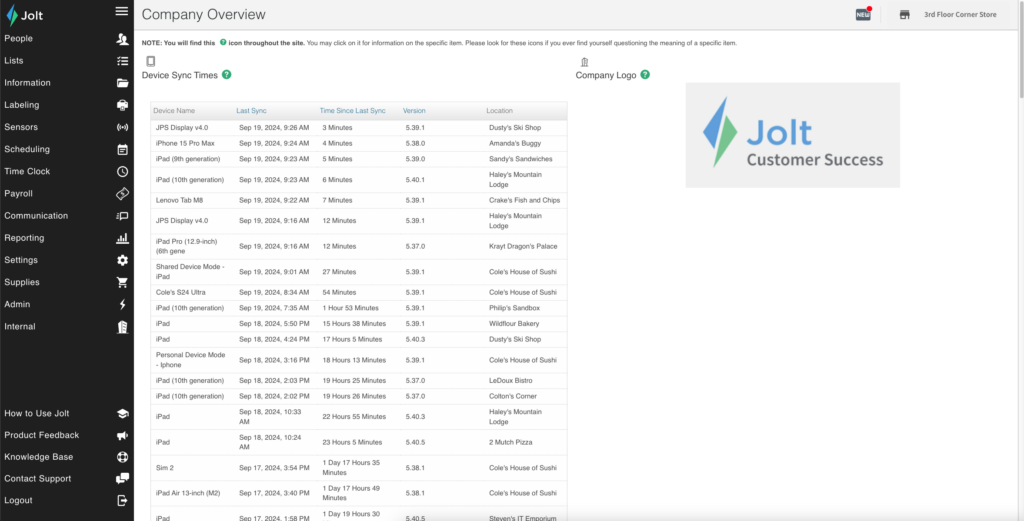
The top horizontal bar hosts some useful features, including a location switcher for multi-site businesses and a toggle between content group and location modes. This dual-mode system caught my interest: Content group mode lets you standardize operations across locations, while location mode enables site-specific customization.
The catch? Switching between these modes isn’t as intuitive as I’d like. The process involves multiple steps, including logging in, navigating to the dropdown menu, selecting the mode, and saving changes. This multi-step process might not be straightforward or quick for all users, especially if they’re frequently toggling between modes.
It took me some time to get used to the navigation. Once I understood how different sections connected, it made sense, but new users might need time to adjust. Unfortunately, I didn’t get a chance to see the process of adding users to Jolt during my demo, so I’m not sure how complicated the onboarding process is.
It’s also important to note that the browser platform is limited to admin functions and didn’t seem to be designed with employees in mind.
Basic tasks in Jolt, like filling out a checklist or starting the time clock, can only be completed on the mobile app. That’s fine for employees who mostly interact with smartphones and tablets (like restaurant or retail staff), but it means Jolt isn’t a good option for desk-based workers.
When it comes to accessibility, I saw basic features like text scaling and contrast options during my demo. However, I wasn’t able to test Jolt’s screen reader compatibility or keyboard navigation. I didn’t find an accessibility statement or certification on Jolt’s website.
Verdict: 6/10
Mobile app
During the demo, the representative walked me through how things look on the employee’s end using an iPad. I found that, like the web portal, the mobile app focuses more on getting things done than looking pretty. The app uses a vertical sidebar with clear icons for essential features: Home, Lists, Library, Logbooks, Labels, Sensors, Reports, People, Tools, Settings, and the Jolt logo.
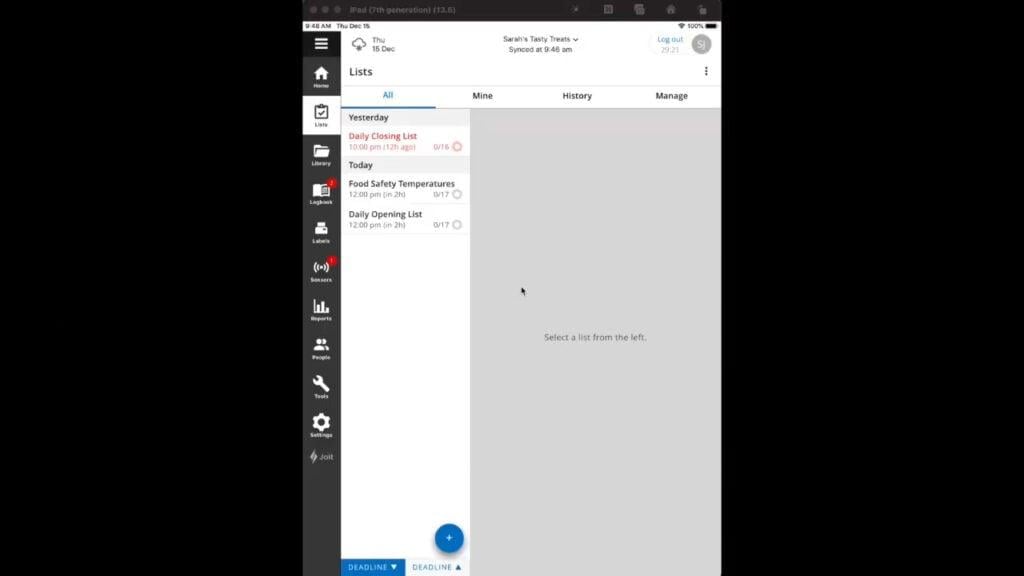
Organization is one of the app’s strong points. Take the Lists module. It smartly divides tasks into “All,” “Mine,” “History,” and “Manage” tabs, making it easy to find assignments.
I also liked the app’s dual operation modes: Single-User Device mode for individual employees and Multi-User Device mode for shared tablets. With the latter mode, a restaurant could require workers to clock in and out through a shared iPad using unique PIN codes, which is great for preventing time theft.
Unfortunately, switching between locations feels clunky on the mobile app, too—you must also do it manually. Some competing apps use GPS or other location services to automatically detect and switch the user’s interface to match their physical location.
Finally, a feature that impressed me was the offline functionality. During my demo, I saw several features of the app including the time clock, scheduling, and document library working without the internet. Data synced once the demo device was back online.
Push notifications work fine in Single-User mode but aren’t available for shared devices, which could present communication issues in busy environments where teams use single shared devices only.
Verdict: 8/10
| Feature | Admin | Employee | ||
|---|---|---|---|---|
| Web | Mobile | Web | Mobile | |
| Core features | ||||
| Time Clock | ✅ | ✅ | ❌ | ✅ |
| Lists | ✅ | ✅ | ❌ | ✅ |
| Schedule | ✅ | ✅ | View Only | View Only |
| Message Blasts | ✅ | ✅ | ❌ | ❌ |
| Announcements | ✅ | View Only | View Only | View Only |
| Document Library | ✅ | View Only | View Only | View Only |
| Time Off Requests | ✅ | ✅ | ❌ | Submit |
| Analytics features | ||||
| Dashboards | ✅ | Limited | ❌ | ❌ |
| Reports | ✅ | View Only | ❌ | ❌ |
| Compliance Tracking | ✅ | Limited | ❌ | ❌ |
| Labor Cost Analysis | ✅ | ❌ | ❌ | ❌ |
| Management functions | ||||
| User Management | ✅ | Limited | ❌ | ❌ |
| Role Configuration | ✅ | ❌ | ❌ | ❌ |
| Location Settings | ✅ | Limited | ❌ | ❌ |
| Device Management | ✅ | Limited | ❌ | ❌ |
| Shift Approvals | ✅ | ✅ | ❌ | ❌ |
| Audit Logs | ✅ | View Only | ❌ | ❌ |
Jolt Core Functionalities
Jolt offers a comprehensive suite of hardware and software solutions to streamline business operations. Below, I focus on core software features.
Checklists and task management
Jolt’s checklist system is its flagship feature, and after my demo, I can see why. It’s not just about ticking off tasks. Jolt has created a full system to handle real-world operations, especially in industries like food service, construction, and retail.
Checklists are created in the web portal and sync to the mobile app, making it easy for teams to follow structured workflows.
What impressed me most was the flexibility. Instead of having staff tick off basic checkboxes only, you can require photo proof, QR code scans, signatures, or even temperature readings. You can even add a timer to a checklist item, which is great for health and safety tasks like proper handwashing. The checklists are really powerful for compliance-focused businesses that need proof tasks were done right.
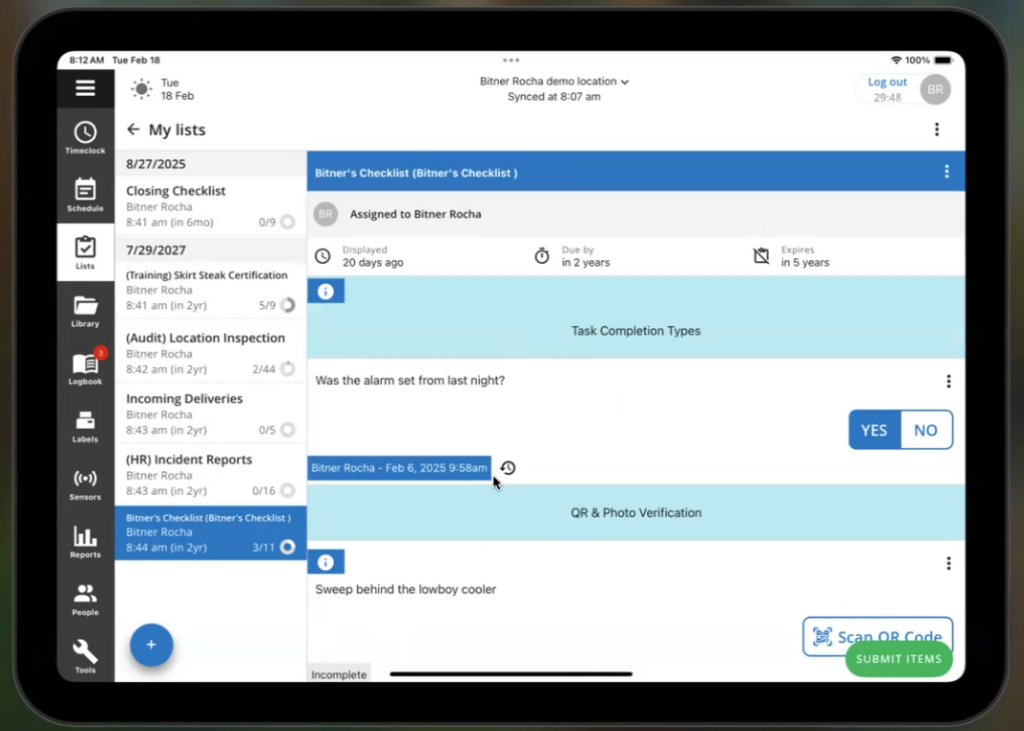
Checklists are dynamic, too. If an employee answers that a temperature measurement was out of range, that can trigger a follow-up question asking how they handled the situation. I think this is very useful for providing additional instruction or gathering extra information when something goes wrong.
For situations that require even more detail, Jolt’s checklists also support comments. This offers a simple way for employees and managers to communicate directly about tasks. Comments support @ tags, and employees and managers receive a notification when they’re tagged in a comment. Plus, managers get alerts for overdue tasks, out-of-range measurements, or incomplete checklists, so nothing slips through the cracks.
I thought the way Jolt handles assignments was smart. Checklists can be assigned to employees so that lists that need to be completed are clearly visible in each employee’s dashboard. You can also create general-use checklists that are available to all employees and assign checklists to roles rather than individuals. This is great since if someone calls out sick, a checklist can still be completed without managers having to scramble.
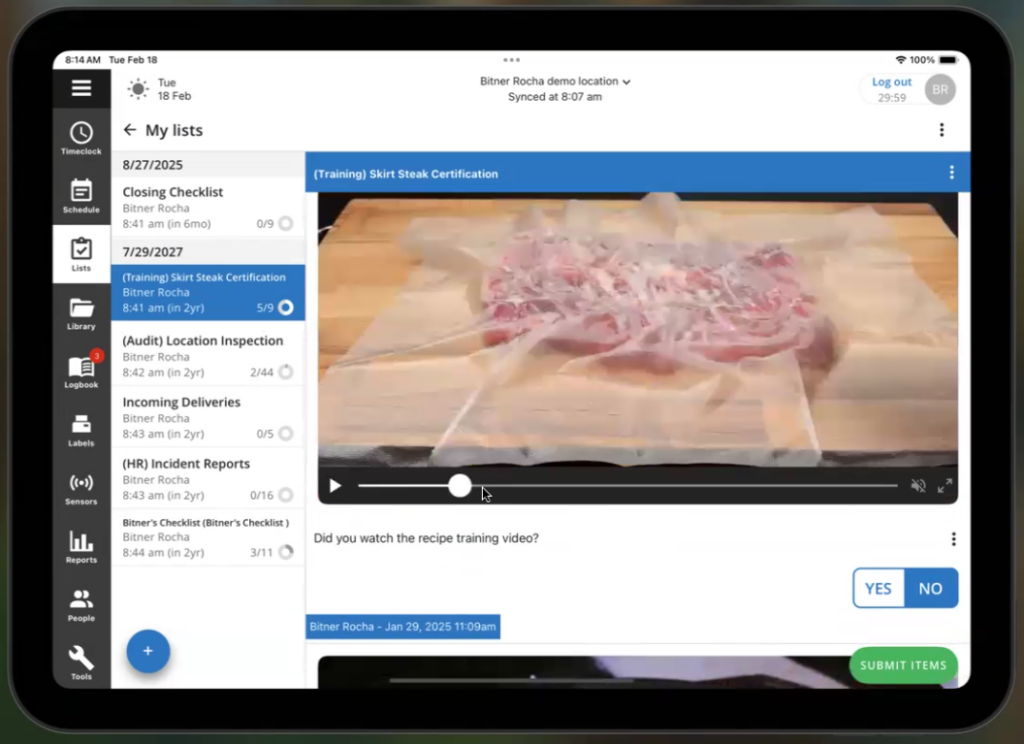
I also appreciated how employee training is built into checklists. You can add videos and quizzes right into tasks, letting employees watch training materials and answer questions before marking a task complete. The system tracks who’s watched the videos, when they completed them, and what scores they got.
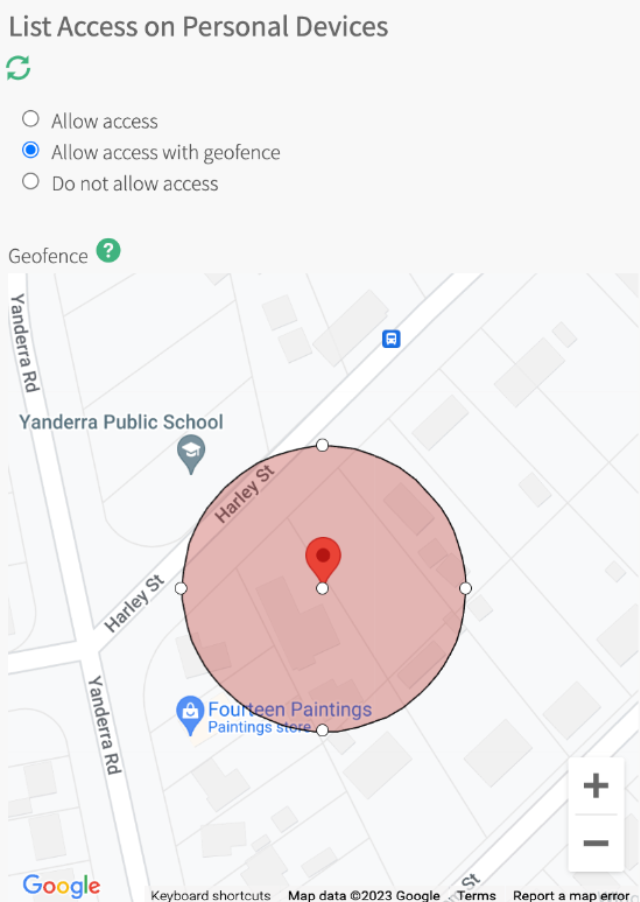
Jolt also offers geofencing for checklists, ensuring that employees can complete lists within defined locations only. This can be useful if you have employees who rotate between different business locations and each location has its own checklists. For example, end-of-day cleaning tasks might differ between different restaurant locations, and geofences help employees use the correct checklist.
However, geofencing works exclusively on single-user devices and doesn’t support shared devices. This could pose issues: For instance, if a construction crew is working on team-wide checklists using a shared device, you can’t ensure lists are getting completed where they should be.
Verdict: 9/10
Time tracking features
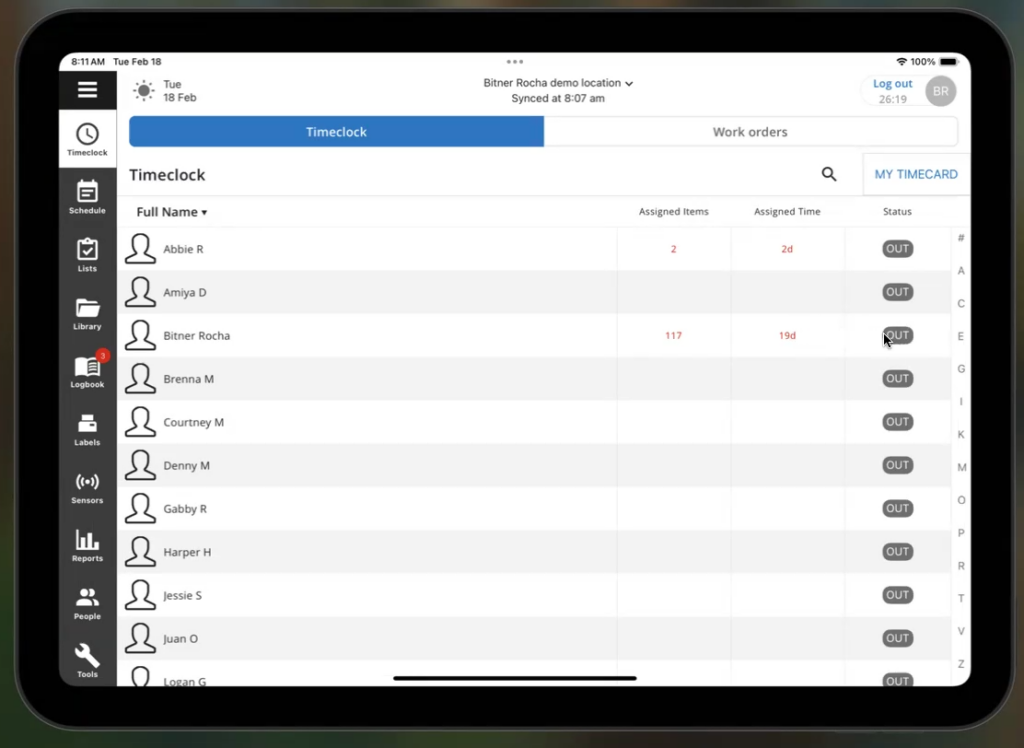
Jolt’s time clock is good, but far from the best I’ve tested. It allows employees to easily clock in or out and track breaks, but it lacks features for enforcing compliance or preventing errors.
Employees can start and stop the clock by entering a PIN or taking a selfie. However, Jolt doesn’t entirely prevent time theft. The time clock captures GPS location at clock-in and clock-out, but you might not be able to set up geofences to restrict clock-ins to specific locations. That’s a big difference from more robust time tracking apps like Connecteam, which use GPS to restrict clock-ins to designated work locations.
During my demo, I wasn’t shown real-time GPS breadcrumbs, so I couldn’t confirm whether managers can see employees’ locations throughout a shift. That’s a potential dealbreaker for field service and construction businesses that need to dispatch employees in real-time.
In addition, I was disappointed to find that Jolt won’t automatically alert employees or managers if they leave a time clock running. Employees can manually edit their time entries to fix the mistake, and these are flagged for managers to add accountability. But if the employee doesn’t catch the error, it’s up to managers to spot it during timesheet review.
Employees can start and stop both paid and unpaid breaks by using their PIN and taking a selfie. However, there are no automated break enforcement features, meaning it’s up to employees to take breaks as scheduled. If someone forgets, there are no automatic reminders or penalties, which could lead to compliance issues.
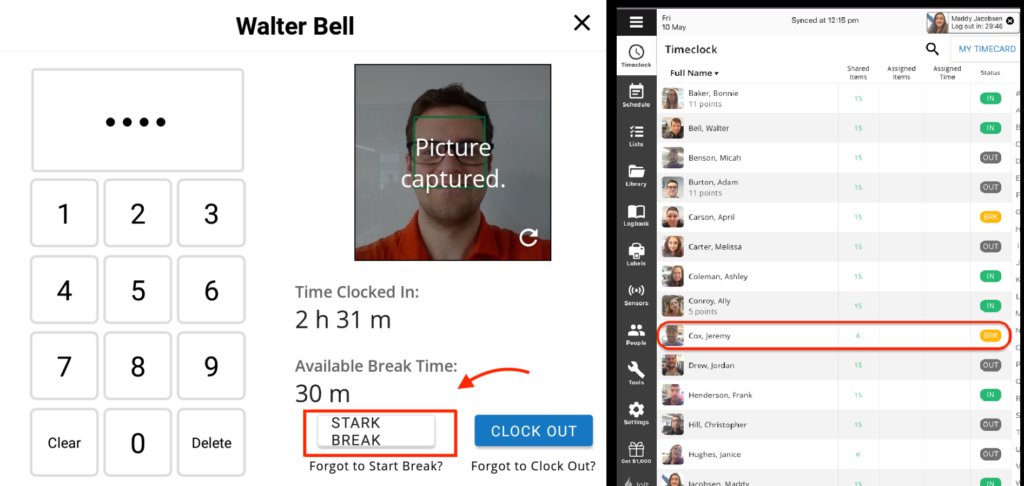
I thought the admin oversight tools work well. Device admins can clock in or out for employees when needed, and the web portal offers clear views of timecard data.
Jolt also tracks overtime and allows administrators to view regular, standard overtime, and total hours for each pay period through the Time Clock Report. However, it lacks advanced overtime management features, such as customizable overtime rules and alerts when employees reach overtime.
Verdict: 6/10
Scheduling and time off management
Jolt’s web-based schedule builder is straightforward. I found the drag-and-drop interface intuitive and liked how easy it is to create and adjust shifts. Just click on the schedule, enter a start and end time, and add shift details like what role and station it’s for.
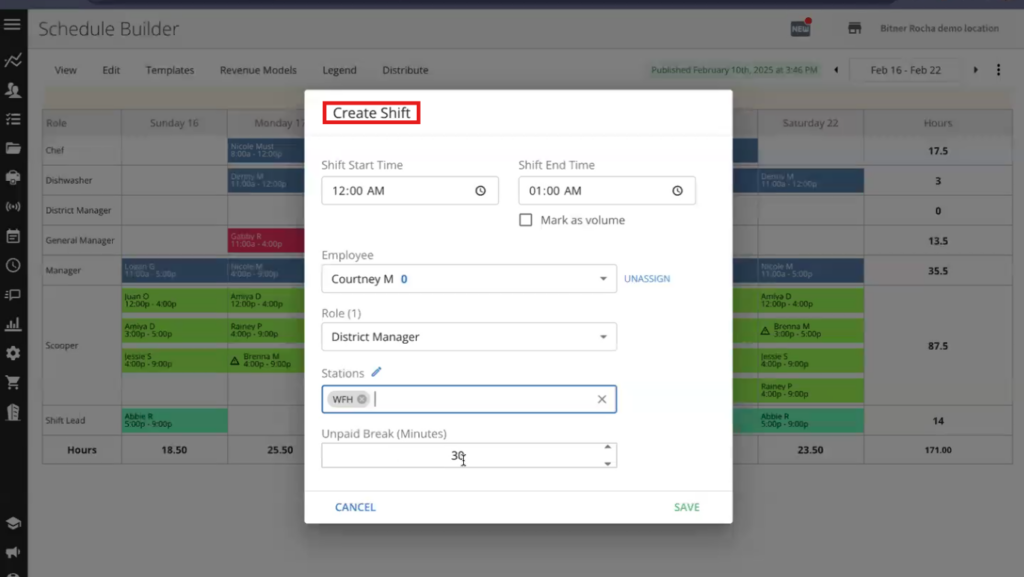
You can assign employees to shifts or leave them open for any employee with the designated role to claim. Employees can also swap shifts through the Jolt app with a manager’s approval.
There are multiple ways to view schedules, including by location, employee, or role, which makes the tool feel flexible for a wide variety of business setups. In the location and employee views, shifts are color-coded by role for easier visualization.
I especially appreciated how Jolt automatically flags issues as you create your schedule. For example, it’ll raise an alert if you assign an employee who doesn’t match the shift’s role. Jolt also allows employees to set recurring availability preferences and request time off, and it’ll notify you if you try to assign an employee who is unavailable during a shift.
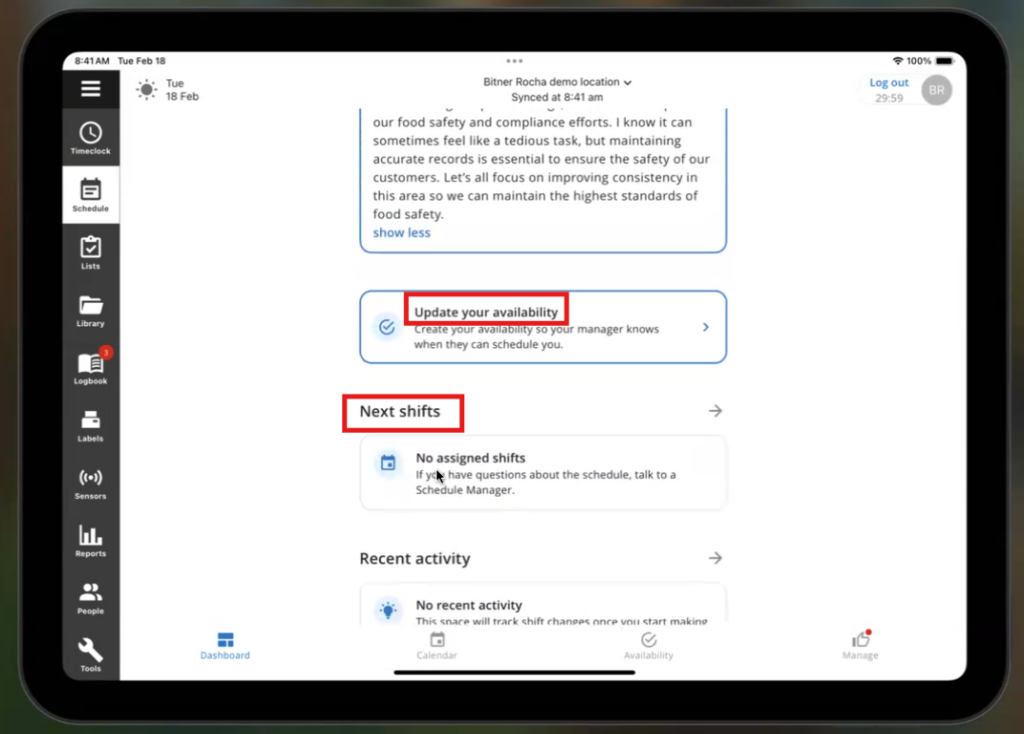
That said, Jolt doesn’t offer auto-scheduling, so you do have to create schedules by hand, at least to start. Once you have a schedule, you can save it as a template and apply it to future weeks. Still, this is a big missing feature for businesses that have frequently changing schedules and want to optimize for labor costs on a weekly basis.
Jolt’s time-off request system is simple and user-friendly, but limited. Employees submit their time off requests through the mobile app, and managers can easily approve or deny requests.
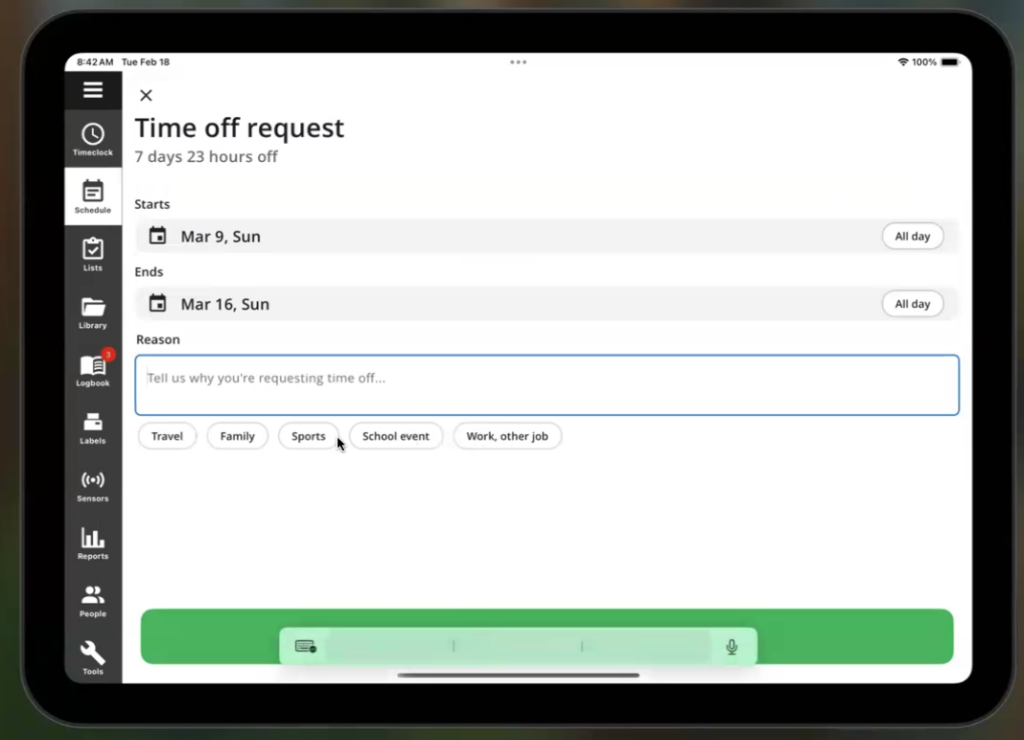
You also have the option to limit how many employees in a specific role can request the same day off, which is nice for ensuring you’re adequately staffed.
But Jolt doesn’t offer any way to track time-off balances or even see how much time off an employee has taken in the past. You also can’t differentiate between different types of time off, like PTO, sick leave, or unpaid leave, which can be a compliance issue in states like California or New York that require sick leave.
Verdict: 7/10
Information Library
Jolt’s information library serves as an online knowledge base for your staff. You can use it to store SOPs, recipes, training documents, an employee handbook, and more.
I liked the library’s flexibility. You can tightly control which employees, roles, or locations in your organization can access which documents. It’s also easy to organize content into folders and sub-folders, then set permissions by folder. You can upload PDFs, Word documents, images, or videos, or even create new items using Jolt’s built-in editor (although this is a pretty basic text editor).
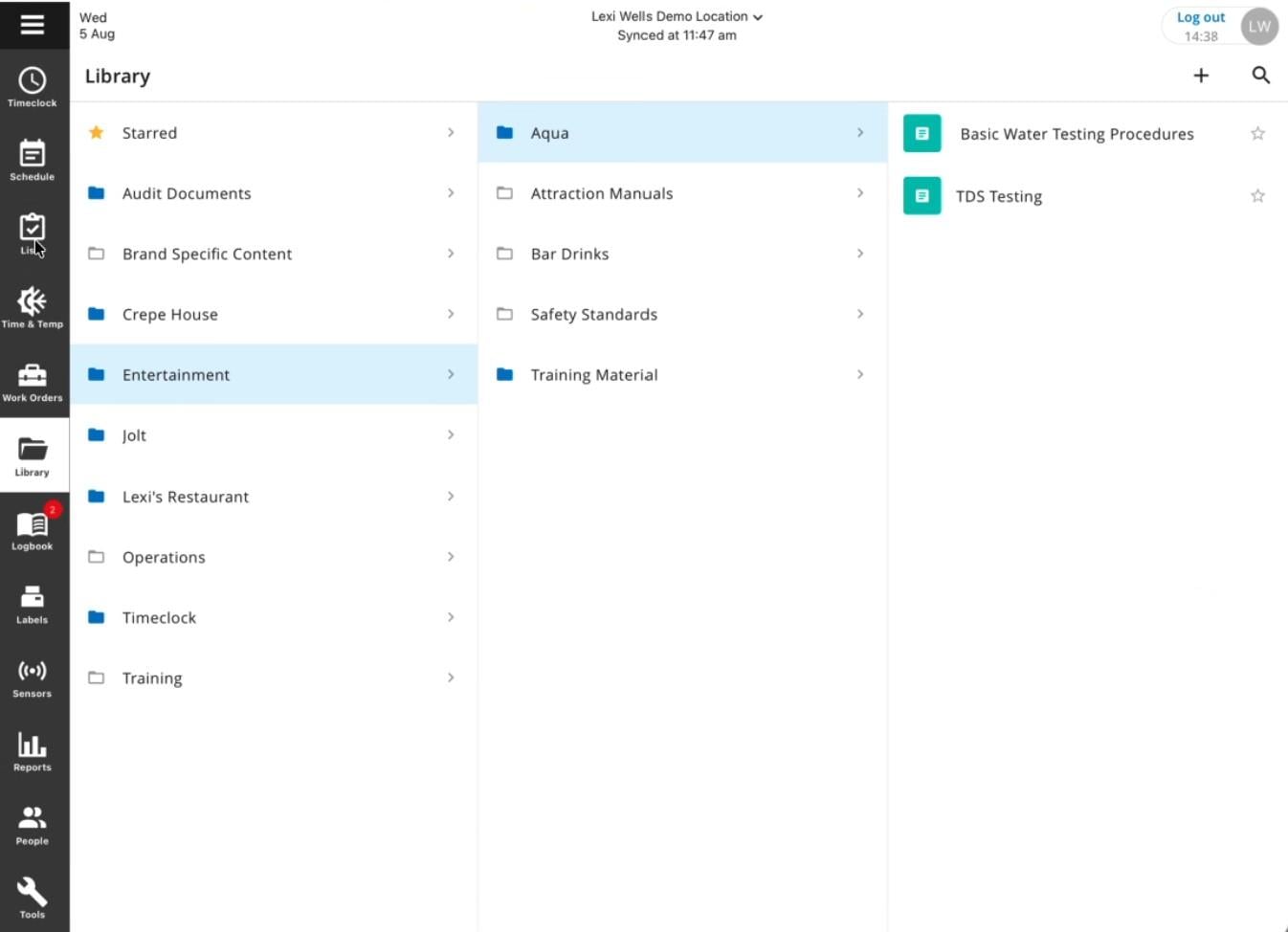
The library is fully searchable, and employees can favorite documents they use frequently for quick access. You can also embed any information library item within a checklist.
Verdict: 9/10
Communications features
Jolt offers 2 main ways to reach your team: message blasts and announcements.
Message blasts work through a simple interface in the web portal. I like that you can target specific people, roles, or entire locations, and send messages through both SMS and email. However, employees can’t reply, making it a 1-way communication tool.
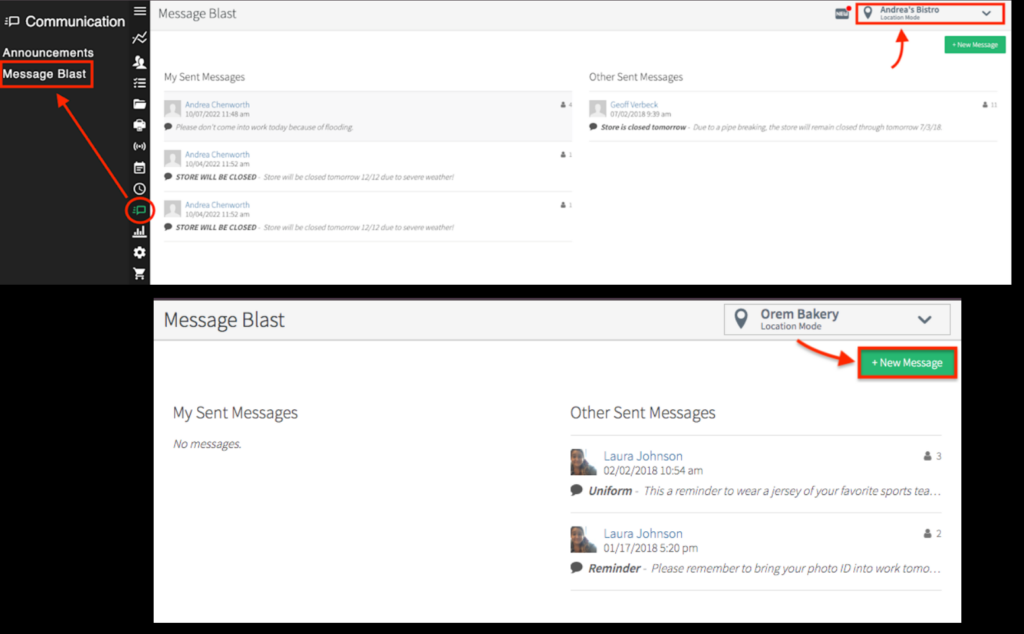
The announcement feature has a clever twist. You can require employees to interact with announcements before they clock in. I think this would be useful for pushing out important operational changes or training materials, especially since you can include videos and add verification questions.
But here’s where things get limiting. There’s no real-time chat, so no direct messaging between individual team members or groups. You can comment back and forth on checklists, but that’s a pretty clunky solution when you need to share information quickly. Competitors like Connecteam offer employee chat, and it’s great for discussing shift handovers, scheduling issues, and more.
Verdict: 6/10
Jolt hardware: Sensors & labels
Jolt’s hardware centers on temperature sensors and a labeling system, both tailored for food service operations. The temperature sensors automatically track and log temperature and humidity, with real-time alerts to prevent food waste. The setup is simple, and the compact design stays out of the way.
The labeling system integrates smoothly with Jolt’s software, allowing quick printing of date labels and ingredient tags. The labels hold up well against moisture and heat, while inkless printing keeps costs low.
Jolt also provides tablets and a central hub to connect all these sensors, syncing data and managing operations. While the system is efficient, beware that hardware costs can add up.
Verdict: 9/10
Jolt Security Features
Jolt is compliant with the EU’s General Data Protection Regulation (GDPR) and the California Consumer Privacy Act (CCPA). Its compliance efforts include secure data hosting, encryption, and regular audits to protect personal data and maintain privacy standards.
The platform uses TLS encryption for all data in transit, and the role-based access control system lets admins set precise permissions at both location and content group levels.
2-factor authentication is available but isn’t turned on by default.
Jolt’s privacy policy mentions the Health Insurance Portability and Accountability Act (HIPAA), but the terms of use advise against storing protected health information (PHI) on the app. So, I wouldn’t recommend storing patient or other protected data in their systems.
Verdict: 8/10
Jolt Reporting & Analytics
Jolt’s reporting system focuses heavily on operational compliance rather than comprehensive business analytics. The system excels at tracking metrics that matter during health inspections or audits.
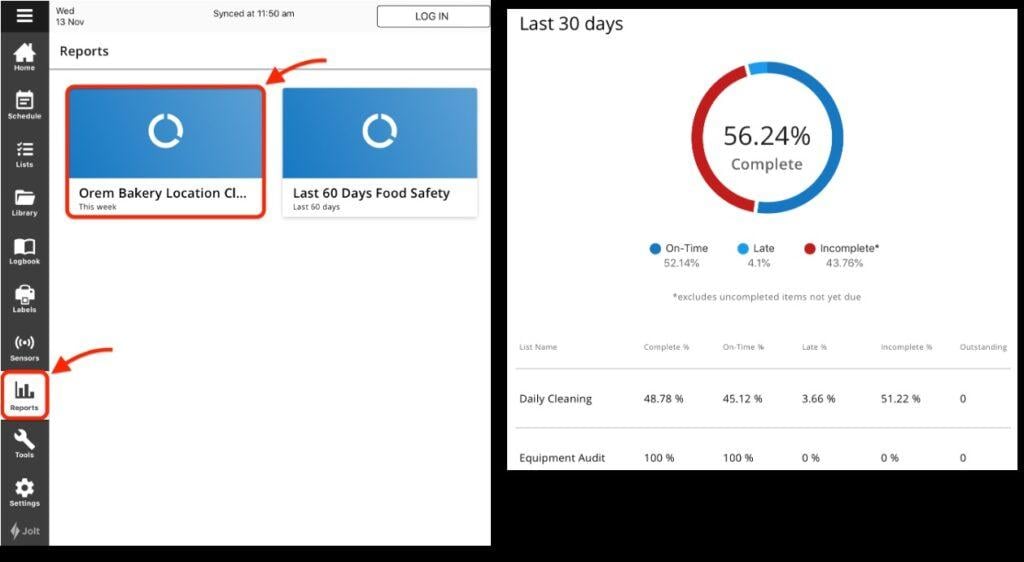
Here are the key reports I found most useful:
- Temperature Monitoring: Tracks sensor readings and violation alerts with correction records.
- Task Completion: Shows checklist completion rates broken down by employee, role, and location.
- Labor Cost: Combines time clock data with wages to show spending patterns.
- Training Compliance: Displays who’s completed required training and certifications.
- Announcement Tracking: Records which employees have seen and responded to key communications.
- Food Label Compliance: Monitors labeling practices and expiration date adherence.
Jolt also includes time and attendance reports for monitoring punches, regular hours, overtime, and pay-period totals.
You can export reports in CSV and PDF formats. I appreciated the ability to schedule automated reports, which is handy for managers who need regular metrics. However, I didn’t find predictive labor forecasting tools or AI-driven insights, which some other workforce management platforms offer. I also missed having customizable dashboards. While you can filter existing reports, creating truly custom ones means exporting data to work with elsewhere.
Verdict: 6/10
Jolt Customer Support
Jolt offers customer support via phone, email, and live chat from 8am-8pm (ET) Monday-Friday. I got in touch via email and received a very helpful response in just 3 hours, although Jolt says it typically takes up to 1 business day to respond.
My positive experience wasn’t unique. Users generally find the support team friendly, knowledgeable, and responsive.
Notably, while Jolt says you can reach a human agent through live chat, I wasn’t able to. When I asked the AI assistant to chat with a person, I was repeatedly directed to contact the support team by email.
On the bright side, the AI assistant was surprisingly capable. I was able to get a full walkthrough of key features, and it did a better job of answering questions than other bots I’ve used.
I found Jolt’s online knowledge base was thorough, but far from exhaustive. It’s integrated into a single knowledge base with SmartSense, another software platform owned by parent company Digi, which makes it hard to find Jolt-specific information. The support articles I explored had helpful step-by-step instructions, but there were limited screenshots and no videos.
The sales and onboarding experience stood out. My demo was thorough and well-structured, with a knowledgeable rep providing practical use-case examples. The follow-up was impressive, including a recording, a customized presentation, and annotated screenshots of key features. Pricing was also clearly explained.
Verdict: 7/10
What are Jolt’s Review Ratings from Review Sites?
(As of August 2026)
Jolt App Review
I think Jolt excels at checklist-based task management and operational compliance, especially for things like temperature monitoring in the food service industry. It’s user-friendly for both managers and employees, flexible for multi-location businesses like franchises, and does a great job of centralizing SOPs and training materials.
However, some of the core workforce management features could be improved. The potential lack of real-time GPS tracking and geofencing for clock-ins makes Jolt less suitable for field service businesses. Without auto-scheduling, Jolt can be cumbersome for businesses that have frequently changing schedules. The restrictive communication tools may also disappoint larger operations.
Businesses seeking more sophisticated scheduling, communication, or analytics capabilities might want to explore more modern alternatives.
Connecteam: The Better Jolt Alternative
I think Connecteam consistently outperforms Jolt on key operations and workforce management functions while offering a more modern user experience.
Where Jolt focuses strictly on compliance-based tasks, Connecteam’s digital forms and checklists offer advanced features like conditional questions so you can collect more information when an inspection fails or a project doesn’t go to plan.
The employee time clock functionality also shows the gap between providers. Connecteam provides real-time GPS tracking and proper geofencing. During my Jolt demo, I was shown location capture at clock-in and clock-out, but I wasn’t shown comparable time-clock geofencing or continuous GPS tracking.
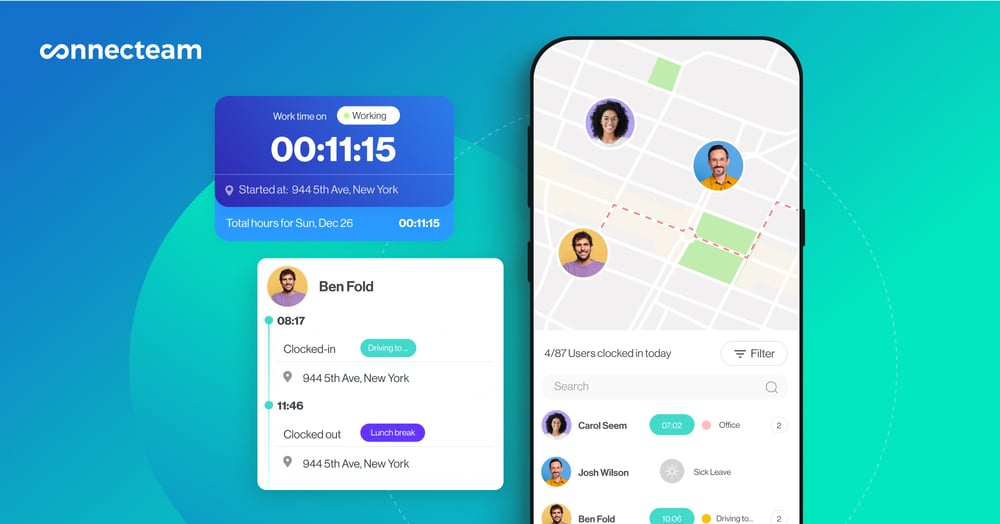
Also, while both platforms offer drag-and-drop scheduling, templates, color codes, and more, Connecteam includes auto-scheduling—a feature I find indispensable.
Connecteam’s communication hub is superior, too. Instead of Jolt’s basic messaging, you get real-time online team chat, social feeds, and rich media sharing.
Plus, Connecteam’s built-in employee training software allows you to train your staff and check their performance through quizzes. You can store training materials and other documents in the company knowledge base.
But what really sets Connecteam apart is everything else it offers. I found features that Jolt doesn’t even touch:
- Digital HR tools for onboarding and documentation
- A comprehensive company employee directory
- Employee recognition features
- Advanced analytics with custom reporting
- Solid integrations with major payroll and HR systems
For businesses looking for more than basic operations management, Connecteam offers significantly more value while providing a complete platform for managing your entire workforce.
Best of all, it’s completely free for small businesses with up to 10 employees. Plans for larger businesses start at only $29 per month for up to 30 employees plus $0.80 per month for each additional employee.
FAQs
No, Jolt doesn’t offer a free trial. However, the Jolt team provides a custom demo to showcase the platform’s features.
Jolt’s terms of use instruct subscribers not to enter protected health information (PHI) into the platform. Healthcare organizations should confirm Jolt’s current terms and availability of a business associate agreement before using it for health data.
