

Great for client-facing tasks, but missing key tools for managing projects end to end
Verdict: 7.1/10
Buildertrend is an all-in-one construction project management platform designed specifically for contractors, remodelers, and specialty construction teams. It’s built to help businesses manage multiple projects at once, streamline client communication, coordinate with subcontractors, and stay on top of budgets and timelines.
Its strength lies in features like change order tracking, scheduling, and budgeting tools, all of which are well integrated and surprisingly customizable. But it’s not without its drawbacks. The learning curve is steep, and Buildertrend appears best suited to established construction businesses managing multiple projects, as smaller contractors may find its price and implementation requirements harder to justify. When I selected $0–$499,000 in annual construction volume during the sales process, Buildertrend indicated that the platform might not be a fit.
Key Features:
- Project scheduling. Use drag-and-drop Gantt charts to build project timelines, assign tasks, set dependencies, and track progress in real time.
- Budgeting and cost tracking. Create job budgets, manage purchase orders and change orders, and compare actual costs against estimates.
- Proposals and invoicing. Build proposals, turn them into invoices, and collect digital signatures, in one system.
- Daily logs. Record daily jobsite activity, including weather, photos, worker hours, notes, and delays.
- Document and file management. Upload and store blueprints, permits, contracts, and images. Files are accessible to the right team members through mobile or web.
- Client communication tools. Give clients a branded portal where they can log in, review updates, approve changes, and stay informed about progress.
- Selections and allowances. Offer clients a list of choices tied to an allowance, then track approvals and the running budget impact as decisions come in.
- Team messaging and notifications. Let field and office teams stay in touch with built-in messaging. Set up automated notifications for task deadlines, approvals, and more.
- Time tracking and timesheets. Allow employees to clock in/out via mobile, with GPS stamping and activity logging. Review timesheets or export them directly to integrated payroll systems.
- Reporting and analytics. Generate job cost reports, labor hour summaries, and progress reports to monitor performance and flag risks early.
Pros
- Strong project analytics
- Intuitive mobile app for field teams
- Built-in client portal for transparency and communication
- Responsive customer support
Cons
- No free trial
- Less suited to smaller businesses earning under $500,000
- No shift scheduling
- A paid support tier is mandatory on top of the subscription
How I Tested Buildertrend
Buildertrend doesn’t offer a self-service trial of the product to small companies. The website suggests shoppers can request an on-demand video or 30-minute demo, though, in my experience, getting a full guided demonstration required progressing further into the sales process.
However, the sales team was more than willing to answer my questions and discuss the details of the product, even offering to record demonstrations of features in action and send them to me.
Buildertrend also has an extensive set of detailed support resources, including over 200 videos covering the interface and functionality. Using these resources, the excellent sales team responses, and third-party reviews of the product, I was able to build a complete picture of Buildertrend and what it can offer a construction business.
Buildertrend Pricing
Buildertrend uses a custom pricing model, offering tailored quotes based on your company’s size, annual construction volume, and specific operational needs. To get a quote, you must fill out a short form on Buildertrend’s website. When I selected the $0–$499,000 annual construction volume option during testing, the system responded that Buildertrend may not be the best fit for smaller businesses.
Pricing runs in bands by volume, so user count and job count don’t influence the cost. A 60-person builder pays the same as a 20-person builder at the same construction volume, which is unusual in this market and gets more attractive the bigger your crew grows.
Annual construction volume is the number that really sets your price. I asked Buildertrend’s sales team what a residential builder with 20 employees, 5-10 active projects, and $1-5 million in annual volume would pay, and got a straight answer: $9,000 to $14,000 a year.
As part of the quote I received during my 2026 research, Buildertrend specified a one-year minimum term with no setup fee and required either Tier 1 support at $100 per month or Tier 2 support at $300 per month. Tier 1 covers onboarding, after which you drop back to standard phone and webchat support. Tier 2 includes unlimited 1-on-1 training for the full year, a dedicated account manager, and quarterly check-ins.
The quote and terms provided during my research also listed a 2.99% charge on client card payments, $15 per client ACH payment, $1 per outbound ACH transfer to a subcontractor, and $2 per mailed check. There’s no monthly fee for the payments platform itself, and you can turn card payments off or pass the fee to clients where local rules allow. Training extras like onsite consulting are quoted separately.
Because Buildertrend doesn’t publish standard pricing, buyers should confirm current contract terms, support costs and transaction fees in writing.
Price is the loudest complaint in current user reviews. On Capterra and G2, small builders keep saying the cost is hard to justify at their size, and long-term customers mention renewal increases. One of the reviewers with a $190,000 annual volume stated the company is “not your friend unless your volume exceeds two million dollars”.
Another notable downside is, unlike some competitors, that Buildertrend doesn’t offer a self-serve free trial. You can access an on-demand video demo or request a scheduled demo, but neither lets you independently test the software in a live account.
Given the potential investment involved, many prospective users may prefer to try the software in a real-world setting before making a decision. And there are several construction management tools that offer free trials.
Here’s some pricing information for similar software:
| Team size | Buildertrend | BuildXact (Pro) | Workyard (Pro) | Connecteam (Expert) |
|---|---|---|---|---|
| View pricing | View pricing | View pricing | View pricing | |
| 10 Users | N/A* | $339 | $180 | Free for life — All features and dashboards |
| 20 Users | N/A* | $339 | $310 | $99 |
| 30 Users | N/A* | $339 | $440 | $99 |
| 50 Users | N/A* | $339 | $700 | $183 |
All prices show the monthly cost when billed annually as of August 2026. *Buildertrend uses custom pricing rather than published rates, so figures depend on your quote.* Read our full BuildXact review | Read our full Workyard review | Learn more about Connecteam
Verdict: 4/10
Given the potential investment involved, many prospective users may prefer to try the software in a real-world setting before committing.
Buildertrend Usability and Interface
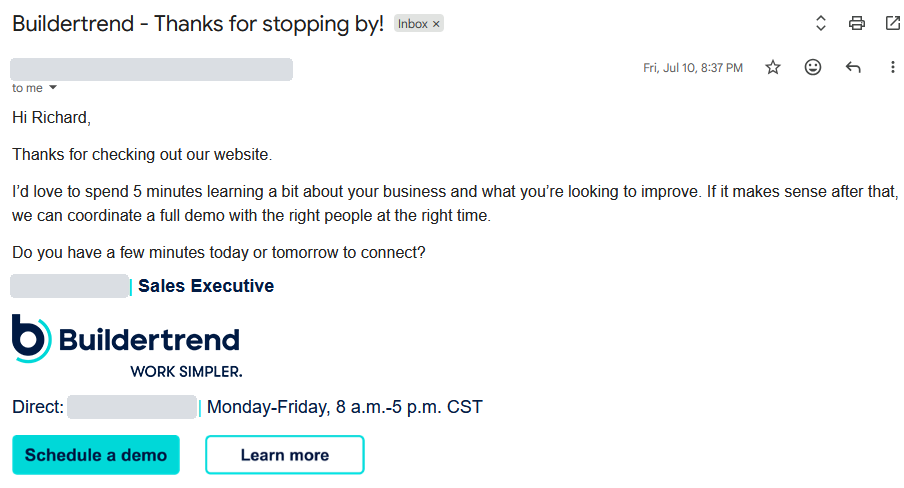
To get a demo, I filled in Buildertrend’s web form, and within 12 hours a sales rep came back asking for 5 minutes on the phone to learn about my business before he’d coordinate a full demo with “the right people at the right time.” Having reviewed several construction project management platforms, I didn’t find this unusual, but it is always nicer to be able to immediately start testing out a product without jumping through hoops.
Setup and onboarding are thorough rather than quick: Buildertrend allocates weeks 1 to 2 to account, data, and accounting configuration with a dedicated onboarding manager, then weeks 3 to 12 to building a live job and establishing budgeting and production workflows.
Buildertrend is a deep, busy, professional tool that pays you back for the effort you put into learning it.
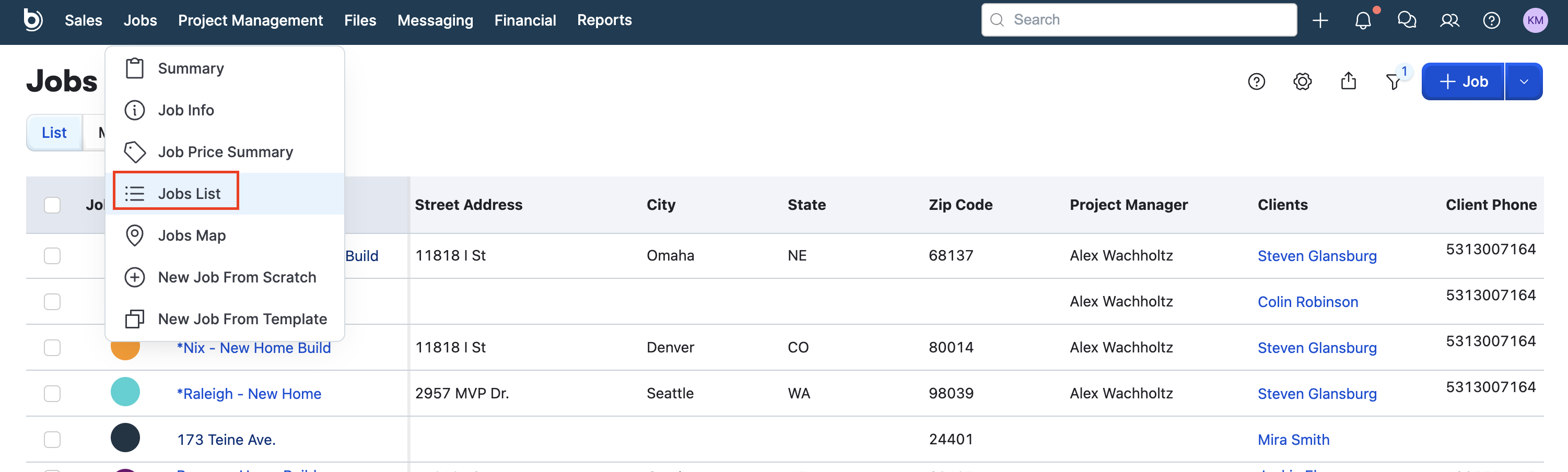
The web app is built around 5 top-level areas: Sales, Jobs, Project Management, Files, and Messaging. Everything you create belongs to a job. Once you’re inside a project, the schedule, daily logs, files, client messages, budget, and change orders are all readily available.
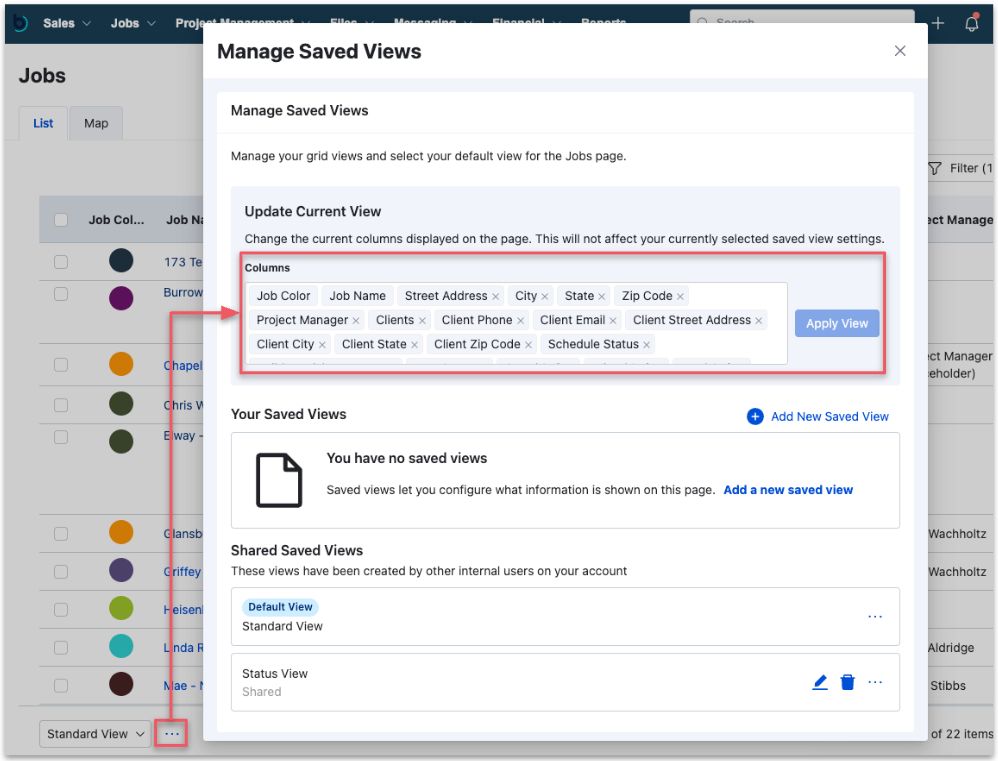
I found the screens to be dense, spreadsheet-busy. A jobs list or a job costing budget has a huge number of columns, with Buildertrend offering filtering and saved views to help cut through the data noise. For a production manager tracking a dozen jobs, it’ll be quick to navigate once you get used to it, but the first few weeks will be hard.
Verdict: 7/10
Accessibility is one area where I couldn’t get a clear answer. Buildertrend’s accessibility statement covers its website, which it says is partially conformant with WCAG 2.1 AA, but that doesn’t extend to the software you log into, and sales wasn’t aware of a VPAT for the web or mobile. If that’s a procurement requirement for you, ask for it in writing before you sign.
Mobile app
Buildertrend’s mobile app, freely available from Apple’s App Store and Google Play, is built for teams in the field, offering streamlined access to the platform’s most essential tools. From the summary screen, users can quickly check key updates across all projects or drill into individual jobs. Core features like Daily Logs, Time Clock, and To-Do’s allow site crews to document progress, track hours, and manage punch-list items directly from job sites.
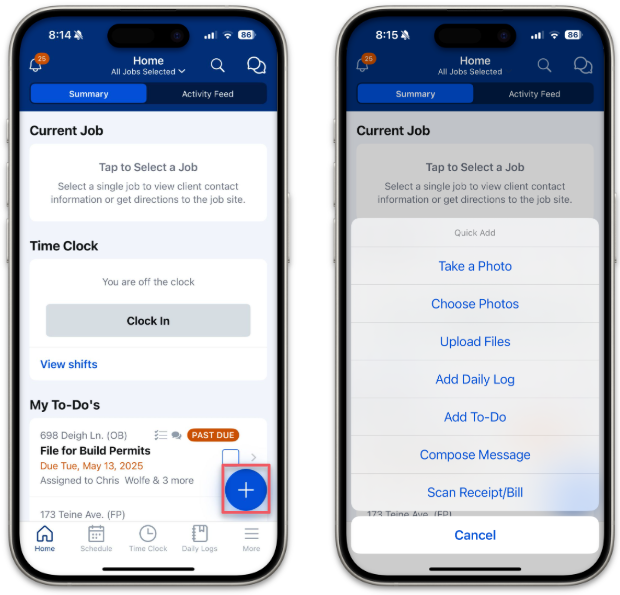
It covers the field workflows you’d expect: job selection, an activity feed, photo and file capture, daily logs, to-dos, time clock, and schedule views including a landscape Gantt chart. Proposals, payments, bills, and purchase orders are documented on mobile too, though I’d expect the heavy estimating and budgeting work to happen at a desk.
Here’s how Buildertrend’s core functionality maps across web and mobile:
| Feature | Website | Mobile App |
|---|---|---|
| Core features | ||
| Summary screen | ✅ | ✅ |
| Daily logs | ✅ | ✅ |
| Time clock | ✅ | ✅ |
| File view/uploads | ✅ | ✅ |
| To-dos | ✅ | ✅ |
| Project scheduling | ✅ | ✅ |
| Schedule templates | ✅ | Limited |
| Offline access | ❌ | Limited |
| Finance and analysis | ||
| Cost estimation | ✅ | Limited |
| Reporting and analytics | ✅ | Limited |
| Buildertrend payments | ✅ | ✅ |
| Proposals | ✅ | ✅ |
| Bills and purchase orders | ✅ | ✅ |
| Communication features | ||
| Internal inbox | ✅ | ✅ |
| Job comments | ✅ | ✅ |
| Request For Information (RFI) | ✅ | ✅ |
| Customer portal | ✅ | ✅ |
| Subcontractor portal | ✅ | ✅ |
| Change orders | ✅ | ✅ |
Verdict: 7/10
I thought Buildertrend’s offline support could be better. Buildertrend’s sales team told me offline use is limited to Time Clock and Daily Logs, with entries saved on the device and synced automatically when service returns. For a crew in a basement or on a rural lot, those are the 2 things that have to work without signal, but don’t expect to run the schedule or the budget out there.
Buildertrend Core Functionalities
Scheduling and task management
Buildertrend’s scheduling tools are built for construction professionals, especially home builders and remodelers, and they offer far more than just a calendar. You get Gantt-style schedules with drag-and-drop editing, baselines, and dependencies.
Schedules are highly customizable, with multiple view options depending on your role or preference. You can view work in a calendar, agenda, or Gantt format, making it easy to plan around crews, subcontractors, and material deliveries.
I appreciate how you can break tasks into multi-tiered work activities, assign total workdays, and organize them by phase. This is especially useful for larger projects where sequencing matters.
This isn’t a mere shared calendar; Buildertrend supports dependencies. You can link a schedule item to its predecessor, and Buildertrend will draw that relationship on the Gantt chart.
For example, drywall can’t start until the electrical and plumbing rough-ins have passed inspection, so you link drywall to the inspection item. If the inspector can’t come out until Thursday instead of Tuesday, the linked drywall, taping, and paint items all move 2 days down the Gantt chart instead of somebody rebuilding the back half of the schedule by hand. Downstream work shifts when the item before it slips.
For recurring job types, you can build and save schedule templates. These are great for streamlining timelines across similar projects and keeping your planning consistent from job to job.
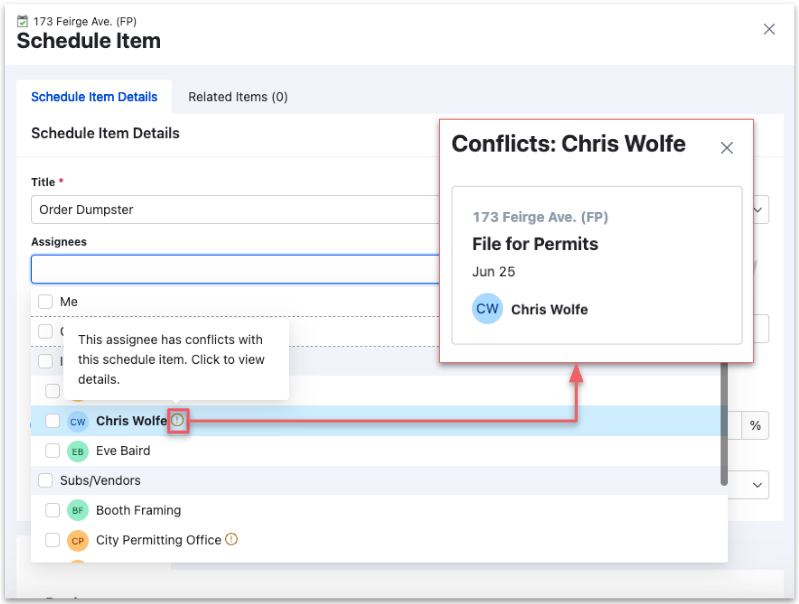
Buildertrend also handles double-booked shifts well. Assign someone who’s already booked on an overlapping item, and a conflict warning appears in the assignee picker before you save, with a panel naming the job and date that clashes. You can set how many overlapping items are allowed before the warning fires.
Verdict: 7/10
Unfortunately, in my testing, I found the scheduling tools lean more toward project-level coordination than individual shift planning. If you’re looking to schedule hourly staff or manage last-minute shift swaps, you’ll need to use a separate tool alongside Buildertrend, or an alternative platform altogether. There’s no employee availability, open-shift board, swap requests, auto-scheduling, or recurring roster. Buildertrend schedules the work, not the people.
Client and subcontractor collaboration
Clients can access their projects through a simple, user-friendly portal. They can log in to check updates, make selections, review change orders, and message their builder directly. I appreciate that everything is centralized. It helps reduce back-and-forth emails and keeps everyone aligned.
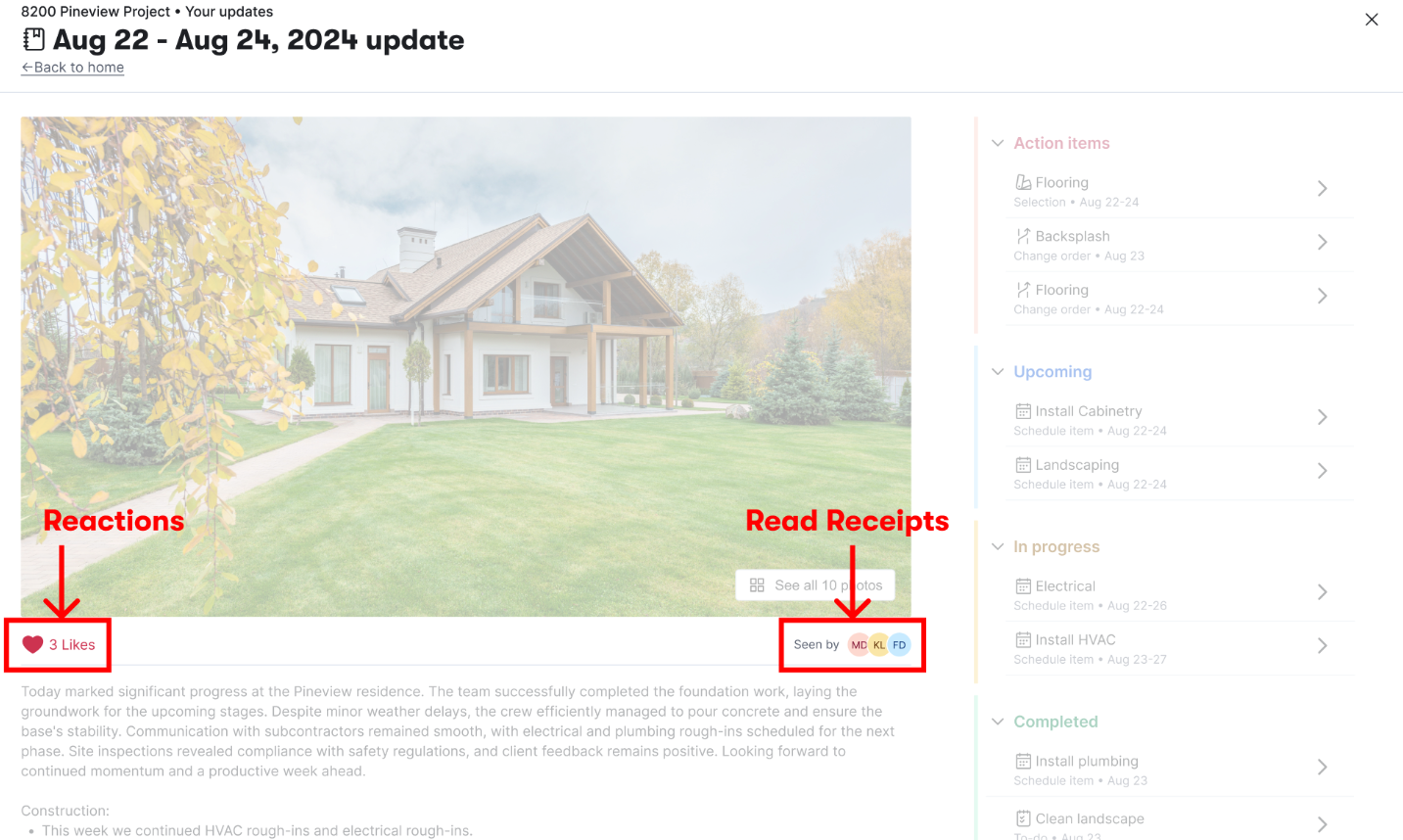
Client Updates is Buildertrend at its best. You can gather progress photos, categorize action items, preview exactly what the client will see, then publish. Once it’s out, reactions and read receipts tell you whether they actually opened it (which settles a lot of “nobody told me” conversations before they start).
Buildertrend also runs selections, invoicing, and payments through the same portal, so approvals and billing are available in the record the client is already looking at.
Verdict: 9/10
I also like how Buildertrend automatically generates AI-powered weekly updates. These summaries pull from existing project data to show recent progress and upcoming tasks. Builders don’t need to manually compile these reports, which saves time while keeping clients informed.
Financial management
Buildertrend’s financial tools are built to keep a construction business organized, accurate, and profitable, starting with bidding and purchase order (PO) management.
I like how the bidding software keeps all bid activity in one place. Having a single source of truth for each project makes it easier to stay on top of everything. You can send bid packages to multiple subcontractors at once, which saves time and ensures everyone gets the correct specs to quote accurately.
Every step feeds the next. You build an estimate line by line, from a template, from a cost-code catalog, or by importing from Excel, QuickBooks, or Buildertrend Takeoff. Approved bids and selections flow into that estimate; the estimate populates the job budget, and from there, purchase orders, bills, change orders, and client invoices all post back against the same cost codes.
I was impressed by how much of the billing workflow stays inside Buildertrend. You can invoice as an unitemized flat fee or line by line, pulling costs straight from the estimate, change orders, or approved Time Clock entries. I like how payment terms like Net 30 fill in the due date for you, and that you can attach supporting files and set a custom invoice number. Hit Preview, and you’ll see exactly what the client will see; from there, you can email it, push it to the client portal, or print it. Clients pay by ACH, Visa, Mastercard, Discover, Apple Pay, or Google Pay.
Buildertrend also launched Bill Pay in 2026, combining AI-assisted bill capture with approval flows, ACH vendor payments, and payment-status tracking.
I also like that with Buildertrend’s purchase order features, you can set and manage spend limits per project, which supports more accurate budgeting. This makes it easier to control costs, plan cash flow, and reduce the risk of disputes over payments.
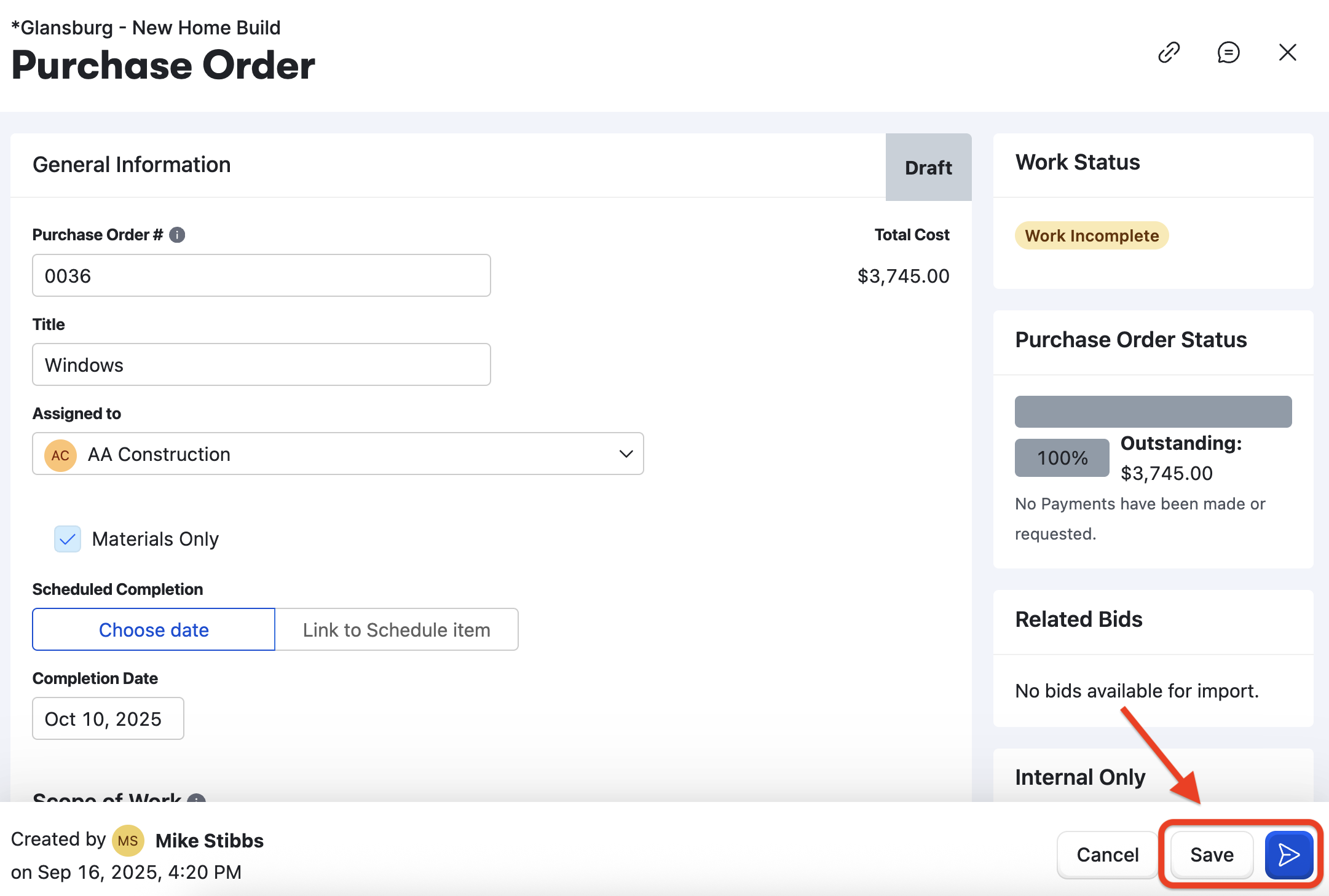
POs are centralized and digitally tracked, making it easy to see which orders are pending, approved, or paid. This improves forecasting, speeds up procurement, and ensures materials and subcontractors arrive on time. It also eliminates manual paperwork by storing digital approvals and syncing data directly with job costing, giving you a clear picture of profitability while reducing admin burden and risk of error.
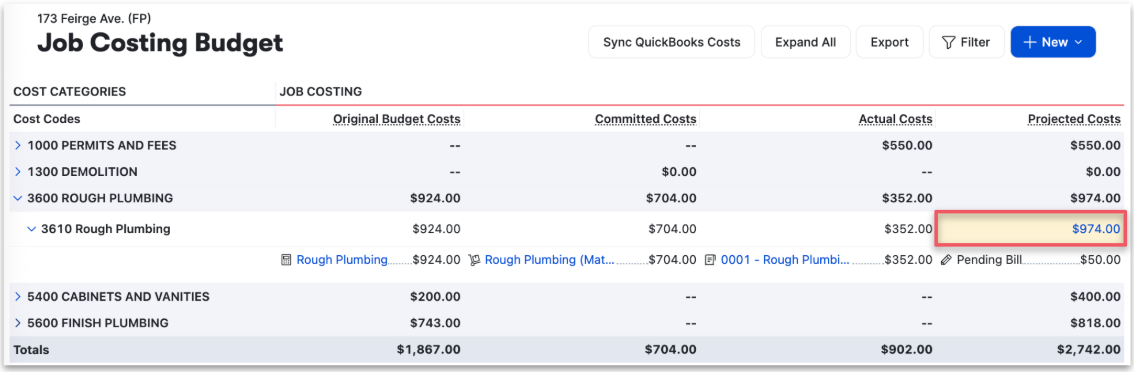
The Job Costing Budget is where all of that lands, and it’s the screen I’d have open the most. It holds original, revised, committed, actual, and projected figures side by side. This way, you get a live view of your margin instead of waiting to close out to discover it.
That said, some users have noted that the functionality isn’t as sophisticated as other popular financial management products. Estimating draws criticism on G2 and Capterra, where reviews describe it as slow and duplicative, with separate proposal and estimate modules and repeated entry across allowances and selections.
Verdict: 8/10
That said, some users have noted that the functionality isn’t as sophisticated as other popular financial management products. Estimating draws criticism on G2 and Capterra, where reviews describe it as slow and duplicative, with separate proposal and estimate modules and repeated entry across allowances and selections.
Time tracking and timesheets
Buildertrend’s time tracking tools are purpose-built for construction sites. Workers can clock in and out directly through the mobile app (even when offline), ensuring accurate records regardless of site connectivity. I appreciate how the app stores entries locally and syncs them once a connection is restored.
Every clock-in carries a job, a cost code, and optional notes. In my opinion, these are exactly the things that make the labor side of job costing work because hours land against the right budget line instead of a general payroll bucket. Supervisors can enter time for several workers at once, record missed jobs, tag entries, log PTO, and push it all through an approval workflow.
I also like how geofencing adds another layer of reliability by recording GPS information when workers clock in and out, helping to verify that employees are on-site during their contracted hours. Buildertrend is refreshingly clear about the scope: location is captured at clock-in and clock-out, not tracked continuously through the shift. I think that’s the right privacy line.
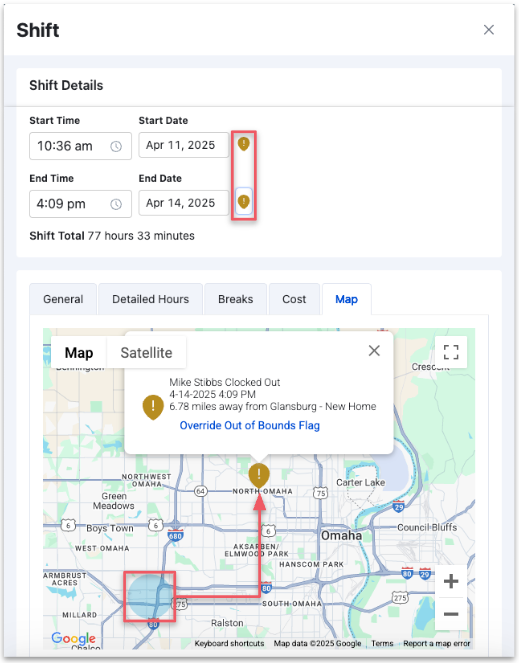
When a pin lands outside the permitted radius, the shift gets flagged for review, and an authorized reviewer can override it.
Overtime is handled properly too. I appreciate that Buildertrend calculates daily and weekly overtime and applies the greater of the 2 instead of double-counting, and managers can filter the time clock grid for overtime and save that view.
Time and attendance data can be synced directly with payroll systems, such as Gusto, reducing manual entry and minimizing errors. Gusto integration availability depends on your plan, permissions, and worker setup.
Based on my testing, I feel that what’s missing is everything around the clock rather than in it: no break reminders or enforced break rules, no alert before someone crosses an overtime threshold, no roster to measure hours against.
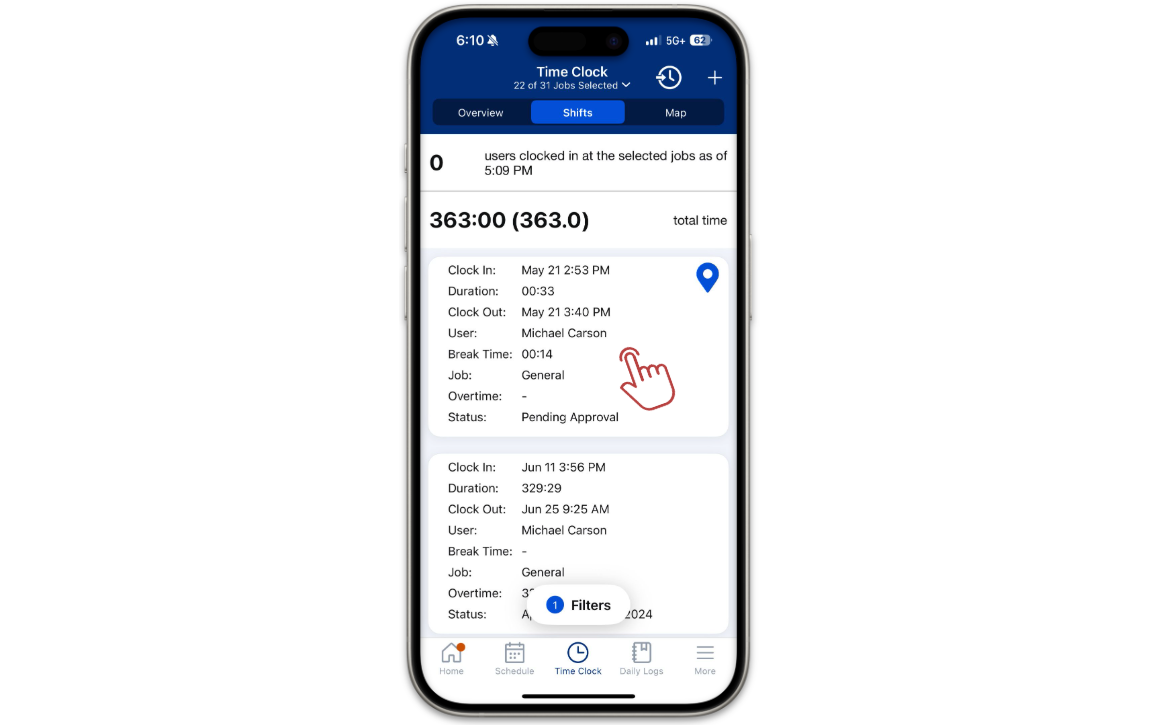
For example, in the shift list below, 1 entry runs from 11 June to 25 June with a duration of 329:29 and no break time recorded. Buildertrend doesn’t appear to have an automatic clock-out or an open-shift alert, so a manager working through the approval queue is the only thing that catches it.
Verdict: 7/10
Buildertrend records labor accurately against jobs, but it won’t help you manage the working day as a comprehensive employee management tool does.
Document and file sharing
Buildertrend’s document management tools are designed to eliminate paper clutter and keep construction teams organized. I appreciate how everything, from blueprints to signed contracts, is stored in clearly labeled, job-specific folders that are easy to access from both desktop and mobile devices.
I also like how you can upload photos, videos, and files directly from the field, and simplify approvals by allowing clients to sign contracts right from their phones (no in-person meetings required).
The system also supports permission-based sharing, so you can control who sees what, ensuring sensitive information stays secure while keeping teams and subcontractors aligned. You set that visibility as you upload, choosing which internal users can see a file and whether the client gets access.
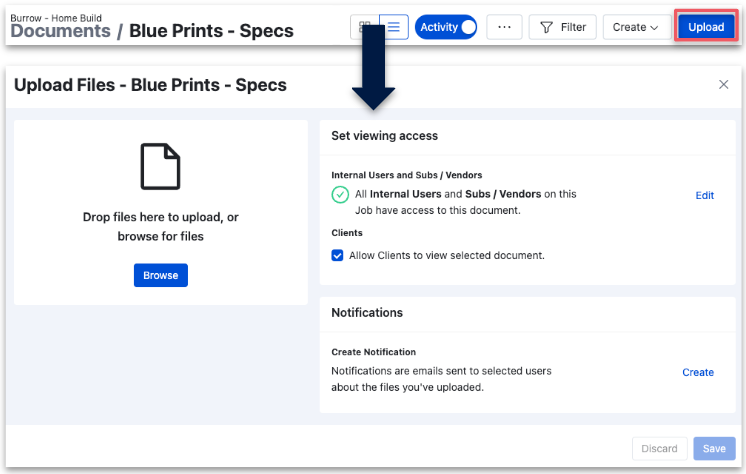
One thing I couldn’t find is an expiry date. Neither the upload workflow nor Builder’s documentation shows a way to make a document lapse on a date, which I find really useful when you’re storing subcontractor insurance certificates or permits that go stale. For comparison, Connecteam allows you to set an expiry date per document so you get notified before it lapses.
Buildertrend helps teams stay on the same page by ensuring everyone works from the most up-to-date file version. Older versions remain accessible for reference. I think this is especially useful for project plans and takeoff documents that frequently change. Subs and crews can pull these files on-site from their phones, reducing delays and miscommunication.
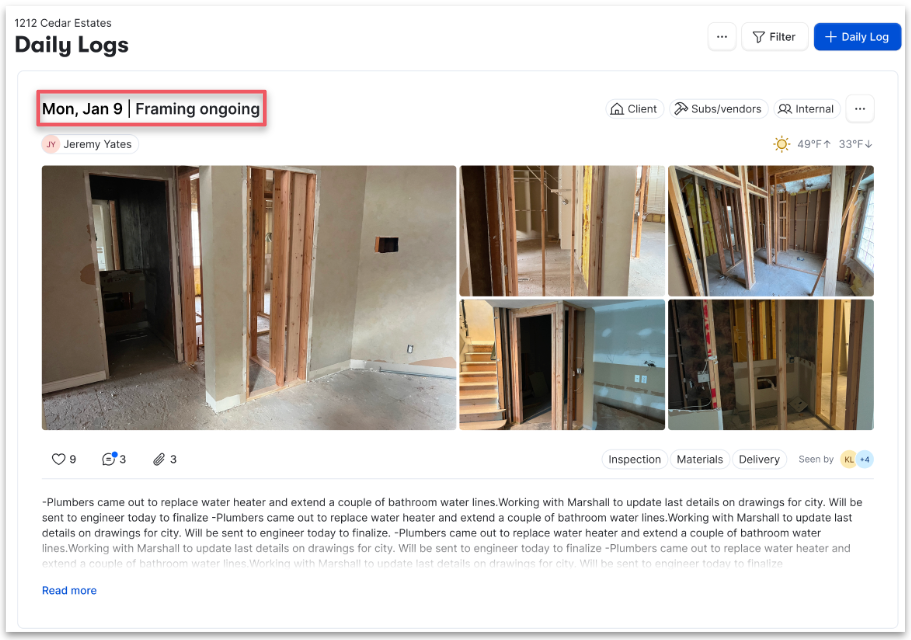
Daily logs hold more than notes; details can include progress photos, weather data, and custom fields. Crews can attach a handful of phone photos at once from the mobile app.
All signed contracts are securely stored, creating an easy audit trail in case of disputes or legal questions. Visual documentation, like job site photos or videos, is also neatly organized, providing quick access to proof of work, especially useful for warranty claims.
I think getting it all back out again is the weak point. Buildertrend’s terms say access to your data ends with your subscription and that your data may stay available for a year after that, but Buildertrend decides whether to grant a request, chooses the format, and can charge for it.
A December 2025 Capterra reviewer called extracting years of files and records from Buildertrend extremely difficult. My advice: export what you need before you cancel, not after.
Verdict: 7/10
A December 2025 Capterra reviewer called extracting years of files and records from Buildertrend extremely difficult. My advice: export what you need before you cancel, not after.
Buildertrend Security Features
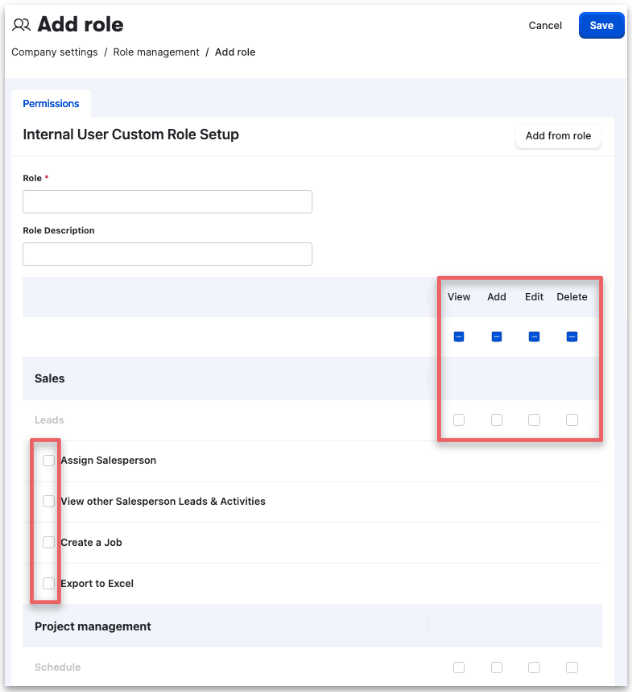
- Roles and permissions are detailed. Alongside the default Owner, Admin, and Project Manager roles, you can build custom roles that grant separate View, Add, Edit, and Delete rights feature by feature. This allows you to give the minimum amount of access required to each staff member, reducing potential security holes.
- Buildertrend documents multi-factor authentication, though buyers should confirm available methods and enforcement options for their account.
- Single sign-on isn’t broadly available yet, though a Buildertrend sales representative told me it’s planned for the future.
- User lifecycle controls let you archive a user to disable access while keeping their history.
- Data encryption and firewalls are in place to protect information during transfer and storage, according to Buildertrend’s Trust Center documentation.
- HIPAA compliance isn’t established at the product level. When I asked Buildertrend directly about HIPAA and BAA, they only said the facilities hosting Buildertrend’s data environments hold ISO/IEC 27001, HIPAA, and FedRAMP certifications and supply at least an annual SOC 2 Type 2 report. But that describes the data centers, not the software.
- EU and UK buyers get the standard GDPR and UK GDPR safeguards from Buildertrend. The company commits to encrypted backups, restricted and logged data access, weekly vulnerability scans, and documented incident response.
- I did not find any biometric login options, such as fingerprint scanning.
Verdict: 7/10
Buildertrend uses several standard security measures to protect user data, though I think there’s room for improvement in some areas.
Buildertrend Reporting & Analytics
Buildertrend offers a strong suite of reporting tools designed for construction project management and financial tracking. While it falls short in employee-specific reporting (such as attendance or time tracking), it’s strong on customizable, project-based analytics.
You can generate 6 reports automatically from your account data: Work-in-Progress, Budgeted vs. Projected, Profitability, Invoicing, Labor Actuals vs. Budgeted, and Cash Flow. Several run across your whole portfolio rather than 1 job, so an owner can see the financial position of every active build at once. I appreciate this because for most builders, these reports can replace complex spreadsheets.
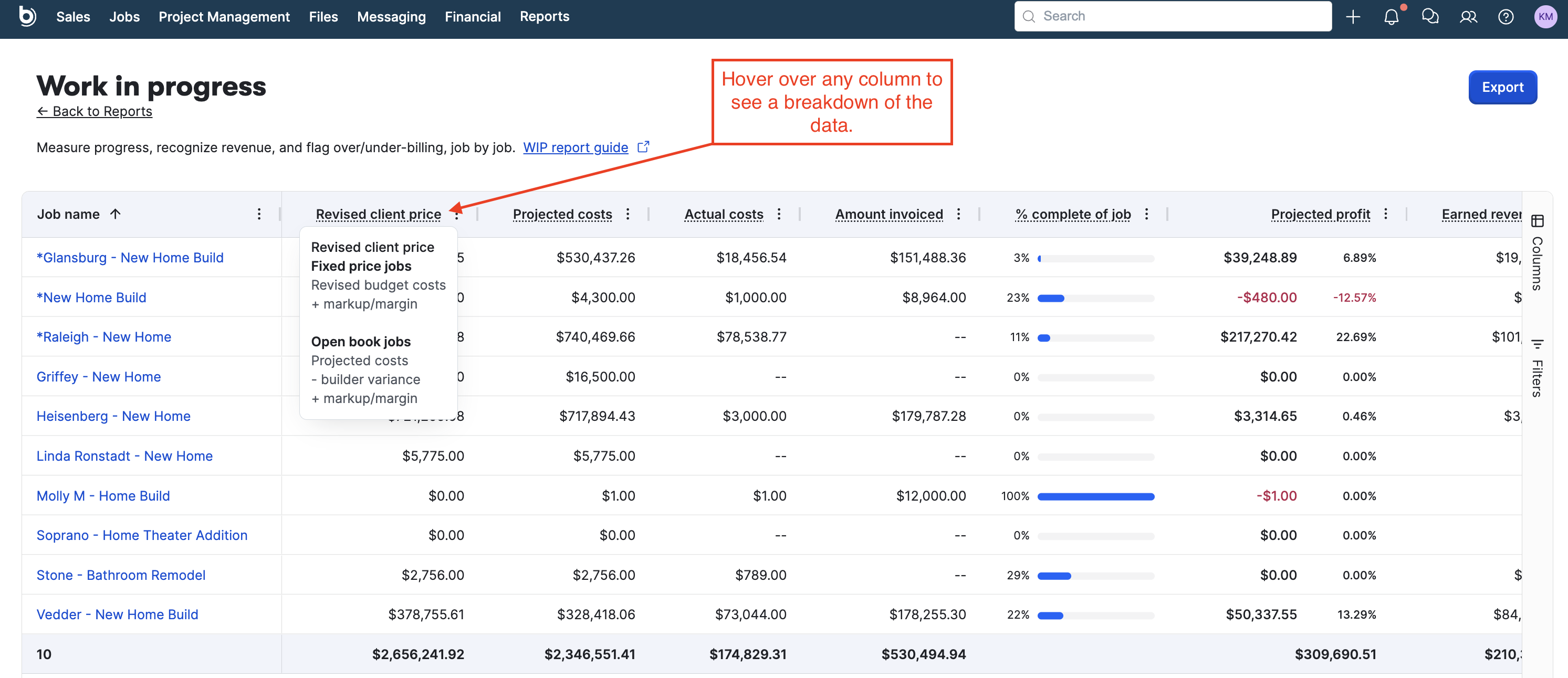
Reports are automatically generated from your project data and can be customized with filters, graphs, and formatting options. The interface is intuitive. For more advanced needs, Buildertrend provides data consulting to help create tailored reports.
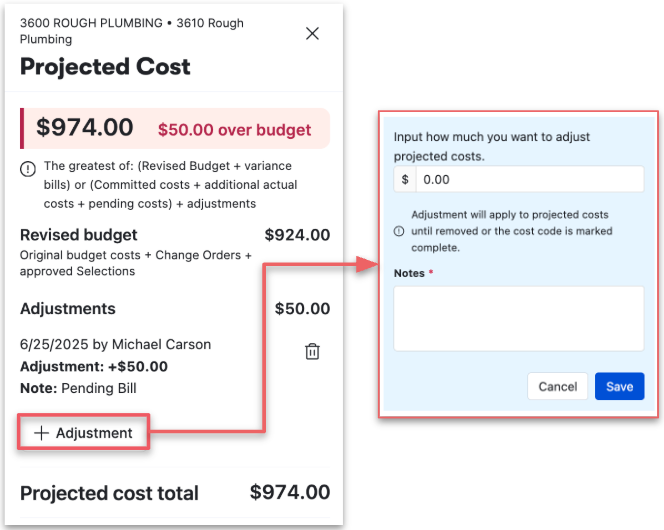
I’m also a fan of the variance handling panel in Buildertrend. When a cost code runs over, the projected cost panel shows the overage and lets a manager record an adjustment with a note, so your forecast reflects the decisions someone made rather than unexplained figures.
Buildertrend uses AI in operational workflows such as Client Updates and Bill Capture, but I didn’t find predictive analytics that forecast cost overruns or schedule risk. As AI-driven analytics become increasingly important, I think this could hold Buildertrend back.
Verdict: 7/10
Another thing I asked Buildertrend about was API access. The representative told me it wasn’t available for the account we discussed. If you need a developer API or data-warehouse connection, confirm whether Buildertrend offers a partner integration, managed export or private API for your plan.
Buildertrend Customer Support
Buildertrend offers multiple customer support channels to assist users, though the quality and speed of service can vary slightly depending on the method used.
- Types of support: Phone, email, live chat, and an in-depth online knowledge base. There’s also a Learning Academy, regular webinars, a user community, guided onboarding, Buildertrend University, and optional onsite consulting, which together make up one of the deeper support libraries I’ve seen in this category.
- Availability: Phone support is available Monday–Friday, from 7 a.m. to 5 p.m. Central Time. You can email outside these hours, with Buildertrend promoting a response within 24 hours. Buildertrend’s packaging guide uses broader “24/7 support” language for some services, so buyers should confirm which channels are staffed outside business hours for their tier.
- Helpfulness: Most users report positive experiences with Buildertrend’s support team, highlighting knowledgeable and friendly representatives. My own experience echoes this, with the sales team going above and beyond to help me with my many queries on Buildertrend.
- Response time: Live chat is typically quick, with responses arriving within minutes. When I contacted support via email, the first response came within a few hours. Even when my questions became more challenging, the email replies came back to me within a day.
- Sales support: My discussions with the sales team were fruitful, despite being unable to get a demo or trial account. A Buildertrend sales executive answered a long list of pricing, contract, integration, and security questions in writing and didn’t dodge any awkward ones, which is more transparency than plenty of vendors offer.
Verdict: 8/10
My discussions with the sales team were fruitful, despite being unable to get a demo or trial account. A Buildertrend sales executive answered a long list of pricing, contract, integration, and security questions in writing and didn’t dodge any awkward ones, which is more transparency than plenty of vendors offer.
What are Buildertrend’s Review Ratings from Review Sites?
(As of August 2026)
Buildertrend App Review
Buildertrend suits an established residential builder, remodeler, or specialty contractor running 5 or more jobs at once who wants estimates, budgets, schedules, client decisions, and field records tied to the same job. Its financial and client-collaboration tools are its strongest features, and since the price doesn’t increase on a per-user basis, it becomes better value as your crews grow.
I’d look elsewhere if Buildertrend’s annual cost is difficult to justify at your construction volume, need to try before you buy, want a price without a lengthy sales process, can’t commit to a year, or mainly need shift scheduling and workforce management for hourly staff.
Connecteam: The Better Buildertrend Alternative
If you’re looking for an alternative to Buildertrend, I think Connecteam’s construction app is an excellent choice. While Buildertrend does a great job with project management (especially with features like scheduling, budgeting, and job costing), I like that Connecteam focuses more on simplifying day-to-day field operations. It brings together time tracking, task management, communication, and reporting into a single, easy-to-use platform.
I’ve found Connecteam extremely intuitive. It’s easy for crews to use on the go, and the GPS-enabled time tracking clock with geofencing is great for knowing exactly who’s on-site and when. The drag-and-drop employee scheduler is another feature I like. It handles the shift planning, availability, and swaps that Buildertrend’s product scheduler doesn’t.
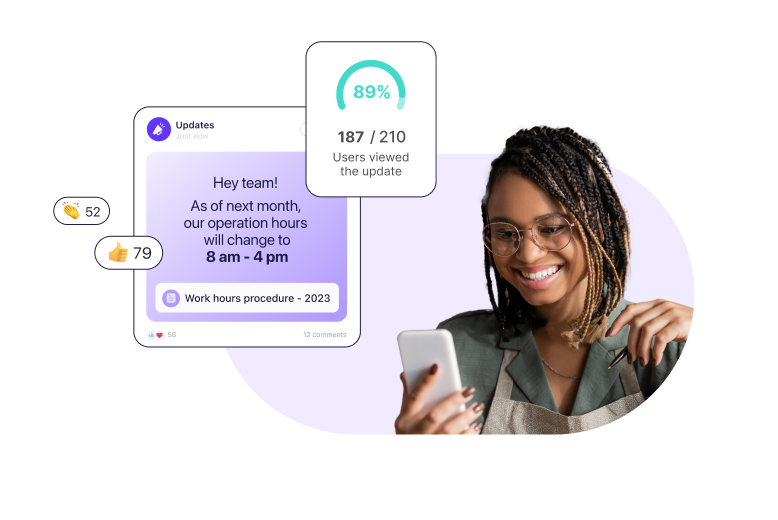
One area where I think Connecteam stands out is internal communication. Buildertrend has an internal inbox, job comments, and RFIs, all tied to a job. Connecteam treats communication as a workforce problem instead, with built-in online team chat, company announcements, surveys, and a company employee directory. I find these tools make it easier to keep everyone aligned across jobs without relying on separate apps or long message chains.
What really sets Connecteam apart for me is how much it can do beyond just managing projects. You can create digital forms and checklists, assign and track tasks, and deliver on-site training. You can also use supported automations within specific Connecteam features and plans.
Price is another clear differentiator. Connecteam is free for life for up to 10 employees, and paid plans start at $29 a month for the first 30 users, billed annually. You can see the numbers before you talk to anyone, too.
FAQs
Buildertrend doesn’t offer a free trial. Instead, prospective users can schedule a demo to explore the platform’s features before committing to a subscription.
Buildertrend doesn’t claim HIPAA compliance for its product. The facilities hosting its data environments hold ISO/IEC 27001, HIPAA, and FedRAMP certifications, but that describes the data centers, not the software.
Partly. Offline use covers the Time Clock and Daily Logs, which save to the device and sync automatically when the connection returns. Scheduling, budgets, and everything else need connectivity.
