


For shift-based teams, scheduling and time tracking can make or break your week. With the right tool, you could save hours of work each week. With the wrong one, you’ll be stuck cleaning up mistakes or paying for extras you never touch.
That’s where Homebase and When I Work come in. They both handle scheduling and time tracking well, but they’re built with different priorities. One leans more “all-in-one,” while the other keeps things simpler and more scheduling-focused.
In this Homebase vs. When I Work comparison, I’ll break down where each tool shines, where it falls short, and how to pick the one that fits your business.
At a Glance: Quick Summary
Homebase is an all-in-one workforce management platform that combines scheduling and time tracking with add-on tools like hiring, onboarding, payroll, and time off. It’s a solid pick if you want to run more of your day-to-day team admin in one system as you grow. While it’s geared towards the hospitality, beauty, and service industries, it has enough tools and features to serve other sectors with hourly employees, too.
That said, some features sit behind higher tiers or paid add-ons, so costs can climb—especially for larger teams or multi-location businesses. Learn more in our full Homebase review.
When I Work, on the other hand, is a scheduling and time tracking tool built for growing teams. Its biggest strength is straightforward scheduling, plus scheduling rules that help you catch issues like too little time between shifts before you publish. While it lacks the depth of Homebase, its simplicity makes it a good choice for a wide range of industries.
The tradeoff is that it doesn’t offer built-in payroll or recruiting, so you’ll likely connect it to other tools. Learn more in our full When I Work review.
Pricing and Plans
| Homebase | When I Work |
|---|---|
| Basic – Free $0/month/location
| ❌ No free plan |
| Essentials $24/location/month Everything in Basic, and:
| Single Location or Schedule $2.50/user/month
|
| Plus $56/location/month Everything in Essentials, and:
| Multiple Locations & Schedules $5/user/month Everything in Single Location plan, and:
|
| All-in-One $96/location/month Everything in Plus, and:
| N/A |
| * All prices show the monthly cost when billed annually as of [Month Year]. | |
Homebase and When I Work have different pricing models tailored to the specific needs of the industries they serve.
Homebase’s charges per location, which can be a good deal for companies with a single site and a larger staff, like businesses in hospitality, retail, beauty, leisure, and healthcare. It’s affordable for single-location businesses, but the price grows fast as you expand to more locations.
The good thing is that Homebase offers a free plan for single-location small businesses with up to 10 employees. It also has a 14-day free trial, in case you need to test advanced features.
When I Work has a user-based pricing model, where you pay for only the seats you need. This makes it more affordable for small and fast-growing businesses. Even better, you access all features with the base subscription without ever needing paid add-ons, unlike Homebase.
When I Work also has a 14-day free trial, too, but unlike Homebase, it doesn’t come with a free plan.
Pros and Cons
The pros and cons below give you a peek into the strengths and weaknesses of Homebase and When I Work.
Homebase Pros ✅
- Built-in payroll add-on
- Powerful offline mode
Homebase Cons ❌
- Comparatively pricey
- Doesn’t support scheduling rules
When I Work Pros ✅
- Flexible shift coverage
- Scheduling rules for compliant rosters
When I Work Cons ❌
- No free plan
- No built-in payroll feature
Use Cases
Even though Homebase and When I Work offers nearly similar tools, small differences make each one a better fit for certain teams:
Homebase is best for:
- Accurate time tracking for on-site teams: Homebase supports mobile and kiosk-style clock-ins, plus location-based clock-ins (geofencing) to help reduce off-site clock-ins and keep timesheets cleaner.
- End-to-end workforce management: Along with scheduling and time tracking, Homebase also offers tools for hiring, onboarding, payroll, and time-off, so you can handle more of your employee admin in one place as you grow.
When I Work is best for:
- Accurate time tracking: When I Work offers various ways to track employee work hours, including mobile and kiosk apps. Unlike Homebase, its mobile apps don’t support offline tracking but they leverage geofencing to enhance timecard accuracy.
- Effective employee scheduling: When I Work doesn’t come with an AI-powered scheduling assistant, like Homebase. However, it lets you stipulate scheduling rules to ensure each schedule adheres to industry regulations.
Side-by-Side Feature Overview
Homebase and When I Work functionalities overlap a lot, which can make it difficult to choose between the two apps. Below, I’ll compare them side by side, highlighting their similarities and differences, to help you choose with confidence.
Time tracking — Winner: Homebase
Homebase and When I Work both give you the flexibility to track time in a way that suits your workforce. Their intuitive Android and iOS apps help field and frontline employees track time anywhere, anytime.
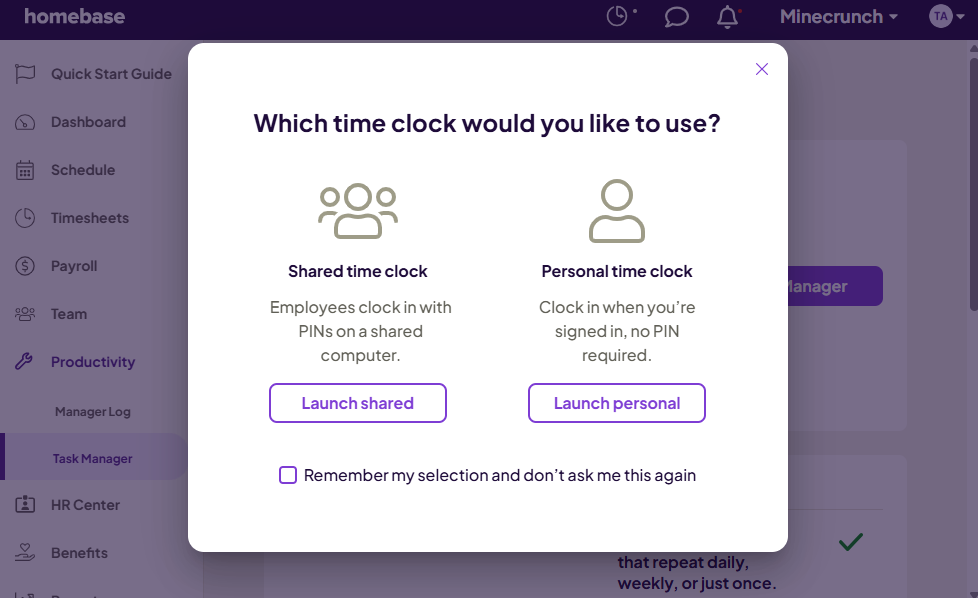
Homebase has a slight edge because its mobile apps work without an internet connection. Offline time tracking makes Homebase the ideal choice for businesses with branches or job sites with spotty internet.
Beyond that, both platforms let you track time on a web app and kiosk app. The kiosk is useful when you need multiple employees to clock in/out on a shared device. The only minor difference is that the When I Work’s kiosk app works on Android and iOS, while Homebase’s works on iOS tablets only.
While their array of tracking options is impressive, we found that both Homebase and When I Work lack advanced precision. For example, they track time to the nearest minute, whereas many top-tier apps, such as Connecteam, track work hours to the second.
Verdict: Both Homebase and When I Work support common time tracking needs. Even so, I have to give it to Homebase here because of its offline mode.
Clock-in restrictions — Winner: Tie
Both Homebase and When I Work have clock-in restrictions that can improve timesheets accuracy. For example, both have built-in tools to prevent early clock-ins, ensuring workers aren’t padding their timesheets. Both also block unscheduled shift clock-ins to prevent unaccounted time entries that complicate payroll processing.
Their standout clock-in restriction is geofencing. With both of them, it’s easy to create geofences (or virtual boundaries) around workplaces. In testing, both apps worked well and blocked attempts to clock in outside these designated sites.
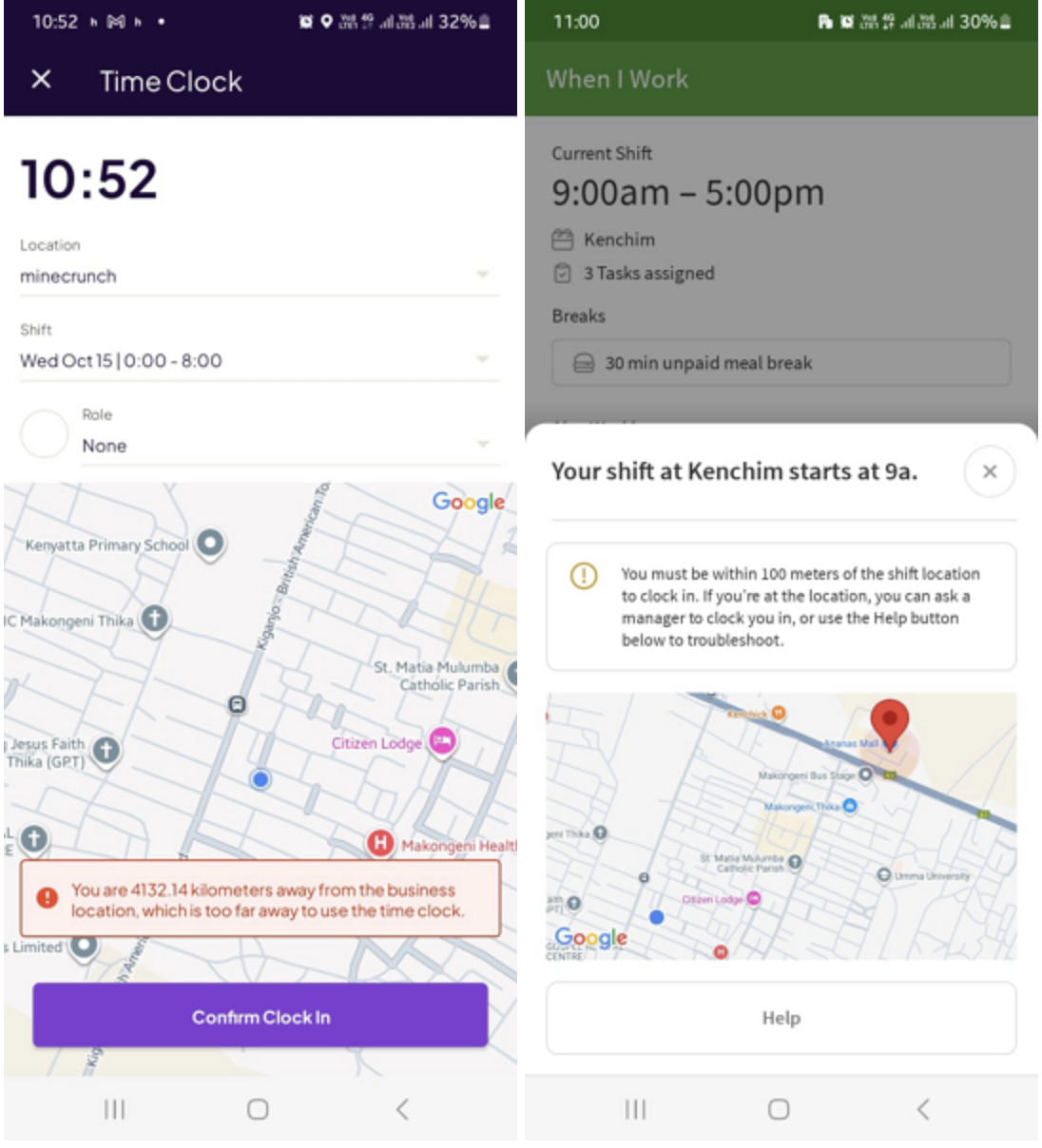
The fact that employees can’t clock in clock-in when they’re a few blocks away from the workplace really helps improve the accuracy of timesheets, ensuring everyone earns a pay for only the time they spend on the actual job. It also helps monitor and prevent late arrivals, which can disrupt operations when left unchecked.
Both platforms also support photo capture for clock-ins and clock-outs. Unfortunately, they don’t check the employee’s identity automatically, but only add the photo ID to an employee’s timesheet. Managers have to verify employees’ identities manually to spot “buddy punching” (when one employee clocks in for another). This can be ineffective for large workforces.
Verdict: Nothing to separate the two apps here. Their clock-in restrictions are identical and serve the same purposes.
Break and overtime tracking — Winner: Homebase
Break and overtime tools matter a lot if you operate in places with strict rules (like California). I’m glad that both Homebase and When I Work provide these vital tools, but they have implemented them in different ways.
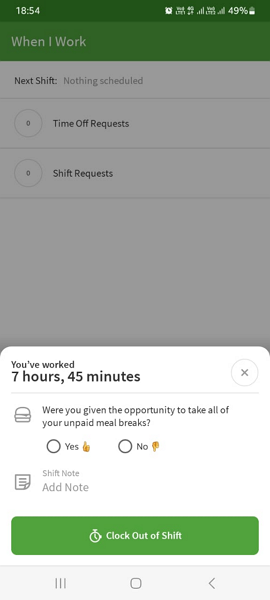
Homebase lets you assign breaks in one place, reducing your admin workload. With When I Work, you assign breaks when creating shifts, which can be time-consuming and ineffective, especially for large workforces. Luckily, When I Work requires employees to confirm that they took their legally required breaks, so it’s easy to flag and address any missed breaks.
Homebase doesn’t have a tool for employees to confirm that they took their breaks, but has unique safeguards to prevent future lawsuits. For example, if an employee misses a mandated break, it automatically adds one hour of premium pay to the timesheet as stipulated by some state laws, such as the California Labor Code. The automation ensures accuracy, preventing costly lawsuits and back-pay claims.
Both have overtime trackers that help track daily and weekly overtime accurately. However, Homebase has a slight edge because it alerts managers when an employee approaches overtime thresholds. This is particularly helpful when you need to restrict overtime to control labor costs.
Verdict: Homebase may lack a break confirmation tool, but its ability to add premium pay automatically and provide overtime alerts, earns it the crown in this category.
Employee scheduling — Winner: Tie
Homebase and When I Work both have strong shift scheduling features, like an intuitive scheduling grid, drag-and-drop functionality, shift swaps, and open shifts.
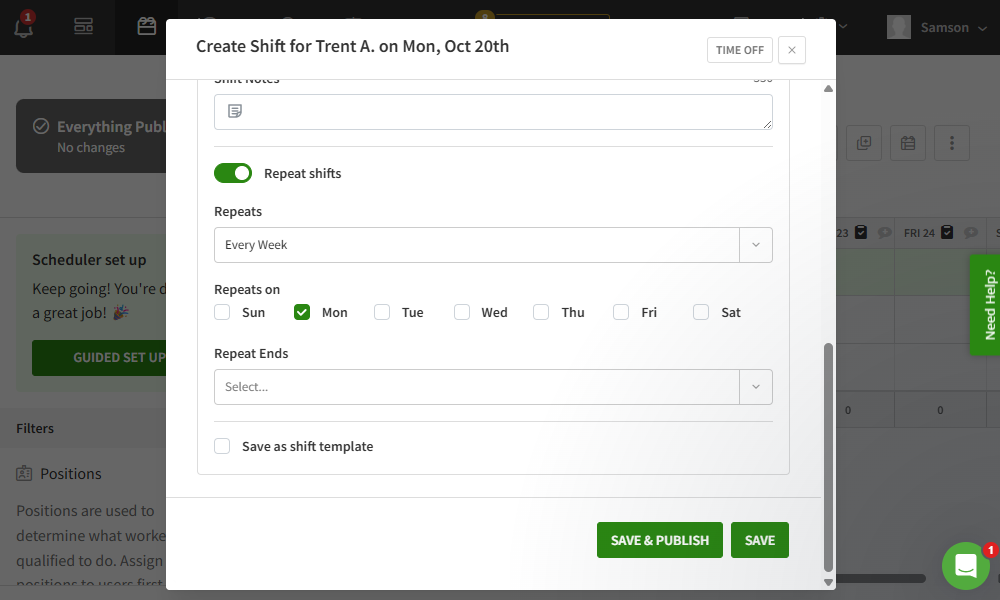
Beyond these similarities, there are differences that make each software suitable for unique purposes. For example, When I Work is better for scheduling employees in regions with strict scheduling laws. This is because it allows you to set scheduling rules, such as maximum shifts and minimum hours between shifts, that each schedule has to follow.
Homebase doesn’t offer an equivalent feature, but has an advantage of its own. It has an AI-powered scheduling assistant that builds schedules in minutes based on employee roles, availability, and labor targets. The feature could be very helpful for managers who need to schedule large workforces.
My main issue is that the AI scheduling assistant doesn’t always behave as expected. In our testing, we set a recurring availability change to start on a future date, but it applied right away instead. That could cause a manager to schedule someone who isn’t actually available and create last-minute coverage problems.
Verdict: Both platforms cover the basics well and bring their own standout features to the table, but neither outshines the other. In this category, it’s a tie.
Paid time-off management — Winner: Homebase
Homebase has arguably one of the best paid time-off management modules, offering a nice mix of essential and advanced features. It supports both lump-sum and hourly accruals, letting you tailor policies to specific workforce’s needs.
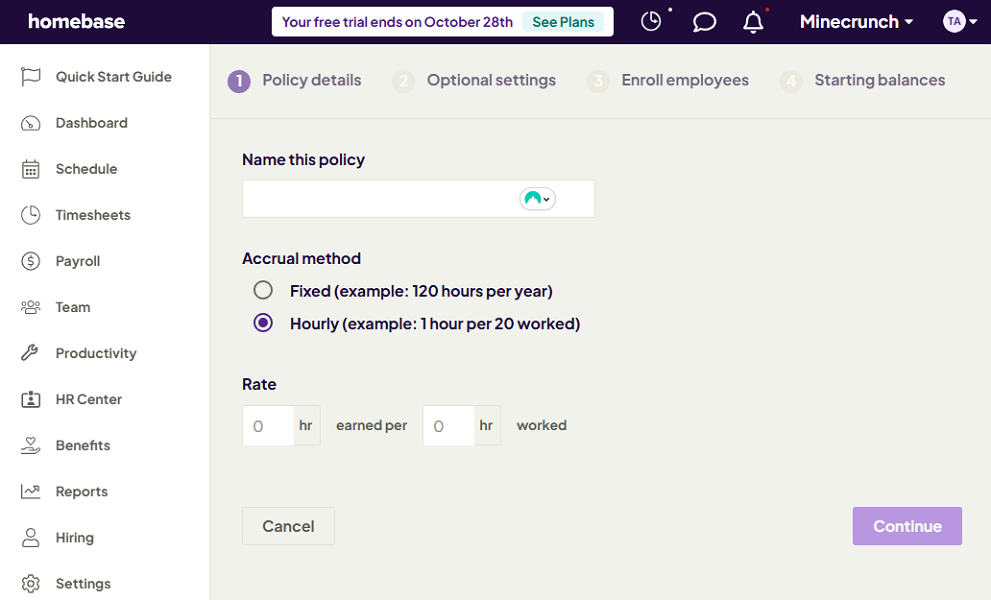
Additionally, with its tenure accrual feature, you can allow hourly employees to earn more time-off on their work anniversaries. This is a small gesture but one that can positively impact employee loyalty, lowering turn-over rates.
I also liked Homebase’s advanced controls that ensure time-offs don’t negatively impact operations. For example, you can limit the number of employees who can be on time-off on a particular day or set blackout dates to restrict time-off altogether during peak seasons.
Doing so helps you maintain the proper staffing levels to meet service demand without compromising quality. I also liked the time-off notice, which ensures you have enough time to respond to each request and adjust schedules if needed.
When I Work feels half-baked compared to Homebase as it supports hourly accrual only. While it should be enough for businesses with hourly workforces and simple needs, it won’t work for businesses with salaried staff. It also lets you set a minimum time-off notice, but doesn’t support blackout dates.
Verdict: Homebase is without a doubt the winner when it comes to PTO management.
Task management — Winner: Tie
Homebase and When I Work both have built-in task managers that help you delegate work with ease. During testing, creating one-off or recurring tasks was easy on both platforms. However, we did notice significant differences in workflows, especially in how managers can assign and monitor tasks.
When I Work treats tasks as the building blocks for schedules. It lets you create team or shift tasks. Team tasks are linked to schedules and assigned to multiple employees. You can only assign shift tasks to an individual employee. Tasks inherit the due date, recurring frequency, and assignees from the linked shift, which works well for assigning core duties.
Homebase’s Task Manager allows you to assign tasks to individuals or teams without linking them to a shift. This unique capability makes it ideal for assigning side work that workers must complete before or after shifts, such as cleaning and restocking in a restaurant. My only issue is that the Task Manager add-on costs $13 per month per location.
Verdict: Although their capabilities differ, both Homebase and When I Work are both powerful in their own rights.
Team messaging — Winner: Homebase
If your team relies heavily on messaging to keep operations sailing along, you’ll find Homebase a better fit. Its chat feature may not rival dedicated messaging apps, but it’s easily one of the most powerful built-in communication tools I’ve seen.
It enables you to separate communication in 1:1 or group chats to keep discussions organized. You can attach locations, polls, GIFs, images from your device, or even snap a photo directly from your smartphone camera while chatting.
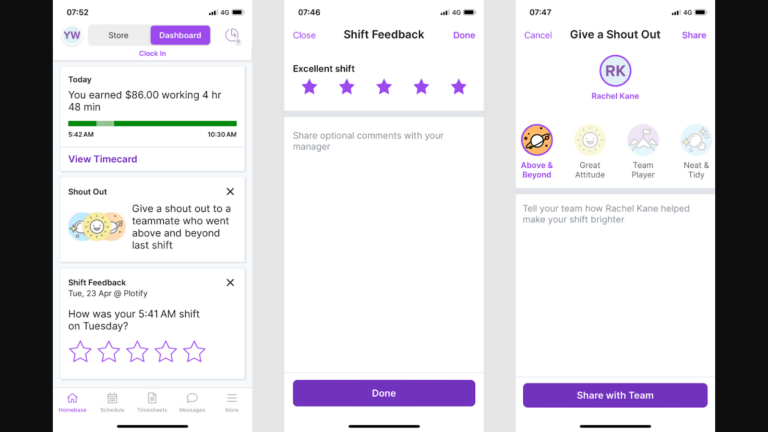
You can also use the Announcements tool — a one-way messaging channel for company-wide and team updates. One thing I liked about Announcements is that you can require employees to acknowledge receipt to confirm they read important updates.
When I Work’s WorkChat sticks to the bare basics. You can either use it as a manager-only broadcast channel or a team communication hub, but not both. If you choose the latter you can start one-on-one or group conversations. Either way, the chat interface lacks appealing aesthetics and vital tools like file attachments.
Verdict: Homebase’s chat function has appealing aesthetics and its features set is more powerful. Even so, it would have been more helpful if it supported advanced tools, such as @mentions and audio and video messages.
Payroll management — Winner: Homebase
Regarding payroll, Homebase stands out because payroll capabilities are baked right into its core. It enables you to track time, pay employees, and run other critical payroll processes within a single platform. This results in faster and more accurate wage payments and tax processes.
Homebase simplifies many processes and can, for example, subtract deductions from employee payslips. The software also files taxes with the state and Internal Revenue Service (IRS), saving managers the manual hassle. The biggest perk is that it lets employees access $400 of their wage in advance to ease emergency expenses.
If you already use a payroll solution, and want to connect it to Homebase, it integrates with popular payroll providers like Rippling, Paychex, ADP, Gusto, QuickBooks, Square Payroll, and SurePayroll.
When I Work doesn’t have built-in payroll functionality, but it integrates seamlessly with popular payroll providers. It also works with Clair On-Demand Pay to give workers access to a portion of earned wage before payday.
Verdict: Homebase is the clear winner here, thanks to its built-in payroll capabilities. However, Homebase’s payroll is available as a paid add-on for $39 per month base fee + $6 per month per employee paid.
User Ratings
Overall, Homebase and When I Work have garnered positive ratings across multiple reviews sites. There are a few gripes, as you’d expect, but there’s a consensus that their product offerings meet the needs of target users.
Homebase
- ⭐ 4.6/5 on Capterra (1,135 reviews)
- ⭐ 4.3/5 on G2 Crowd (218 reviews)
When I Work
- ⭐ 4.5/5 on Capterra (1,252 reviews)
- ⭐4.4/5 on G2 Crowd (360 reviews)
* Reviews were last checked in January 2026.
Security & Compliance
| Category | Homebase | When I Work |
|---|---|---|
| Data Encryption | ✅ | ✅ |
| GDPR Compliant | Aligns with PII protection principles | ✅ |
| HIPAA-Compliant | ❌ | ❌ |
| Certification | ✅ SOC 2 Type 2 | ✅ SOC 2 Type 2 |
| MFA | ✅ Two-step account verification | ✅ Two-step account verification |
| Admin controls | ✅ Role-based access control | ✅ Role-based access control |
| Hosting Region | US | US |
Both Homebase and When I Work take security seriously, and both encrypt your data. The clearest signal is that both have SOC 2 Type 2, which means they’ve gone through a formal security audit and have strong controls in place.
On the privacy front, When I Work is GDPR compliant. So if GDPR is a must-have for your business, When I Work is the safer choice. Homebase doesn’t position itself as GDPR compliant, but it aligns with GDPR principles, and it’s compliant with the California Consumer Privacy Act (CCPA) and Canada’s Personal Information Protection and Electronic Documents Act
(PIPEDA), which will be more than enough for most U.S.-based companies.
Unfortunately, neither platform is HIPAA compliant, so they may not be the right fit if you handle protected health information.
Setup and Onboarding
It’s incredibly easy to create an account and set up a team on either Homebase or When I Work. Having all settings in one window on both platforms makes it easy to configure core functions without hopping between tabs. However, When I Work’s setup takes a bit more time because managers can’t apply some settings universally.
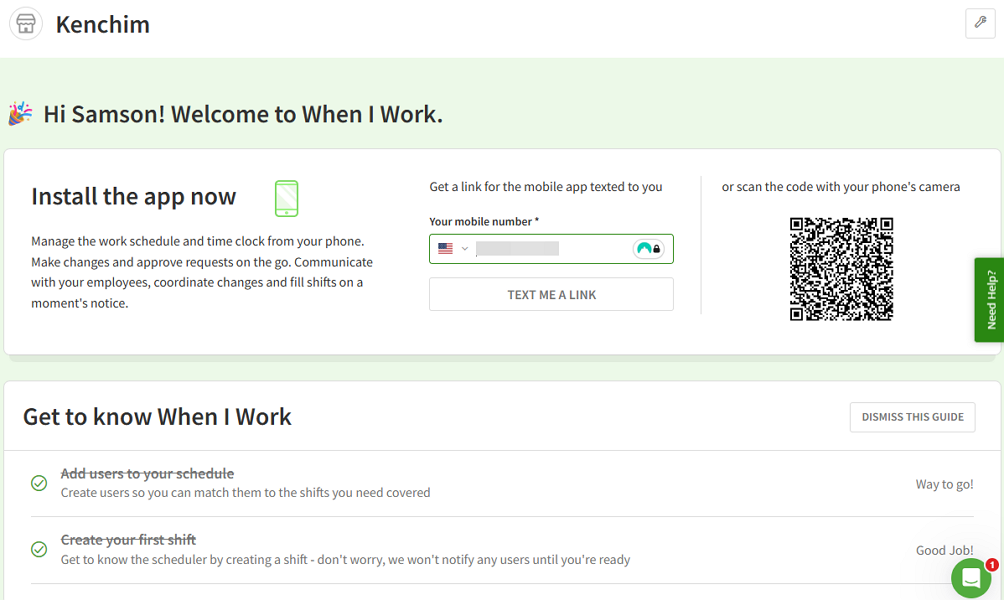
When it comes to user onboarding, we found it easier to navigate Homebase than When I Work. Homebase’s interfaces follow the principles of modern app design. For example, its web app sports nice aesthetics and a menu to the right, where today’s users expect it.
Some of When I Work’s design choices, such as having the web app’s menu at the top, feel odd. While this doesn’t affect usability on large screens, it takes away from overall user experience on small laptop screens, where the menu collapses into a hamburger icon.
Support and Customer Service
| Support Type | Homebase | When I Work |
|---|---|---|
| Live Chat | ✅ Business hours – features an AI support assistant | ✅ Business hours – features an AI support assistant |
| Phone Support | ✅ Business hours | ❌ |
| Email Support | ✅ | ✅ |
| Community forum | ❌ | ❌ |
| Ticket support | ✅ | ✅ |
| Help Center | ✅ | ✅ |
Homebase and When I Work live chat support is only available during U.S. business hours, which is inconvenient for users in different time zones. Thankfully, both platforms have an AI support assistant on live chat that enables users to find instant help outside business hours.
Beyond live chat, Homebase has phone support, and both have options to submit support tickets. These options don’t give either platform an advantage, as both have support agents available only during business hours. However, I think When I Work offers the better self-service options which include how-to articles, videos, and other easy-to-follow resources to get users started.
🏆 Who Wins: Homebase or When I Work?
Based on the overall performance, Homebase is the outright winner of our Homebase vs. When I Work showdown. It packs more value with its flexible time tracking, powerful PTO tools, built-in payroll features, and advanced break management.
When I Work covers the basics well, but falls short of matching Homebase’s depth in areas that matter most. This doesn’t mean that When I Work is a fly-by-night workforce management app. On the contrary, I still think it’s pretty great for scheduling and tracking time for hourly workers.
👉 The verdict: If you want an all-in-one workforce management software that can schedule workers, track their time, and run payroll, choose Homebase. However, if you need a simple solution to plug the scheduling and time tracking gaps in your technology stack, When I Work fits the bill.
Connecteam vs. Homebase vs. When I Work
Connecteam offers a truly affordable, all-in-one workforce management solution. It has a broader functionality that fills the gaps that both Homebase and When I Work have. Below, I’ll highlight some unique Connecteam advantages:
Grow your business, not your bill
Unlike Homebase, Connecteam has a hybrid tiered and user-based pricing model that lets you use all advanced functionalities and expand to more locations without paying more. Its free plan gives small businesses unlimited access to all features, while paid plans start at less than $1 per user per month. This makes it a budget-friendly and scalable option for fast-growing businesses.
Ensure employees take mandated breaks without fail
Some state labor laws require employees to take multiple meal breaks depending on the length of their shifts. In California, for example, you must give employees a meal break for work periods longer than five hours. This means that if the shift is more than ten hours long, you should provide workers with two breaks.
Connecteam’s break tracker enables you to space out meal breaks so that employees take the correct number of breaks at the right time. For example, you can set it to require employees to take a 30-minute meal break every 5 hours. This way, even if the shift is over ten hours you won’t run the risk of non-compliance.
California labor law also mandates that the meal break must be at least 30 minutes. To ensure employees are taking the required break, Connecteam provides an option to restrict early return. It also reminds employees to start and end breaks on time, further enforcing compliance.
Track employees real-time location
When your construction crew, lawn care workers, outside catering, or security guards are out in the field, it can be challenging to keep up with their field activities. That’s where Connecteam’s GPS location tracking can make a difference.
Connecteam tracks and updates employee location in real-time. You can open the map, and confirm the location of your field employees at any time during their shifts. The location details help you stay on top of field activities, and proactively prevent mishaps that could disrupt operations.
Other scenarios include:
- Connecteam’s geofence feature alerts you when an employee leaves a designated job site, which is helpful when employees must remain at a specific location. For example, you can use this feature to ensure a field nurse stays with a patient to meet care standards.
- Connecteam’s AI-powered scheduling assistant lets you assign hundreds of shifts in minutes based on employee qualifications, availability, and preferences.
- Connecteam’s scheduling rules help you follow the strict scheduling rules in industries such as hospitality and healthcare. For example, you can set a minimum period between shifts to prevent employees having an early morning shift immediately after a late night shift (clopening) and ensure they get enough rest.
Try Connecteam
The better employee management alternative
FAQs
The main difference between Homebase and When I Work for multi-location scheduling is pricing and scaling: Homebase charges per location, while When I Work charges per user with multi-location tiers. If you manage many crews or job sites, Connecteam is often a stronger pick because it supports multi-site operations without per-location pricing pressure.
The main difference between Homebase and When I Work for no-shows and lateness is emphasis: When I Work focuses on scheduling workflows and rules, while Homebase combines scheduling with broader shift and time-tracking workflows. Both support tools like shift coverage features and clock-in controls, but neither eliminates no-shows by itself.
The main difference between Homebase and When I Work timesheet reporting is what you optimize for: Homebase leans into payroll-adjacent time reporting inside an all-in-one setup, while When I Work keeps reporting simpler and tied closely to schedules and attendance. Your best fit depends on how complex your pay rules are.
Homebase is a strong pick for small businesses that want an all-in-one system tied to a location, especially if you can use the free plan for one location. When I Work is better if you want a simpler scheduling-and-time-tracking setup with predictable per-user pricing. If you want broader tools at a better price as you grow, Connecteam usually offers the best overall value.
The main difference between Homebase and When I Work value is pricing: Homebase charges per location (with a free plan for one location up to 10 employees), while When I Work charges per user with no free plan. For an even better option, Connecteam often delivers the best value overall because it includes more workforce tools at a lower price, with a strong free plan and affordable tiers that scale.
The main difference between the Homebase and When I Work mobile apps is experience and focus: Homebase’s app supports a broader all-in-one workflow, while When I Work’s app stays more scheduling-and-attendance focused. If you want less complexity for employees, When I Work often feels lighter.
The main difference between Homebase and When I Work is scope: Homebase is more all-in-one, while When I Work is simpler and more scheduling-first. Choose Homebase if you want more tools in one place; choose When I Work if you want a lighter system for schedules and hours.
The main difference between Homebase and When I Work for client billing is how you validate time: both can produce reliable hours if you use controls like job-site clock-ins and approvals. Reliability depends more on setup and enforcement than the brand. If you bill by job-site often, consider tools like Connecteam too.