


Harvest and RescueTime are two leading time tracking apps with different goals. Harvest tracks billable hours for freelancers and teams, while RescueTime helps individuals improve productivity.
Considering that Harvest and RescueTime have unique use cases, it should be easy to decide between the two apps. But don’t make a hasty decision. Read my comprehensive Harvest vs. RescueTime comparison to learn their strengths and weaknesses.
We tested both apps rigorously, and in this guide, I’ll compare them side by side to help you make an informed decision. I’ll go over their similarities and differences on fronts such as time tracking, activity monitoring, expense tracking, project tracking, and more. Keep reading for all the details.
At a Glance: Quick Summary
Harvest is a time-tracking app for manual time tracking. In other words, users start/stop timers or enter timesheets manually to log work hours, just like they would with many other time trackers.
Harvest also helps manage the financial processes of your business. It lets you create estimates, track out-of-pocket expenses, and manage invoices. Learn more in the full Harvest review.
RescueTime, on the other hand, automatically logs the time you spend on apps and websites. Unlike Harvest, you don’t need to start or stop a timer. Instead, RescueTime starts recording your time and activity in the background once you start your device.
Beyond time tracking, it tracks productivity levels and blocks distractions to encourage deep concentration on the tasks at hand. Learn more in the full RescueTime review.
Looking for a more versatile time tracker?
While Harvest and RescueTime cater to desk workers, Connecteam covers both desk and mobile employees. It combines time tracking, scheduling, task management, and team communication — all in one platform.
Pricing and Plans
| Harvest | RescueTime |
|---|---|
Free plan
| Free plan
|
| N/A | Solo – $6.50/month
|
Pro – $11/user/month
| Team – $6/user/month
|
Premium – $14/user/month
| N/A |
| * All prices show the monthly cost when billed annually as of November 2025. | |
Individual users with basic time tracking needs can use Harvest and RescueTime without paying a dime. However, Harvest’s free plan is more appealing as it also offers project management, invoicing, and basic reporting tools. But as you’d expect, you’ll need a paid plan to access advanced features with both platforms.
You can test advanced features before buying with Harvest’s 30-day free trial or RescueTime’s 14-day free trial. Harvest doesn’t require a credit card for a trial, allowing you to tinker with key features risk-free. RescueTime’s trial requires a credit card, so if you decide that it’s not for you, remember to cancel the subscription within 14 days to avoid a charge on your card.
Both providers support user-based pricing, allowing you to pay for only the seats you need. This makes them appealing to freelancers and small teams with limited budgets. On the surface, RescueTime looks more affordable than Harvest, but I think that Harvest delivers better value for money, thanks to its impressive feature set.
If you’re managing a small team…
You’ll quickly outgrow Harvest or RescueTime’s free plans. Connecteam lets teams of up to 10 users track time, manage schedules, and communicate seamlessly — completely free. Try Connecteam now.
Pros and Cons
The following pros and cons give you a sneak peek into the areas where Harvest and RescueTime excel or fall short.
Harvest Pros ✅
- Easy to track billable and non-billable time
- Manage estimates and invoices on a single platform
Harvest Cons ❌
- No GPS time tracking capabilities
- No labor compliance features
RescueTime Pros ✅
- Logs time spent on apps and websites
- FocusTime boosts productivity
RescueTime Cons ❌
- Doesn’t have a designated timer
- No labor compliance features
Use Cases
Harvest and RescueTime feature sets differ significantly, making them ideal for different workforce management needs:
Harvest is best for:
- Billable time tracking: Harvest requires users to select a project and task when clocking in. This makes it easy to attribute every minute to a specific project, improving billing and cost tracking.
- Monitoring project budgets: With Harvest, you can set project budgets and track costs based on actual hours. Staying ahead of spend can help you adjust processes on the fly to boost profitability.
RescueTime is best for:
- Improving personal productivity: RescueTime tracks the time you spend on websites and apps on mobile and desktop devices. It then categorizes your activities to help you pinpoint and eliminate time-wasters for better productivity.
- Avoiding distractions during work: RescueTime lets you block social media and other personal or distracting websites during FocusTime. This helps you spend time on meaningful work, boosting productivity.
Side-by-Side Feature Overview
While Harvest and RescueTime are both time-tracking apps, their methods and feature sets are very different. Each app is designed for different needs. Below, I’ll break down how the apps work, highlighting their differences to guide you to the better choice for your workflow.
- Time Tracking — Winner: Harvest
In my testing, tracking time with Harvest was simple. Whether you prefer using the web or mobile apps, or the Chrome extension, it only takes a few clicks to start the timer. When a user clocks in, they must pick a project and task they’re working on, and the app attributes their working time to the right client. This simplifies billing down the road.

While its user-friendliness shines through, Harvest isn’t without flaws. One issue was that the app continued tracking time even when the tester turned off the device. In a real-world scenario, this could lead to inaccurate timesheets, complicating billing and cost tracking. What’s worse, managers can’t edit employees’ timesheets, which almost guarantees a constant back-and-forth during approval.
RescueTime, on the other hand, has no option to start or end a timer. Instead, it jumps straight into action once you turn on your device, and continues logging time as long as the device is on. With the automatic approach, employees who juggle multiple tasks don’t have to rely on their recall to track project time accurately.
Without proper safeguards, automatic tracking could lead to intrusive monitoring. The good thing is that you can configure RescueTime to log time only during work hours, protecting employee privacy. You can also predefine work types and productivity statuses to enable the app to accurately categorise activities.
Verdict: Harvest has a clear advantage over RescueTime because it puts you in control of time tracking. I also found it the best fit for businesses that want to accurately track project time for fair billing. Still, Harvest could use advanced controls to streamline compliance with labor laws.
- Project Management — Winner: Harvest
Project management isn’t Harvest’s or RescueTime’s main focus. Their project modules provide only the essential features for tracking time and budgets, rather than managing projects through various phases.
Harvest lets you create projects and link them to specific clients for easy billing. You can also break projects into tasks for efficient delegation, define budgets for cost tracking, and set deadlines to keep projects on track.
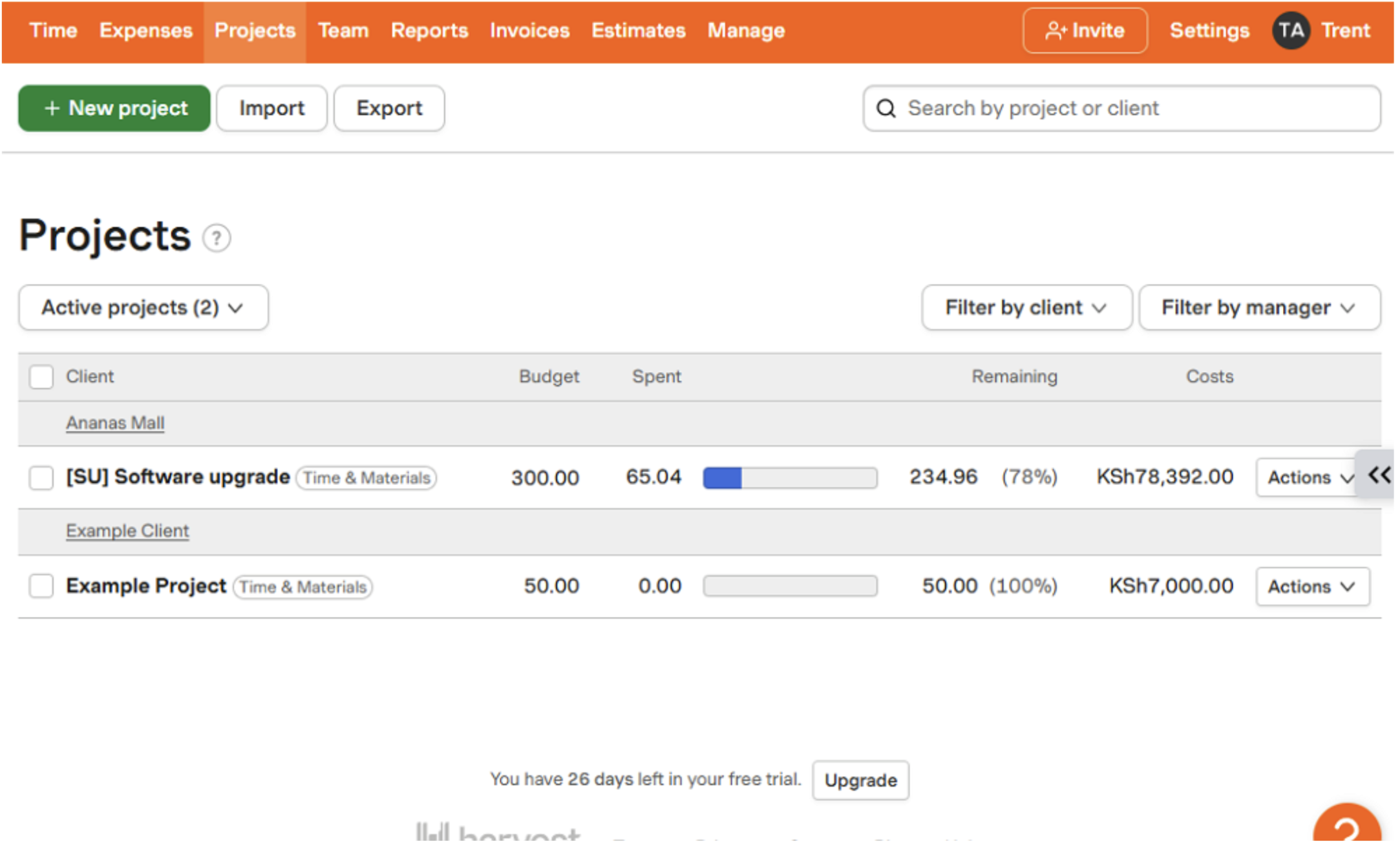
I liked the ability to set up Harvest to notify me when a project used up a certain percentage of the project’s budget. The alerts help you spot issues early and prevent cost overruns.
RescueTime also lets you create projects and break them into tasks. But unlike Harvest, you can’t set a project budget or monitor labor costs against it. It doesn’t help with billing, either. Remember that RescueTime lacks a billing module, and doesn’t let employees select projects and tasks at the start of the day.
Instead, RescueTime tracks all activity on a computer and uses automation to categorize activities per task or client. For example, instead of seeing that an employee spent 4 hours on Google Chrome, you can see the specific project they worked on during that time. This helps understand how workers spend their time during work hours.
Verdict: Harvest is the winner in this category, with project management tools that work well to help users track billable hours per client and track costs. RescueTime’s project tools help determine how employees spend their time, but need manual editing for accurate reporting.
Need deeper project management tools?
Connecteam lets you assign tasks, track progress, and tie time logs directly to projects — all while ensuring your deskless teams stay aligned in real time. Try for free.
- Productivity-boosting modes — Winner: RescueTime
While it falls short on time tracking modes, RescueTime shines when used to boost productivity. One notable feature is FocusTime, which lets you carve out distraction-free sessions to focus on deep work. The way it works is simple.
It automatically creates a block list based on apps categorized as personal or distracting. I do wish that RescueTime made it easier to create lists of websites to allow or block. Right now, you need to go to your Activities overview, hover over a website, and use an arrow to move it to the list you want. If you have a long list, this gets tiring pretty fast.
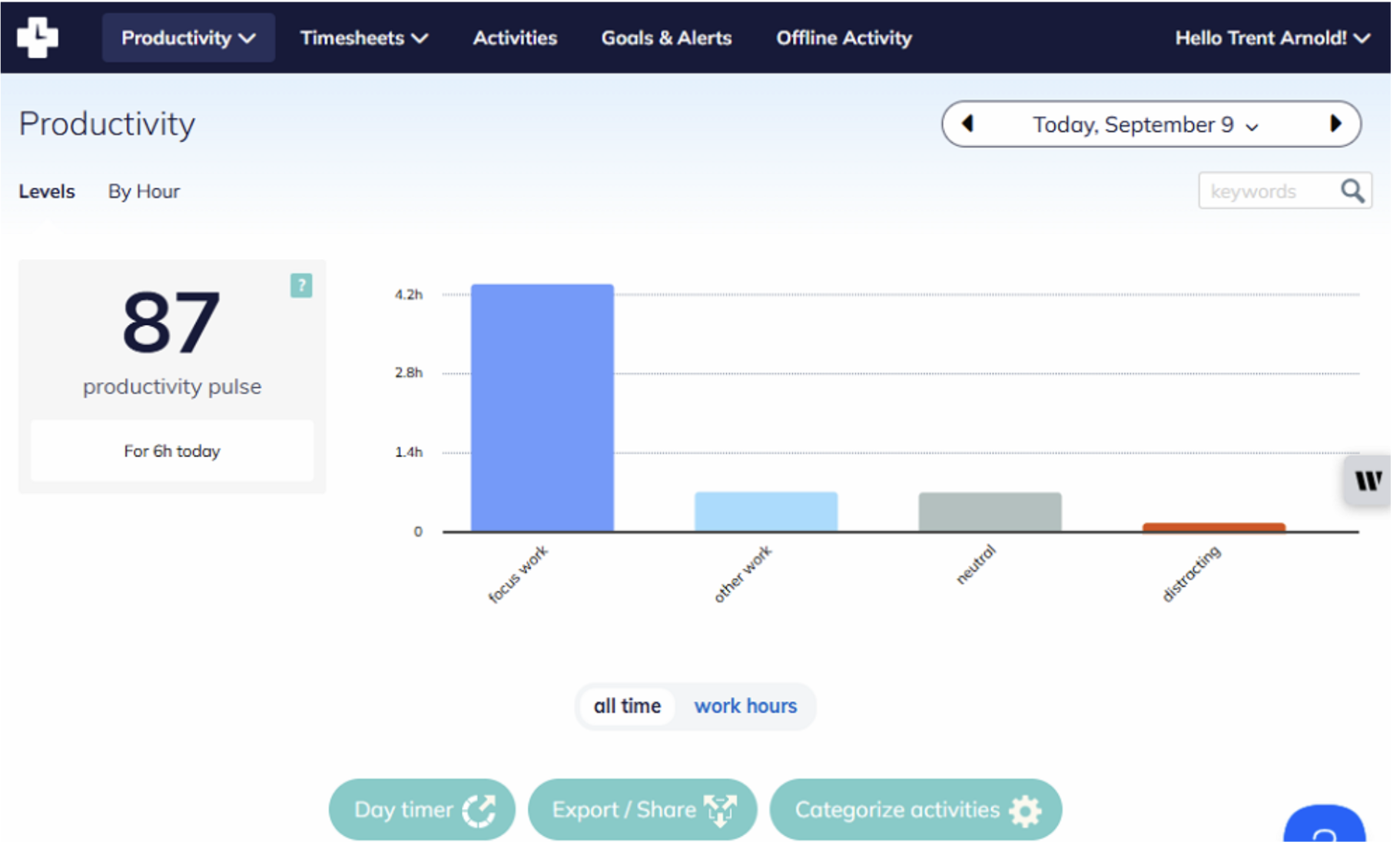
You can vary the length of focus sessions and schedule them during the time of day when you’re most productive. For example, if you’re a night owl, you can schedule focus sessions late into the night. RescueTime alerts you before a focus session, helping you start on time.
Once you’re in a focus session, you can’t access any website or app on the block list. This helps you achieve deep focus and improve productivity. You can also sync a music streaming service, like Spotify or YouTube, to vibe to your favorite tunes while working.
Harvest doesn’t offer a similar feature.
Verdict: RescueTime is the clear winner in this category. I have found it useful for users who struggle with distractions during work hours.
- Activity Tracking — Winner: RescueTime
If you need to track productivity and digital activity, RescueTime can do it with some limitations. Unlike other apps designed for monitoring desktop activity, RescueTime doesn’t have common features like screenshots or keystroke recording. But it’s great at capturing the apps and websites your workers visit during the day and sorting them into different productivity categories.
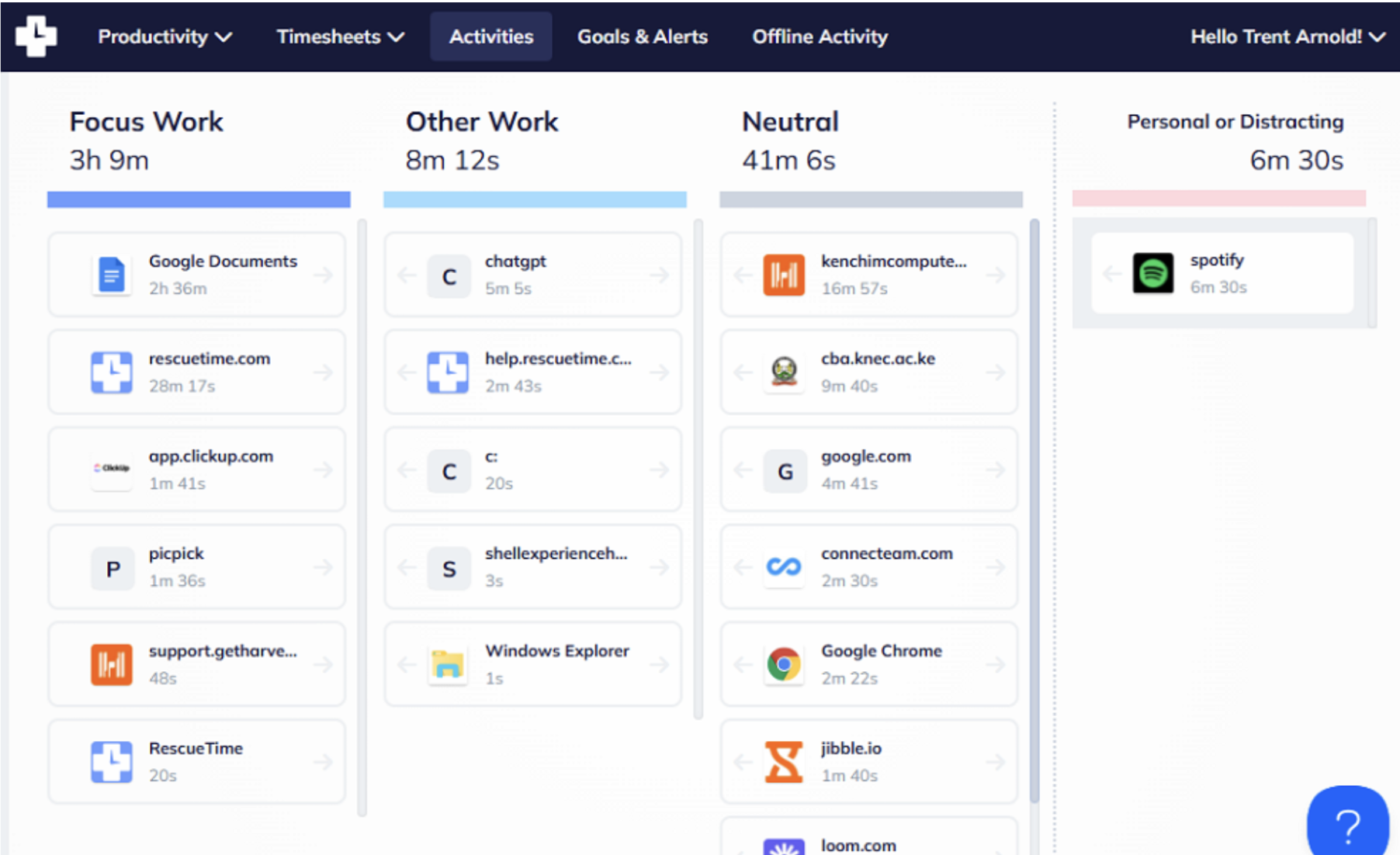
Activity categories are RescueTime’s standout feature. The app automatically groups activities and flags potential time-wasters. You can also reclassify them and assign productivity scores to fine-tune your results. These categories are used to block distracting websites during FocusTime and in reports to show where your time goes.
By default, there are 11 activity categories, like business, communication & scheduling, social networking, design & composition, and entertaining. The categories are further broken down into sub-categories, each with a productivity score, either focus work, other work, neutral, personal, or distracting.
When RescueTime tracks an app, say “Google Docs,” it groups it to a category like “design/comp: writing” and assigns a productivity score like “Focus work.” You can open the “Activities” tab to get a detailed report showing how much time you spend on productive or non-productive work.
Harvest doesn’t come with an activity tracking feature.
Verdict: RescueTime is the winner in this category. It may not be as feature-rich as Clockify or Hubstaff, but its activity tracker provides clear visibility into your habits. It helps spot and block time-wasters to focus more effectively on meaningful work.
- Expense Tracking — Winner: Harvest
Harvest lets employees log any out-of-pocket expenses they have during a project. Think mileage, meals, hotels, parking, tolls, and entertainment. You can add a new expense type or customize existing ones to match your internal policies.
You can also assign a unit price for some expenses, like mileage. This helps ensure that the billing rate is consistent with established standards like the IRS mileage rates.

Logging expenses is simple on both the mobile and desktop apps. What impressed me is that each expense is categorized under a specific project and task. And since each project is tied to a client, expenses are automatically grouped by clients, simplifying billing. Even better, Harvest requires employees to attach a receipt, making it easy to verify each expense.
While all that sounds good, Harvest’s expense tracking might feel limited for businesses with relatively complex expense management needs. During testing, I noticed the lack of a built-in approval workflow, which means expenses are considered approved immediately upon entry. This may not suit businesses that require multi-step approval to maintain accuracy and accountability.
RescueTime doesn’t have an expense management module.
Verdict: Harvest is without a doubt the winner in this category. While it lacks a built-in approval workflow, it’s still effective if you want to bill clients for expenses and worked hours.
- Estimating and Invoicing — Winner: Harvest
Besides expense tracking, Harvest also automates other tasks like estimating and invoicing. But its Estimates module lacks advanced features like multi-phase estimation and forecasting, and feels limited compared to established estimating tools.
Still, I found Harvest to be effective for light estimations. You can include detailed item descriptions, tax, discounts, and branded elements to create professional-looking estimates. What I liked is that it’s easy for clients to review the estimates and
accept or decline them online.
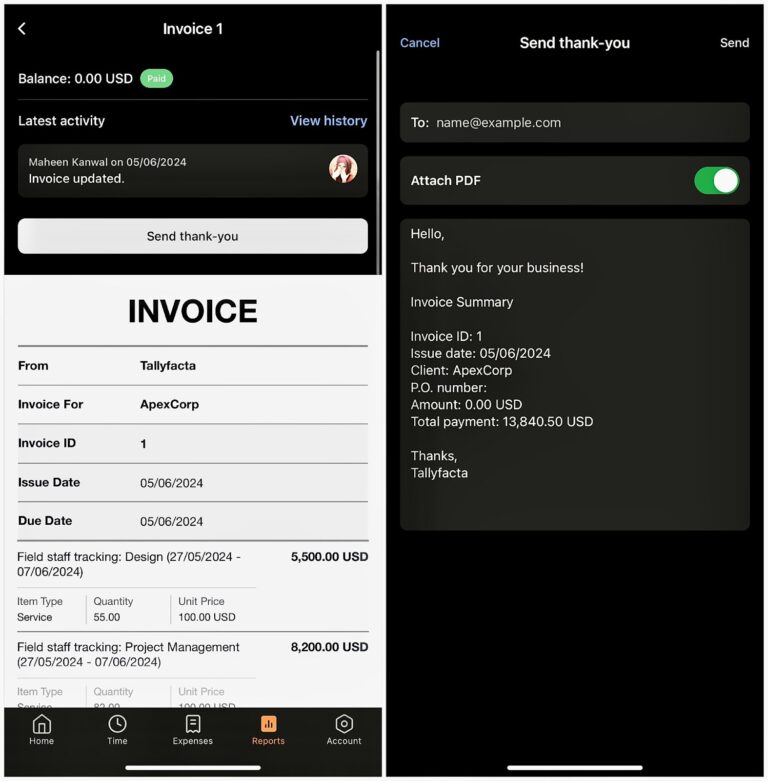
Harvest groups each client’s billable expenses and time to simplify the invoicing workflow. Just select the client, add the expenses and project time you want to bill, and that’s it. You can also turn approved estimates into invoices.
I also found it easy to track invoices to see what’s been paid and what’s overdue. Even better, you can track payments within Harvest, with an option to accept partial payments to maintain a steady cash flow. However, you can’t automatically charge cards or bank accounts, so clients have to make payments manually.
RescueTime doesn’t support estimating and invoicing.
Verdict: Harvest wins another finance-related category since RescueTime doesn’t offer any estimating or invoicing features.
- Reporting — Winner: Tie
Both Harvest and RescueTime have a wide range of reporting options.
Harvest focuses on providing useful information that helps you to improve day-to-day operations and keep an eye on profitability. Some of its notable reports include time, profitability, expense, un-invoiced, activity log, and contractor reports.
In my testing, generating Harvest reports was a breeze, thanks to its intuitive interface. The reports use graphs and charts to make complex data easier to understand for faster decision-making. The only minor issue is that Harvest’s report-sharing options are limited to PDF and CSV report downloads.
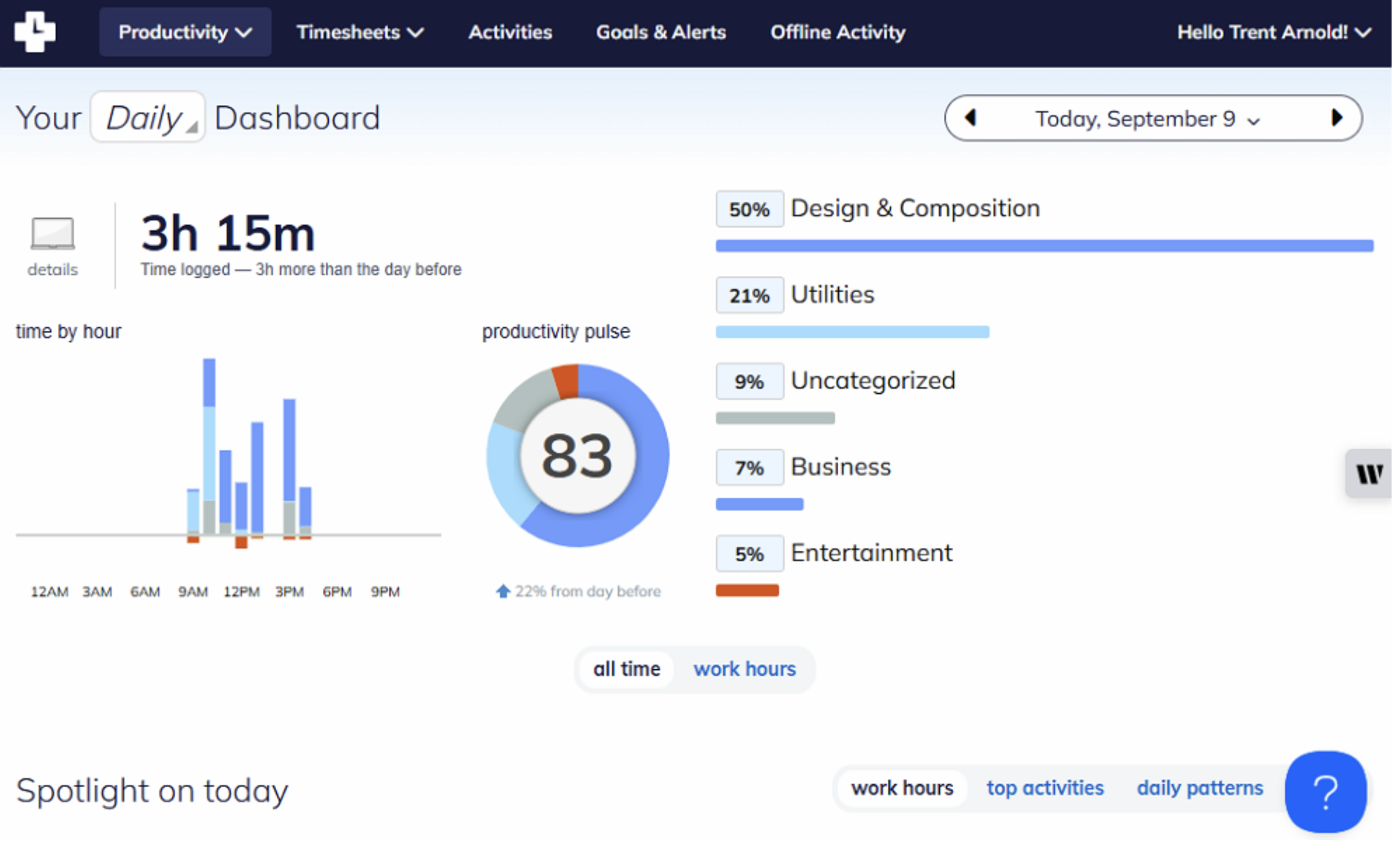
Meanwhile, RescueTime prioritizes reports that help you get to the bottom of your work habits and productivity. Its dashboard displays productivity metrics, such as a productivity pulse, FocusTime goals, and lifetime milestones – all on a single page.
Like Harvest, it uses graphs and charts to make data easily digestible. However, its sharing options are limited to CSV download only. You can’t set up reports to be sent to your inbox or email reports to people directly from the platform.
Verdict: Both Harvest’s and RescueTime’s reporting modules help you to get relevant insights from your data. While their reports focus on different areas, they are equally capable. Hence, this category ends in a tie.
- Integrations — Winner: Harvest
I liked Harvest’s ability to integrate with more than 70 third-party apps. I found it useful for extending its capabilities in areas where it falls a little short. For example, its integrations with project management software let you track time right inside your go-to tools.
It also integrates natively with accounting, invoicing, developer tools, file storage, and CRM. Sadly, Harvest doesn’t integrate with payroll platforms, which can be off-putting for companies looking to improve wage payment.
By contrast, RescueTime integrates natively with six third-party apps. It syncs nicely with popular calendars, project management, communication tools, and other time trackers like Harvest. However, since RescueTime isn’t geared towards tracking any financial transactions, it doesn’t integrate with payroll or accounting software.
These differences aside, both Harvest and RescueTime support Zapier integrations. Zapier lets you connect the platforms to virtually any software in your tech stack without coding. Moreover, the two apps have an API that helps you build custom integrations.
Verdict: Harvest is a clear winner as it supports far more native integrations than RescueTime. Still, it has a few gaps that may be discouraging for some businesses, like the lack of integrations with payroll software.
User Ratings
Harvest and RescueTime both have good review ratings, which largely reflect high customer satisfaction with the platforms. While the positive reviews outweigh the negative ones, there are a few critical comments, like RescueTime’s privacy concerns and Harvest’s usage limits on the free plan.
Harvest
- ⭐ 4.6/5 on Capterra (637 reviews)
- ⭐ 4.3/5 on G2 (818 reviews)
RescueTime
- ⭐ 4.6/5 on Capterra (141 reviews)
- ⭐ 4.2/5 on G2 (94 reviews)
* Ratings were updated in November 2025.
Security & Compliance
| Category | Harvest | RescueTime |
|---|---|---|
| Data Encryption | ✅ | ✅ |
| GDPR Compliant | ✅ | ✅ |
| HIPAA-Compliant | ❌ | ✅ Can be configured to meet HIPAA requirements |
| Certification | ❌ None explicitly stated | ❌ None explicitly stated |
| 2FA | ✅ Two-factor authentication | ✅ Two-factor authentication |
| Admin controls | ✅ Role-based access | ✅ Role-based access |
| Hosting Region | US | None explicitly stated |
Harvest’s and RescueTime’s security and privacy options look robust on the surface. They both encrypt data in transit and rely on the server-host’s encryption to protect data at rest.
However, the platforms don’t hold any certification and haven’t undergone a third-party audit to validate their security measures. Luckily, neither Harvest nor RescueTime has ever had a data breach or security problem. It’s a good sign, but if you need verified security, then better options exist.
Setup and Onboarding
Testing Harvest, it took me some time to set up a mock company profile, branding, teams, clients, and projects for invoices and estimates. This doesn’t mean that it’s hard to set up Harvest.
On the contrary, even first-time users will find it pretty easy. But the sheer number of things you need to configure to get your team up and running makes the process time-consuming. The good thing is that Harvest does offer a get-started wizard, which lets you do all basic configuration tasks in one place.
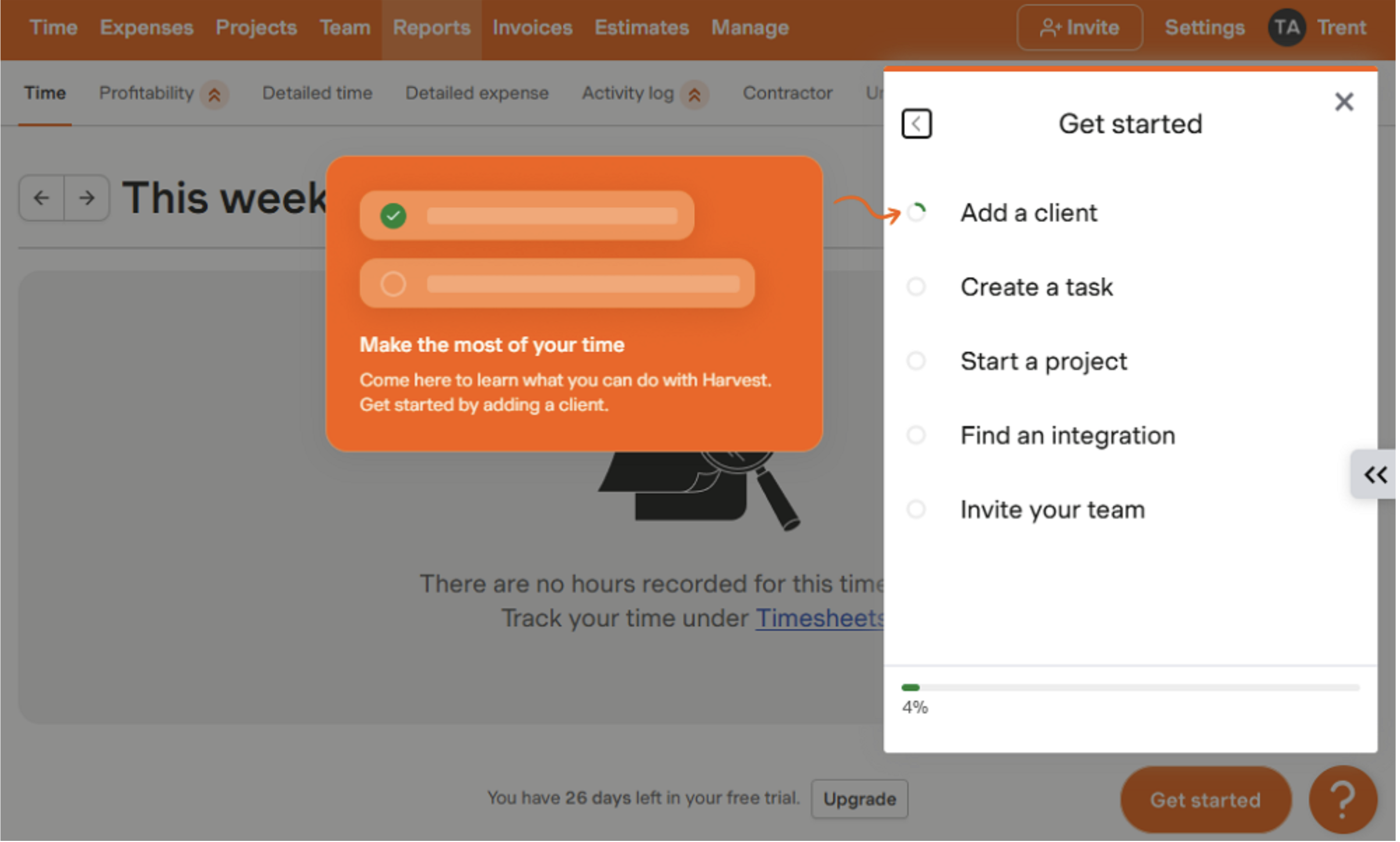
When I tried Harvest, its interface looked a bit dated and bland. For example, its navigation panel is located at the top, while modern users expect it to be on the left. The good thing is that its design doesn’t take away from the overall user experience.
Similarly, signing up for RescueTime takes longer than usual. The signup started with a series of frustrating questions that turned an otherwise simple process into something unnecessarily time-consuming. That issue aside, setting up an account takes minutes since RescueTime preconfigures many features, like productivity scores and projects.
Get up and running faster with Connecteam
Connecteam’s intuitive setup wizard and 24/7 support help your team onboard in minutes. No steep learning curve or complex configuration required. Try for free.
Support and Customer Service
| Support Type | Harvest | RescueTime |
|---|---|---|
| Live Chat | ✅ (Business hours) | ❌ |
| Phone Support | ❌ | ✅ (Voicemail only) |
| Email Support | ✅ | ✅ |
| Community forum | ❌ | ✅ |
| Help Center | ✅ | ✅ |
Judging their performance on the number of available support options, RescueTime has the edge. It has a community forum and a voicemail-only phone line, two options you don’t get with Harvest. Harvest, for its part, offers a live chat option, which is available during normal business hours only.
When it comes to responsiveness, Harvest wins by a mile. When I tested it, the support agents responded within 7 minutes of submitting the query on live chat. Since RescueTime doesn’t offer a live chat, the contact form is the fastest way to find help. During testing, RescueTime agents responded within 2 hours to contact form queries.
Who Wins: Harvest or RescueTime?
| Choose Harvest if you… | Choose RescueTime if you… |
| Need to manage client projects, track billable hours, and manage invoicing. | Want to automatically track your digital activity and productivity. |
| Need to monitor budgets against predefined limits | Stay disciplined and distraction-free during serious work. |
| Read our in-depth Harvest review. | Read our in-depth RescueTime review. |
Our take:
Although Harvest and RescueTime are both time trackers, they’re not direct competitors. I found big differences in their capabilities, which means that they’re geared towards different use cases. Your choice between Harvest and RescueTime won’t come down to which app is superior, but rather, which platform has the features you need.
Harvest is ideal for freelancers and teams that want to track billable hours and improve estimating and invoicing. It’s a good fit for users who spend their time in front of the screen, either in a physical office or working from home.
RescueTime is also great for desk workers, but for different needs. Considering that it lacks a manual timer, it won’t help users track billable time. But its automatic time tracking mode makes it a good pick for users who want to track productivity metrics and understand how they spend their work hours.
Connecteam vs. Harvest vs. RescueTime
While Harvest and RescueTime are designed for desk workers, Connecteam is built primarily for deskless employees. For this reason, it has some features you won’t find with either Harvest or RescueTime, including:
Compliant GPS Time Tracking
Connecteam time tracker helps you track time accurately and in full compliance with labor laws. It lets you set up geofences (virtual boundaries) around job sites — construction sites, offices, warehouses, and restaurants. This feature is especially useful in workplaces where you need to verify employee locations to prevent time theft.
With the geofence, employees can only clock in or out when physically within the job site, preventing off-site punching. Better yet, you can configure the Connecteam geofence to clock out employees who leave a job site without authorization. This improves timesheet accuracy, ensuring your company pays workers only for the hours spent on the actual job.
I also really like Connecteam’s flexible break tracker. It lets you configure mandated breaks and strictly enforce them to avoid legal trouble. You can set up reminders to remind employees to start breaks on time, and you can block early returns, which often lead to mandatory break violations.
On top of that, Connecteam overtime tracker lets you track daily, weekly, daily double-time, holiday, and seventh consecutive day overtime. I love that you can easily adjust the overtime thresholds and rates to align with local labor laws. Even better, Connecteam calculates workers’ overtime pay automatically, eliminating tedious manual calculations.
Automatic Shift Scheduling
Connecteam’s scheduling helps ensure each employee is where they need to be at the right time. It has an intuitive scheduling interface, a drag-and-drop tool, shift templates, and recurring shifts. Combined, these tools speed up scheduling, helping you achieve full coverage in minutes, not hours.
For large teams looking to schedule employees even faster, Connecteam’s AI-powered Auto-Scheduler ticks the right boxes. It analyzes shift requirements, employee qualifications, and availability to automatically assign the right staff to hundreds and even thousands of open shifts. Besides slashing scheduling time down to minutes, it ensures each worker handles a shift within their skillset, improving work quality.
Connecteam also lets you set scheduling rules, such as maximum shifts and hours, to align with industry regulations and labor laws. The automatic conflict detector helps enforce these rules. It examines each schedule to pinpoint issues like overlapping shifts, prompting you to fix them before publishing the schedule. This prevents the last-minute scramble and confusion that often cripple operations.
Excellent Customer Support
With Connecteam, customer support isn’t an afterthought. It’s a built-in advantage that makes your experience smoother and more rewarding. What I love is that the provider offers a nice blend of guided and self-service support options. Help is available to all users, including free plan subscribers, via 24/7 live chat, phone, email, and knowledge base.
When I tested Connecteam’s live chat, I received responses within a minute of submitting the query. In most cases, I didn’t even need to escalate my issue to a human agent, thanks to the thorough AI assistant. The assistant provided great answers, with links to detailed guides in case I needed additional context.
Connecteam also offers a paid support option called Connecteam Pros. With this option, you’re connected to a certified setup and onboarding partner to help you through the initial setup phase and get your team up and running in record time. This lets you make the most out of each feature from the start, even ones you might not have found on your own.
| Connecteam | Harvest | RescueTime | |
|---|---|---|---|
| Time tracking with GPS | ✅ | ❌ | ❌ |
| Geofencing | ✅ | ❌ | ❌ |
| Shift scheduling | ✅ | ❌ | ❌ |
| Open shifts and shift swapping | ✅ | ❌ | ❌ |
| Free plan | ✅ Up to 10 users | ✅ One user | ✅ One user |
| 24/7 support | ✅ 24/7 live chat | ❌ | ❌ |
Connecteam is your best fit if you want to manage your deskless workforce without paying more for advanced features. Its free plan — available for up to 10 employees — gives you access to all features, including GPS time tracking, scheduling, and task management.
You’ll only need a paid plan when your team grows. In this case, you can start with the Basic plan for $29 per month for 30 employees, which works out to less than $1 a month per user. Even with larger teams, you can try Connecteam for free with a generous 14-day trial, no credit card required.
FAQs
Yes, Harvest is a reliable time tracking app for freelancers and desk teams looking to track project time for accurate billing.
No, Harvest doesn’t track desktop activity or take screenshots when the employee is clocked in.
Yes, RescueTime automatically creates a block-list of personal or distracting websites. However, the block-list only comes into effect when you’re in FocusTime mode.
Yes, the app works just fine without an internet connection. It keeps monitoring your activity and logs the data locally on your device. Once you reconnect the device, it automatically syncs the data to your account.
Connecteam outshines both Harvest and RescueTime when it comes to compliance. It has geofencing, built-in break enforcement, overtime tracking, and overtime & break rules that help comply with labor laws. Neither Harvest nor RescueTime have these features.
Yes. Connecteam has one of the most generous free plans in the industry. It’s free for up to 10 users and includes all paid features like GPS time tracking, scheduling, and task management. Harvest and RescueTime limit free access to solo users.