


When time tracking lives outside the tools your team actually uses, missed entries can turn into messy project costs, billing errors, and wasted admin work. Everhour and Toggl Track both solve that problem, but in different ways: Everhour works best inside project management tools, while Toggl Track is stronger as a standalone timer.
I compared them by testing their time tracking, automation, project workflows, billing, visibility, setup, support, and pricing.
Use this guide to decide which app better fits how your team tracks time, manages project costs, and turns work hours into reports or invoices.
At a Glance: Quick Summary
Everhour is a time-tracking app that comes into its own when used within third-party project management software. It works fine as a standalone app, but it’s most helpful for remote teams, agencies, and project teams that already use project management tools without built-in time trackers.
Additionally, Everhour has activity monitoring (with screenshot recording), expense tracking, and invoicing. The wide range of features makes it a good choice for managers looking to track productivity, bill clients, and control costs all from a single platform. Learn more in our full Everhour review.
Like Everhour, Toggl Track accurately logs work hours, but it takes a different approach, focusing on automation. The auto-tracker lets users log work hours without having to start or stop the timer, while the timeline feature records the apps and websites a user visits, revealing work habits and enabling performance assessment.
However, the timeline is visible to individual users only, not the manager. While this enhances employee privacy, it also inhibits managerial oversight. Without visibility into the apps and websites employees visit, managers can’t monitor team productivity. Learn more in our full Toggl Track review.
Pricing and Plans
| Everhour | Toggl Track |
|---|---|
Free – $0/user/month
| Free – $0/user/month
|
Team – $8.50/seat/month
| Starter – $9/user/month
|
| N/A | Premium – $18/user/month
|
Custom
| Enterprise – Custom pricing
|
* All prices show the monthly cost when billed annually as of June 2026.
Everhour’s and Toggl Track’s pricing models may look similar on the surface, but they differ slightly. Everhour charges per seat and requires a minimum of five seats on its paid plan. This means that solo users who want the paid plan must pay for four extra seats they don’t need.
On the other hand, Toggl Track uses a per-user model and doesn’t impose a minimum-user requirement on any of its plans. With Toggl Track, you pay only for the seats you need, even if it’s just one, which makes it ideal for solo users and small teams.
In addition, Toggl Track offers three paid plans, giving users the flexibility to choose the one that best meets their needs. Everhour, on the other hand, has a unique advantage: Its one paid plan packs all of the advanced features and still costs less than Toggl Track’s cheapest plan, which offers just a handful of advanced features.
Free Plan and Free Trial
Both Everhour and Toggl Track are free for solopreneurs and small teams with up to five employees. However, their free plans aren’t exactly generous, as they restrict access to basic time-tracking and project management features.
The free trials don’t require a credit card, which allows you to test the premium features without worrying about an automatic charge on your card. The trial duration differs, though: Toggl Track offers a 30-day free trial, whereas Everhour has only a 14-day free trial.
Pros and Cons
The pros and cons below offer a snapshot of the strengths and weaknesses of Everhour and Toggl Track:
Everhour Pros:
- Built-in billing and expense tracking
- Seamless integration with project management tools
Everhour cons:
- No break tracking
- No advanced auto-tracking tools
Toggl Track Pros:
- Powerful offline tracking capabilities
- Automated time tracking
Toggl Track cons:
- No overtime or break tracking
- No built-in expense tracking
Use Cases
Both Everhour and Toggl Track are reliable for time tracking, yet their unique features make each tool suitable for different use cases:
Everhour is best for:
- Tracking time inside project management tools: Everhour is a strong fit for teams that already manage work in tools like Asana, ClickUp, Jira, or Trello and want employees to track time where their tasks already live.
- Managing project costs, expenses, and client billing: Everhour connects billable hours, project budgets, expenses, and invoices, making it useful for agencies, consultants, and project teams that need clearer cost control.
Toggl Track is best for:
- Automated time tracking for desk-based work: Toggl Track’s auto-tracker, timeline, reminders, and offline mode make it a strong option for freelancers and office teams that want fewer missed time entries.
- Personal productivity tracking with stronger employee privacy: Toggl Track is useful for employees who want visibility into their own work habits without giving managers screenshot-based activity monitoring.
Side-by-Side Feature Overview
I tested both Everhour and Toggl Track and compiled my findings in the sections below. Keep reading to discover how these apps stack up against each other to make an informed decision:
-
Time Tracking — Winner: Tie
-
Activity Tracking — Winner: Everhour
-
Project Management — Winner: Everhour
-
Expense Tracking — Winner: Everhour
-
Billing and Invoicing — Winner: Everhour
Everhour and Toggl Track are powerful time-tracking apps for knowledge workers, and the wide range of time-tracking options on each app proves it. However, while both let users log time using the mobile, web, and desktop apps, browser extensions, and a pomodoro timer, they have subtle differences that make one a better fit for you.
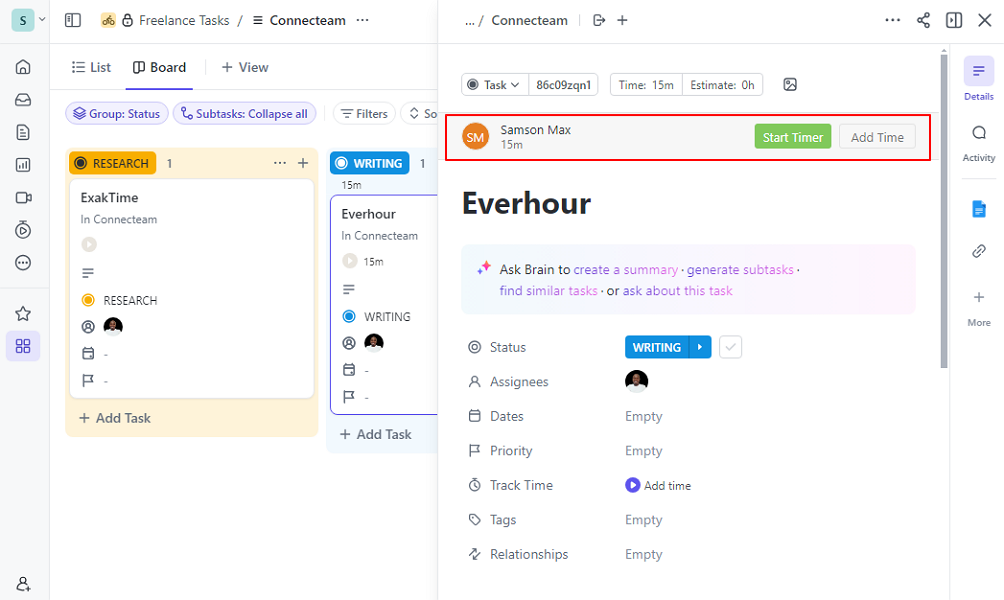
Unlike Toggl Track, which is compatible with both Android and iOS devices, Everhour offers only an iOS version — sorry, Android users. To make up for the missing Android version, Everhour’s browser extension works on nearly all browsers: Chrome, Firefox, Edge, Safari, and Opera. Toggl Track, on the other hand, is compatible only with Chrome, Firefox, and Edge.
Another difference is that Everhour provides a kiosk app, and Toggl Track doesn’t. A kiosk app lets employees clock in and out on a shared device and serves as a digital substitute for traditional punch clocks. It’s helpful in workplaces where employees start and end their work at the same place, such as the front desk, workshop floor, or office entrance.
Perhaps the most significant difference between Everhour and Toggl lies in their approaches. While Toggl Track works best as a standalone time tracker, Everhour comes into its own when used within project management software. This lets project teams log work hours directly where tasks live, while managers view all timekeeping data on a single Everhour dashboard. When reviewing Everhour, our tester found its embedded project-management timer especially useful because users can track time right inside where work happens and consolidate the timekeeping data on a single dashboard.
Last but not least, Toggl Track has excellent offline capabilities and can log time even without an internet connection. Everhour requires an internet connection to work, which is important to keep in mind if you intend to use the app in low-connectivity regions.
Automatic Time Tracking
Everhour isn’t big on automation. In fact, its automation options are limited to clock-in and clock-out reminders and the auto-clock-out option. In contrast, Toggl Track offers timeline and auto-tracker features, which log time without the employee having to lift a finger.
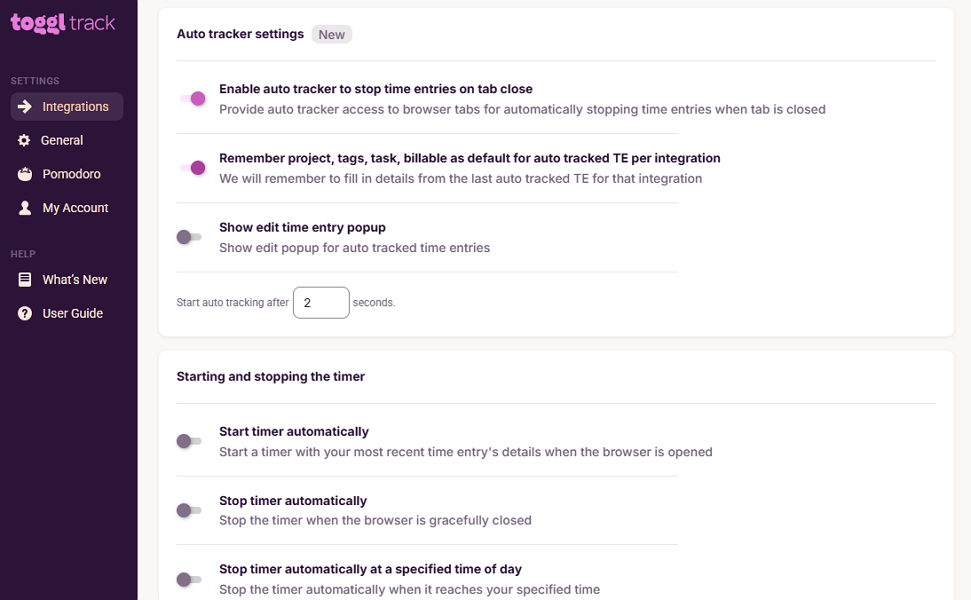
The auto-tracker lets you set rules to automatically start and stop the timer for specific web pages on the Chrome extension. For example, you can set it to start the timer whenever you open Google Docs or a project management tool, and stop it when you close a tab. This way, you don’t have to manually start the timer when you visit these pages.
Moreover, Toggl Track’s timeline runs in the background, tracking desktop activity to record the time a user spends on apps and websites. It doesn’t automatically create timesheets, but recording desktop activity helps fill gaps in the timesheet when you forget to start the timer.
Break and Overtime Tracking
If payroll accuracy for hourly office workers is a priority, Everhour is the better choice. In addition to logging regular work hours, it tracks daily overtime, double time, and weekly overtime.
During testing, I set it to track overtime in accordance with California overtime laws, and it worked just fine. However, with no advanced options, the app couldn’t help when I needed to track holiday and seventh-consecutive-day overtime. If labor laws in your region mandate advanced overtime tracking, Everhour won’t help.

Toggl Track doesn’t track overtime and is useful in scenarios where overtime isn’t mandated, such as for exempt employees. Additionally, neither platform has built-in tools for tracking breaks, which makes them unsuitable for companies with non-exempt employees in tightly regulated regions, such as California.
Verdict: Declaring the winner is a tough call, as each platform’s options cancel out the other’s advantage. Everhour doesn’t have an Android app, but it makes up for it with stronger browser compatibility. Meanwhile, Toggl Track doesn’t support overtime tracking, but its time-tracking automation is hard to beat. For these reasons, this is a tie.
When it comes to activity monitoring, both Everhour and Toggl Track are capable, but their approaches differ significantly. While Everhour swears by screenshot recording, Toggl Track prefers automated activity detection without screenshots.
Everhour takes a screenshot every 10 minutes, giving managers insights into employees’ desktop activities. It organizes screenshots into hourly blocks so managers can easily see the web pages a team member visited and determine whether they were actually working on the assigned tasks.
Many employees have reservations about screenshot recording, and rightly so. Without proper controls, the screenshot-recording approach can easily spiral into intrusive monitoring. To help you steer clear of this vice, Everhour has implemented various measures.
First, employees must grant the app permission to take a screenshot, and the manager can’t make it mandatory. Second, employees can easily turn off the screenshot feature anytime they are doing personal work. They can also blur screenshots to hide sensitive data. Last, Everhour records screenshots only when the employee is clocked in.
Toggl Track records employee activity using its timeline feature. The provider prides itself on the level of privacy this feature grants employees, but that comes with a trade-off. The timeline feature is built primarily for personal productivity and is entirely private. As a result, managers can’t peek into an employee’s timeline to see the apps or websites they visit during work hours.
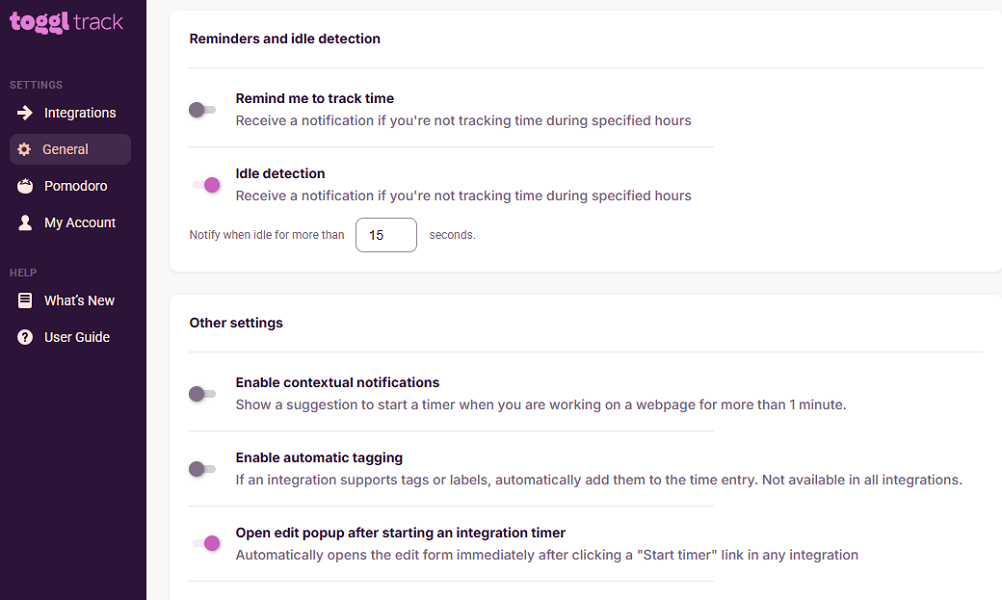
Both platforms support idle detection, but each uses it for different purposes. Toggl Track detects extended periods of desktop inactivity and prompts the employee to keep or discard the idle time. Meanwhile, Everhour stops the timer when the computer is idle for a preset period (typically 15 minutes).
Verdict: I have to give this one to Everhour for its privacy-conscious screenshot-recording approach. This helps managers determine where employee hours go during the day, a perk you don’t get with Toggl Track.
Everhour and Toggl Track come with essential project and task management tools. During testing, I was able to create projects, set billable rates, and add budget estimates in hours or fees. It was also easy to break down projects into tasks and assign them to specific team members so everyone knew what was on their plate.
What sets Everhour apart is that it lets you import projects and tasks from the integrated project management tool, giving you twofold benefits. First, it eliminates the manual, repetitive work of duplicating projects and tasks in Everhour. Second, it lets you make the most out of advanced project management features, while still performing detailed time analysis. What stood out in our Everhour review was how much duplicate setup the integration removed: Everhour pulled projects from the tester’s ClickUp workspace in minutes, saving hours of manual project and task entry.
Another difference is that Everhour supports list and board task views, giving managers the flexibility to choose a view that suits their workflow. The board view is particularly useful for teams that need a visual card-based way to track progress, as they would in a dedicated kanban project management solution like Trello.

Toggl Track, on the other hand, has limited view options to help users track tasks as they move through different stages. While it supports list and calendar views, these are available on the timer page, not the project page. As such, the views let you visualize only time entries, rather than giving you insights into where each task stands. When reviewing Toggl Track, our tester found the project dashboard useful but not especially intuitive because project-level reporting was located inside the Projects tab rather than under Reports or Insights.
Verdict: Everhour wins here, thanks to its ease of use, integration with project management tools, and flexible task views. Toggl Track is powerful in its own right, but its PM tools are less about traditional task management and more about time data analysis.
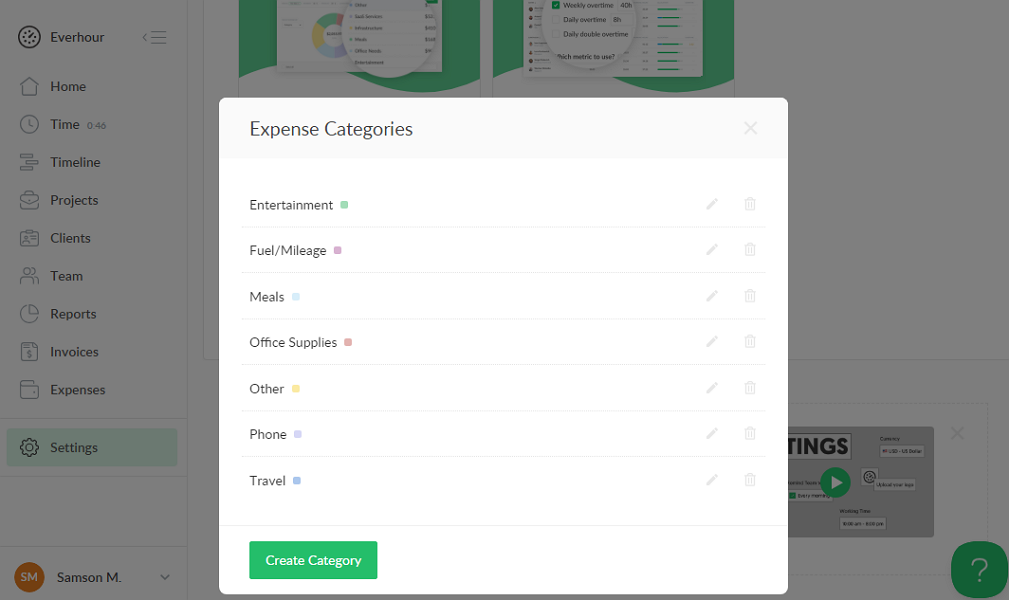
In addition to tracking project-related costs, Everhour enables business owners to manage expenses such as meals, mileage, fuel, entertainment, and phone use. However, its expense-tracking features are basic and may not be helpful for businesses with complex expense-tracking policies and approval workflows.
Employees can submit expenses via the web or the iOS app. Unfortunately, Android users are out of luck. Unlike dedicated expense-tracking apps, Everhour doesn’t have a built-in approval workflow. As a result, expenses are deemed approved upon submission. Without oversight, expense errors could easily sap your profitability or spiral into billing inaccuracies and reimbursement disputes.
Everhour requires employees to attach receipts, which is a great way to prove expenses were genuinely business-related. However, the platform doesn’t provide an option to make receipt attachment mandatory for each expense. Unless this requirement is defined in your internal policy, employees may end up submitting expenses without receipts.
Toggl Track, by contrast, accurately tracks project costs but lacks built-in expense-tracking features.
Verdict: If I had to choose between the two platforms, I would definitely select Everhour for its essential expense-tracking tools. Even so, Everhour is suitable only for basic expense tracking; it falls short in complex use cases such as compliant mileage tracking.
If there’s an area where both Everhour and Toggl Track excel, it’s tracking billable hours and calculating costs using predefined rates. This removes the guesswork from client billing and helps managers quickly prepare invoices without the manual drudgery.
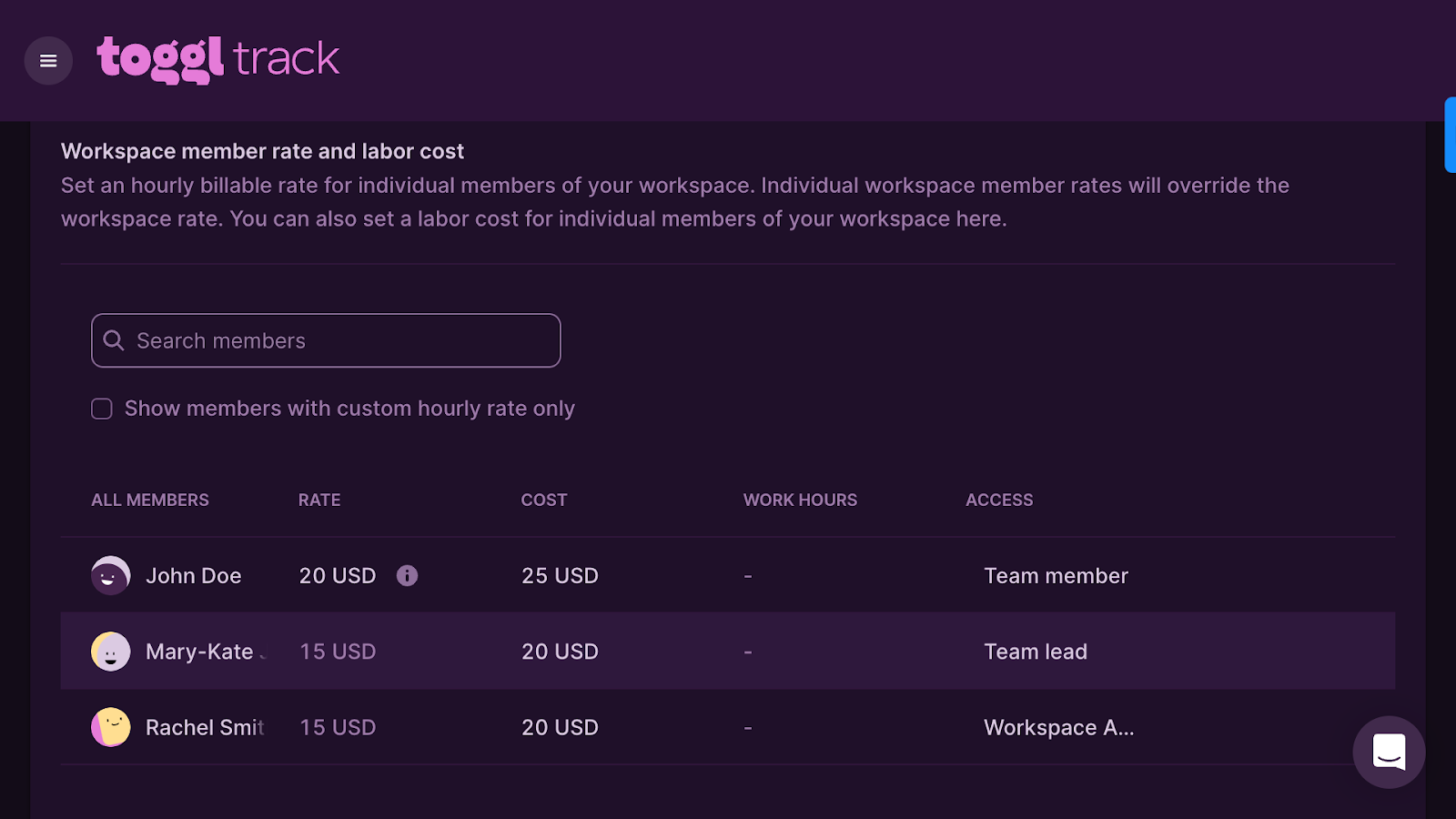
However, Everhour has a slight advantage because it lets you track expenses alongside project costs. This removes the need to manually add expenses when billing clients, which you have to do in Toggl Track.
Moreover, creating invoices is easier with Everhour than with Toggl Track. With Everhour, all I had to do was click “create invoice” on the invoice page and select the client, project, and duration. The system pulled data relevant to that client, allowing me to create an invoice in seconds.
The invoicing process in Toggl Track feels clumsy, as the invoice creation feature is tucked away in the reporting section. Plus, to generate an invoice, you must filter timesheets by client, click “create invoice,” and then manually add other expenses (if any).
Both apps let you send invoices through email without leaving the platform. However, Everhour has a clear edge because it enables you to download invoices as PDFs, an option Toggl Track doesn’t offer. Additionally, while Everhour supports integrations with various popular accounting platforms, Toggl Track integrates only with QuickBooks.
Verdict: Everhour is the clear winner in this category. With its built-in expense tracker, straightforward invoice creation, PDF downloads, and broader integration with accounting solutions, Everhour makes billing faster and more efficient than Toggl Track.
User Ratings
Based on ratings on popular review sites, both Everhour and Toggl Track are robust time-tracking apps. However, while they garner excellent rating scores, Toggl Track has a larger review base, which makes its overall score more reliable.
Everhour
- ⭐ 4.7/5 on Capterra (432 reviews)
- ⭐ 4.7/5 on G2 Crowd (183 reviews)
Toggl Track
- ⭐ 4.7/5 on Capterra (2,585 reviews)
- ⭐ 4.6/5 on G2 Crowd (1,588 reviews)
* Ratings were last checked in June 2026.
Security & Compliance
| Category | Everhour | Toggl Track |
|---|---|---|
| Data encryption | ✅ TLS 1.2 in transit | ✅ TLS 1.2 in transit; AES-256/AES-128 at rest |
| GDPR compliant | ✅ | ✅ |
| HIPAA compliant | ❌ | ❌ |
| Certification | ❌ | ✅ ISO/IEC 27001:2022, SOC 2 Type 1 |
| MFA/2FA | ✅ 2FA | ✅ 2FA |
| Admin controls | ✅ Role-based access control | ✅ Role-based access control |
| Hosting region | U.S. and Europe | Not specified |
I scoured the web and found no publicly reported security incidents or data breaches linked to either Everhour or Toggl Track. These clean security records are a clear sign that both platforms are reliable and safe to use.
However, while their security measures hold up well, Toggl Track has certifications that make it a better fit for enterprises in tightly regulated sectors. Its SOC 2 Type 1 certification confirms that its security controls, policies, and procedures have been independently audited and have received the seal of approval.
That said, neither Everhour nor Toggl Track is HIPAA compliant, making them unsuitable for the healthcare industry.
Setup and Onboarding
Everhour and Toggl Track are exceptionally easy to set up from scratch, thanks to their intuitive interfaces and straightforward onboarding processes.
During testing, I got basic time tracking up and running in minutes with both platforms. I also found it easy to invite users, configure budget settings, and set billable rates for accurate project cost tracking.
However, Everhour’s setup process is more straightforward, especially for businesses that want to integrate it with project management software. With the integration, the app automatically syncs your existing projects and tasks. This saves you the hassle of manual syncing and enables your team to quickly align task and project data, a process that takes time with Toggl Track.
Both platforms provide a quick setup wizard that lets users configure essential settings without jumping between tabs. Toggl Track’s real advantage becomes apparent after signing up, as it provides text walkthroughs to help users learn the platform quickly. Everhour, by contrast, doesn’t offer a feature walkthrough, so users have to explore the product on their own.
Support and Customer Service
| Support Type | Everhour | Toggl Track |
|---|---|---|
| Live chat | ✅ (Business hours) | ✅ (Business hours) |
| Phone support | ❌ | ❌ |
| Email support | ✅ | ✅ |
| Community forum | ❌ | ✅ |
| Ticket support | ❌ | ❌ |
| Help center | ✅ | ✅ |
While live chat support is available during business hours on both platforms, Everhour’s agents responded to my queries within an hour. Make no mistake: Its response times were slow by live chat standards, but they were faster than with Toggl Track, whose agents took four hours to respond.
Toggl Track appeals to users who value self-service and peer-driven help. Its live chat has an AI assistant that provides quick responses to urgent issues. Additionally, it has community support, an option you won’t get with Everhour. It isn’t the most active community, but it can still help you find answers and get practical tips from other users.
🏆 Who Wins: Everhour or Toggl Track?
My results point to a clear Everhour win. The platforms are neck and neck in the area that matters most: time tracking. Beyond that, though, Everhour proved to be a better platform across nearly all other categories, including activity tracking, expense tracking, and invoicing.
However, by no means does this make Toggl Track a fly-by-night time tracker. Toggl Track performs the basics pretty well. Plus, its advanced time-tracking automation features, such as the auto-tracker, make it an ideal choice for teams that prefer a hands-free approach to time tracking.
👉 The verdict: Choose Everhour if you already use project management software such as ClickUp, Asana, or Jira and want to track time within the platform. However, if you prefer a simple, standalone time-tracking app that prioritizes privacy and automation, Toggl Track checks the right boxes.
Connecteam vs Everhour vs Toggl Track
While Everhour and Toggl Track are suitable for desk-based teams, they don’t cut it for field- or shift-based teams. They track time accurately but lack essential tools to simplify workforce management in field-based industries.
If you need a solution that combines GPS time tracking with geofencing, real-time location tracking, team communication, and shift scheduling, Connecteam stands out as one of the best options. Connecteam is useful across industries such as construction, landscaping, retail, manufacturing, and healthcare, where real-time visibility and field workforce coordination matter.
Let’s explore some of the benefits of using Connecteam:
Accurate, Compliant Time Tracking
Picture this: You run a company with field-based teams and are struggling to ensure workers clock in only when they arrive at the jobsite. In this scenario, neither Everhour nor Toggl Track can help, as they don’t support GPS time tracking. That’s where Connecteam can make a difference, bringing order to chaos with its advanced time-tracking features.
Connecteam lets you set geofences or virtual boundaries around your work sites. Using its real-time location capabilities, Connecteam tracks employee movement and allows them to clock in only once they’ve arrived at the jobsite. This prevents early clock-ins and buddy punching, ensuring each employee’s timesheet reflects the actual time they spend on-site.
Moreover, if you operate in an industry or region with strict labor compliance requirements, fret not. With Connecteam, you can set break and overtime policies that align with labor laws in your region, such as in California or Australia. Whether you want to assign recurring breaks for longer shifts or track seventh-consecutive-day overtime, Connecteam is equal to the task.
Fast, Efficient Scheduling
With Connecteam’s scheduling features, you can finally say goodbye to the headaches of coordinating shift teams. Whether you’re managing construction workers, hotel staff, or home caregivers, Connecteam lets you build conflict-free schedules in minutes, not hours.
With handy tools such as recurring shifts, a drag-and-drop scheduler, shift copying, and shift templates, creating complete schedules is fast, easy, and stress-free.
One of my favorite Connecteam features is the AI auto-scheduler, which makes assigning shifts a lot easier. All you have to do is create open shifts and click a single button to assign them all, even if they number in the hundreds.
What sets the auto-scheduler apart is its ability to assign shifts based on employees’ qualifications, ensuring the right person is scheduled for the right task. This is especially valuable in industries like healthcare, hospitality, and construction, where an employee’s skills directly affect service quality and compliance.
Other notable scheduling features include:
- Scheduling rules: Set maximum hours and shifts per employee, as well as the gap between shifts, to ensure schedules comply with the underlying labor laws.
- Employee self-service tools: Allow employees to accept or decline assigned shifts in compliance with predictive-scheduling laws. Connecteam also lets employees swap shifts and find replacements on their own, though you can require the manager’s approval for each request.
- Automatic conflict detector: Connecteam automatically flags any scheduling errors, ensuring managers publish only conflict-free schedules.
Real-Time Location Tracking
With Connecteam’s location tracker, keeping tabs on field employees’ movements and activity has never been easier. Managers can open the map to see the real-time locations of field technicians, delivery drivers, cleaners, construction crews, home caregivers, and more. This helps ensure everyone is where they need to be, improving accountability and security.
What really impresses me is Connecteam’s ability to enforce location compliance. You can set the app to alert you when an employee leaves a jobsite. This feature is helpful in industries like healthcare, where home caregivers need to stay with the patient for a certain amount of time to comply with care standards.
Connecteam doesn’t just track employee location; it also monitors their movement, mapping the exact route they take while clocked in. Using advanced breadcrumb technology, the app adds timestamps along the route, giving managers a clear view of where employees were throughout the day. For example, you can easily tell when a delivery driver was at the drop-off or pickup location.
And So Much More
Connecteam offers other useful workforce management features, including:
- Employee onboarding and training
- Time-off management
- HR management
- Team communication
- Task management
- Forms and checklists
In short, Connecteam is an all-in-one workforce management platform that enables you to streamline workflows without juggling multiple tools or breaking the bank. It offers an impressive suite of advanced tools and still costs much less than Everhour or Toggl Track.
For comparison, Connecteam’s Basic plan costs $29 per month for 30 employees, which is less than $1 per employee. Compare this to Everhour’s and Toggl Track’s most affordable plans, which cost $8.50 and $9 per user, respectively – and neither can match Connecteam’s capabilities.
Even better, Connecteam lets solopreneurs and small businesses with up to 10 employees use all of its advanced features free of charge.
FAQs
Yes, Toggl Track is a reliable time tracking app for small office-based teams, but it doesn’t cut it for businesses with field teams.
Connecteam is better than Toggl Track for organizations where operational efficiency relies heavily on location verification and coordinated field workforce management.
Connecteam is one of the best time-tracking tools for non-desk teams, thanks to its advanced features, such as GPS time tracking and geofencing.
The main difference between Everhour and Toggl Track is that Everhour works best inside project management tools, while Toggl Track works best as a standalone time tracker. Everhour is stronger for project costs, expenses, and invoicing. Toggl Track is stronger for automated time tracking and personal productivity.
