



Weekend coverage can become a constant source of tension. When the same employees work every Saturday and Sunday, you can end up with exhausted employees, missed shifts, and a team that feels the schedule isn’t fair.
But even a rotation that looks balanced on paper can create overtime, skill gaps, or unsafe handoffs if it isn’t planned well. Night shifts and extended hours can also disrupt sleep, reducing attention, reaction time, and judgement.
A rotating weekend schedule splits the workload more evenly while keeping the right people on the job. This guide covers how to compare common patterns, choose the best fit, build your rotation, and manage it with less manual work.
Key Takeaways
- A rotating weekend schedule spreads Saturday and Sunday work across employees or teams instead of assigning the same people every weekend.
- The best rotation matches demand, skills, shift length, and rest needs, while complying with local regulations.
- Every-other-weekend and 2-2-3 schedules work well when fairness and predictable time off matter most.
- 4-on, 4-off and DuPont schedules can support continuous coverage, but long or night shifts need extra planning to avoid fatigue.
- Recurring templates, availability, time-off requests, open shifts, and live attendance tracking make a rotation easier to run.
What’s New in This Update (August 2026)
- Added a side-by-side schedule comparison and a recommendation tool to help you select a pattern.
- Clarified how federal overtime works and where local rules or agreements may change your plan.
- Added step-by-step guidance for building, publishing, monitoring, and adjusting rotations with software.
Choose a Weekend Pattern Before You Build the Rotation
A rotating schedule isn’t one fixed formula. The right one depends on whether you need full 24/7 coverage, only daytime weekend staffing, or a smaller backup team. Use this table as a starting point, then adjust it for your staffing levels, local laws, and any union agreements.
| Schedule pattern | How weekend time off works | Typical shift length | Best fit | Main planning considerations |
|---|---|---|---|---|
| Every other weekend off | Two teams alternate full weekends off. | 8, 10, or 12 hours | Retail, customer support, labs, and service teams with steady weekend demand. | You need enough trained backup staff for absences and holidays. |
| 2-2-3 / Panama | A two-week cycle gives each team alternating full weekends off. | Often 12 hours | 24/7 operations that need steady day and night coverage. | The repeating pattern can be hard to understand without a shared calendar. |
| 4-on, 4-off | The eight-day cycle moves through weekends over time. | Often 12 hours | Manufacturing, security, transport, and other continuous operations. | A long run of shifts can increase fatigue, especially when nights are involved. |
| DuPont | A four-week rotation includes a seven-day break after a mix of day and night shifts. | 12 hours | Stable, high-volume operations with enough teams for continuous coverage. | It takes careful planning for overtime, recovery time, and handovers. |
| Weekend-only team | A dedicated team works weekends instead of rotating the work. | Any | Businesses with consistently high weekend demand and willing volunteers. | You need a fair pay, recruiting, and retention plan for permanent weekend work. |
Longer shifts can reduce the number of handovers and give employees more days away from work. But they also need more careful risk management. NIOSH guidance identifies nonstandard schedules as a fatigue concern, while OSHA guidance highlights the risks of extended, rotating, and irregular shifts.
Treat the patterns in this guide as planning templates, not safety or legal rules.
Pro Tip
Know When to Use a Fixed vs. Rotating Weekend Schedule
A fixed weekend schedule means the same employees work the same weekend days each week. It can be a good choice when you have staff who prefer weekend work, when weekend demand is predictable, or when you have a dedicated weekend team.
A rotating weekend schedule alternates weekend duties among employees or teams. It usually makes more sense when you need seven-day coverage and want to share less desirable shifts fairly. The trade-off is complexity: you need to plan staffing, time off, shift swaps, holidays, and overtime before the rotation goes live.
A rotation works best when the weekend workload is steady and employees can see the pattern far in advance. It works poorly when staffing changes every week, key skills are held by only one or two people, or managers use it to cover a staffing shortage without creating a backup plan.
Examples that show the difference
Good fit: A 24/7 security company needs two licensed guards at each client site every weekend.
Three guard teams rotate weekend day and night assignments, while a cross-trained relief guard covers approved leave. Each site stays covered by qualified staff, the rotation is predictable, and weekend work is shared instead of falling on the same people.
Poor fit: A retail store has unpredictable Sunday rushes and only one trained closer.
An every-other-weekend roster may look fair, but it won’t solve the skill gap. Train more closers, use demand data to set Sunday staffing, or create an open-shift backup plan before rotating the work.
Pick a Rotation That Protects Coverage, Rest, and Payroll
A schedule should protect coverage and give employees enough recovery time, while keeping labor costs visible. Let’s narrow it down for your business:
-
Map your real weekend demand
-
Choose shift length with fatigue in mind
-
Set your legal and pay guardrails first
-
Test the skill mix and absence plan
Look at each weekend by hour, location, job, and required skill. Don’t use a weekday staffing number as a shortcut. Your Saturday morning demand, Sunday closing shift, and overnight coverage may all need different staffing levels.
Use past schedules and actual time data to find where you regularly overstaff, underfill, or call people in at the last minute. With an employee time clock app, you can compare planned shifts with worked hours, spot attendance patterns, and review overtime before it becomes a payroll surprise.
An 8-hour shift can mean more handovers but may be easier to staff and recover from. A 12-hour shift can mean fewer workdays and handovers, but it raises the stakes for breaks, workload, commute time, and sleep.
Injury rates are higher on evening and night shifts than on day shifts and link 12-hour workdays with increased injury risk.
For a safety-sensitive role, fatigue can show up as slower decisions, poor handoffs, quality issues, or an accident. For a customer-facing team, it may turn into longer waits, more errors, and lower service quality. In both cases, the business cost can include rework, absences, overtime, customer complaints, and lost trust.
Under federal overtime rules, working on Saturday or Sunday doesn’t by itself require federal overtime pay. For covered, nonexempt employees, the Fair Labor Standards Act generally requires at least time-and-a-half for hours worked over 40 in a fixed workweek. The law doesn’t let you average hours across two or more workweeks.
State and local laws, union agreements, industry rules, and company policies may require additional protections or pay premiums. Review all applicable requirements before publishing a new rotation.
For general guidance, see Connecteam’s state labor law guides and break-law guide. Always consult a qualified legal professional for specific advice for your business.
A fair schedule isn’t enough if every Saturday team has new employees and every Sunday team has experienced staff. Spread licensed, trained, or senior employees across teams, and then decide who can cover a sick call, a vacation day, or a holiday before it happens.
Approved leave should appear in the same place as the schedule. Connecteam’s time-off management lets employees submit requests, alerts managers about conflicts, and syncs approved time off with schedules and timesheets.
Start With These Rotating Weekend Schedules
Take a look at the sample rotating weekend schedules below. Remember: each pattern works differently, so check the use case and potential drawbacks before choosing one. If your schedule includes nights, long shifts, or physically demanding work, consider fatigue risks and review the rules that apply to your team.
Every Other Weekend Off: Simple and Predictable
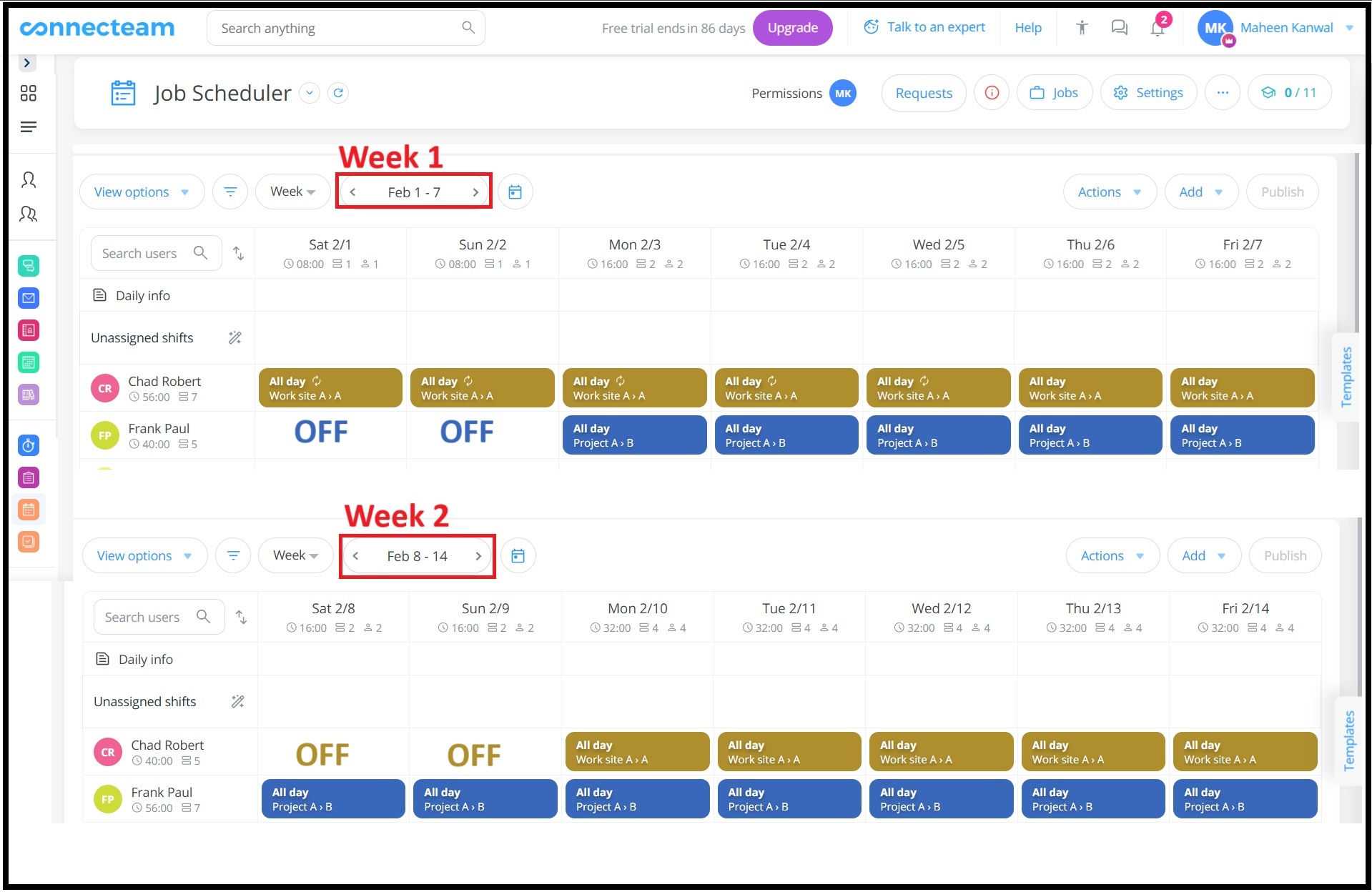
This is often the easiest rotation to explain. Team A covers one full weekend while Team B has it off, then they switch the next weekend. You can use 8-, 10-, or 12-hour shifts based on demand.
| Weekend | Team A | Team B |
|---|---|---|
| Weekend 1 | Works | Off |
| Weekend 2 | Off | Works |
| Weekend 3 | Works | Off |
| Weekend 4 | Off | Works |
This pattern is a strong fit for teams that need weekend coverage but don’t have to rotate day and night shifts. It gives employees a clear promise: every other full weekend off. The risk is coverage. Keep a qualified backup list and use open shifts with manager approval when an absence creates a gap.
2-2-3 (Panama): Built for Continuous Coverage
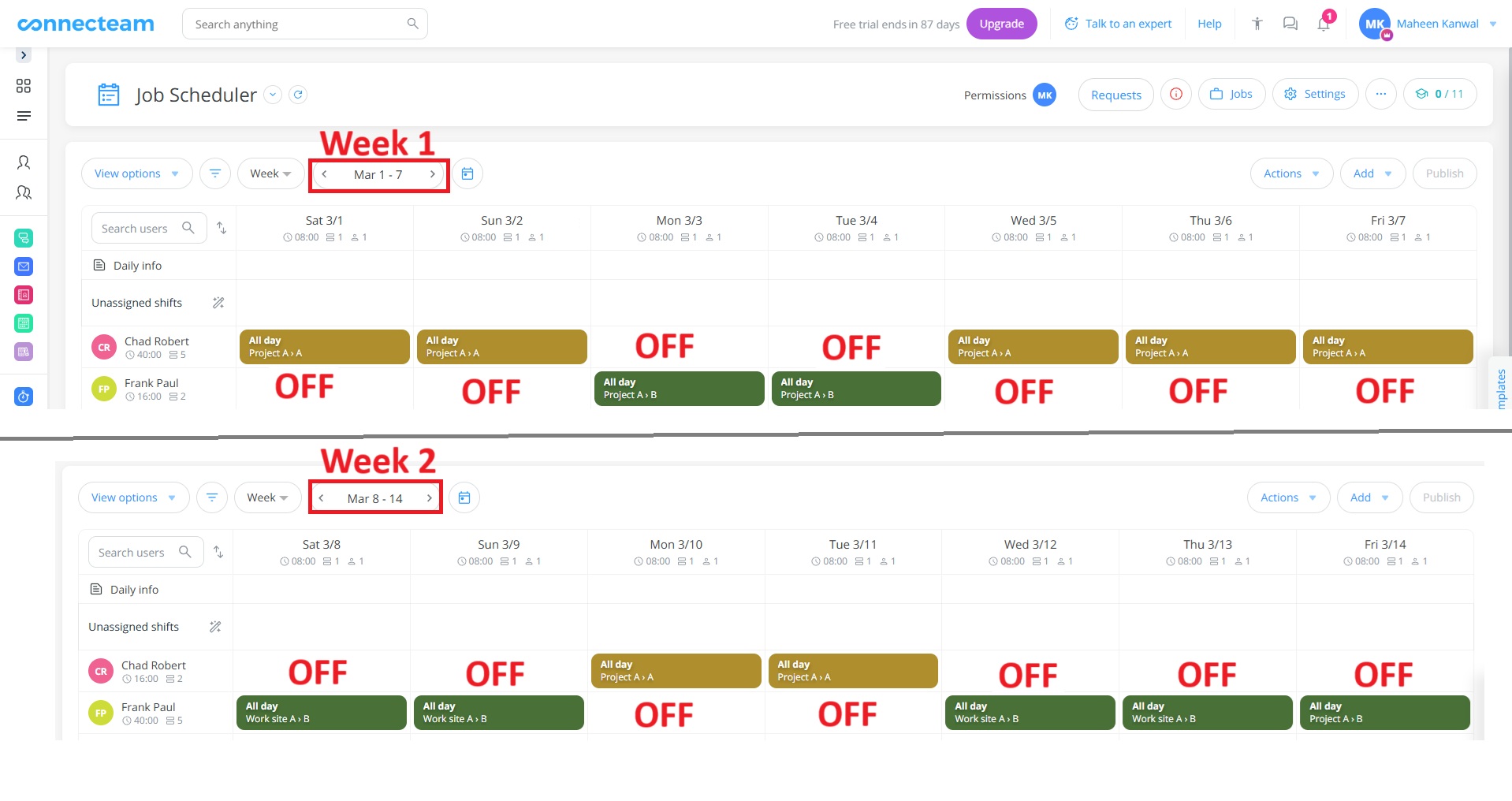
The 2-2-3 schedule runs on a two-week cycle. One team works two days, has two days off, works three days, has two days off, works two days, then has three days off. Over the full cycle, teams alternate full weekends off.
A simple one-team view looks like this:
| Week | Monday–Tuesday | Wednesday–Thursday | Friday–Sunday |
|---|---|---|---|
| Week 1 | Work | Off | Work |
| Week 2 | Off | Work | Off |
This pattern works well for 24/7 coverage because each team knows its rotation in advance. But it needs clear team assignments, a shared calendar, and enough qualified teams to cover day and night work. Build the pattern once in a scheduling app, set it to repeat, and publish a full cycle so employees can plan ahead.
Did You Know?
4-on, 4-off: Longer Breaks With a Moving Weekend
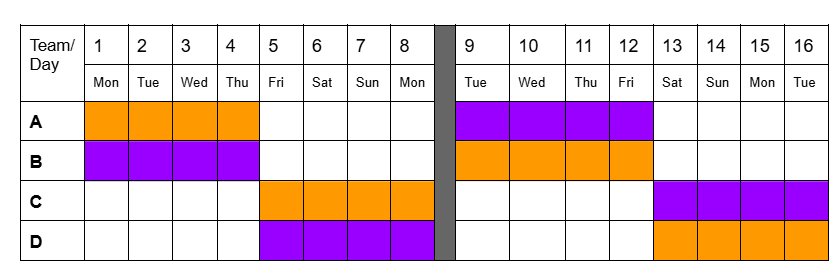
In a 4-on, 4-off schedule, employees work four shifts in a row and then have four days off. Because the cycle is eight days rather than seven, employees won’t have the same weekends off every time. Over time, weekend work is spread across the team.
This can be a good fit for businesses that value longer blocks of time off and use stable teams. It needs close attention when shifts are 12 hours or include nights. Track consecutive shifts, late arrivals, missed breaks, and overtime so you can see whether the pattern is still working for your team.
Pro Tip
DuPont: A Long-Break Pattern That Needs Strong Controls
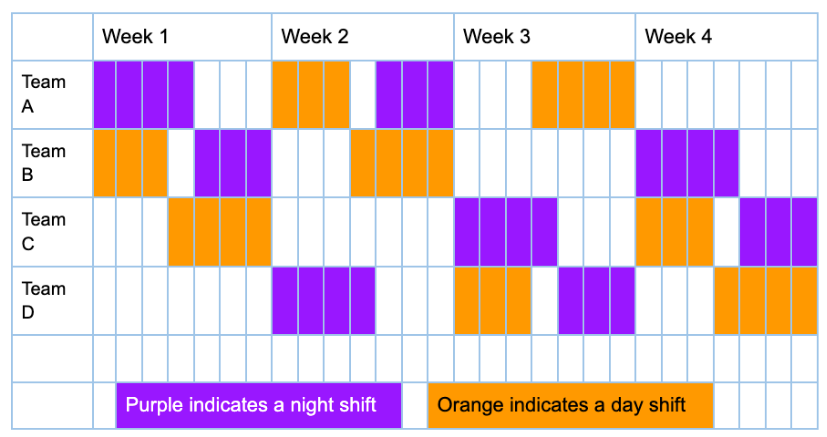
The DuPont schedule is a four-week, 12-hour rotation that moves employees through day and night shifts and ends with seven consecutive days off. One common sequence is: four night shifts, three days off, three day shifts, one day off, three night shifts, three days off, four day shifts, then seven days off.
The long break can be appealing, and fewer handovers can be helpful. Use it only when you can balance skills across teams, meet all break and pay obligations, and give managers a way to spot fatigue or coverage risks early.
Alternating Weekend Days Off: Full Coverage Without a Full Weekend
This setup gives one employee or team Saturday off and another Sunday off, then rotates those days in the next cycle. It can be useful in restaurants, retail, and local service businesses that need full weekend coverage but can’t spare entire weekends.
The advantage is simple coverage. The drawback is that employees don’t receive a complete weekend away from work. Be clear about how you’ll rotate holiday weekends and whether Saturday and Sunday are treated as equally desirable in your workplace.

Other Options to Consider
You may also want to use every-third-weekend rotations, a weekend-only team, a Pitman schedule, a Continental shift pattern, or a Southern Swing schedule. These options can work when your staffing, coverage, and shift-length needs are different from the examples above. The same rule applies: pick the pattern only after you consider demand, skills, time off, rest, and pay rules.
Build Your Weekend Rotation in 7 Steps
Once you’ve found a pattern that works for your team, turn it into a repeatable process. The goal is to make coverage dependable without having employees chase down changes.
-
Define the minimum coverage for each weekend shift
-
Write the rules before assigning names
-
Build balanced teams and a reusable template
-
Publish at least one complete rotation cycle
-
Plan for absences before the weekend starts
-
Watch planned versus worked hours
-
Review the rotation after one or two full cycles
Set the minimum number of employees, required skills, location needs, and manager coverage for each Saturday and Sunday shift. Include handover time if it matters to safety or service. Mark roles that can’t be filled by an untrained replacement.
Set rules for overtime, breaks, maximum consecutive shifts, shift swaps, call-outs, holiday rotation, and time-off notice. Check relevant federal, state, local, and collective-agreement rules. This prevents managers from making different decisions each weekend.
Balance experience and critical skills across teams. Then create the rotation as a recurring schedule template. Tools like Connecteam support daily, weekly, and monthly recurring schedules, and its scheduler considers availability, roles, labor laws, and costs as you plan.
Give employees the full cycle, not just next week’s shifts. A 2-2-3 or 4-on, 4-off pattern is much easier to follow when staff can see several weeks ahead. Ask employees to confirm their shifts and keep questions in one shared channel.
Keep a current list of qualified backups. Let staff submit availability and time-off requests early, then decide whether you will use approved shift swaps, open shifts, an on-call roster, or a combination of these options. Don’t wait for a Saturday morning call-out to define the rule.
Pro Tip
A published schedule is only your plan. Review actual clock-ins, missed breaks, late arrivals, no-shows, shift swaps, and overtime after each weekend. Connecteam’s time clock app turns worked hours into timesheets, flags late arrivals or no-shows, and can alert managers to missed breaks and overtime limits.
Ask a few direct questions: Were all shifts covered? Did any team carry more weekend or holiday work? Did overtime increase? Were the right skills on each shift? Did employees have enough time to recover before returning? Use the answers to adjust the template, team mix, or backup plan.
The Impact of a Fair, Well-Run Rotation
A fair rotation can make coverage more predictable and give managers a clearer view of the trade-offs behind every weekend shift. Here are some ways a weekend rotation schedule can impact your business:
| If the rotation is planned poorly | What it means for your business | What to monitor |
|---|---|---|
| The same people take most weekend or night shifts. | Higher fatigue risk, perceived unfairness, and more pressure on a small group of employees. | Weekend assignments, shift swaps, absences, and feedback. |
| Critical skills aren’t balanced across teams. | Delayed work, poor handoffs, quality issues, or a manager having to cover the shift. | Skill coverage by shift and last-minute replacement requests. |
| Worked hours exceed the plan. | Overtime costs, payroll corrections, and less control over labor spend. | Planned versus actual hours and overtime alerts. |
| Schedule updates stay in chats or spreadsheets. | Employees may miss changes, and managers can’t see the full coverage picture. | Confirmed shifts, unread updates, and no-show patterns. |
Managers should review how the schedule is working, listen to employees, and make changes before fatigue, coverage gaps, or unexpected payroll costs become routine.
Solving Common Weekend-Rotation Problems
Even well-planned rotating shift schedules can face challenges. Here are some examples of what to look out for and how to handle them:
| Challenge | What to do |
|---|---|
| Employees say the rotation isn’t fair. | Track full weekends, holidays, nights, and last-minute call-ins over a set period. Share the rule used to balance them. |
| A sick call leaves a weekend shift uncovered. | Use a qualified backup list, approved open shifts, and a clear escalation path. |
| Holiday weekends create conflict. | Use a separate annual holiday tracker and rotate priority fairly instead of changing the normal pattern at the last minute. |
| Employees are tired during day-to-night transitions. | Review consecutive shifts, work intensity, breaks, and return times. Make changes when you see fatigue signals or quality errors. |
| Payroll takes too long to clean up. | Set workweek, overtime, break, and pay rules before publishing. Review exceptions every weekend. |
Run a Reliable Weekend Rotation With Connecteam
Connecteam can help you turn a weekend pattern into a working process that employees can see, follow, and update from one place.
Build and repeat the rotation
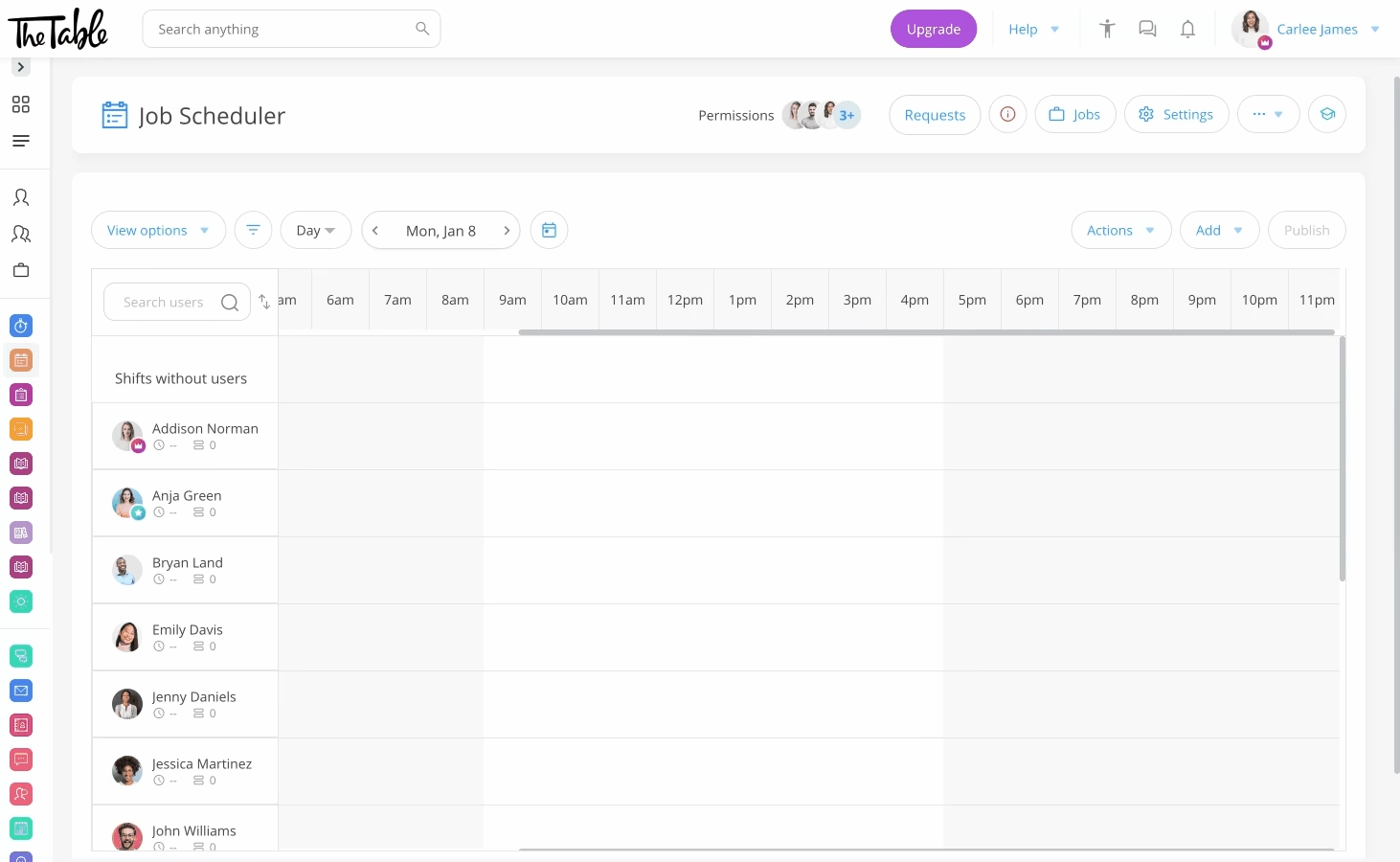
Use Connecteam’s employee scheduling app to create a template, assign the right people by role, and repeat the schedule daily, weekly, or monthly. It’s especially useful for 2-2-3 and other patterns that are easy to set up once but time-consuming to rebuild by hand.
Catch conflicts before the schedule goes live
Set availability, overtime, break, and other schedule limits before publishing. Connecteam can flag conflicts and help you see labor costs so you can fix coverage issues before they become a weekend emergency.
Handle time off and shift changes in one place
Employees can request time off, update availability, and request shift trades through the app. Managers can review changes from the schedule, so they don’t approve a request that leaves a critical weekend role empty.
Track attendance and control payroll surprises
Connecteam’s employee time clock gives managers live attendance visibility, organizes worked hours into timesheets, and helps identify missed breaks and overtime limits. That makes it easier to compare your planned rotation with what really happened.
Keep schedule updates where employees will see them
Use the online team chat to communicate changes by team, location, or shift. Staff can keep shift questions in a dedicated work channel, and managers can schedule messages to go out at the next clock-in or shift.
Rotating Weekend Schedules Without the Burnout
The best rotating weekend schedule is the one that matches real demand, shares difficult shifts fairly, and includes a plan for fatigue, absences, and overtime. Build the first cycle, measure what happens, and adjust the template before problems become routine. When you’re ready to run the process in one place, try Connecteam’s scheduling app for free.
FAQs
Not necessarily. Under federal overtime rules, covered, nonexempt employees generally earn at least time-and-a-half after 40 hours in a fixed workweek, which may not apply to weekends. State or local rules, union agreements, and company policies may require more.
There’s no one right number. Start with your coverage needs, then track weekend, holiday, night, and call-in assignments over a clear period. The goal is a pattern employees can understand and managers can apply consistently.
Yes, if your policy allows it and a qualified replacement is available. Set approval rules in advance so a swap doesn’t create overtime, leave a required skill uncovered, or break a rest rule.
Publish at least one full rotation cycle ahead whenever possible. Employees need enough visibility to plan family time, appointments, and transport, while managers need time to solve gaps before the weekend starts.
Choose based on workload, safety risk, handovers, staffing availability, recovery time, and legal requirements. A 12-hour shift can reduce the number of handovers, but long and night shifts need stronger fatigue controls.
