


If your employees don’t speak up, small problems turn into daily frustrations, and before you know it, you’re dealing with turnover, angry customers, and unnecessary costs.
I reviewed 4 digital suggestion box apps and ranked them by ease of use, feedback quality, and reporting tools.
Use these picks to collect honest feedback, spot issues early, and act faster.
| App | Best for | Starting Price | Key Considerations |
| Ideanote | Teams that want to run structured idea campaigns with workflow automation | $6/user/month | Complete pure-play suggestion box with custom forms, AI content suggestions, and reporting. Lacks built-in private messaging. |
| Suggestion Ox | Organizations that need true anonymity as the foundation of their feedback culture | Contact vendor for price | Anonymity is central to the platform. Direct Replies let managers respond without revealing identity. Reporting tools are basic. |
| Officevibe | HR teams that want pulse surveys and suggestion collection in one platform | $4,999/year | Strong reporting and benchmarking with AI analysis. 10-user minimum and structured cadence make it heavier than a simple suggestion box. |
| TINYpulse | Companies that want employee feedback tied to well-being research and benchmarks | Contact vendor for price | Backed by WebMD Health Services' research, includes Onboard Surveys for new hires. Unclear pricing and limited product info. |
| Connecteam | Collecting employee ideas and turning feedback into action across deskless and frontline teams | Just $29/month for the first 30 users | Custom surveys, Live polls, Digital forms, In-app chat. |
What’s New in This Update (August 2026)
Our Top Picks
-
1

Best for teams that want to run structured idea campaigns with workflow automation
-
2

Best for organizations that need true anonymity as the foundation of their feedback culture
-
3

Best for HR teams that want pulse surveys and suggestion collection in one platform
Why trust us?
Our team of unbiased software reviewers follows strict editorial guidelines, and our methodology is clear and open to everyone.
See our complete methodology
How I Chose the Best Digital Suggestion Box Software
Here are the key features I looked for to find the best digital suggestion boxes:
Core Feedback Collection
- Keeping feedback front of mind: The software must let managers customize prompts, run targeted campaigns, and organize submissions by topic, department, or urgency so that no idea gets lost in a generic inbox.
- Getting honest input without fear of retaliation: Employees need the option to submit feedback anonymously, with controls that go beyond just hiding names.
- Closing the loop so employees keep participating: Managers should be able to respond directly to submissions, ask follow-up questions, and update employees on what happened with their idea.
Visibility and Actionability
- Spotting patterns before they become problems: There must be clear dashboards that show submission volume, sentiment trends over time, response rates, and follow-through metrics.
- Making it easy enough for people to actually use: The system needs to be simple enough that any employee can submit feedback in under 60 seconds, without training, a desktop login, or multiple steps.
Operational Integration
- Reaching employees who don’t sit at desks: The software must allow mobile submissions so field crews, retail staff, and shift workers can share ideas from anywhere.
- Following up privately on sensitive issues: Managers should be able to send private messages to discuss sensitive feedback one-on-one, without making the conversation visible to the whole team.
- Showing employees their voice matters: The tool needs a way to broadcast updates, share what’s changing, and connect decisions back to employee suggestions.
The 4 Best Digital Suggestion Boxes of 2026
-
Ideanote — Best for teams that want to run structured idea campaigns with workflow automation
Available on
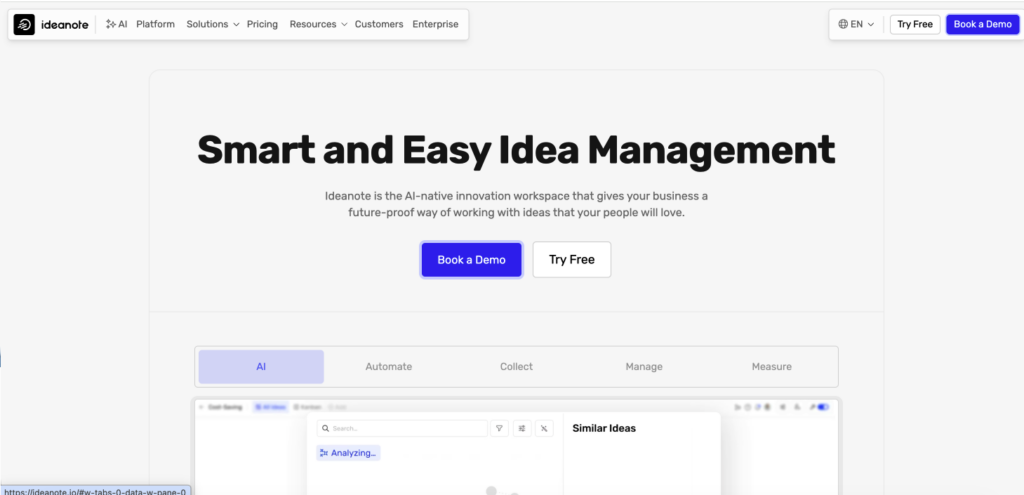
Ideanote is an idea management platform that helps organizations collect, organize, and manage employee suggestions and feedback in one system.
Why I chose Ideanote: Ideanote caught my attention because of its sleek interface and automated workflows that move ideas from submission through review to implementation.
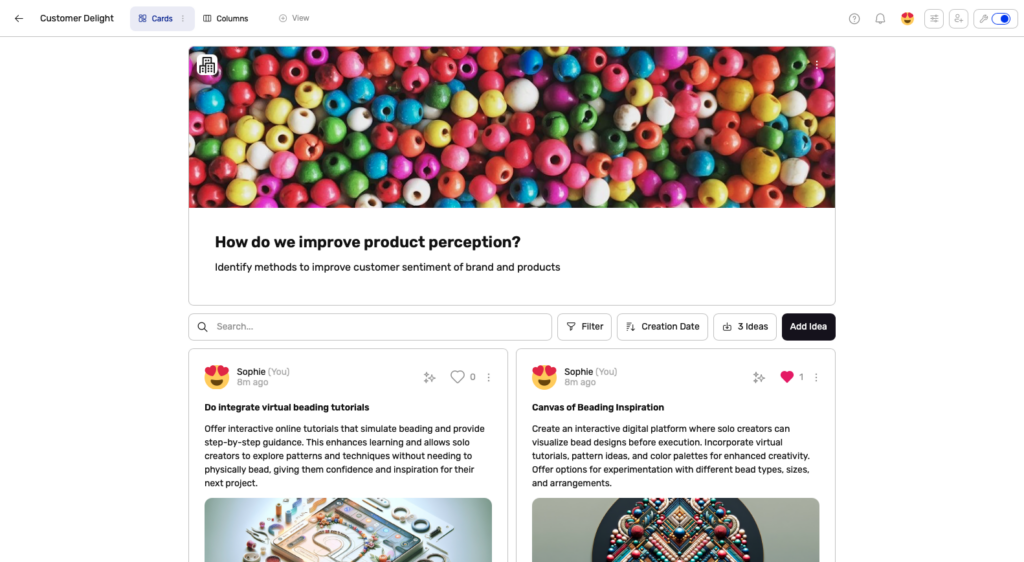
Prompts and idea collection
With Ideanote, collecting employee ideas is simple and flexible. I liked that teams can create custom prompts and run focused idea campaigns using two types of forms: ones tied to a single idea collection or reusable forms that work across multiple campaigns. This definitely made it easier to tailor submissions to specific goals, from improvements to innovation initiatives.
Ideanote also supports a wide range of input fields, including dropdowns, sliders, and file attachments, which I appreciated. There are conditional fields that allow forms to adapt based on previous responses. I liked that this creates a more guided submission experience for employees. You can also use AI to suggest starting points for idea campaigns, which is really helpful.
One limitation I found is that the free plan caps at 250 ideas, which could fill up quickly for active teams.
Feedback and collaboration
You can add comments and receive notifications on Ideanote. When someone comments on an idea, all of the contributors are alerted. I liked that you can tag people to loop them in for clarification or next steps. Plus, employees can react to ideas, rate them, and view statuses.
There are a few anonymity settings, which I also appreciated. However, I found that general collaboration was pretty public. Ideanote doesn’t have a built-in private messaging feature, which makes me wonder how managers would be able to handle sensitive feedback or send one-on-one follow-ups.
Workflows and reporting
Organizing ideas is definitely one of Ideanote’s strengths. Idea collections can be grouped into sections like Sales, Marketing, or HR. You can view idea collections as cards or in column layouts that show different workflow stages.
Ideas move through customizable workflow phases, so teams can track progress from submission to review to implementation. I liked that you can create automation rules to trigger actions, such as notifications or updates, when ideas move between phases.
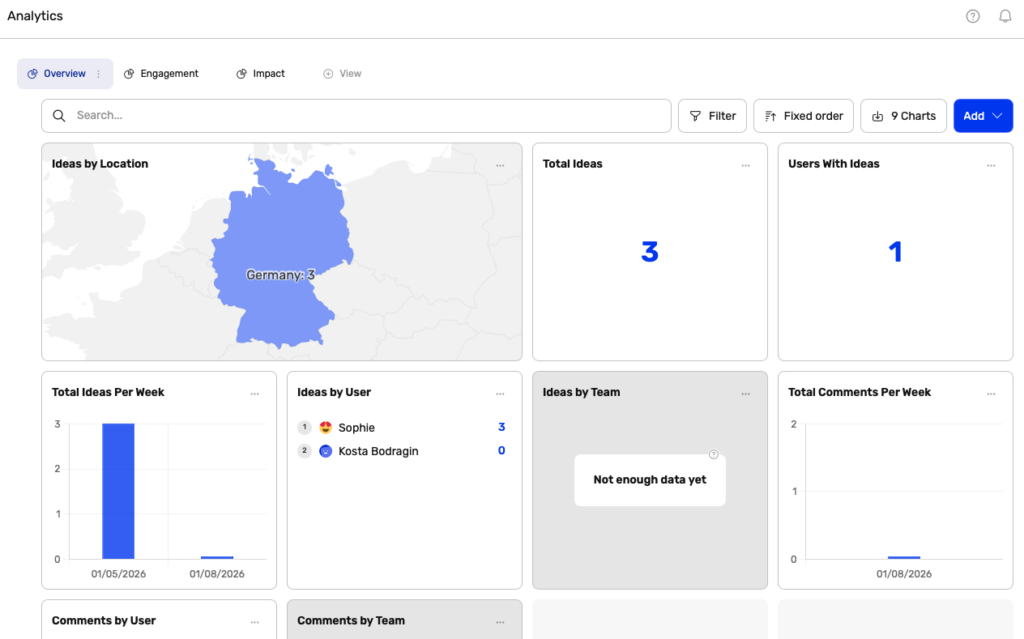
Ideanote also includes reporting tools that show participation, engagement, and idea progress. Managers can view metrics tied to individual campaigns or visualize ideas using custom criteria to identify patterns and priorities.
What users say about Ideanote
We use IdeaNote for internal collaboration. But, the real power is gathering ideas and feedback from outside of the company.
The layout can be a bit confusing. It’s a powerful tool but presents itself ‘too’ simplistically, so much so that at first I asked myself..’is this it?’..’am i missing something?’
Key Features
- Custom forms
- Idea collection
- AI content suggestions
- Reporting and analytics
Pros
- Anonymous submissions
- User-friendly interface
Cons
- No private messaging
- Free plan capped at 250 ideas
Pricing
Starts at $6/user/month Trial: No Free Plan: Yes — up to 10 users, 250 ideas
-
Suggestion Ox — Best for organizations that need true anonymity as the foundation of their feedback culture
Available on
- Web
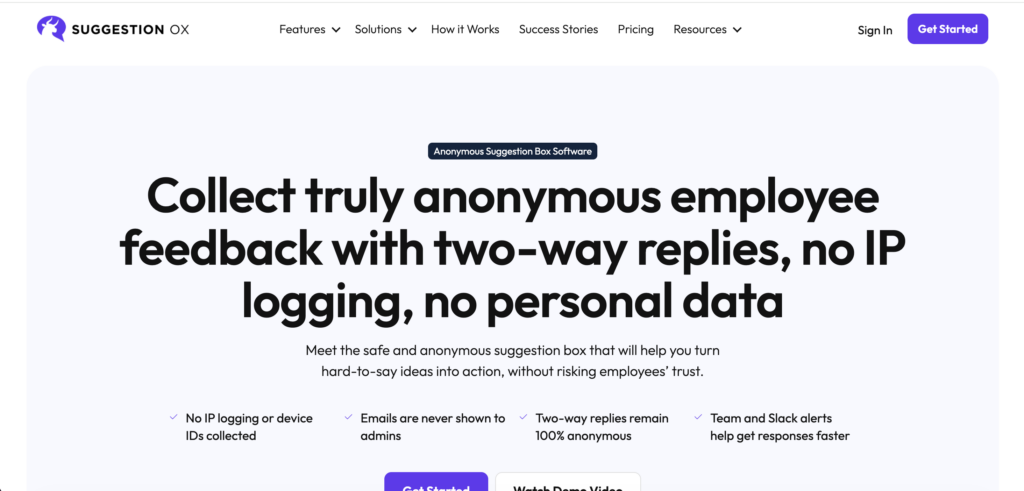
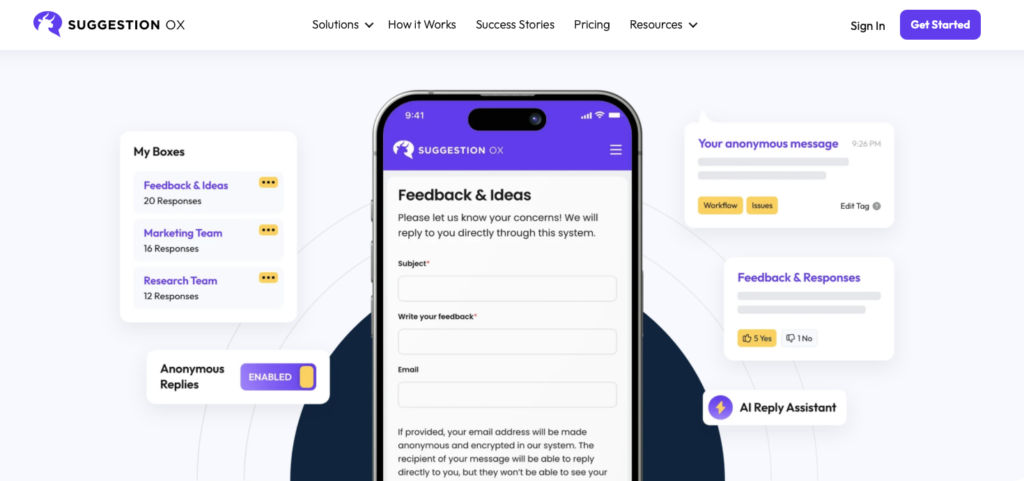
Suggestion Ox is an electronic suggestion box focused on collecting anonymous employee feedback.
Why I chose Suggestion Ox: Suggestion Ox stands out for its emphasis on giving employees a safe, confidential way to share ideas and concerns. Unlike tools that treat anonymity as a checkbox, Suggestion Ox actively strips IP, device, and browser details from submissions to protect identity at a technical level.
Forms and feedback collection
SuggestionOx lets teams customize submission forms to fit different feedback needs. I liked that you can add custom fields, apply branding, and create multiple suggestion boxes for different topics, departments, or campaigns. It makes the experience feel more personal.
I also noticed they offer QR code sharing for suggestion box links, making it easier for teams to participate from their phones.
This is a good setup to keep feedback organized and make sure that submissions reach the right people. Teams can assign, categorize, and track suggestions consistently with defined workflows. You can also use tags and categories to group ideas by theme, spot patterns, and prioritize action as feedback volume grows.
Anonymity and communication
SuggestionOx really stresses anonymity as a way for employees to share honest feedback without the fear of receiving pushback. This concept is really baked into the product. Submissions are designed to remain private as a way to create a safe environment for candid input.
I also found that they offer a dedicated phone number for voice or text reports, complete with voice modulation to protect identity. This is a unique option for employees who prefer speaking over typing.
I was really impressed by Direct Replies, which allows managers to respond privately to a suggestion while still keeping the employee’s identity hidden. That way, managers can ask follow-up questions and address sensitive issues without making the conversation public.
Reporting and limitations
Suggestion Ox has reporting tools that track trends over time, including sentiment and keyword analysis. While these insights can definitely help organizations, I noticed there are fewer advanced features like benchmarking, automated reports, and native BI integrations.
For smaller teams, I think the reporting capabilities are fine. However, larger organizations that need deeper analytics may find the reporting a bit limiting.
What users say about Suggestion Ox
It has helped us get in touch with our employees and understand what they are thinking, what their concerns are, and to plan based on their feedback.
I wish it were more customizable where we could put a logo and a box that the user can select if they WANT to be known who put the suggestion in.
Key Features
- Direct replies
- Multiple suggestion boxes
- Custom forms
- Workflows
Pros
- Anonymity and privacy features
- Simple setup
Cons
- Lacks transparent pricing
- Limited reporting
Pricing
Contact vendor for price Trial: Yes Free Plan: No
-
Officevibe — Best for HR teams that want pulse surveys and suggestion collection in one platform
Available on
- Web
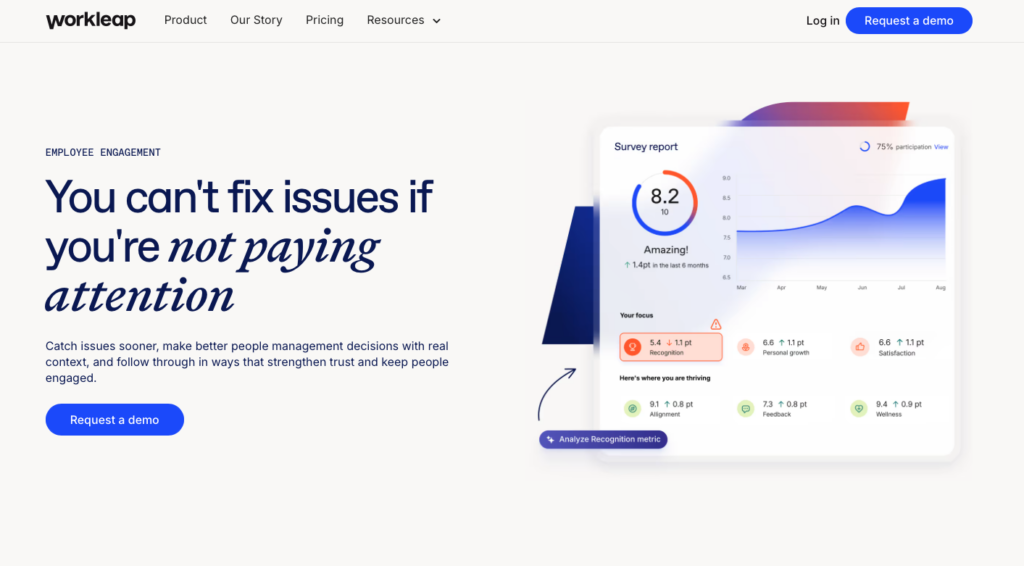
Workleap Officevibe is an employee engagement and feedback software that helps teams measure, understand, and improve employee satisfaction.
Why I chose Officevibe: Officevibe stood out for its use of AI to analyze employee feedback and surface themes quickly. For teams that rely heavily on surveys to understand sentiment and recurring issues, this can speed up the process of turning feedback into action.
Surveys and feedback
Officevibe’s Pulse Survey feature shapes the platform’s feedback experience. I really liked how customizable surveys were, and how you can tailor them through pulse, onboarding, or fully custom formats. Officevibe uses smart question logic, which adapts follow-up questions based on employee responses. There’s also a built-in scoring system, so positive scores trigger different prompts than lower ones, encouraging detailed feedback instead of just one-off ratings.
Employees can share input through multiple channels, including the pulse surveys, follow-up questions, and direct feedback submissions. I also appreciated that there were anonymity controls to protect employee privacy.
Something interesting about Officevibe is that feedback is only aggregated when the minimum responses required are submitted. That way, you have a better chance of preventing individual identification and managers can spot trends. All feedback and responses are stored in one place, making it easier for leaders to track themes over time and show that employee input leads to action.
Reporting and AI insights
For me, Officevibe’s reporting is the platform’s greatest strength. It offers a wide range of reports, covering trends, engagement scores, anonymous feedback, benchmarking, and more. You can also export raw data for deeper analysis, which is helpful. These reports are designed to look at sentiment, participation, and engagement over time.
The Team Insights are used to highlight strengths and flag areas where improvements are most likely to impact overall engagement. There’s also the built-in trend analysis, which automatically surfaces meaningful changes in scores, so leaders can focus on what needs attention without manual review.
I also noticed they’ve added an AI-powered feedback reply assistance tool to help managers craft responses and close the loop on highlighted issues.
Gaps and limitations
Officevibe is a feedback platform that may be more than some teams need if they’re looking for a simple digital suggestion box. There’s no dedicated private messaging for sensitive one-on-one conversations outside of survey responses, and the platform doesn’t include a built-in company update or broadcast feature to close the loop on feedback.
I can also see the 10-user minimum being a potential hurdle for small teams. Since Officevibe was brought into the broader Workleap enterprise platform, pricing has shifted from a simple per-user model to enterprise-tier packages starting at $4,999/year. For teams that prefer open-ended, always-on feedback, or a lightweight suggestion box with minimal setup, the depth and complexity may feel unnecessary.
What users say about Officevibe
Officevibe provides a regular stream of honest feedback and discussion between managers and employees across our company.
The tool is less effective for small teams, as it’s optimized for groups larger than 5 members. This makes it challenging to extract meaningful insights in smaller teams.
Key Features
- Pulse surveys
- AI feedback analysis
- Custom surveys
- Anonymous submissions
Pros
- Industry benchmarking
- Advanced reporting
Cons
- 10-user minimum
- Lacks one-on-one messaging
Pricing
Starts at $4,999/year Trial: Yes — 14-day Free Plan: Yes
-

TINYpulse — Best for companies that want employee feedback tied to well-being research and benchmarks
Available on
- Web
- iOS
- Android
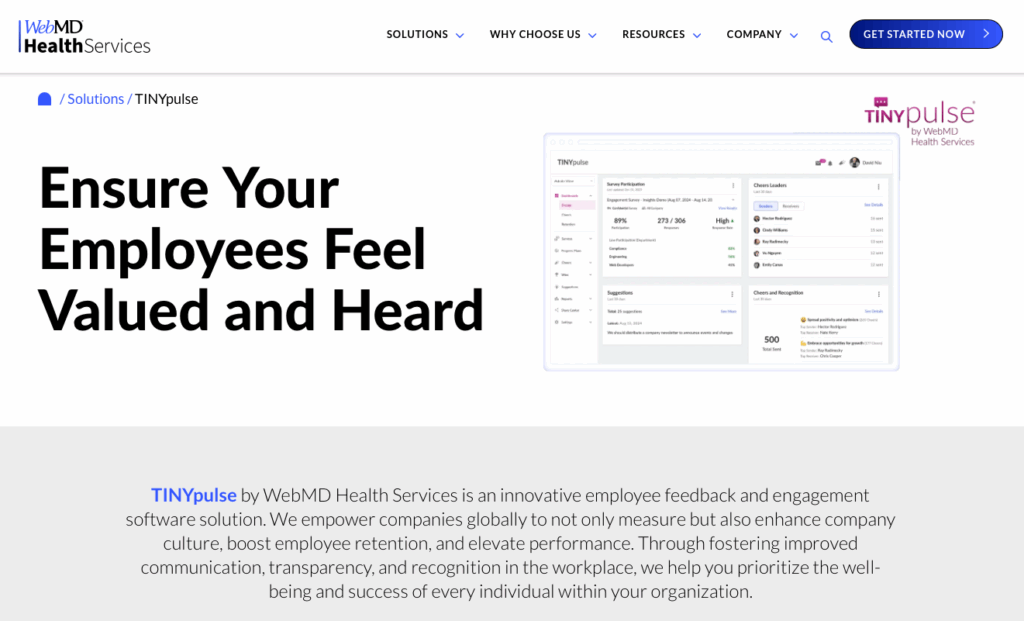
TINYpulse by WebMD Health Services is an engagement software designed to gather employee sentiment through pulse surveys, and improve company culture, retention, and performance.
Why I chose TINYpulse: I chose TINYPulse because it focuses on employee well-being and brings WebMD’s research-backed approach to employee engagement.
Customizable surveys and feedback collection
TINYPulse’s feedback is centered around two main survey products: Engage Surveys for existing employees and Onboard Surveys for new hires. Engage Surveys include recurring pulse surveys sent at regular intervals and flexible surveys you can launch anytime with custom questions. I liked that you can choose from a built-in question library, or create your own questions from scratch.
Onboard Surveys are designed for employees in their first 90 days and are sent on a fixed schedule. These aren’t anonymous, so managers can reach out to new hires who may need extra support and act quickly.
I noticed from their site that the platform seems geared toward larger organizations, with its demo form starting at 0-999 employees. Smaller businesses may find the sales-led onboarding process less accessible than a self-serve option.
Anonymity and two-way communication
Anonymity is a core part of TINYPulse. Employees can submit anonymous suggestions and feedback, including through the mobile app, which makes it easier to participate. The platform also supports two-way communication, allowing leaders to respond directly to feedback and continue the conversation.
While I appreciate that managers can address feedback within the platform, I wish there were dedicated private messaging and company announcements features. I think this would help strengthen the feedback loop on an individual and organizational level.
Reporting and analytics
TINYPulse offers dashboards and reports to track sentiment, engagement trends, and areas for improvement. I thought the reporting tools were helpful for teams that want to understand feedback patterns and guide follow-ups.
TINYPulse’s analytics are pretty straightforward, which is a strength and potential drawback. I can see this feeling limited to organizations that want AI-driven insights or benchmarking. But if you’re looking for clear, easy-to-read reports without the complexity, then TINYPulse definitely delivers.
What users say about TINYpulse
Happiness survey and happiness trends were quite useful to see the general morale in the organisation.


Responding to TinyPulse surveys is optional, so there may be some bias in our survey responses.
Key Features
- Pulse surveys
- Engagement reports
- Anonymous two-way communication
- Reports and dashboards
Pros
- Focus on well-being
- Backed by established research group
Cons
- No internal messaging
- Product information is limited
Pricing
Contact vendor for price Trial: No Free Plan: No
Workforce Communication Software for Employee Feedback
-
Connecteam — Best for collecting employee ideas and turning feedback into action across deskless and frontline teams
Connecteam is an all-in-one workforce management app that helps businesses collect employee ideas, concerns, and suggestions. It gives teams a simple, mobile-first way to share input and helps managers track, respond to, and act on feedback in one place.
Why I chose Connecteam: Connecteam combines a digital suggestion box with everyday operational tools in one platform. It’s strong for teams that need reliable feedback channels without forcing employees to download a separate, single-use survey app.
Here’s what else Connecteam has to offer:
Custom surveys
The best way to set up a digital suggestion box in Connecteam is with employee surveys in Connecteam. I liked that you can use ready-made templates or create your own prompts with different question types, including open-ended submissions. It was really easy to enable anonymous responses, so employees can be honest without feeling pressured. Plus, you target specific teams and tailor the look to feel to fit how your business works.
Connecteam makes it easy to turn suggestions into action. Feedback comes in real time, automatic reminders keep participation high, and employees can submit ideas right from their mobile devices. From the manager side, you can track participation, follow up quickly, and export results for deeper analysis. This made it simple to spot trends and act on insights.
Live polls
Polls are a simple, interactive way to encourage quick participation and real-time feedback. You can use a template or build your own with multiple-choice, open-ended, yes/no, or rating questions. Plus, you can limit submissions to one per person to avoid duplicates or spam. I liked that this gives employees an informal way to weigh in on small decisions or share their preferences.
Managers can use polls to gather input on everyday choices, test ideas, or get a sense of team sentiment. As employees vote, they can see the results update in real time, which I really liked. This kind of low-effort feedback helps build a habit of speaking up, even outside of more formal suggestions.
Digital forms
Connecteam’s digital forms are another great way to capture structured feedback and ideas. I liked that teams can submit suggestions, concerns, or observations in a consistent format, helping managers collect clearer, more actionable input.
Submissions can include text, photos, locations, or signatures, which adds context and accountability when you need it. Managers receive feedback instantly and can share reports internally, so it’s easier to spot patterns and follow up quickly.
If your team already uses existing forms or feedback documents, Connecteam’s AI can convert PDFs, spreadsheets, or even photos into digital versions in seconds. That means you can keep familiar workflows while removing manual work and paper trails.
I also liked that the different field types help employees share details without slowing down. From a quick written note to voice-to-text entries, feedback stays lightweight and accessible. Every submission is time-stamped, securely stored, and easy to search, helping teams turn everyday input into organized insight instead of lost messages.
Messaging and updates
With Connecteam’s online team chat, managers can send private messages to follow up on sensitive feedback. You can message individuals or groups, share files or images for context, and see read receipts to confirm messages were received. I also liked that conversations are searchable, and that everything stays in one work app, separate from personal messages.
The company update feed is also a good way to close the loop on feedback. You can share announcements, explain what’s changing, and show how employee suggestions are being taken seriously by impacting decisions. Employees can react and comment, and leaders can track who’s seen each update or require confirmation on important messages. I think that this transparency is a great way to build trust and encourage employees to keep sharing.
And so much more…
Connecteam offers an API integration and connects with HR and the business tools you already use, such as Zapier, PrismHR, and Bamboo HR. There are also integrations with popular payroll and POS systems.
Beyond being a powerful digital suggestion box software, Connecteam also offers tools like the employee scheduler and employee time clock to keep your core operations covered. Overtime tracking? Timesheets for payroll? Time off management? Connecteam does it all and simplifies your employee training and onboarding. The AI Course Creator is great for creating custom learning materials in minutes.
When Connecteam isn’t a good fit
Connecteam is a comprehensive workforce management platform, not a dedicated enterprise HR analytics suite. It doesn’t have deep industry benchmarking data, complex AI sentiment analysis for massive corporate workforces, or research-backed well-being scoring. Very large corporate offices that need deep organizational psychology benchmarking across thousands of employees might prefer a dedicated enterprise engagement platform.
0Key Features
- Custom surveys
- Live polls
- Digital forms
- In-app chat
- Company feed
- Anonymous submissions
Pros
- Anonymous surveys with participation tracking
- Mobile friendly submissions
- Private one-on-one follow-up
- Free up to 10 users
Cons
- Needs Wi-Fi or Internet access to work
- No industry benchmarking data
Pricing
Free-for-life plan availablePremium plans start at $29/month for 30 users
Amazing Solution for a Digital Suggestion Box
Try Connecteam here
Compare the Best Virtual Suggestion Boxes
| Topic |
|
|
|
|
 Start for free
|
|---|---|---|---|---|---|
| Reviews |
N/A
|
 |
|
|
|
| Pricing |
Starts at $6/user/month
|
Contact vendor for price
|
Starts at $4,999/year
|
Contact vendor for price
|
Starts at just $29/month for the first 30 users
|
| Free Trial |
no
|
yes
|
yes
14-day
|
no
|
yes
14-day
|
| Free Plan |
yes
up to 10 users, 250 ideas
|
no
|
yes
|
no
|
yes
Free Up to 10 users
|
| Use cases |
Best for teams that want to run structured idea campaigns with workflow automation
|
Best for organizations that need true anonymity as the foundation of their feedback culture
|
Best for HR teams that want pulse surveys and suggestion collection in one platform
|
Best for companies that want employee feedback tied to well-being research and benchmarks
|
Best for collecting employee ideas and turning feedback into action across deskless and frontline teams
|
| Available on |
Web
|
Web
|
Web, iOS, Android
|
How to Choose the Right Digital Suggestion Box Software
Selecting the right digital suggestion box depends on your specific needs. Ask yourself these questions before making a decision:
- Do your employees work at desks with computers, or are they constantly on the go needing mobile access?
- What’s your budget? Are you looking for a free tool to test, or do you have the budget for an enterprise platform?
- Do you need true anonymity? Is it enough to just hide names, or do you need a system that strips IP addresses and device data?
- What happens after submission? Do you need workflow automation to route ideas to specific departments, or just a simple inbox for managers to read?
- Do you want more than a suggestion box? Are you looking for a standalone feedback tool, or a broader platform that also offers HR and communication tools?
What are Digital Suggestion Boxes?
A digital suggestion box is a software tool that gives employees a simple, structured way to share ideas, concerns, and feedback with management. It replaces physical suggestion boxes and informal channels like emails or hallway conversations with a centralized, trackable system.
Unlike traditional feedback methods, digital suggestion boxes are designed to encourage participation. Employees can submit suggestions anytime, often anonymously, which promotes sharing honest input that might overwise go unheard. For businesses, this means clearer visibility into what’s happening on the ground and fewer surprises down the road.
How Do Digital Suggestion Boxes Work?
Employees can typically access digital suggestion box software via a web or mobile app. They submit feedback through prompts or open-text fields, choosing whether to include their name or remain anonymous. Submissions are collected in one place instead of being scattered across inboxes, conversations, or pieces of paper.
On the management side, feedback is organized by category, theme, or urgency. Leaders can review submissions, respond directly, request clarification, or direct items to the right team. Many tools also allow status updates so employees can see whether a suggestion is under review, in progress, or resolved.
Reporting dashboards show trends, participation levels, and recurring issues. This helps organizations move from reactive problem-solving to proactive improvement.
The Benefits of a Digital Suggestion Box
Digital suggestion boxes give employees a safe way to share feedback without pressure from peers or leadership. They also provide multiple other benefits for your business, including:
Lower costs
When employees stop speaking up, small issues quietly grow. A digital suggestion box gives teams an easy way to flag problems early, before they turn into turnover, customer complaints, or operational breakdowns.
More honesty
Anonymity lowers the risk employees feel when sharing concerns or unpopular ideas. That leads to more honest input, especially around management practices, workload, safety, or team dynamics.
Improved engagement
When employees see that their suggestions aren’t just read but actually acted on, participation increases. People feel heard, not ignored. That sense of involvement strengthens engagement and reduces frustration that often leads to disengagement or even exits.
Enhanced decision-making
Frontline employees often spot inefficiencies and risks long before leadership does. A digital suggestion box creates a direct line to those discoveries, helping managers prioritize based on real issues, not assumptions.
Strengthened trust
When businesses respond to feedback and communicate what’s changing, trust grows. Over time, the suggestion box becomes less about complaints and more about continuous improvement.
Sustainable growth
As teams grow or become more distributed, informal feedback breaks down. Digital suggestion boxes scale with the business, ensuring every voice has a place, no matter where or how people work.
How Much Does a Digital Suggestion Box Cost?
The cost of virtual suggestion boxes typically depends on the size of your team and the features you need. Most tools use a per-user, per-month pricing model, with entry-level plans starting around $5–$6 per user per month. Pricing can increase with advanced features like analytics, integrations, or enterprise support.
Connecteam stands out as the most affordable option, plus its Small Business Plan is completely free for up to 10 users. Connecteam’s paid plans start at just $29 per month for up to 30 users. Higher-tier plans start at $49/month for Advanced and $99/month for Expert, both also covering up to 30 users.
FAQs
Launch your digital suggestion box by setting clear goals, promoting it through internal channels, ensuring anonymity, and responding promptly to feedback to build trust and increase participation.
Measure ROI by tracking submission volume, analyzing idea implementation rates, monitoring employee engagement metrics, and comparing retention or productivity before and after launch.
Integrate feedback by routing suggestions into platforms like Connecteam, which offer task management, HR tools, and communication. This enables you to implement a structured follow-up and seamlessly incorporate feedback into your existing workflows.
The Bottom Line on Virtual Suggestion Boxes
Digital suggestion box software gives employees a safe, simple way to share ideas and concerns, while giving managers visibility and follow-through. With a clear system to collect and respond to input, leaders can stay proactive instead of reactive.
Connecteam stands out by combining surveys, live polls, digital forms, and team chat into a single mobile-first app that teams actually use. It’s affordable, easy to set up, and connects feedback directly to action.