


Sling and 7Shifts are two leading restaurant scheduling platforms, packed with powerful tools to help you build smart, flexible schedules that keep up with unpredictable customer flow.
Both handle scheduling well, but they take different approaches. 7Shifts leans heavily on automation and works best for larger, multi-location teams. Sling is more manual and hands-on, which makes it a better fit for smaller restaurants where the owner or manager prefers more direct control.
In this comparison, I’ll break down what each app does, how they differ, and when to choose one over the other — so you can find the right fit for your restaurant. Read on for all the details.
A note about our method: Product comparisons and verdicts in this guide are based on hands-on testing by our expert team. Several screenshots were taken from real use during our evaluation.
At a Glance: Quick Summary
Sling is designed to help manage workforces in different industries. It’s ideal for small and medium-sized businesses in industries like retail, healthcare, and hospitality. The platform stands out because of its generous free plan that lets business owners use essential features and add up to 30 employees for free. Learn more in our full Sling review.
7Shifts, by contrast, is made to help manage workforces in the restaurant sector. What really sets it apart are the AI-powered auto-scheduler and automatic labor forecasting features. These tools let restaurant owners balance coverage and labor costs to keep operations running smoothly while protecting the bottom line. Learn more in our full 7Shifts review.
Pricing and Plans
| Sling | 7Shifts |
Free
| Yes
|
| Premium$1.70/user/month Everything in Free, plus:
| Essentials$33.99/location/month Everything in Free, plus:
|
| Business$3.40/user/month Everything in Premium, plus:
| Pro$79.99/location/month Everything in Essentials, plus:
|
| Premium – $134.99/location/month Everything in Pro, plus:
| |
| * All prices show the monthly cost when billed annually as of December 2025. | |
Sling and 7Shifts have different pricing models. Sling uses a flexible per-user pricing model that keeps costs predictable since you only pay for active users. It suits fast-growing restaurants or locations with seasonal peaks, where staff size changes often. 7Shifts, on the other hand, charges per location, which is great for full-service restaurants with large workforces working under one roof.
Small restaurants looking for basic scheduling tools can use either Sling or 7Shifts without paying a dime, thanks to generous free plans. Sling’s free plan is slightly better, as it allows 30 employees, compared to the 15 employees 7Shifts allows.
What’s more, Sling offers a 15-day free trial, while 7Shifts’ trial lasts 14 days. You can start a free trial on either platform without needing a credit card. This allows you to test their features without the fear of auto-renewals.
Pros and Cons
The following pros and cons give you a sneak peek into the strengths and weaknesses of both apps:
Sling Pros
- Generous free plan
- Has a kiosk app
Sling Cons
- Limited integrations
- Limited customizations
7Shifts Pros
- Time tracking with facial recognition and geofencing
- Automated labor forecasting and scheduling tools
7Shifts Cons
- Requires separate app for task management and time tracking
- Mobile apps don’t have an offline mode
Use Cases
While Sling and 7Shifts share a lot in common, their differences make them better suited for unique use cases:
Sling is best for:
- Tracking time on a shared device: Sling has a kiosk mode that lets multiple employees clock in/out on a shared device. This is helpful in places where employees can’t use smartphones during work, such as waiters on the floor.
- Budget-friendly workforce management: Sling has a very generous free plan. It lets small hotels and restaurants manage up to 30 employees and use essential features without paying a dime.
7Shifts is best for:
- Data-backed labor forecasting: 7Shifts’ Optimal Labor tool analyzes past sales data and scheduling patterns to give precise labor forecasts. This helps make sure that there’s no understaffing on busy shifts and no overstaffing during slow periods.
- Accurate time and attendance tracking: 7Shifts uses clock-in restrictions, geofencing, and facial recognition to make sure timecards match the hours employees actually work on site. This helps reduce time theft.
Side-by-Side Feature Overview
While 7Shifts is designed for the restaurant industry, Sling works across multiple industries, including hotels, healthcare, hair salons, and more. To level the playing field, I’ll compare how each software’s features support restaurant and hotel management. Let’s dive straight into it:
Scheduling — Winner: 7Shifts
If you’re looking for an intuitive and effective restaurant scheduling software, you can’t go wrong with either Sling or 7Shifts. Both platforms have a drag-and-drop function, shift templates, and recurring shifts. These features speed up staff scheduling, helping you achieve full coverage in minutes.
The recurring shift feature is great for scheduling jobs that follow the same pattern over weeks or months. For example, you can schedule a sushi chef once and set their shift to repeat every week. This saves you the hassle of having to create a new shift each time.
Unfortunately, they only support daily recurring tasks, so you can’t set complex recurring cycles. For example, you can’t set tasks to repeat twice a week or on an irregular cycle, like deep cleaning, inventory counts, and equipment checks.
Sling vs. 7Shifts scheduling differences
Sling lets you enforce rest periods between shifts, so employees aren’t scheduled to close late and return early the next morning. This not only keeps your business compliant with labor laws but also protects employees from fatigue and burnout. This keeps your workforce healthier and more productive. Sling also has an AI-powered feature that auto-assigns open shifts to save time.

7Shifts doesn’t let you set a minimum rest period between shifts, which is off-putting for restaurants in states like Oregon, where such breaks are legally required. Still, 7Shifts is a good fit for compliance-conscious businesses. Its conflict detector flags and displays labor exceptions, overtime, and compliance issues at the top so you can address them before publishing a shift.
7Shifts’ standout scheduling feature is the auto-scheduler. It analyzes past patterns, factoring in sales forecasts, employee availability, and labor laws to match staffing levels to demand. The insights make scheduling both efficient and cost-effective. You won’t be short-staffed during sudden guest surges or overstaffed during slow periods.
Verdict: The auto-scheduler gives 7Shifts the edge. Because it adjusts staffing to changes in guest traffic, 7shifts helps control labor costs better than Sling.
Time tracking — Winner: Sling
Both Sling and 7Shifts help you track employee regular time, breaks, and overtime for fair wage payments, but one is much more powerful than the other.
7Shifts vs. Sling time tracking differences
The biggest drawback is that 7Shifts doesn’t include time tracking in the main app. Managers can turn on time tracking in 7Shifts, but employees have to clock in and out on your POS or in a separate app called 7Punches.
That two-app setup feels awkward. It splits the experience, can confuse staff, and some employees won’t want to download a second app just to clock in.
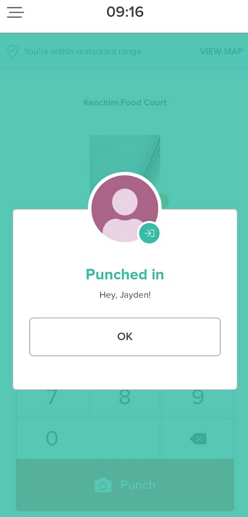
Sling, by contrast, has a powerful built-in time tracker that works seamlessly in the web, mobile, and kiosk apps. The kiosk app lets multiple users clock in/out on a shared device. It’s ideal in workplaces where smartphones are either restricted or impractical to use.
When it comes to enforcing breaks, Sling works better. It reminds employees to start and end breaks, prevents early returns, and requires employees to attest to whether they took their mandated breaks. In case of a meal break violation, Sling automatically adds premium pay to the employee’s earnings, preventing potential legal disputes.
By comparison, 7Shifts only includes a tool that asks employees to confirm that they took their breaks. This helps protect your restaurants from potential lawsuits, but it lacks break reminders and early-return restrictions, which could be problematic for businesses looking to enforce strict break laws.
Verdict: In my view, Sling wins this round, thanks to a wider range of tracking options and advanced break controls.
Clock-in restrictions — Winner: 7Shifts
Sling and 7Shifts share a lot in common when it comes to clock-in/out restrictions. Both apps can prevent early clock-ins and automatically clock out employees who forget to stop the timer at the end of the shift. This keeps timesheets accurate and helps prevent payroll errors that can quietly increase labor costs.
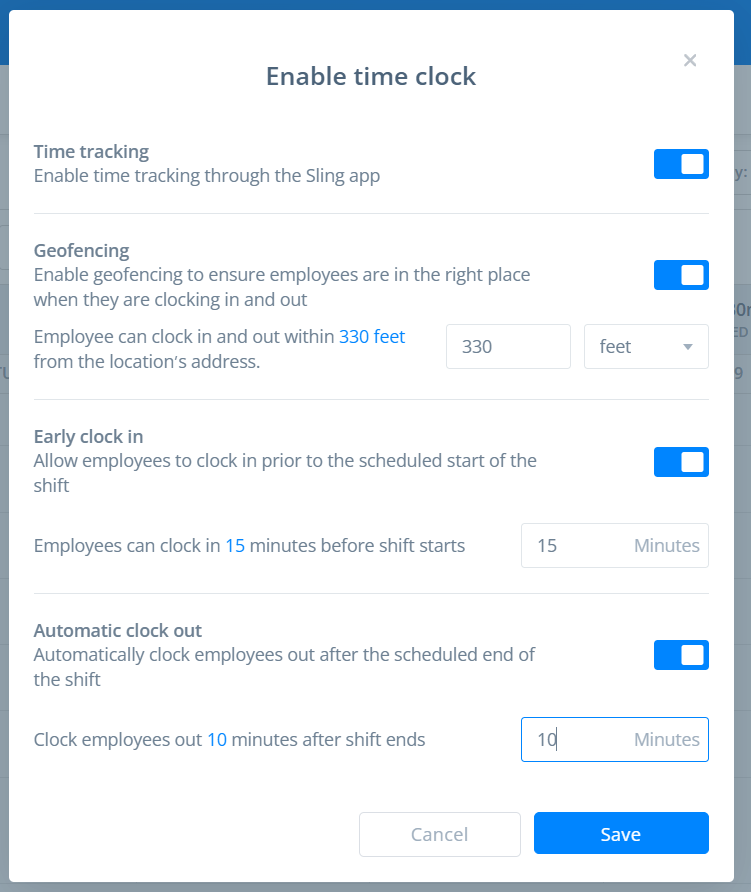
We also found geofencing in both apps to work well. Geofencing means employees can only clock in or out when they’re actually at the restaurant. This stops people from clocking in a few blocks away, helps you track late arrivals more accurately, and reduces timecard padding that can raise labor costs.
The difference? Facial recognition
7Shifts lets you turn on selfie verification for clock-ins, but only if your team uses the 7Punches app. When it’s on, 7Punches takes a photo at clock-in and clock-out and attaches it to the punch on the timesheet for manager review.
It takes a picture when someone clocks in or out and adds it to their timesheet for the manager to review. It doesn’t verify identity or block buddy punching automatically, so it still takes time to check manually — especially with a larger team. Sling doesn’t offer this feature at all.
Verdict: Both platforms start on equal footing with strong geofencing and clock-in restrictions. However, 7Shifts edges ahead, thanks to its facial recognition feature, a perk you don’t get with Sling.
Task management — Winner: 7Shifts
Sling and 7Shifts are both good for managing tasks in fast-paced environments. Both let you create tasks and break them into subtasks (task lists) to bring structure and consistency to restaurant operations. Still, there are some small but important differences that could sway your decision.
Sling vs. 7Shifts task management differences
The main difference is that with 7Shifts, employees have to install a separate app (7Tasks) to view and manage tasks. Sling, on the other hand, lets you handle everything in one app, including task management. This all-in-one setup helps avoid the confusion and friction that comes from switching between multiple tools.
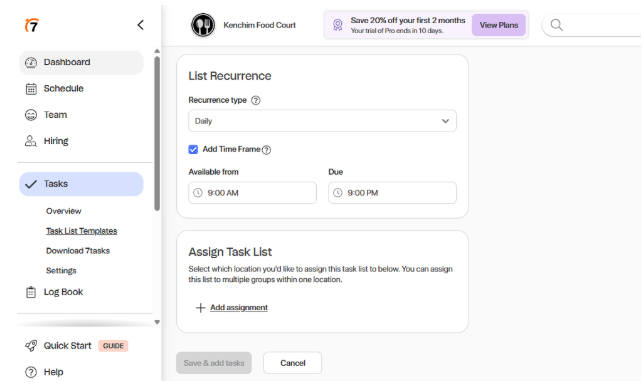
Despite having separate apps, 7Shifts has a better user experience. It’s more intuitive to use, and employees can start ticking off tasks without needing to read through any manuals.
On the other hand, Sling hides its tasks tab in the shift overview, making it much more difficult to access tasks.
Another difference is how the platforms treat shift tasks. While 7Shifts lets you assign recurring task lists based on shifts, the tasks themselves aren’t embedded inside the shift the way they are in Sling. This creates a subtle separation between scheduled hours and assigned duties, which can work well for side tasks like cleaning or opening checklists, but may feel disconnected when you’re trying to define core shift responsibilities.
7Shifts also lets you set deadlines and a time window when employees must complete each task, something Sling doesn’t currently offer. This helps keep tasks on schedule and reduces delays that can disrupt service. You can even assign subtasks to different employees, making it easier to divide work and keep everyone accountable.
Verdict: Despite having a separate app for tasks, 7Shifts is, without a doubt, the better task manager than Sling. It has all the features you need to assign tasks to enhance accountability, set deadlines to keep operations on track, and track progress to make sure that nothing is overlooked.
Labor cost optimization — Winner: 7Shifts
Both Sling and 7Shifts let you create schedules with labor costs and projected sales in mind, which helps you stay on budget and avoid over- or understaffing.
That said, the way each platform handles labor cost optimization is quite different.
7Shifts vs. Sling labor cost management differences
The key difference is that Sling requires you to enter projected sales manually, while 7Shifts calculates projected sales based on past data. In my view, 7Shifts saves more time and delivers more accurate forecasts.
Once you’ve entered the projected sales, Sling asks you to decide what percentage of your earnings you wish to spend on labor. As you create schedules, the platform monitors these limits in real-time and highlights any violations. This makes it easy to spot overspending in time and balance coverage to keep schedules within budget.
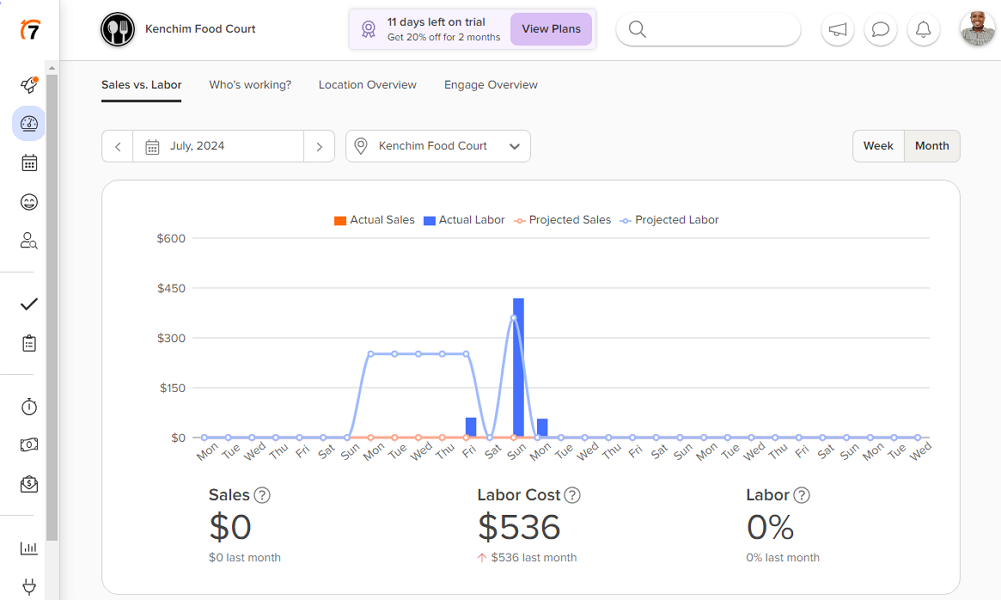
7Shifts takes a different approach to keeping labor costs in control and aligning staffing needs with business demands. Its Optimal Labor tool analyzes past sales and schedule data to recommend the right staffing levels for each shift. It prevents overstaffing that causes unnecessary labor expenses, and understaffing that can ruin guests’ experiences.
Just bear in mind that the Optimal Labor tool requires a significant amount of past data and might not be helpful for new businesses.
Verdict: 7Shifts’ labor cost optimization is more reliable because it generates recommendations based on past data. As a result, its forecasts are more accurate, and it’s ideal for restaurants with complex labor forecasting needs. Sling is useful for smaller restaurants and newly opened locations.
Paid time-off (PTO) management — Winner: 7Shifts
If you’re looking to automate unpaid time-off, both Sling and 7Shifts can do it well. You can add unpaid time-off in line with internal policies and easily define who’s eligible. When it comes to PTO, it’s a different story.
Time-off management differences
To begin with, both Sling and 7Shifts let you give employees a fixed amount of paid time off for the year, but with big differences in how the balances reset. Sling lets you choose whether PTO balances reset on a set date for everyone, or on each employee’s hire date. I love the second option as it aligns the reset cycle with an important employee’s milestone, encouraging loyalty.
In contrast, 7Shifts can only reset PTO balances at the start of the calendar year. But when a new employee joins mid-year, 7Shifts automatically gives them a smaller amount of PTO based on their start date. For example, someone who joins halfway through the year would get about half the usual days off.
7Shifts also supports hourly PTO accrual, which is ideal for part-time or hourly employees.
Another thing I like about Sling and 7Shifts is that both let you set a required notice period for time-off requests. In other words, you can ask employees to submit time-off requests a certain number of days in advance. This gives you enough time to adjust schedules to prevent last-minute scrambles that disrupt operations.
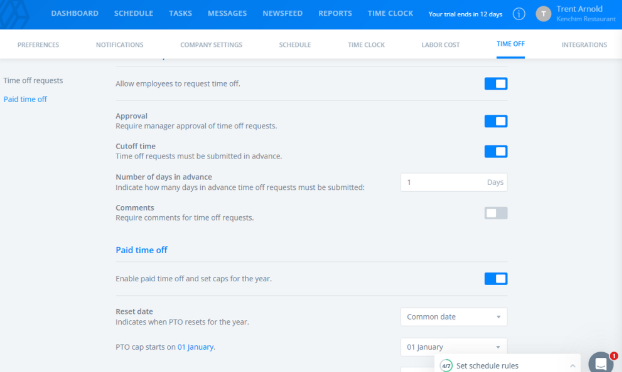
From the employee perspective, 7Shift has a better experience. Its time off tab is easy to access from the main menu, which makes it easy to view time-off balances and submit requests. In Sling, the time-off page is hidden inside the shifts tab, making it a bit harder to find.
Verdict: 7Shifts has the leg-up on Sling, thanks to its hourly accrual and intuitive time-off tab.
Team communication — Winner: Tie
Sling and 7Shifts both provide the tools you need to make sure that your team is pulling in the same direction. Whether you want to start 1:1 or group chats, or make company-wide announcements, both apps have the tools you need.
Below are some of the features you get with both apps:
- Emojis: You can use emojis to add tone and clarity to every message and make communication more engaging.
- @Mentions: Both apps let you use @mentions to direct messages at specific employees.
- Threaded replies: While Sling and 7Shifts threads aren’t as organized as Slack’s, I found them helpful. They keep related discussions organized, making it easy for people who see the messages late to follow the conversation.
Beyond these similarities, the two competitors differ in several key ways.
Team communication differences
Sling’s chat interface feels more user-friendly than 7Shifts’. I found it pretty easy to create groups, start conversations, and format messages with Sling.
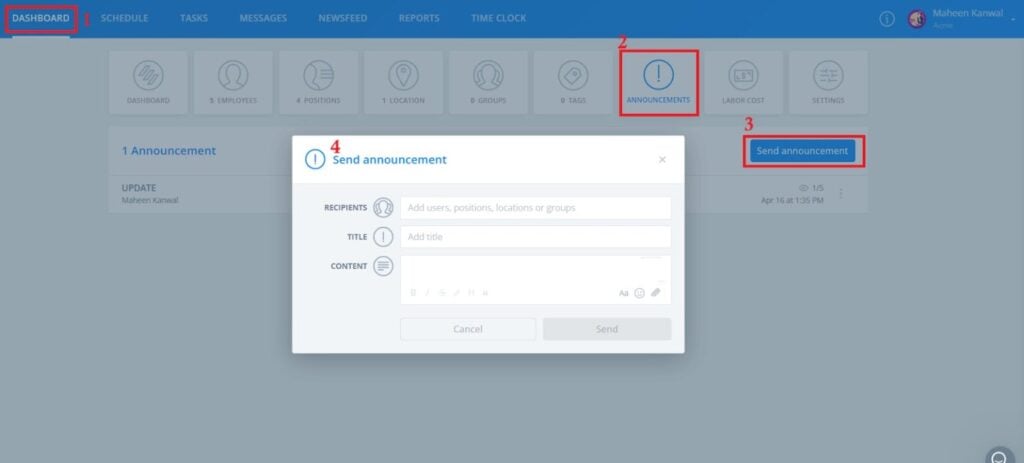
I was particularly impressed by its message formatting options, like italics, bold, headings, and in-message links. The options enable you to emphasize key instructions and highlight urgent updates so employees don’t miss important details. Unfortunately, 7Shifts doesn’t have these formatting options — instead choosing to stick to plain text.
That said, 7Shifts has perks of its own. It has read receipts for one-way announcements, which let you see which employees read important messages. 7Shifts also lets you schedule messages and create anonymous and multiple-answer polls.
Verdict: Both apps perform well where it matters the most: creating unique channels for different types of communication. Beyond that, the apps’ unique advantages balance out to send the matchup into a tie.
Integrations — Winner: 7Shifts
When it comes to integrations, both support native, Zapier, and API integrations. However, their selections differ significantly.
Sling integrates natively with seven business tools only, including: Toast, Square, Shopify, and Gusto. While it covers several common payroll and POS solutions, the list is very limited and may not meet the needs of restaurants with an expanding tech stack. Luckily, it supports Zapier and API integrations, so you can connect to almost any software with some effort and technical knowledge.
7Shifts, on the other hand, integrates natively with over 50 third-party solutions. The list includes popular POS, payroll, and analytics software. If the list doesn’t cover every tool in your tech stack, you can use API and Zapier integrations to ensure all systems work in sync.
Verdict: 7Shifts is the outright winner because it integrates with many more third-party apps than Sling.
User Ratings
Sling
- ⭐ 4.6/5 on Capterra (201 reviews)
- ⭐ 4.4/5 on G2 (87 reviews)
7Shifts
- ⭐ 4.7/5 on Capterra (1,202 reviews)
- ⭐ 4.5/5 on G2 (122 reviews)
* Reviews were last checked in November 2025.
Security & Compliance
| Category | Sling | 7Shifts |
| Data Encryption | ✅ Data on transit ❌ Data at rest (except passwords & employee IDs) | ✅ |
| GDPR Compliant | ✅ | ✅ |
| HIPAA-Compliant | [No] | [No] |
| SOC 2 Type 2 Compliant | ❌ | ❌ |
| 2FA | ❌ | ✅ |
| Role-based access | ✅ | ✅ |
| Hosting Region | Unspecified | Unspecified |
Both Sling and 7Shifts have never had a data breach or security incident, which is a good sign. Even so, I think 7Shifts has a slight edge because of its strong encryption standards. It uses AES 256-bit encryption for data at rest and SSL/TLS 1.2 for data in transit, and encrypts all data at rest.
Sling, by contrast, doesn’t reveal the encryption cipher it uses to safeguard data in transit. Even worse, the vendor claims that all data is stored without encryption, except for passwords and employee IDs. This raises serious concerns regarding data security.
Worse still, a support agent told me that Sling doesn’t support any form of multi-factor authentication (MFA). Instead, the platform relies on the standard email + password login to authenticate users. This is unlike 7Shifts, which supports two-factor authentication (2FA) to add a layer of protection to user accounts.
The differences aside, both platforms are GDPR compliant, meaning that they have put measures in place to safeguard sensitive data. Neither is HIPAA-compliant, which isn’t a big deal if you’re looking at them for your restaurant or hotel business.
Setup and Onboarding
During my testing, I found it quick and easy to set up 7Shifts. The platform takes you through a 5-step quick-start process, allowing you to configure all essential settings in minutes without bouncing between tabs. This, coupled with the pre-configured restaurant departments and roles, speeds up the whole process for multi-location enterprises.
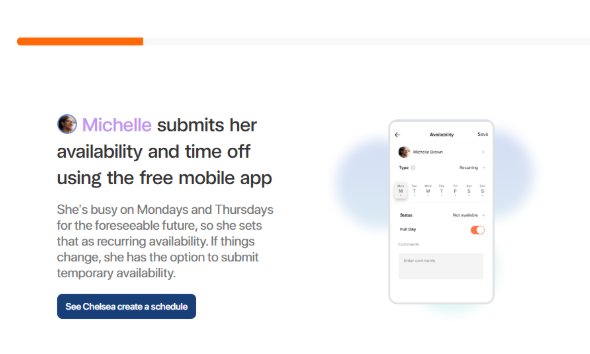
Even better, employees don’t need to read guides to learn 7Shifts. All they need is to click “see it in action” beside each feature in the quick-start guide. This opens a walkthrough that shows them how scheduling and time tracking features work in a practical, easy-to-follow context.
Similarly, Sling lets you add roles and employees before you even land on your team’s dashboard. Once you’re on the dashboard, the platform takes you through a seven-step guided setup to get your team up and running without a fuss. During setup, you create shifts, define wages, enable time clocks, and set schedule rules without switching between tabs.
It took me less than 20 minutes to set up a team. However, unlike 7Shifts, Sling doesn’t come with pre-configured restaurant roles, probably because it’s not explicitly geared toward restaurants. Unfortunately, the platform doesn’t offer a guided tour either, so users have to explore the platform on their own, which can be intimidating for less experienced users.
Support and Customer Service
| Support Type | Sling | 7Shifts |
| 24/7 Chat | ❌ | ❌ |
| Phone Support | ❌ | ✅ |
| Email Support | ✅ | ✅ |
| Help Center | ✅ | ✅ |
Both Sling and 7Shifts offer help through live chat, email, and a help center. 7Shifts offers phone support, which is a big advantage.
My only issue is that while both offer a live chat seven days a week, it’s limited to specific hours. You may end up waiting for help longer than you’d like. Thankfully, when the agents are online, they usually respond in under two minutes, which is great by live chat standards.
While neither app has community forums, they do provide guides and tutorials to get users up to speed with the features. Sling backs up its options with webinars, live online sessions, and in-person training. 7Shifts’ Academy, on the other hand, provides guided lessons for restaurant staff, owners, and operators.
Who Wins: Sling or 7Shifts?
| Choose Sling if you… | Choose 7Shifts if you… |
| Are a small hotel or restaurant looking for free workforce management software. | Are a large chain that loves making data-backed labor forecasts and scheduling decisions. |
| Need employees to clock in and out on a shared device. | Want to prevent time theft, offsite clock-ins, and buddy punching. |
| Read our in-depth Sling review | Read our in-depth 7Shifts review |
Our take:
Sling and 7Shifts let you create dynamic, flexible schedules that easily adapt to unpredictable customer flow, but their approaches differ significantly. Your best fit will ultimately depend on your team size, budget, and unique operational needs.
Choose Sling if you’re just starting out and need reliable restaurant scheduling software that delivers efficiency without draining your budget. Sling’s free plan lets you manage up to 30 employees and use basic scheduling tools without paying a dime. It also has affordable per-user pricing, so you can pay only for the users you need.
Choose 7Shifts if you run a multi-location restaurant chain, where data-backed decisions are critical. Its Optimal Labor tool analyzes past sales data and scheduling patterns to provide precise labor forecasts. This helps you to align staffing needs with customer demands to control costs and protect your bottom line.
Connecteam vs. Sling vs. 7Shifts
If you find yourself undecided, use Connecteam. It’s an all-in-one workforce management app that offers the best of both Sling and 7Shifts — plus adds powerful automation and customization features that can fit your unique operational needs. Here’s how Connecteam compares to Sling and 7Shifts on key fronts:
Accurate, compliant time tracking
Connecteam’s time tracker accurately tracks regular time, overtime, and break time for fair wage payment and compliance. Like Sling, it lets employees track time using its intuitive web, mobile, and kiosk apps. Better yet, it uses geofencing, facial recognition, and advanced clock-in restrictions to enhance timesheet accuracy and prevent payroll leakages.
Its break tracker has advanced controls you won’t find with either Sling or 7Shifts. It reminds workers to start breaks on time and prevents early return, preventing potential violations. Moreover, Connecteam’s Forms feature lets you create a break confirmation form that has to be filled out at clock-out. This requires employees to confirm that they took their mandated breaks.
Additionally, Connecteam’s overtime tool tracks even the most complex overtime rules, including holiday pay and overtime for the seventh consecutive day worked. My favorite feature is that the platform calculates employee overtime pay for you, so there’s no need to do it manually. When pay day rolls around, you’ll only need to download the timesheets and upload them into your payroll software — everything’s ready to go.
Mobile-first onboarding and training
When you use Connecteam for employee training, you don’t need to gather everyone in one room. Instead, you can create a mobile-friendly course and share it with relevant employees. You can also include quizzes at the end of each course to test knowledge and ensure each employee understands the course.
Employees can complete the training at their own time and pace to stay compliant with regulations and internal policy. Managers, on the other hand, can track progress on a centralized dashboard to see who has completed mandatory courses. Doing so saves you the hefty cost and service disruption caused by in-person training.
AI-powered automatic scheduling
Connecteam scheduling is tailored specifically to handle the complexity of restaurant workforce scheduling. What stands out to me is that compliance and labor optimization are baked into its core.
The platform lets you predefine scheduling rules like shift limits, shift maximum hours, and coverage requirements. You can have different schedules and rules for different locations. The rules ensure each schedule aligns with the underlying labor needs and regulations.
Creating and assigning shifts is also a breeze, whether you do it manually or using the AI-powered Auto-Scheduler. Manual scheduling is fast and easy, thanks to handy tools like shift templates, recurring shifts, and drag-and-drop functionality. Employees can also find shift replacements on their own with self-service shift swaps.
Connecteam’s Auto-Scheduler lets you assign hundreds of shifts in minutes based on employee availability, qualifications, and preferences. This saves you a lot of manual work and improves service quality by ensuring each staff member handles shifts suited to their skills.
Excellent customer support
Another area in which Connecteam outshines both Sling and 7Shifts is customer support. Basic options like live chat, phone, and email are available 24/7. When I last tested Connecteam’s live chat, I got a reply in under a minute, which was impressive.
Moreover, Connecteam has a paid support option called Connecteam Pros. With Pro, the provider connects you with a setup and customization expert who gets your team up and running in minutes. Most importantly, they ensure you get the most out of every feature from day one, including some you’d never discover on your own.
| Connecteam | Sling | 7Shifts | |
| Time tracking with GPS | ✅ | ❌ | ✅ |
| Geofencing | ✅ | ❌ | ✅ |
| Shift scheduling | ✅ | ✅ | ✅ |
| Open shifts and shift swapping | ✅ | ✅ | ✅ |
| Free plan | ✅ Up to 10 users | ✅ Up to 30 users | ✅ Up to 15 users |
| 24/7 support | ✅ 24/7 live chat | ❌ | ❌ |
Choose Connecteam over Sling and 7Shifts to experience smarter, compliance-first scheduling for restaurant staff. Try Connecteam for free.
FAQs
Sling has a free plan with basic scheduling features for up to 30 employees.
7Shifts offers a free plan with basic features for up to 15 employees.
Connecteam offers a Small Business Plan with all premium features for free for businesses of up to 10 employees.
Yes, 7Shifts is suitable for small businesses, thanks for its per-location pricing
Yes, 7Shifts’ PTO module lets you assign time-off days and track balances with ease. Employees can request time off on any device, including smartphones.
Connecteam is the most efficient app for employee management, thanks to its excellent user interface that combines all features in one app.
Yes. Employees clock in and out either on your POS or in the 7punches app. That means time tracking isn’t inside the main 7Shifts app. Sling and Connecteam include time tracking in the same app employees already use for schedules.
/verdSling can work for multi-location restaurants, but it’s best for smaller operations. It doesn’t automate labor forecasts the way 7Shifts does, and it has fewer built-in integrations. If you have a large team across many locations and want more automation, 7Shifts or Connecteam will usually fit better.