



Intelligent scheduling for field service and mobile workforces in medium to large-sized teams
Verdict: 7.5/10
Skedulo is an advanced workforce management platform for scheduling and dispatching field-based teams.
I found its intelligent scheduling capabilities particularly impressive, as they match workers to jobs based on skills, locations, and availability. The software shines in complex scheduling scenarios, making it ideal for industries like healthcare, utilities, and fleet services. Its mobile app also supports job updates, signatures, photos, and on-site data collection.
While Skedulo tracks time spent on individual jobs, it doesn’t have built-in timesheets and payroll tools. As such, it’s not ideal for companies seeking a more comprehensive workforce management solution. The sales team also mentioned a 75-user and $50k/year minimum, which means Skedulo is built only for larger organizations, not small teams.
Key Features:
- Intelligent scheduling and dispatching: Automatically assigns the right worker to the right job based on multiple factors.
- Route optimization: Suggests efficient travel routes to minimize travel time between jobs.
- Shifts and rostering: Simplifies the process of creating and managing worker shifts and rosters.
- Dynamic messaging: Facilitates real-time communication between field workers and managers via built-in messaging.
- Analytics and reporting: Offers insights into workforce performance and operational efficiency.
Pros
- AI-powered scheduling algorithms
- Powerful reporting and analytics
- Suitability for large-scale operations and complex scheduling
Cons
- Might be challenging for new users to learn
- May be too complex for small businesses with simple needs
- $50k/year minimum spend
How I Evaluated Skedulo
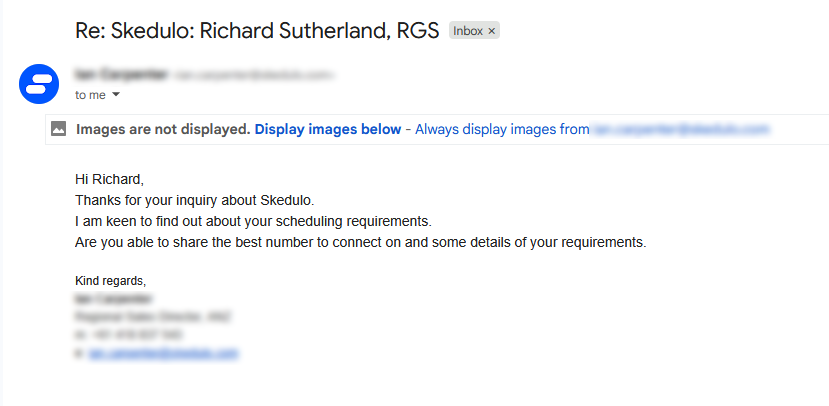
I signed up for Skedulo’s demo via the contact form on the website. Unfortunately, I was advised by email that software demonstrations were only available after an introductory call. I was also told that Skedulo has a 75-user, $50k/year minimum license.
I asked to proceed with the meeting and requested a demo for review purposes, but the company canceled the sales meeting. I then asked for a press contact I could use for further discussion, but received no further contact even after 14 days of waiting. As such, I evaluated the platform based on the data available on its website and through online customer reviews.
Skedulo Pricing
Skedulo’s pricing structure is based on a per-user monthly rate. It offers 2 main plans, and many organizations purchase both plans together to make full use of the software:
| Scheduler plan | Mobile Workers plan | |
|---|---|---|
| Suitable For | Managers and schedulers overseeing resource allocation | Field agents requiring robust mobile access capabilities |
| Features |
|
|
Skedulo doesn’t offer a free plan or a free trial, which is a drawback for potential customers wanting to test the software before committing. Interested parties must contact the sales team for pricing information.
My experience doing this was disappointing. I wasn’t able to secure a demo, but learned that Skedulo has a minimum requirement of 75 users and a $50k/year minimum spend. I asked for more details, but didn’t hear anything further from the company. At 75 users, that minimum works out to about $56 per user per month, but this is a rough estimate, not a confirmed seat price. Skedulo only quotes plans privately and may bundle services, add-ons, or implementations differently.
Skedulo also doesn’t accept monthly billing, which might be inconvenient for businesses that prefer more flexible payment options. The company mentions “low, per-user monthly rates,” but the actual costs aren’t publicly available, making it challenging to compare directly with competitors.
Certain features, such as team messaging, are also paid add-ons rather than standard inclusions, so teams that want built-in chat should also inquire whether it’s included in their quote.
Here’s how Skedulo’s minimum compares with a few workforce tools that do publish pricing.
| Team size | Skedulo | Deputy (Core) | When I Work (Single location) | Connecteam (Basic) |
|---|---|---|---|---|
| View pricing | View pricing | View pricing | View pricing | |
| 10 users | N/A | $65.00 | $25.00 | Free for life on the Small Business Plan |
| 30 users | N/A | $195.00 | $75.00 | $29.00 |
| 50 users | N/A | $325.00 | $125.00 | $45.00 |
| 75 users | $50k/year minimum, roughly $4,167/month | $487.50 | $187.50 | $65.00 |
| Read our full Deputy review. | Read our full When I Work review. | Learn more about Connecteam. |
All prices show the monthly cost when billed annually. As of June, 2026.
Verdict: 5/10
Skedulo Usability and Interface
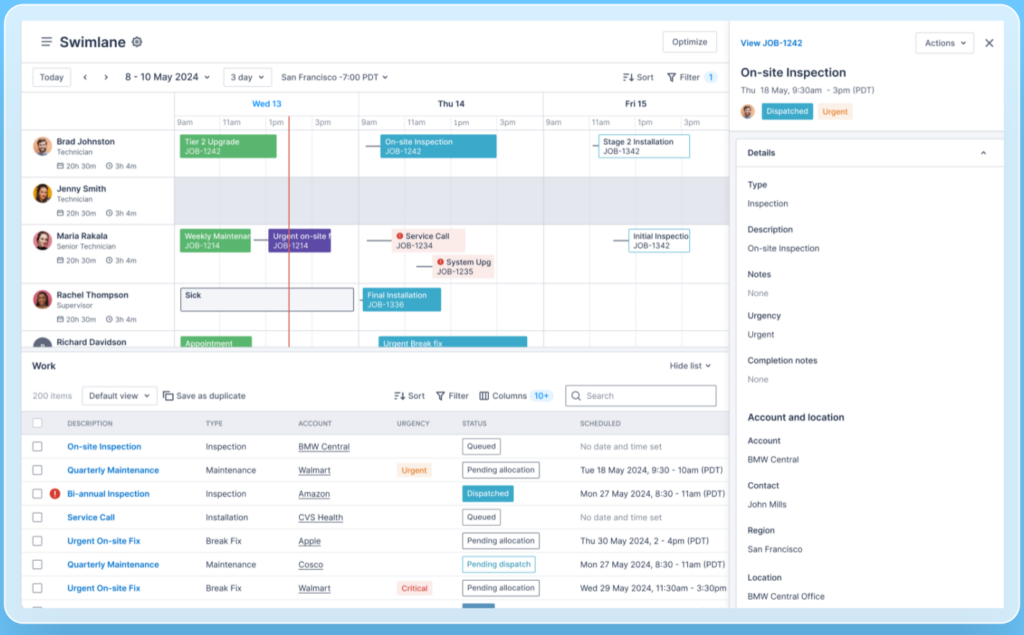
While I wasn’t able to secure a Skedulo demo, it was clear that the platform significantly updated its scheduling interface in 2025, and I think it’s certainly for the better. The updated design displays employee schedules, job details, and unassigned work in one interface.
Its “swimlane” view is a timeline-style schedule where each worker has their own row, so schedulers can see who is booked, who is available, and where open work might fit. Color-coded job cards make statuses and urgent work easier to distinguish, while collapsible panels prevent schedulers from having to open a separate page for every detail.
List views now support multi-value selections, allowing schedulers to filter by multiple regions, job types, statuses, or worker groups at once. A 2026 update also added visual AND/OR groups, so managers can build searches like “show me urgent jobs in Region A or Region B, but online if they’re unassigned”.
However, a recent Skedulo user complained that they “can’t easily view the entire company’s schedule all at once,” which managers often want to do.
Larger organizations can use the Page Builder to change what information appears on record pages, such as jobs, customers, workers, or assets. I can see why an enterprise team would want that control, but smaller teams will find the setup work excessive. But I also think this level of customization adds complexity that many businesses aren’t prepared to deal with. One customer, for instance, said that the “initial setup took a few weeks”.
From a permissions perspective, Skedulo’s standard user roles include:
- Administrators: Have full permissions that can’t be edited and are required for managing key system categories like Activity types and Job types. They can access the mobile app only if they also have a Resource role.
- Schedulers: Have full permissions necessary for using the Skedulo web app to create and allocate work items. Their access levels are customizable. They need a Resource role to access the mobile app.
- Resources: Resources are primarily field personnel who use the Skedulo mobile app to view and accept job assignments and manage their availability. Their permissions are more limited, focusing on job-related activities and personal data access.
Companies can even edit these roles or add custom roles. This is more flexible than a simple admin-versus-worker split. Overall, the new interface is much more practical and polished than the old interface. Its learning curve comes from the amount of operational detail and configuration rather than a poor user interface design.
Verdict: 7/10
Mobile app
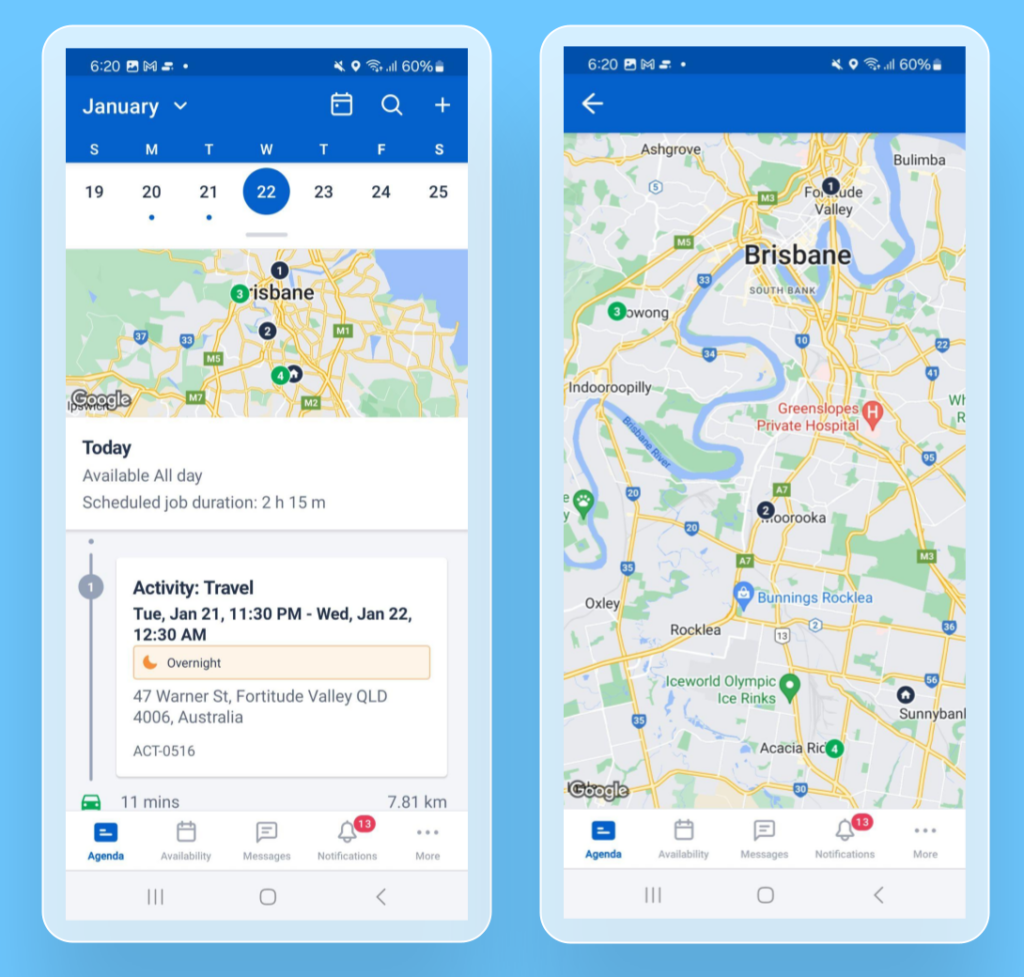
In April 2025, Skedulo replaced its mobile app for iOS and Android with a new one called Skedulo Plus. It’s specifically designed for field workers rather than as a mobile copy of the scheduler’s web application.
Its main tools include:
- Agenda and routing: Workers can view their jobs and activities, scheduled duration, travel information, and daily locations. I like that the map can be expanded to show the full route and individual stops.
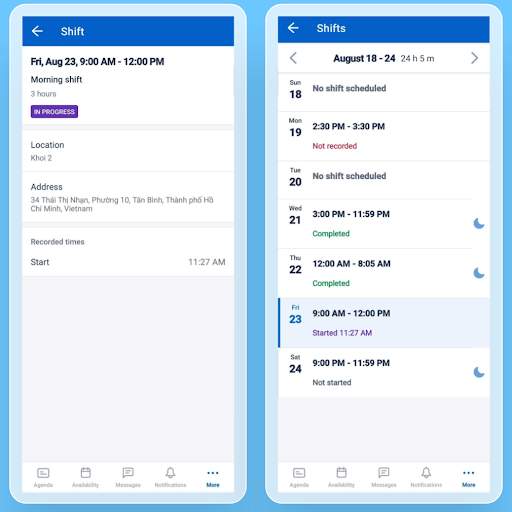
- Shifts and offers: The app shows shift details and a weekly calendar with scheduled hours and shift statuses. Workers can start and end shifts or breaks, and claim or decline offers when online.
- Availability: Workers can submit their availability and unavailability, including weekly recurring patterns.
- Field execution: Workers can update jobs, add notes, complete tasks, fill in mobile forms, upload photos and other evidence, and capture customer signatures.
The Skedulo mobile app also has some offline functionality. Workers can update job details and add notes without a connection. The changes remain on the device until the app reconnects and syncs.
I also found field data collection to be impressive. Mobile forms can use conditional fields, attachments, barcode or QR scanning, and image annotation. Administrators can require a customer signature before particular job types can be marked complete. I think this is especially useful for home healthcare visits, utility repairs, residential services, or any inspection where the worker needs to prove what happened on-site before the job can be closed.
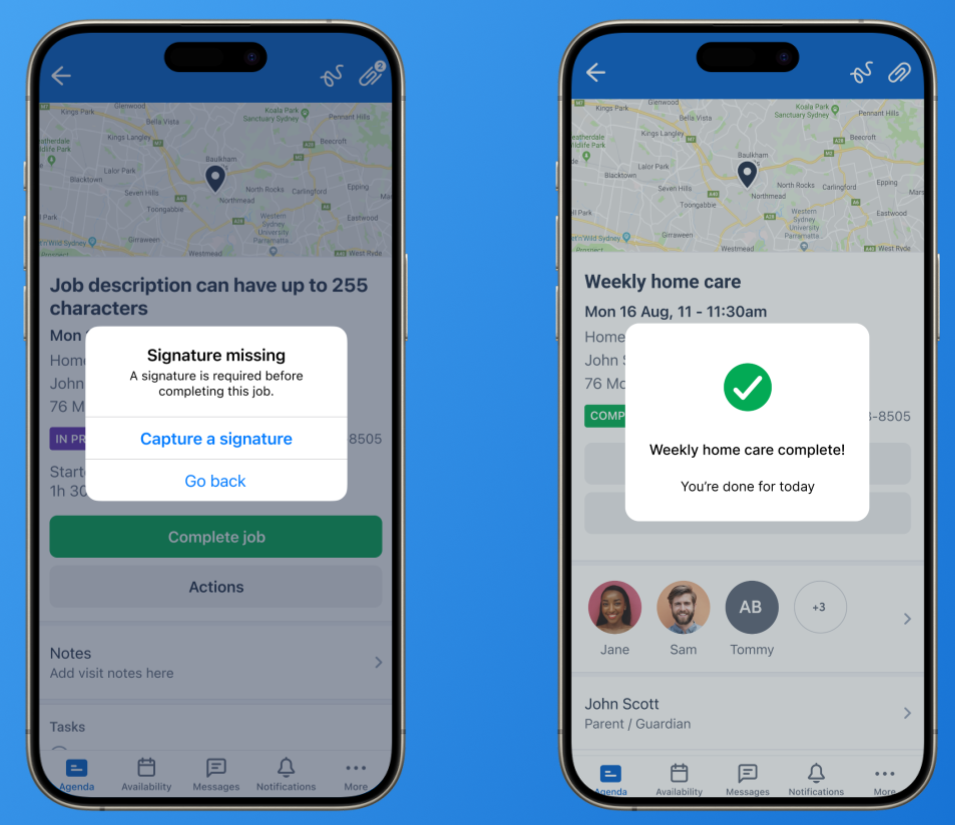
Finally, the mobile app supports features like text resizing and color contrast adjustments, which are compliant with WCAG AA standards, enhancing accessibility for visually impaired users.
Verdict: 9/10
| Admin Web App | Admin Mobile App | Employee Web App* | Employee Mobile App | |
|---|---|---|---|---|
| Scheduling | ✅ | ❌ | ✅ | ❌ |
| Jobs and activities | ✅ | ✅ | ✅ | ✅ |
| Job and shift offers | ✅ | ✅ | ❌ | ✅ |
| Availability and unavailability | ✅ | ✅ | ✅ | ✅ |
| Time recording | ✅ | ✅ | ❌ | ❌ |
| Mobile forms and field evidence | ✅ | ✅ | ❌ | ✅ |
| Routing and maps | ✅ | ✅ | ❌ | ✅ |
| Notifications | ✅ | ✅ | ✅ | ✅ |
| Messaging | ✅ (paid add-on) | ✅ (paid add-on) | ✅ (paid add-on) | ✅ (paid add-on) |
| Analytics dashboards and reports | ✅ | ❌ | ❌ | ❌ |
| Administrative settings and permissions | ✅ | ❌ | ❌ | ❌ |
*Employees can’t see scheduling, jobs, availability, and notifications through the web app, but it’s possible to give them access by individually changing user permissions.
Skedulo Core Functionalities
Shift scheduling and rostering
In Skedulo, creating shifts (which can include jobs and appointments) is straightforward. You can access the Shifts console from the navigation menu, where shifts can be created and activated individually or in bulk by using the “Create Shift” button or right-clicking in the calendar.
Shifts can be filtered by region, location, and resource type or tags. Skedulo has recently updated its scheduling interface, adding configurable job cards, color-coding, advanced filters, scheduled-hour summaries, and bulk actions such as duplicating or moving selected work.
You can assign resources (a person or a physical asset like a truck or forklift) to shifts during the shift creation process or by editing an existing shift. You can also reassign a shift by dragging and dropping a shift card in the calendar, which I find could really help with last-minute changes.
Shift tags let you match work to skills, qualifications, and other worker attributes, ensuring the right person is assigned to the right shift. This process starts manually: tags need to be created and assigned to work and workers. But once those requirements exist, Skedulo’s Suggest tool can use them to recommend or automate scheduling. If a resource doesn’t meet the tagged requirements, an exception icon appears, alerting you to potential conflicts, which is so useful.
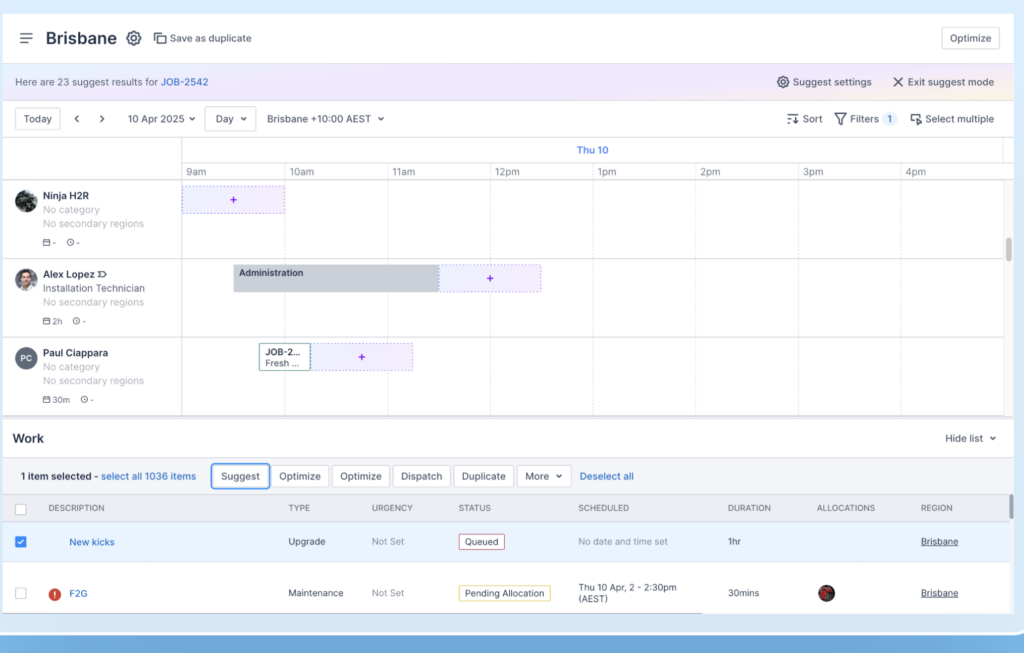
Another powerful feature is Skedulo’s MasterMind, an optimization engine that takes automated job scheduling to the next level. It can account for travel time, availability, workload, skills, job requirements, breaks, and working-hour limits. That complete automation feels better suited to large teams with many jobs, such as home care providers, solar installers, utility contractors, or mobile healthcare teams trying to reduce travel and missed service windows.
Administrators or users with the right permissions can configure working hour limits for field workers directly in the Skedulo web app. These limits help Skedulo avoid assigning work outside a person’s allowed hours, while travel settings help judge when a worker can realistically move between jobs.
Recurring work has also become easier to manage in Skedulo, thanks to some updates. You can extend a recurring schedule, filter its completed or canceled jobs, and duplicate the entire schedule.
Skedulo’s scheduling depth is its biggest strength. That said, it requires extensive setup and has a steep learning curve. Smaller operations with simple weekly rotas may find it excessive.
Verdict: 9/10
Dispatching and work management
I like the amount of control Skedulo gives you over creating, allocating, and tracking jobs to optimize resources and travel time.
Work management
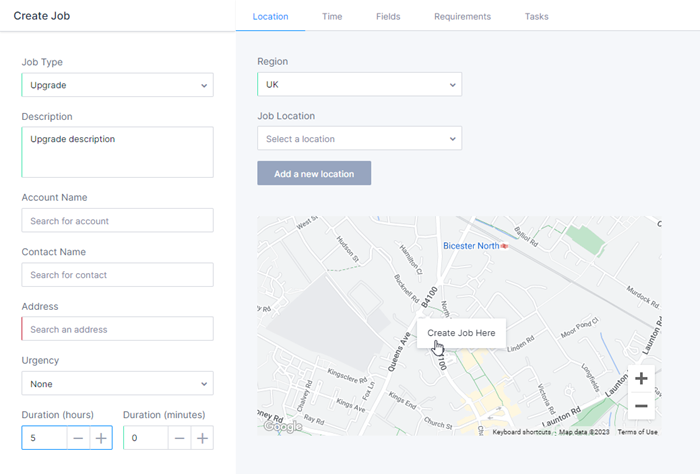
The Skedulo Work console can be used for:
- Creating and assigning work: Schedulers can create and send work (job offers) to a pool of field workers, who can accept or decline based on their availability.
- Viewing work: The table displays upcoming or past work, with sortable columns for details such as status, urgency, scheduled time, assigned workers, and account.
- Bulk actions: Schedulers can notify workers, lock or unlock jobs, deallocate resources, unschedule work, or cancel items in bulk.
- Filtering and sorting: There’s a time filter for upcoming or past work and a region filter for viewing work in specific areas. Additional filters for Account, Contact, Job Type, and more can be applied to refine the view.
- Custom filter templates: Frequently used combinations can be saved for quicker access.
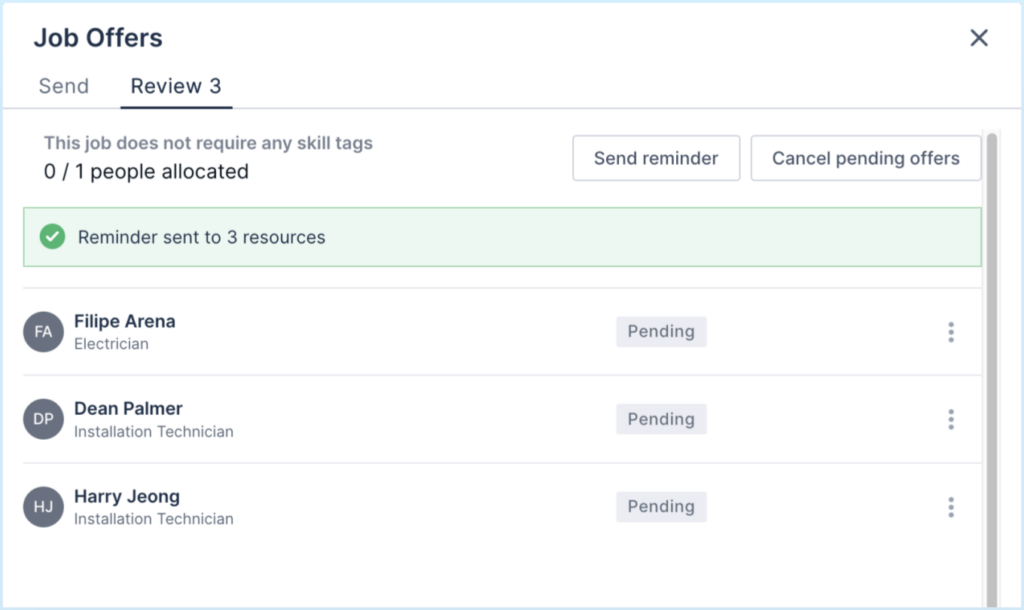
- Reminders: Schedulers can remind everyone who hasn’t responded to a request or target a particular worker. If a work offer is declined, the scheduler can cancel the entire list of offers, opening all workers to receive a fresh offer. The mobile app gives workers separate views for open, successful, and expired shift offers.
Route optimization
Skedulo’s route optimization tackles tough challenges like deciding the best order of stops for visiting multiple job sites by using the home addresses of your team and job locations. Skedulo uses something called geoservices, which considers traffic patterns to calculate the most efficient travel routes and times.
Skedulo has started positioning this established optimization system alongside 4 new AI agents for scheduling, administration, mobile workflow creation, and development. The Scheduling Agent is designed to make dispatch decisions across skills, certifications, service windows, and live traffic.
While Skedulo handles most dispatch and route optimization tasks admirably, I noticed that the initial setup can be quite complex and might require technical support beyond the help of Skedulo’s AI agents, which could be a hurdle for smaller businesses or companies without dedicated IT support.
Verdict: 8.5/10
Dynamic Messaging
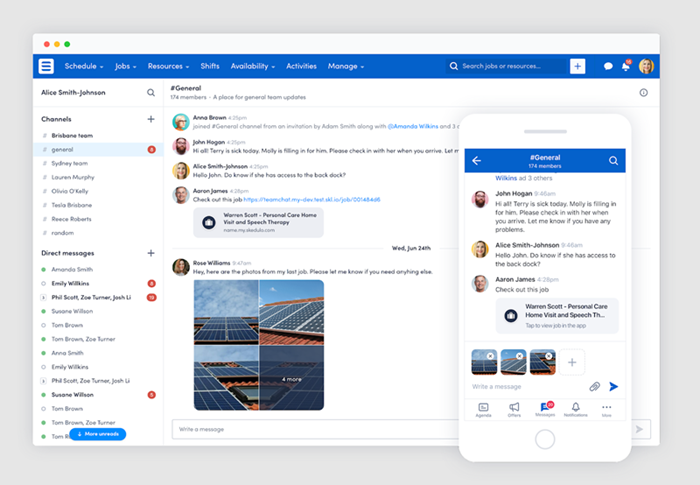
Dynamic messaging is a paid add-on product within the Skedulo platform. This feature introduces instant messaging capabilities into both the web and mobile applications.
Channels can be public or private and can keep a discussion connected to a job or appointment. Users can mention colleagues, react with emojis, edit messages, and attach images, PDFs, spreadsheets, Word documents, text files, CSV files, or HTML files.
Direct messages can include up to 8 other Skedulo users, so they function more like small private group chats than large team channels. I found that limit a little odd for enterprise software. Even though options like public “anyone in the organization” channels are available, that’s not always what you need, and I’d like to see better options for direct messaging between larger groups of people.
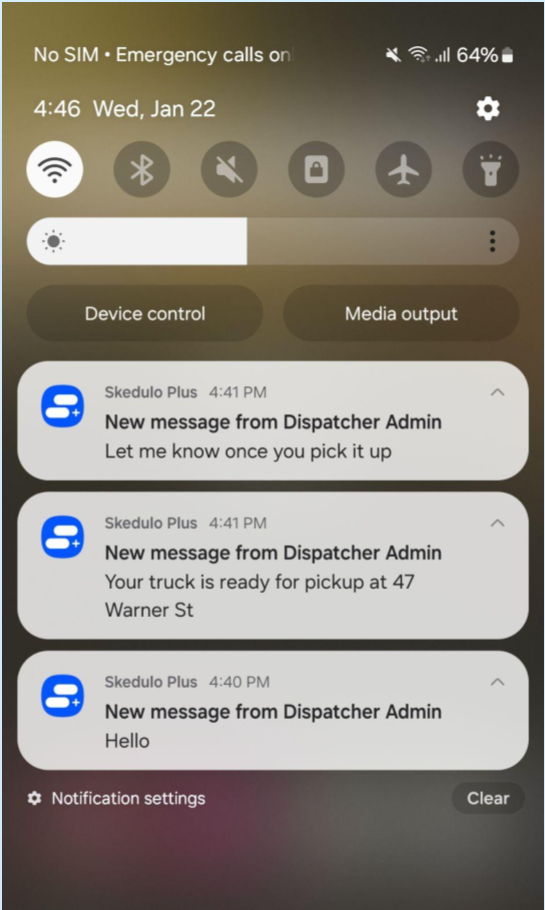
While Dynamic Messaging integrates well within Skedulo’s environment, it being a paid add-on might deter some potential users, especially smaller organizations with tight budgets.
Verdict: 8/10
Integrations
Skedulo provides a suite of integrations with leading business applications for HR, payroll, CRM, and financial operations.
- Skedulo offers deep integration with Salesforce. Particularly notable is the Salesforce Chatter social integration. This integration allows users to leverage real-time social feeds and collaboration tools within Salesforce directly alongside Skedulo’s scheduling capabilities. However, note that enabling Dynamic Messaging replaces Salesforce Chatter, so you can only use one or the other.
- The Zendesk integration lets support agents book field appointments from a ticket. Skedulo filters the available times according to the organization’s scheduling criteria, then supports confirmations by email or SMS, and push notifications when the field worker is approaching.
- Other notable integrations include Epic, Workday, Microsoft Dynamics 365, UKG, and Employment Hero Payroll.
- Skedulo also supports custom integrations through the Skedulo Lens API, providing flexibility to connect with other essential software solutions tailored to an organization’s needs.
Integrations are managed within the Skedulo web application. While it’s possible to connect with almost any software through the API, I’d like to see more straightforward out-of-the-box support for common software like ADP, Paychex, Gusto, and Xero.
Verdict: 6/10
Skedulo Security Features
Skedulo documents a solid set of enterprise security controls. Its security policy says customer data is encrypted in transit and at rest, production and test environments run in separate AWS accounts, databases are located on different private subnets, and network and host vulnerability scans take place monthly. The platform also supports single sign-on and multi-factor authentication.
Administrators can create custom roles and control access to functions, administration tools, and APIs. Individuals can be restricted to specific records. For example, a field worker can be limited to jobs allocated to them, while a regional manager sees records from assigned regions only.
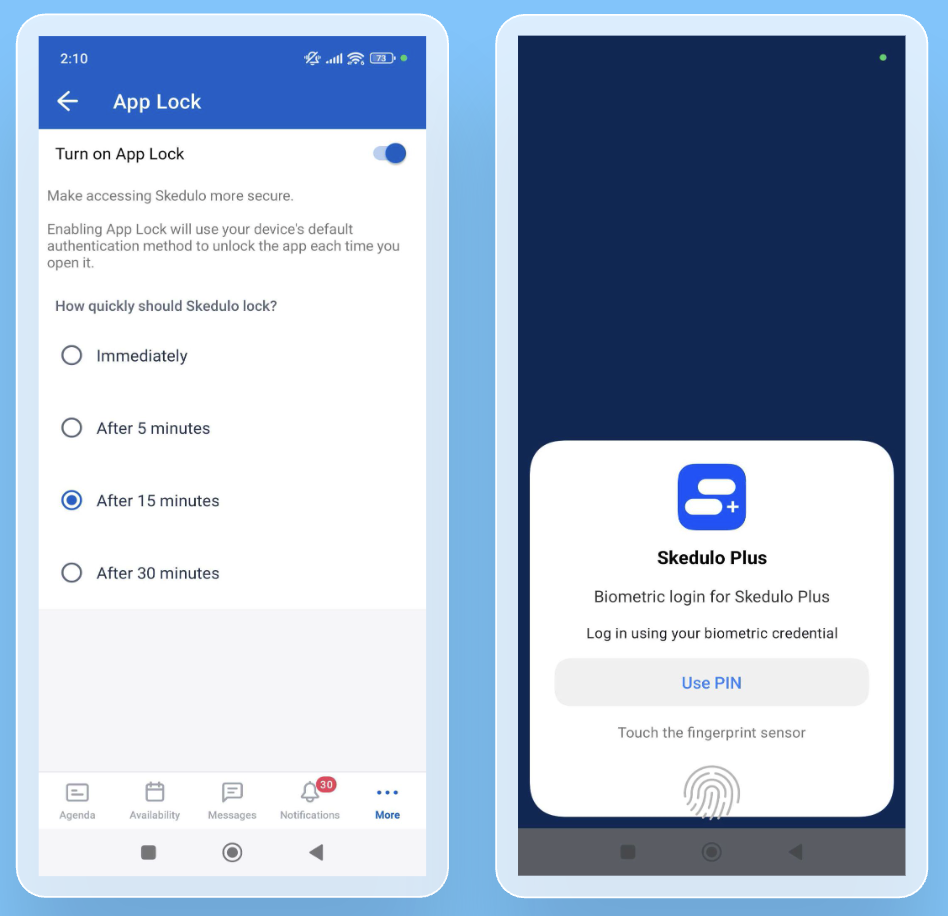
Skedulo’s mobile security has improved over the past 2 years. The Skedulo Plus app can now be set to require Face ID, Touch ID, or a PIN. Skedulo also recently added the ability to prevent mobile screenshots or take app-data backups.
Skedulo identifies itself as a HIPAA business associate and states that its security policy is managed in accordance with ISO 27001, SOC 2, NIST SP 800-53, HIPAA, and GDPR requirements. Current SOC 2 Type 2 and HIPAA/HITECH assessment reports are available to customers under a nondisclosure agreement. These are strong controls for healthcare and other regulated industries.
Verdict: 9/10
Skedulo Reporting & Analytics
Skedulo uses embedded Looker analytics for workforce reporting. Its 4 standard dashboards cover different levels of operational performance:
- Job Analytics tracks job volumes, locations, cancellation and decline reasons, travel times, hours, customers, and individual schedulers.
- Operational Analytics gives managers a more immediate view of job statuses, late or overrunning work, current allocations, cancellations, and available workers.
- Resource Analytics covers workforce trends such as scheduled hours, travel time, completed work, resource churn, regional distribution, categories, and tags.
- Resource Utilization compares workers’ available time with estimated and actual job allocations through tables and heat maps.
Each dashboard contains individual widgets called “Looks,” which can be customized and cross-filtered to provide interconnected insights. For example, a utilities contractor could filter by region and job type to see whether missed appointments are concentrated around emergency repair work or specific service areas.
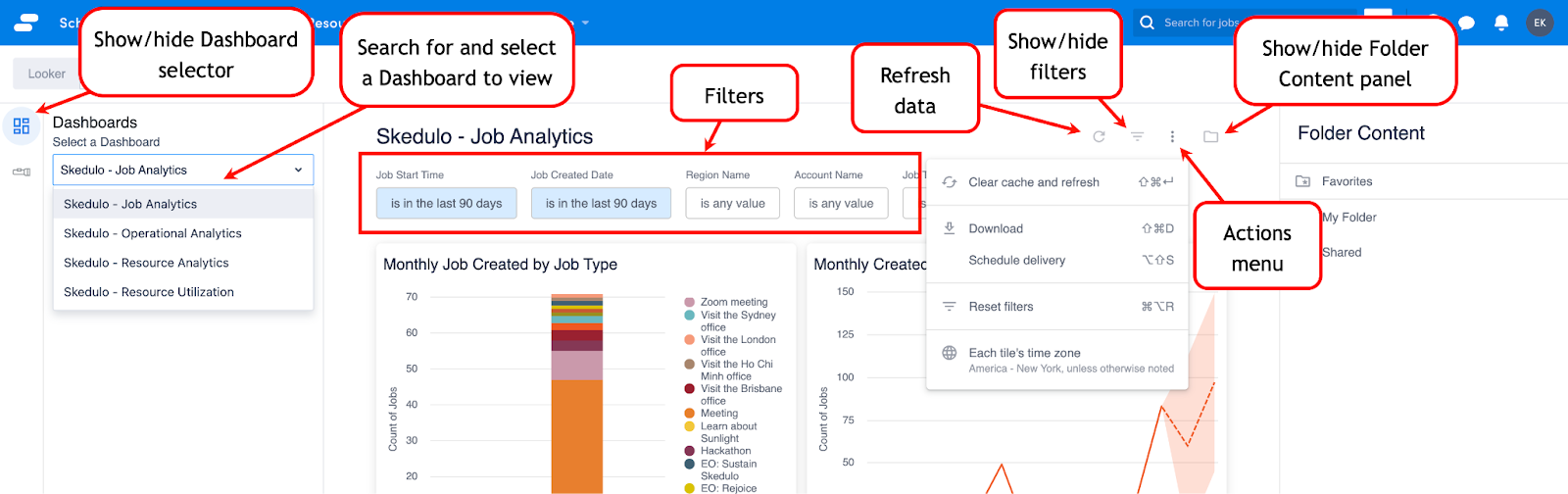
I find that the option to filter data across different parameters, like region, date, job type, or resource, and apply these filters across all Looks in a dashboard, helps you see the exact information you want.
The reporting tools don’t stop at dashboards. You can create email alerts for numerical thresholds, such as canceled jobs passing a set limit, and schedule recurring reports for people who don’t have a Looker license. Plus, you can export data directly from individual looks or complete dashboards in formats such as TXT, XSL, CSV, JSON, HTML, Markdown, and PNG.
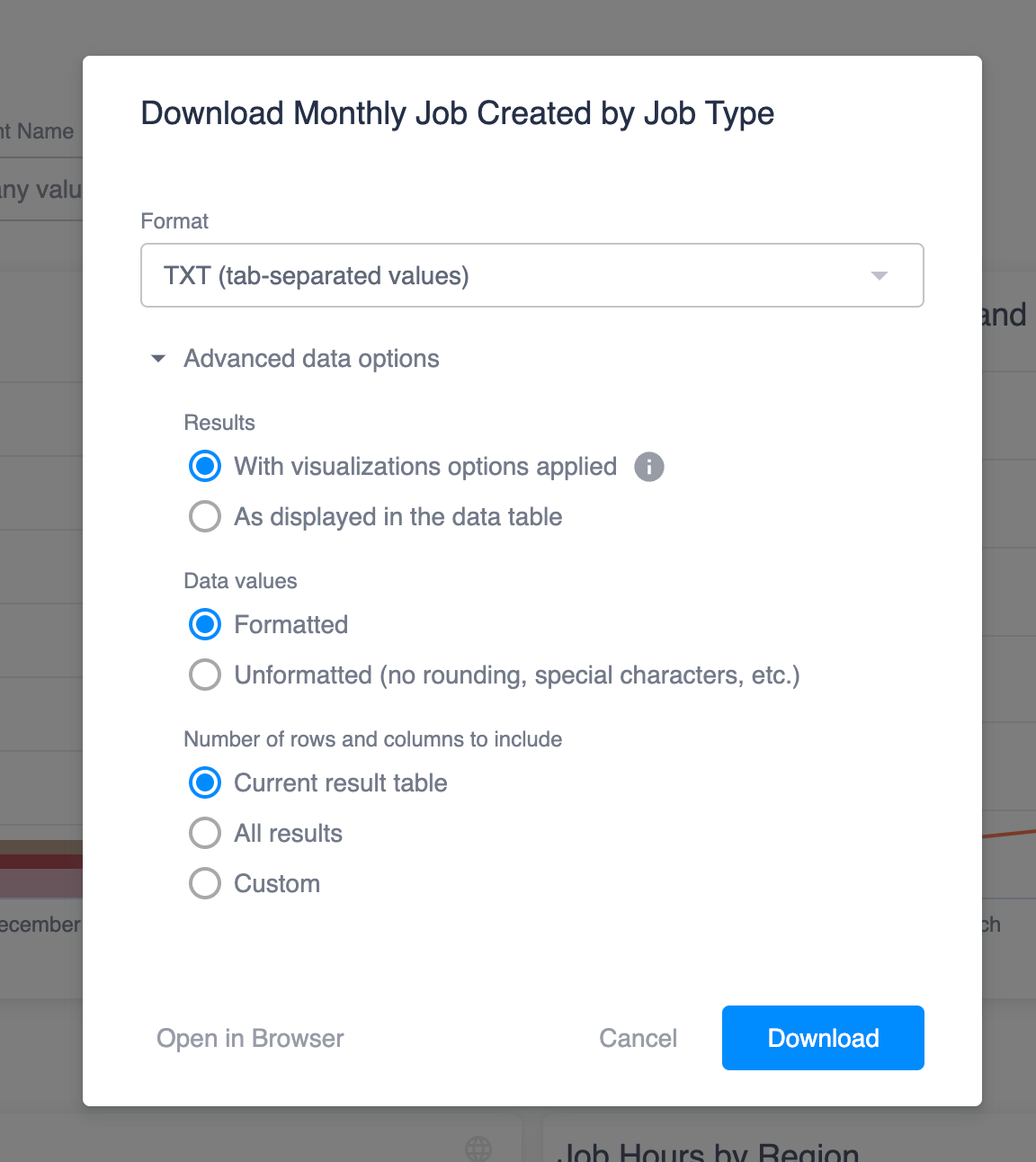
While Skedulo’s analytics are powerful, there’s a learning curve involved in fully using all available tools, which might be challenging for users unfamiliar with data analytics platforms. Also, while cross-filtering is valuable for gaining enhanced insights, it isn’t available across all dashboards. And analytics also aren’t truly real-time. Changes can take up to 45 minutes to appear as the pipeline runs on a schedule.
Verdict: 8.5/10
Skedulo Customer Support
Every Skedulo customer gets access to its help center, support team, and online support portal. The portal is available 24/7 for submitting and tracking tickets, searching the knowledge base, and accessing training materials. However, this doesn’t mean every plan includes round-the-clock responses from support staff.
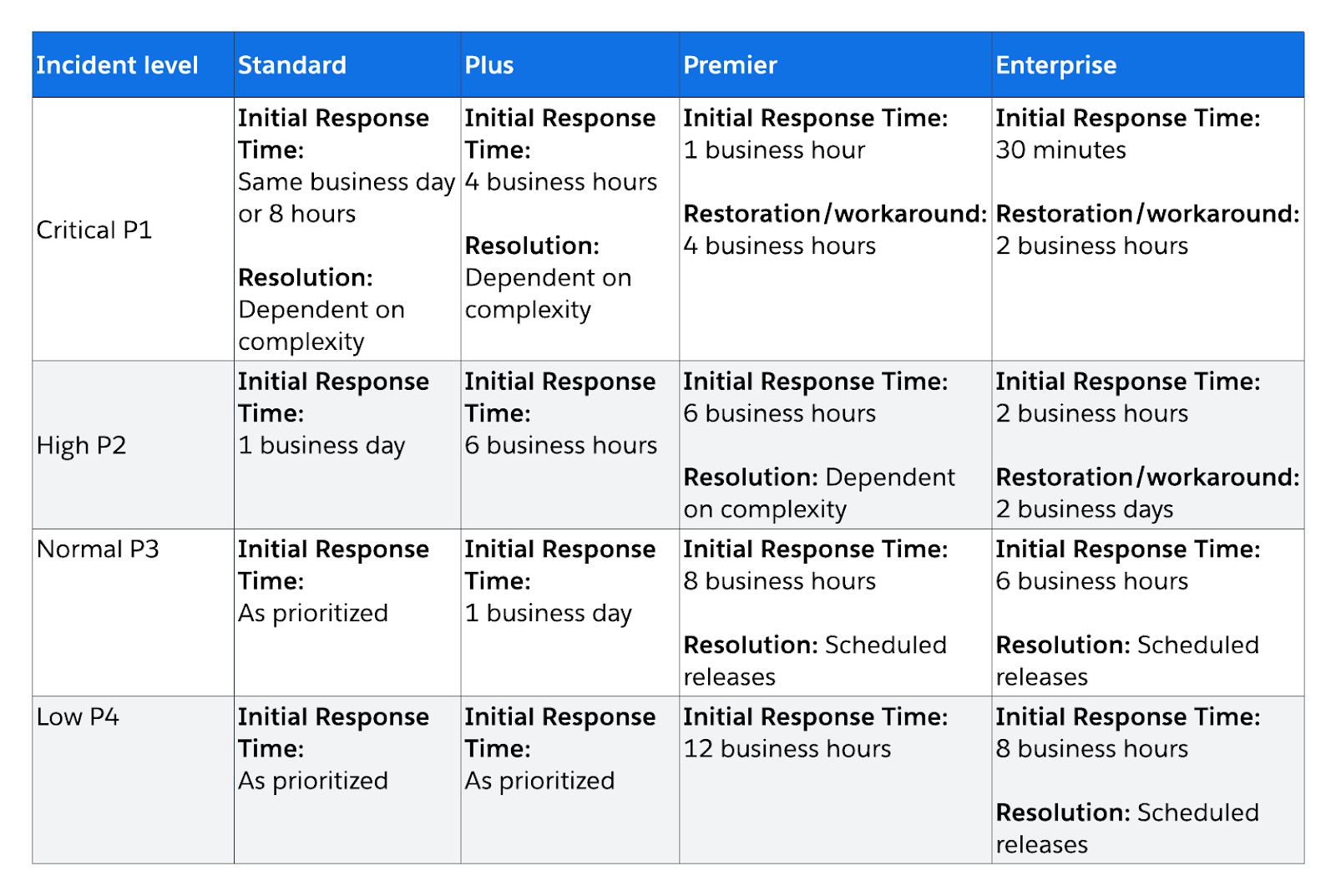
Skedulo currently offers 4 support plans: Standard, Plus, Premier, and Enterprise.
- Standard support operates during business hours from Monday to Friday, excluding holidays.
- Plus extends coverage by 2 hours before and after local business hours for critical issues.
- Premier provides 24×5 critical-issue coverage.
- Enterprise adds the fastest critical-issue response target and the highest support tier.
Its service level agreements (SLAs) also vary considerably by plan. For a critical issue, the target initial response is:
- The same business day or within 8 hours on Standard
- 4 business hours in Plus
- 1 business hour on Premier
- 30 minutes on Enterprise
Normal- and low-priority tickets on Standard may simply be handled “as prioritized”, so Skedulo does not offer a firm response or resolution time for these lower-priority tickets. Skedulo also says tickets submitted by email are automatically categorized as low priority, so the Support Portal is the best route for an urgent problem.
Skedulo offers 24/7 access to an online Support Portal, where customers can submit tickets, search the knowledge base, and access downloadable resources, training guides, and product videos. I like seeing that documentation depth for a complex tool, but it doesn’t replace fast human support when you need it.
Skedulo lacks a live chat feature, which could hinder some immediate support needs since users must create a support ticket for assistance. After submitting a ticket, I received an immediate ticket number via email, but I didn’t receive a response for 8 hours.
Similarly, when I initially attempted to schedule a demo, I got an immediate automated response, then a human reply within around 12 hours. Our discussions continued by email, and I found the responses to be cordial and direct to the point.
Verdict: 6/10
What Are Skedulo’s Review Ratings from Review Sites?
(As of June 2026)
Skedulo App Review
Skedulo is best suited for large organizations that require complex, dynamic scheduling and workforce management. Its advanced features, like route optimization and detailed analytics dashboards, make it a reasonable choice for large-scale businesses with mobile workforces.
However, for smaller organizations, Skedulo is simply not an option due to the company’s minimum user policy, and those looking for simpler, more cost-effective scheduling solutions might want to look at Skedulo alternatives.
Connecteam: The Better Skedulo Alternative
Skedulo is built for large enterprises with complex field operations, but its $50k annual minimum puts it out of reach for many teams. Connecteam delivers powerful scheduling, dispatching, and workforce management tools that scale from a handful of workers to thousands, starting with a free-forever plan for small businesses.
Scheduling for any size of business
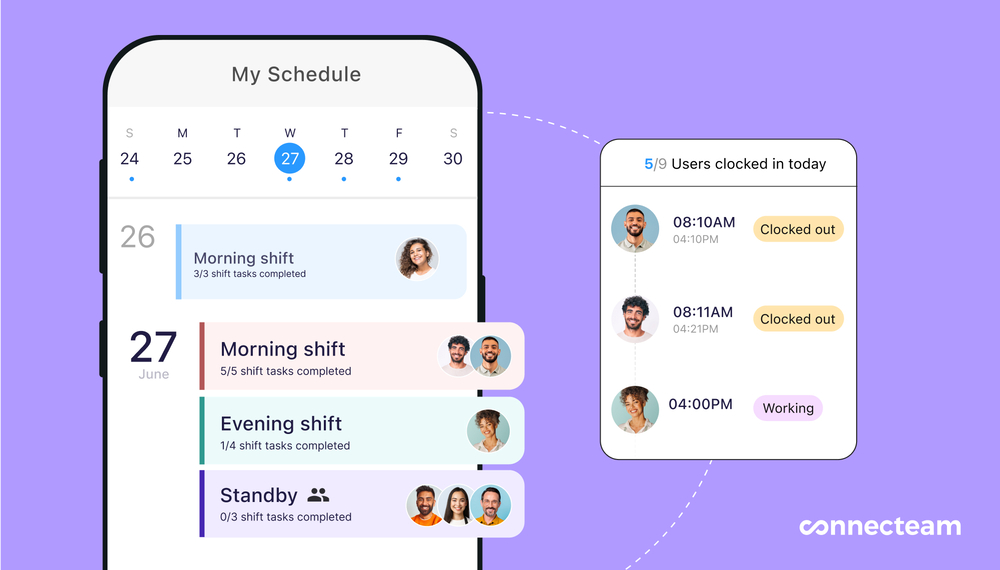
Connecteam’s scheduling app handles everything from simple weekly rosters to multi-site field operations. You can build shifts with drag-and-drop tools, set them to recur automatically, and let the auto-scheduler assign the right people based on qualifications, availability, and location. Workers see their shifts instantly on mobile and can pick up open shifts or swap with colleagues.
GPS time tracking with job-level detail
The employee time clock app lets employees punch in from their phone, a kiosk, or the web. Managers can track real-time locations, set geofences around job sites, and see exactly who is working where. Connecteam also lets workers log time against specific projects, tasks, and clients, and every entry feeds directly into timesheets for payroll.
Connecteam also integrates with payroll providers, including Gusto, Paychex, QuickBooks Online, and Xero, which makes the time-clock-to-payroll workflow easy for any team.
Built-in team communication
Connecteam includes a full online team chat with channels, direct messages, voice notes, reactions, and file sharing. Managers can also push company-wide updates, run surveys, and share documents within the same app employees are using for their scheduling and time tracking.
A complete operations platform
Beyond scheduling and time tracking, Connecteam bundles employee task tracking, digital forms and checklists, employee training courses, recognition and rewards, and an internal help desk. It’s a single app that replaces the patchwork of tools many field-service companies use alongside a platform like Skedulo.
FAQs
No, Skedulo doesn’t offer a free trial. A sales demonstration is available, but only for companies looking to spend at least $50k/year with a 75-user minimum.
Yes, Skedulo is HIPAA compliant.
Skedulo is a productivity platform used to schedule, manage, and analyze frontline teams and mobile workforces.
