


Simple employee app good for businesses that need basic team management but will struggle with more complex workflows
Verdict: 6.7/10
Pebb is a user-friendly employee app that works well for small businesses needing basic workforce management tools. It offers a variety of features like shift scheduling, time tracking, task management, and employee chat.
None of the features are especially impressive, and I generally felt like Pebb prioritized simplicity at the expense of functionality. The app has a very gentle learning curve and is suitable even for the least tech-savvy managers, but Pebb’s tools won’t handle complex workflows or prevent errors.
For that reason, I recommend Pebb only for small businesses with just a few employees and a predictable work environment from week to week. For growing businesses or companies that have more complex management needs, alternatives like Connecteam offer far more advanced capabilities.
Key Features:
- Shift scheduling: Schedule employees to shifts and allow shift swaps with manager approval.
- Time tracking: Track time manually or with a digital clock, and build simple timesheets for payroll.
- Task management: Create and assign tasks to employees.
- Time off: Enable employees to request time off and automatically block it in your schedule.
- Employee chat: Message with employees 1-on-1 or in project-specific groups.
Pros
- Very simple setup with no technical knowledge required
- Offers reusable forms and checklists
- Easily track time for billing and payroll
- Free plan for up to 15 users
Cons
- Mobile app doesn’t work at all if you’re offline
- Scheduler doesn’t flag conflicting shifts
- Task management tools are extremely limited
How I Tested Pebb
I signed up for Pebb’s free plan and added 5 users to create a team so I could fully explore the app’s features. I created shift schedules, tracked time, chatted with my teammates, set up digital tasks and forms, and built a small knowledge base. I also created conflicting shifts and time entries to see how Pebb handles errors and contacted Pebb’s support team to gauge the company’s responsiveness.
Pebb Pricing
Pebb offers a free plan for small businesses with up to 15 users. You get access to nearly all of the platform’s features, including some advanced capabilities like time off management, digital forms, and the knowledge base. The main limitations of the free plan are that you can have only 3 team spaces, and you don’t get video calling or analytics.
For larger teams, there are 2 paid tiers: Basic and Premium.
The Basic plan costs $2.50/user/month and includes core features like team chat, shift scheduling, time tracking, an employee directory, and unlimited team spaces.
The Premium plan costs $4/user/month and adds voice calling, an employee news feed, time off management, task management, digital forms, a company knowledge base, and analytics.
Notably, video chat isn’t included in this pricing and instead must be purchased as an add-on for $1.50/user/month.
All plans are billed monthly, which is good and bad. On the one hand, you get the flexibility to switch to another app whenever you want, but it also means there’s no annual discount available for companies that plan to stick with Pebb for at least a year.
Overall, I found Pebb’s pricing to be in the middle of the road among all-in-one employee apps. Here’s how it stacks up against similar tools.
| Team size | Pebb (Basic) | Blink (Core) | Homebase (Essentials) | Connecteam (Basic) |
|---|---|---|---|---|
| View pricing | View pricing | View pricing | View pricing | |
| 10 Users | Free | $37.50 | $24.00 | Free for life—All features and dashboards |
| 20 Users | $50.00 | $75.00 | $24.00 | $29.00 |
| 30 Users | $75.00 | $112.50 | $24.00 | $29.00 |
| 50 Users | $125.00 | $187.50 | $24.00 | $39.00 |
| Read our full Blink review | Read our full Homebase review | Learn more about Connecteam | ||
| * Prices for competitors show the monthly cost when billed annually as of July 2026. | ||||
Pebb is more expensive than Homebase and Connecteam, but significantly cheaper than Blink. Note that Homebase charges per location, so Pebb can be the more affordable option if you have a small number of employees spread across multiple business locations.
Verdict: 8/10
Pebb Usability and Interface
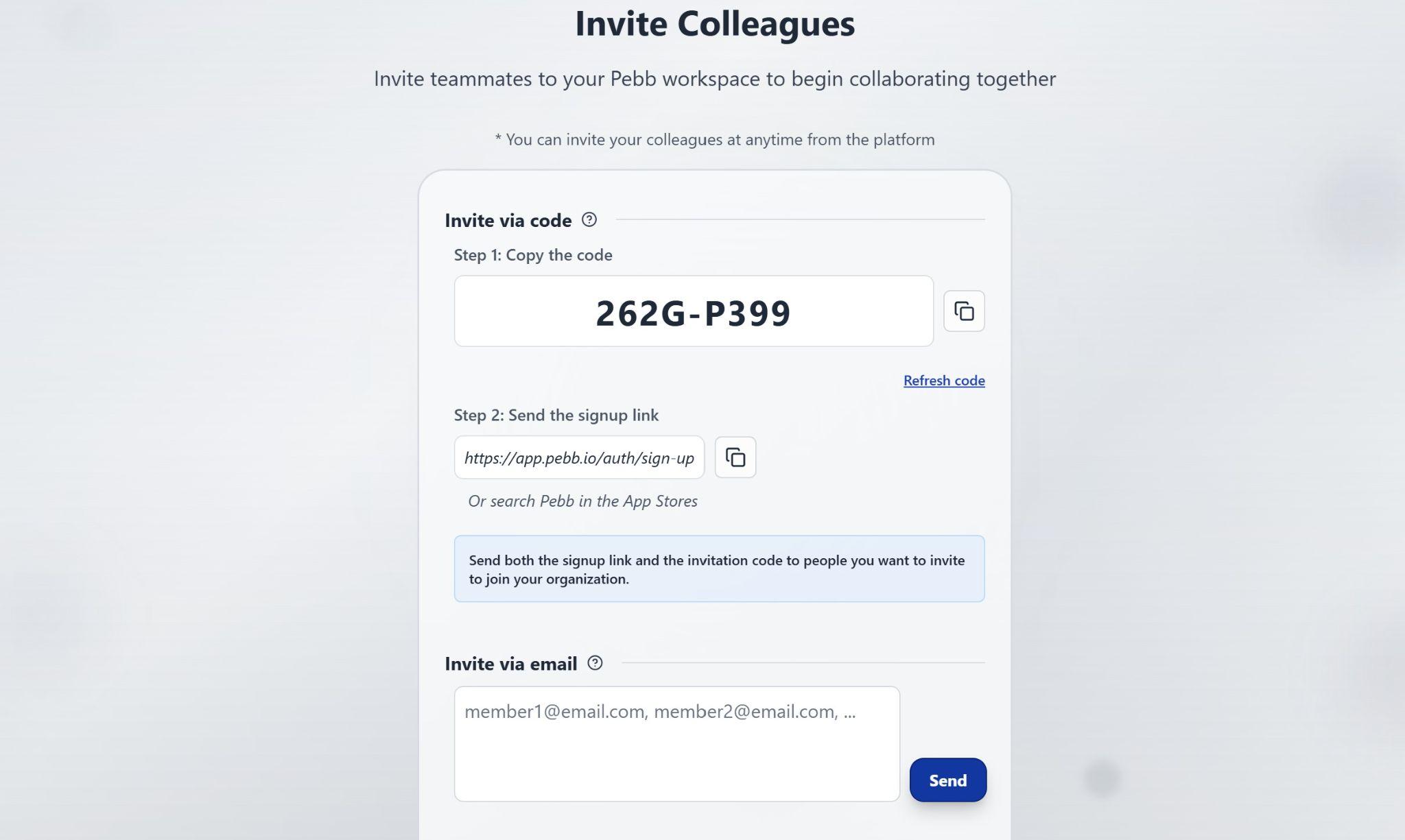
I found getting started with Pebb to be fairly seamless. I was able to sign up for the free plan instantly with just an email address and create a new organization by answering a few questions about my company’s size and how I planned to use the platform. After creating a profile for myself (a name and job title are all that’s required), I was able to invite teammates by entering their emails or sharing a sign-up link.
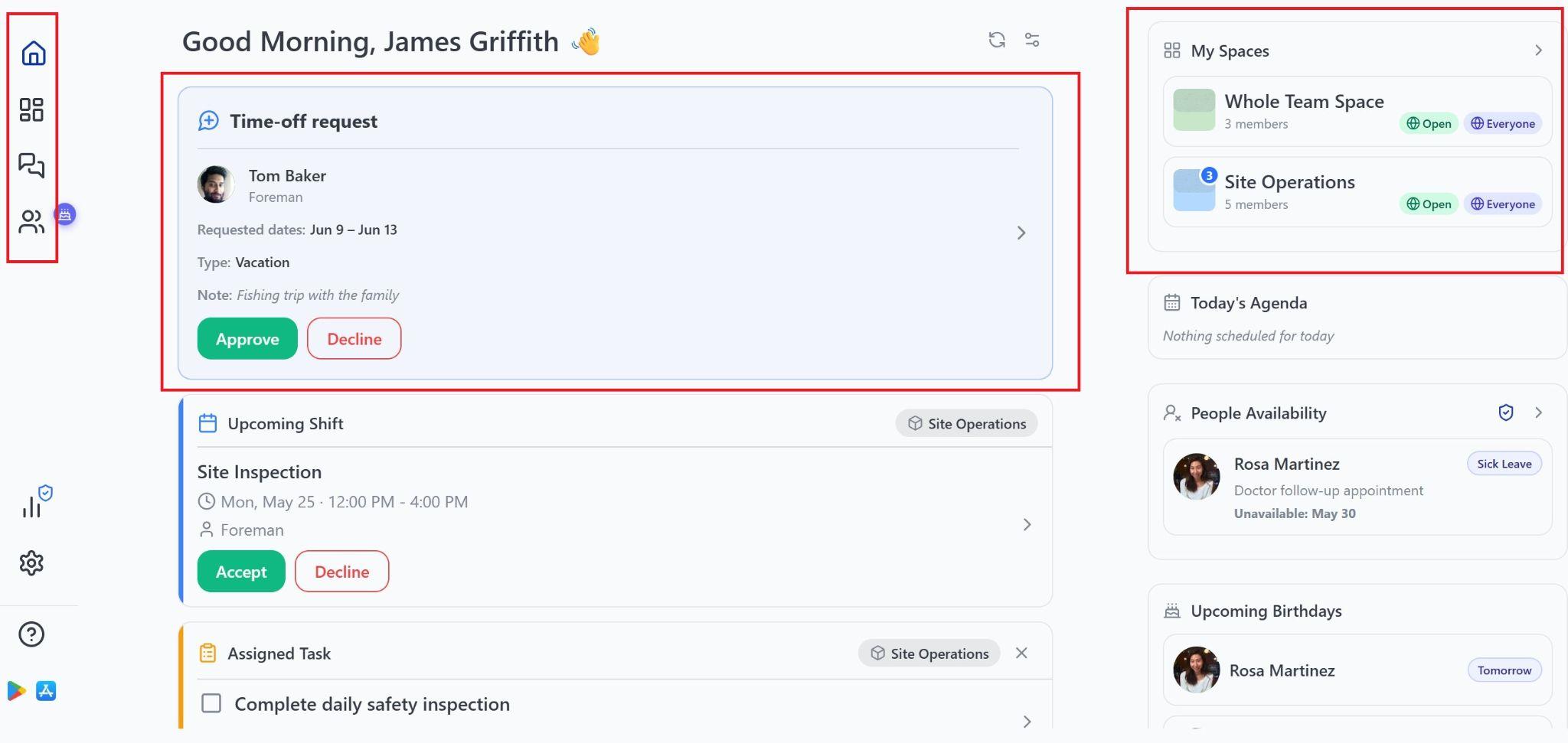
At the end of the setup process, I was able to create a space for my whole team. This is an aspect of Pebb I really liked. It’s easy to create spaces for your whole team or specific groups of employees, and they can be public, private, or secret (not visible to non-members). Within each space, you can choose which Pebb features are available—such as shift scheduling, time tracking, and forms—and set granular permissions to control who can make changes to schedules or view employee timesheets.
Pebb’s dashboard displays important updates from across your spaces, and your current space is always visible at the top of the screen when working with Pebb’s tools. Within spaces, I could access all tools from a single drop-down menu, so finding what I was looking for was straightforward. I still found myself working in the wrong space a few times during testing, but it felt more like part of the learning curve than a fundamental issue with Pebb’s layout.
Another thing I liked is that Pebb doesn’t require you to make big adjustments to the platform settings before you can start working. I added a few teams and job titles within my organization settings, which made it easier to add groups of employees to a space in 1 click. I also added different types of leave (paid and unpaid) so I could use the time off feature effectively. But Pebb would still work pretty well even if you never touched the default settings.
Verdict: 9/10
Mobile app
I tested Pebb’s Android mobile app and found it to be just as user-friendly as the web platform. The dashboard is nearly identical on mobile, and the main navigation menu is the same, which makes it easy to switch between devices. I had no trouble creating shifts and tasks, using the chat, or tracking time using the app.
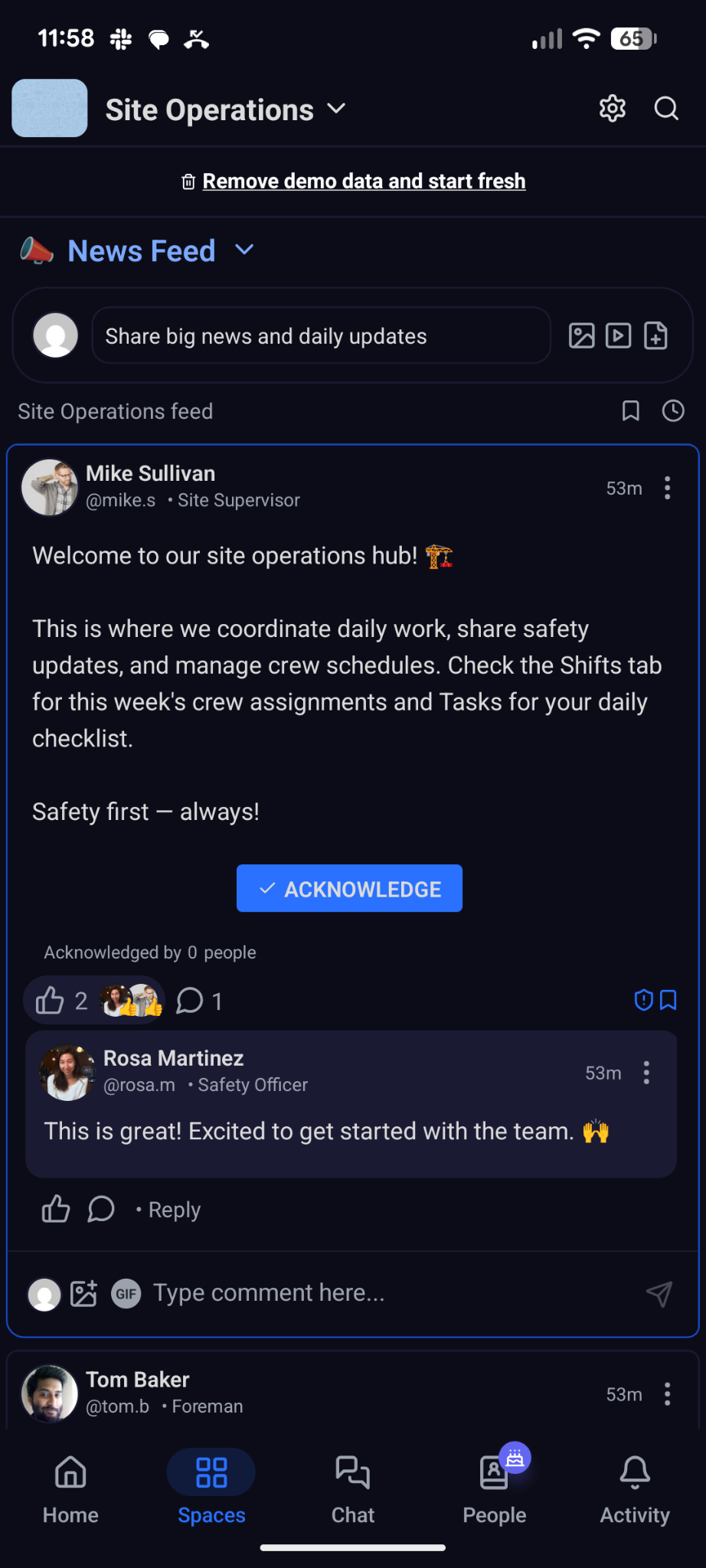
Even better, I couldn’t find any differences in functionality between the mobile app and web platform. That extends to admin functions—you have the same flexibility to adjust your organization settings and invite users when on the mobile app as you do on the web.
However, there is one huge drawback: the Pebb app doesn’t work offline at all. It’s not just that you can’t track time or enter new data while offline; the app displays a full-screen error message and doesn’t let you access any information. You can’t view a cached version of your schedule, chats, or any other data within Pebb.
So, employees working in the field could be left without the information they need to do their jobs if they travel somewhere with no cellular signal. That’s potentially a safety issue as well as an operational challenge. This is a huge miss that, honestly, makes it hard for me to recommend Pebb to any businesses with field-based employees.

| Menu Item | Admin | Employee | ||
|---|---|---|---|---|
| Website | Mobile App | Website | Mobile App | |
| Operations | ||||
| Shift scheduling | ✅ | ✅ | ✅ | ✅ |
| Time tracking | ✅ | ✅ | ✅ | ✅ |
| Tasks | ✅ | ✅ | ✅ | ✅ |
| Forms | ✅ | ✅ | ✅ | ✅ |
| Communication | ||||
| Chat | ✅ | ✅ | ✅ | ✅ |
| News feed | ✅ | ✅ | ✅ | ✅ |
| Voice and video chat | ❌ | ✅ | ❌ | ✅ |
| Additional features | ||||
| Knowledge base | ✅ | ✅ | ✅ | ✅ |
| Files | ✅ | ✅ | ✅ | ✅ |
| Employee directory | ✅ | ✅ | ✅ | ✅ |
Verdict: 5/10
Pebb Core Functionalities
Shift scheduling
Pebb offers a relatively basic shift scheduler that makes it easy to build simple schedules, but lacks some of the more advanced features I typically look for in this type of tool.
With the scheduler, you can create shifts and assign them to any team members within a space. You can also leave shifts open for employees to self-assign or set shifts as swappable with manager approval.
[GIF PLACEHOLDER — not accessible via service account; needs manual upload]
Caption: Pebb makes it easy to create shifts and assign employees to work.
However, there’s no way to limit shifts to employees with a specific job role or certification, and Pebb doesn’t alert you to overtime or labor compliance issues. I also tried assigning an employee to overlapping shifts, and Pebb didn’t raise any alerts about the scheduling conflict.
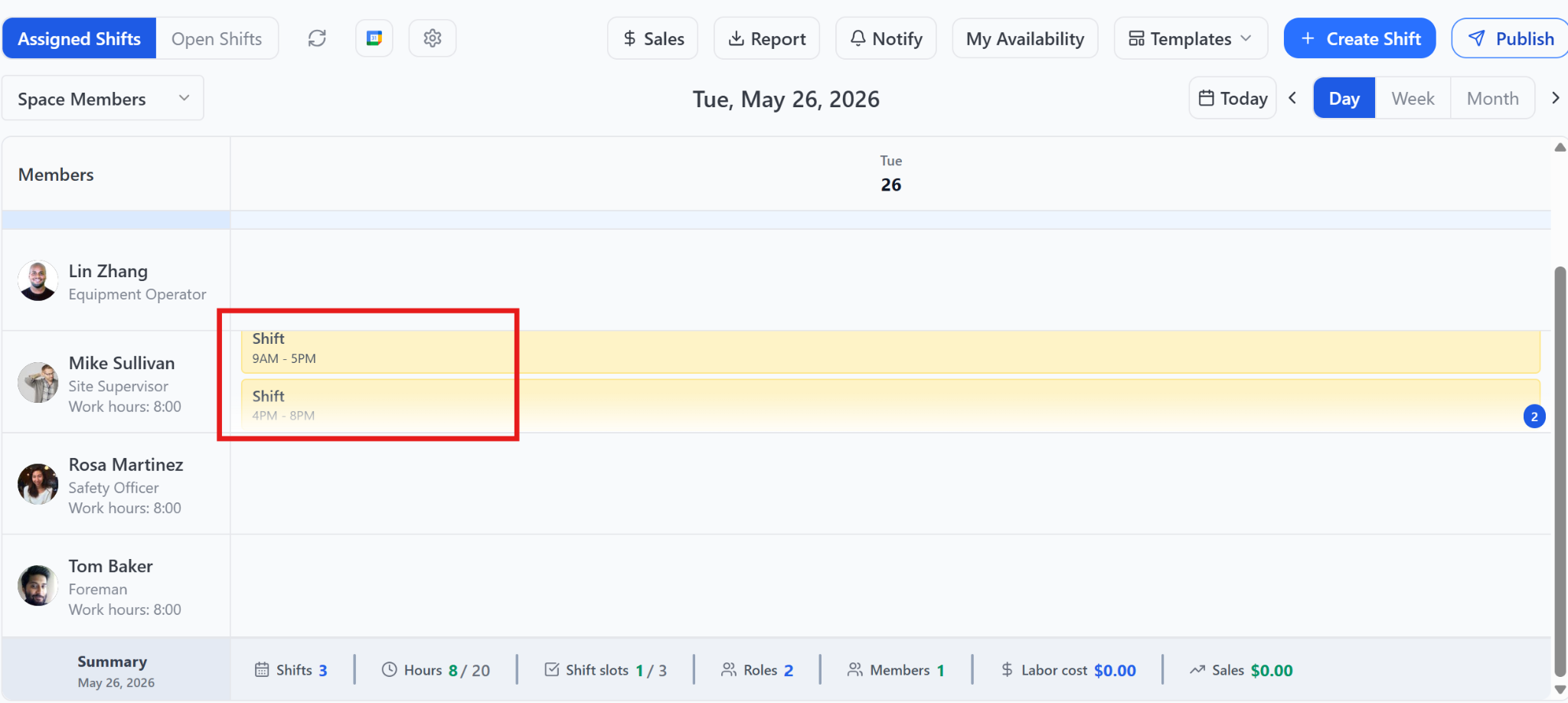
Another shortcoming I found is that Pebb allows you to add notes and location details to shifts, but not photos, tasks, or documents. So, unless a shift is self-explanatory, employees will need more than just their schedules to work effectively.
On the bright side, Pebb automatically syncs shifts with Google Calendar, making it easy to notify employees of schedule changes. I also appreciated that you can save any schedule as a template and set up recurring shifts with a click.
Overall, this felt like a decent scheduling tool for businesses with just a few employees and little complexity. But it has a lot of gaps that can lead to errors if you need to manage more complex schedules.
Verdict: 6/10
Time tracking
Pebb offers simple time tracking using either a digital time clock or manual time entry. At the most essential level, it was pretty easy to start and stop the digital time clock or create a manual entry. However, the broader functionality around time tracking was pretty underwhelming.
For example, I found the Pebb app allows employees to share their GPS location at clock-in, but there’s no way to require location sharing or limit clock-ins to geofenced areas. That makes it difficult to enforce location-based clock-in policies.
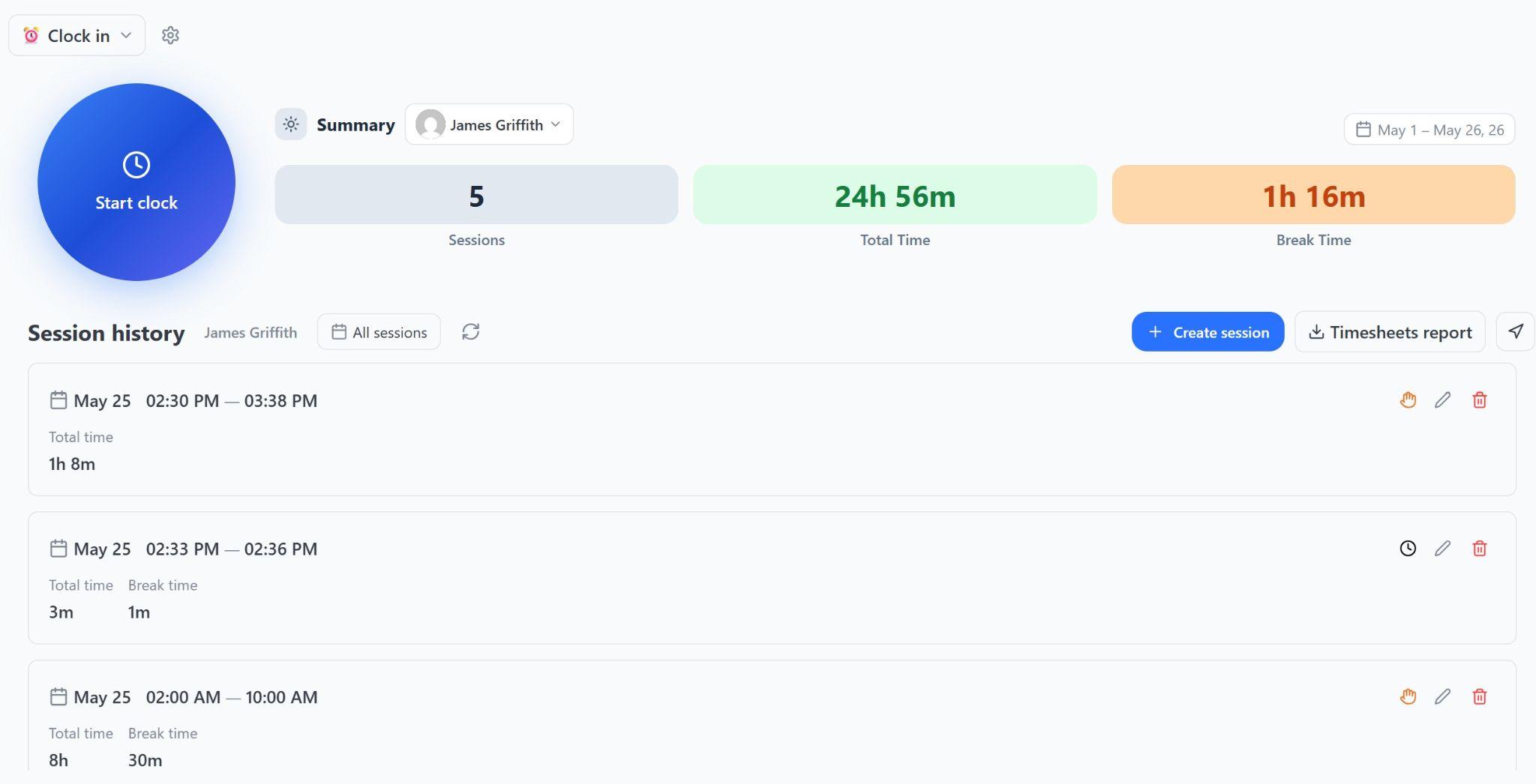
Employees can also enter break time for each time entry, which is important for compliance. However, break time can only be entered manually when clocking out of a time entry—there’s no way to track time for breaks in the middle of a shift.
I got mixed results when I tested Pebb’s ability to identify time tracking errors. It wouldn’t let me submit a break that was longer than the time entry it was part of, but I had no trouble creating overlapping time entries.
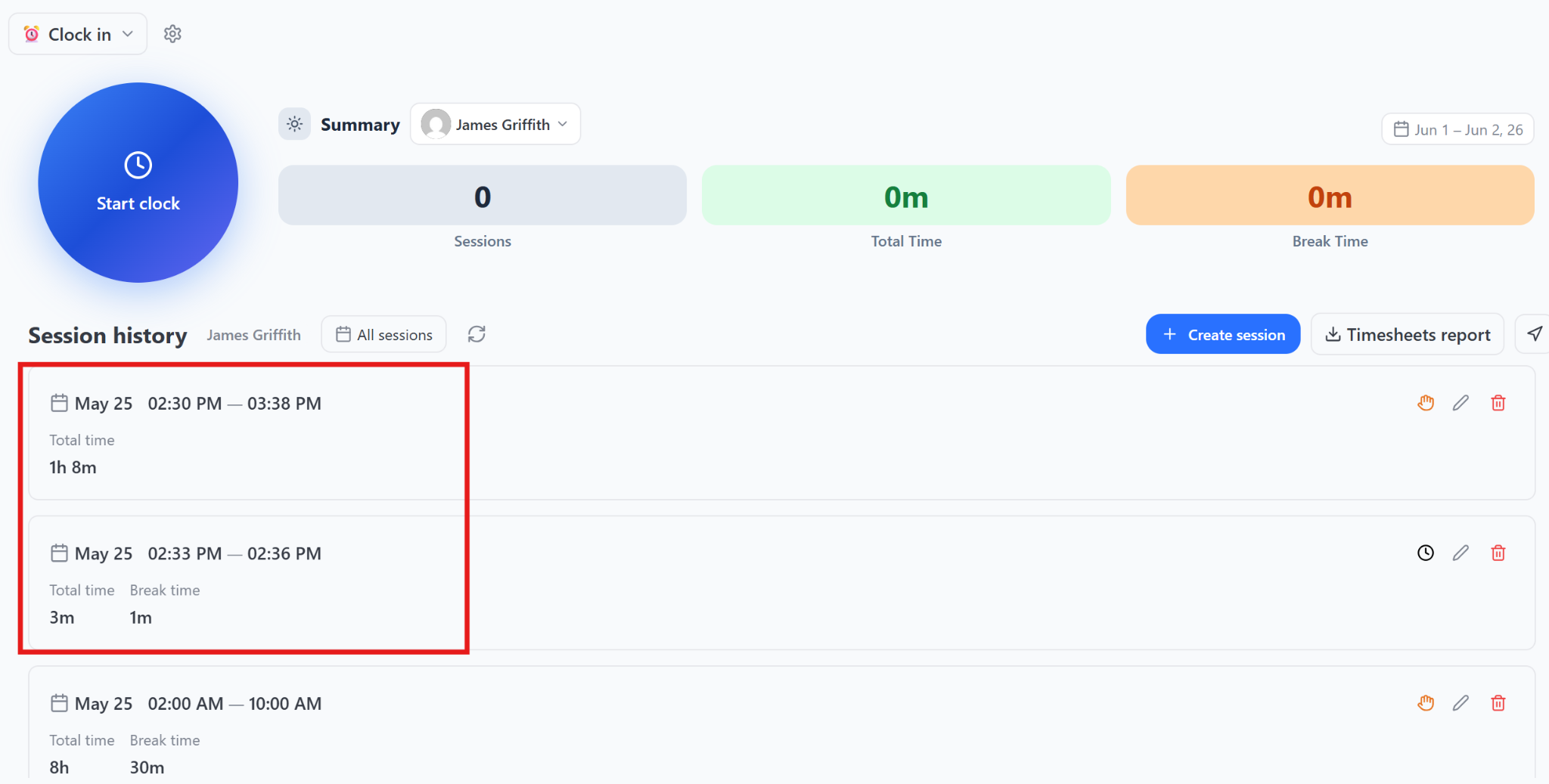
This is a big problem because Pebb’s timesheets also aren’t especially helpful for validating employees’ hours. The software doesn’t highlight overtime or conflicting time entries, nor does it allow you to view time entries on a calendar or compare them against an employee’s schedule. I ultimately landed on downloading timesheets and then visualizing the time entries on a calendar in Excel.
Verdict: 5/10
Task management
Tasks in Pebb are also quite limited. You can create tasks with a title and description, assign them to 1 or more people, and give them a due date.
But that’s about it. You can’t add photos, forms, or attachments, mark tasks as “in progress,” or add comments to existing tasks. I also found there’s no way to edit a task after creating it, which means you can’t assign additional employees to a task without deleting it and making a new one.
[GIF PLACEHOLDER — not accessible via service account; needs manual upload]
Caption: Tasks in Pebb are extremely limited. You can add a description and due date, but that’s about it.
Given these limitations, this feature felt more like a task list than a true task management tool.
Verdict: 4/10
Digital forms
Pebb’s digital forms tool allows you to create a variety of reusable forms and checklists. There are 4 response options: text-response, drop-down menu, checkboxes, or file upload. You can set forms as mandatory, give them a due date, and decide whether to allow multiple submissions. You can also set individual questions as “required” or “optional.”
It’s very basic, but the forms will likely be enough to meet many businesses’ needs. Still, I’d love to see Pebb do more here. For example, competitors like Connecteam have dynamic forms, where questions branch according to an employee’s responses to earlier questions.
Verdict: 6/10
Time off
I was surprised to find that Pebb offers time off management, considering it doesn’t offer any tools to track attendance or late arrivals. That said, I appreciate that this feature exists, since knowing when employees will be unavailable is crucial for scheduling. It’s also one of the better-executed features I found in Pebb, although it still has a few quirks.
Employees can request time off with a simple form that asks when they’ll be off and the type of time off they’re requesting. Oddly, it also asks who the request should be sent to—and the list of possible approvers includes everyone in your organization, not just managers.
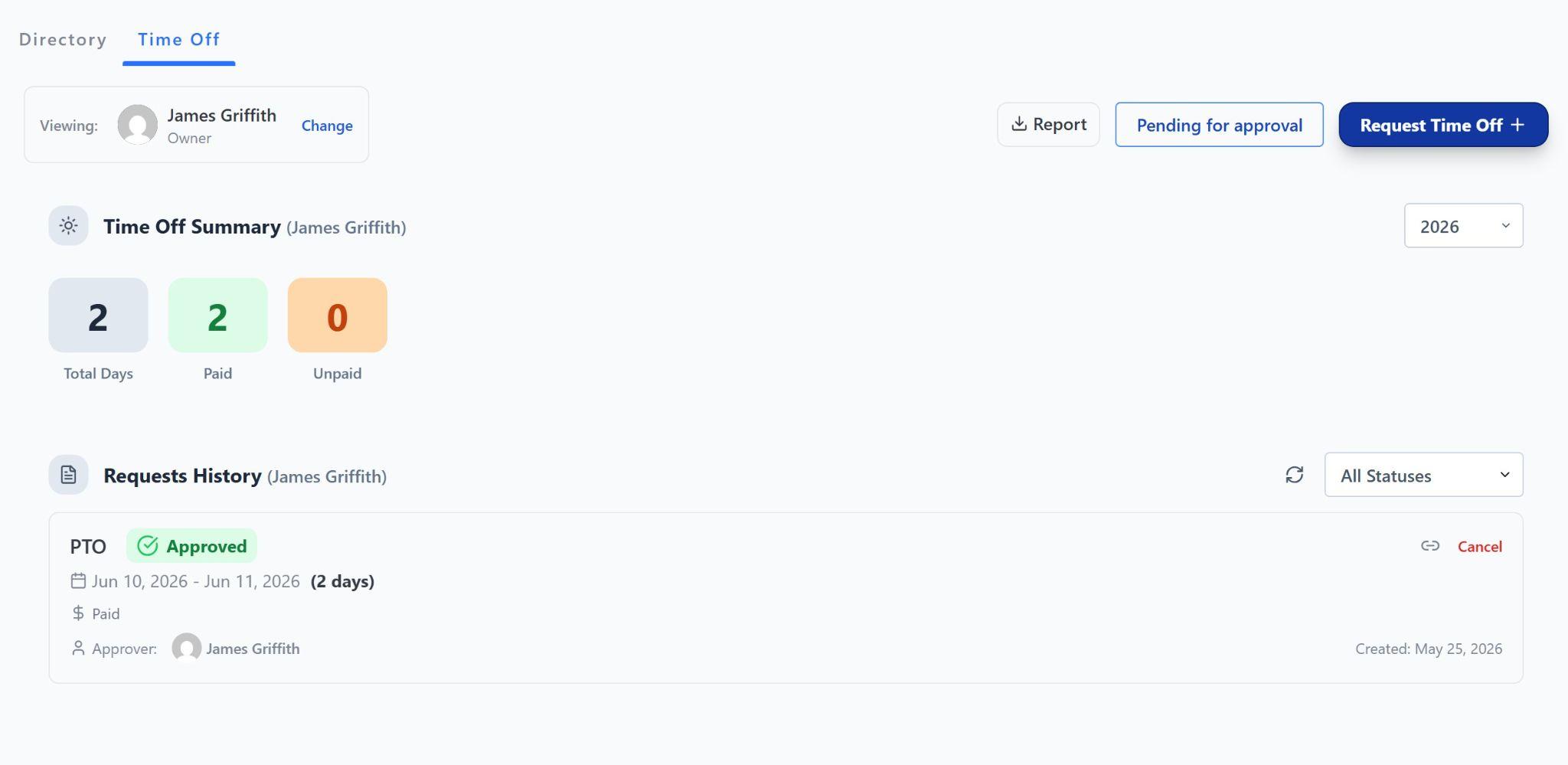
Pebb alerts you when new requests are made and offers a centralized dashboard to review time off requests. Managers can also view each employee’s complete time off history and upcoming time off.
Even better, approved time off shows up in the shift scheduler, and Pebb automatically prevents you from assigning shifts to employees who are unavailable. I was very happy to see this, considering that Pebb doesn’t prevent other types of scheduling conflicts.
Verdict: 7/10
Employee chat
Pebb’s employee chat is another helpful feature for small teams. It lets you communicate 1-on-1 or in groups, and you can create channels for each of your team spaces or specific projects. The chat supports a wide range of emojis, attachments, and GIFs, and you can tag individual users within group messages. Messages are also fully searchable.
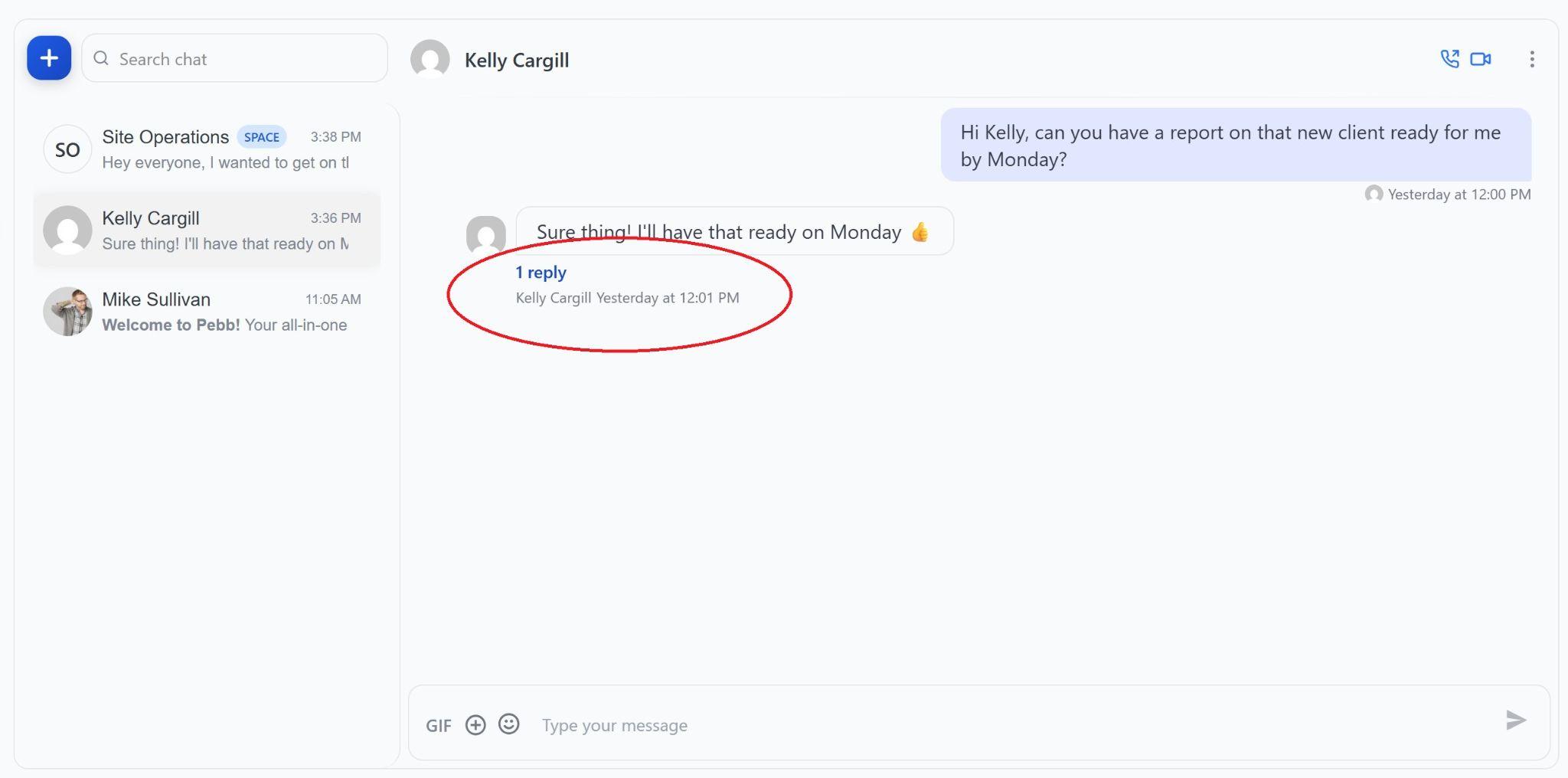
While I generally liked Pebb’s approach to chat, there are definitely shortcomings to this feature. For example, it allows you to reply to messages in threads, but the layout makes it very easy to miss threaded responses. I would avoid threads as much as possible for this reason. Pebb also doesn’t offer a way to moderate conversations or delete other users’ messages, so discussions can easily go off topic.
Verdict: 7/10
Pebb Security Features
Pebb is certified to the Service Organization Control Type 2 (SOC 2) standard, which is considered one of the top security certifications for business software. All data is hosted in US-based Amazon Web Services data centers and encrypted with 256-bit encryption. It’s also fully compliant with the EU’s General Data Protection Regulation (GDPR), which is stricter than most state-level privacy laws in the US.
Two-factor authentication (2FA) is enabled by default when employees join your organization, which is a great security feature. I also like that Pebb offers admin and manager user roles, giving you control over who can access what data within your organization.
I’d love to see single sign-on offered as a standard feature with the Premium plan. I’d also like the Pebb mobile app to support biometric authentication, like fingerprint sign-in. But these are minor shortcomings, and I was mostly happy with Pebb’s approach to security.
Verdict: 8/10
Pebb Reporting & Analytics
Pebb’s analytics platform is only available with the Premium plan, so I wasn’t able to test it hands-on. I asked Pebb’s support team about the analytics, and they told me it primarily focuses on employee engagement, including how much time employees spend on the app and which news feed posts get the most attention. You can filter data by space or team, but you can’t download the data.
Verdict: 6/10
Pebb Customer Support
Pebb’s customer support team is supposed to be available by email and live chat 24/7. I reached out by live chat on a weekday and was connected to an agent almost immediately. I also tried contacting support on a weekend, and it took about 12 hours to get a response, which is still pretty quick. In both cases, the responses I received were helpful and directly answered my questions.
Pebb also has a self-service online knowledge base, although it’s not as extensive as I would have hoped. All of the app’s core features are covered thoroughly, but there aren’t guides to premium features like video calling or analytics.
Verdict: 8/10
What Are Pebb’s Review Ratings From Review Sites?
Pebb is relatively new, so it hasn’t yet been widely reviewed. I only found a small number of customer reviews on G2 and the Apple App Store.
Pebb App Review
Pebb is an easy-to-use employee app that offers enough basic functionality for small businesses to operate effectively. The gentle learning curve and intuitive interface make it especially ideal for businesses with non-tech-savvy managers and employees.
That said, Pebb’s core features for shift scheduling, time tracking, and task management aren’t very advanced, so the app can feel limiting for more complex organizations. The lack of offline functionality in the mobile app also means that Pebb isn’t suitable for businesses with field-based employees.
Connecteam: The Better Pebb Alternative
While Pebb offers limited workforce management features, Connecteam is a better alternative that offers everything you need to keep your business running smoothly.
Although Connecteam offers the same features as Pebb, including shift scheduling, time tracking, time off management, and team communication, what sets it apart is that the features are far richer and packed with automations to help your business stay one step ahead.
Take Connecteam’s employee scheduler as an example. It offers 1-click scheduling that automatically assigns employees to shifts based on their qualifications, availability, and work preferences. You can make changes by dragging and dropping shifts on a calendar, plus allow employees to swap shifts with manager approval. Connecteam also alerts you when employees are assigned overtime and helps you ensure work is distributed fairly.
I also love Connecteam’s time clock, which is GPS-enabled, so you can see where field-based employees are located throughout their shifts. This makes it easy to reassign employees when a last-minute job comes up. Connecteam also allows you to create geofences so you can limit employees to clocking in only at approved sites.
Connecteam’s chat app lets you communicate seamlessly with your entire team via text, voice, and video. It includes thoughtful touches like read receipts and message scheduling. I also like that it lets managers moderate group chats to ensure conversations remain professional.
Beyond these features, Connecteam offers comprehensive task management tools, digital forms and checklists, an employee news feed, and a company knowledge base. It also supports employee onboarding and training, document and certification management, and employee recognition.
Best of all, Connecteam is free for small businesses with up to 10 employees. Paid plans for larger businesses start at just $29 per month for up to 30 employees, plus $0.50 per month for each additional employee.
Try out Connecteam free for 14 days to see how it can help you bring your workforce together.
FAQs
Pebb offers a free plan for up to 15 users to test the platform. There’s no free trial available for Pebb’s paid plans.
No, Pebb isn’t HIPAA compliant. However, Pebb is compliant with less stringent privacy laws like the EU’s GDPR and the California Consumer Privacy Act (CCPA).
