

Solid app for Australian construction compliance, but a clunky interface, unreliable mobile app, and opaque pricing hold it back.
Verdict: 6.4/10
Assignar is an operations management platform designed specifically for the construction industry, with features like end-to-end job management, scheduling, time tracking, and integration with several popular payroll tools. It’s primarily aimed at the Australian market, but has a small footprint in the US, UK, Canada, and New Zealand.
For mid-sized construction companies with serious compliance to manage, Assignar is a strong option. It pulls scheduling, worker certifications and equipment maintenance into one system — a big step up from whiteboards and spreadsheets.
I’m not sure that smaller contractors will see the same payoff. The setup can feel heavy for simpler operations, and the pricing sounds high. Plus, the mobile app is central to using Assignar day to day, but many users report it’s buggy and unreliable.
Key Features:
- Crew & equipment scheduling: Assign workers and assets using drag-and-drop scheduling.
- Field data capture: Let workers clock in/out with GPS stamps, record hours, and complete job tickets in real time via a mobile app.
- Custom forms & compliance: Create digital checklists and safety forms that crews complete on site, with automatic expiry tracking
- Asset & equipment management: Track machinery usage and service schedules to prevent breakdowns
- Reporting & analytics: Generate custom reports and dashboards to monitor project progress, costs, and crew utilisation.
- Integrations: Sync with Xero, QuickBooks, or Sage for automated invoicing and payroll processing.
Pros
- Built specifically for construction
- Modern, straightforward interface
- Drag-and-drop scheduling
Cons
- Glitchy mobile app
- No free plan or trial
- Pricing not transparent
Assignar Pricing
During testing, I wasn’t able to verify Assignar’s pricing, as it’s not transparent. Reviews suggest this is not by accident, as many users say the prices are very high.
I reached out to the Assignar team for pricing details. I learned that Assignar pricing is customized to your company and depends on things like your team size, current software, and any other specific requirements.
Assignar charges an annual subscription fee and a mandatory onboarding fee. To get pricing for your company, you must first book a demo for a tailored quote.
If you want to integrate with third-party software like Xero, Workbench, and Sage Intacct, Assignar charges extra. Assignar Pay, an AI-focused feature for job costing, payroll, invoicing, and payment workflows, also costs extra. Even the ability to create and customise your own reports comes at an extra cost.
Personally, I prefer when companies are upfront about pricing. Deputy, RosterElf, and Connecteam are all much more transparent about how much things will cost you. That way, you don’t have to sit through a long demo only to find the software is out of your price range.
| Team Size | Assignar | Deputy(Pro) | RosterElf | Connecteam(Advanced) |
|---|---|---|---|---|
| View pricing | View pricing | View pricing | View pricing | |
| 10 Users | Custom | A$130/month | A$70/month | Free for life — All features and dashboards |
| 20 Users | Custom | ~A$260/month | A$140/month | ~A$75/month |
| 30 Users | Custom | ~A$390/month | A$210/month | ~A$75/month |
| 50 Users | Custom | ~A$650/month | A$350/month | ~A$150/month |
| Read our full Deputy review | Read our full RosterElf review | Learn more about Connecteam. | ||
| * As of December 2025. All prices are AUD rounded to the nearest dollar and show the monthly cost when billed annually. Connecteam pricing converted from USD. | ||||
User reviews suggest Assignar is expensive, with costs that differ between companies. A G2 user says, “The cost is astronomical for a clunky program that does not offer the same features as many others, well under the price of Assignar.” A business owner on Capterra states they were charged $27,500 for a year with Assignar. I couldn’t verify this pricing with Assignar staff.
Additionally, Assignar doesn’t offer a free plan to small businesses like Connecteam does. There’s not even a free trial, and you can’t log in to the mobile app without a current plan. So if you want to try it out, you’re basically committing to a price you won’t know upfront.
Verdict: 4/10
Assignar Usability and Interface
Assignar has a detailed self-guided product tour that shows all its main features, plus a video tour and the option for a 1:1 demo with a representative. These tours and user reviews gave me a good feel for how Assignar’s website interface works.
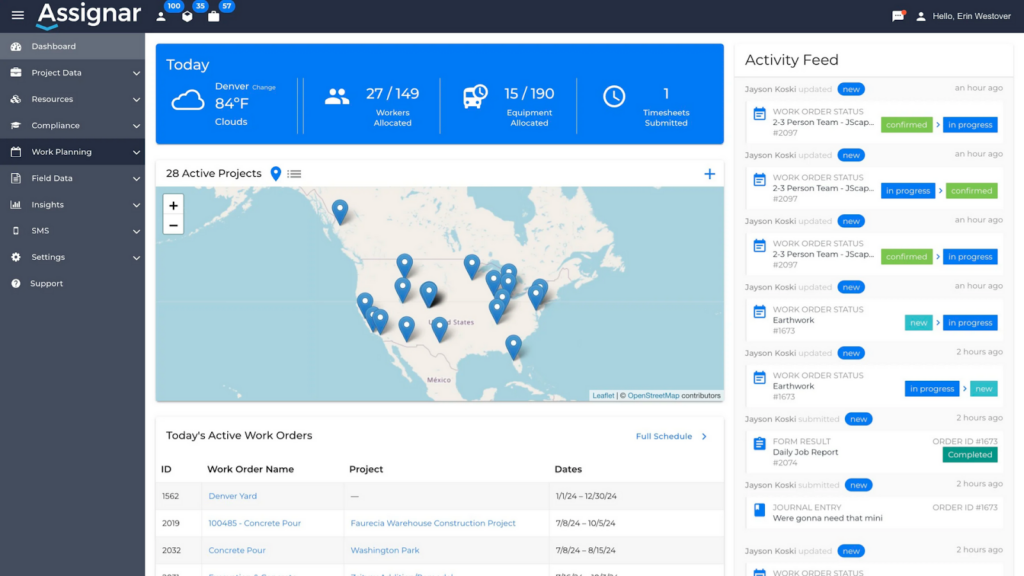
Assignar has a friendly and professional colour scheme that fits the construction industry. I immediately liked the project dashboard, which gives a bird’s eye view of all your current jobs. It’s not too cluttered, and you get a map showing your active projects, a list of your active work orders, and an activity feed that updates in real time.
You get to most of Assignar’s tools through the left-side main menu and submenus. You’ll spend most of your time in the Work Planning section that includes your work orders, project timelines, and scheduler.
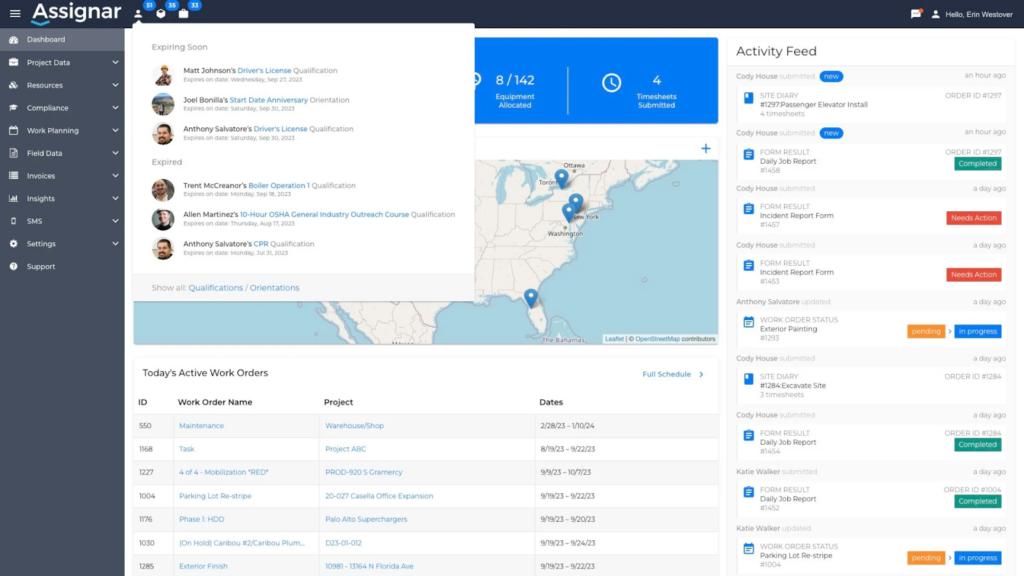
That said, for an application that’s supposed to replace spreadsheets, Assignar has too manybland tables and long forms. A few pages, like the Scheduler, offer some basic drag-and-drop features. I wish these were available everywhere on the platform, as they could make everyday tasks quicker.
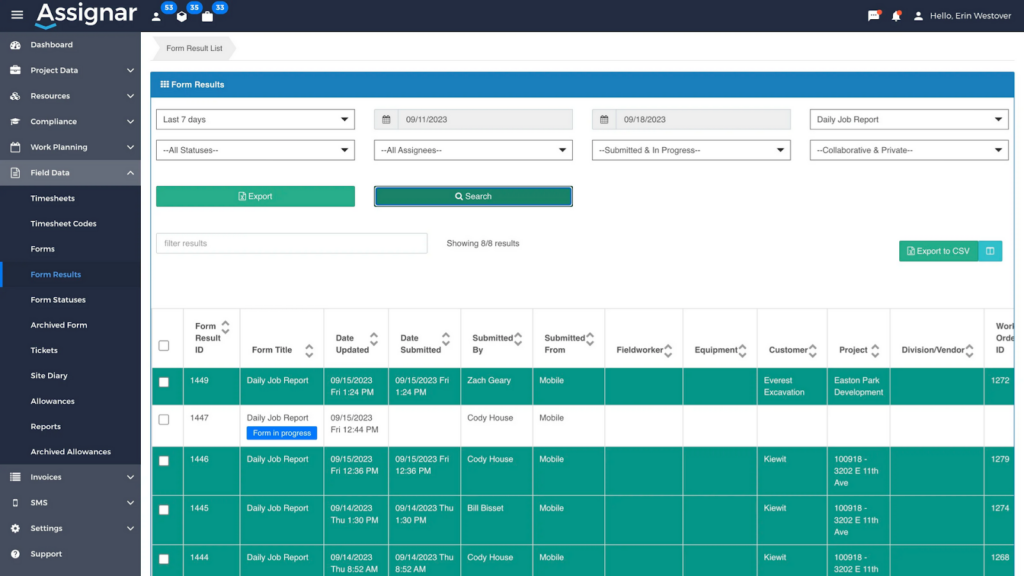
From my experience, Assignar is more complicated than its competitors, and new users will take longer to get used to it than other software. It also takes more clicks to find the things you need than in other apps. There’s no search feature, on-page help, or AI assistant.
Let’s say you want to check how many people on the job site have excavator training. Should you check the Project Data or Resources menu? Perhaps it’s in one of the Compliance or Field Data submenus, or in an Insights report? Figuring this out takes more time than it should.
Assignar doesn’t really have built-in accessibility options. Instead, it takes a “tell us if there’s a problem” approach, asking users to reach out if any part of the site is hard to navigate. I prefer software to have accessibility features like high-contrast modes and screen reader compatibility built in.
Verdict: 6/10
Mobile app
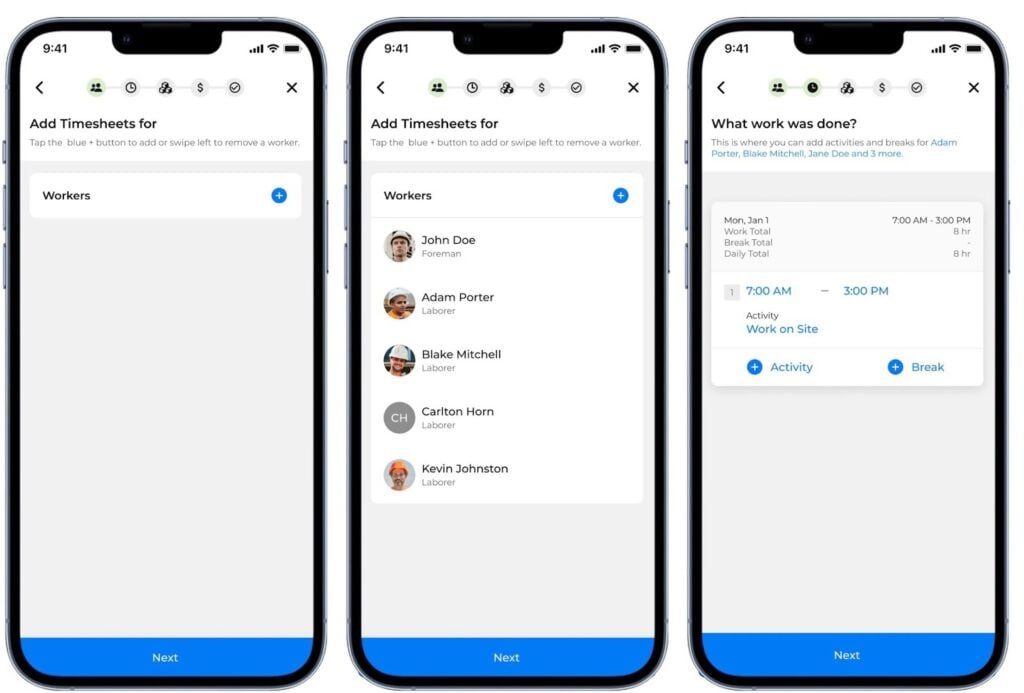
Assignar has mobile apps for Android and iOS. Assignar supports devices on Android 11 and above, or iOS 14 and above. Workers can use the app to view their tasks, submit timesheets and forms, and record daily work progress.
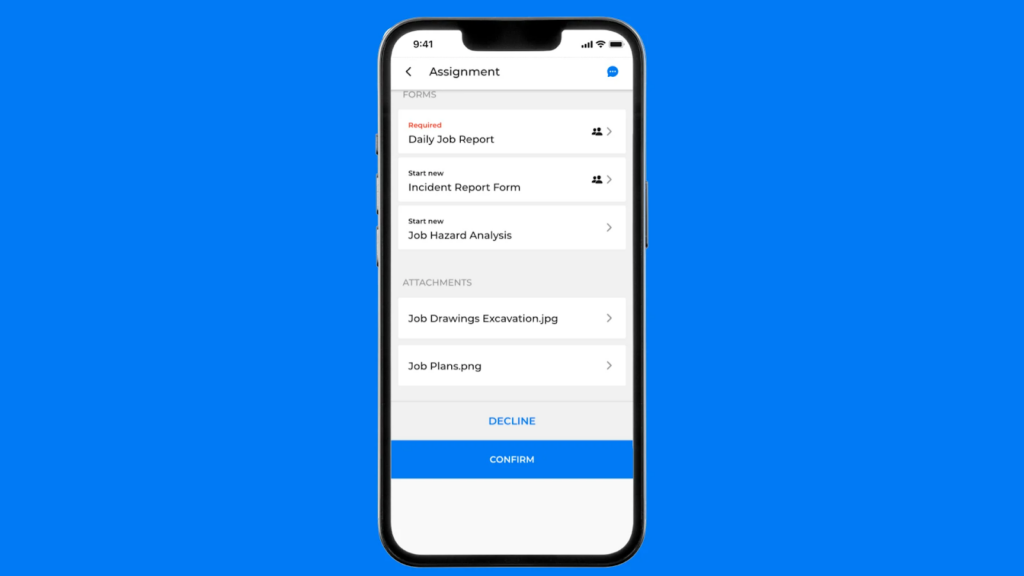
Supervisors get a few extra tools in the app. The big one is a daily site diary—a daily log where they can record crew hours, activities, and progress all in one form. In construction, not everything always goes to plan, and this feature makes it easy to log timesheet data for emergency work and last-minute jobs without having to set up a roster in advance.
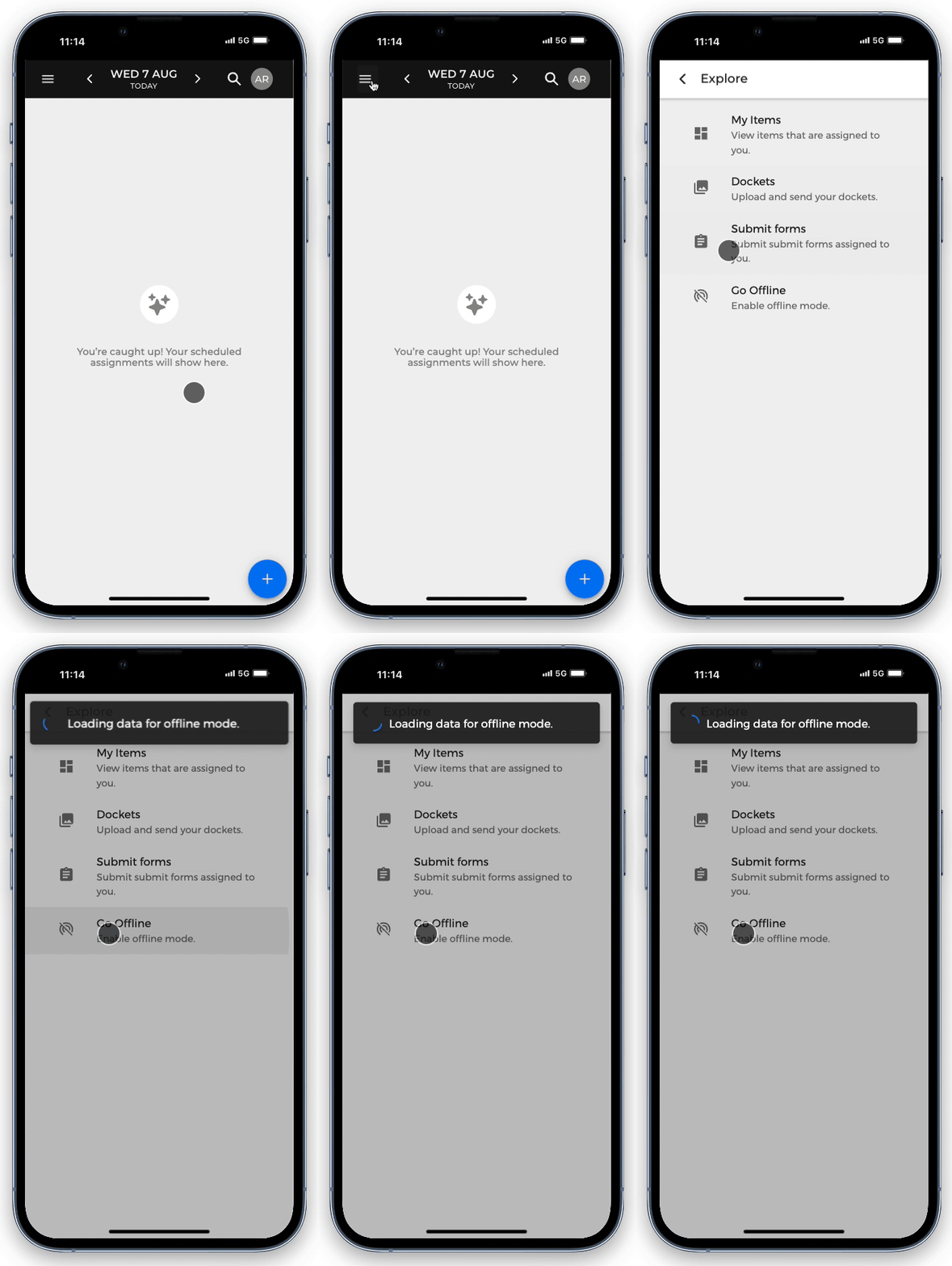
The Assignar mobile app can be used offline to view the assignments from the past few days, but the offline mode is fiddly. Workers must tap the Go Offline button before they lose internet connection so the app can download the information they’ll need when offline. In my experience, you don’t always know when you’re heading to a location with poor signal.
Anything created offline is then synced when the worker gets an internet connection.
Unfortunately, the Assignar mobile app has a 2.7/5 rating on Apple’s App Store, with users frequently citing bugs, crashes, and instability as frustrations. Many also have other complaints:
- The user interface is unintuitive for new users.
- Uploads fail to work.
- Workers are left stuck on endless loading screens.
Assignar likely needs to work on its mobile app to bring it up to par with leading user-friendly options like Connecteam, which scores 4.9/5 on Apple’s App Store.
Verdict: 5/10
Assignar Core Functionalities
Construction crew and equipment management
Perhaps the biggest difference between Assignar and many workforce management tools I’ve tested is its focus on compliance and asset management.
You can create a detailed profile for every worker, tracking all their skills, certifications, and inductions, including expiration dates. This means you can assign workers to the right jobs and remind them when any important credentials are about to expire.
You can do the same for equipment, managing everything from maintenance schedules and registration to service history and required pre-start forms.
Equipment tracking becomes really useful when you have multiple work orders at the same time. Assignar keeps track of which equipment is being used where, so you never end up trying to assign a tipper to two different jobs at once.
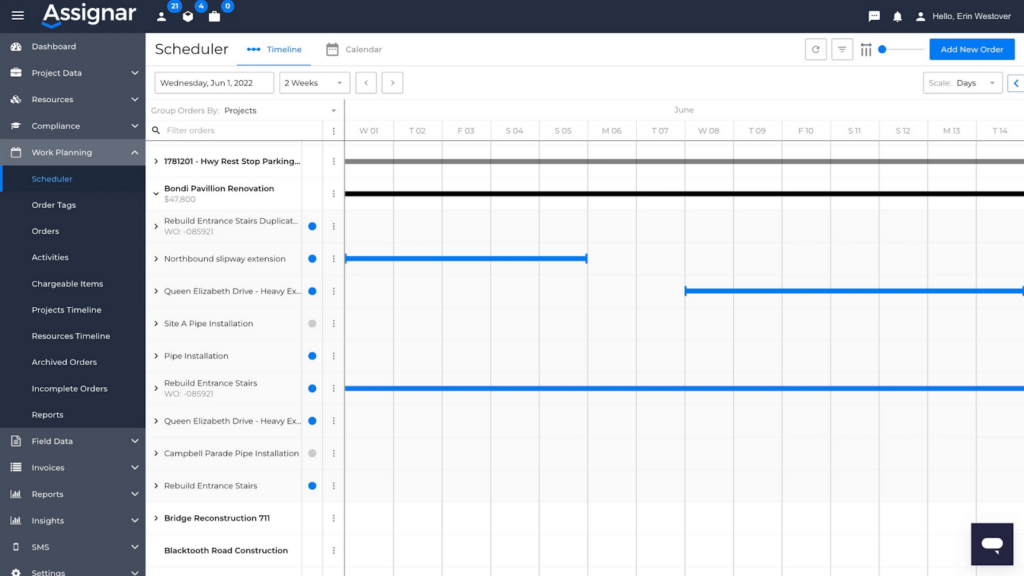
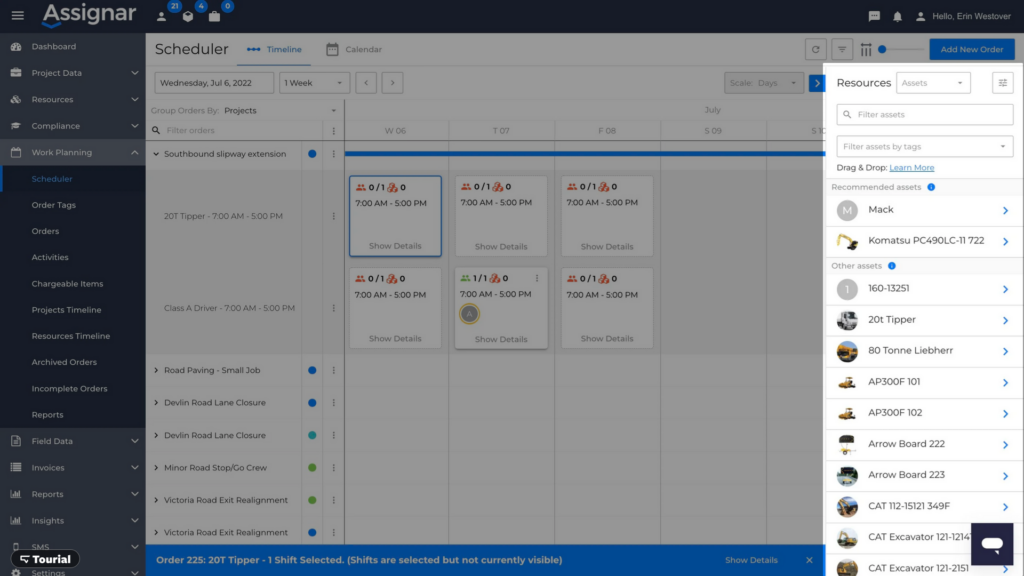
When you create new jobs, Assignar can recommend the equipment that’s best for the job. You can then drag and drop the equipment you want into the roles you’ve set up for the dates you’ve planned.
You can also track the status of equipment and create pre-start forms for workers to complete before they use it. You might ask them to always check that the lights are functioning and the hydraulic levels are okay before they start up an excavator. Any issue that comes up is flagged in Assignar’s activity feed with a ’Needs Action’ alert button.
For larger construction companies, this kind of equipment tracking could be a lifesaver. But it does add extra complexity.
Verdict: 8/10
Scheduling
Assignar’s scheduling dashboard is where you’ll spend most of your time, and it’s well-designed to handle complex roster and compliance rules.
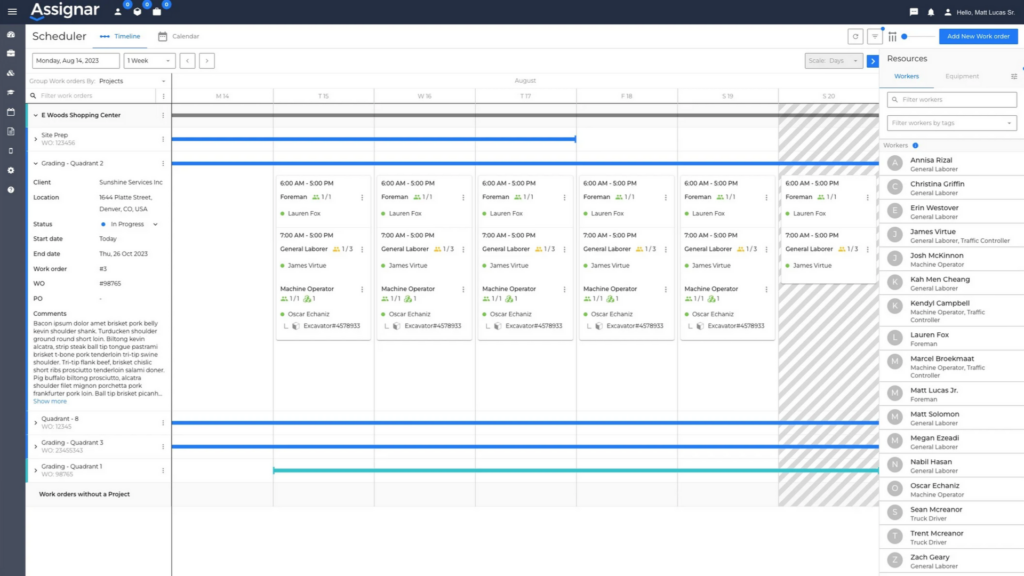
For me, the most interesting feature is the recommendation engine. It uses your compliance data — things like tickets, licences, site inductions, and expiry dates — to automatically suggest qualified workers. It even takes into account how far they are from the job site.
The system is also designed to alert you to potential problems. It provides clear warnings for scheduling conflicts or issues. For example, the system alerts you if a worker is missing a required ticket or is already booked on another job. This helps you stick to modern award rules by ensuring staff are qualified.
However, I’d like to see more tools to help prevent safety issues. To truly manage risk, the system needs to evolve from just logging compliant hours for your payroll system to flagging potential worker fatigue.
For field operations, supervisors can manage schedules from the mobile app, with the ability to “push” a day’s shifts to the next day in case of weather delays.
Once you set up a roster, the app notifies workers with an SMS or in-app alert. I’d like to see better team communication tools here, as the scheduling app mostly sends out rosters and doesn’t give teams tools to keep in contact and share updates while on the job.
Verdict: 7/10
Time tracking
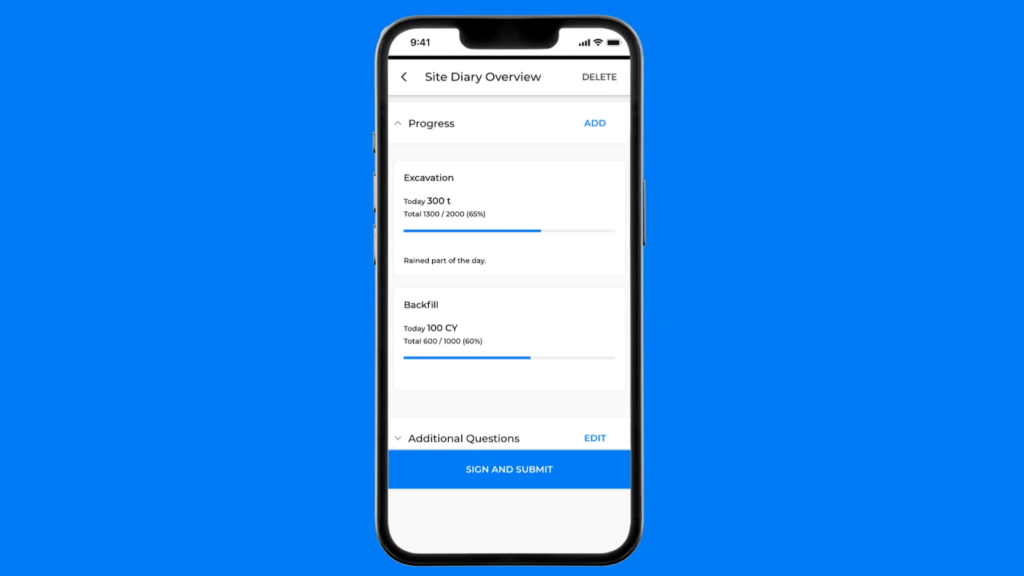
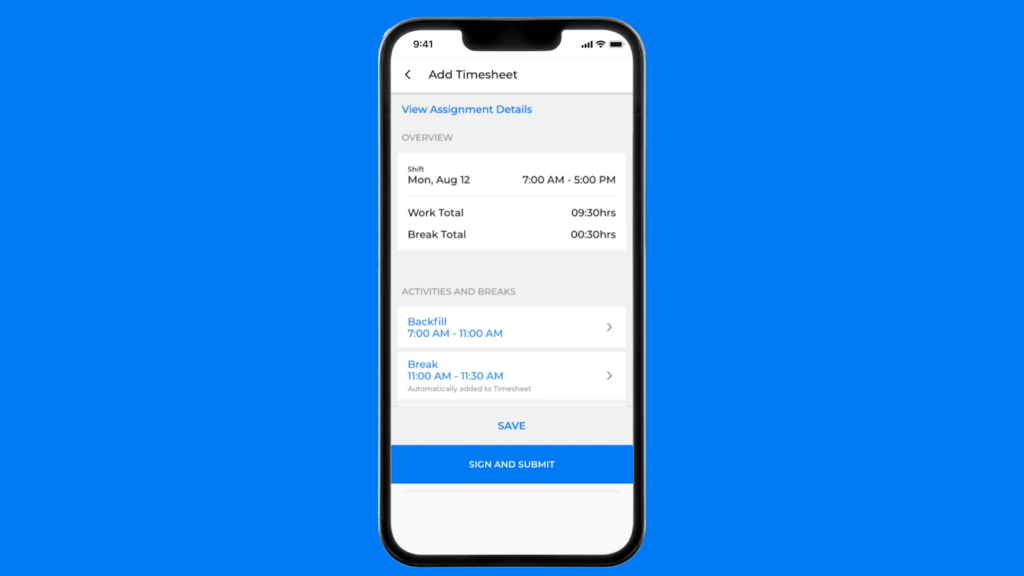
Assignar has two ways to track time. Individual workers can log their own hours on the mobile app, with GPS location stamps captured at clock-in to verify their location. Managers can use the Site Diary feature to manage time for an entire crew from a single daily entry, which then automatically fills everyone’s individual timesheets.
I like how the Site Diary captures more than just hours. You can log project progress, weather, and chargeable expenses, giving a complete picture of the job.
I also like that you can configure custom pay rates, client charge rates, and complex overtime rules (like daily vs. weekly) that run automatically on approved time. You can set specific rules for penalty rates (like weekends) that override standard rates automatically. Workers can select their own allowances (like travel or meals) directly from the mobile app, meaning payroll doesn’t have to hunt down receipts later.
The biggest issue with time tracking is the mobile app. In reviews, field workers have expressed frustration that the app’s unreliability adds extra work to their day.
Verdict: 7/10
Integrations
Assignar has a few different ways to integrate with other software. At the time of writing, there are 9 services that Assignar can connect with:
- Acumatica.
- Sage Intacct.
- Foundation Software.
- Xero.
- Intuit QuickBooks Online.
- MYOB AccountRight.
- Workbench.
- Simpro.
- Employment Hero.
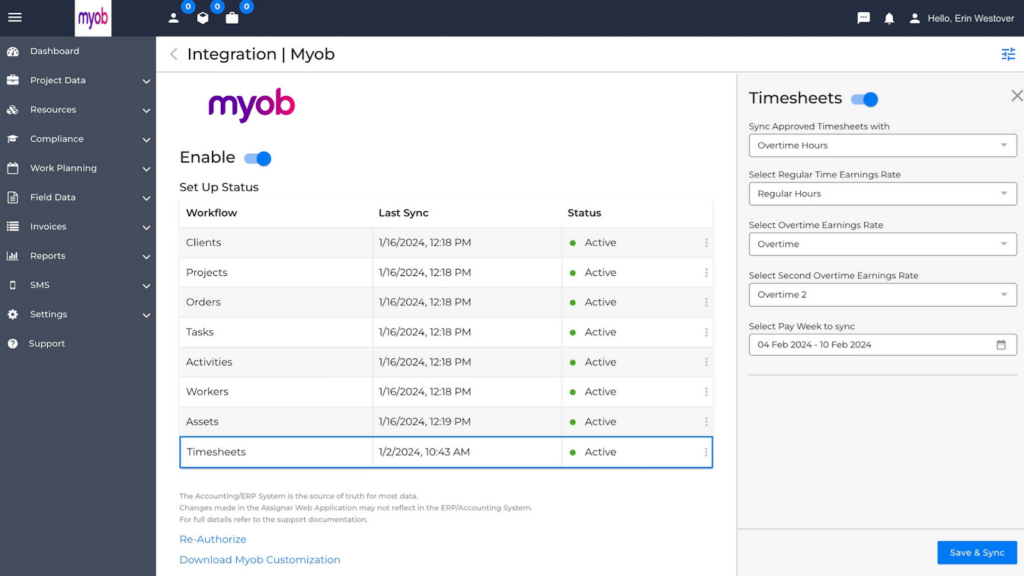
If the software you use isn’t on that list, Assignar also has CSV or Excel exports. Having to manually export, edit, and then import into other software isn’t ideal for software designed to save you time.
The third option is API access. What this means is you could build a software bridge between your current software and Assignar, but this requires a lot of technical knowledge.
All these integrations cost extra, and because Assignar isn’t upfront about pricing, you won’t know how much they’ll cost until you’ve spent time talking with the company.
Verdict: 6/10
Assignar Security Features
Assignar has a strong security foundation, with a strong infrastructure and key certifications:
- AWS hosting: The platform runs entirely on Amazon Web Services, which has strong security and network protection.
- Data encryption: All data is encrypted both in transit and at rest.
- Role-based access control: The platform offers granular permissions that let you control exactly what dashboards users and field workers can access.
- External certifications: Assignar holds ISO 27001 and SOC 2 Type 1 certifications, which means that its security has been verified by external experts.
These are strong foundations, but there’s no mention of multi-factor authentication (MFA) or single sign-on (SSO), which concerns me. The platform instead relies on basic password authentication, which is not enough for software managing sensitive employee data, payroll information, and compliance documents.
Verdict: 7/10
Assignar Reporting & Analytics
Assignar Insights is where you can create customisable and shareable reports from the data within Assignar. Out of the box, Assignar comes with 31 reports that construction companies often use, including:
- Equipment document expiry reports.
- Buddy punch detection reports.
- Worker utilisation reports.
- Check-in and check-out exception reports.
- Billing reports.
In most cases, you’ll be getting a typical spreadsheet-style table report, which you can export to Excel or PDF. You can also set reports to be emailed automatically on a set schedule.
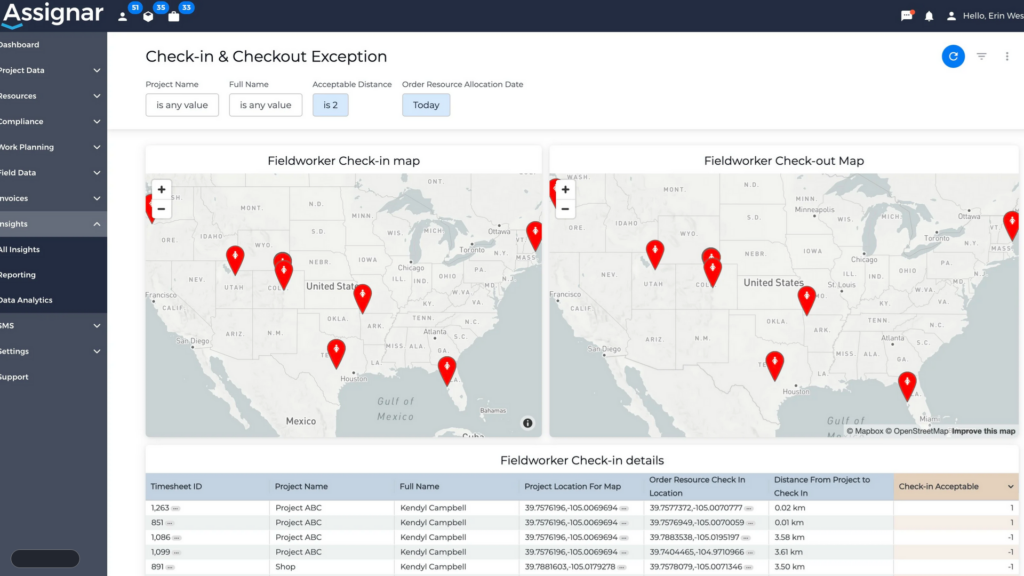
If you want to build your own reports, you’ll have to pay extra for an Insights Creator licence. If you have this licence, you can also create dashboards for a quick visual representation of your data. You can add elements like bar charts, pie charts and maps.
Overall, I think the reports and dashboards work well enough, but they feel pretty basic. I also don’t like that you must pay extra to create and customise your own reports.
Verdict: 6.5/10
Assignar Customer Support
Each Assignar customer is assigned a dedicated customer success manager, which is nice.
Assignar technical support is available Monday–Friday, 6:00 a.m. to 6:00 p.m. (AEST, AWST, ACST), excluding holidays. I like that Assignar’s support hours consistently cover the entire Australian continent.
While there’s a sales phone line for potential customers, Assignar customer support is almost entirely through an online ticket-based system. This is somewhat disappointing, as many other companies offer phone support and live chat.
Once I had access to the support system, I sent a simple question at 11:00 a.m. and received a short reply 5 hours later. Our ongoing discussions continued at this pace. Reviews of Assignar customer support are mostly positive, indicating a responsive, friendly, and helpful team, but my experience shows that replies can be a little slow.
Verdict: 7/10
What Are Assignar’s Review Ratings from Review Sites?
(As of March 2026)
Assignar App Review
Assignar is an operations management platform for the construction industry that brings scheduling, equipment management, and compliance tracking into one system.
I appreciated Assignar’s focus on construction-specific needs, particularly its equipment tracking, compliance management, and recommendation engine for qualified workers.
However, I have concerns about the mobile app’s reliability. Users consistently report bugs, crashes, and slow performance. I was also disappointed by the lack of transparency around pricing.
I feel the platform could work well for mid-sized Australian construction companies with complex compliance needs and lots of equipment to manage, but smaller contractors will be better off with simpler, more reliable tools.
Connecteam: The Better Assignar Alternative
For Australian construction companies looking for powerful workforce management software, Connecteam offers a more reliable platform with a stronger mobile app, clear pricing, and better built-in communication.
While Assignar’s mobile app struggles, employees love Connecteam’s mobile app, and it has an amazing 4.9/5 with over 1 million downloads. When your crews depend on the app daily in the field, that reliability matters.
Both platforms track GPS locations when workers clock in, but Connecteam’s real-time GPS tracker provides continuous location tracking during work hours, useful for both safety and accountability.
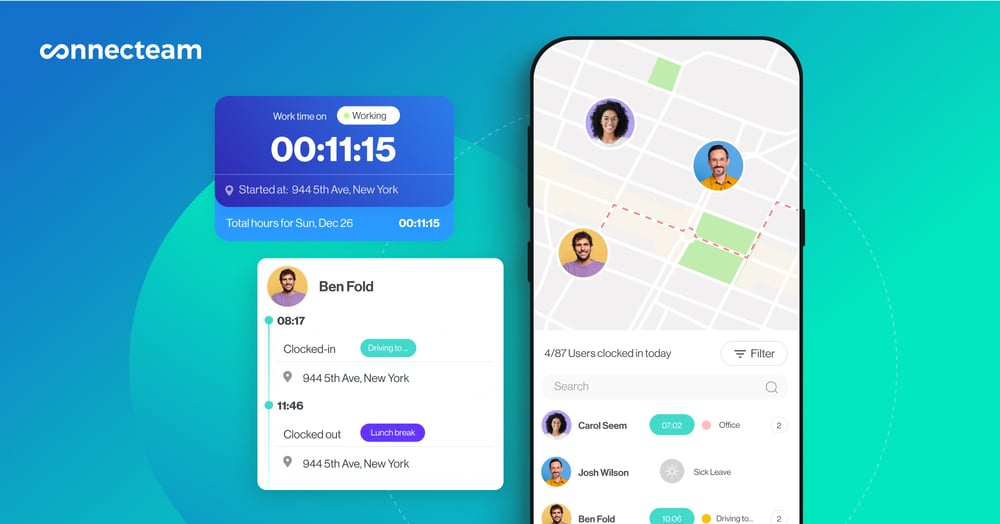
Communication is significantly stronger, too. Where Assignar mainly broadcasts rosters, Connecteam includes full online team chat, and a knowledge centre for procedures and manuals.
I like that Connecteam offers AI capabilities on its higher plans, which help employees find everything they need, including safety steps, manuals, or procedures. AI can also help you build rosters in seconds, accounting for availability, qualifications, and fairness. (You can also easily create rosters on your own with the employee scheduler.)
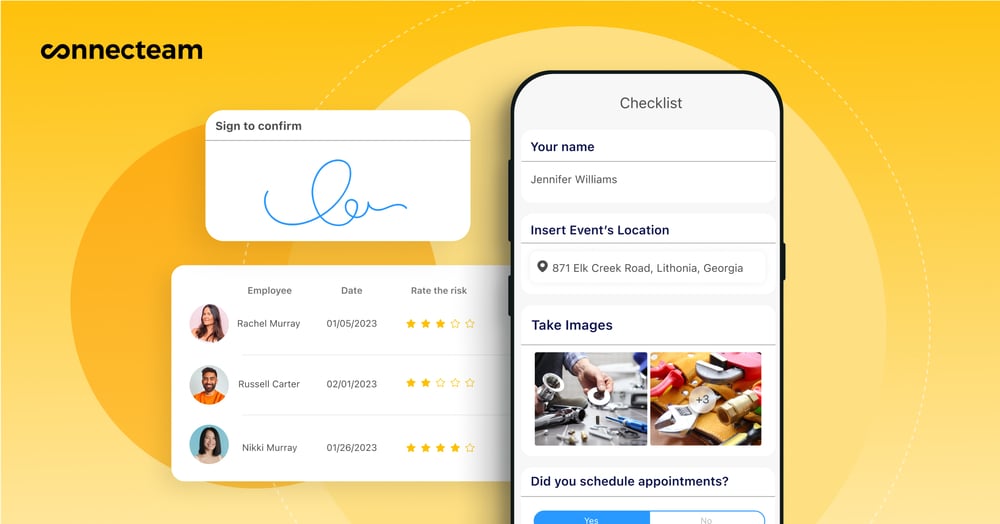
I also like how easy it is to attach detailed task lists, digital forms, and safety checklists directly to shifts. Workers get everything they need in one place when they arrive on site. I think it’s great that you can just photograph your existing paper forms and they’re digitised instantly through the power of AI.
Connecteam also lets you schedule equipment and vehicles alongside workers.
Connecteam’s time clock app handles customisable overtime rules and penalty rates, with automatic alerts before workers go over approved hours.
Pricing is straightforward and you can test Connecteam with a 14-day trial, or use it free forever if you have fewer than 10 employees. Learn more about using Connecteam for construction.
FAQs
No, Assignar only offers a product demo.
Yes, Assignar is fully compliant with the Privacy Act 1988 and the Australian Privacy Principles (APPs)
Assignar helps you track construction compliance for workers and equipment. You can store tickets, licences, inductions, and expiry dates for each worker, and set alerts before anything runs out. You can also track equipment maintenance, rego, and pre-start checks in the same system
Switching to Assignar takes some setup. You need to load your workers, jobs, equipment, and compliance records into the system. Assignar provides onboarding help and training, but it’s not instant. Expect a learning curve, especially for supervisors and crews using the app daily.
Switching away is doable but not automatic. You can export data like timesheets, job records, and reports as CSV or Excel files, then import them into your next system. If you want a cleaner transfer, you may need IT help using Assignar’s API
Assignar integrates with popular payroll and accounting tools so approved hours flow into your pay system. It supports platforms like Xero, MYOB, QuickBooks Online, Sage Intacct, Workbench, and Employment Hero. Most payroll integrations cost extra, so ask for the full price during your demo.
Assignar connects with nine main business systems, mostly in accounting, ERP, and workforce tools. If your software isn’t on the list, you can export CSV or Excel files and upload them manually. Assignar also offers API access for custom integrations, but that usually needs technical help.
Yes. Assignar is a real construction platform used in Australia and overseas. It runs on AWS cloud hosting, encrypts stored and sent data, and has ISO 27001 and SOC 2 Type 1 security certifications. It looks safe for storing worker, payroll, and compliance data
Assignar is powerful but not the simplest tool. The web app has a lot of tables and menus, and there’s no search bar, so it can take time to learn. The mobile app is helpful for field work but has low ratings, with users reporting bugs and crashes.
Assignar uses GPS-stamped clock-ins to show where workers were when they started or finished a shift. It also includes reports like “buddy punch detection” to spot suspicious patterns. This helps reduce time theft, but it doesn’t fully stop it without good site rules and checks.
Connecteam is one of the best options for Australian construction teams because it’s simple to run, works well on mobile, and has clear pricing. It covers scheduling, time tracking, forms, GPS, and team communication without the heavy setup that some construction-only platforms require.
Connecteam stands out for mobile use. Its app is fast, stable, and easy for crews to learn, with top ratings in app stores. That reliability matters on site, where workers need to clock in, fill forms, and check shifts without glitches.
Connecteam is one of the easiest tools to pick up and run. It has a clean interface, quick setup, and simple day-to-day use for both managers and workers. You also get a free trial and transparent pricing, so you can test it properly before committing.
No. Assignar doesn’t publish set pricing on its website. To see a cost, you have to book a demo and get a custom quote. Many add-ons, like integrations and advanced reporting, can also increase the final price.