


Homebase and HotSchedules both promise easier scheduling and time tracking, but once shifts change last minute, staff clock in from their phones, or labor rules come into play, the differences between them become hard to ignore.
HotSchedules is built mostly for restaurants, and it can be powerful, but many of its best features require extra subscriptions. Homebase also works well for restaurants, but it’s built to fit a wider range of hourly small-to-medium businesses, including retail and service teams.
Pick the right platform and you’ll spend less time fixing schedules, chasing time punches, and cleaning up payroll. Pick the wrong one and you may be stuck paying extra for basics, or fighting the system during every rush. This Homebase vs. HotSchedules comparison breaks down the key differences so you can choose with confidence.
At a Glance: Quick Summary
Homebase is designed for small and medium-sized businesses with hourly staff. It includes scheduling, time tracking, team messaging, and payroll processing tools, all wrapped in an easy-to-use app. What sets it apart is the HR module, which helps business owners hire and onboard employees with ease.
Learn more in our detailed Homebase review.
HotSchedules is built primarily for restaurants and hospitality teams. Like Homebase, it has time tracking, payroll, and team messaging features. However, its standout feature is advanced labor forecasting that simplifies staffing in busy, demand-driven businesses.
Read our full HotSchedules review to learn more.
Many teams comparing Homebase and HotSchedules eventually run into the same gaps, especially around compliance controls, mobile usability, and flexibility across roles. That’s why some businesses also evaluate Connecteam, which takes a different approach to managing hourly and frontline teams.
Pricing and Plans
| Homebase | HotSchedules |
Basic – $0/month
| No Free plan |
| Essentials – $30/location/month Everything in Basic, and:
| Essentials – $2/employee/month
|
| Plus – $70/location/month Everything in Essentials, and:
| Plus – $4/employee/month Everything in Essentials, and:
|
| All-in-One – $120/location/month Everything in Plus, and:
| Custom pricing Everything in Plus, and:
|
| * All prices show the monthly cost when billed monthly as of January 2026.** Homebase has annual subscriptions, which cost 20% less. HotSchedules only bills monthly. | |
Homebase and HotSchedules use different pricing models, which directly affect how affordable each platform is for small businesses.
Homebase has a free plan, which offers essential tools for small companies of up to 10 users (in one location). The company also offers a 14-day free trial across all its paid plans, so you can try its premium features risk-free.
When I tested HotSchedules for the full review, it offered a 30-day free trial. But it looks like the company has replaced it with a live demo. The demo is still a good way to get a feel for its features, but removing the free trial can be off-putting for users who prefer to explore the product on their own.
Regarding paid plans, Homebase offers per-location pricing that’s affordable for single-location businesses. But it can add up as your business expands to more locations. HotSchedules has per-user pricing, which can offer flexibility for small and fast-growing businesses.
Unfortunately, HotSchedules doesn’t have a free plan, which is a deal-breaker for small businesses on a tight budget. Even worse, you can only pay for a subscription on a month-by-month billing cycle. Without an annual subscription, you won’t get discounts for extended subscriptions.
Another issue is that HotSchedules charges employees a $2.99 one-time fee to download its mobile app from the Google Play Store or Apple’s App Store. Since most competitors offer mobile apps for free, this cost is a significant disadvantage.
Pros and Cons
The pros and cons below give you a sneak peek into the strengths and weaknesses of Homebase and HotSchedules:
Homebase Pros
- Generous free plan
- Built-in payroll add-on
Homebase Cons
- Advanced features are available on costlier plans
- No break reminders
HotSchedules Pros
- Strong labor forecasting
- Built-in payroll management
HotSchedules Cons
- Paid mobile app download
- Buggy Android app
Use Cases
Since Homebase and HotSchedules have many similar features, their use cases often overlap. Having used both, I find that:
Homebase is best for:
- Accurate, compliant time tracking: With easy-to-use time tracking options, solid clock-in restrictions, and effective break and overtime tracking, Homebase helps you track time accurately and in full compliance with labor laws.
- Smooth, hassle-free payroll management: Although Homebase’s payroll is a paid add-on, it’s built right into its core. This lets you track time, process payroll, and complete tax administration on a single platform, enhancing accuracy and efficiency.
HotSchedules is best for:
- Effective labor demand forecasting: With advanced forecasting, HotSchedules predicts labor demand using historical sales data. This helps you have the proper staffing levels, whenever demand rises or falls.
- Seamless payroll management: Like Homebase, HotSchedules lets you process payroll without ever relying on third-party systems.
Side-by-Side Feature Overview
On the surface, Homebase and HotSchedules feature sets may look identical, but when I dug deeper, I found key differences in how they actually work. Keep reading for the all the details.
Employee scheduling — Winner: HotSchedules
Homebase and HotSchedules both have the essential scheduling features you need to keep staff organized and ensure smooth operations. They come with an intuitive scheduling grid, drag-and-drop scheduling, and open shifts features. These tools reduce manual steps, letting you create optimal schedules in minutes, not hours.
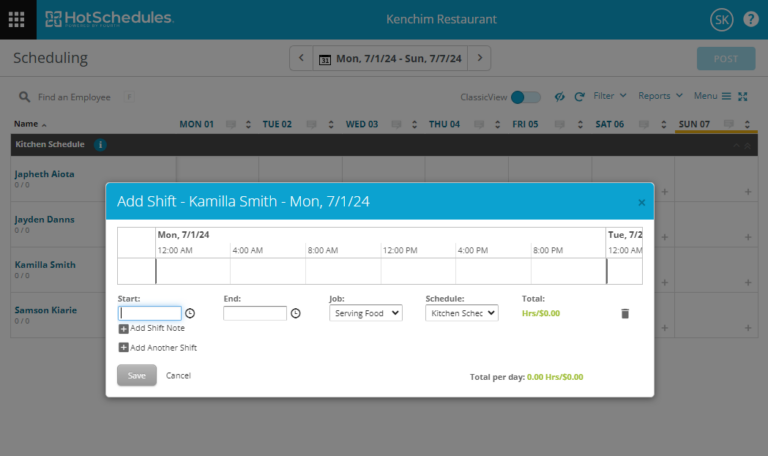
While both platforms cover the basics well, they take different approaches to employee self-service and automation tools. To begin with, Homebase supports shift swaps, and HotSchedules uses automatic shift release.
Both features serve the same purpose: allowing employees to drop shifts when they’re unable to work. However, with shift swaps, employees trade shifts without leaving a gap in the schedule, which is a risk with auto-release.
Both platforms also have an auto-scheduling feature, which lets you assign hundreds of shifts in minutes. However, HotSchedules has an advantage, thanks to its AI labor-forecasting tool, which analyzes past sales data to predict staffing needs. This helps prevent understaffing during peak seasons and overstaffing during low seasons.
Verdict: HotSchedules takes the crown thanks to its AI-powered forecast tool, which helps maintain optimal staffing levels regardless of service demand. I have found this feature helpful in industries where labor fluctuates with service demand, such as hospitality.
Did You Know?
Unlike Homebase and HotSchedules, Connecteam lets you enforce scheduling rules such as minimum rest time between shifts and maximum weekly hours. This helps prevent burnout and ensures schedules stay compliant without managers having to manually double-check every change.
Time tracking — Winner: Homebase
Homebase lets you track time on convenient web and mobile apps. I was also impressed by its kiosk app, which works on web, Android, iOS, and iPad devices. This range of options gives you the flexibility to support the needs of field, on-site, and mobile workforces.
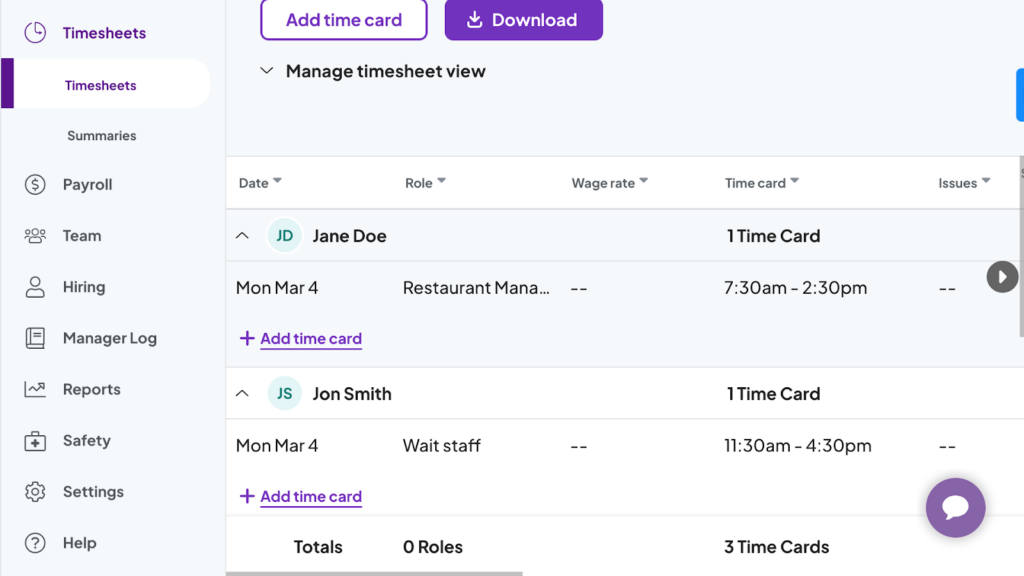
When I tested Homebase’s apps, tracking time was a breeze. Even employees who aren’t comfortable with tech can use the time trackers without needing to read any guides. The only issue was that when I turned off our internet connection, the mobile app became unusable, even though Homebase claims to offer an offline mode.
This issue aside, Homebase’s time tracker works seamlessly on various POS systems. The integration lets employees clock in and out through the POS system, which is great for hospitality and retail businesses. The HotSchedules time tracker is also compatible with POS systems, but offers nothing near the flexibility you get with Homebase.
Even worse, the HotSchedules time tracker, WebClock, is not built into the mobile app. While the feature is clearly labeled on the mobile menu, when you tap it, you’re taken to an entirely new web platform. You’ll need to log in (again) to your HotSchedules account just to use the time tracker. This makes time tracking on mobile much more difficult than it needs to be.
Verdict: Homebase wins this category hands down because it works seamlessly across all major platforms and is easier to use than HotSchedules.
Clock-in restrictions — Winner: Tie
Homebase and HotSchedules use basic clock-in restrictions to improve timecard accuracy. Both prevent unscheduled or early clock-ins, helping stop time theft and inaccurate payroll calculations. They can also both automatically clock out employees if they forget to do so at the end of their shift.
Both apps can also require employees to take a selfie photo at clock-in to help managers investigate buddy punching. That said, this still typically requires managers to review photos manually to find buddy-punching incidents, which can be difficult in a large workforce.
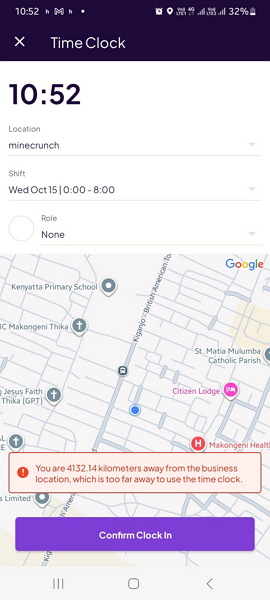
Homebase and HotSchedules also let you use geofencing (a virtual boundary around a job site) to make sure that employees clock in only when they arrive at the workplace. While effective, their geofencing tools lack the flexibility to cover job sites of different sizes. By default, HotSchedules uses a 100-meter geofence radius, while Homebase uses a 150-meter radius.
You can adjust the Homebase geofence radius to either one block or five blocks, without stating a specific length in meters. On the other hand, you have to contact HotSchedules’ support to adjust the geofence radius, which is impractical and should be a simple setting.
Verdict: Both Homebase and HotSchedules offer essential clock-in restrictions, but neither really pulls ahead. For this reason, the category is a tie.
Break and overtime tracking — Winner: Homebase
Homebase and HotSchedules take different approaches to enforcing overtime laws.
Homebase gives you the flexibility to create overtime policies that ensure compliance with your local labor laws. It also has overtime alerts, which can help with compliance and labor cost control.
On the other hand, HotSchedules doesn’t offer the same level of customizability. Instead, it has pre-configured thresholds for various states and provinces in the U.S., Canada, Australia, and the U.K. The options let you to set overtime policies with only a few clicks, but limit the ability to track less common cases, like holiday overtime.
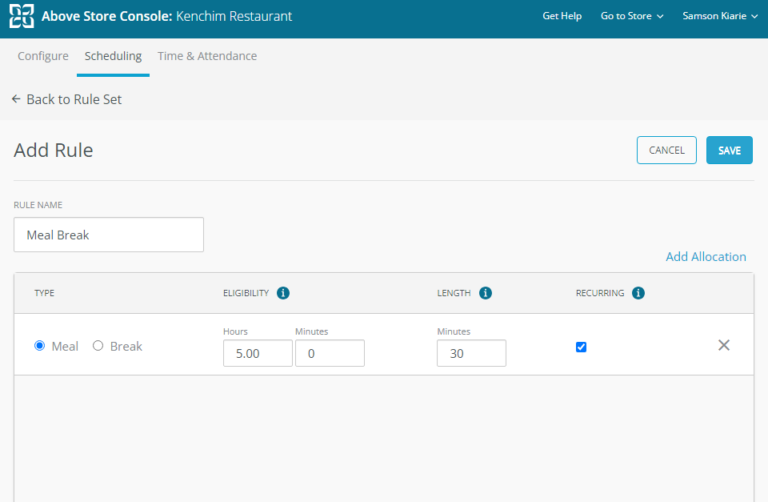
Both platforms track manual and automatic breaks, but Homebase enforces manual breaks more effectively. It can prevent early return, ensuring employees take their legally required breaks. Even better, Homebase can automatically award employees an additional paid hour for each missed break, which is required in some states, like California.
Both tools have a recurring break tool that ensures employees get multiple breaks during longer shifts. This helps you comply with strict regulations like the California break law, which requires multiple meal breaks for shifts longer than 10 hours.
Verdict: Homebase takes the lead here with flexible overtime rules, the ability to enforce manual breaks, and tools to automatically repay employees for missed breaks, which can prevent costly lawsuits. Even so, it could have been more effective if it had break reminders and a way for employees to confirm that they took their breaks.
Human resources and payroll management — Winner: Tie
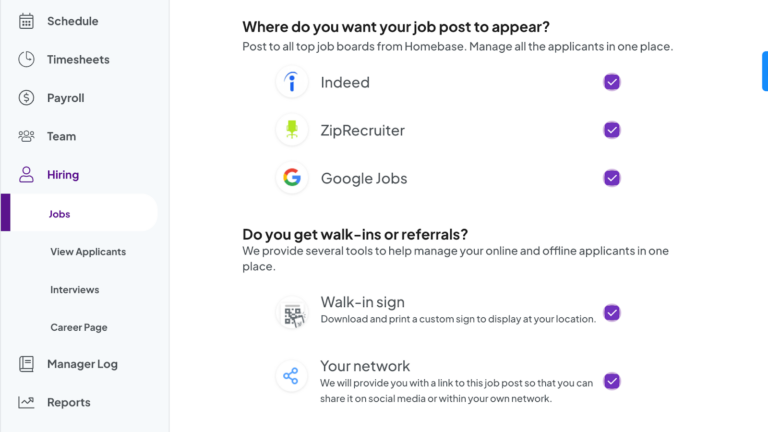
I really liked Homebase’s end-to-end employee hiring management. The platform lets you create and edit job ads with AI , and post them on popular hiring platforms like Indeed, ZipRecruiter, and Google You can also screen applicants without leaving the app.
HotSchedules also offers HR tools, but they’re sold as separate add-ons through Fourth (the company that owns HotSchedules). That can mean extra cost and extra setup, depending on what you need. While it supports the hiring process, some of its features, like applicant tracking and screening, may require complex integrations.
Another real advantage of using either Homebase or HotSchedules is that both offer built-in payroll tools. Having payroll in the same system as time tracking can help you run payroll and handle taxes in one place, with fewer manual steps and fewer mistakes. This reduces human errors, enhancing data accuracy and compliance. However, both platforms charge an extra fee for their payroll tools.
Additionally, both Homebase and HotSchedules support earned wage access, letting employees access a portion of their earned wages before payday. With Homebase, employees can withdraw up to $600 of their paycheck early. HotSchedules takes a more generous approach, allowing employees to cash out up to 50 percent of their earned pay. Since these programs can change and may vary by employer setup, it’s worth confirming the current limits and terms.
Verdict: No real standout winner in this category. Both Homebase and HotSchedules have strong HR and payroll tools that help businesses simplify core processes. Just keep in mind that unlocking these features often requires paying extra.
Paid time-off management — Winner: Homebase
The Homebase time-off management module supports both fixed- and hourly-accrual PTOs. It gives you the flexibility to pick a PTO setup that genuinely fits your salaried or hourly workforce. On top of that, it has a tenure accrual option that lets long-serving employees earn more time off on their work anniversary, rewarding their loyalty.
Requesting time off is easy through Homebase’s web or mobile apps, and a powerful notification system keeps everyone in the loop while ensuring the approval process runs smoothly and without delays. It notifies managers of time-off requests and informs employees of approval status, so they can adjust schedules and plan vacations effectively.

Both tools let you set rules around when time-off requests can be submitted. For example, you can require employees to request time off a certain number of days before the schedule is published, instead of at the last minute. You can also block time-off requests during busy or peak periods, when you need full coverage to keep operations running smoothly.
Homebase gives managers even more control with its ‘limit requests’ tool that can cap how many employees can be off on the same day. This helps maintain proper staffing levels to enhance service quality and profitability. HotSchedules does not offer a similar feature.
Verdict: Homebase has all the features you find with the best employee PTO management software, and it’s the clear winner here.
Team messaging — Winner: Homebase
Both Homebase and HotSchedules have built-in communication tools to keep your teams connected and aligned, but the experience is very different.
Homebase takes a more modern approach to team messaging. While it’s not as powerful as standalone chat tools like Slack, it covers the basics well. It has standard one-on-one and group channels, as well as an Announcements feature: a one-way messaging channel for company-wide announcements and updates.
What sets it apart is the acknowledgement button that requires employees to confirm they have read an update. This way, managers can monitor engagement and see employees who have yet to read important announcements.
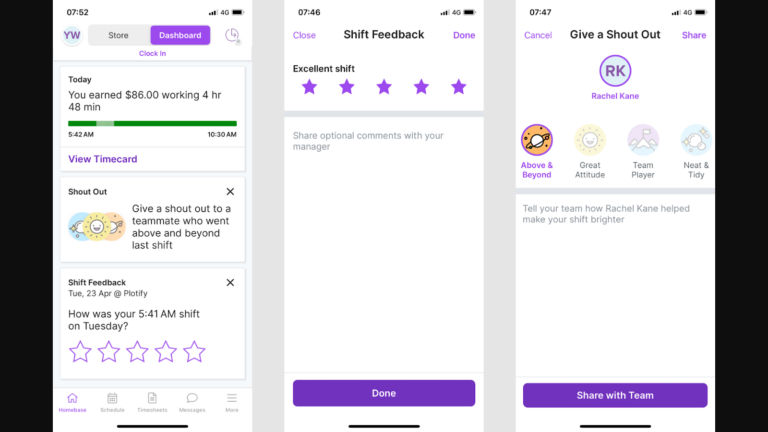
Homebase lets you attach GIFs, locations, images from your device, or even snap a photo directly with the device camera. There’s no doubt that these tools make communication more engaging and clearer. HoThat said, it doesn’t include everything you’d expect in a full chat app (like @mentions or audio/video messages).
HotSchedules doesn’t follow modern messaging trends, and instead has an email-like messaging feature. Its layout and aesthetics look outdated, but it gets the job done. It lets team members send one-on-one and group messages just as they would on any email client.
Verdict: Homebase chat takes the lead here because it has most of the features you find with dedicated messaging apps, eliminating the need for a separate messaging app to keep teams connected. HotSchedules’ email-like approach is less practical for many modern teams.
Integrations — Winner: Homebase
Both Homebase and HotSchedules support POS (point-of-sale) integrations, which is a big deal for restaurant teams. Homebase lets you integrate POS systems directly with the platform, whileHotSchedules requires you first to install an integration agent (a small connector program) to make POS integrations possible, which makes the setup feel more complicated.
Beyond POS integrations, Homebase supports native integrations with popular payroll solutions, job boards, and business applications, including:
- ADP
- Gusto
- QuickBooks
- Paychex
- Rippling
Homebase also supports Zapier connections and API integrations, letting you connect it to virtually any app in your tech stack. HotSchedules offers API integrations, but it doesn’t support Zapier or Make (formerly Integromat) connections, which can be off-putting for some businesses.
Verdict: Homebase takes the lead here because it supports a broader range of native integrations. It also supports Zapier connections, an option you don’t find with HotSchedules.
User Ratings
Both Homebase and HotSchedules have impressive ratings on popular review sites. There are minor complaints, which is normal with any software, but the positives outweigh the negatives. That said, many users are disappointed with HotSchedules’ Android app, citing its paid access and persistent lags and bugs.
Homebase
- ⭐ 4.6/5 on Capterra (1,126 reviews)
- ⭐ 4.4/5 on G2 Crowd (205 reviews)
HotSchedules
- ⭐ 4.4/5 on Capterra (457 reviews)
- ⭐4.3/5 on G2 Crowd (104 reviews)
* Reviews were last checked in December 2026.
Security & Compliance
Homebase and HotSchedules have strong security measures to protect your business and employee information. In my research, I found no reports of a data breach or security incident linked to either Homebase or HotSchedules. This is a strong signal that their security measures hold up.
Some of their options include:
| Category | Homebase | HotSchedules |
| Data Encryption | ✅ | ✅ |
| GDPR Compliant | Aligns with PII protection principles | ✅ |
| HIPAA-Compliant | ❌ | ❌ |
| Certification | ✅ SOC 2 Type II | SOC 2 Type II |
| MFA | ✅ Two-step account verification | ✅ Multi-factor authentication |
| Admin controls | ✅ Role-based access control | ✅ Role-based access control |
| Hosting Region | US | US, EMEA, and APAC |
HotSchedules is GDPR compliant by default, which can be an advantage for companies working in the EU. On the other hand, Homebase will require additional setup to be compliant. HotSchedules also has a slight edge because it’s SOC II type II compliant. This means that HotSchedules isn’t just claiming to protect your data, its measures have been independently audited and given the seal of approval.
Setup and Onboarding
Creating an account and setting up your team is pretty simple with Homebase, especially for single-location businesses. It took me only a few minutes to sign up, set key settings, and add a team. Homebase’s intuitive interface flattens the learning curve for new users, so you can start using it straight away and with minimal to no training.
HotSchedules, on the other hand, is built to serve larger, multi-location operations. While creating an accounting and adding team members are simple processes, some functions like scheduling, break tracking, and forecasting require more configuration. The interface looks a bit dated, but it’s well-organized and delivers a smooth user experience.
Support and Customer Service
| Support Type | Homebase | HotSchedules |
| Live Chat | ✅ Business hours | ✅ Business hours |
| Phone Support | ✅ Business hours | ✅ Business hours |
| Email Support | ✅ | ✅ |
| Ticket system | ✅ | ✅ |
| Community forum | ❌ | ✅ |
| Help Center | ✅ | ✅ |
While Homebase and HotSchedules support options look similar, Homebase comes ahead with slightly better response times on its ticket system. During testing, Homebase support agents resolved tickets within 24 hours, whereas HotSchedules took more than 48 hours. Another thing I didn’t like about HotSchedules’ support is that users have to wade through a maze of questions to complete the ticket form.
The good thing with HotSchedules is that phone and live chat support are available to all users. By contrast, these options are only available to Plus and All-in-One subscribers on Homebase. Other than that, both platforms use a chatbot to respond to questions asked on live chat outside business hours.
🏆 Who Wins: Homebase or HotSchedules?
Homebase wins by a narrow margin, thanks to flexible time-tracking options, stricter break controls, stronger PTO management, and better integrations. However, HotSchedules offers a broader set of features overall, including advanced labor forecasting—an option you don’t find with Homebase. Keep in mind that some features live in other Fourth products (Fourth is HotSchedules’ parent company). Depending on what you need, that can mean paying for an additional product and setting up an integration.
That aside, both platforms are powerful and have the features you need to simplify scheduling, time tracking, payroll, and hiring. Picking the best software for your business shouldn’t boil down to which of the platforms is superior. It should come down to which app best solves the specific challenges your business faces.
The verdict: If you need a simple and flexible workforce management app for a small or medium business, pick Homebase. However, if you’re a multi-location company that needs to strengthen scheduling, payroll processing, and core HR functions, and don’t mind complex configuration, HotSchedules fits the bill.
Connecteam vs. Homebase vs. HotSchedules
While both Homebase and HotSchedules are powerful, they fall short in key areas. They have no scheduling rules for labor law compliance, their geofences are limited, and break reminders are missing. Connecteam solves these issues while offering the best of both platforms at a more affordable price.
Some of the benefits of using Connecteam include:
Compliant and Efficient Scheduling
Like Homebase and HotSchedules, Connecteam’s Auto-Scheduler lets you create optimal schedules in minutes. What sets it apart is the ability to assign shifts based on employee qualifications. This ensures each job is handled by an employee with the right skill set, improving service quality.
Even better, Connecteam lets you set scheduling rules, such as the maximum number of shifts per week and the rest period between shifts. This ensures no team member is overworked, eliminating burnout while boosting employee satisfaction. It also ensures that each schedule complies with labor laws and regulations across industries and regions.
Other scheduling features you find with Connecteam include:
- Automatic schedule conflict detector
- Recurring shifts
Accurate, Compliant Time Tracking
I really love the easy-to-use Connecteam time tracker that works on any device — mobile, web, or desktop. Like Homebase and HotSchedules, Connecteam has a kiosk app. However, it beats the competition because it works seamlessly on any Android or iOS device, so you don’t need to buy expensive tablets or computers to track time.
Another real advantage is that Connecteam offers all the features you need to track breaks and overtime. It lets you track all types of overtime, including holiday and seventh-day consecutive overtime, and it automatically calculates overtime pay. Even better, it reminds employees to take manual breaks, prevents early return, and has a tool for employees to confirm that they took their breaks.
And so much more
In addition, Connecteam has other features you don’t find with Homebase and HotSchedules, including:
- Automated, Flexible Geofencing
- Employee training that’s easy to use
- Real-time location tracking
| Connecteam | Homebase | HotSchedules | |
| Time tracking with GPS | ✅ | ✅ | ✅ |
| Geofencing | ✅ With automatic clock-out | ✅ | ✅ |
| Shift scheduling | ✅ | ✅ | ✅ |
| Open shifts and shift swapping | ✅ | ✅ | ✅ Auto-release shifts |
| Free plan | ✅ Up to 10 users | ✅ Up to 10 users, 1 location | ❌ |
| 24/7 support | ✅ 24/7 live chat | ❌ Tiered, limited hours | ❌ Limited hours |
| Security | ✅ SOC 2, ISO 27001 | ❌ Not stated | ✅ SOC 2 |
All these features are available on the Connecteam Small Business plan, which costs absolutely nothing. For $0 per month, you get access to all premium features and can manage up to 10 employees. Paid plans start at $29 per month for 30 employees, which works out to less than $1 per employee.
Get started with Connecteam for free!
FAQs
Yes, Homebase has all the essential scheduling tools small and medium teams need to keep staff organized.
Yes, Homebase has a built-in time tracker that accurately tracks employee work hours, overtime, and breaks.
Even though HotSchedules doesn’t publicly disclose its pricing, multiple sources claim its paid plans cost between $2 and $4 per employee per month.
Both support overtime tracking, break rules, and clock-in restrictions. Homebase offers more flexible overtime and break enforcement, while HotSchedules uses pre-set regional rules that are faster to set up but less customizable. If you need scheduling rules and break reminders, Connecteam covers those gaps.
HotSchedules is often better for restaurants that rely on labor forecasting and demand-based scheduling. Homebase works well for smaller restaurants that want simpler pricing and setup. If you want a simpler all-in-one option with strong mobile tools, Connecteam is also worth comparing.
Homebase is usually better for small businesses. It offers a free plan, simpler setup, and fewer add-ons. HotSchedules is more complex and better suited to restaurant groups that need forecasting and multi-location controls.
Both support shift changes and open shifts. Homebase relies on shift swaps, which help avoid coverage gaps. HotSchedules uses shift release, which can leave a shift unfilled until a manager assigns it.
/Yes. Homebase offers a free plan for one location and up to 10 employees, with basic scheduling and time tracking. Paid plans add more advanced scheduling and team features, and payroll costs extra.
No. HotSchedules does not offer a free plan. It’s a paid product, and total cost can increase if you need features that live in other Fourth products.
Homebase integrates with common payroll providers like ADP, Gusto, QuickBooks, Paychex, and Rippling. It also offers its own payroll add-on for an extra fee. Whether syncing is automatic can depend on the provider and your setup.
HotSchedules offers payroll tools, and some payroll/HR capabilities may be part of separate Fourth products. Specific payroll provider integrations and whether the sync is automatic depend on your plan and setup.
The main difference between Homebase and HotSchedules is that they offer similar basic controls—clock-in rules, geofencing, and photo capture—but both still rely on manager review to catch issues. If you want tighter controls with less manual checking, Connecteam is also worth comparing for features like PIN-based clock-ins and stronger clock-in rules.