

Employee ID cards represent your brand, boost security, and keep your business running smoothly. Here’s how to get them right.
There’s a lot more that goes into an employee ID card design than just a company logo and staff info.
You have to consider the layout, sizing, photos, and fonts. More importantly, you need to think about how the staff ID card is going to be functional in your team’s daily routine.
In this article, I break down everything you need to make a great employee ID card template, including a staff ID generator, plus a better alternative.
What is an Employee ID Card?
An employee ID card is a physical card issued by companies to identify staff members. Cards usually feature distinguishing details like an employee’s name, photo, role, and ID number, in addition to company branding. Some businesses include smart chips on each ID for security and system access.
While many ID cards are printed on PVC and look similar to other forms of identification, they can also be digital. The main purpose of having staff ID cards is to make it easier to validate and recognize who belongs to the organization.
Why You Need Employee ID Cards
Let’s say your company has 500 employees. Chances are, you’re not going to know everyone. If someone you don’t recognize is wandering around, you need a quick way to identify if they work at the same company. That’s where employee ID cards come in.
Employee ID cards serve as a frontline defense, helping prevent unauthorized access to your workplace. They can protect sensitive data and clearly divide staff from visitors, external contractors, or strangers.
ID badges can also help secure entry and access to restricted areas through barcodes, magnetic stripes, or RFID chips. If someone leaves your company, it’s easy to revoke their access immediately, which helps reduce risk.
In addition to security, employee ID cards help maintain professionalism in the workplace. It helps teams understand who’s who, recognize roles, and keeps a unified brand image.
What Should I Include on an Employee ID Card?
You don’t have to include every piece of information on an employee ID card. As long as it’s clean and easy to read, you should be good. Here’s what to include:
- Employee Name: Full name, spelled clearly and correctly.
- Job Title or Department: Helps identify roles at a glance.
- Photo: Use recent, high-quality headshots for visual identification.
- Company Logo: Confirms authenticity and reinforces your brand.
- Employee ID Number: A unique identifier for internal recordkeeping.
- Issue & Expiry Date: Useful for monitoring validity and long-term access.
- Security Features: Barcode, QR code, magnetic stripe, or RFID chip for access control.
- Contact Info (optional): Company email or phone number.
How to Design an Employee ID Card
Designing an effective employee ID card is about making sure it’s functional, secure, and consistent (it doesn’t hurt if it looks good, too). Here are the steps to design your ID card:
Define the purpose
Decide how the card will be used. Think about if you just want to use it as a visual ID, or if it should also grant access, track time, or connect to internal systems. This will help you narrow down what features to include.
Choose the size and orientation
Most employee ID cards use the CR80 standard, which is the size of a credit card: 2.125” × 3.375” or 54mm × 85.6mm. You need to decide if you want a vertical or horizontal layout.
Decide what info to include
List all the details you want displayed on the ID card: first name, last name, job title, photo, ID number, logo, etc. Decide if you want to include a barcode or chip.
Pick a design tool or template
Use a design tool like Adobe Illustrator, Photoshop, or Canva to build your layout. Alternatively, start with a template to speed up the process and ensure correct spacing and alignment.
Include branding and functional elements
Add your company’s logo, colors, and fonts for brand consistency. Include functional features, such as a barcode, magnetic stripe, or RFID chip.
Review, proof, and test
Double-check every detail: names, photos, job titles, and scan elements. Print a test card on the material you intend to use to preview the print quality, layout, and functionality.
Print and distribute
Once you’ve approved the test, you can go ahead with full production, either in-house or via a professional printing service. When the cards are ready, distribute them to employees and activate any access or system they’re linked to.
Best Practices for Designing Employee ID Cards
A well-designed ID card is only helpful if you use it consistently for its intended purpose. Here are some tips for how to make staff ID cards work for your business:
Design it for real work
Make sure the card’s layout and features support how it will be used day to day. If it needs to unlock doors, clock time, or verify an employee’s identity, the design should reflect that. Your design should be clear and practical.
Enforce consistent usage
Once you issue the ID cards, set clear expectations with your team. Add a section to your employee handbook on how ID cards should be used in the workplace. Incorporate enforcement into your onboarding and security protocols, so it becomes an on-going policy.
This Might Interest You
Need help creating an employee handbook for your business? Our guide walks you through each step of the process. Read it now!
Keep only necessary info
Employee ID cards are small. There’s only enough space for what’s necessary, so keep to the basics, and make sure there’s enough room for tech features like QR codes or RFID.
Protect employee privacy
Avoid including sensitive information like an employee’s home address or personal phone number. If the card gets lost or stolen, it’s your responsibility as the employer to protect your team’s privacy.
Test, update, and replace
Always print a test card to spot layout or printing errors. Review your design regularly, especially when your brand, job roles, or systems change. If a card is expired or damaged, replace it quickly.
Free Employee ID Card Design Template
Create your own professional ID card with our free Employee ID Card Maker! Here’s how to use it:
- Upload images: Add a clear photo of the employee and your company’s logo.
- Enter employee details: Choose which fields to include, and then fill them in. You can include the employee’s name, job title, ID number, department, phone number, or email. Click the arrow next to any field to hide it.
- Preview the ID: As you fill in the details, the live preview to the side updates automatically so you can see exactly what the card will look like.
- Download the card: Click “Download Card as Image” to save your card as a PNG file, ready for printing or digital use.
Try it for yourself:
Employee ID Card Maker
Fill Employee Information


Go Digital with Connecteam’s Employee ID Cards
Employee ID cards can be expensive to print, challenging to design, and pose security risks if they end up in the wrong hands. Connecteam’s digital Employee ID Card is the smarter alternative to cut costs, speed up staff adoption, and enhance security in your workplace.
Manage employee IDs smarter
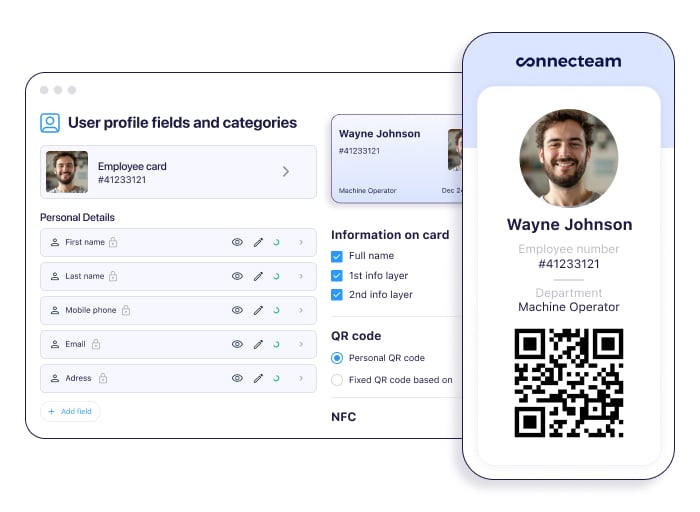
Give your team easy, secure access with mobile employee ID cards. Employees can access IDs in the Connecteam app, right from their mobile devices. Instantly issue IDs to staff across multiple locations, manage access with custom QR codes, and immediately revoke cards when someone leaves the company. It’s fast, flexible, and eliminates the admin burden.
Save time with customized cards
Mobile ID cards stop buddy punching, reduce lost card issues, and eliminate the need for plastic badges, saving time, money, and waste. Customize each card to display the exact fields you need, from job title to employee number, and choose between user-specific or general QR codes for secure, streamlined access to doors, systems, or events. Update cards in seconds when details change, and say goodbye to reprinting.
The more affordable option
Connecteam doesn’t just issue employee ID cards. It’s an all-in-one employee management platform with enterprise-grade tools for time tracking, staff scheduling, task management, communication, training, and so much more.
The best part is that Connecteam is built to scale with your business. Connecteam’s Small Business Plan is completely free for up to 10 users. For larger businesses, pricing starts at $29 per month for up to 30 users. The Advanced plan starts at $49/month, and Expert starts $99/month, both also covering up to 30 users.
The Bottom Line on Creating Employee ID Cards
Employee ID cards serve an important purpose, helping with identification, security, and professionalism. Designing staff IDs is about maintaining your company brand, while ensuring that the cards are clear, consistent, and functional.
Ditch the printing and plastic with Connecteam’s mobile employee ID cards, the smarter, more secure alternative. Issue, customize, and manage IDs with just a few clicks. Easily update and control access with Connecteam’s solution, built for the modern workforce.
So what are you waiting for? Try Connecteam for free today!
FAQs
What are the best practices for taking employee ID photos?
Use a neutral background, consistent lighting, and professional clothing. Center the employee’s face, maintain eye-level framing, and avoid using filters to ensure clear, standardized ID photos.
What are the different technologies used in employee ID cards?
Common employee ID card technologies include NFC for contactless access, RFID for tracking, magnetic stripes to swipe, and Bluetooth for proximity authentication.
What is the cost of implementing an employee ID card system?
Implementing an employee ID card system can cost $10–$50 per card, plus additional expenses for printers, software, and security integrations.
How do I handle lost or stolen employee ID cards?
Deactivate lost cards immediately, issue replacements, and update the system access. Create a clear reporting policy for all employees.
What are the security risks associated with employee ID cards and how can I mitigate them?
Risks include unauthorized access, duplication, and data theft. Mitigate these risks by using encrypted chips, secure verification systems, and performing regular audits.
