


If physical ID cards are lost or damaged, they can create security concerns, add administrative work, and make it harder to keep employee access up to date.
I reviewed 5 digital employee ID card apps and compared them by customizable design, remote management capabilities, and anti-fraud features.
Use these picks to streamline identification, enhance workplace security, and reduce manual administrative tasks.
| App | Best for | Starting Price | Key Considerations |
| Connecteam | Digital IDs synced with employee records | Just $29/month for the first 30 users | Offers employee ID cards with QR codes, live date display, and NFC technology, plus seamless integration with scheduling and time tracking |
| ID123 | Managing digital IDs across multiple employee types | $0.20/record/month (billed annually, 200-record minimum) | Provides strong offline functionality and security features like animated holograms, but lacks 2-way chat and requires a 200-record minimum |
| PassKit | Linking employee IDs to rewards and wallet integration | $39.50 | Integrates natively with Apple Wallet and Google Pay, but design customization is strictly controlled by Apple and Google |
| Yoti | Government-verified identity verification and age assurance | Contact vendor for price | Good for high-security identity verification, but requires mandatory biometric enrollment for all staff and acts as a personal identity wallet |
| CardsOnline | Organizations needing both digital and physical ID cards | Contact vendor for price | Combines digital and physical ID card capabilities in one platform, but digital IDs are a paid add-on and require a multi-step app registration process |
What’s New in This Update (July 2026)
Our Top Picks
-
1

Best for digital IDs synced with employee records
-
2

Best for managing digital IDs across multiple employee types
-
3

Best for linking employee IDs to rewards and wallet integration
Why trust us?
Our team of unbiased software reviewers follows strict editorial guidelines, and our methodology is clear and open to everyone.
See our complete methodology
How I Ranked the Best Digital Employee ID Card Apps
Here are the areas I focused on while evaluating the best employee ID badge software.
Core Digital ID Card Requirements
- Stopping badge fraud and buddy punching: I looked for anti-fraud features like live date displays, rotating holograms, or animations that make screenshots and recordings useless for cheating the system.
- Cutting off access the moment someone leaves: Admins should be able to remotely deactivate or delete a digital ID instantly, without waiting to collect a physical badge.
- Avoiding reissue costs when roles change: Employee info updated in the system should reflect instantly on their digital IDs, so there’s no need to issue new cards for employees who change roles or access levels.
- Getting IDs into employees’ hands fast: New hires should receive their digital IDs within minutes via email or app notification, not wait days for printing and distribution.
- Keeping impostors out of the app: Only the actual ID holder should be able to open their card.
Day-to-Day Badge Usability
- Preventing confusion for non-tech-savvy staff: Both admins and employees should be able to find, display, and manage cards without training or IT support.
- Making IDs work on any employee device: Apps scored higher when they work across iOS, Android, Web, Windows, and Mac, so no one is limited by their phone type.
- Verifying identities without special hardware: Anyone should be able to confirm an employee’s identity by scanning a QR code with a standard smartphone or device.
Workforce Coverage and Access Control
- Managing contractors and seasonal workers safely: I prioritized temporary ID cards with expiration dates that deactivate automatically when the work period ends.
- Avoiding app-switching for everyday tasks: IDs that connect to other workflows, like clocking in, checking into company events, or claiming rewards, earned extra points.
- Opening doors and equipment without keycards: NFC support lets employees hold their device near a reader to activate doors and access company equipment, replacing separate fobs and badges.
Top 5 Best Digital Employee ID Card Apps (In-Depth Comparison)
-
Connecteam — Best for digital IDs synced with employee records
Connecteam is an employee management platform that generates digital ID cards directly from each employee’s profile. It’s built for businesses that want IDs connected to their broader employee data, so cards stay current automatically as roles, photos, and details change.
Why I chose Connecteam: I chose Connecteam because its ID cards pull straight from the employee profiles you already manage in the platform. Update someone’s role or photo once, and their card reflects it instantly, with no reissuing. The QR integration and live date display add a layer of convenience and security that’s hard to beat.
Instant and secure employee ID cards
Connecteam lets you issue employee ID cards across multiple locations in seconds, without waiting for printing or shipping. When someone leaves your company or changes roles, you can instantly revoke their card from the admin dashboard, so they lose access immediately, with no physical badge to collect or worry about.
This instant control is especially valuable for businesses with high turnover or seasonal staff. Employees can be archived when they leave, which removes their app access while keeping their historical records intact. If they return later, you can restore their profile without rebuilding everything from scratch.
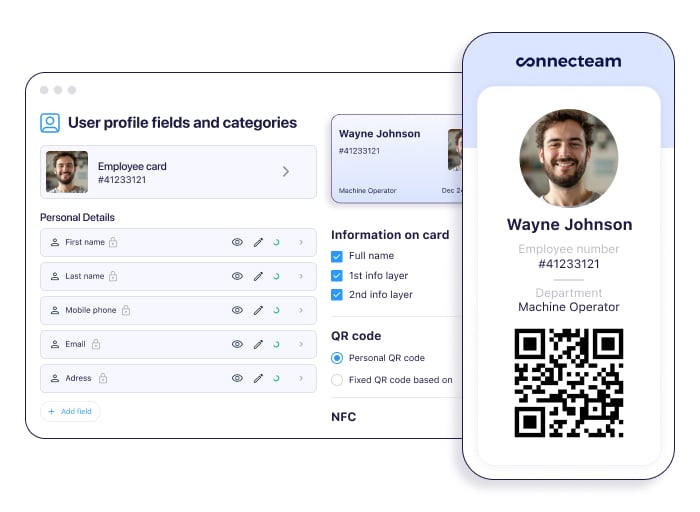
Add custom fields to employee ID cards with Connecteam. Customizable cards with live date display
You can customize each card to show exactly the fields you need: job title, employee number, department, or hire date. The card pulls directly from each employee’s profile in Connecteam, so updates happen automatically. If you change someone’s title or photo once, their card reflects it instantly.
Plus, the live date display on cards prevents fraud by showing the current date in real time. This stops people from using old screenshots or recordings to fake access. Combined with device authentication (facial recognition or fingerprint), only the actual employee can open their card on their phone.
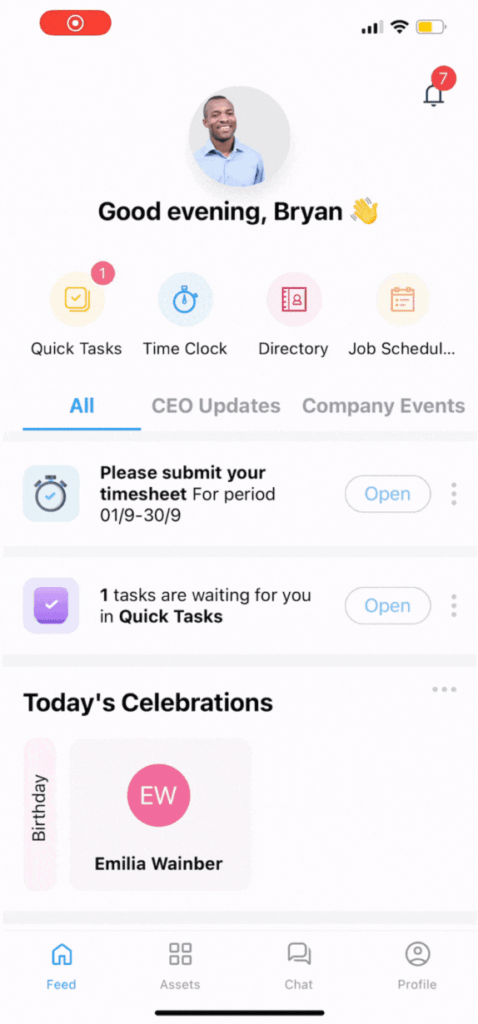
Connecteam’s employee ID cards include QR codes, live animations, and a live date display. QR codes for flexible access
You can add either user-specific (showing individual details) or general (showing company info) QR codes to cards. Employees can scan their codes with any smartphone to unlock doors, clock in, check into events, or access other systems. No special hardware needed.
This eliminates the need for separate physical badges, keycards, or fobs. One digital card handles multiple access points.
And so much more…
Connecteam has so many more features beyond digital employee ID cards. There’s staff scheduling, NFC time tracking, an online team chat, rewards and recognition features, company events, and so much more.
Not quite ready to dive into a full-featured app for ID verification? Use Connecteam’s free employee ID card maker to create employee IDs in seconds. You and your employees can download cards as PNG image files and quickly access them on your devices or print them.
When Connecteam isn’t a good fit
Connecteam is a workforce management platform, not a dedicated physical access control system. It doesn’t integrate directly with legacy on-premise turnstiles or proprietary keycard hardware systems out of the box. Organizations that require deep integrations with existing physical security infrastructure or legacy hardware may prefer a specialized access control tool.
Connecteam also offers a free for life plan – Try Connecteam here!
0Key Features
- Customizable details
- Live date display
- Authentication animation
- QR code integrations
- NFC technology
- Time tracking and event attendance
Pros
- User-friendly setup process
- Real-time updates across cards
- Detailed employee profile fields
- Built into the Connecteam ecosystem
Cons
- No integration with legacy on-premise turnstiles
Pricing
Free-for-life plan availablePremium plans start at $29/month for 30 users
Join Connecteam - The Best Business App for To Do List
Get Started Now -
ID123 — Best for managing digital IDs across multiple employee types
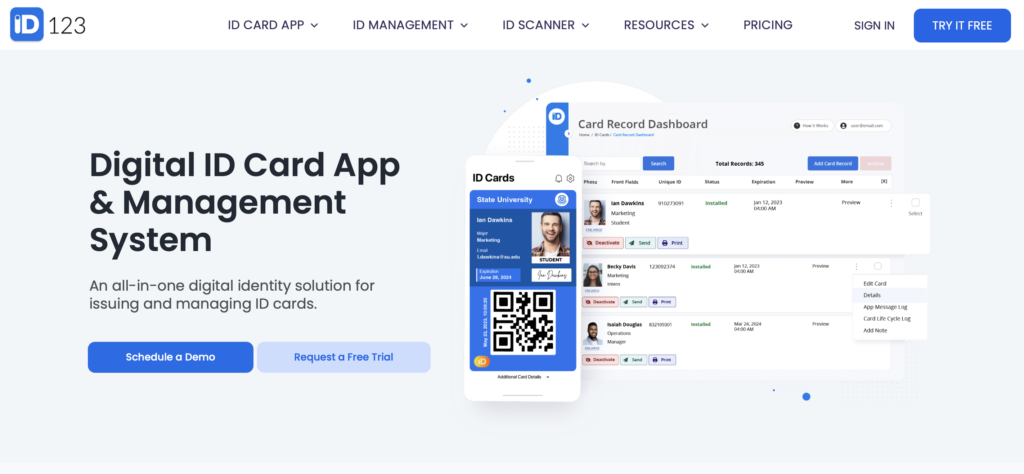
ID123 is a cloud-based digital ID card system that transforms traditional physical badges into mobile-friendly digital credentials.
Why I chose ID123: ID123 supports various digital ID cards, including employee, member, student, and professional—catering to different industries and needs. I was particularly drawn to its user-friendly interface, offline functionality, and multi-platform support.
Mobile ID card display and management
The app’s interface is clean and intuitive—both employees and administrators can easily manage multiple ID cards to fit different roles or departments. As admin, you can input employee details, upload photos, and add company logos. I especially appreciate the customizable fields feature that lets you add up to 16 different data points on each card, including clickable links and phone numbers.
The live preview feature ensures you can see exactly how the final card will look before it’s activated in the app. After cards are activated, employees can access and use them directly within the app.
Security features
I found the security implementation quite strong. You get single sign-on (SSO) capabilities, encrypted cloud storage, and automatic card expiration. Plus, you can remotely deactivate, activate, or delete installed mobile ID cards. This can help prevent unauthorized use if an employee leaves or changes roles.
ID123 includes animated holograms on digital ID cards to verify authenticity. The hologram rotates on display, indicating that the card is valid. Administrators can customize the animation to match their company’s branding. QR integration further enhances security and convenience. What I particularly like is the screen recording prevention feature—the app immediately blocks any attempt to take screenshots.
Temporary ID cards
The app allows you to issue temporary digital ID cards for contractors, interns, seasonal workers, and other temporary employees. These cards can have expiration dates, automatically deactivating when the period ends. Renewing or revoking these cards is straightforward.
Communication tool
ID123’s messaging system allows administrators to send in-app messages to cardholders, which is primarily a 1-way communication channel. This feature is useful for sending important alerts, updates, and reminders directly to users’ devices. That said, I noticed it doesn’t support dynamic 2-way chat. It’s only a broadcast tool.
I also found in their support documentation that the offline functionality can sometimes require manual intervention; if a card disappears while offline, users must reconnect to the internet, manually clear their card cache in the settings, and reload the card.
Key Features
- Multiple card designs
- Remote deactivation and activation
- Temporary ID cards
- QR code integration
Pros
- Offline function
- Flexible designs
Cons
- Costly for small businesses due to minimums
- Offline cache requires manual clearing if cards fail to load
Pricing
Starts at $0.20/record/month (billed annually, 200-record minimum) Trial: Yes — 30 days Free Plan: No
-
PassKit — Best for linking employee IDs to rewards and wallet integration
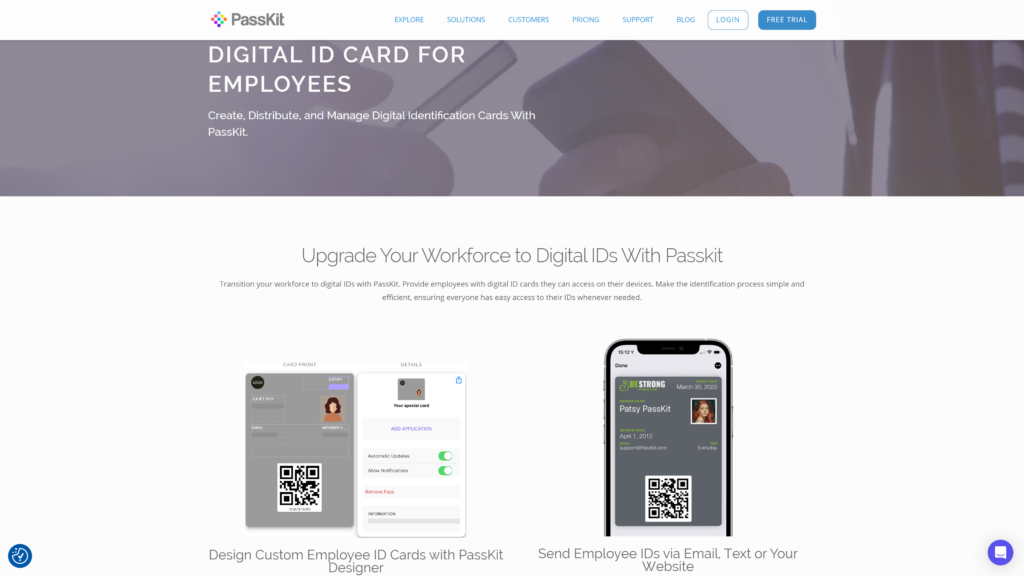
PassKit is a digital employee ID card system that makes it easy to create, distribute, and manage digital ID cards for employees.
Why I chose PassKit: I find its intuitive design and integration with Google and Apple Wallets to be highly efficient for managing digital IDs.
Designer tool
PassKit provides a highly intuitive designer tool that lets you create custom digital ID cards with ease. Unlike other platforms, PassKit offers a drag-and-drop interface, so you can simply drag elements like text, images, and QR codes onto the card template. There are also options for background colors, fonts, and even interactive elements that can be updated in real time.
When you modify an ID card, changes update instantly in the app.
Links employee perks and rewards
One standout feature I found particularly useful is the ability to link digital ID cards with company rewards and perks. This means employees can easily access exclusive offers, discounts, and benefits you give them through their ID cards, which is a fantastic way to boost satisfaction and engagement.
Additionally, PassKit’s native integration with Apple Wallet and Google Pay is especially convenient, as employees can access their ID cards right through their phone’s built-in wallet.
Location-based features
PassKit.io’s geofencing capabilities enable you to create virtual boundaries around specific locations. When employees enter these areas, their digital ID cards automatically display on their lock screens.
However, I noticed in their documentation that Apple Wallet imposes a strict limit of 10 relevant locations per pass. Plus, because PassKit relies entirely on Apple and Google Wallet frameworks, the font style, text size, and image placement are controlled by the wallet platforms, not PassKit, which really restricts your design customization options.
Key Features
- Designer tool
- QR and barcode integration
- Geofencing
- Employee rewards and perks linked
Pros
- Multi-platform accessibility
- Wallet integration
Cons
- Limited customization due to Apple/Google Wallet constraints
- Strict 10-location limit for geofencing
Pricing
Starts at $39.50 Trial: Yes — (45 days) Free Plan: No
-

Yoti — Best for government-verified identity verification and age assurance
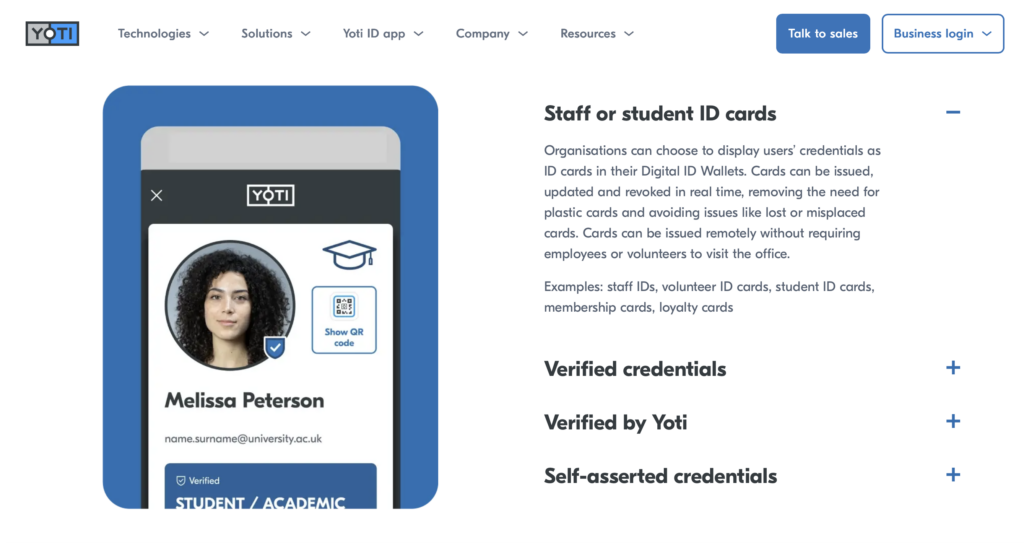
Yoti is a digital identity platform that offers employee ID verification alongside a broader suite of identity verification services, including age verification and document authentication.
Why I chose Yoti: The platform’s strong focus on biometric verification and its government-grade security protocols caught my attention.
Design & QR code integration
I liked the clean and user-friendly interface, with clear sections for personal details, ID documents, and passwords. Each digital ID card includes a photo of the staff member, plus their name, role, and the organization.
Yoti incorporates a live hologram into its digital ID cards, which shows you if a card is legit. Plus, you can include QR codes on digital IDs and scan them using smartphones or dedicated scanning devices, which makes verification fast and efficient.
Fraud detection system
What sets Yoti apart is its comprehensive fraud detection system.
I liked how liveness detection ensures the presence of a real person during verification. The system requires employees to take selfies and detect if the selfie is of a photo, mask, or video. Biometric face match compares the live face scan with the ID document photo to confirm identity ownership.
Together, these features ensure that the person attempting access is the ID’s legitimate holder—like a multi-factor authentication process that combines physical proof (liveness) and biometric verification (face match).
Privacy-first architecture
Yoti’s approach to privacy stands out. The platform uses encryption and data minimization principles. This means admins can provide the app with only those employee details that are essential for the verification process. This safeguards sensitive employee data—and I think they’ll appreciate that.
However, I noticed that Yoti requires mandatory biometric enrollment for all staff. Every employee must complete a biometric face scan to create their personal Yoti ID before a staff card can be issued, which creates heavier onboarding friction than other employee ID apps.
Key Features
- Digital ID verification
- QR integration
- Biometric verification
- Liveness detection
Pros
- Strong security
- Versatile ID services
Cons
- Limited customization options
- Mandatory biometric face scan
Pricing
Contact vendor for price Trial: No Free Plan: No
-

CardsOnline — Best for organizations needing both digital and physical ID cards
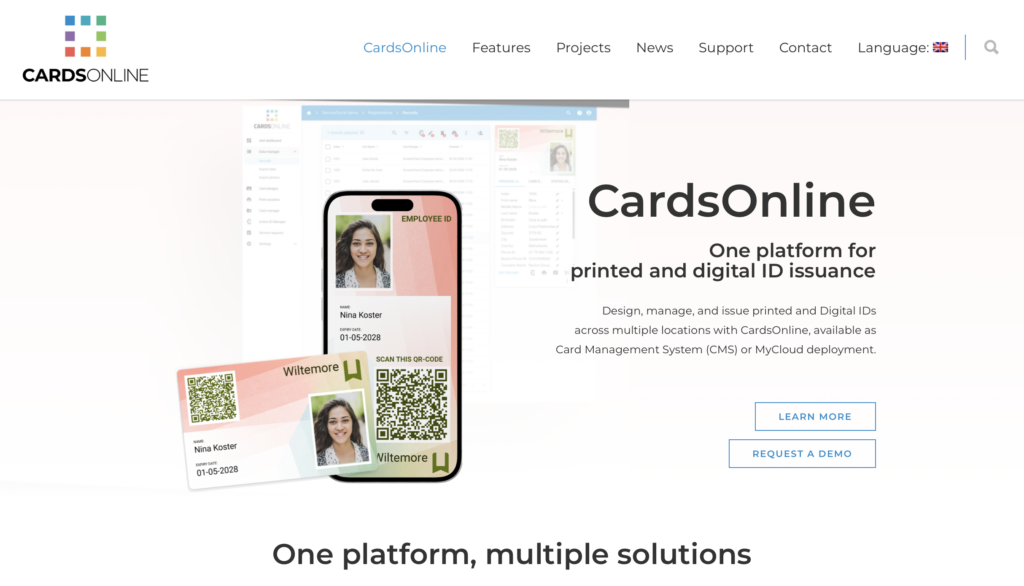
CardsOnline is an enterprise-focused employee ID card maker platform that combines physical card printing capabilities with digital ID management.
Why I chose CardsOnline: I found the dual physical-digital system quite comprehensive. You can manage traditional plastic cards and digital IDs from the same interface, though I noticed the digital features aren’t quite as polished as those of dedicated digital-only solutions.
Card design and layout
CardsOnline provides an intuitive online Card Designer that lets users create professional card layouts. You can use shapes, images, placeholders, dynamic text, and logos to design your cards. I appreciate how the designer supports multiple designs and card templates, making it easy to manage and reuse card layouts across different locations.
Also, CardsOnline supports photo capture through the phone camera, webcam, file upload, or IntelliTWAIN capture software. I find the auto-capture and auto-cropping functionality incredibly useful for adding photos to the ID cards.
The centralized management system makes it easy to add, modify, or revoke IDs. Plus, QR codes offer a quick and secure way to verify identities. However, CardsOnline lacks a live animation, hologram, and live date display.
Data management
I like how the platform lets you import cardholder data from various resource systems—including HR systems—ensuring that the information on the ID cards is always current.
CardsOnline also supports batch printing and inline encoding (process of embedding data directly into the card during the printing process), streamlining the production process. However, it comes as a paid add-on named Cards Print Manager, which must be installed on local workstations for instant printing.
Service portal
The Service Portal is an add-on service that allows cardholders to interact with their card data, send and receive requests, upload new photos, and report lost or broken cards. I think this portal could enhance user engagement and simplify the management of ID cards.
I also noticed that the digital ID functionality is a paid add-on to their core cloud bundles. Issuing an Active ID also requires employees to complete a multi-step registration process including email verification codes before they can even access their badge. While this extra verification is important for security, it slows down implementation and adds more setup work for administrators and employees.
Key Features
- Card designer
- Service portal
- Print manager
- Photo upload and capture
Pros
- Supports physical ID cards
- Integrates with facility systems
Cons
- Lacks live date and hologram
- Digital IDs are paid add-on to base subscriptions
Pricing
Contact vendor for price Trial: No Free Plan: No
Compare the Best Digital Employee ID Apps
| Topic |
 Start for free
|
|
|
|
|
|---|---|---|---|---|---|
| Reviews |
  |
N/A
|
N/A
|
N/A
|
N/A
|
| Pricing |
Starts at just $29/month for the first 30 users
|
Starts at $0.20/record/month (billed annually, 200-record minimum)
|
Starts at $39.50
|
Contact vendor for price
|
Contact vendor for price
|
| Free Trial |
yes
14-day
|
yes
30 days
|
yes
(45 days)
|
no
|
no
|
| Free Plan |
yes
Free Up to 10 users
|
no
|
no
|
no
|
no
|
| Use cases |
Best for digital IDs synced with employee records
|
Best for managing digital IDs across multiple employee types
|
Best for linking employee IDs to rewards and wallet integration
|
Best for government-verified identity verification and age assurance
|
Best for organizations needing both digital and physical ID cards
|
| Available on |
How to Choose the Right Digital Employee ID Card App
The right app depends on your team’s size, how your employees work, and which security features matter most to your organization. Ask yourself these questions before committing to a platform.
Team Size & Budget
- How many employees need a digital ID card right now?
- Do you plan to scale your workforce significantly in the next year?
- Are you looking for a free plan for a small team, or do you have a budget for enterprise features?
- Does the platform charge per user, per record, or a flat monthly fee?
Industry & Use Case
- Do you employ temporary workers, seasonal staff, or contractors who need expiring IDs?
- Does your team work in remote locations where offline access to ID cards is necessary?
- Do you need to verify employee identities for high-security access or compliance reasons?
- Are you transitioning from physical plastic cards and need a system that supports both formats?
Feature Requirements
- Do you need built-in QR codes or barcodes to scan employees into events or buildings?
- Is integration with Apple Wallet and Google Pay a priority for your team?
- Do you need anti-fraud features like live date displays, holograms, or biometric login?
What Is Digital Employee ID Card Software?
Digital employee ID card apps are software platforms that replace physical plastic badges with digital credentials stored on mobile devices. They allow organizations to design, issue, and manage employee identification securely from a central dashboard. Instead of printing and mailing physical cards, administrators can send a digital ID directly to an employee’s smartphone via email, text, or an app notification.
These apps typically feature customizable templates where you can add company branding, employee photos, names, and job titles. They often include dynamic elements like QR codes, barcodes, or NFC capabilities, allowing employees to scan their digital badges to access buildings, log into systems, or clock in for their shifts.
How Do Digital Employee ID Card Apps Work?
A digital employee ID system typically works by securely storing employee identification information—such as their name, photo, title, and other relevant details—within a mobile application or digital wallet. Administrators can set up and configure the app to their organization’s specific needs—for instance, by defining access permissions and customizing the layouts of ID cards.
For managers and HR personnel, the process often starts with entering employee data into the app, either by inputting it manually or importing it from existing HR systems. They can then assign digital smart cards to each employee and manage them centrally, with the ability to activate, deactivate, or update the cards as needed.
Employees can access their IDs directly through the app, using features like QR codes to check in, access certain areas at work, and more.
The Benefits of Digital Employee ID Card Apps
Here’s how a digital employee ID badge system can make things better at your workplace.
Boost operational efficiency
Switching to digital IDs saves the time it takes to make, hand out, and replace physical cards. Plus, everything’s managed from one central spot, so your HR and security teams can easily update or cancel IDs remotely.
Enhance security and access control
Digital IDs come with strong security features—including anti-fraud features—that make it difficult for fraudsters to misuse IDs to gain access to areas, equipment, events, and so on that they shouldn’t have access to.
These features also help prevent other forms of fraud, such as buddy punching, by ensuring that only the rightful owner of the ID can use it for tasks like clocking in. Additionally, if an ID is lost or stolen, you can remotely and instantly deactivate it.
Reduce administrative tasks and manual work
Managing plastic ID cards takes time—from printing them to handing them out and keeping track of them. Digital ID apps automate many of these processes—like updates and expirations—and make it easy for admins to quickly revoke access when needed.
Plus, with digital IDs, automated access systems can handle identity verification without requiring staff to manually check IDs.
Improve the employee experience
Your team will appreciate having digital IDs accessible on their smartphones—they’re less likely to forget or lose their phones than physical ID cards.
Environmental sustainability and reduced costs
By eliminating the need for plastic ID cards and the associated printing and disposal, digital IDs are an eco-friendly option. This can help reduce your organization’s carbon footprint and align with sustainability goals.
It also removes expenses for plastic, lanyards, and advanced card technologies—like magnetic stripes or chips—plus all other overhead costs.
How Much Do Digital Employee ID Card Apps Cost?
Digital Employee ID Card Apps typically follow a subscription-based pricing model, with costs varying based on the features and number of users. For instance, ID123 starts at $0.20 per record per month but requires a minimum volume, while PassKit charges a platform fee starting at $39.50 per month plus volume fees. Other enterprise tools like CardsOnline require custom quotes based on the specific modules and add-ons you need.
Connecteam stands out with its cost-effective pricing structure. The Small Business Plan is entirely free for up to 10 users, making it an attractive option for startups and small businesses. For larger teams, paid plans start at just $29 per month for up to 30 users, offering a comprehensive set of features at a fraction of competitors’ costs.
The Bottom Line on Digital Employee ID Card Apps
Digital employee ID card apps are built to serve organizations of all sizes, from small teams managing a handful of contractors to large agencies running complex multi-site operations.
What matters most when choosing is balancing ease of use with the specific features your organization needs, as enterprise tools often come with steep learning curves and complex employee onboarding requirements.
For organizations that want to avoid the complexity and cost of enterprise tools, Connecteam offers the best combination of simplicity, mobile access, and built-in communication. Start your free Connecteam trial today.
FAQs
To make employee ID badges, gather employee details and photos, use ID card design software—like Connecteam’s free employee card maker—to create the layout, and print the badges on durable card stock or plastic. For digital badges, use an app like ID123 or Connecteam to design and distribute them electronically.
Connecteam is one of the best apps, boasting a user-friendly interface, rich customization options, and seamless integration with other systems. Connecteam supports QR integration, live date display, and NFC, making it a comprehensive solution for digital employee ID cards.
Yes, many digital ID apps offer offline functionality. Once the card is downloaded and cached on the device, employees can view their ID and scan their QR codes even without an active internet connection.