


When scheduling eats up your evenings, one shift change turns into a chain of texts, timesheet fixes, and payroll cleanup, and you end up doing admin work instead of running the business. That’s exactly what scheduling and time-tracking software should take off your plate.
At a Glance: Quick Summary
Deputy is a workforce management tool built for teams with more moving parts. It simplifies scheduling and time tracking, and leans into automation with features like auto-scheduling and labor forecasting. It also gives you deeper controls for things like labor rules, reporting, and multi-location scheduling. Learn more in our full Deputy review.
When I Work is a reliable yet simple employee scheduling and time tracking software for hourly and shift-based teams. While it doesn’t offer some of the advanced features you find with Deputy, it covers the basics well and is a solid choice for small and medium-sized businesses. Read our detailed When I Work review to learn more.
Pricing and Plans
| Deputy | When I Work |
|---|---|
| ❌ No free plan | ❌ No free plan |
| Lite $5/user/month
| Single Location or Schedule $2.50 user/month
|
| Core $6.50/user/month Everything in Lite, plus:
| Multiple Locations & Schedules $5user/month Everything in Single Schedule, and:
|
| Pro $9/user/month Everything in Core, plus:
| ❌ N/A |
| * All prices show the monthly cost when billed annually as of January 2026. | |
On the surface, When I Work looks cheaper than Deputy, but this is a classic case of “you get what you pay for.” While Deputy has a higher price point, it offers a broader feature set and provides better value for money. Still, it’s disappointing that neither platform offers a free plan.
When I Work has a 14-day free trial, while Deputy offers a 10-day free trial by default. You can extend Deputy’s free trial to 31 days by completing a few basic tasks, such as adding your business name, setting up schedule rules, and adding team members.
While all that sounds good, Deputy has a minimum spend of $30 on all monthly subscriptions. Some small businesses might end up buying extra seats they don’t need, leading to wasted resources. For example, a small team with five employees must purchase one unused seat on the Lite plan.
Pros and Cons
The following pros and cons give you a sneak peek into the strengths and weaknesses of both platforms.
Deputy Pros ✅
- Supports labor optimization and demand forecasting.
- Helps with complex labor laws, such as predictive scheduling laws.
Deputy Cons ❌
- Mobile apps don’t have an offline mode.
- The built-in payroll system is available only in Australia.
When I Work Pros ✅
- User-friendly design makes When I Work easy to use for new users.
- Let’s you create scheduling rules for compliance with labor laws.
When I Work Cons ❌
- Pricing can be steeper for multi-location businesses
- Its messaging interface looks dated
Use Cases
Although Deputy and When I Work have nearly identical feature sets, their automations and advanced features are different. That makes each one a better fit for different use cases:
Deputy is best for:
- Automated scheduling: Deputy’s auto-scheduler creates complete schedules from scratch, saving you hours of manual effort. Its labor forecasting can help you predict staffing demand based on historical sales data, preventing both understaffing and overstaffing.
- Effective labor-compliance control: Deputy helps you stay compliant with break, overtime, and predictive scheduling laws, making it ideal for businesses in regions with strict labor laws.
When I Work is best for:
- Basic time tracking: When I Work’s time tracker accurately tracks employees’ regular hours and overtime. The main downside is that the app doesn’t track complex types of overtime, such as holiday overtime.
- Efficient shift scheduling: Besides offering standard scheduling tools, When I Work lets you create scheduling rules, such as rest between shifts, to comply with labor laws.
Side-by-Side Feature Overview
Deputy and When I Work both have basic workforce management tools. They differ most in how they handle scheduling, time tracking, and advanced features. Below, I’ll highlight the strengths and weaknesses of these platforms to help you understand how each works.
Employee scheduling — Winner: Deputy
Deputy and When I Work both make scheduling easier with tools like drag-and-drop scheduling, pre-built templates, and recurring shifts. We also liked their shift-swap tools, which let employees quickly find replacements when they can’t work.
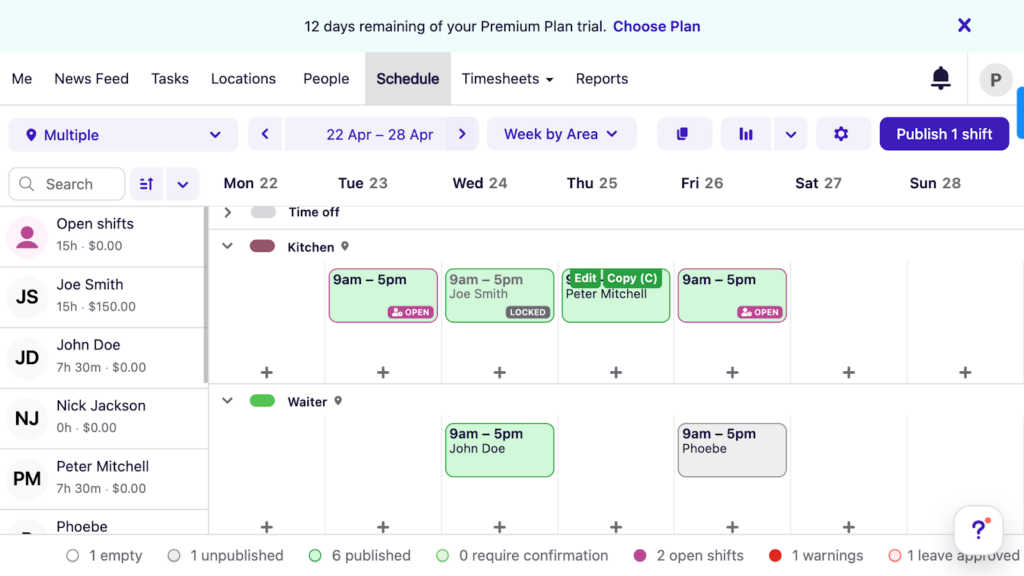
Both platforms let you build scheduling rules (like rest-between-shifts and change controls). That matters most in Fair Workweek areas, where last-minute changes can trigger extra requirements. Deputy has the edge here because it flags sudden schedule changes that require predictability pay. It even calculates the correct amount owed for predictability pay, which can save time during payroll.
Both platforms have an automated scheduling feature, but Deputy’s AI-powered auto-scheduler is stronger. When I Work requires you to create open shifts first and then assign them.
With Deputy, you set your staffing needs (like headcount, shift length, and start times), and it builds the schedule automatically, even hundreds of shifts at once.
Verdict: Deputy AI-powered auto-scheduler is, without a doubt, a game-changer for managers in busy environments. Its time-saving capabilities and compliance with Fair Workweek laws give it the crown in this category.
Time tracking — Winner: Tie
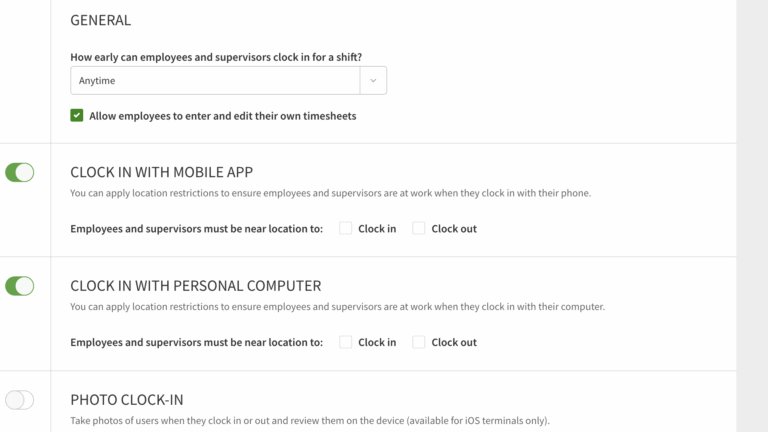
Deputy and When I Work offer multiple time-tracking modes that can work well for hourly and shift-based teams across industries such as hospitality, retail, and healthcare. Their web time trackers work flawlessly on any internet-enabled device, making it the perfect fit for back-office staff.
Their mobile time tracking works well on both Android and iOS, which is helpful for teams in the field. The downside is that both apps need an internet connection to work, so they’re not ideal if your team is often in low-service areas.
Deputy and When I Work also have kiosk apps that let multiple employees clock in/out on a shared device. That’s useful when several employees start their shifts at the same time, or when you have temporary staff who don’t want to install an app.
The only minor difference is that the When I Work kiosk works only on iOS tablets. Deputy’s kiosk app is more flexible and can run on iPads, Android tablets, or any other device through its web version.
Verdict: Deputy and When I Work time tracking options look solid. There are minor differences, such as which devices each kiosk app supports, but neither app has a real edge. For this reason, this category is a tie.
Clock-in restrictions — Winner: Deputy
If you want to improve timesheet accuracy, simplify payroll processing, and keep labor costs in check, choose a time-tracking app with strict clock-in restrictions. The good thing is that both Deputy and When I Work have strong clock-in restrictions, but the details are different.
When I Work prevents employees from clocking in too early, which helps prevent timecard padding. Deputy doesn’t have a similar feature, but it does block employees from clocking into unscheduled shifts, a feature you don’t find with When I Work.
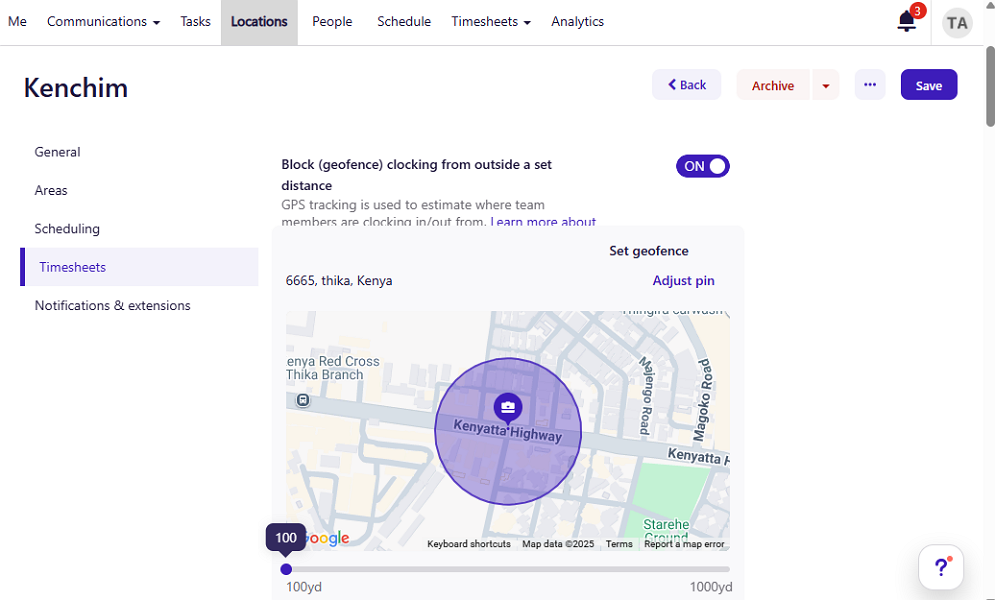
Both Deputy and When I Work use geofencing (a virtual boundary around a job site) to ensure employees can clock in only when they arrive at the job site. They can also require employees to take a selfie photo when clocking in through the kiosk app to prevent buddy punching (when someone clocks in for someone else). That said, managers have to hunt down buddy punchers manually, which can be ineffective for large teams.
Beyond that, Deputy can require employees to use facial recognition to log into the Deputy Time Clock for Android app. If the face doesn’t match, the app blocks access. While the feature prevents buddy punching, it would have been more effective if applied at clock-in/out.
Verdict: Both platforms do a great job of ensuring employee timesheets are accurate, but I have to give it to Deputy for its biometric facial recognition.
Break and overtime tracking — Winner: Deputy
If compliance with overtime laws is a top priority, both Deputy and When I Work deliver precisely what you need. During testing, both apps accurately tracked overtime based on the California overtime laws, including daily, weekly, and daily double-time overtime.
Setting up overtime policies is easier on When I Work than Deputy. But there’s a trade-off: you can only set weekly, daily, and double-time overtime.
If you must track complex overtime, like holiday and seventh-consecutive-day overtime, Deputy is the better option. The only problem with Deputy is that it doesn’t have a designated overtime settings tab. You can only set overtime through the pay rule builder, which can be difficult to use and is available only to Core and Pro plan subscribers.
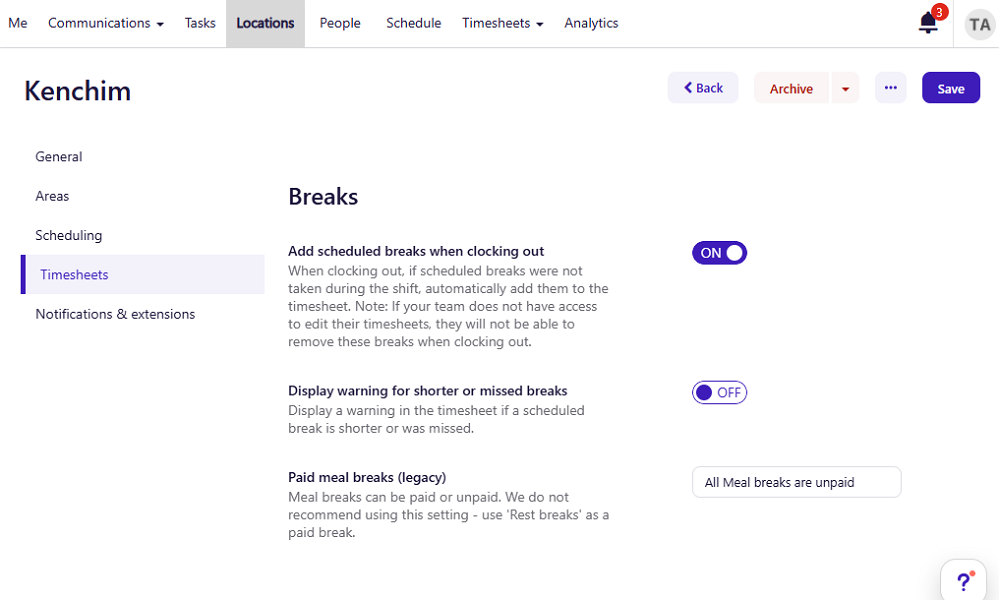
That aside, both Deputy and When I Work can track paid and unpaid breaks, but fall short when it comes to enforcing strict regulations. For example, neither app has an option to track multiple breaks for longer shifts. This can lead to violations in states like California, where labor laws require more than one break for shifts longer than 10 hours.
Additionally, neither tool reminds employees to take breaks, which can occasionally lead to missed breaks. Deputy makes up for the missing feature by flagging timesheets with shorter or missed manual breaks, but this doesn’t prevent violations. When I Work, on the other hand, can require employees to confirm they took their break on longer shifts, but it still doesn’t prevent missed breaks.
Verdict: Deputy wins by a hair, only because it supports more advanced overtime rules. That said, both platforms have gaps when it comes to enforcing breaks. If break rules are strict where you operate, you may need to look closely at how you’ll handle that.
Paid time-off management — Winner: Deputy
Both platforms make time-off requests and approvals easy, but Deputy gives you a bit more flexibility in how you set up policies.
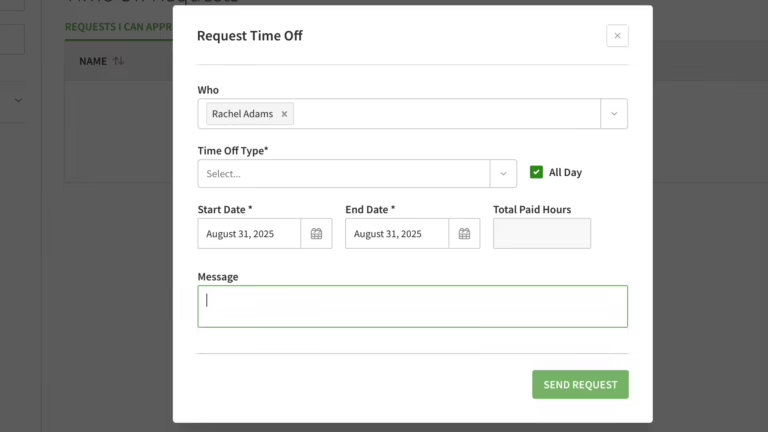
Deputy lets you create both fixed (lump sum) and hourly accrual PTO. It works well for businesses with salaried, part-time, and/or hourly workers. When I Work, on the other hand, supports only hourly accruals, making it a better fit for businesses with only hourly or part-time workers.
That said, managers and employees will find it simple to use both Deputy and When I Work. I found it easy to set PTO policies, and requesting time off was child’s play on mobile and web apps. Both also have strong notification systems, which keep everyone in the loop, helping approvals move faster.
Beyond that, When I Work lets you set a minimum request notice to prevent last-minute scheduling surprises. Deputy doesn’t have a similar feature, but it does allow you to restrict time-off requests on busy days.
Verdict: Both platforms have strong PTO systems, but I give the win to Deputy because it supports both fixed and hourly accruals.
Task management — Winner: When I Work
I wouldn’t call Deputy and When I Work’s task management tools powerful, because they’re missing several key features like task priority and progress tracking. Still, they’re a good fit for businesses looking to manage simple tasks and projects.
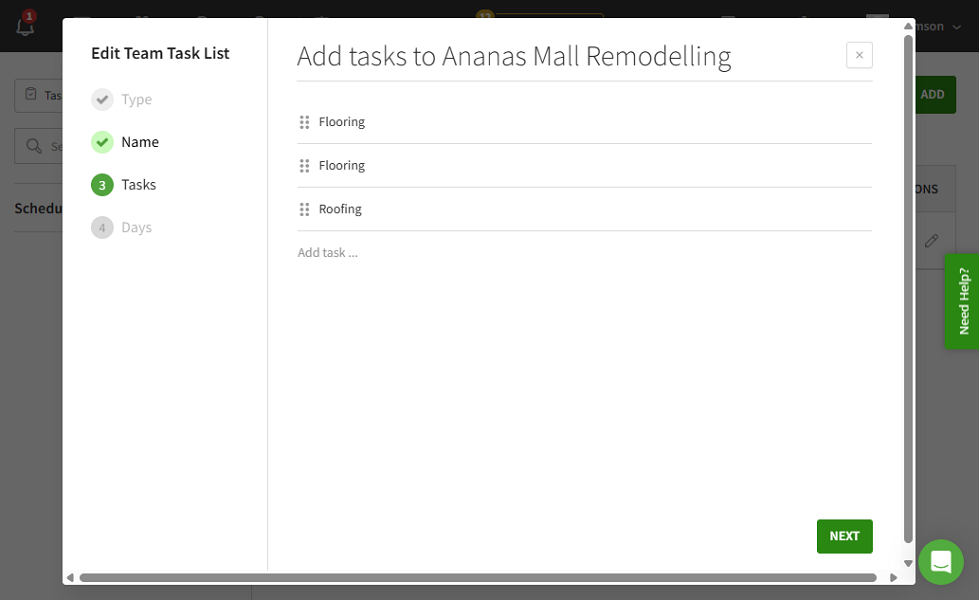
While creating tasks is easy with both platforms, When I Work has a clear edge because it lets you break tasks into sub-tasks or checklists. I do wish it would let managers assign individual subtasks. That aside, When I Work lets you create recurring tasks, so you don’t have to create repetitive jobs from scratch all the time.
Even better, When I Work lets you link tasks to shifts, so employees can easily view them on the shift card. In Deputy, tasks aren’t linked to shifts, but employees can still find assigned tasks through the mobile tasks widget.
Verdict: When I Work has better task tools and is, without a doubt, the winner here. Still, it could have been helpful if it offered a structured view that gives managers clear visibility into who’s working on what, and where each task stands.
Team messaging — Winner: Deputy
Both Deputy and When I Work have built-in communication features, but their interfaces, feature sets, and permission controls differ. For me, Deputy has a cleaner look and a layout that makes it easy to use. In comparison, When I Work’s interface looks dated and less appealing.
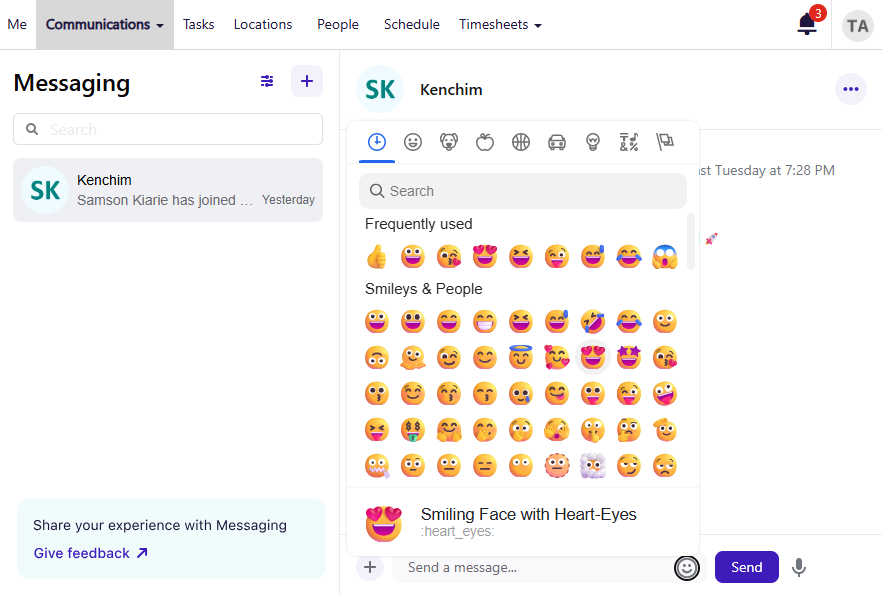
With Deputy, employees can send DMs and group messages just like they would on any modern messaging app. I particularly liked the message filters, which make it easy to find unread, direct, and archived messages. I could also attach files to messages, send voice messages, and use emojis in the web app.
Deputy’s News Feed is also useful for announcements. You can post company-wide or location-based announcements with images, videos, and PDF attachments. Employees can view updates on their smartphones or via the kiosk app if they clock in on a shared device. What stood out to me is the read receipts, which let you track message delivery.
While you can create one-on-one and group channels on When I Work, sending messages feels like using a clunky email client. It also doesn’t have a read receipt feature, so you can’t tell whether all employees have read an important update.
Verdict: Deputy takes the lead because its messaging looks modern and it’s more powerful. It also gives better control over who can post messages and where.
Payroll management — Winner: Tie
For payroll, both Deputy and When I Work mostly get the job done through integrations. The idea is simple: track time in the app, then send approved hours to your payroll provider so you’re not re-entering everything by hand.
Deputy integrates with popular payroll tools like ADP, Gusto, Paychex, and OnPay. When I Work also relies on payroll integrations and supports options like Rippling, ADP, Gusto, Square Payroll, and QuickBooks.
The one clear exception is Australia. Deputy offers built-in payroll there, which gives it a real edge if you want to run payroll directly in the same system you use for time tracking.
Both Deputy and When I Work also offer earned wage access, which lets employees access a portion of their earnings before payday. Earned wage access helps workers handle emergencies and unexpected expenses.
Verdict: This one’s a tie for most businesses. The only place Deputy clearly wins is Australia, where built-in payroll gives it an edge.
User Ratings
Deputy has slightly better ratings than When I Work on popular review sites like Capterra and G2 Crowd. For both platforms, the positives outweigh the negatives, and the overall scores match what I saw in this comparison.
Deputy
- ⭐ 4.6/5 on Capterra (763 reviews)
- ⭐ 4.6/5 on G2 Crowd (648 reviews)
When I Work
- ⭐ 4.5/5 on Capterra (1,245 reviews)
- ⭐4.4/5 on G2 Crowd (341 reviews)
* Review scores were last checked in January 2026.
Security & Compliance
Deputy and When I Work cover security and privacy basics well. Both encrypt data in transit and at rest, and both offer common account protections. I looked for public reports and found no security incident or data breach linked to either Deputy or When I Work, which is a sign that their security measures hold up well.
The following table summarizes Deputy and When I Work security and compliance options:
| Category | Deputy | When I Work |
|---|---|---|
| Data Encryption | ✅ | ✅ |
| GDPR Compliant | ✅ | ✅ |
| HIPAA-Compliant | ❌ | ❌ |
| Certification | ✅ SOC 2 Type IIISO 27001 | ✅ SOC 2 Type II |
| MFA | ✅ Two-factor authentication | ✅ Two-factor authentication |
| Admin controls | ✅ Role-based access | ✅ Role-based access |
| Hosting Region | US / EU / Australia | US |
Both Deputy and When I Work check the big security boxes: strong encryption and SOC 2 compliance. So I wouldn’t pick one over the other on “basic security.”
If enterprise security features are a big factor, the real difference is single sign-on (SSO)—logging in through your company account system. Deputy has the edge here (especially for SSO/SAML setups, depending on your plan). When I Work supports SSO too, but it’s more limited and works only on the web app.
Neither Deputy nor When I Work is HIPAA compliant, so keep that in mind if your industry requires it.
Setup and Onboarding
It’s pretty simple to create an account and set up a team in When I Work. Its intuitive interface, combined with easily accessible settings, simplifies the initial setup process. Having key settings on one page also speeds up early setup.
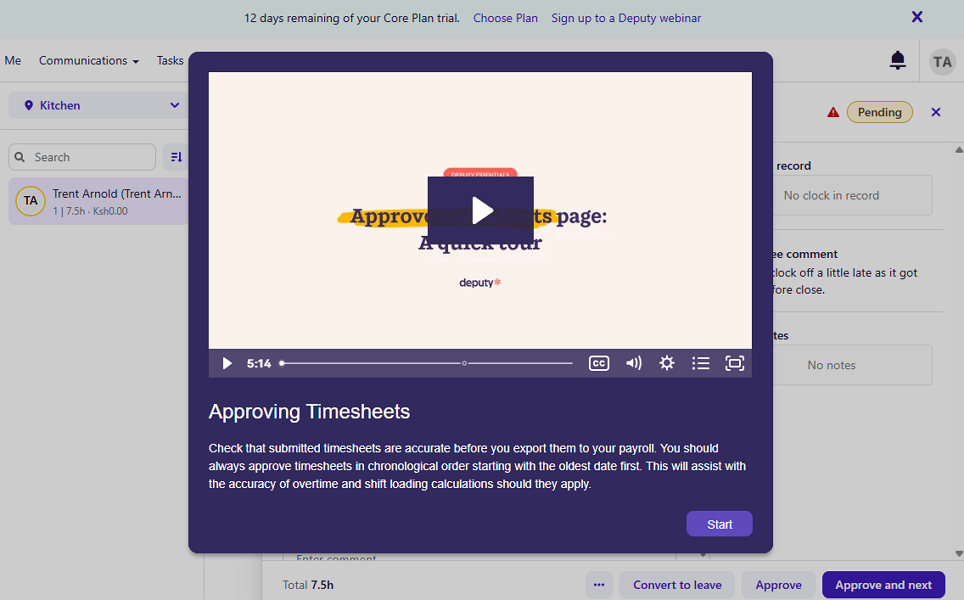
The biggest issue is that you can’t assign certain functions universally (for example, break policies). Assigning breaks during shift creation can sometimes be tedious and time-consuming, mainly for large workforces. What’s more, some When I Work tools, like WorkChat, have a dated interface, which can make the experience less smooth.
In comparison, Deputy has an intuitive interface, and more settings can be applied universally. This should make it easy to set up in theory, but the reality is different. Since Deputy includes more advanced features, its setup process naturally takes longer, especially for very large teams.
Support and Customer Service
| Support Type | Deputy | When I Work |
|---|---|---|
| Live Chat | ✅ 24/7 on Pro plan Available for the first 90 days on the Core plan. Uses an AI support assistant | ✅ Business hours Uses an AI support assistant |
| Phone Support | ✅ Outbound only | ❌ |
| Email Support | ✅ | ✅ |
| Ticket system | ✅ | ✅ |
| Community forum | ❌ | ❌ |
| Help Center | ✅ | ✅ |
When you compare their support options and response times, Deputy clearly comes out on top. During testing, Deputy resolved two tickets within an hour each, which was impressive. When I Work responded in less than 24 hours, which is fast by ticket support standards, but still slower than Deputy.
Both platforms have an AI support assistant on live chat that enables users to get instant help, anytime. Beyond that, Deputy’s agents are available 24/7 on live chat, but only to Pro plan subscribers. In comparison, When I Work’s agents are online only during business hours, but the option is available to all users.
🏆 Who Wins: Deputy or When I Work?
Deputy wins this match-up thanks to a broader range of features, and these tools perform better than When I Work’s in several categories. It also provides a set of advanced tools you won’t find with When I Work. That includes demand forecasting, labor optimization, and stronger support for predictive scheduling laws.
This doesn’t mean that When I Work is unreliable, far from it. When I Work is really dependable, especially for small teams looking for a simple scheduling and time tracking solution.
With this in mind, the best choice isn’t about which platform is superior, but which one meets the specific needs and preferences of your business.
👉 The verdict: Pick Deputy if you run a multi-location business with complex shift rules and need labor forecasting and advanced reporting. But if your team is relatively small and scheduling is reasonably straightforward, When I Work fits the bill.
Connecteam vs. Deputy vs. When I Work
Deputy and When I Work are powerful in their own ways, but each has its own limitations. For example, both lack advanced geofencing, real-time location tracking, or built-in employee training and onboarding tools.
If you want a tool that combines the best of Deputy and When I Work (and closes their gaps), check out Connecteam. Some of Connecteam’s key features include:
- Accurate GPS time tracking: Connecteam can capture an employee’s location when they clock in or out, so you can confirm where work started and ended. It also uses geofencing, so employees can only clock in when they’re at the job site. Better yet, you can configure the geofence to automatically clock out employees when they leave the site.
- Automated shift scheduling: Connecteam helps you build smart schedules in minutes with rule-based automation, shift templates, and instant conflict alerts. You can also use the AI-powered Auto-scheduler to assign hundreds of open shifts in seconds based on employee qualifications and availability.
- Real-time location tracking: With Connecteam’s location tracker, you can see (in real time) who’s on-site, on the way, or running late. You can also use geofencing to get an alert when an employee leaves a job site and to view the turn-by-turn route an employee takes while clocked in. This can help you monitor multiple job sites without leaving your office.
- Mobile-first employee onboarding and training: With the Connecteam onboarding and training module, new hires complete onboarding documentation and training from their phones. It also lets frontline employees complete mandatory courses at their own pace right from their phones, so you don’t have to gather everyone in a single room.
The icing on the cake? Connecteam is more affordable and offers better value for your money than both Deputy and When I Work. Its Small Business Plan lets small businesses with up to 10 employees use all its features for free, forever. And paid plans start at $29 per month for 30 users, which is less than $1 per user.
Get started with Connecteam for free!
FAQs
Deputy is used for workforce management, mainly employee scheduling and time tracking. It also includes tools that support labor-rule settings, reporting, and team communication.
Yes, Deputy captures employee location when they clock in or clock out. However, it doesn’t have a feature to track their location and movement when they’re clocked in.
When I Work costs $2.50 per user per month for single-location businesses seeking basic scheduling and time-tracking features.
Yes, When I Work captures employee locations, but only during clock-in/out. It can’t track their location and movements when clocked in
When I Work is used for employee scheduling and time tracking for hourly, shift-based teams. It focuses on the core tools you need to build schedules, track hours, and communicate around shifts
Deputy can help you follow labor rules by letting you set scheduling and time-tracking policies (like breaks and overtime). It does not “make you compliant” automatically. Labor law requirements vary by location, so you still need to configure rules correctly
Deputy does not offer a free plan. It usually offers a free trial, and paid pricing is per user
When I Work does not offer a free plan. It usually offers a free trial, and paid pricing is per user.
Yes. Deputy integrates with payroll providers so approved hours can sync to payroll and reduce manual entry. Exact providers and sync details depend on your payroll system and setup.
Yes. When I Work integrates with payroll providers so hours can be exported or synced to payroll. The specific providers and how automatic the sync is depends on your plan and payroll software.
When I Work can help with basic labor-law compliance through scheduling rules (like rest between shifts) and time tracking. It’s more limited than Deputy for advanced compliance needs, especially in places with stricter scheduling rules
If budget is the top concern, Connecteam can be the best fit for very small teams because it has a free Small Business plan (up to 10 users). Deputy and When I Work don’t offer a free plan, so you’ll pay per user once the trial ends.
The main difference between Deputy and When I Work is that Deputy has more automation and deeper controls, while When I Work is simpler and easier to roll out. For small teams with straightforward scheduling, When I Work is often enough. If you want a free option for up to 10 users, Connecteam is also worth a look
No. Deputy does not offer real-time location tracking during a shift. It focuses on scheduling and time tracking, with location captured at clock-in and clock-out. If you need live location visibility for field teams, Connecteam is a better fit.
No. When I Work does not offer real-time location tracking during a shift. It captures location at clock-in and clock-out, not continuous tracking. If live tracking matters for your team, Connecteam is a better fit.
No. Deputy does not offer a free plan. If you’re trying to keep costs down for a very small team, Connecteam offers a free Small Business plan for up to 10 users
No. When I Work does not offer a free plan. If you want a free option for a very small team, Connecteam offers a free Small Business plan for up to 10 users.