


Timely and Harvest both track desk workers’ time, but in very different ways. Timely uses AI for automatic tracking, while Harvest has workers record their hours manually and includes expense tracking for accurate billing.
In this detailed Timely vs. Harvest guide, I’ll compare the two apps side by side to help you choose the right app for you. I’ll highlight their key similarities and differences in time tracking, expense and invoice management, project management, and other fronts. Read on for all the details.
Product comparisons and verdicts in this guide are based on hands-on testing done by our expert team. Several screenshots were taken from real use during our evaluation.
At a Glance: Quick Summary
Timely positions itself as a reliable automatic time tracking solution for agencies, consultancies, and software companies. Its main feature is an AI tool called Memory Tracker, which automatically “remembers” what you do on your computer and turns that activity into helpful time records. You still need to manually review these “memories” and turn them into timesheet entries, which can be slow and lead to errors. Read our full Timely review to learn more.
Harvest, by contrast, is built primarily for freelancers and project teams that want to simplify billing. It sets itself apart with the ability to track time inside your favorite project management software like ClickUp, Asana, monday.com, and more. It also comes with budgeting, invoicing, and expense tracking features for automating your financial workflow. Learn more in our full Harvest review.
Pricing and Plans
| Timely – Monthly/User | Harvest – Monthly/User |
| ❌ | Free plan
|
Starter$9/user/month
| Pro$11/user/month Everything in Free, plus:
|
| Premium$16/user/month Everything in Starter, plus:
| PremiumCustom pricing Everything in Pro, plus:
|
| Unlimited$22/user/month Everything in Premium, plus:
| NA |
| Enterprise Price available upon request Everything in Unlimited, plus:
| NA |
| * All prices show the monthly cost when billed annually as of November 2025. | |
Both apps charge per user, but Harvest is more affordable and offers better value. Its plans are built with small businesses in mind, so the pricing is flexible and easy to scale.
Harvest has a free plan for solo users, and its paid plans aren’t tiered, meaning you can buy only the seats your team needs. Even better, Harvest offers discounts for teams with more than 50 members, as well as non-profits and learning institutions. You also get a 30-day free trial to test premium features.
I am not a fan of Timely’s pricing, mainly because it lacks a free plan and its first two paid plans have user limits. The Starter plan allows only 5 users, whereas the Premium plan supports a maximum of 50 users. In my view, these user caps limit scalability and might not suit fast-growing teams.
For example, a small team with five members pays $9 per user per month. Adding just one more user forces you to upgrade to the $16-per-user plan. While you’re still paying for the seats you need, the sharp price jump can be off-putting for growing teams. Timely’s free trial is also shorter, with only 14 days to test paid features.
Pros and Cons
The pros and cons below should give you a clear idea of each app’s strengths and weaknesses:
Timely Pros
- The AI Memory Tracker feature tracks time automatically without relying on users manually starting or stopping the timer.
- Provides a detailed report on the apps and websites employees use during their workday.
Timely Cons
- Because employees can remove any memory while building timesheets, managers can’t fully rely on Timely to show how time was actually spent.
- The time tracker doesn’t come with advanced controls to help you comply with labor laws.
Harvest Pros
- Harvest assigns every tracked minute to a project, which makes client billing simple and accurate.
- The invoicing feature lets you send invoices and track payments on one platform.
Harvest Cons
- Harvest doesn’t have geofencing, facial recognition, or other clock-in restrictions required by field teams.
- The app doesn’t support payroll integrations.
Use Cases
Timely and Harvest are two reliable time trackers for office workers, but their use cases are different:
Timely is best for:
- Hands-free time tracking: Timely is ideal for freelancers and teams looking for an app that tracks time automatically, without having to manually start or stop the timer.
- Detailed activity tracking: Timely works great if you want to know how much time employees spend on various apps and websites.
Harvest is best for:
- Accurate, manual time tracking: Harvest requires you to select a project and task when clocking in so that it can attribute every minute to a specific client for accurate billing.
- Invoicing and expense tracking: Harvest automatically calculates all expenses and time spent on a project for each client, letting you create and send invoices with only a few clicks.
Side-by-Side Feature Overview
Timely and Harvest are both powerful time-tracking tools, their features are very different. Below, I go through their time tracking, project and task management, activity tracking, and invoicing tools so you can make an informed decision.
Time Tracking — Winner: Tie
Both Timely and Harvest offer strong time-tracking tools, but they take very different approaches.
Timely uses automatic tracking through its AI Memory Tracker, which creates “memories” you can add to your timesheet. When it’s time to submit your timesheet, you can organize these memories by dragging them into the right projects or let the Timesheet Assistant suggest entries for you.
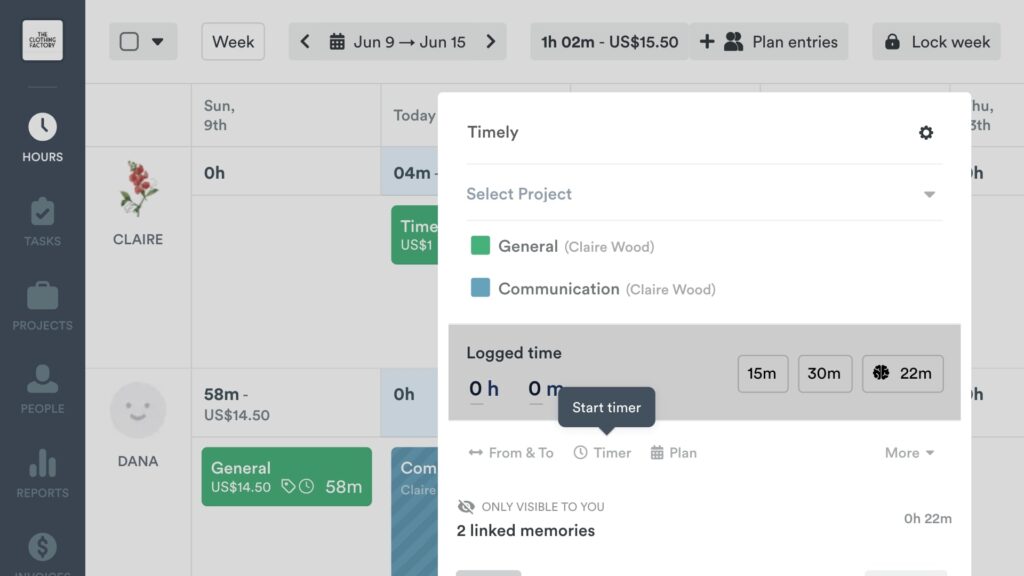
Harvest, in contrast, relies on manual tracking. You can start and stop a timer or enter hours yourself, and the timer works across the web app, mobile apps, the Chrome extension, and supported project management tools.
Verdict: Both apps support different work styles, so neither clearly wins. Timely is better for users who switch tasks often and prefer automatic tracking. Harvest is better for teams that want simple manual timers and need consistent project-based tracking.
Clock-In Restrictions and Reminders— Winner: Harvest
I expected both apps to have basic reminders and restrictions to enhance timesheet accuracy. Timely met my expectations, but not fully. You can configure the app to remind you to create timesheets at the end of the workday, but managers can’t apply this reminder to all employees. Only users themselves can set their own reminder.
Timely does have a “log hours” reminder. It lets you remind employees to submit timesheets at the end of the pay period. Unfortunately, reminders aren’t automatic and can’t be applied universally. You can only trigger reminders manually one by one, which is ineffective in large companies.
Harvest does a better job, thanks to more advanced personal and team-wide reminders. Employees can set their own daily reminders to track time and log hours.. Better yet, Harvest allows managers to set automatic reminders for the whole team or send individual reminders as needed.
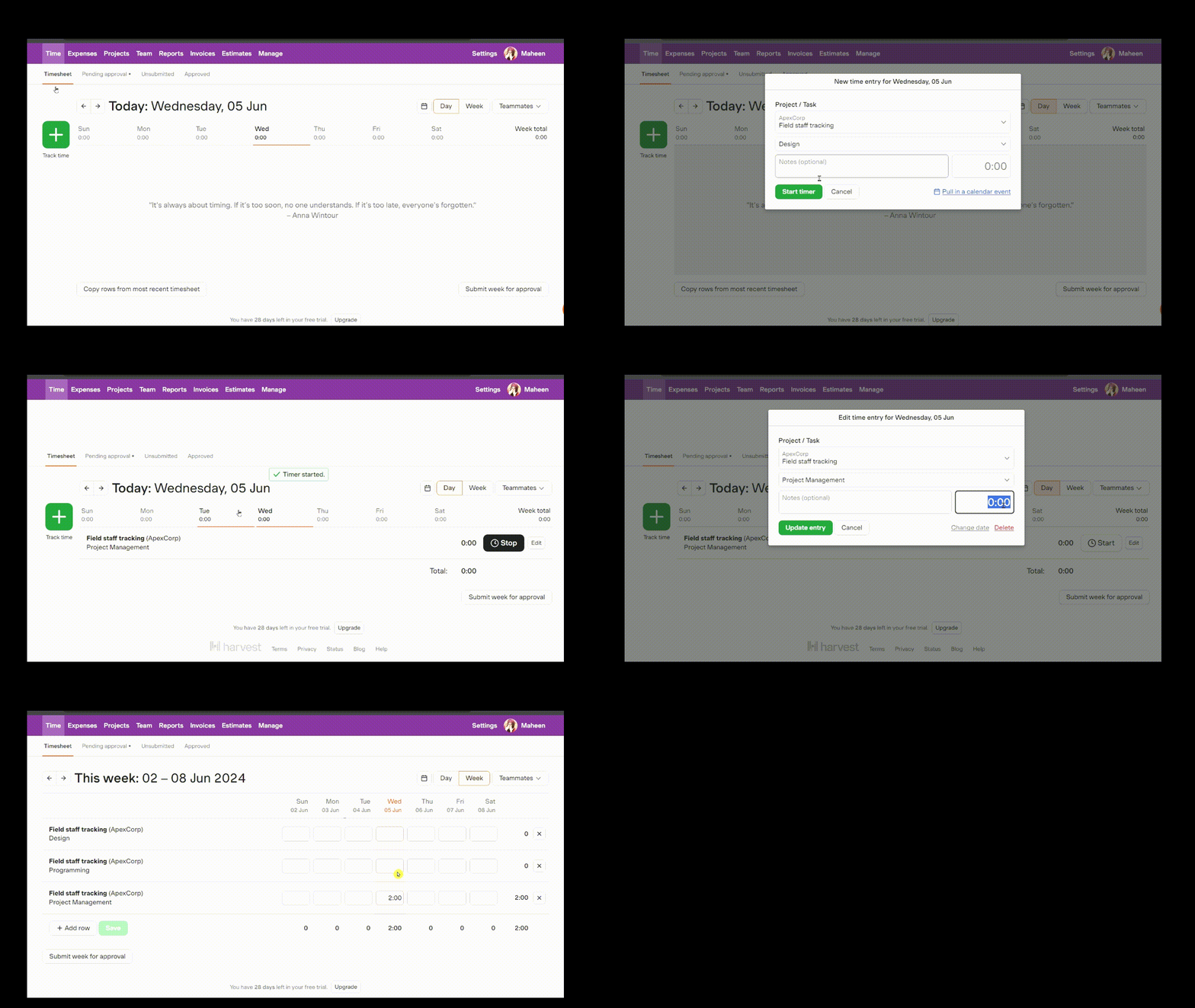
Harvest also notifies you when a team member submits a timesheet, which lets you review timesheets as soon as they come in, minimizing payroll bottlenecks.
Verdict: In my view, Harvest’s reminders are easier to use and more effective than Timely’s. For this reason, Harvest takes the crown in this category. Even so, it lacks advanced restrictions like geofencing, break reminders, and automatic clock-out, which can make managing employees even easier..
Project and Task Management — Winner: Tie
Compared to standalone project management platforms, Harvest and Timely are both limited. For example, they don’t offer standard project views like Kanban, Gantt Chart, or timeline. As a result, they won’t be enough for businesses that need to track project progress through various phases.
Still, they can help keep projects organized for accurate time tracking, budget tracking, and client billing. Both apps let you add projects, break them into manageable tasks, and set budgets for better cost tracking. Each project is assigned to a specific client, which simplifies billing down the road.

Additionally, both apps can alert you when a project uses a certain percentage of the budget you set for it. This helps spot potential budget overruns and course-correct early. Timely sends you notifications when you’ve reached 50%, 80%, and 100% of the budget. Harvest takes a more flexible approach and lets you set your own limit for sending a notification.
One notable difference between the apps is that with Harvest, you create projects and break them into tasks on one page. This makes project planning easy and painless. On the other hand, Timely requires you to bounce between multiple tabs to create projects and tasks, making the process more complicated than it needs to be.
That said, Timely notifies you when it detects strange time logging activity, like an employee logging hours for someone else. Automatic detection lets you stay ahead of crises, catch errors, and make sure that work stays within budget.
Verdict: During testing, I found it much more efficient to manage projects with Harvest than Timely. This, coupled with the flexible budget notifications, almost tips the scales in Harvest’s favor. However, Timely’s anomaly detection balances things out, making this category a tie.
Activity and Productivity Tracking— Winner: Timely
When it comes to activity and productivity monitoring, Timely’s automatic activity tracker gets the job done, but it lacks the advanced features you get with more established apps like Clockify and Hubstaff. For example, it doesn’t take screenshots or record keystrokes. But if all you need is a detailed report about your digital activity, Timely’s Memory Tracker fits the bill.
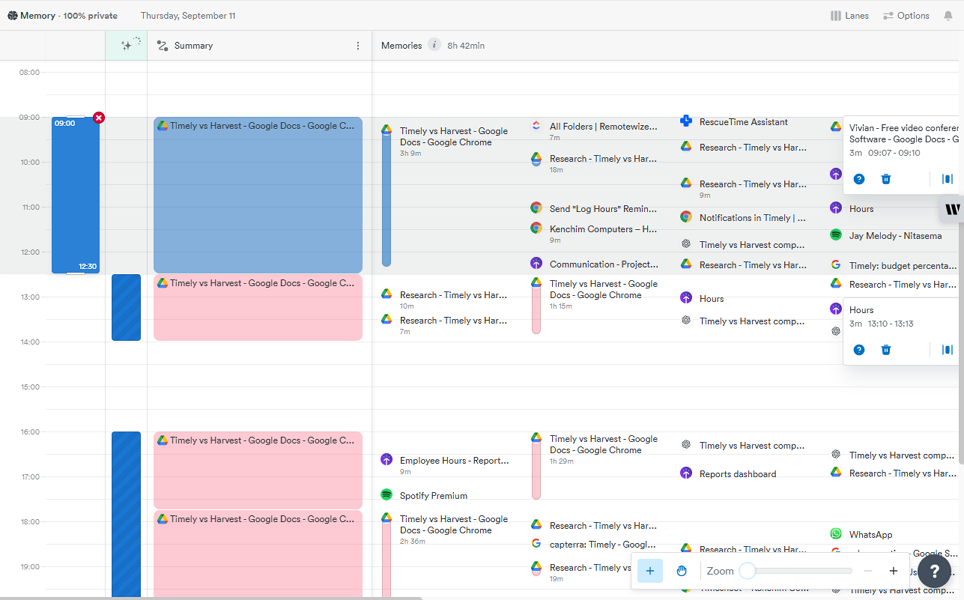
It’s particularly helpful for freelancers who need to monitor the apps and websites they visit and the time they spend on each. But unlike RescueTime or Clockify, it doesn’t give each activity a productivity score. As a result, you need to manually figure out which activity is productive work or unproductive time wasting.
Another issue is that managers only see the memories employees add to timesheets. This is a great move from an employee privacy perspective. But because employees can hide any activity they want, managers can’t trust Timely to give them the full picture of employees’ activity. This makes it harder to know exactly how they spend their workday.
By contrast, Harvest doesn’t track employee activity or productivity at all. The platform sticks to tracking time and budgets.
Verdict: As the only app with relevant features, Timely is the winner in this category. Still, I’d say that Timely’s win is weak because it lacks basic activity tracking tools like keystroke and screenshot recording. It also has no reports to help you analyze employee activity or productivity.
Expense Tracking — Winner: Harvest
If you work on projects for clients, you’re going to want to track expenses. Think travel, parking, hotels, materials, and more. Most time tracking tools don’t track expenses, but having the option to track them in one app can be useful.
Harvest comes with a built-in expense tracker. This lets you track time and expenses on a single platform, streamlining billing without the need to invest in third-party apps.
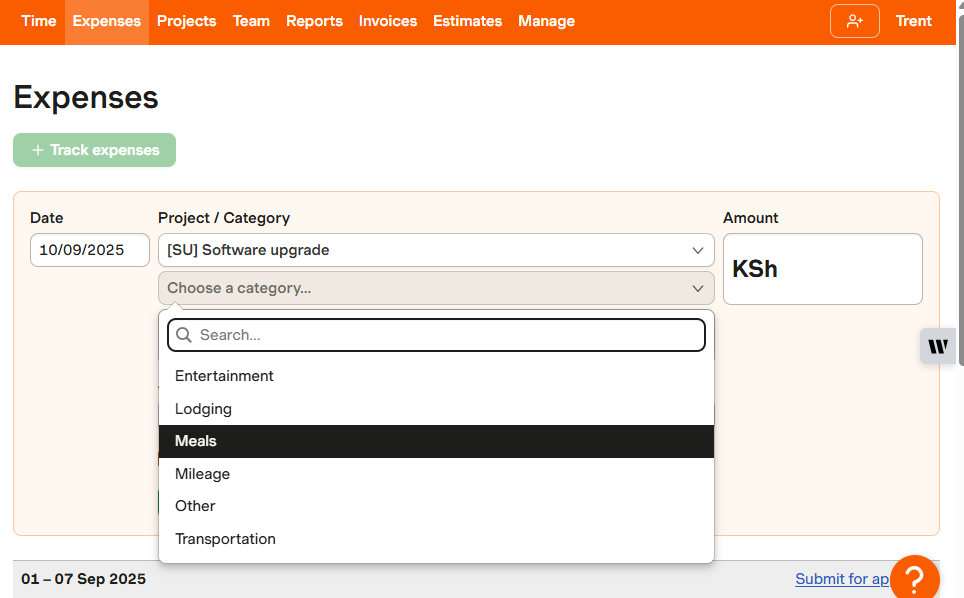
I liked the ability to add expense categories to align with internal policies and preferences. I was particularly impressed by the option to add a unit price for some expenses, like mileage. This ensures that the billing and reimbursement rates are consistent with standard rates like those set by the IRS.
Employees can log expenses on a mobile or web app and attach receipts to support their claims. The only minor issue is that Harvest lacks a built-in expense approval workflow. This means that expenses are considered approved upon entry, making it difficult to flag duplicate or fraudulent claims.
On the other hand, Timely doesn’t track expenses at all. It does integrate with QuickBooks, which gives you the option to track expenses separately, which will be enough for most users. Still, Harvest’s approach is much more convenient if you need to track a lot of expenses for projects.
Verdict: Harvest is the clear winner, thanks to its built-in expense tracking — a feature you won’t find with Timely. Still, Harvest has room for improvement. It could benefit significantly from a revamped approval workflow to help managers catch expense errors before they creep into the client’s bill.
Invoicing — Winner: Harvest
Both Timely and Harvest come with built-in invoicing tools that help turn billable hours into invoices, without needing separate apps. However, their invoicing tools aren’t equally strong.
Timely’s invoicing feature is quite limited. While I found it easy to create invoices, I couldn’t download the invoices or send them directly to clients from within the platform. This defeats the purpose of creating the invoices in the first place.
You can only share invoices with clients by integrating Timely with a third-party accounting software. At the time of writing, Timely only supported integration with QuickBooks Online. If you already use a different accounting platform, Timely won’t be able to help you with invoicing.

On the other hand, Harvest’s invoicing feature doesn’t require third-party integrations to work. While it’s not as powerful as a standalone accounting platform, it lets you create and send invoices directly through the platform. Invoices include detailed item descriptions, discounts, taxes, and branded elements to look professional.
Even better, Harvest lets you track payments directly within the app, simplifying the follow-up process. It also supports partial payments, which can improve cash flow and reduce the risk of non-payment. However, Harvest doesn’t let you automatically charge cards or bank accounts. A payment can only be manually initiated by the client.
Verdict: Harvest is the undisputed winner in this category. It may not be the most powerful invoicing software, but its built-in invoicing tools are far superior to Timely’s options.
Reporting — Winner: Timely
When it comes to reporting, both platforms have intuitive interfaces that let users generate reports with ease. While they don’t have the widest range of reporting options, they can help you drill down to the most important employee, client, and project data.
For example, Timely’s dashboard gives you a high-level view of logged time, costs, money, and profits for every project and client. You can also create custom reports to analyze an aspect that matters to you. The reports make it easy to monitor budgets, workload, and overall performance for better control and decision-making.

Timely’s excellent report-sharing options really shine with Excel, CSV, and PDF exports. You can also schedule a report to be sent by email, weekly, monthly, or yearly. You can even publish snapshots or live reports, and share the link with stakeholders for easy access.
Harvest, in comparison, has more reporting options. Beyond the standard timesheets, time, and budget reports, it offers advanced options like profitability reports. This report lets you visualize revenue, costs, and profit margins to make informed business decisions. Like Timely, it also lets you create and save report templates.
The only issue is that Harvest report-sharing options are limited to CSV and PDF downloads only. You can’t download a report in the Excel format, schedule it, or email it directly from the platform.
Verdict: Timely takes the crown in this category because of its excellent report-sharing options.
Integrations — Winner: Harvest
Regarding integrations, both apps support native, Zapier, and API integrations. Timely integrates natively with 18 third-party apps. The list includes the most popular project management, time tracking, and scheduling software. My gripe is that Timely doesn’t support payroll integrations, which is a huge miss considering it’s a time tracking app.
The issue aside, Timely supports Zapier and Make integrations, enabling connections to almost any software in your tech stack. Additionally, you can use Timely’s API to link it with your favorite apps.
On the other hand, Harvest supports integration with over 70 third-party apps, as well as Zapier and API integrations. Its list includes popular accounting, project management, communication, and CRM software. My main worry is that, like Timely, it doesn’t offer payroll integrations.
Verdict: Harvest supports a wider array of native integrations than Timely. While Timely offers Make integrations, an option you won’t find with Harvest, I think Harvest can still claim the top spot in this category.
User Ratings
Timely and Harvest have excellent review ratings on popular software review sites. The high scores indicate that most users are highly satisfied with their offerings. Here’s a sneak peek at their review ratings:
Harvest
- ⭐ 4.6/5 on Capterra (638 reviews)
- ⭐ 4.3/5 on G2 (867 reviews)
Timely
- ⭐ 4.7/5 on Capterra (217 reviews)
- ⭐ 4.8/5 on G2 (470 reviews)
* Ratings were checked in November 2025.
Security & Compliance
| Category | Timely | Harvest |
| Data Encryption | ✅ | ✅ |
| GDPR Compliant | ✅ | ✅ |
| HIPAA-Compliant | ❌ | ❌ |
| Certification | ❌ None explicitly stated | ❌ None explicitly stated |
| Two-factor authentication | ✅ | ✅ |
| Admin controls | ✅ Role-based access | ✅ Role-based access |
| Hosting Region | EU | US |
Both Timely and Harvest have strong security and privacy measures, giving users confidence that their data is well-protected.
The apps do not explicitly mention how they encrypt data at rest. However, Harvest and Timely host data on Google Cloud and Amazon Web Services (AWS), respectively. Both cloud service providers are generally secure, and they adhere to regulations such as SOC II type II compliance.
On the account security side, both apps support role-based access. They ensure each user has access to data relevant to their role to protect against internal breaches. Both also support Two-Factor Authentication (2FA), which adds an extra layer of protection to account access, preventing unauthorized access.
Setup and Onboarding
Setting up a Timely account takes less than a minute. On the whole, the process is extremely simple, and you won’t need much help to succeed. I did initially hit a snag with the installation of the Memory Tracker, which failed to download during setup. Thankfully, I eventually managed to download and install it.
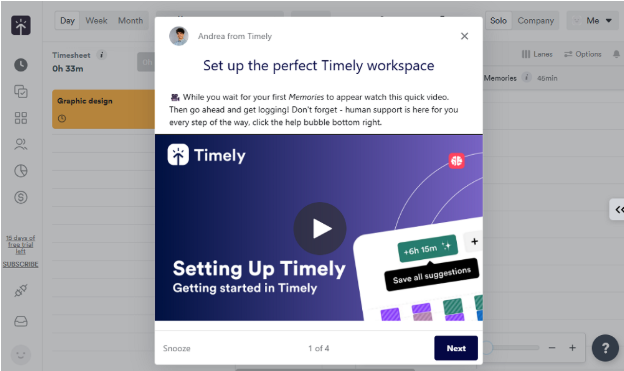
First-time users don’t need to get up to speed with guides to learn Timely. The app has a modern, intuitive interface that helps users find their way around and use key features with ease. Like most modern apps, it has its menu on the left.
By contrast, Harvest requires more time to configure than Timely. This isn’t because the setup process is complicated — far from it. The process takes longer because you need to set up many things, from projects and billing rates to team members and company branding.
In my view, users don’t need training to learn Harvest. The platform displays menu items clearly, making it easy for users to find their way around. However, the interface may look a bit dated and bland for users who prefer dynamic interfaces.
Support and Customer Service
| Support Type | Timely | Harvest |
| Live Chat | ✅ 24/7 Chatbot | ✅ During business hours) |
| Phone Support | ❌ | ❌ |
| Email Support | ✅ | ✅ |
| Community forum | ❌ | ❌ |
| Help Center | ✅ | ✅ |
Timely and Harvest customer support options are identical on the surface. Support is available through live chat, email, and a knowledge base on both platforms. But once you dig deeper into the finer details, differences begin to appear.
Take live chat, for example. While Timely’s live chat is available both on the website and in-app, Harvest’s live chat option is available in-app only. This means that only users with an account can access Harvest’s live chat. In my tests, Harvest responded in under 7 minutes, whereas Timely replied in under 60 minutes.
Who Wins: Harvest or Timely?
| Choose Timely if you… | Choose Harvest if you… |
| Want automatic time tracking, without relying on employees.Need to track the apps and websites employees visit during the day. Want to schedule reports to be delivered to your email for faster decision-making. | Want to manually track time for accurate billing.Track expenses for fair reimbursement and accurate billing.Prefer to manage invoices without having to rely on a separate app. |
| Read our full Timely review |
Our take:
Overall, Harvest wins in more categories than Timely. While this means Harvest is more powerful, it doesn’t tell the whole story. Remember that while both apps are designed for desk employees, they are better suited for different use cases. The decision between the two will come down to your unique operational needs.
Harvest lets you track project time, log expenses, and send invoices in one tool. These features, combined with budget tracking, help control project costs and get paid faster. This makes Harvest suitable for freelancers, agencies, and project-based teams that bill clients for both time and expenses.
Timely, on the other hand, is a perfect fit for freelancers, knowledge workers, and teams looking for automatic, distraction-free time tracking. It’s particularly helpful if you don’t want employees to rely on their recall to log hours.
Timely’s AI Memory Tracker quietly tracks the time you spend on apps and websites in the background. Plus, with the AI timesheet, it takes minutes to convert memories into accurate timesheets.
Connecteam vs. Timely vs. Harvest
While Timely and Harvest are geared towards office workers, Connecteam is designed mainly for deskless workforces. It offers time tracking, shift scheduling, location tracking, and more tools for industries like construction, retail, manufacturing, hospitality, and healthcare.
Let’s explore how Connecteam’s features differ from Timely’s and Harvest’s toolsets:
GPS Time Tracking
I have found Connecteam’s Time Tracker a must in situations when managers need to keep track of employees’ locations. If you’re dealing with employees clocking in while a few blocks away from the restaurant, warehouse, construction site, or designated job sites, Connecteam can help.
Connecteam’s powerful yet intuitive mobile app uses built-in GPS tools to prevent off-site punching, enhancing timecard accuracy. You can also set up virtual boundaries called geofences around job sites to ensure employees clock in only when inside the assigned work area. This prevents timecard padding, ensuring each employee is paid only for hours spent on the actual job.
Even better, Connecteam lets you track time in full compliance with break and overtime laws. Its break reminders and early return restrictions help you enforce break rules, whether you’re in California or Australia. The flexible overtime tracker lets you set up any type of overtime and calculate employee pay automatically.
Automatic Shift Scheduling
I liked Connecteam’s fast and efficient shift scheduling, a feature you won’t find in either Timely or Harvest. I really love its intuitive scheduling grid, recurring shifts, and shift templates, which let managers quickly build error-free schedules, not to mention the handy drag-and-drop feature, which enables you to adjust schedules on the fly.
My favorite feature is Connecteam’s Auto-Scheduler, which saves managers hours of manual planning. It automatically assigns hundreds of shifts in minutes based on employee availability and qualifications. This ensures that each shift is matched to a worker with the right skillset, leading to smoother operations and higher-quality work.
Better still, Connecteam lets you set scheduling rules to help your business stay compliant with labor laws and avoid overlapping shifts and other schedule issues. This helps you to address issues early enough to eliminate no-shows and last-minute scrambles to find cover.
Excellent Customer Service
Connecteam helps you right from your first interaction to ensure you have an excellent experience. It provides onboarding videos, feature walkthroughs, and guided tours to help users learn the app with ease. And if you hit a snag with anything, support is available 24/7 via live chat, phone, email, and a knowledge base.
For businesses looking to speed up the setup and onboarding process, Connecteam Pros will come in handy. With this support option, Connecteam assigns an onboarding expert to handle the initial setup for you. This lets you get your team up and running in record time, and make the most out of every feature from day one.
| Connecteam | Timely | Harvest | |
| Time tracking with GPS | ✅ | ❌ | ❌ |
| Geofencing | ✅ | ❌ | ❌ |
| Shift scheduling | ✅ | ❌ | ❌ |
| Open shifts and shift swapping | ✅ | ❌ | ❌ |
| Free plan | ✅ Up to 10 users | ❌ | ✅ One user |
| 24/7 support | ✅ 24/7 live chat | ✅ 24/7 chatbot | ❌ |
Pick Connecteam over Timely and Harvest if you want an affordable yet feature-rich time tracking app for deskless teams. GPS time tracking, location tracking, shift scheduling, HR management, and team communication are some of the features you get with Connecteam.
The icing on the cake? You can access all these features on the free plan, which is great for companies with up to 10 employees. Plus, Connecteam paid pricing starts at $29 per month for 30 employees, which is less than $1 per employee. Try Connecteam for free.
FAQs
Yes, Harvest is a reliable time tracking app for project teams looking to simplify billing and invoicing.
No, Harvest doesn’t have the capabilities to record your screen or keystrokes.
Yes, Timely is a good time-tracking app for teams that want to automatically track the time they spend on apps and websites.
Not really. Harvest is built mainly for desk workers and project teams. It doesn’t offer GPS tracking, geofencing, or clock-in restrictions, so it’s not a strong fit for field employees.
If you need GPS time tracking for workers in the field, Connecteam is a better option.
No. Timely focuses on computer activity and automatic tracking. It doesn’t have the tools field employees usually need, such as geofencing, location-based clock-in rules, or automatic clock-out. It’s designed mainly for desk workers, not mobile crews.
For teams that work in the field, Connecteam is a better fit because it includes GPS tracking, geofencing, and mobile time-clock controls.
Not really. Harvest can track hours and expenses, and you can export this data to a payroll system. But it does not have built-in payroll features like wage calculations or pay runs. You’ll still need separate payroll software.
No. Timely tracks time and desktop activity well, but it does not offer dedicated payroll tools or native payroll integrations. You’d need another platform to process pay-runs and calculate salaries.
Timely and Harvest have limited compliance tools. For things like break rules, overtime rules, or location-based clock-ins, Connecteam has a more complete set of features.
Harvest offers a free plan for solo users. Timely does not offer a true free plan for most users. If you need a free plan for a whole team, consider Connecteam’s free tier for up to 10 users.