


Powerful construction management for large teams, but too complex and pricey for smaller businesses.
Verdict: 7.9/10
I found Procore to be a construction management heavyweight, built for teams running big, complex jobs with many moving parts. With robust drawing and document control, project and financial management features, and strong field access to many tools through its mobile app, it’s a good choice for large-scale projects and established construction businesses.
Its drawbacks lie in its lack of transparent pricing, the time needed for setup and training, and limitations in its everyday employee management tools. I would most strongly recommend Procore to general contractors (GCs) and specialty trades managing multiple subcontractors, large budgets, and formal approval processes. Leaner teams will likely find it more complex and expensive than they actually need.
Key Features:
- Project management tools. Manage RFIs, submittals, tasks, observations, photos, schedules, punch items, daily records, and other project workflows from 1 connected platform.
- Drawing tools. Make notes on your site drawings and automatically upload them to the cloud for simple sharing.
- Financial management tools. Manage budgets, commitments, change events, invoices, direct costs, and forecasting within construction-specific financial workflows.
- Document management. Organize docs with a metadata-based document control system for naming standards, revisions, and approvals (currently only available in the UK, Ireland, Australia, and New Zealand).
- Scheduling. Use a drag-and-drop scheduler to get qualified workers in the right places at the right times, or use Procore’s newer standalone Project Scheduling tool to manage full construction timelines and dependencies.
- Time tracking. Let workers and managers record project time from the office or field, connect hours to jobs and locations, manage multiple line items, and review or approve timesheets.
- In-app chat. Use direct, group, and item-specific conversations so discussions remain connected to the relevant project or workflow.
Pros
- Broad field-focused mobile functionality, including selected offline workflows
- Designed with accessibility in mind
- Deep, connected financial controls for complex, multi-contract projects
- Fast-growing AI capabilities
Cons
- No pricing transparency
- Can require substantial configuration and training before teams use it consistently
- Overpowered for smaller businesses
How I Evaluated Procore
I requested a Procore demo through its website. The form asked whether I already used construction software, what type of business I represented, and what solution I needed. I selected “Main Contractor,” then provided my work email, name, company, and phone number.
A Procore representative later emailed me to arrange a short qualifying call before the demo. During that call, I explained that I was reviewing the platform as an independent consultant. The representative said Procore doesn’t provide demos for independent consultants, so I couldn’t test the full platform firsthand.
I therefore evaluated Procore through its official product pages, help documentation, training videos, release notes, demonstrations, and feedback from verified customers.
Procore Pricing
Verdict: 3.5/10
Procore’s prices are completely custom. Your quote depends on the products you buy and your Annual Construction Volume (ACV), which Procore defines as the aggregate value of construction work across your projects.
Procore makes a real case for this model, pointing to a few things:
- Multi-year pools, so you can use your contract volume whenever you need it, instead of it resetting yearly
- Locked-in renewal rates, so your cost doesn’t surprise you later
- Unlimited users, including subs and clients, not just your own staff (Field Productivity is an exception and is priced by full-time employee)
- No hidden fees on top of what you agreed to
Procore also offers onboarding and implementation services, but buyers should confirm the scope and cost in their quote. Reporting access depends on the products and entitlements purchased.
I find this is a fair pitch if you’re a large GC who already knows this system works for you. It’s a lot less convincing if you’re still deciding whether Procore is worth it, since none of this pricing is visible until you’re deep into a sales conversation.
And I can speak to that firsthand. I filled out Procore’s custom quote form myself to see how the process works. I got an automated confirmation email, but no salesperson ever followed up with an actual quote. So, beyond the pricing itself not being visible anywhere, I can’t even confirm you’ll reliably get a figure once you ask for one.
Customer feedback suggests price can be a serious concern. One G2 reviewer called Procore “prohibitively expensive” and felt it was more clearly geared toward general contractors than specialty contractors. Another said, “their pricing is ridiculous, and we plan to leave once our contract expires.”
Procore does not advertise a standard free trial for its paid construction platform. However, companies in the US and Canada can create a limited free company account. It includes access to collaborator projects and bids, company and team profiles, Bid Board, estimating, and takeoffs. It is not a free version of Procore’s complete paid project-management suite.
| Team size | Procore | Autodesk Forma Build (per user) | Fieldwire (Business Plus) | Connecteam (Advanced) |
|---|---|---|---|---|
| View pricing | View pricing Contact sales for unlimited users plan | View pricing | View pricing | |
| 10 Users | Custom pricing structure | $1170 | $890 | Free for life—All features and dashboards |
| 20 Users | Custom pricing structure | $2340 | $1780 | $49 |
| 30 Users | Custom pricing structure | $3510 | $2670 | $49 |
| 50 Users | Custom pricing structure | $5850 | $4450 | $99 |
| Read our full Fieldwire review | Learn more about Connecteam | |||
| * All prices show the monthly cost when billed annually as of August 2026 | ||||
Procore Usability and Interface
Procore doesn’t offer a free trial, so I couldn’t experience what it’s like to sign up for the platform or click around the tool myself. I requested a demo to see the process firsthand. To do this, I had to fill in a short form, as it’s not instant access. But unfortunately, I couldn’t secure one.
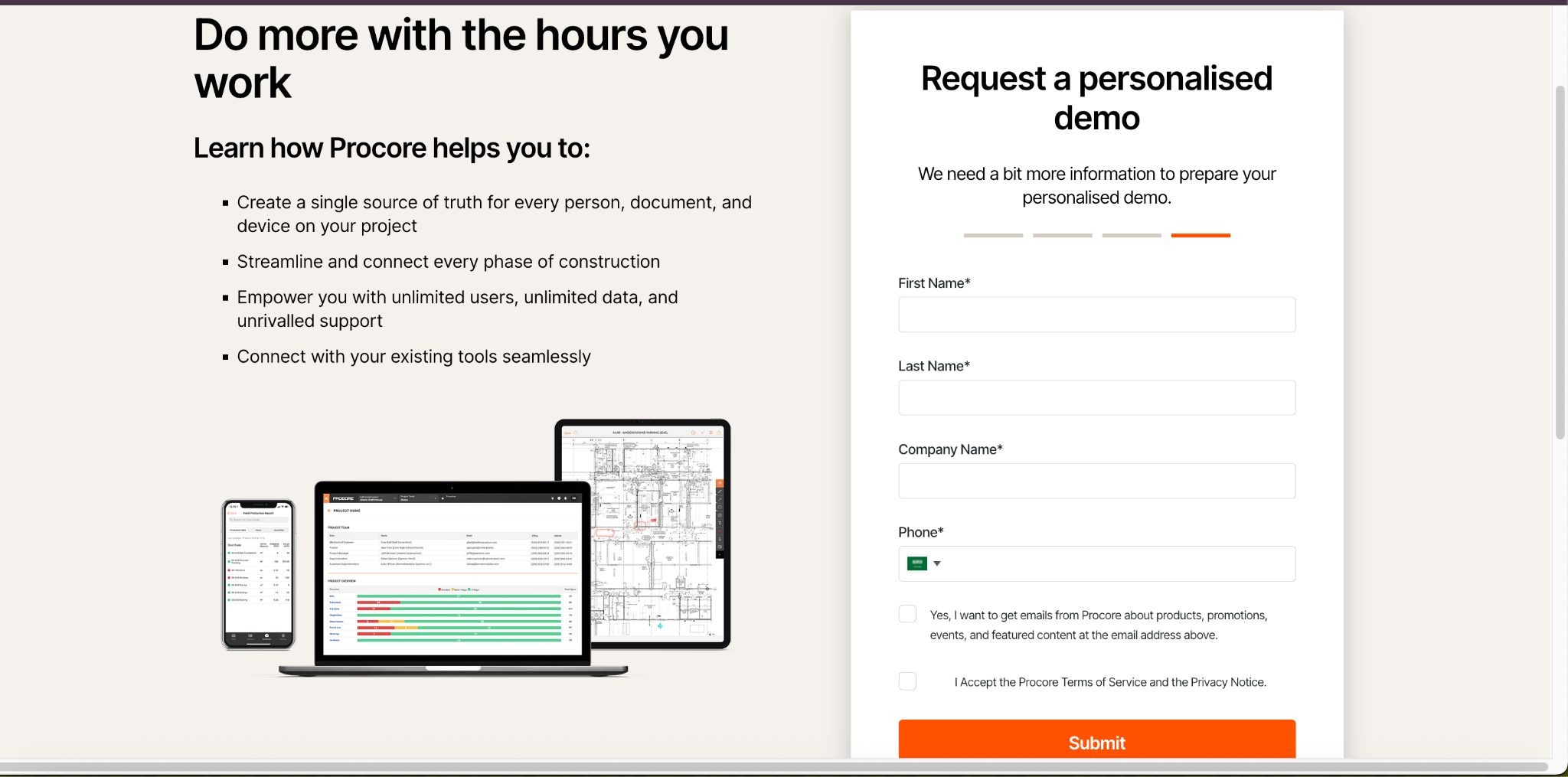
I’ve reviewed tons of online resources (like customer reviews), as well as brochures and video walkthroughs of the platform to get a sense of how it works and write this review.
Users can’t simply sign up and enter the main platform themselves. An existing Procore administrator must add them to the company or project directory. They then receive an email inviting them to create a password and log in. I find this controlled setup useful for larger companies, but it’s less convenient for small teams that want to get started quickly.
Procore web app
Verdict: 7/10
Based on what I could see, the interface seems well-organized and visually clean. Different modules appear on different pages, and the layout is clearly structured into different boxes with labels. Tools are split into company-level areas for the whole business and project-level areas for individual jobs. This setup makes sense for contractors managing several projects, but it may take new users some time to learn where everything is.
The top bar keeps it simple: it has a project switcher, an app switcher, help, chat, notifications, and your profile icon. Click the main menu, and a sidebar opens with nearly 20 tools listed by name, including Admin, Bid Board, Cost Catalog, Directory, Documents, Equipment, Inspections, Payments, Permissions, Planroom, Reports, Schedule, and Timesheets.
For a GC running a big job with a dozen subs, having it all in one sidebar is genuinely useful. For a 5-person specialty crew, it means scrolling past 15 tools you’ll never open just to clock in.
But organization doesn’t necessarily mean ease of use, especially for powerful tools with lots of modules and features. Although Procore may provide dedicated trainers and implementation specialists to help you get on board, there’s still a learning curve, especially for teams that aren’t used to working with construction management software.
I know this because many user reviews say that:
- Modules are confusing and don’t work well with each other.
- The tool is complex and difficult to implement.
- Training and interface can be overwhelming.
- While Procore “keeps everything in one place,” it can feel “a bit clunky” when moving between tools or loading large sets of drawings.
- Smaller contractors can struggle to onboard new people.
This is a fundamental drawback, as construction teams need software that enhances efficiency, not one that requires extensive time and effort to master.
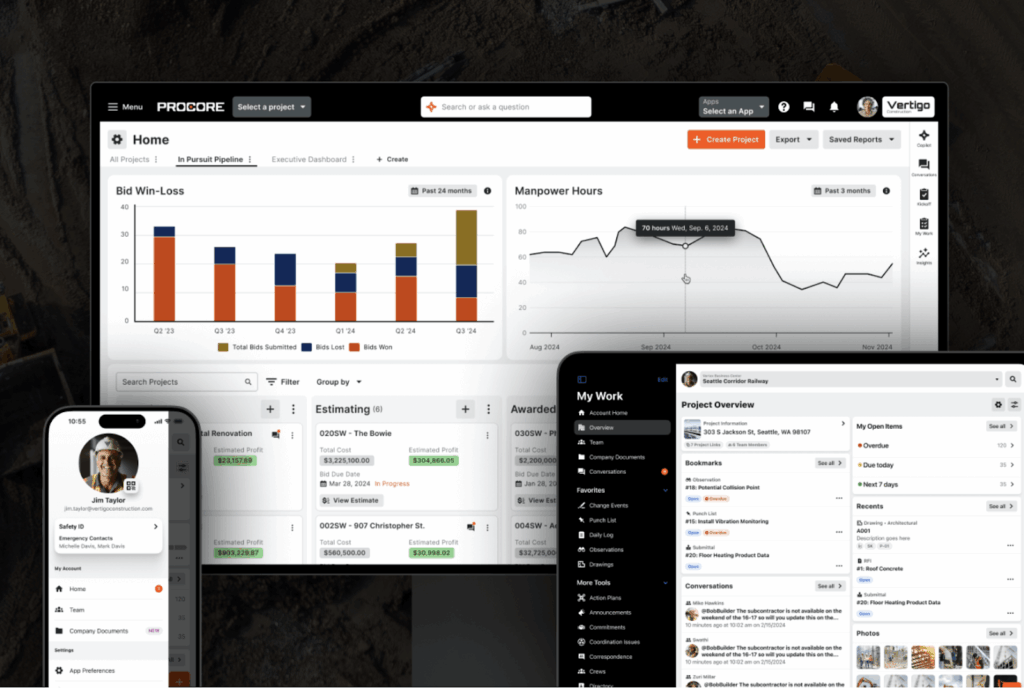
In addition, some users state they wish the tool were more customizable—for example, one user wished they could use colors to categorize different projects. Other apps enable these sorts of customizations, and they enhance usability. For instance, Connecteam allows for a high degree of customization, offering color-coded tags, custom fields, and flexible dashboard layouts. These help teams organize their work more effectively.
Permissions and user access
Procore gives administrators detailed control over what each user can see and do. Permissions are set separately for each tool using 4 main access levels:
- None: The tool is hidden completely from that user’s menu
- Read Only: View but not edit, good for clients or owners checking progress
- Standard: Day-to-day use, for PMs, engineers, and subs running operations
- Admin: Full control including settings and user management, usually IT or lead PMs
Admins can also give someone extra access to a specific task without making them a full administrator. For example, a user can be granted permission to create and edit people in the Directory while retaining Standard access to the rest of the tool.
Permission templates let admins apply the same setup to groups such as subcontractors, project managers, or field workers. I like this flexibility. A laborer could see timesheets and drawings while financial tools remain hidden. However, setting up permissions across many tools could take time and may require someone who understands Procore well.
Procore publishes accessibility information and makes compliance documents available through its Trust Center. However, I couldn’t verify that the full platform follows a specific black-and-white accessibility standard. Teams with accessibility requirements should review Procore’s current VPAT and test the workflows they plan to use.
Mobile app
Verdict: 9/10
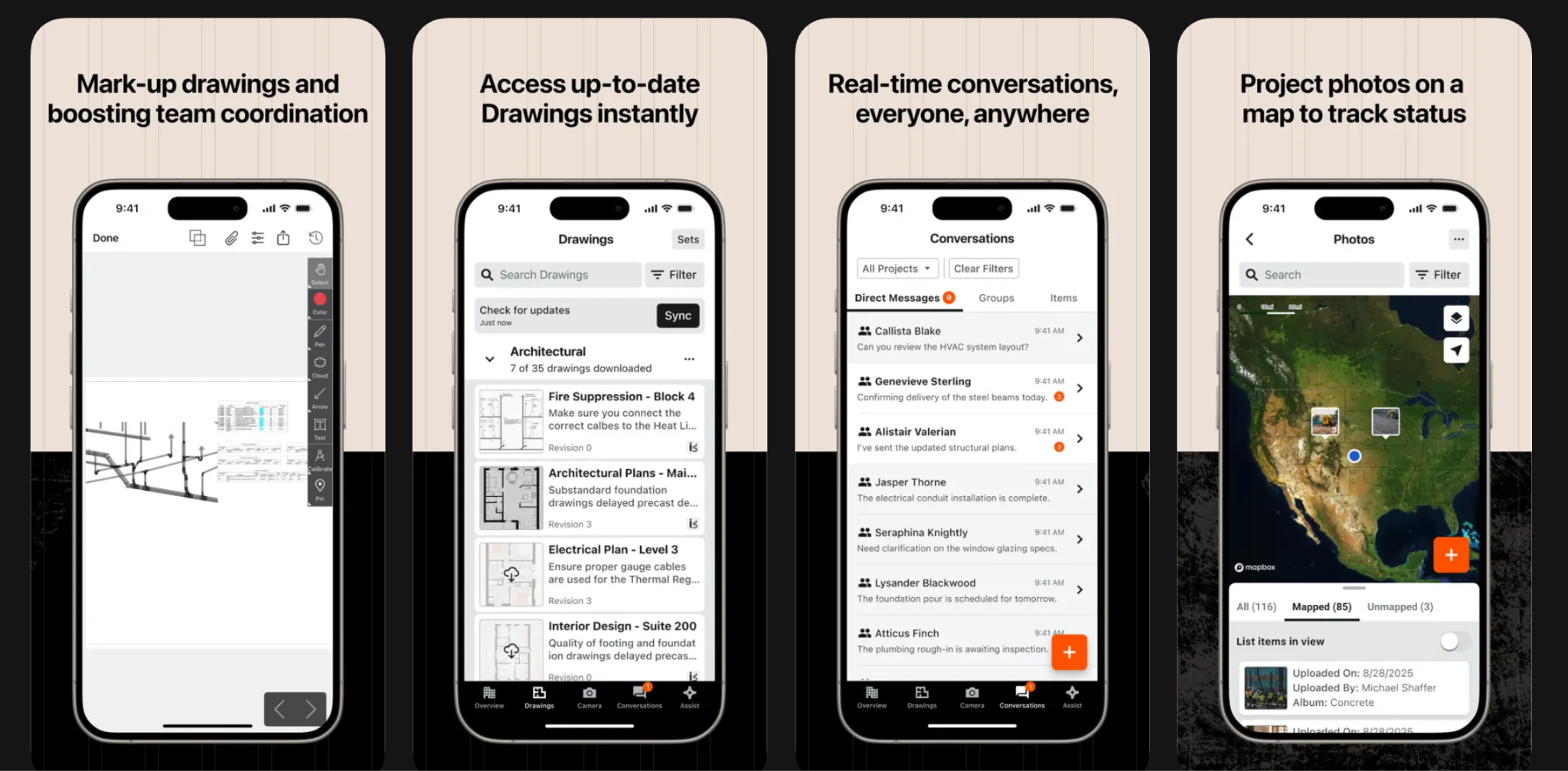
Procore’s mobile apps give field teams access to many project tools, but they do not mirror every web workflow. What each user sees depends on the products purchased, their project access and permissions, and whether they use iOS or Android.
The bottom menu also provides quick access to Tools, Drawings, Camera, and the Dashboard. A project selector at the top lets users move between different jobs without leaving the app.
I spent some time on a demo version of the app on YouTube, and a few things stood out. The home screen is genuinely customizable, more than I expected, given the customization complaints on the web app. You can:
- Star your most used tools so they show up first
- Reorder tools by dragging them into the order you want
- Hide tools you never touch, so your team isn’t scrolling past 15 things they don’t need
This matters specifically for a small crew. You can strip the home screen down to just Camera, Dashboard, Timesheets, and Tasks, and hide everything else. A big GC managing submittals, specs, and daywork sheets can instead leave it all visible.
There’s also a proper app preferences menu covering storage, upload behavior, and notifications. Both mobile platforms include upload-queue and Wi-Fi-only upload settings. On iOS, Quick Capture can use Apple’s on-device transcription service, allowing supported audio to be transcribed locally rather than sent to an online service.
When the device is connected, updates can sync with the wider project team. Some supported actions also work offline, but changes are saved locally and only synchronize after the connection returns. Teams may need to download required drawings and other records before entering an area with poor signal.
That said, the usability issues mentioned above (e.g., tools being too complex) may extend to the mobile app. This still shows up in current reviews too. One G2 reviewer said drawing uploads can be “wonky” and slow, and that classifying and approving each page is a hassle. Also, many recent user reviews on the Apple and Google Play stores mention slow loading times and laggy features, and Google Play’s rating has actually dropped since we last reviewed this, from 4 to around 3.7.
| Menu Item | Admin | Employee | ||
|---|---|---|---|---|
| Website | Mobile App | Website | Mobile App | |
| Core features | ||||
| Drawings | ✅ | ✅ | ✅ | ✅ |
| Documents | ✅ | ✅ | ✅ | ✅ |
| RFIs & Submittals | ✅ | ✅ | ✅ | ✅ |
| Timesheets & Time Tracking | ✅ | ✅ | ✅ | ✅ |
| Tasks & Punch List | ✅ | ✅ | ✅ | ✅ |
| Conversations | ✅ | ✅ | ✅ | ✅ |
| Inspections & Observations | ✅ | ✅ | ✅ | ✅ |
| Analysis features | ||||
| Budget & Forecasting | ✅ | 🟨 | ❌ | ❌ |
| 360 Reporting & Dashboards | ✅ | ❌ | 🟨* | ❌ |
| Analytics 2.0 | ✅ | ❌ | ❌* | ❌ |
| Procore AI | 🟨 | 🟨 | 🟨 | 🟨 |
| Management & planning | ||||
| Project Scheduling | ✅ | 🟨 | 🟨 | 🟨 |
| Resource Planning | ✅ | 🟨 | 🟨 | 🟨 |
| Equipment Management | ✅ | ✅ | 🟨* | 🟨* |
| Tender Management | ✅ | ❌ | 🟨* | ❌ |
| Invoice Management | ✅ | 🟨 | 🟨* | 🟨 |
* Access depends heavily on assigned permissions and purchased Procore products.
✅ Full or meaningful access 🟨 Partial/limited access ❌ No access
Procore Core Functionalities
Project management
Verdict: 10/10
With the project management features, you can upload technical drawings, ensuring your whole team is on the same page when it comes to project progress. You can also add observations and RFIs (requests for information), as well as snap photos, add items, and more.
What I like most is that these records don’t sit in isolation. An RFI can stay tied to the relevant drawing or issue, while the response and project history remain easy to trace later. That is much more useful on a complex job than treating everything as a generic task.
I really appreciate this level of visibility. It means less back-and-forth, fewer surprises, and more confidence that everyone is pulling in the same direction.
Procore can also surface open and overdue work across areas such as RFIs, submittals, inspections, and tasks. I find this more useful than a simple project-health indicator because you can see what actually needs attention and open the relevant record directly.
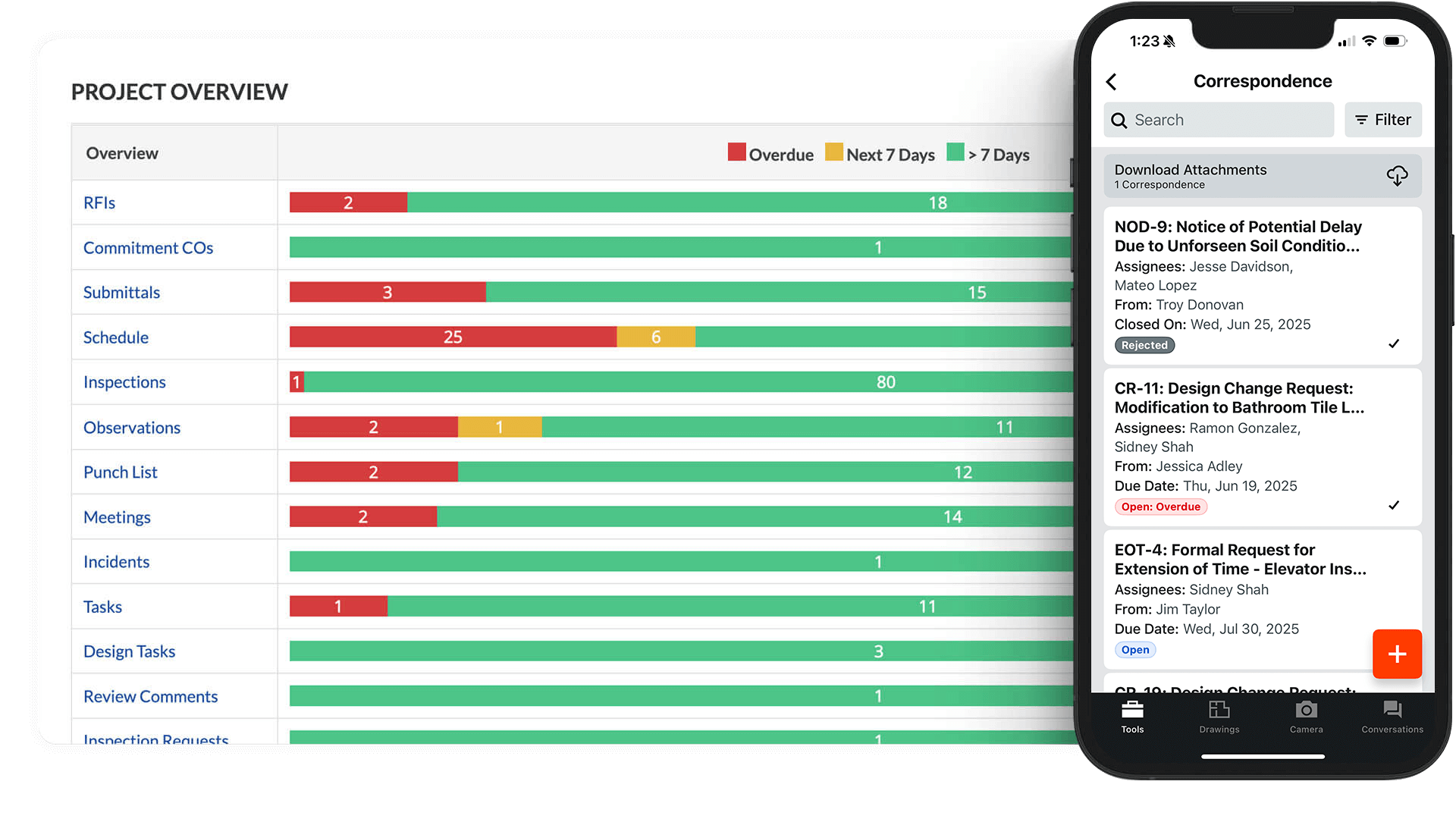
Image note: Vendor marketing composite. Interface layout and feature availability may vary by subscription, permissions, device, and release.
Daily Logs add another useful layer. A superintendent can record what happened on-site, so there is a clearer history to refer back to if a delay, dispute, or handover question comes up later. Procore helps preserve that record, although it still depends on the team keeping it accurate and up to date.
The project management tools also include quality and safety workflows for entitled accounts. Procore enables managers to keep a record of on-site incidents, while inspections and observations can help teams document issues and follow corrective work through to verification. You can also carry out inspections, assign corrective actions, and monitor safety trends across multiple projects—all within the same platform.
For checks that don’t fit a standard workflow, Procore also lets you create custom forms with the fields you need. A contractor could use these for things like welfare checks, PPE checks, or other project-specific site records. I like this flexibility because not every contractor needs to capture the same information.
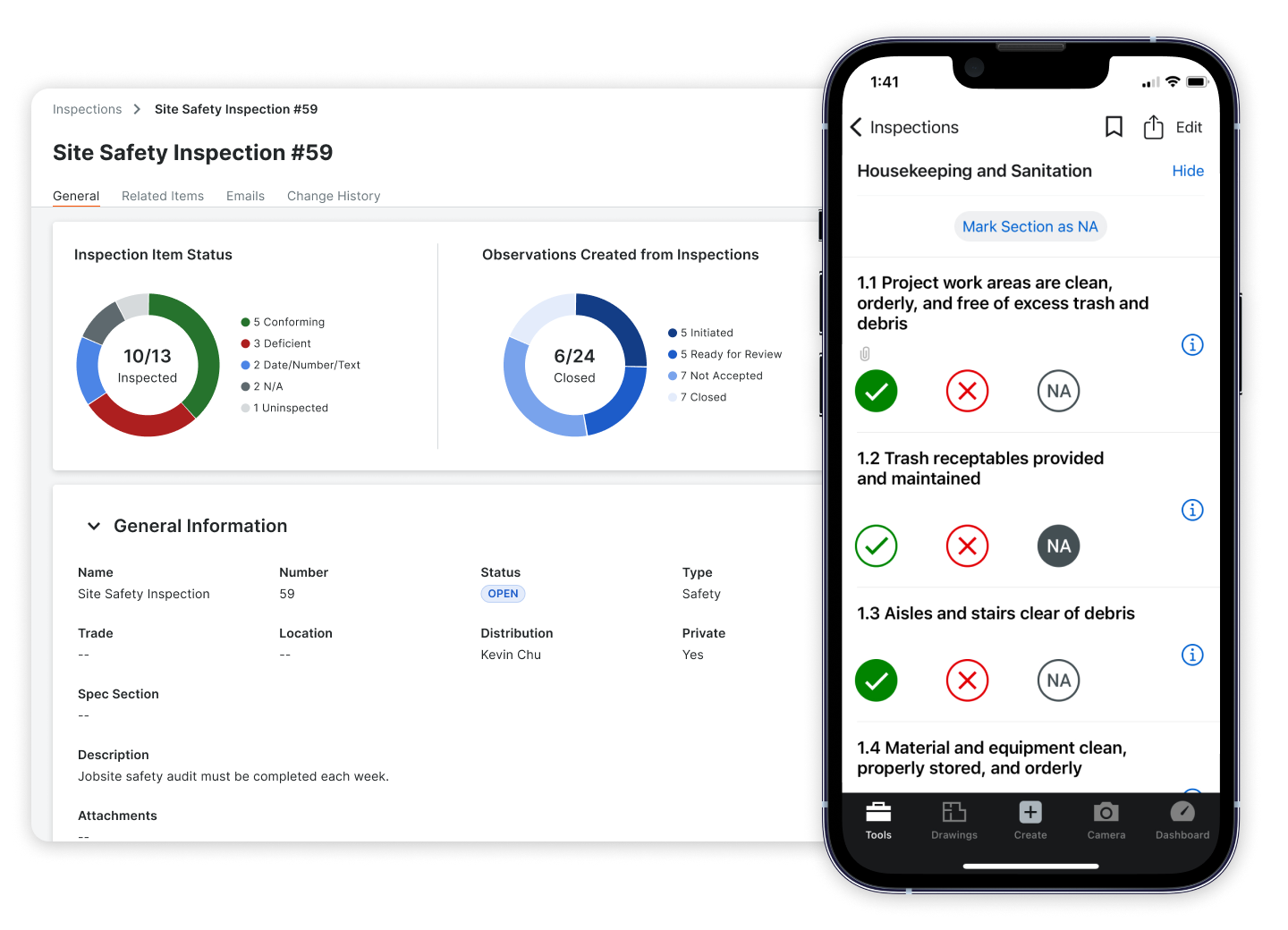
Image note: Vendor marketing composite. Interface layout and feature availability may vary by subscription, permissions, device, and release.
For example, if an inspection finds a missing guardrail, the contractor can fix it and mark the issue Ready for Review. The inspector still has to verify the repair before it’s closed. I like that separation because “fixed” doesn’t automatically mean “accepted.”
For incidents, Procore captures the details, photos, witness statements, and contributing factors, but it doesn’t handle regulatory reporting for you. It’s built with US OSHA recordkeeping in mind, so outside the US, you’ll still need to sort out your own local reporting obligations separately.
There’s also a heavier tool called Action Plans for things like concrete pours, which can enforce hold points, meaning work literally can’t move forward until a required inspection or sign-off happens first. Useful on complex jobs, but a lot of setup for something simple.
Overall, I see Project Management as one of Procore’s strongest areas. It makes the most sense for general contractors and larger specialty trades that handle many RFIs, approvals, subcontractors, and project records.
Drawings
Verdict: 9/10
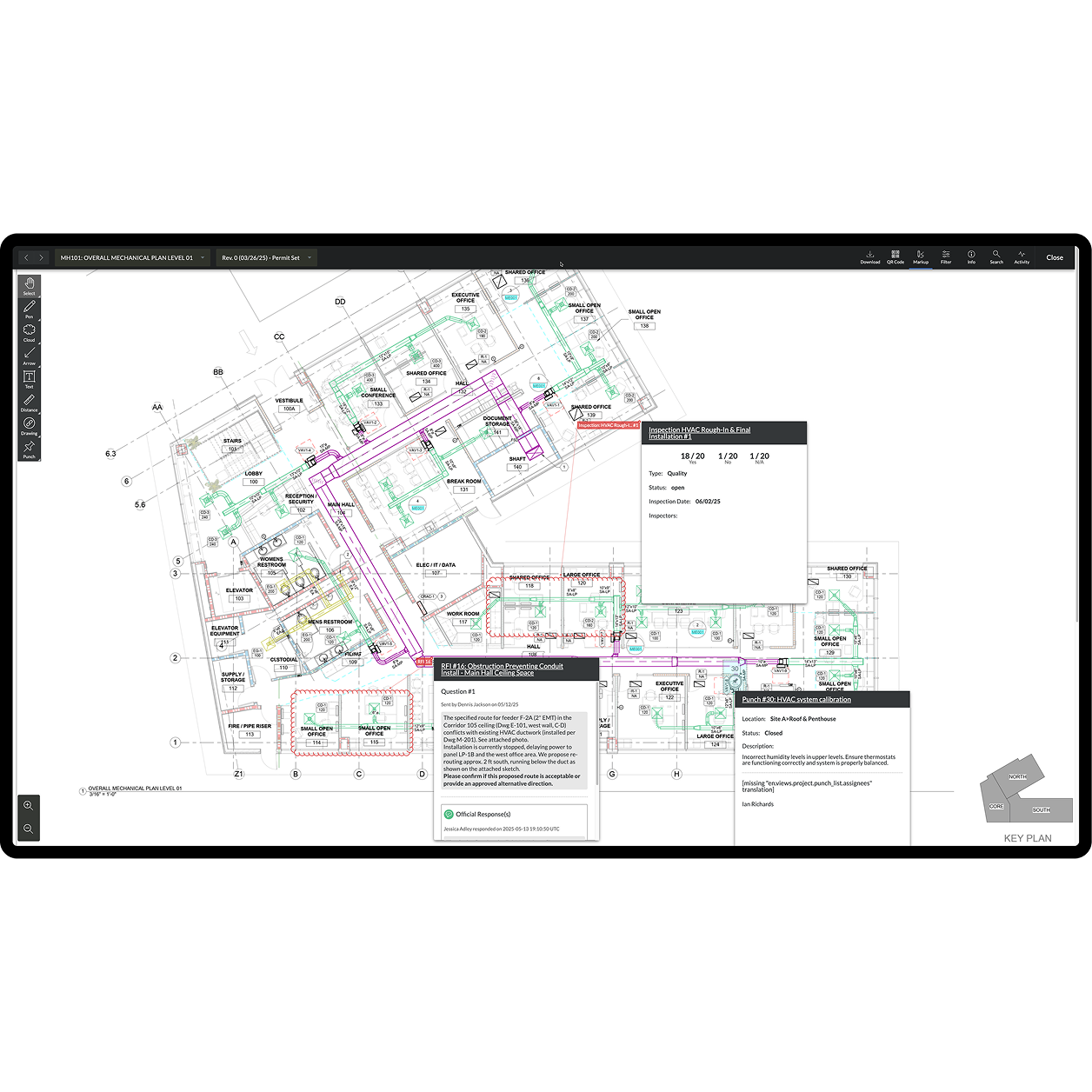
Image note: Vendor product image. Interface layout and feature availability may vary by subscription, permissions, and release.
The drawings tool organizes all project drawings according to title, construction discipline, and drawing size, allowing you to check at a glance that you’re working from the right version.
I like the OCR tool here. When you upload a drawing, it scans the title block and automatically fills in the drawing number, title, and discipline, so you’re not manually renaming and sorting a 120-page PDF sheet by sheet. It’s not perfect, though. Messy scans, rotated text, or unusual fonts can trip it up, so someone still needs to review and confirm what it catches before the drawings go live to the team.
Moreover, you can easily create tasks or tag users in specific areas of the drawing using the “Punch List” tool. This creates a virtual to-do list on the drawing so there’s no confusion about what needs doing or where. I think this is great for construction projects where multiple teams are working simultaneously and need clear, visual direction to avoid delays or miscommunication.
One thing worth knowing: markups come in 2 layers: personal and published. A personal markup is just for you, useful for draft notes before you’re ready to share. A published markup is visible to the whole team. Publishing a markup doesn’t make it an official design change on its own, though. If something actually needs to change on the drawing, that still has to go through a proper RFI or a revised sheet from the architect, not just a comment on the PDF.
Comparing revisions is genuinely handy too. Procore can overlay an old and new version of a sheet, showing what was removed in red and what was added in blue, so you’re not squinting at 2 nearly identical PDFs trying to spot the difference yourself.
Since Procore offers unlimited storage for your drawings, there’s no risk of running out of space or needing to delete older versions. This is ideal for large contractors, ensuring the history from every project is safe and easy to access.
A feature I’d like to see is layer control functionality—similar to what you find in CAD software. The ability to toggle the visibility of specific layers (like MEP, structural, or finishes) would make it easier to focus on the details that matter most at any given stage, especially on complex jobs.
Document management
Verdict: 7/10
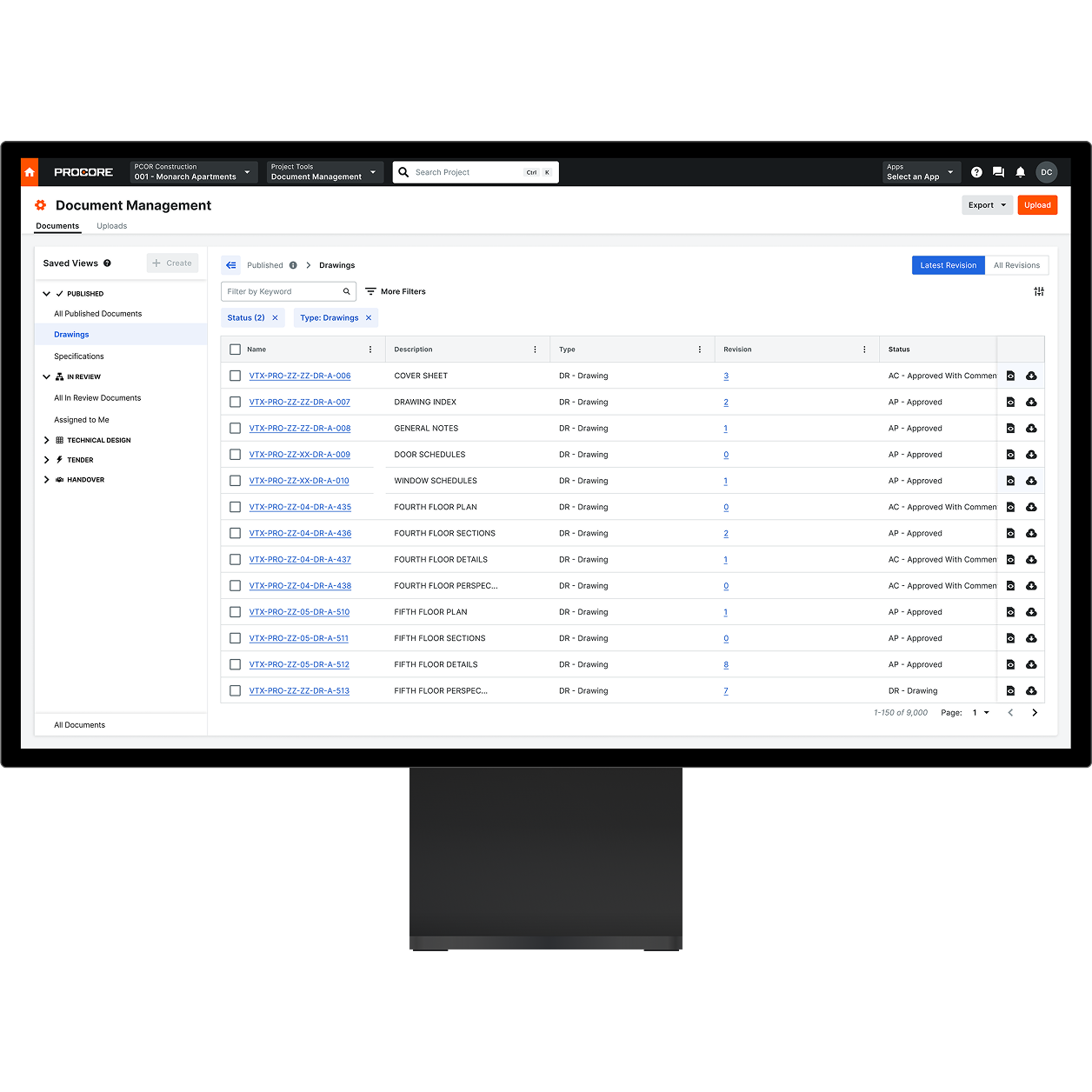
Image note: Vendor product image. Interface layout and feature availability may vary by subscription, permissions, and release.
Document control is one of the more common pain points I hear about on construction projects, so I dug into how Procore handles it. Turns out Procore actually runs 2 separate systems here, and which one you’d get matters more than I expected.
The basic one is called Documents. It’s a folder-based file store, and it feels pretty familiar, similar to a construction-flavored Dropbox or shared drive. You create folders, upload files, set permissions, and track versions.
I get why teams like it; there’s no learning curve. But I noticed the same weakness that comes with any folder system: it only works as well as your team’s discipline. Nothing stops someone from uploading “Final Drawing Updated 2.pdf” into the wrong folder, and now you’ve got real uncertainty about which version is actually current.
The newer one is called Document Management, and it’s a genuinely different approach. Instead of folders, every document gets tagged with metadata (type, status, discipline, revision, and more), and the system organizes and controls access based on those tags instead of where a file happens to sit.
I like this idea a lot in theory. When a document moves from “Work in Progress” to “Approved,” the field team can automatically gain access without anyone manually moving a file or resetting permissions by hand.
Document Management is currently only available for accounts in the UK, Ireland, Australia, and New Zealand. It’s not available in the US yet, so if you’re outside those 4 countries, I’d confirm your entitlement directly with Procore before assuming you’ll have access.
One more thing I found worth flagging is that there’s no automatic migration between the 2 systems. If a company later adopts Document Management, existing files in the old Documents tool have to be downloaded and re-uploaded, not moved over automatically. That’s a real project in itself if you’ve already got years of files sitting in folders.
Scheduling and resource planning
Verdict: 7.5/10
Procore actually splits “scheduling” into 2 separate tools these days. Project Scheduling, launched in February 2026, handles the construction work itself, things like sequencing and dependencies between tasks, while Resource Planning handles staffing, deciding who goes where. They connect, but they solve different problems, so it’s worth understanding both before you commit to Procore for this.
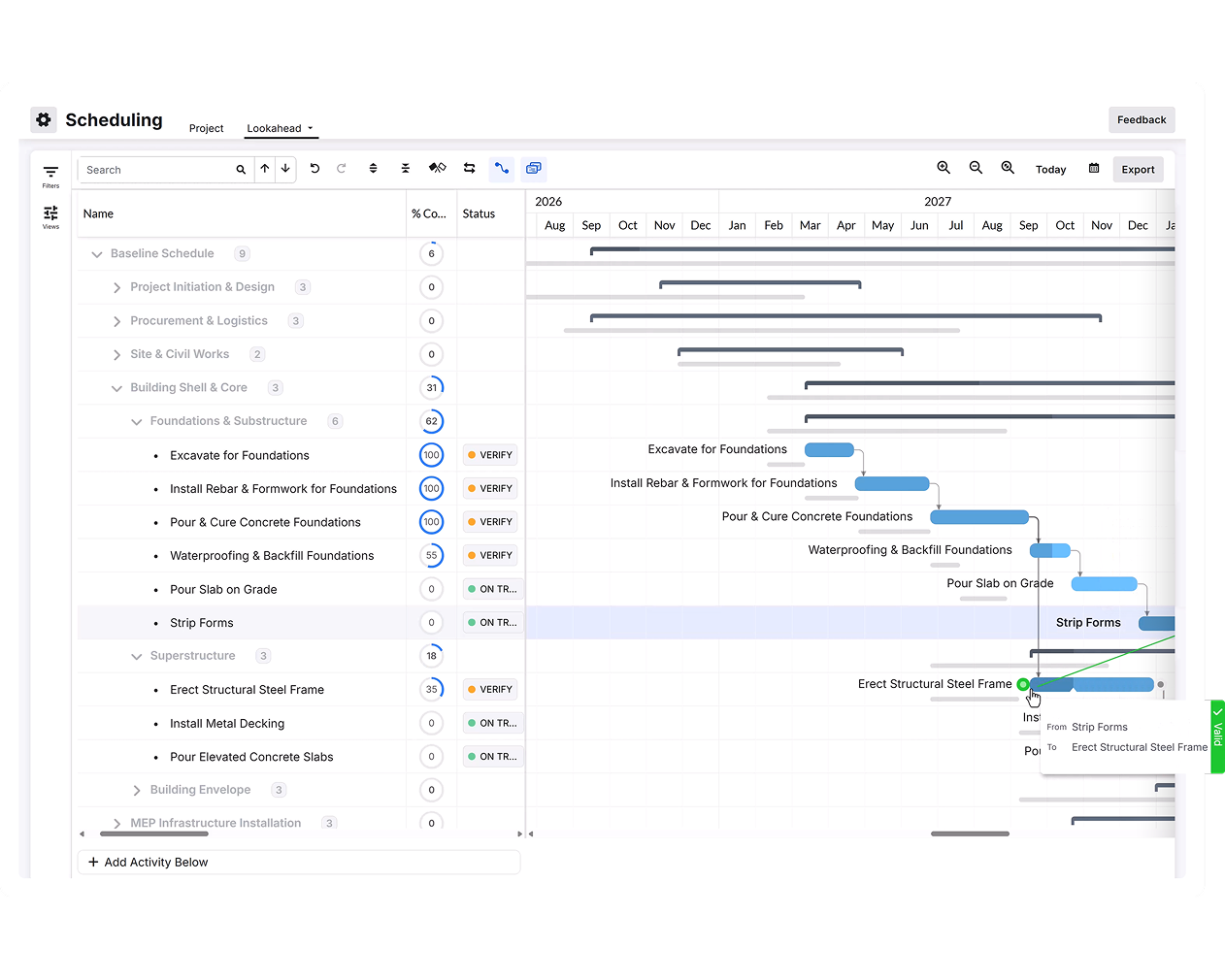
Image note: Vendor product image. Interface layout and available scheduling controls may vary by subscription, permissions, and release.
Project Scheduling
Project Scheduling is genuinely different from employee scheduling. It manages construction sequence and dependencies. For example, electrical rough-in may not begin until framing is complete, while framing may need to wait several days for concrete to cure. If one activity moves, Procore can show the effect on later work and the project’s critical path.
You can build the schedule inside Procore or bring in an existing program from tools such as Microsoft Project or Primavera P6. I see the clearest value for GCs coordinating several trades, milestones, and long-term project deadlines. A small company that only needs next week’s shifts would not need this level of scheduling logic.
Resource Planning

Image note: Vendor illustrative screen. Interface layout and available Resource Planning features may vary by subscription, permissions, and release.
Procore’s Resource Planning tools help you get the right people in the right places at the right times. You can tag employees based on their skills, qualifications, and availability, so you’re not accidentally assigning a steel fixer to a plumbing job or booking someone who’s already maxed out that week.
I really like that the schedule is drag-and-drop, meaning you can make quick changes on the fly without having to start from scratch every time something shifts.
Procore does support resource requests, but they don’t work like open shifts that workers can claim. A planner still has to select an available worker or drag them onto the request.
One G2 reviewer who manages several subcontractors called this live scheduling visibility a “game changer.” It helped them spot project gaps and manage manpower without digging through folders and shared drives.
Where Procore falls short is in its lack of automatic worker matching and simple repeat-shift scheduling, which competitors like Connecteam have. I checked Procore’s current documentation and found that assignments are still made manually. Rapid Assign lets a planner apply the same details to multiple workers, but it doesn’t automatically select the best available person.
This is also a huge downside for small construction firms with limited HR or admin staff—these firms benefit from time-saving scheduling features.
Procore financials
Verdict: 9/10
Procore’s project finance management tools enable managers to manage project budgets, track costs and spending, and streamline change management.
Budget management
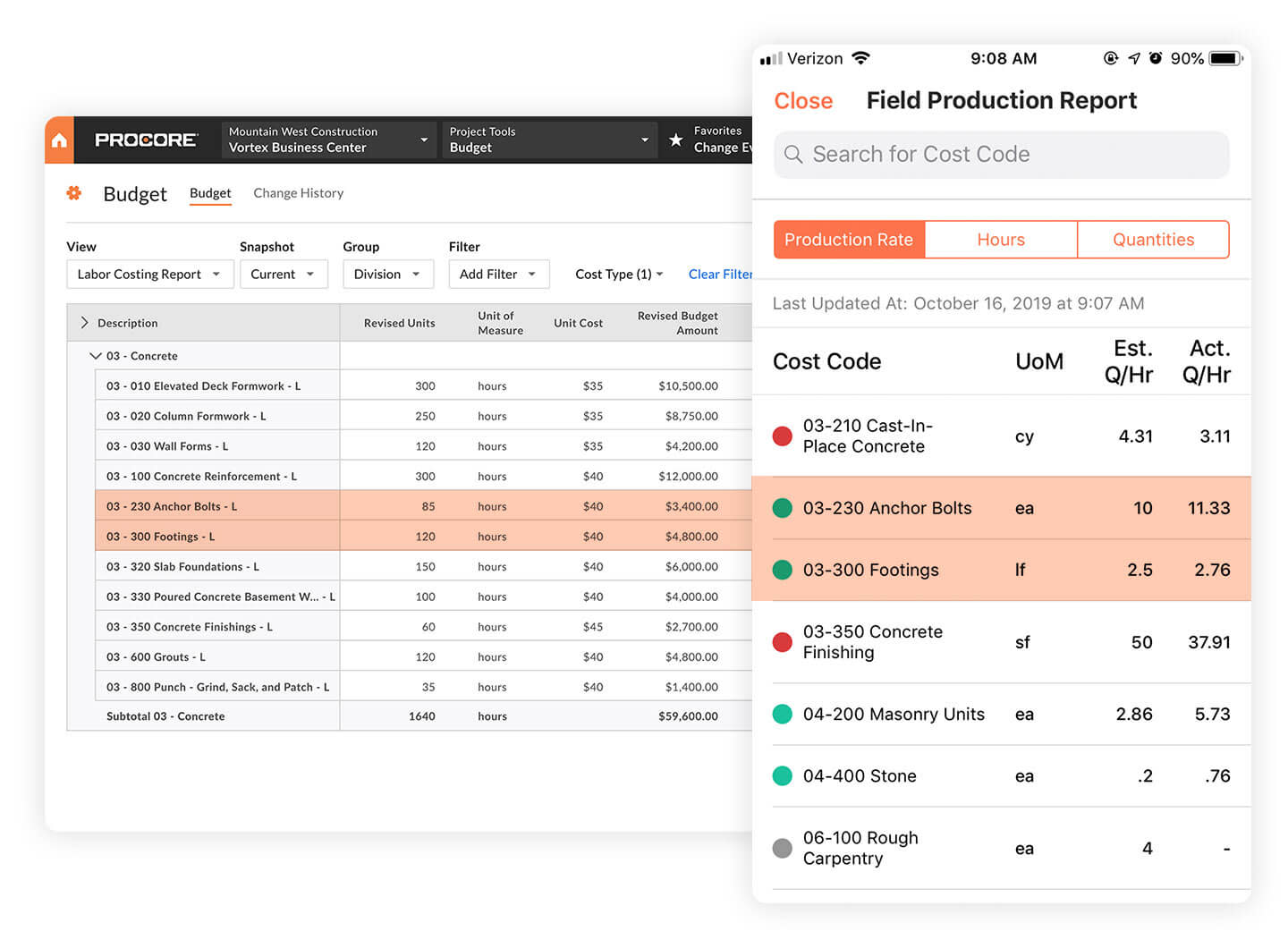
Image note: Vendor-provided illustrative screen using historical sample data. The current interface and available fields may differ.
This clear, spreadsheet-style tool enables you to check at a glance the original budget, any modifications, any pending changes, and more. You can also filter the tool by group, project, sub-job, and more. Plus, you can export the data in an Excel format to conduct more detailed analysis through a third-party tool.
I particularly like that potential costs can be flagged before they become approved changes. For example, if a design revision creates unexpected work, a Change Event can indicate potential cost exposure while the price and approval are still being worked out. You still need to keep the underlying project data accurate, though.
Once it’s set up properly, it gives you a really solid view of where your money’s going and where things might be creeping over budget.
Invoicing
Procore also handles construction invoicing. Subcontractors can submit invoices against their contracts, while project teams can review what’s been billed, what’s been approved, and what’s still outstanding. Owner invoicing can also be managed against the project contract.
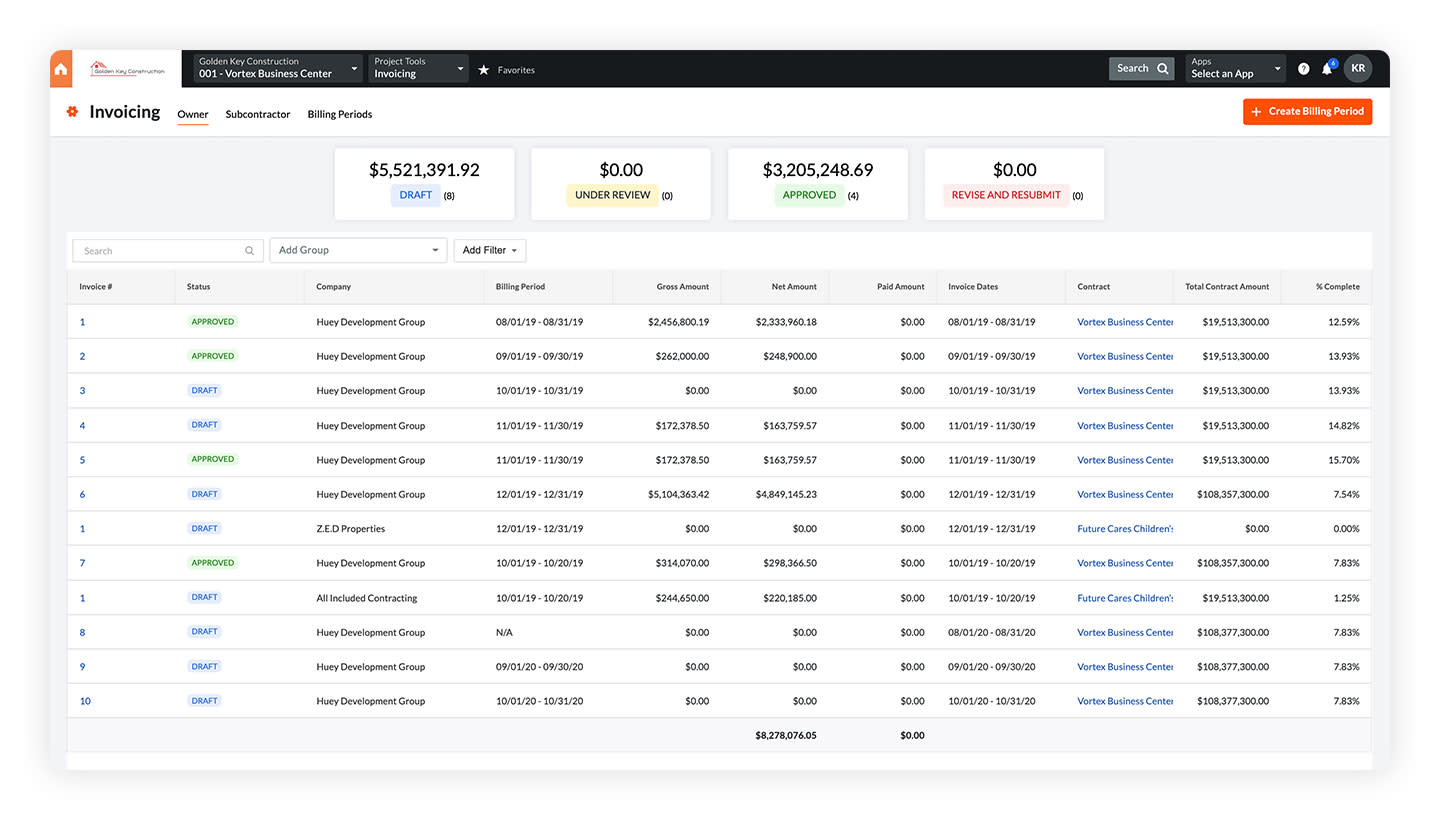
Image note: Vendor-provided illustrative Procore screen using historical sample data. The current interface and available fields may differ.
I like the clear, simple layout. You don’t have to sift through complex reports or endless rows of data, and I think it makes financial tracking much less daunting. Smaller businesses might find this feature overpowered, though, and prefer the simplicity of other tools, like QuickBooks or even spreadsheets.
It’s important to note that Procore doesn’t replace full accounting software. Your accounting or ERP system will still have to handle areas such as the general ledger, payroll, tax, and actual payments.
Time tracking
Verdict: 8/10
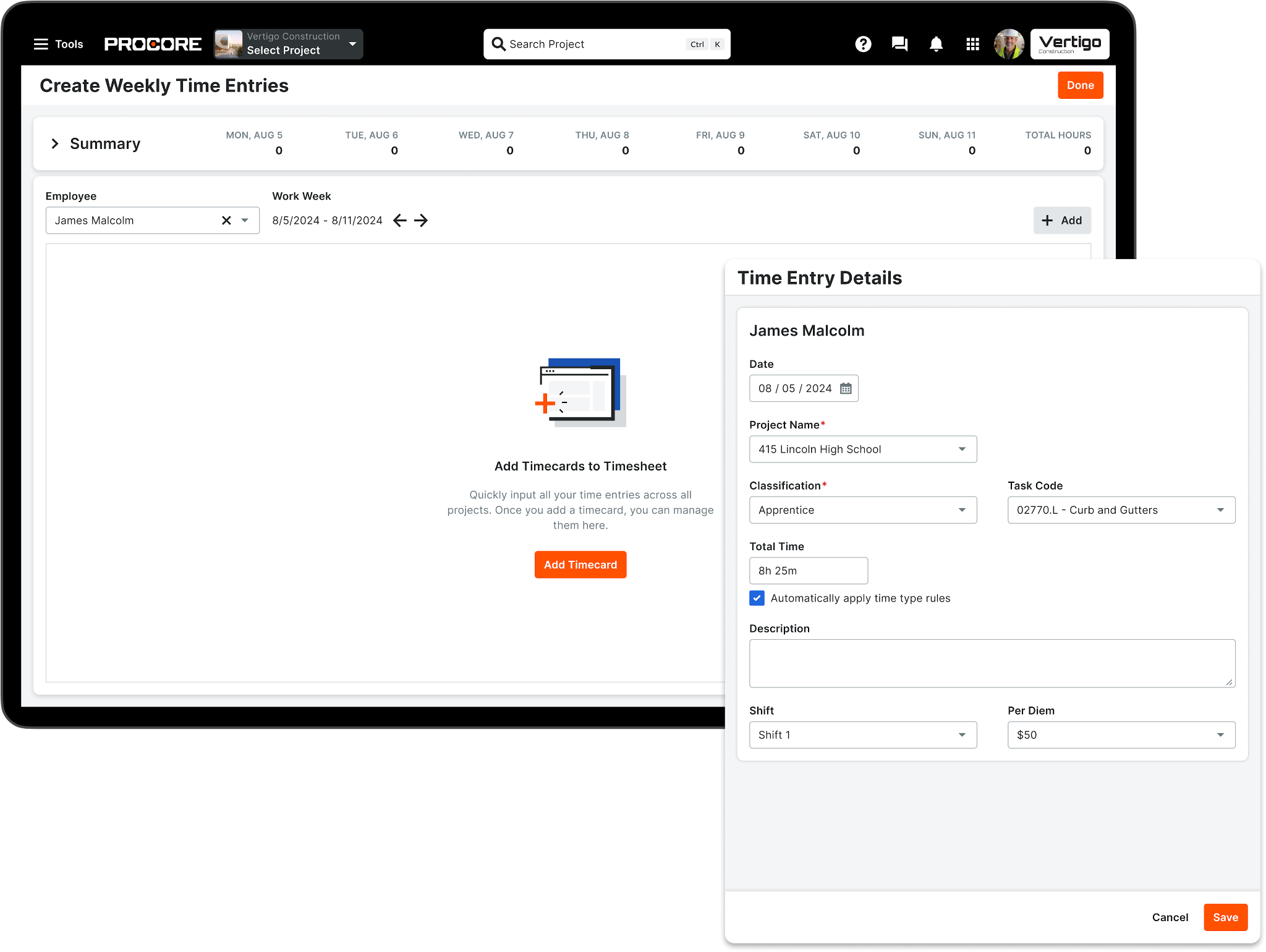
Image note: Vendor-provided illustrative screen using historical sample data. The current interface and available fields may vary by subscription, permissions, and release.
Procore offers 3 main ways to record time:
- Employee timer: Workers clock themselves in and out through My Time and can switch tasks or record lunch breaks.
- Manual entry: Workers add total hours or start and stop times, including entries made offline.
- Supervisor entry: Foremen record time for individual workers, full crews, or equipment and can copy previous timesheets.
I like this flexibility. Companies can let some workers manage their own time while a foreman handles entries for crews that don’t regularly use the app.
During clock-ins, employees must select key details like the project, cost code, sub-job, location, pay/time type, whether time is billable/nonbillable, and more, which helps tie labor data directly to specific project components.
This is useful for job costing, but it does make clocking in slower than a 1-tap system, especially for a crew that just wants to start their day.
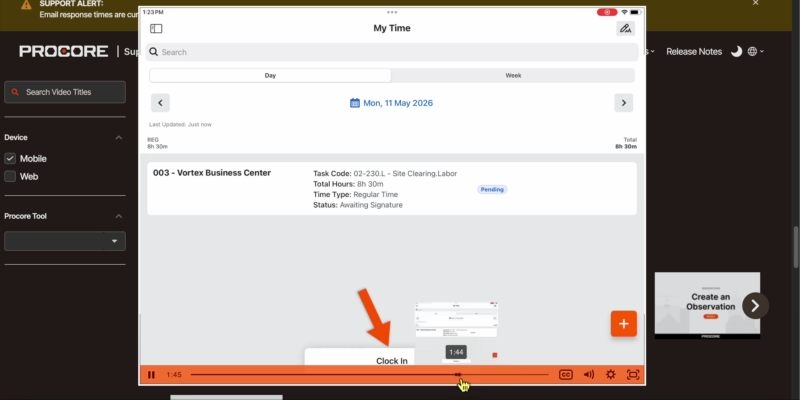
Employees can sign their daily or weekly time entries. A supervisor can then review them, another authorized user can approve them, and payroll staff can mark them as completed. Completed entries are locked from further changes.
If someone edits signed hours, Procore removes the signature and asks the employee to sign again. I think this provides a useful audit trail when timesheets are corrected.
Procore includes geofencing, so employees get a reminder to clock in or out when entering or leaving a job site, which helps cut down on missed punches.
But it’s worth being precise here, since it changes how Procore stacks up against competitors: this is not live GPS tracking. The geofence reminder happens on the worker’s own phone and is never sent to Procore. The only location data an admin actually sees is 1 snapshot taken the moment someone clocks in or out. If you want to see where your crew is throughout the day, not just at punch-in and punch-out, Procore won’t give you that.
There’s also an auto-overtime feature that assigns hours to the correct pay type on its own, though Procore’s documentation still lists parts of it as beta, so I’d test it before fully trusting it.
Procore doesn’t run payroll itself; it exports the data for another system to process. Officially supported exports cover QuickBooks Desktop, Sage 300 CRE, and CSV. ADP is available through a separate Marketplace integration from Flexspring, while other payroll systems may require a CSV or custom setup. I’d check compatibility, setup requirements, and extra fees before expecting a seamless handoff.
In-app chat
Verdict: 8/10
Procore’s “Conversations” is still in open beta, so I’d treat it as useful but not fully mature. It supports direct messages, group chats, and discussions linked to supported project items across web and mobile. I like that item conversations stay attached to the related record, since it keeps the context from getting lost.
Privacy depends on the message type: direct messages are private to participants, group chats stay within the group, and item conversations follow access to the linked Procore record. Admins can also control where Conversations is enabled, whether direct messaging is allowed, and who can create groups.
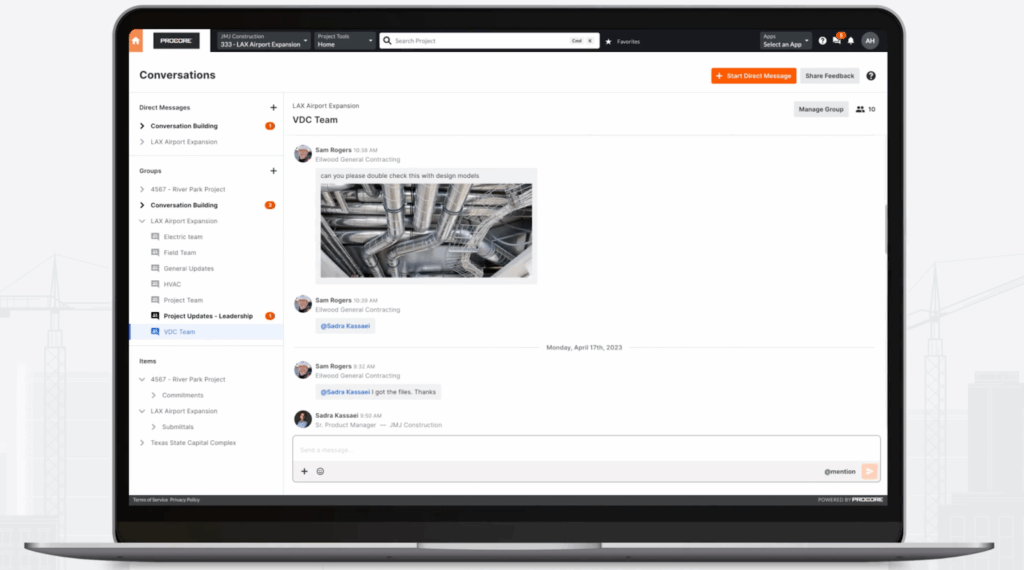
Image note: Vendor-provided product image. Conversations remains in open beta, so the interface and available controls may change.
Messages are stored securely in Procore, but it’s worth knowing Procore doesn’t send a separate email for chat messages, only in-app banners and push notifications. If someone has notifications off or isn’t in the app, they can genuinely miss something, so I wouldn’t rely on this for anything urgent.
Also, I’d like to be able to make calls from within the app, which would speed up communication even further.
Preconstruction capabilities
Verdict: 8/10
Procore also has 3 tools that come into play before construction even starts. I think they’re worth a quick look, since how useful they are really depends on the size of your projects.
Tender management
This is how bids get collected. You send drawings and specs to a group of subcontractors, and Procore tracks who’s bidding and lines up their quotes side by side. Say you’re buying electrical work and get 6 quotes back; instead of comparing 6 separate PDFs by hand, you can see at a glance who left something out or priced way off from the rest.
I’d say this is genuinely useful if you’re juggling a dozen trade packages on a big job. If you’re a small contractor who just asks a couple of people for a quick quote, I don’t think you need this.
BIM (Building Information Modeling)
This brings 3D models into Procore, so your team can spot design problems before they become real issues on site, like ductwork running straight through a support beam. I like that when someone flags an issue, it keeps the exact view of the model attached, so whoever handles it isn’t guessing what was actually seen.
Worth knowing: a flagged clash isn’t always a real problem; someone still has to check it. This is great for model-heavy jobs, such as hospitals or towers. If your projects run on simple 2D drawings, skip it.
Estimating
This turns your drawings into actual quantities and cost proposals, measuring things like area and length and automatically pulling in labor and material rates. It can even auto-count repeated items, say every outlet on a floor plan, though I’d still double-check anything it counts on its own.
Procore Security Features
Verdict: 9/10
Procore is serious about security. It uses data encryption tools, multi-factor authentication (MFA), single sign-on (SSO) via Security Assertion Markup Language (SAML), and role-based permissions to access project data. Data is encrypted both in transit and at rest, with TLS 1.2+ used for connections and AES-256 encryption used for stored data.
When reviewing a year ago, a rep I spoke with confirmed that there are biometric log-ins on the mobile app. I checked this again, and Procore’s current iOS and Android apps still support options such as Face ID, Touch ID, or fingerprint authentication on compatible devices.
Procore publishes data-protection information covering California’s Consumer Privacy Act (CCPA), the UK’s General Data Protection Regulation (GDPR), and Australia’s Privacy Act of 1988. It also has SOC 1 and SOC 2 Type 2 attestation reports and an ISO/IEC 27001:2022 certification, which gives me more confidence in the controls behind the platform itself. Buyers with formal compliance requirements can request the latest reports and their scope through Procore’s Trust Center.
Plus, it offers strict access control policies and claims that all applications are consistently scanned for vulnerabilities and patched as soon as possible.
Procore Reporting & Analytics
Verdict: 9/10
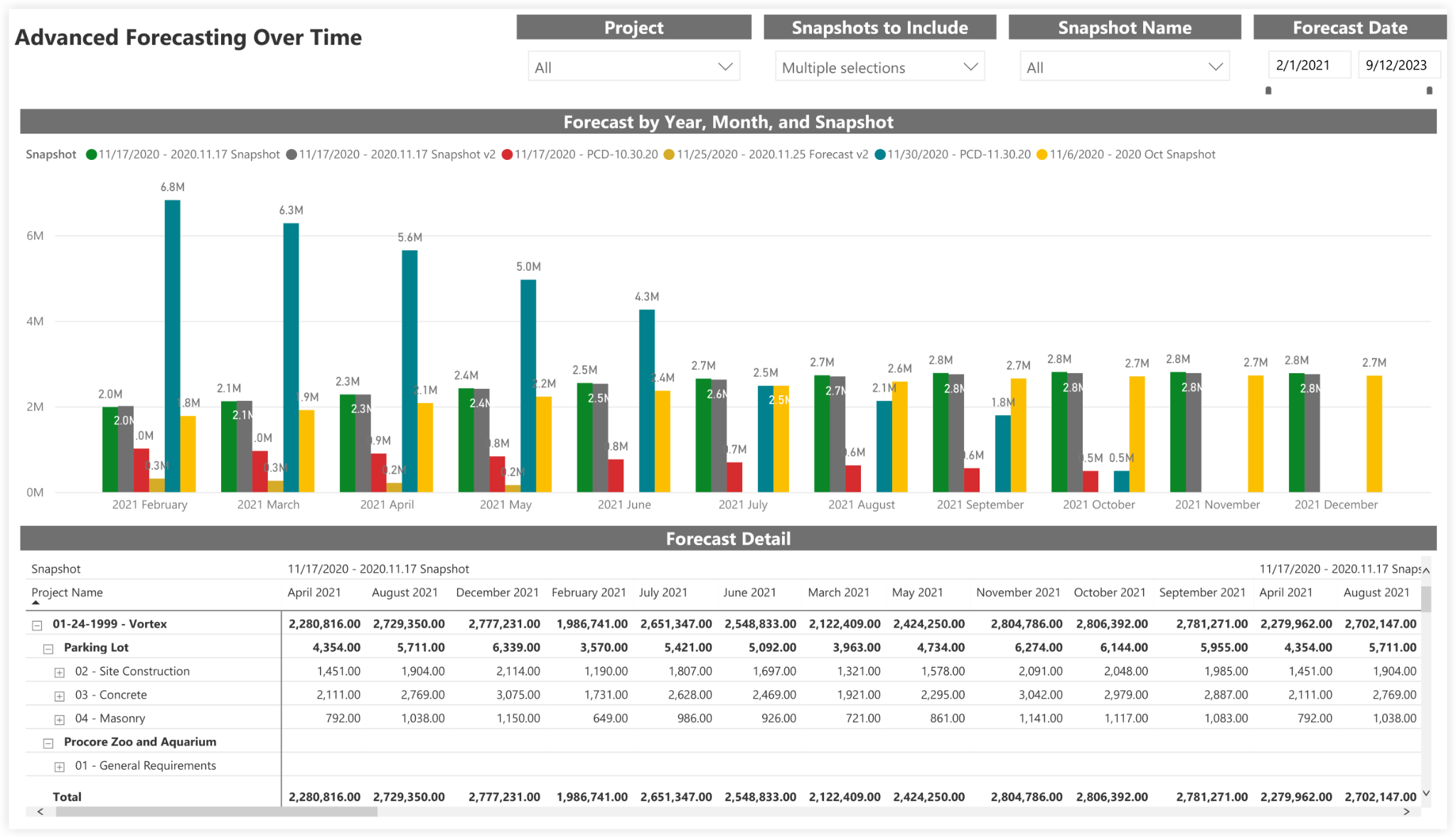
Image note: Vendor-provided illustrative screen using historical data. The current interface and available reporting features may differ by product entitlement and release.
Procore’s reporting stack has several layers. The standard operational reports cover most areas of a construction project, including:
- Project management: Overdue RFIs, submittals, Daily Logs, and open tasks.
- Financials: Budgets, commitments, changes, invoices, and forecasts.
- Quality and safety: Inspections, observations, incidents, and punch items.
- Resources and scheduling: Timecards, labor allocation, and project schedule health.
For more specific needs, 360 Reporting lets eligible users create custom reports for an individual project or across the wider company. You can combine information from related Procore tools, apply filters, and reuse reporting templates. However, its custom visuals and dashboard builder are still documented as beta or open beta.
Analytics 2.0 is a separate, more advanced analytics offering. It includes more than 130 prebuilt dashboards and reports for portfolio comparisons, trends, and detailed analysis. I see this feature as most useful for larger companies that need to compare performance across several projects. A Power BI Pro licence is required to view its Power BI reports, although Analytics data can also be connected to other applications and data stores.
Procore now has two distinct AI experiences. Existing Assist customers can still ask questions about project data and create custom 360 reports, but new Assist activations are paused. Its newer Datagrid-powered Procore AI is a separate paid Digital Coworker add-on, not something included automatically with every account. A company admin must enable selected projects and users, while the Starter Pack is limited to three projects. Managers still need to review the results and make sure the underlying data is accurate.
Procore Customer Support
Verdict: 7/10
Procore offers support in English and Spanish through live chat, phone, and email. For US customers, support hours are:
- Monday–Thursday: 24 hours
- Friday: 12:00 am–11:00 pm CST
- Saturday: 9:00 am–8:00 pm CST
- Sunday: 9:00 am–12:00 am CST
Support hours may vary by region, so international customers should check their local contact page.
My experience with Procore’s sales team was mixed. When I requested a demo, a representative emailed me within about 20 minutes and arranged a short qualifying call. However, after I explained that I was reviewing Procore as an independent consultant, I was told they couldn’t provide me with a demo.
I also submitted a separate request for pricing. I received an automated confirmation email, but no salesperson followed up with an actual quote. So, while the initial response to my demo request was impressively quick, my overall pre-sales experience was inconsistent.
However, I was impressed by Procore’s peer-to-peer support offered through the community page. This page is full of real users who work in the industry, face challenges other users face, and are happy to share creative solutions.
What Are Procore’s Review Ratings From Review Sites?
(As of August 3, 2026)
Procore App Review
Overall, I find Procore to be a comprehensive platform that streamlines complex construction project management from start to finish. It covers everything from drawing management and project records to budgeting, scheduling, and communication.
There are some drawbacks. For instance, I’d like to see a more transparent pricing model. Also, the platform can take time to learn and configure. Some features feel overly comprehensive for small businesses.
Ultimately, Procore is best suited to larger contractors, while smaller businesses may find it overpowered and overpriced.
Connecteam: The Better Procore Alternative
Connecteam is a better fit for contractors whose main priority is managing their workforce rather than complex construction project controls. I find it much simpler for everyday tasks like scheduling crews, tracking hours, communicating with workers, and managing forms in the field.
Drag-and-drop shift scheduling
This is one of the clearest differences. Procore’s Project Scheduling is built around construction sequencing, dependencies, milestones, and critical paths. Connecteam is better for everyday employee scheduling, with recurring and open shifts. These core scheduling tools are available on lower Operations tiers, but AI-powered automatic shift assignment is reserved for the Operations Expert plan and above. It builds the schedule around employee availability, qualifications, and other scheduling rules.
I’d choose Procore for planning when construction activities happen, but Connecteam for deciding who is working where this week.
Time tracking and geofencing
For workforce location control, I find Connecteam clearly stronger. Employees can clock in using the GPS-enabled employee time clock, allowing you to see exactly where they are when they start work.
You can set geofences to prevent them from tracking time outside job sites—and, unlike Procore, Connecteam lets you track their locations throughout their shifts, which I think is great for safety, productivity tracking, and more.
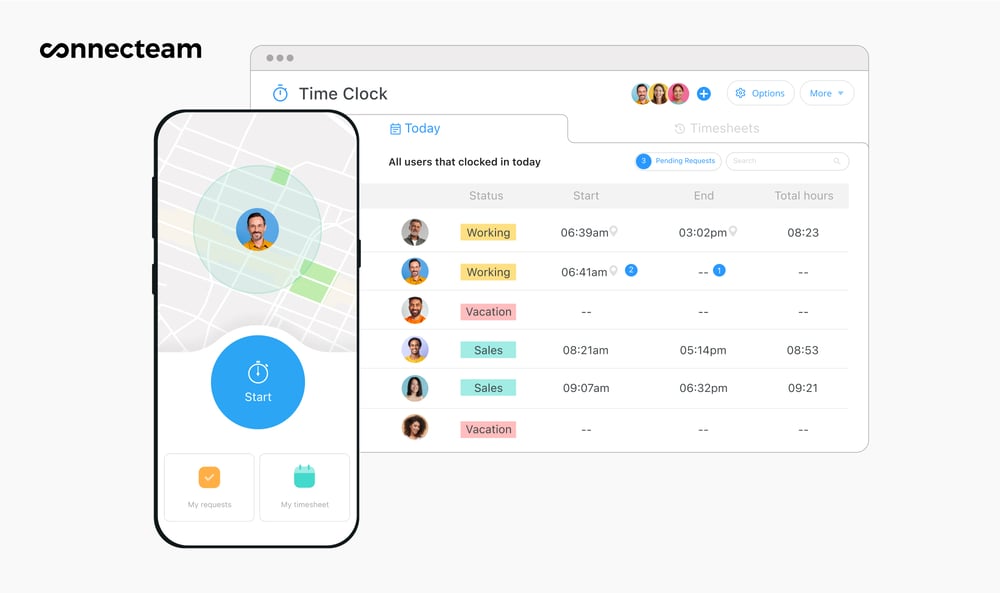
Connecteam can also send break reminders, apply configured break rules, flag missed or shortened breaks, and help managers review overtime or excessive hours. These controls can support compliance, but employers still need to configure the rules correctly and remain responsible for meeting applicable labor laws.
Time data is uploaded to timesheets for payroll, and Connecteam integrates with various popular payroll tools.
Task and document management
Connecteam also offers a task tracking tool that’s similar to Procore’s to-do list feature. However, in contrast to Procore, Connecteam offers slightly more advanced customization options when it comes to setting priorities, deadlines, and recurring tasks.
The company knowledge base is the perfect place to save documents, process maps, guides, and safety protocols, making it easy for your team to access essential information anytime, anywhere. You can create customized forms and checklists, too, which are ideal for inspections, daily reports, or safety audits.
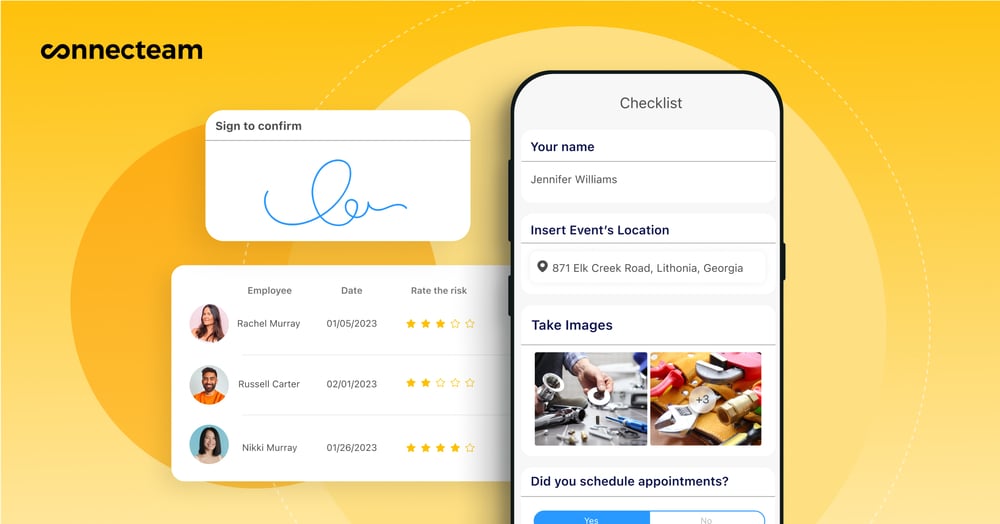
However, Connecteam doesn’t replace Procore’s deeper drawings, RFIs, submittals, financial controls, or critical-path scheduling. But for smaller and midsize contractors that mainly need to organize people and daily field operations, I think it’s the more practical choice.
Plus, there’s a completely free plan for businesses with under 10 people and a 14-day free trial. Try Connecteam for free today!
FAQs
Procore doesn’t offer a standard free trial of its full construction management platform. However, companies in the US and Canada can create a limited free company account for projects and bids, company profiles, Bid Board, estimates, and takeoffs. This is not a free version of Procore’s full project-management suite. Buyers can also request a demo.
Procore is best used for managing large, complex construction projects. It’s packed with features like drawing tools, project health dashboards, and safety inspection forms that are ideal for enterprise contractors juggling multiple job sites. Smaller firms may find it too heavy for their needs.
Procore’s price depends on the products you choose and your Annual Construction Volume, or ACV. Because ACV reflects the value of work managed through Procore, costs can rise for companies running larger or more projects. Unlimited users are included, which can improve value for bigger teams, but there is no public starting price.
It depends. Many users report a steep learning curve, especially for teams unfamiliar with digital construction tools. While Procore offers onboarding support, it’s still a complex system that may feel overwhelming for smaller crews or businesses transitioning from spreadsheets.
Procore does not include built-in payroll processing. It allows detailed job costing by linking labor to cost codes and projects, but it does not run payroll itself. Its Timesheets tool supports payroll exports for QuickBooks Desktop and Sage 300 CRE, plus CSV handoffs. ADP is available through a separate Marketplace integration from Flexspring, so buyers should confirm compatibility, setup requirements, and any extra fees.
Procore is strongest for construction companies that need connected drawings, financial workflows, reporting, and formal project controls across complex jobs. Connecteam focuses more on everyday workforce management, including scheduling, GPS time tracking, team chat, and tasks. Smaller contractors can use Procore, but its custom pricing, setup effort, and wider feature set may make Connecteam better value when managing workers is the main priority.
Procore offers a fair amount of workflow customization. You can create custom forms and fields, configure fieldsets and workflows, and build custom dashboards through 360 Reporting. However, not every part of the platform can be freely customized.
Yes, Procore offers AI features, but access depends on the customer’s package and rollout status. The new Procore AI requires a paid Digital Coworker SKU and admin enablement. Existing Assist customers can still use Assist, while new Assist activations are paused.
For specialty contractors like electricians or plumbers, Procore can be useful for managing complex projects, multiple crews, and detailed costs and workflows. However, smaller trades running straightforward jobs may still find it more software than they need.
Yes. Procore can track owned, rented, and project-specific equipment, along with maintenance, inspections, usage, and supported telematics data. Resource Planning can also assign equipment to projects over scheduled periods.
Procore is widely used by commercial construction firms, infrastructure companies, and large residential developers. Its features cater to businesses handling multiple large-scale builds with high regulatory, safety, and coordination demands.
