


Jobber and ZenMaid are two popular field service management software solutions on the market. While one is geared towards a super-specific niche, the other casts a broader net and is suitable for various field-based teams. Keep reading for all the details.
When field service schedules live across customer messages, calendars, and invoices, missed bookings can turn into payroll cleanup, angry customers, and lost revenue. I compared Jobber and ZenMaid across scheduling, booking, time tracking, customer management, payments, support, and workforce controls.
Whether you want light software for a small cleaning business or advanced tools to manage complex field workforce operations, there’s a solution for you. Read on to discover which of these options checks the right boxes.
At a Glance: Quick Summary
Jobber is an all-in-one field service management (FSM) software solution built for various industries, including cleaning, landscaping, lawn care, and HVAC. Unlike many FSM solutions, Jobber covers the full spectrum of field service operations, from client management and customer relationship management (CRM) to job scheduling and time tracking.
However, because Jobber offers such a wide range of features, some areas feel less complete than others. For example, the app may be a poor fit for businesses that need built-in break, overtime, and scheduling-rule controls, making it unsuitable for businesses in states with strict regulations. Learn more in our full Jobber review.
ZenMaid, on the other hand, takes a simple and targeted approach. Instead of offering all the bells and whistles you get with Jobber, it provides features tailored specifically for cleaning and maid service businesses. Read our full ZenMaid review to learn more.
ZenMaid’s narrow approach, combined with its intuitive interfaces, makes the platform a joy to use for anyone, including newbies. However, due to the lack of advanced features such as automatic scheduling, full-featured PTO management, and payroll integrations, some commercial cleaning businesses may find it limited.
Pricing and Plans
ZenMaid’s hybrid pricing combines a base fee with per-user costs, while Jobber has a tiered pricing model with no base fee.
The table below shows Jobber’s and ZenMaid’s pricing details:
| Jobber | ZenMaid |
| No free plan | No free plan |
| Core – $29/month 1 user Quotes Online booking Job scheduling Invoicing and payments Website creation Reporting Jobber app marketplace | Starter – $19/month + $4/user/month 40 appointments Job scheduling Automated SMS and email communications Stripe and Square payments Chat-only support |
| Connect – $149/month Everything in Core, plus: Up to 5 users Time tracking Expense management Automated reminders Job forms QuickBooks Online integration Automated quote and invoice follow-ups | Pro – $39/month + $14/user/month Everything in Starter, plus: Unlimited appointments GPS tracking Digital checklist Booking forms (with ZenMaid branding) Reports Payroll |
| Grow – $299/month Everything in Connect, plus: Up to 10 users Automatic time tracking Job costing Two-way SMS Advanced quote customizations Optional line items Custom workflow creation | Pro Max – $49/month + $24/user/month Everything in Pro, plus: PTO tracking Cleaner availability management Online booking (without ZenMaid branding) Mailchimp and Zapier integrations Priority support Service ratings Data export |
| Plus – $529/month Everything in Grow, plus: Up to 15 users Dedicated onboarding specialist Premium support Jobber marketing suite API walkthrough for custom integration Jobber’s receptionist | N/A |
| * All prices show the monthly cost when billed annually as of May 2026. | |
Jobber’s pricing plans have low user limits, and adding extra seats costs a steep $29 per user per month. When you factor in the paid add-on and additional charges like card and tap-to-pay fees, Jobber’s costs can add up quickly, especially for companies that need all of its firepower.
Another problem with both platforms is that they don’t have a free plan, which is particularly limiting for small businesses with no software budget. For comparison, Connecteam has a free Small Business Plan for teams with up to 10 users, while its paid plans start at less than $1 per user per month.
On the plus side, both ZenMaid and Jobber offer a 14-day free trial, allowing users to test their features for free before committing. However, ZenMaid’s free trial requires a credit card, so be sure to cancel the trial plan before it expires to prevent an automatic charge on your card. Jobber’s free trial doesn’t require a credit card.
Pros and Cons
The pros and cons below give you a sneak peek into the strengths and weaknesses of both Jobber and ZenMaid:
Jobber Pros
- Strong client management tools for leads, quotes, invoices, payments, and service history.
- Broad field service feature set for teams managing multiple service lines, including invoicing and payment processing.
Jobber Cons
- Limited workforce compliance controls for teams that need built-in break, overtime, and scheduling-rule tools.
- Costs can rise quickly because higher plans have user caps and extra users cost more.
ZenMaid Pros
- Simple booking and recurring appointment management
- Easy-to-use scheduling tools for assigning cleaners and avoiding double bookings
ZenMaid Cons
- Limited workforce compliance tools, such as built-in break and overtime tracking
- Availability management on the higher plan only
Use Cases
While Jobber and ZenMaid have overlapping features, the two products also have subtle differences that make each one better for different use cases:
Jobber is best for:
- Efficient field service scheduling: The online booking, drag-and-drop scheduler, and recurring jobs features make Jobber ideal for scheduling customer bookings and dispatching field teams.
- End-to-end client lifecycle management: Jobber doesn’t just schedule jobs; it helps field service businesses find and nurture leads, send quotes, generate invoices, and process payments, all from a single platform.
ZenMaid is best for:
- Simple cleaning task execution: ZenMaid provides features that are specifically designed to help cleaning businesses assign and manage tasks.
- Smooth recurring appointment scheduling: ZenMaid enables cleaning businesses to schedule recurring visits for consistent service delivery without manual calendar management.
Side-by-Side Feature Overview
Since Jobber and ZenMaid have several similar features, you have to rigorously test them to decide which platform truly meets your needs. Our testers did the hard work for you by testing both platforms based on our strict criteria and process. Below, I’ll highlight the differences and similarities between the two apps to help you make an informed decision.
Online Bookings — Winner: Jobber
Jobber and ZenMaid enable field service businesses to build custom booking forms and embed them on their websites. With the easy-to-use forms, customers can book services on their own based on slots that align with their schedule, without having to call every time.
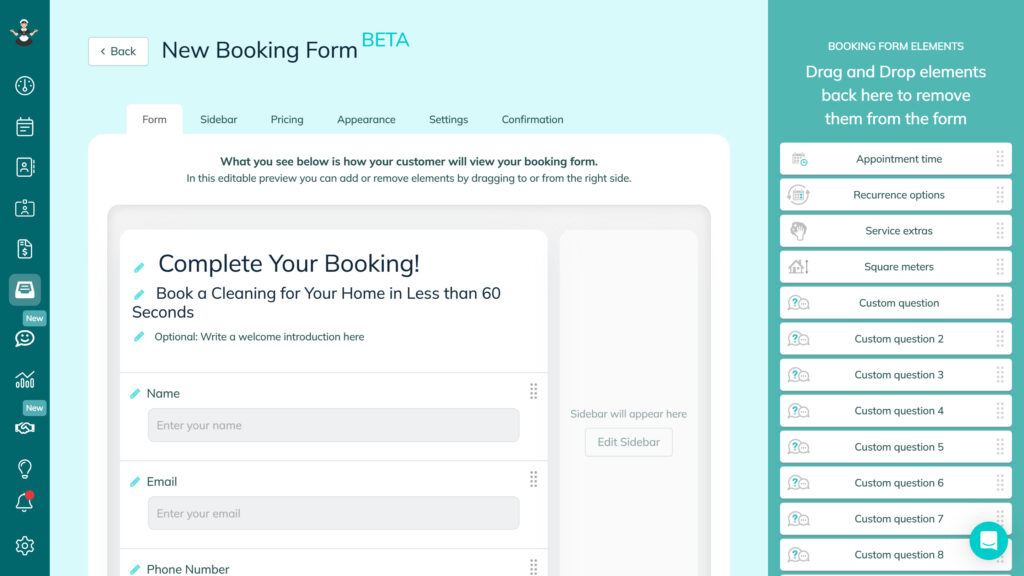
While their booking capabilities are evenly matched, Jobber has an edge because it enables new businesses to create multi-page websites with its drag-and-drop builder. This makes it ideal for new companies that don’t already have a website, especially those without the financial means to hire web development services.
Additionally, as our reviewer found, Jobber automatically turns bookings into jobs and assigns them to available technicians. The assignees receive the appointment details in the mobile app, ensuring that no customer requests slip through the cracks. ZenMaid, by contrast, requires managers to manually assign all customer bookings.
Verdict: While both platforms make it easier for customers to book your services online, Jobber pulls ahead with its booking automation. It reduces the manual administrative work, making it a better pick in a fast-paced environment where hundreds of bookings roll in daily.
Scheduling and Dispatching — Winner: Tie
When it comes to job scheduling and dispatching, both Jobber and ZenMaid cover the basics well. I found it easy to assign jobs with either platform. Jobber gives managers several ways to view the schedule; our reviewer found that its scheduler includes month, week, day, list, and map views.
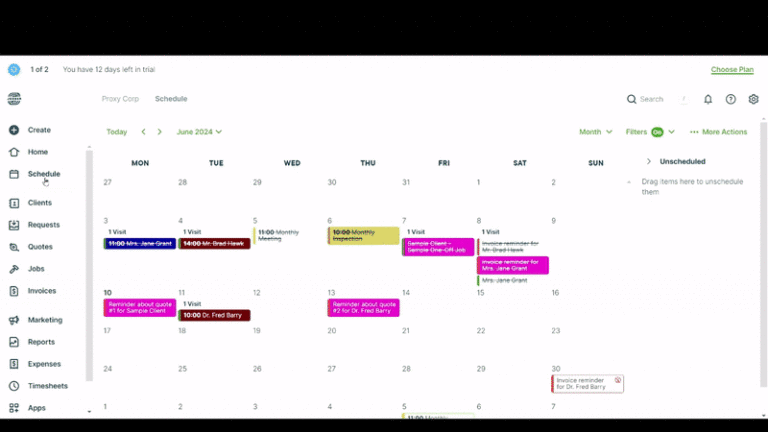
I particularly liked each platform’s recurring shift feature, which lets managers quickly assign recurring visits, saving hours of manual work. In addition to saving time, this feature helps you deliver consistent service and create a predictable revenue stream from repeat customers.
As a manager, you know how difficult it is to squeeze an urgent booking into an already packed schedule. Thankfully, Jobber’s Find a Time and ZenMaid’s SpotFinder automatically scan the schedule to find open slots in seconds. This saves you the time you would have spent searching for a suitable slot, helping you schedule urgent jobs much faster.
While Jobber and ZenMaid are fine for core scheduling needs, they lack vital advanced features such as automatic scheduling. This means that scheduling with either platform is largely manual. What’s more, the fact that you can’t set hourly and shift limits for employees highlights that both platforms have pretty narrow scheduling capabilities.
I also discovered that neither platform offers self-service tools like shift swaps and replacements. Another drawback is that they don’t allow employees to accept or decline assigned shifts, making it more difficult for U.S.-based businesses to enforce predictive scheduling laws.
Verdict: Jobber and ZenMaid have solid tools that enable field service businesses to improve efficiency and service quality. However, the lack of essential compliance tools is a deal-breaker for companies operating in regions with strict labor laws, such as the U.S.
Time Tracking — Winner: Jobber
The best time-tracking apps use advanced clock-in restrictions such as geofencing to improve timesheet accuracy. Geofencing is particularly useful in field service management, as it lets you set virtual boundaries (geofences) around customers’ houses.
The geofence ensures that field technicians and cleaners clock in only when they arrive at the customer’s home, improving the accuracy of billable time. Unfortunately, neither Jobber nor ZenMaid supports geofencing, which is a huge miss, considering that both apps are geared towards field teams.
For mobile teams, accurate timesheets are easier when clock-in rules, jobsite boundaries, breaks, and overtime settings live in the same tool. Connecteam’s time clock supports GPS-based clock-ins, geofencing, break rules, and overtime controls, giving managers a clearer record of hours worked in the field.
This shortcoming aside, both platforms let employees track time on their Android and iOS smartphones. However, Jobber’s mobile app has a slight edge, because, as our reviewer found, it can track time without an internet connection and is suitable for teams in areas with poor cellular service. Employees in the back office can also track time in the web app with either Jobber or ZenMaid.
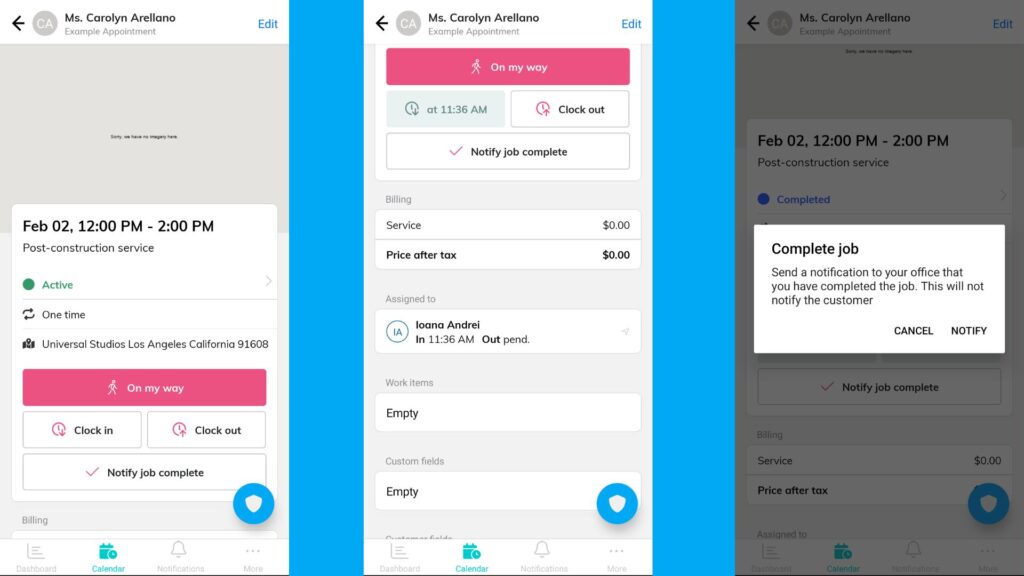
However, Jobber and ZenMaid fall short on compliance. With no built-in break or overtime trackers, they are a poor fit for businesses operating in regions that mandate breaks and overtime, such as California.
Verdict: Jobber is the winner simply because its mobile app supports offline time tracking, a benefit you won’t get with ZenMaid. This doesn’t make Jobber the best app for field service teams. There are better time trackers, such as Connecteam, which supports geofencing and tracks time in compliance with break and overtime laws.
GPS Location Tracking and Route Optimization — Winner: Jobber
Jobber excels in both real-time location tracking and route optimization. Our reviewer found that Jobber adjusts routes based on real-time job changes, helping optimize travel time and fuel usage. However, it doesn’t factor in real-time traffic, which can limit its usefulness for technicians in busy urban areas.
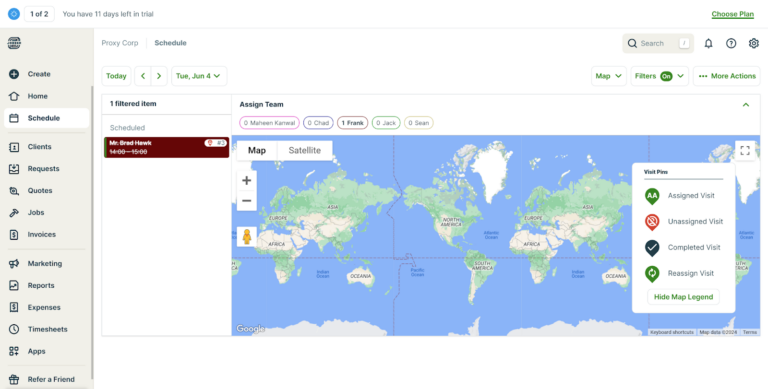
Regarding location tracking, Jobber continuously tracks technicians’ locations throughout their shift, giving managers complete visibility into their movements. Knowing where technicians are in real time enables managers to assign urgent jobs to the closest available team member, thereby improving response time.
ZenMaid, on the other hand, shows employees’ clock-in and clock-out locations, helping managers verify that employees were at the job site. However, unlike Jobber, the platform doesn’t continuously track employees’ movements or routes when they’re clocked in. As a result, managers can’t see where cleaners are during the day.
Verdict: Jobber wins this category, mainly because of its powerful real-time location tracking and route optimization capabilities.
Availability and PTO Management — Winner: Tie
Sometimes life happens and employees fall sick or have personal emergencies, causing them to be unavailable. When this happens, employees need to submit time-off requests, and managers need to approve them with staffing levels in mind. To do this effectively, you need an automated PTO tracker, though — a feature neither Jobber nor ZenMaid has.
When schedules change often, managers need more than a calendar note showing who is unavailable. Connecteam helps teams manage availability, time off, scheduling rules, and employee responses in one place, making it easier to fill shifts without relying on spreadsheets, texts, or last-minute calls.
However, both Jobber and ZenMaid make up for this somewhat by letting you manage employee availability to maintain staffing levels and meet service demands. Both apps sync availability details directly with the team schedule. I found this to be a useful workaround, as the manager can clearly see who’s available and who’s not so that they don’t assign jobs to unavailable team members.
Even so, employees can’t submit their availability themselves – only managers can manually update a team’s availability. This is problematic on two fronts: First, managers must call employees to confirm availability, which can be time-consuming and lead to lengthy back-and-forth. Second, the manual process adds extra admin work and is inefficient with a large workforce.
Verdict: It’s a tie, because neither platform provides PTO trackers. If you’re in a state or city that mandates various types of paid leave with specific accrual, usage, and payout, you’re better off using another solution, like Connecteam. Connecteam’s PTO tracker supports lump-sum and hourly accruals, allowing you to create policies that align with PTO requirements in your regions.
Client Relationship Management — Winner: Jobber
Jobber and ZenMaid let you keep customer information, interactions, and service history in a centralized repository. Having a single source of truth for each customer prevents a disconnected support experience. Any team member can pick up a customer service request where a colleague left off and deliver quality service without the customer having to repeat themselves.
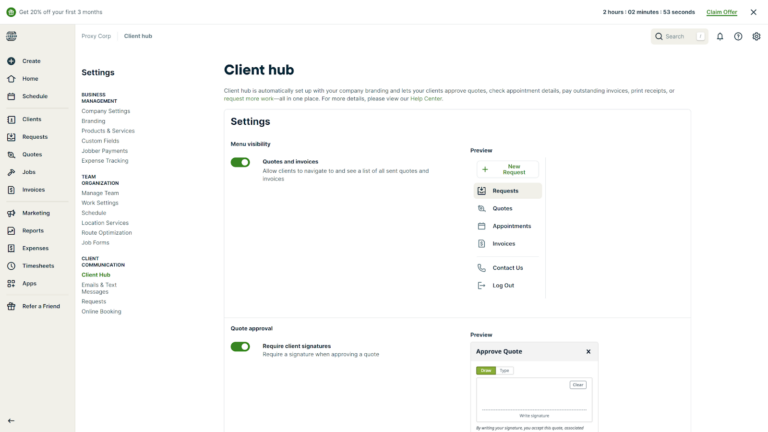
Whereas ZenMaid’s CRM benefits revolve around contact management, Jobber streamlines operations from lead management to customer communication. One feature that sets Jobber apart is the ability to tag and manage leads separately from active clients. This enables you to track prospects and nurture them without cluttering active client workflows.
Even better, Jobber provides a dedicated client portal — a feature ZenMaid doesn’t offer. The portal improves client communication and the coordination of critical processes. Customers can request service without calling, review upcoming appointments, approve quotes, and make payments anytime, anywhere.
Verdict: While both platforms simplify contact management, Jobber has the edge thanks to its advanced CRM tools, including lead management and a client portal.
Invoicing and Payments — Winner: Jobber
Jobber and ZenMaid provide built-in invoicing tools that are simple and easy to use. I liked how customizable their invoice templates are. During testing, I was able to customize invoices with my brand logo and colors for a professional look.
However, Jobber goes beyond the basics, providing automated tools that ensure you get paid without too much effort. For example, it automatically sends invoice reminders when customers forget to make a payment. It also lets you send multiple invoices at once, reducing admin work.
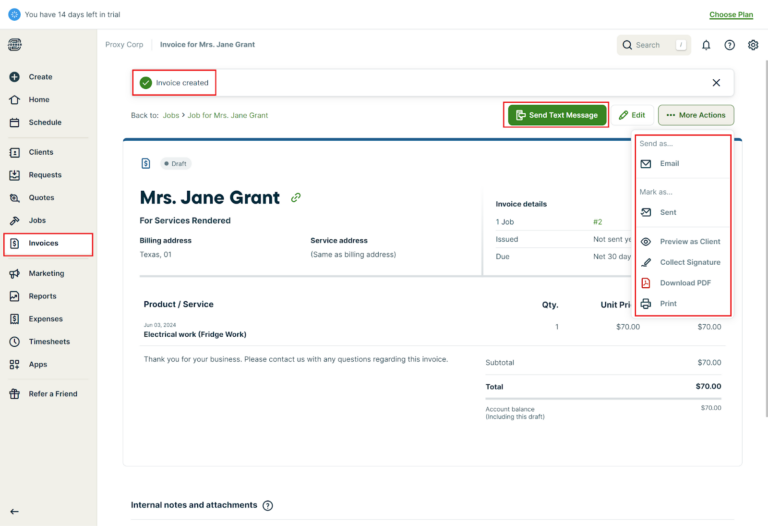
While both platforms process payments flawlessly, Jobber uses built-in tools, whereas ZenMaid relies on Stripe and Square integrations. What’s more, Jobber has an integrated mobile card reader that lets customers pay by card on the spot, helping you manage your cash flow.
My only quibble is that Jobber’s payment options are mainly available in the U.S. and Canada only. As a result, businesses handling clients outside these countries will need third-party payment integrations.
Verdict: Jobber takes the crown here. It works well for companies looking for professional billing workflows, in-person payment tools, and automation features to streamline invoicing and speed up cash flow. ZenMaid, on the other hand, is a good option for small cleaning businesses that primarily invoice online.
User Ratings
Raw numbers show that ZenMaid edges out Jobber in terms of ratings. However, Jobber’s much larger review base indicates that it’s more popular than ZenMaid.
Jobber
- ⭐ 4.6/5 on Capterra (1,456 reviews)
- ⭐ 4.6/5 on G2 Crowd (509 reviews)
ZenMaid
- ⭐ 4.7/5 on Capterra (205 reviews)
- ⭐4.8/5 on G2 Crowd (16 reviews)
Security & Compliance
| Category | Jobber | ZenMaid |
| Data encryption | ✅ TLS in transit | ✅ TLS in transit and AES-256 encryption for payments |
| GDPR compliant | ✅ | ✅ |
| HIPAA compliant | ❌ | ❌ |
| Certification | ❌ | ❌ |
| MFA/2FA | ✅ 2FA | ❌ |
| Admin controls | ✅ Role-based access control | ✅ Role-based access control |
| Hosting region | Not explicitly specified | Not explicitly specified |
I scoured the web and found no publicly reported security incidents or data breaches linked to either Jobber or ZenMaid. This is usually a sign that the providers have implemented robust security measures.
When I dug deeper into each platform’s security infrastructure, I discovered that Jobber is more enterprise-ready than ZenMaid. While they both encrypt data in transit using the TLS protocol, Jobber’s two-factor authentication (2FA) adds an extra layer of protection.
Jobber’s combined security features make it the better choice in an environment where data security, auditability, and access control matter. Although ZenMaid uses AES-256 encryption for payment data and is also GDPR compliant, it lacks advanced controls such as 2FA. Neither has a SOC 2 Type 2 certification.
Setup and Onboarding
Jobber and ZenMaid are intuitive platforms. Creating an account and setting up my team was pretty straightforward. However, since Jobber has more features, the setup process took a bit longer than with ZenMaid – something to keep in mind for teams with complex lead generation, quoting, invoicing, and payment processes.
On the plus side, Jobber provides a setup wizard that lets managers configure key features in a single tab. This saves managers the time they would have spent switching between different pages, thus speeding up the setup process.
Another advantage of Jobber is that its guided tours provide detailed instructions that flatten the learning curve. It also offers in-app tips to help users quickly learn workflows and get the most out of every feature from day one.
ZenMaid, on the other hand, doesn’t provide a setup wizard, so managers have to jump between tabs to configure essential features. However, setup is quick since there aren’t many features. Another detail I noted is that ZenMaid’s walkthroughs are pretty basic. They did serve the intended purpose, though.
Support and Customer Service
| Support Type | Jobber | ZenMaid |
| Live chat | ✅ Business hours | ✅ Business hours |
| Phone support | ✅ | ❌ |
| Email support | ✅ | ✅ |
| Community forum | ❌ | ❌ |
| Ticket support | ❌ | ❌ |
| Help center | ✅ | ❌ |
Jobber provides a nice mix of guided and self-service support options, including email, phone, help center, and live chat. The responsiveness of the support agents on live chat and email really stood out to me. Jobber claims that live chat support is available only during business hours, but the agents replied to one of my queries on a weekend, which was a pleasant surprise.
ZenMaid is more limited and less responsive compared to Jobber. Its live chat is truly restricted to business hours — I didn’t receive any responses during weekends, even when my case was urgent. The agents did respond quickly to my initial query once they were live, but they took significantly longer to answer subsequent questions.
The biggest issue is that ZenMaid doesn’t offer a dedicated help center. It provides guides and ebooks to impart essential business tips, but it doesn’t have the standard how-to guides that help users configure and use its features.
🏆 Who Wins: Jobber or ZenMaid?
When you weigh affordability, range of features, and how well the products streamline field service workflows, Jobber is the clear winner.
Jobber offers a wide range of field service management features, which isn’t surprising considering it’s geared towards the wider field service industry. It also comes with a nice suite of advanced features that you don’t get with ZenMaid, such as built-in payments, a client portal, and team communication.
ZenMaid, on the other hand, is geared towards cleaning businesses, and as you’d expect, its feature set is limited compared to Jobber’s. Still, the platform provides the essential features that cleaning businesses need to streamline workflows.
👉 The verdict: Choose ZenMaid if you’re a cleaning or maid service business and want a simple platform with industry-specific features. However, if your field service business offers a wide range of services or you need a platform with a broader toolset, Jobber checks more of the boxes.
Connecteam vs Jobber vs ZenMaid
Jobber and ZenMaid are powerful in their own right, but like any other solution, they have their faults. One of the biggest issues with both platforms is the lack of compliance features – in particular, the inability to track breaks and overtime.
If you need a software solution that offers the best of both Jobber and ZenMaid, and complies with labor laws, use Connecteam. Unlike Jobber, which attempts to do it all, Connecteam streamlines the vital processes that directly impact service quality, costs, and profitability.
Let’s explore some of the benefits of using Connecteam:
AI-Powered Auto-Scheduler
Picture this: Your business is growing fast, and daily service requests are pouring in by the hundreds. However, with rapid growth comes a major problem: To meet service-quality standards, you have to assign jobs quickly and ensure technicians complete them within tight deadlines.
Jobber and ZenMaid go only so far in this regard; they can help you find slots in your schedule but don’t automatically assign jobs to technicians. This is where Connecteam’s auto-scheduler outshines both platforms.
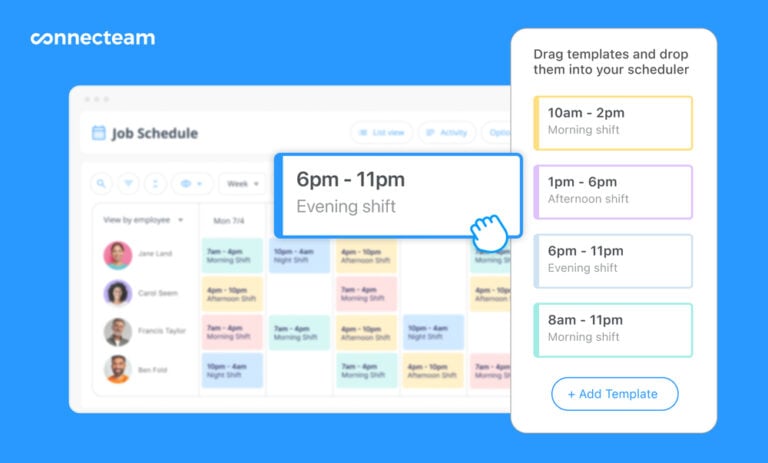
With this feature, all the manager needs to do is add service requests to the team’s schedule as open shifts. They can then assign hundreds of shifts to available technicians with a single click. I also like that Connecteam assigns shifts based on employee qualifications, ensuring each person handles tasks within their skill set.
Another bonus is that Connecteam lets you set scheduling rules and work limits, such as maximum hours or shifts per day and the maximum gap between shifts. As you create the schedule, Connecteam enforces these rules to ensure compliance with labor laws. Employees can also accept or reject shifts, helping you comply with predictive scheduling laws.
Accurate, Compliant Time Tracking
Connecteam’s time tracker logs time accurately for fair employee pay and client billing. What sets it apart from Jobber and ZenMaid is its compliance tools and advanced clock-in restrictions.
To begin with, Connecteam uses geofencing to ensure field workers clock in and out only when physically within a designated jobsite. It also provides powerful geofencing automation to help you track billable hours and monitor job completion. For example, you can set it to remind field technicians to clock in when they arrive at a client’s house and automatically clock them out when they leave.
In addition to tracking regular work hours, Connecteam has one of the most effective break and overtime trackers. Whether you’re in California or Australia, Connecteam tracks overtime and breaks in full compliance with underlying labor laws, a perk you don’t get with either Jobber or ZenMaid.
Excellent Customer Service
When it comes to customer support, having multiple support options is just as important as getting fast responses. As I found out during testing, Jobber performs better than ZenMaid on both fronts. However, Connecteam outperforms both and delivers an even stronger overall support experience.
Connecteam’s live chat support is available 24/7, making it easy for users to find instant help regardless of timezone. Every time I put the live chat to the test, agents respond to my initial and follow-up questions in less than a minute, which is impressive. I’m also always impressed by how detailed the responses are, which shows that the agents are well versed in various topics.
Connecteam also provides a paid option called Connecteam Pros. With this option, Connecteam assigns you a dedicated setup expert to help you set up your team and get the most out of every feature from day one.
In addition, unlike Jobber and ZenMaid, Connecteam lets you manage your field workforce in full compliance with local labor laws. The cherry on top? Connecteam is affordable, enabling you to scale your field service company without breaking your software budget.
FAQs
What is the best software for a cleaning company?
Connecteam is the best software for a cleaning company that wants to streamline scheduling, time tracking, location tracking, and other essential FSM workflows.
What software is better than Jobber?
Connecteam is better than Jobber, especially for companies that want to manage field workforces in full compliance with labor laws.
What are the alternatives to ZenMaid?
One of the best alternatives to ZenMaid is Connecteam, thanks to its impressive suite of advanced features. Like ZenMaid, Connecteam can schedule jobs and track time, but it also offers tools such as automatic scheduling, geofencing, and break and overtime tracking.
Is Jobber or ZenMaid better for cleaning businesses?
ZenMaid is better for cleaning businesses that want simple booking, cleaner scheduling, recurring appointments, and time-off visibility. Jobber is better if the cleaning business also needs stronger client management, quotes, invoices, payments, and broader field service workflows.
Is Jobber or ZenMaid better for scheduling?
Jobber and ZenMaid both work well for scheduling. Jobber is stronger for broader field service scheduling, dispatching, and route planning. ZenMaid is strong for recurring cleaning appointments, cleaner assignments, and finding open schedule slots for cleaning jobs.
Does Jobber or ZenMaid offer better time tracking?
Jobber offers stronger time tracking because workers can track time from the mobile app and use timers for jobs. However, both tools have limits. Neither appears to offer full workforce compliance controls like geofenced clock-ins, built-in break tracking, and advanced overtime rules.
Is Jobber or ZenMaid better for invoicing and payments?
Jobber is better for invoicing and payments. It offers stronger billing workflows, including invoices, payment processing, and mobile payment tools. ZenMaid supports invoicing and online payments, but Jobber has a broader payment and client billing feature set.
