

Secure and compliant messaging app for healthcare professionals.
Verdict: 6.9/10
Celo Health is a HIPAA-compliant app made to help healthcare teams communicate and work together. Celo focuses on helping doctors, nurses, and care staff communicate more effectively with colleagues and external specialists. The platform has strong security and compliance measures that help care teams comply with the industry’s strict regulatory standards.
It lets healthcare staff discuss sensitive patient details in secure 1:1 or group chats. My favorite feature is role-based messaging, which sends messages straight to the on-call staff member for a role. It cuts out the time spent tracking down the right person, speeding up decision-making, and improving patient care in critical moments.
Celo’s secure external chat feature lets staff communicate with external specialists without exposing sensitive data, and the external user doesn’t even need to download an app. And while Celo’s video-calling tool is more basic than Zoom or Google Meet, it’s more than good enough for simple, face-to-face conversations.
Celo Key Features
- Internal messaging: Celo lets you create 1:1 chats and private group channels to keep healthcare teams connected. Staff can send voice messages, use emojis and @mentions, and attach images and documents in chats.
- Role-based messaging: Instead of hunting down the on-call staff member, Celo lets you message the role directly, so your note reaches whoever is covering it right away, saving you valuable time.
- External chat: With external chat, you can seek the opinion of specialists from other facilities on a secure, HIPAA-compliant communication channel. The external user chats on a web browser without ever needing to download the Celo app.
- Audio and video calling: Start an audio or video call inside any 1:1, group, patient case, role-based, or external chat. The calling tools are lightweight, so they work best for quick, real-time conversations rather than full meeting-style calls.
Pros
- Role-based messaging to speed up approvals and critical care decisions.
- External specialists can chat without downloading the Celo app.
- Easy-to-use video calling feature.
Cons
- Some design aspects could be improved to improve the user experience.
- Secure Library doesn’t let you store files and documents in subfolders.
- The Library search is weak, so finding files takes longer than it should.
Celo Pricing
Unlike most of its competitors, Celo publishes its prices publicly. It also has no setup fees or other hidden costs, as you can see in the following table:
| Plan | Features |
| Free – |
|
| Growth — $49/month | Everything in Free, and:
|
| Business — $99/$3.6 for each additional user | Everything in Growth, and:
|
| Business Pro — $199/month $5 for each additional user | Everything in Business, and:
|
| Enterprise — Custom pricing | Everything in Business Pro, and:
|
| * Prices shown refer to annual billing as of December 2025. | |
Celo’s free plan is suitable for small care teams with simple communication needs or large ones looking to get a first-hand feel for Celo’s basic features. If you outgrow the free plan, you’ll need to upgrade to a paid plan. But before committing to a paid plan, you can try Celo with a 14-day free trial to test its features and make an informed decision.
While all that sounds good, Celo’s advanced features: role-based messaging, external chat, video, and audio calls sit behind the higher-tier plans. Another issue is that Celo claims users can only create multiple workspaces when they subscribe to the Enterprise plan. However, I was able to create three workspaces on the free trial of the Business Pro plan.
Celo is reasonably priced, compared to other clinical communication and collaboration apps for care teams, as you can see in the table below:
| Plan | Celo (Business pro) | OnPage (Enterprise Silver) | OhMD (Automate) | Connecteam (Advanced) |
| View pricing | View pricing | View pricing | View pricing | |
| 10 users (per month) | $199 | $229.90 | $500 | Free for life—all features and dashboards |
| 20 users (per month) | $199 | $459.8 | $500 | $49 |
| 30 users (per month) | $199 | $689.7 | $500 | $49 |
| 50 users (per month) | $299 | $1149.5 | $500 | $79 |
| Learn more about Connecteam |
Verdict: 8/10
Celo Usability and Interface
From the moment I started using Celo, I noticed that it puts more emphasis on security and compliance than design. But does this impact the app’s user-friendliness? I put Celo’s web and mobile apps to the test and compiled my findings in this section. Read on for my take:
Setting Up Celo
Creating a Celo account is easy, even for users who aren’t comfortable with tech. The signup wizard guides you through the process and makes it pretty simple.

However, getting your team up and running on Celo may require some time, not because the setup is complex, but because you need to configure so many things. You have to create a workspace and split it into departments, define positions, set up communication channels, add users, and manage permissions.
All these steps are easy, especially if you’re familiar with healthcare administration. But I didn’t like that important settings were split, with some sitting in the main communication hub and others in the admin portal. Celo should consolidate all settings into a single place, so admins don’t have to jump between tabs or platforms.
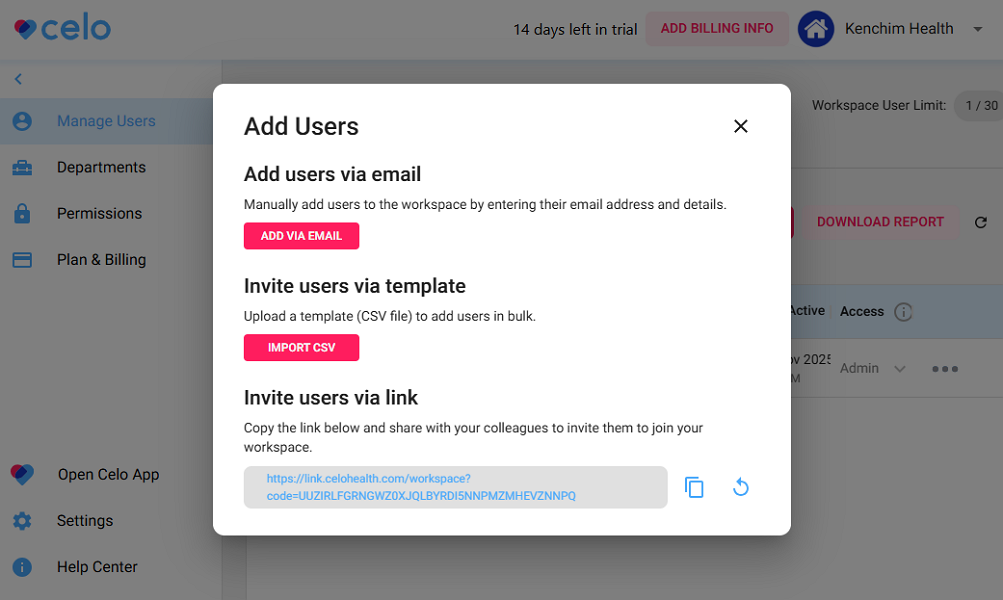
Another problem is that options to import users are limited. Admins can add people by email, invite link, or CSV, but there’s no way to pull users in directly from other healthcare systems. This means larger facilities may still need to do a lot of manual work when onboarding staff.
Celo could’ve also added video or text walkthroughs to help users quickly learn the platform without having to read multiple guides.
Verdict: 7/10
Celo Web App
I expected the Celo web app to work on any device or browser, but I was wrong. The web version of Celo runs only on Google Chrome and Microsoft Edge installed on a Windows or macOS computer. For this review, I used the Celo communication hub in Chrome on Windows, and here’s what I found.

The web app has three main areas: the menu at the top, the left sidebar, and the main content area to the right. The top menu helps users access key features — messages, roles, external, network, secure library — regardless of the page they’re on.
When you open a feature, the sidebar and content area adapt to show information relevant to that feature. For example, when you open “Messages,” you’ll see your latest 1:1 chats, patient cases, external chat, and group channels in the sidebar. This makes it easy to pick up a conversation where you left off.
Overall, the design feels modern and, in some ways, similar to popular messaging apps like Slack and Microsoft Teams. Unfortunately, Celo isn’t as intuitive as these apps due to some design flaws that can slow users down.
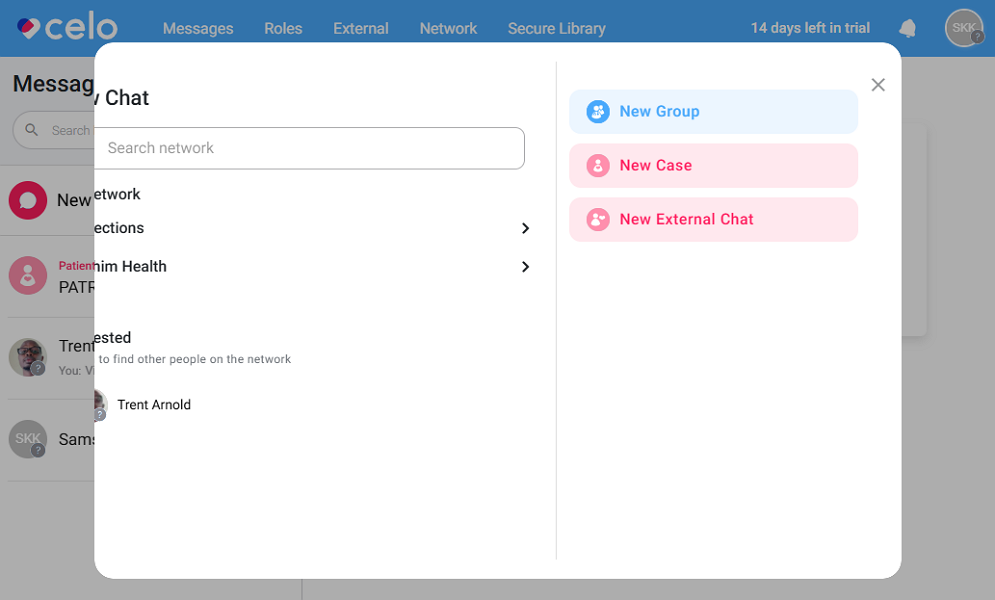
For example, when I started a new chat window in an unmaximized window, some details were hidden, even though the window was larger than Celo’s recommended minimum width of 500 pixels.
I also wish Celo would let users switch between Workspaces from the sidebar, like Slack. This would make communication simpler in medical groups with several facilities.
Verdict: 7/10
Celo Mobile App
I used Celo’s Android app for this review. Since the app is similar to the iOS version in both design and functionality, the description below applies to both. Celo’s mobile app enforces a strict security policy that blocks screenshots to protect patient data. It worked well and prevented me from capturing any screenshots during testing.
When you open the app, you land on the home page with three tabs: inbox (recent internal conversations), roles (roles you can clock into), and external (recent external conversations). In my view, Celo makes a smart choice by opening on your recent chats, so healthcare teams can pick up conversations right away.
Accessing other features is easy, thanks to Celo’s intuitive design and well-organized layout. The app has a menu at the bottom of the screen that displays the key features, including: home, connections, in-app camera, secure library, and notifications. Every feature is a tap away, simplifying navigation and helping users spend less time learning the platform.
The mobile app has all the functionality of the web app as well as some extra features. For example, I found that you can only create consent forms or upload videos to Celo’s library on the mobile app.
The only issue for me is that the admin portal isn’t available on mobile, so managers can’t perform any admin functions while in the field or on the move.
That aside, the Celo mobile app functions normally without an internet connection. You can even send messages and capture images with the in-app camera, and the app delivers the message when you reconnect the device to the internet.
| Menu Item | Admin | Employee | ||
| Website | Mobile App | Website | Mobile App | |
| Communication | ||||
| 1:1 chat | ✅ | ✅ | ✅ | ✅ |
| Group chats | ✅ | ✅ | ✅ | ✅ |
| Threaded conversations | ✅ | ✅ | ✅ | ✅ |
| Video and audio call | ✅ | ✅ | ✅ | ✅ |
| Emojis | ✅ | ✅ | ✅ | ✅ |
| @mentions | ✅ | ✅ | ✅ | ✅ |
| Admin functions | ||||
| Add users | ✅ | ❌ | ❌ | ❌ |
| Create workspace | ✅ | ❌ | ❌ | ❌ |
| Create departments | ✅ | ❌ | ❌ | ❌ |
| Configure features | ✅ | ❌ | ❌ | ❌ |
| Workforce management | ||||
| Scheduling | ❌ | ❌ | ❌ | ❌ |
| Time tracking | ❌ | ❌ | ❌ | ❌ |
| Location tracking | ❌ | ❌ | ❌ | ❌ |
| Onboarding and training | ❌ | ❌ | ❌ | ❌ |
Verdict: 7.5/10
Celo Core Functionalities
Celo promises secure, compliant messaging for healthcare teams, whether they work in the same facility or across different ones. But does the app live up to its billing? I tested Celo to discover how its features work, and compiled my unbiased findings in the sections below. Keep reading for the detailed breakdown:
- Cello workspaces and departments
In large healthcare organizations, communication can get messy fast. Teams need a clear structure, so everyone knows who to contact when they need help. This is where Celo’s organization hierarchy can make all the difference.
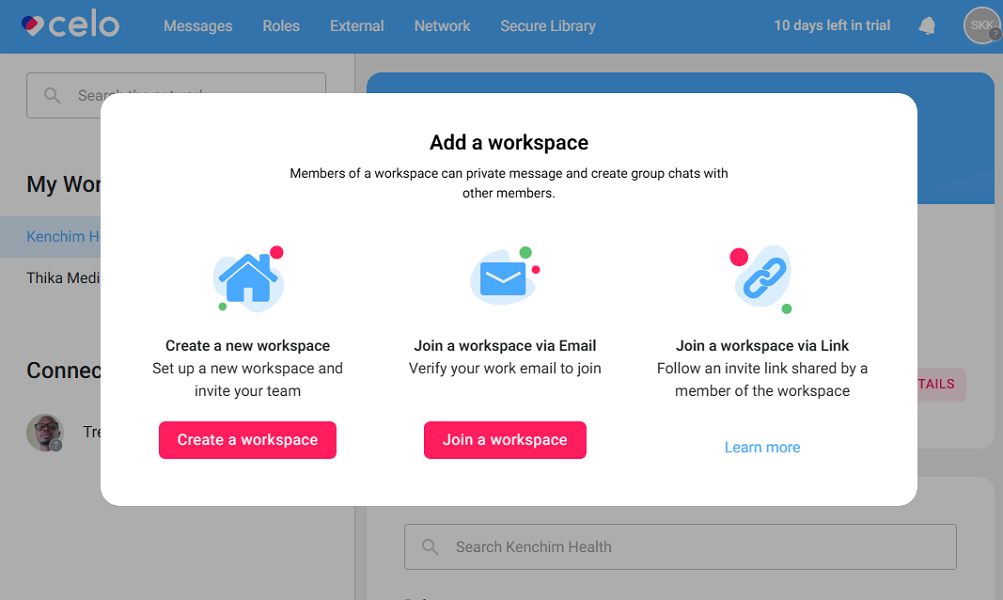
Celo lets healthcare groups create separate workspaces for each hospital or clinic they manage. For example, if your group owns three facilities, you can set up three workspaces, each with its own staff, roles, permissions, directories, messaging rules, and broadcast tools.
Within each workspace, you can add departments to mirror the departments in your facility, such as emergency, radiology, nursing, home care, pharmacy, and more. When adding users to a workspace, Celo lets you set their departments to organize them by their functional roles.
My favorite feature is Celo’s user verification, which makes it clear who’s verified so people know they’re talking to the right person. There are four verification levels, each with its own requirements: verified professional, verified identity, verified workspace, and unverified users. The badges give fellow professionals confidence that they are engaging the right person for a particular issue.
Verdict: 8/10
- Secure internal messaging
Celo has strong and secure messaging tools to keep teams within one unit connected and engaged. It supports 1:1 conversations, so doctors, nurses, and other staff can message each other privately. It also lets you create invite-only group chats when you need to collaborate with multiple people.
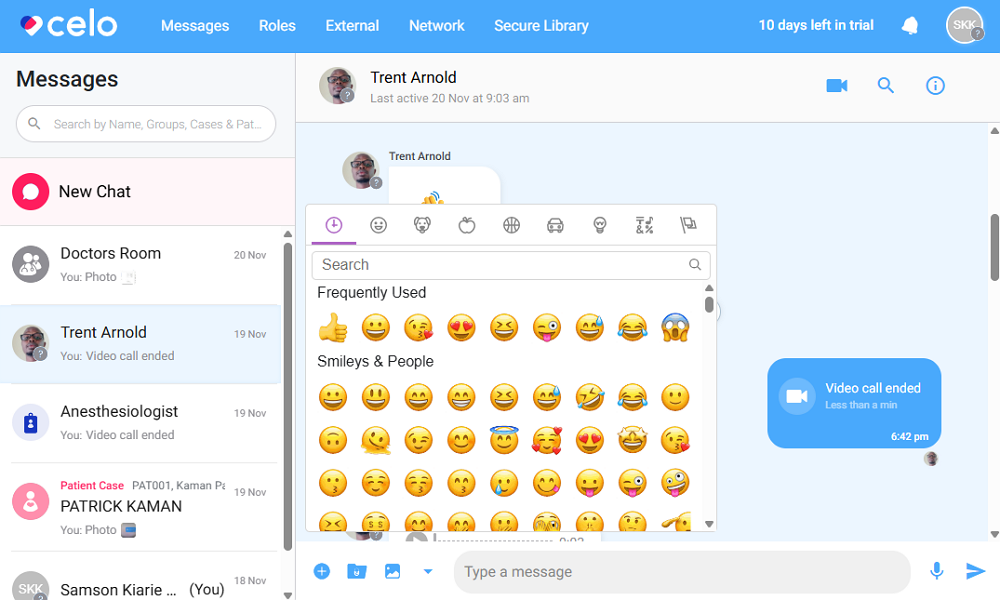
What stood out to me was patient case channels, which let staff hold conversations centered around a particular patient in a secure chat. Patient case chats function similarly to private groups, but they include editable patient details like ID, name, date of birth, and gender. You can add or remove clinicians to a case as needed.
Cases keep information and discussions around that patient in one place, making them ideal for handling long-term care. Even as shifts change or a patient is moved through different departments, clinicians can pick up where others left off, ensuring the patient gets the care they need.
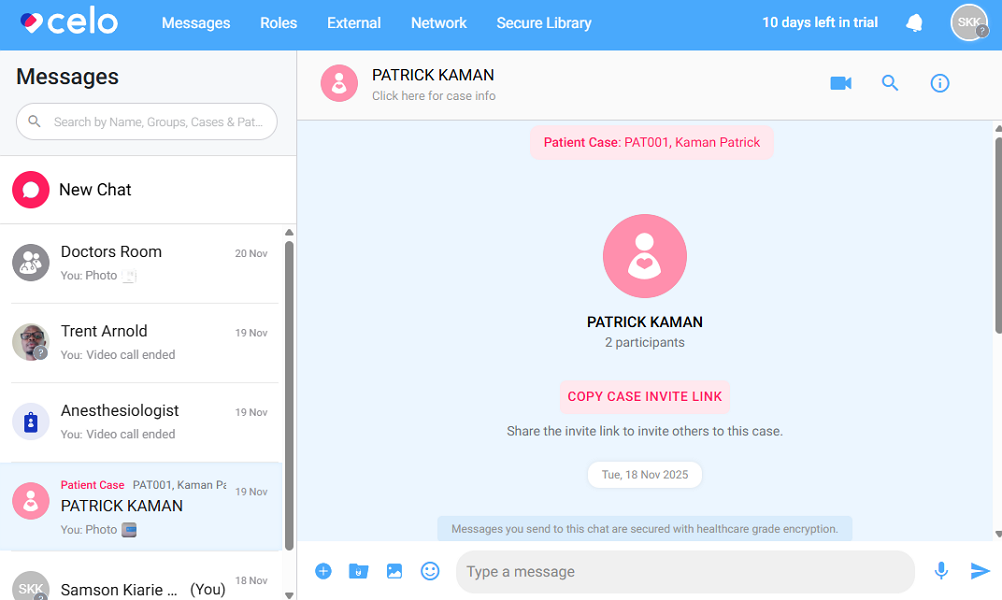
I also liked the ability to send voice messages. Voice messages let you deliver detailed, context-rich information faster than typing, which is especially useful in high-pressure clinical environments. Sending voice messages is easy: open a chat, click/tap the microphone icon, record, and send. Just note that the free tier limits them to 30 seconds per message, and the paid plans allow messages of up to 5 minutes.
Other notable messaging features include:
- Emojis
- @mentions
- Thread
- Messaging forwarding
- Broadcast (available exclusively for Enterprise subscribers)
Most importantly, all chats are end-to-end encrypted to ensure the confidentiality of sensitive patient data. But for all its strengths, Celo doesn’t support public group channels, which means that you can’t set up company-wide channels for work announcements or general discussions.
Verdict: 7.5/10
- Role-based messaging
Picture this: a clinician in the emergency department needs immediate approval for an urgent CT brain scan. The clinician calls the facility’s switchboard to reach a radiologist, but the long call queue is causing delays, putting the patient’s life at risk. This is where Celo’s role-based messaging comes in handy.
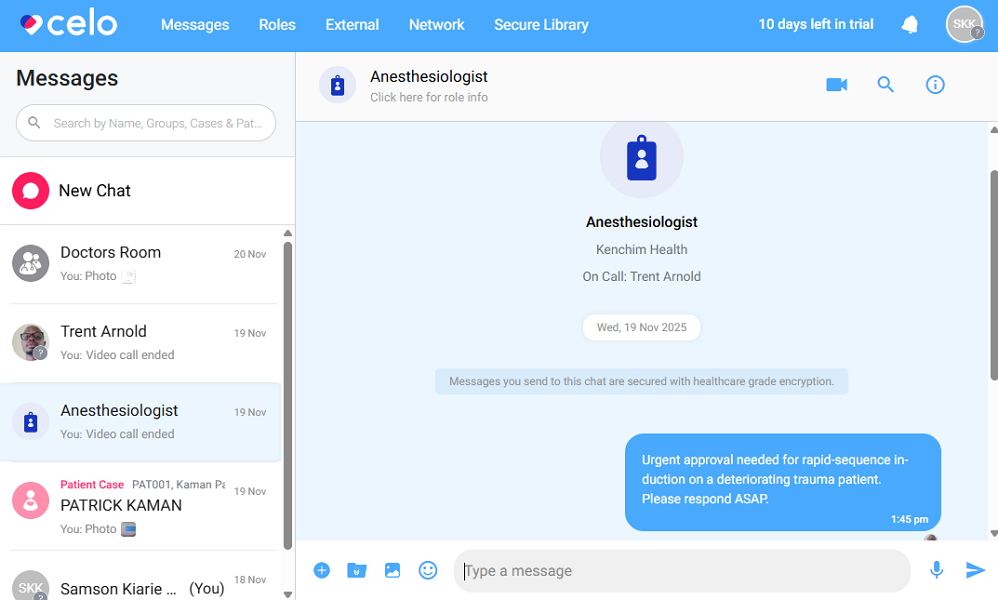
Instead of relying on hospital pagers or switchboard systems, the clinician can message the role rather than a specific individual. This way, the person who’s currently on duty for that role gets the message and can reply instantly, avoiding unnecessary delays.
I found it easy to clock into a role from either the web or mobile app, and most clinicians shouldn’t have trouble with it. That said, you can only clock into roles you already belong to. This helps prevent staff from picking up duties they’re not qualified for, which lowers the chance of mistakes.
The nurse or doctor on-call gets instant alerts for every new role message. If they miss something, any other member of that role can reply, so urgent decisions don’t get delayed. Even better, all messages stay in the role channel, which makes them easy to track and hand over when shifts change.
Verdict: 8/10
- External chat
Celo’s external chat is useful whenever a healthcare professional needs to communicate securely with people outside the organization, such as specialists, GPs, temporary staff, or community providers. It’s a secure, HIPAA-compliant channel that helps you gather input from specialists while protecting patient privacy and maintaining compliance.
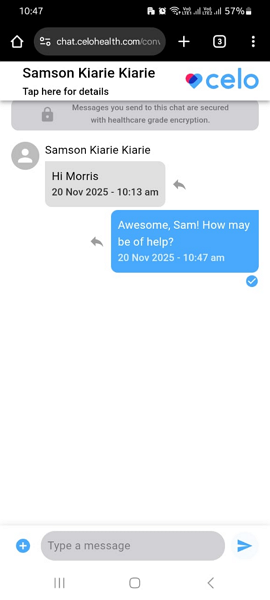
To start a chat with an external specialist, go to the “External Chat” page and click “new external chat.” Add the recipient’s name, date of birth, and mobile phone number, and hit “create external chat.” Once you send your first message over that chat, the recipient will get a text notification with a secure link.
The link opens an end-to-end-encrypted chat in the specialist’s web browser, so they can chat without downloading the Celo app. However, the external user gets a trimmed-down version of Celo. They can send written messages and attach files, but can’t use emojis or send voice messages on mobile.
What I really liked is that Celo sends the text message at no extra cost to the healthcare facility. Even so, the external chat isn’t suitable for emergency cases, as the text message containing the link can be delayed or even fail to reach the recipient.
When I reached out to Celo’s support, an agent hinted that some cross-border communication may require a bit of configuration, which the Celo team can help set up during onboarding to ensure smooth text message delivery.
Verdict: 8/10
- Audio and video calling
Instead of adding the bells and whistles you find with Zoom or Microsoft Teams, Celo provides basic video and audio features tailored specifically for the healthcare industry. First, all calls are end-to-end encrypted to enable secure, face-to-face collaboration between healthcare staff, departments, and external collaborators.
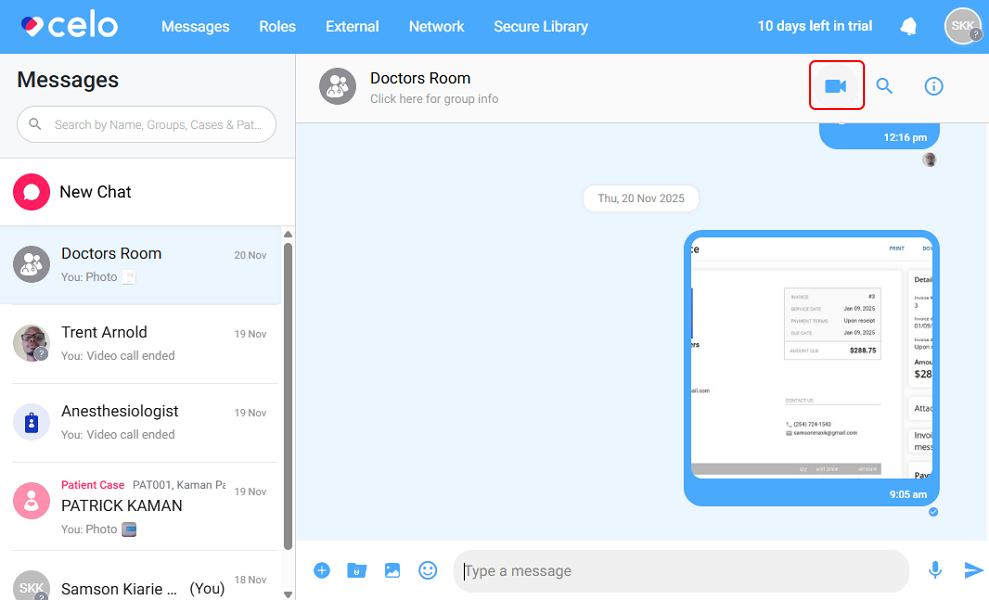
Second, users can start calls from anywhere, including inside a 1:1 chat, or from group, role-based, patient case, or external chats. This lets you start calls when and where you need them, instead of breaking the flow by moving to a different window.
Starting a call is easy. Simply open the relevant chat and click the video icon in the top-right corner. Participants in that chat will receive a call notification and can join the call via the web or mobile app.
Joining a call takes several steps. Users have to tap or click the call notification to open the relevant chat and then click “join” in the call message. The multiple steps take away from an excellent user experience, but they ensure that users don’t accidentally accept group calls when in public or clinical areas.
What’s more, having users accept calls only while inside the chat makes sure that they can have a look at the latest messages before joining a call. This way, they clearly know the scenario they’re walking into.
Verdict: 7/10
- Media and consent library
Celo’s Secure Library lets you store media and documents in one place, organized into three main folders: media, consents, and documents. My main complaint is that Celo doesn’t allow users to create subfolders within the main folders. Over time, facilities that frequently upload documents can end up with a scattered mess in each main folder.
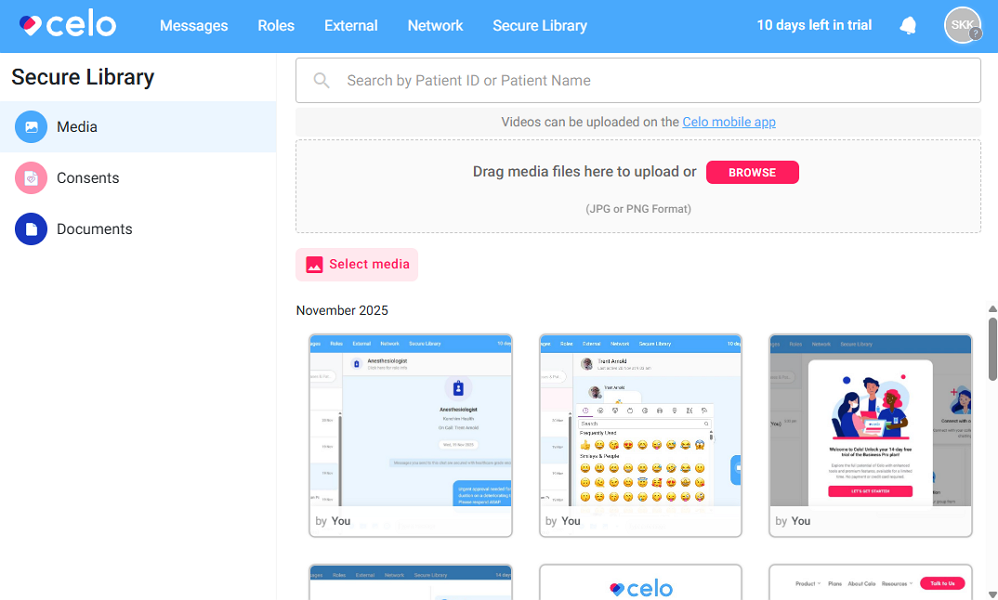
When you capture an image using Celo’s in-app camera or upload documents and media from your device, Celo requires you to tag them by the patient’s name and ID. But even with the tag, Celo doesn’t group documents into separate patient folders. Instead, the tag helps retrieve documents and media using the search function within the secure library.
Sadly, the search function doesn’t seem to support predictive search, which makes it ineffective as your folders grow. For example, I created a file and attached it to the patient’s ID: “PAT001”. When I searched only “pat” Celo didn’t surface any documents. I had to type the entire ID to find the document.
Celo lets you attach documents and media from the Secure Library directly to your chat to add context to your conversation. Whether it’s a radiology report, CT scan, or scanned consult notes, Celo lets you pull them straight from the library. However, I wish Celo had a search function to help me find the documents I need to attach more quickly.
Verdict: 6/10
Celo Security Features
Celo leaves nothing to chance when it comes to protecting patient data. The vendor is compliant with various data security and privacy regulations and standards, including:
- HIPAA
- GDPR
- HITECH Act
- ISO 27001
- SOC 2
- Cyber Essentials
- NHS
In addition, Celo stores data in Microsoft Azure databases, which use 256-bit AES encryption to protect data at rest. AES 256-bit encryption is regarded as the most secure cipher and is practically unbreakable with current technology. Celo also uses Transparent Data Encryption (TDE) to protect data against theft if the physical storage is tampered with.
During testing, I saw firsthand how Celo uses multiple safeguards to keep data safe. To begin with, two-factor authentication (2FA) isn’t optional: Celo implements it by default on all accounts.
Accessing an account requires a three-step identity authentication that leaves no room for unauthorized access. You first log in with your email and password, use 2FA via email, and enter a four-digit PIN to log in. You can also enable fingerprint scanning on mobile devices to add an extra layer of account security.
If you stay inactive for a long time, Celo automatically locks the app, requiring you to enter your PIN to log back in. In addition to the auto-log-out feature, Celo offers an option to lock the app, which is especially useful when you need to step away from your desk temporarily.
Celo also blocks screenshots on mobile apps, ensuring no user can use this loophole to share unauthorized information. Even better, Celo claims that no patient information is stored on user devices, including the photographs the user captures. This way, even if a clinician loses the device, patient information won’t be compromised.
Verdict: 8.5/10
Celo Customer Support
Celo’s customer support options are limited to live chat, help center, email, and web form. As is my norm during software testing, I sent a few queries via the web form and engaged support agents via live chat to gauge their responsiveness.
Celo’s live chat is very responsive. While the platform has yet to adopt an AI assistant, it has an automated routing system that asks questions, such as your name and email, before connecting you to a human agent.
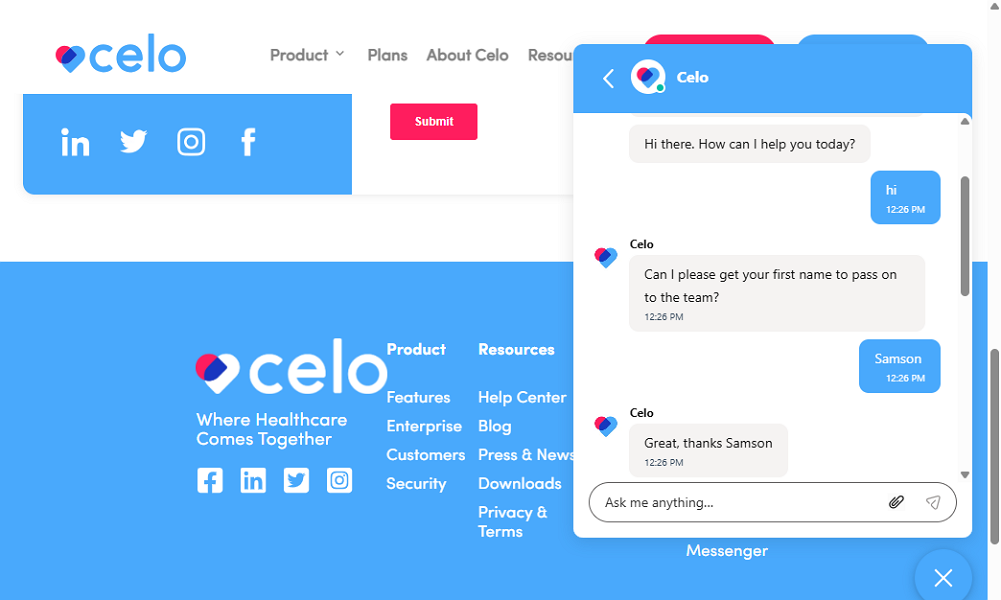
During testing, a human agent joined the chat within 1 minute. The agent responded to questions in seconds and consistently provided satisfactory answers, even when the questions were highly technical, demonstrating a deep understanding of Celo.
The only minor gripe is that the chat function isn’t available while logged into Celo’s app. I could only access it while on the product page. This means that Celo doesn’t link chats to your account. As a result, you can’t refer to past discussions or access information shared in previous chats.
That aside, the help center groups support guides into six categories: getting started, using Celo, premium features, workspace admin portal, account settings, and FAQs. It would have been more helpful if Celo grouped articles by feature name to simplify navigation. Still, I could find the guides I needed with ease using the search tool in the help center.
Verdict: 6.5/10
What are Celo’s Review Ratings from Review Sites?
(As of December 2025)
Capterra: No reviews yet
G2: 4.6/5 (57 reviews)
Software Advice: No review yet
TrustRadius: No reviews yet
GetApp: No reviews yet
Google Play Store: 3.9/5 (134 reviews)
Apple App Store: 3/5 (2 ratings)
Celo App Review
Celo is designed to make communication and collaboration easier for care teams of all sizes. It has powerful healthcare-specific features that help you stay secure and compliant, something you don’t get with standard messaging apps like Slack or WhatsApp.
I particularly like its external chat feature for two reasons. First, it lets users communicate with external specialists on a HIPAA-compliant platform. And second, the external collaborator doesn’t need to install an app to communicate. There are other notable features, such as role-based messaging, which speed up decision-making and approvals, helping you quickly provide quality care.
Celo is also affordable, compared to other healthcare collaboration platforms. However, you have to get the most expensive plan to create multiple workspaces. And Celo’s advanced features — external chat, role-based messaging, and calls — are only available in the Business Pro and Enterprise plans.
Connecteam: The All-In-One Celo Alternative
While Celo is powerful, it mainly focuses on improving communication, which is just one part of managing a healthcare facility. Effective workforce management requires more than just communication tools. You need to create schedules, track work hours, onboard and train employees, manage availability and time off, and much more.
Imagine having all of these features in a single platform — no more juggling multiple systems to keep healthcare staff organized. Enter Connecteam: an all-in-one, HIPAA-compliant workforce management platform that not only has more features than Celo but is also much more affordable.
Some of the benefits of using Connecteam include:
Connecteam has built compliance into its core
We know that HIPAA compliance is not negotiable for healthcare organizations, which is why Connecteam was built to meet these strict standards. Connecteam ensures that every piece of sensitive information on the platform is stored and transmitted securely. More importantly, Connecteam helps you comply with labor laws across all features, including scheduling, time tracking, and PTO management.
Connecteam has secure communication features
Connecteam chat is a good fit for healthcare organizations that don’t need Celo’s most advanced features, like patient case channels or role-based messaging. It has encrypted messaging, file sharing, and announcements, helping you keep sensitive information safe and reach all employees when you need to.
Care teams can use emojis, voice messages, and @mentions in chat. One of my favorite features is the ability to pin locations directly on chat, ensuring home caregivers arrive at the correct home, which is beneficial when multiple patients live close together.
Connecteam has essential workforce management features
Connecteam also provides a full suite of workforce management tools that Celo doesn’t offer, allowing you to coordinate care teams without switching between multiple apps.
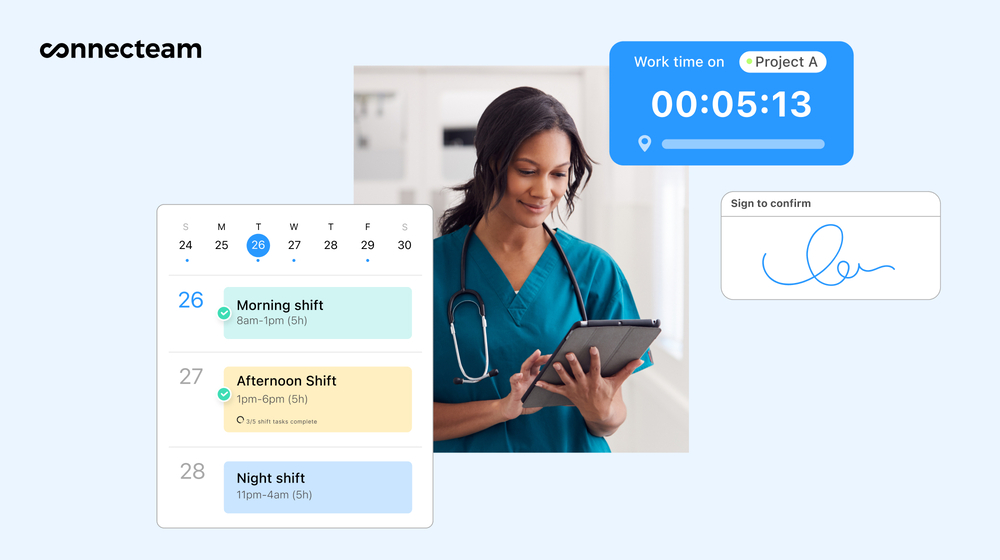
Connecteam scheduling lets you easily build schedules, so everyone knows exactly where they need to be. I particularly love its AI Auto-Scheduler, which lets you assign hundreds of shifts in minutes based on employees’ qualifications and availability.
What’s more, Connecteam’s time tracker lets you log employee work hours, breaks, and overtime in compliance with local labor laws. You can also track home caregivers’ locations in real time to provide patients with accurate ETAs, improve resource allocation, and improve worker safety.
Most importantly, you get all these features at a fraction of Celo’s price. Small teams with up to 10 staff can use all of Connecteam’s premium features for free. Paid plans start at $29 per month for 30 users, which is less than $1 per month per employee.
Get started with Connecteam for free today.
FAQs
Yes. Celo has a Secure Library where teams can store and share clinical photos, videos, and documents in a HIPAA-compliant way. Files in the library can be pulled into chats when you need to add context to a case.
Not fully. Celo works on iOS, Android, and web, but the web app only supports Chrome and Microsoft Edge.
Yes. Celo’s External Chat lets staff message outside specialists or partners in a secure, HIPAA-compliant chat. You can start the chat from Celo, and the external person joins through a secure link.
Yes. Celo offers a Free plan for individuals and small teams. It includes one workspace, up to 10 users, secure messaging, and access to the Secure Library, with some limits compared to paid tiers.
Connecteam is the most affordable option for most healthcare teams. It also includes scheduling, time tracking, and HR features.
No. Celo is built for clinical messaging, not scheduling, time tracking, PTO, or daily ops. If you need these options, Connecteam is an all-in-one app that can handle all your workforce management needs.
Yes. Connecteam offers secure, HIPAA-compliant chat and announcements for staff.