


When scheduling, time tracking, payroll, and POS workflows do not work together, managers lose time fixing missed punches, staffing gaps, and payroll errors. Homebase and Square both help small businesses manage hourly teams, but Homebase is stronger for workforce management, while Square is stronger for POS-first operations.
I compared Homebase and Square by looking at pricing, scheduling, time tracking, payroll, hiring, communication, compliance, support, security, and integrations.
Use this guide to decide whether your business needs a workforce-first platform or an all-in-one POS system with staff management tools.
At a Glance: Quick Summary
Square is an all-in-one operations management solution, best known for its POS system. In fact, Square started as a POS solution, but has since added staff management tools, such as time tracking, PTO management, and scheduling, to its arsenal. This has made it the go-to application for small businesses in hospitality, beauty, and service industries.
Homebase, on the other hand, focuses primarily on workforce management. It offers powerful features for scheduling, labor compliance, hiring, and onboarding. The platform stands out for its built-in ability to simplify core HR functions, like payroll processing, that often require third-party integrations. Learn more in our comprehensive Homebase review.
Pricing and Plans
| Homebase | Square |
|---|---|
| Free plan: Basic $0 / location / month
| Free plan: Square Free $0 / location / month
|
| Essentials $24 / location / month Everything in Basic, and:
| Square Plus $49 / location / month Everything in Free, and:
|
| Plus $56 / location / month Everything in Essentials, and:
| Square Premium $149 / location / month Everything in Plus, and:
|
| All-in-One $96 / location / month Everything in Plus, and:
| Square Pro Custom pricing Everything in Premium, and:
|
| * All prices show the monthly cost when billed annually as of June 2026. | |
Homebase and Square use per-location pricing, which is particularly appealing for single-location businesses. Both platforms offer a free plan, but Homebase has the edge for workforce management because it supports up to 10 employees and includes basic time tracking and scheduling. Square Free is stronger for POS-first businesses, with tools for payments, checkout, invoicing, bookings, and online selling, but not shift management.
Paid plans remove the user cap, letting you manage any team size per location without paying more as you hire. That said, Homebase is the more affordable option if workforce management is your main priority. The Homebase Essentials plan costs less than half of Square Plus, which is where Square starts bundling staff-management tools like time tracking and shift management.
Needless to say, you’ll pay more with both platforms as your business branches out to more locations. You’ll also need to upgrade to access more advanced workforce tools, such as advanced scheduling, PTO management, or bundled staff management.
Pros and Cons
The following pros and cons give you a sneak peek into the strengths and weaknesses of both Homebase and Square:
Homebase Pros
- Free plan supports up to 10 employees
- Strong scheduling, time tracking, and hiring tools
Homebase Cons
- Gets pricey as businesses expand to more locations
- No built-in POS functionality
Square Pros
- Proprietary POS apps and hardware
- Offers a wide array of integrations
Square Cons
- Doesn’t support GPS tracking
- Mobile apps lack an offline mode
Use Cases
While Homebase and Square features overlap, each software solves unique business challenges:
Homebase is best for:
- Accurate time tracking for hourly workers: With GPS, geofencing, and break and overtime trackers, Homebase enables you to accurately track time for fair remuneration and compliance.
- Effective shift scheduling: Homebase includes handy tools such as a drag-and-drop feature, shift templates, and an auto-scheduler. These features enable managers to build schedules with minimal manual effort.
Square is best for:
- Seamless point-of-sale (POS): Square has an all-in-one POS system that streamlines payments and inventory for small businesses.
- Effective workforce management: Square also provides robust time-tracking, scheduling, and payroll tools that automate key aspects of workforce management.
Side-by-Side Feature Overview
Homebase and Square provide vital workforce management features. However, they handle time tracking, scheduling, labor compliance, and team communication differently. Below, I’ll highlight how the two platforms stack up on the core fronts to help you decide the perfect fit for your business.
Time tracking — Winner: Homebase
Homebase and Square have built robust time-tracking systems that capture not only regular work hours but also breaks and overtime. This makes them suitable for businesses seeking to simplify remuneration and compliance with labor laws.
That said, Homebase offers greater time tracking flexibility to support diverse workforce needs.
To begin with, its mobile apps feature an offline mode that enables employees to track time even without an internet connection. The offline mode should let employees in areas with poor cellular service track time without an internet connection, but offline clock-in didn’t work as expected during our testing.
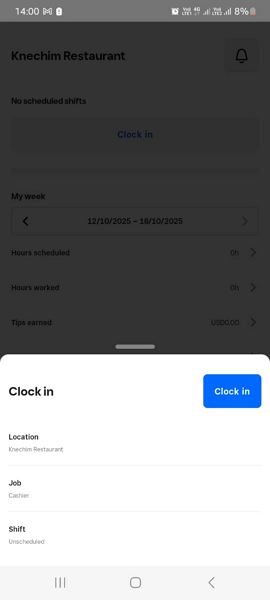
Additionally, both platforms let employees track time on mobile and POS apps, but Homebase takes it a step further with a time clock kiosk and a web-based timer. The kiosk mode is helpful in environments where POS or smartphones are unusable, such as remote outdoor events.
Regarding clock-in restrictions, both platforms use geofencing to prevent off-site punching. They also prevent early or unscheduled clock-ins and automatically clock out employees at the end of the shift. These features ensure employees receive pay for hours spent on the actual job, preventing payroll leakage that eats away at your profits.
Moreover, Homebase supports photo clock-ins to curb buddy punching. However, unlike top-tier time trackers like Jibble, managers have to manually check for buddy punchers, which can be tedious in large workforces.
Verdict: Homebase wins this category because it offers more clock-in options and stronger controls, including photo clock-ins, geofencing, and restrictions for early or unscheduled clock-ins. That makes it the better choice for businesses that need tighter oversight of employee hours and job-site attendance.
Employee scheduling — Winner: Tie
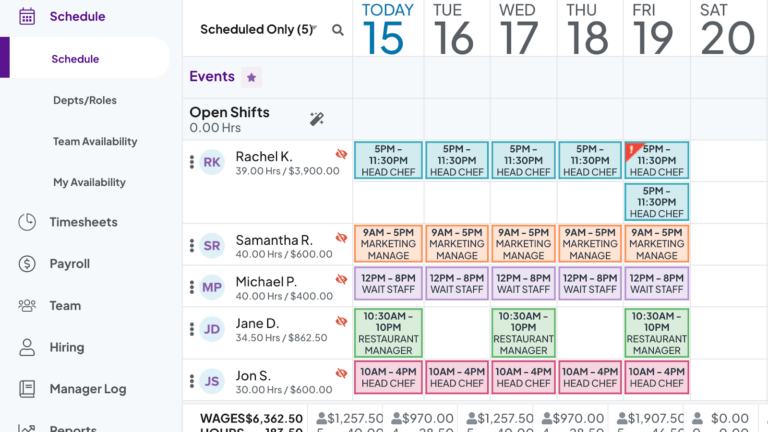
Homebase and Square are robust shift scheduling software for field and frontline staff. When we last tested the apps, creating schedules was straightforward due to their intuitive scheduling grid and drag-and-drop features. We also liked the option to let employees claim open shifts when they have time for extra work or swap shifts when life happens, reducing the admin load.
That said, I found one minor but critical difference that could sway your decision. With Square, you can schedule a job once and set it to recur on specific days of the week. This saves you time because you don’t have to manually schedule regular jobs such as deep cleaning, supply ordering, and inventory checks every week.
Homebase doesn’t offer a recurring shift feature. However, it lets you turn an entire schedule into a recurring template, saving time in the future.
That aside, Homebase has an auto-scheduler that analyzes sales forecasts, employee availability, and labor demand to create optimal schedules. It’s beneficial in industries where staffing levels fluctuate with service demand, like hospitality. Unfortunately, Square doesn’t provide a similar feature.
To make up for the missing features, Square supports 24/7 online booking, which is great for service businesses like salons, barber shops, and spas. This ensures you catch service requests you’d otherwise miss when your doors are closed. Moreover, Square’s integrated payment system enables customers to pay at the time of booking, improving your cash flow.
Verdict: Homebase and Square have the essential features you need to coordinate schedules and ensure smooth operations. Homebase should have taken the crown because of its solid auto-scheduler, but Square’s online booking ensured the category ended in a tie.
Payroll management — Winner: Tie
What I really liked is that payroll is baked right into Homebase and Square. As a result, you don’t have to import timesheets into third-party systems to streamline remuneration. Instead, you process payroll directly within the platforms, resulting in more accurate, faster payments.
Even better, both platforms automatically calculate and subtract deductions from every paycheck. They also file employer and employee taxes with the state and Internal Revenue Service (IRS), so you don’t have to do it on your own. We also found that both apps generate and file 1099-NEC for all contractors at the end of the year.
Beyond these similarities, Homebase allows employees to access $400 of their wages in advance. Earned wage access alleviates employees’ stress from unexpected expenses, leading to higher morale and productivity. Square, on the other hand, lets employees access their pay two calendar days early.
Verdict: Homebase and Square make payroll processing more accurate and efficient. My only gripe is that payroll is a paid add-on with both platforms. Homebase payroll costs $ 39 per month base fee + $6 per month per employee paid, and Square costs $35 per month base fee + $6 per month per employee paid.
Hiring and onboarding — Winner: Homebase
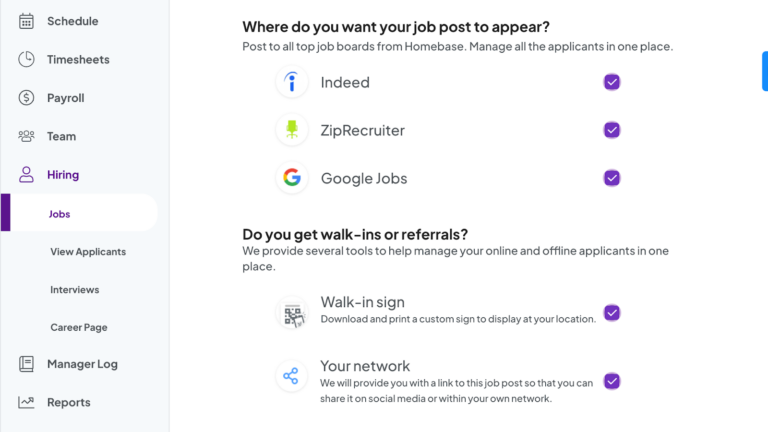
One thing I liked about Homebase is that it automates the entire hiring process, from posting job ads to onboarding. It lets you create job posts from scratch or use prewritten templates to speed up the process. You can then post the ad to popular job boards to reach a diverse pool of candidates. Our reviewer found that the posting process can be a bit frustrating, as Homebase requires you to re-enter your business information during posting, even though it’s already on file.
Homebase is also gradually integrating Artificial Intelligence (AI) into its hiring suite. As of writing, its AI allowed us to polish job posts and screen applicants to surface the best-fit candidates in seconds. The latter saves managers hours of manual screening, improving each candidate’s time-to-hire. Square, by contrast, doesn’t offer built-in recruiting features.
The difference aside, both platforms automate onboarding to improve the time-to-productivity of each hire. They let new hires upload onboarding documents and access company handbooks, safety protocols, and other training resources. Even so, Homebase allows employees to e-sign documents online, cutting days off the onboarding timeline, a perk you won’t get with Square.
Verdict: Homebase is the clear winner for hiring and onboarding because it includes built-in recruiting tools, job posting, applicant tracking, and e-signatures. Square can support basic onboarding, but it doesn’t offer the same hiring workflow, so businesses may need separate recruiting software.
Team communication — Winner: Square
Homebase and Square are a good fit if you need a built-in communication tool to keep your teams connected and engaged. The platforms stick to the mere basics, letting you start one-on-one and group conversations.
One benefit Square has over Homebase is that it lets employees use emojis in conversations. It also enables managers to send one-way messages, which is useful when making company-wide updates and announcements. However, Square doesn’t provide read receipts for one-way messages, so you can’t tell whether important updates reached the right people.

Unfortunately, neither Square nor Homebase supports audio and video messages. You can only share text messages, which can be inconvenient when talking is easier than typing long messages. Moreover, they don’t support threaded conversations to keep discussions organized, or @mentions to draw the attention of specific people in crowded group conversations.
Verdict: Square offers the more powerful communication suite, and it’s without a doubt the winner in this category. Even so, both apps look half-baked, especially compared to other workforce management software that offer robust communication features.
This Might Interest You
If communication is central to your team’s day-to-day work, Connecteam chat gives managers and employees more ways to stay organized. Teams can use channels, emojis, @mentions, and audio or video messages to keep conversations clearer and easier to follow.
HR and labor compliance — Winner: Homebase
Homebase and Square have built-in features that streamline compliance with local labor laws. I liked the flexibility to configure breaks and overtime to align with specific labor laws, whether state or federal Fair Labor Standards Act (FLSA) laws.
If your company doesn’t allow overtime, you’ll be better off using Homebase. This is because it alerts you when an employee is approaching overtime. The alerts prompt you to warn workers or even end their sessions so that you don’t incur overtime costs. Be sure to test the feature well, as our reviewer didn’t receive manager alerts when overtime happened. On the other hand, Square doesn’t have overtime alerts at all.
Homebase takes it a step further, providing regular updates about changes to labor laws. Doing so keeps you in the pulse of ever-changing compliance requirements. This way, you can tweak your policies and systems to comply with new rules, preventing unexpected surprises.
Verdict: While both platforms help you comply with labor laws, I have to give it to Homebase here because it lets you respond more quickly to evolving compliance requirements.
Employee happiness and perks — Winner: Homebase
Homebase lets you recognize employees and celebrate their milestones to keep them happy. It enables you to store employees’ birthdays, hire dates, and other important dates.
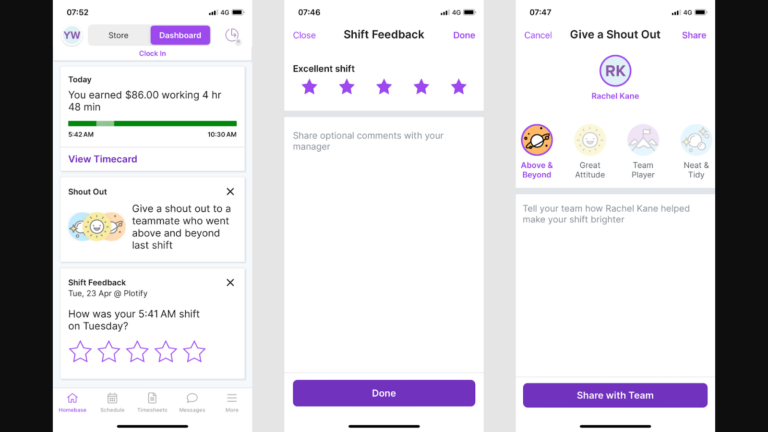
Recording important dates ensures you never miss a chance to celebrate an employee’s milestone, even if your workforce is in the hundreds. The seemingly simple gestures — like celebrating birthdays and anniversaries and recognizing good work — go a long way towards keeping everyone happy. Square doesn’t have reward and recognition features, which is a huge miss.
Verdict: Homebase is the clear winner here, but despite its functionality, Homebase only takes you so far when it comes to employee reward and recognition. It would have been helpful if it allowed businesses to reward employees with tangible gifts, such as redeemable gift cards.
Integrations — Winner: Square
Interestingly, Homebase and Square integrate natively. This means that if you already use Square POS, you can integrate it with Homebase to streamline scheduling, time tracking, and workforce management. Conversely, if you have implemented Homebase, you can integrate with Square to fill in its POS gaps.
Beyond that, Square integrates natively with a broader range of applications, including booking, scheduling, invoicing, inventory management, POS, and team management. It also supports Zapier integrations, allowing businesses to integrate it with virtually any app. Even better, it offers open APIs that let you customize and extend its functionality.
Homebase, by contrast, integrates natively with POS, payroll, accounting, and job board applications. Like Square, it supports both Zapier and API integration. The only minor issue is that its API is read-only. As a result, it only helps pull data from Homebase but doesn’t offer a way to push data in.
Verdict: Despite their seamless interoperability, Square wins because it has a better ecosystem of native integrations. This, combined with its open API, makes it appealing to businesses that often rely on a cluster of software to keep operations sailing.
User Ratings
Homebase and Square have impressive ratings on popular review sites like G2 Crowd and Capterra. This is a clear sign that most users are satisfied with each product. However, Square has separate reviews for its POS, appointment, and team management features because of its setup.
Homebase
- ⭐ 4.6/5 on Capterra (1,149 reviews)
- ⭐ 4.3/5 on G2 Crowd (516 reviews)
Square Point of Sale
- ⭐ 4.6/5 on Capterra (3,031 reviews)
- ⭐4.6/5 on G2 Crowd (1,208)
Square Payroll
- ⭐ 4.7/5 on Capterra (621 reviews)
- ⭐4.2/5 on G2 Crowd (31 reviews)
Square Team Management
- ⭐ 4.4/5 on Capterra (10 reviews)
- ⭐4.6/5 on G2 Crowd (4 reviews)
Security & Compliance
| Category | Homebase | Square |
|---|---|---|
| Data Encryption | ✅ TLS in transit/AES-256 at rest | ✅ SSL/TLS and PGP |
| GDPR Compliant | Aligns with PII protection principles | ✅ |
| HIPAA-Compliant | ❌ | ✅ For some services |
| Certification | ❌ None explicitly stated | PCI, SOC 2 Type 2, ISO 27001 |
| MFA | ✅ Two-step account verification | ✅ Two-step account verification |
| Admin controls | ✅ Role-based access control | ✅ Role-based access control |
| Hosting Region | US | US |
Both Homebase and Square implement solid data protection measures, including encryption and two-step account verification. However, Square has the edge because its security posture has been independently audited, earning SOC 2 Type II, ISO 27001, and PCI certifications.
Moreover, Square is HIPAA compliant, making it ideal for healthcare businesses in the United States. However, the vendor requires businesses subject to HIPAA to sign a Business Associate Agreement (BAA).
Setup and Onboarding
I liked Homebase’s clean and modern interface, which offers a smooth, beginner-friendly setup experience. Our testers needed only a few minutes to configure essential features and get their team up and running. Even better, the sidebar makes it easy to access key features such as payroll, scheduling, and time tracking, simplifying navigation.
Similarly, it’s pretty straightforward to set up Square, especially for small businesses with relatively simple staffing needs. But for companies with complex needs, such as multiple-location setups, complex pay rules, labor compliance, and tip pooling, setup takes longer. Luckily for employees, the Square Team management app is intuitive and easy to use.
Support and Customer Service
| Support Type | Homebase | Square |
|---|---|---|
| Live Chat | ✅ Business hours | ✅ Business hours |
| Phone Support | ✅ Business hours | ✅ Business hours |
| Email Support | ✅ | ✅ |
| Community forum | ❌ | ✅ |
| Help Center | ✅ | ✅ |
On paper, Square appears to offer better customer support with community support, an option you won’t find with Homebase. However, when I dug deeper into the performance of available channels, Homebase came out on top. Some users claim Square support is “mostly unavailable and otherwise completely unhelpful.”
Homebase’s only issue is that it offers tiered access to its support options. This means that live chat and phone support are available only on the Plus and All-in-one plans. As a result, users on Basic and Essential plans don’t have access to instant support. Other than that, users on premium plans describe its customer service as “always responsive.”
🏆 Who Wins: Homebase or Square?
Homebase wins our match-up, thanks to its advanced time tracking, auto-scheduler, and array of recruiting features. This doesn’t mean Square is unreliable. On the contrary, Square gives Homebase a run for its money across all categories and offers better team communication and integrations.
That said, finding your best fit shouldn’t come down to which software is superior. Instead, you should pick a software that truly aligns with your specific business’s needs and preferences.
👉 The verdict: If you already use a POS system and need an app to streamline scheduling, time tracking, payroll, and labor compliance, Homebase fits the bill. However, if you’re getting started and want an all-in-one platform to handle payments, sales, and staff management, then Square is the better fit.
Connecteam vs. Homebase vs. Square
As we found out, Homebase — the winner in our comparison — has its own flaws. So, while it outshines Square in key categories, it’s not a one-size-fits-all solution for all businesses. What if you could get a software that brings the best of both Homebase and Square, and adds many extras without breaking your bank?
Connecteam fits this profile very well. It features an intuitive design like Homebase, but tops it with an array of advanced tools to streamline workforce management. Some of its main advantages include:
Advanced break tracking
Like both Homebase and Square, Connecteam tracks paid and unpaid breaks, manually or automatically. However, Connecteam stands out for its strong ability to enforce break policies, ensuring unwavering compliance.
In some states, such as California, employers must provide a 30-minute meal break before the end of the fifth hour of a workday. Connecteam reminds employees to take their break at the stipulated time. Moreover, it prevents employees from ending their breaks before the mandated time has elapsed for compliance purposes.
Some state laws, like California labor laws, require a paid rest break and an unpaid meal break. In other words, the rest break contributes towards the timesheet, whereas the meal break doesn’t. Connecteam automatically classifies employee breaks, saving you the manual hassle, while ensuring compliance and payroll accuracy.
Fully compliant scheduling
Connecteam scheduling brings the best of both Homebase and Square. It combines an array of handy tools, including drag-and-drop functionality, recurring shifts, shift templates, and copy-shift tools. It also has an AI-powered auto-scheduler that assigns hundreds of shifts in minutes based on employees’ qualifications, availability, and preferences.
What sets it apart is the robust scheduling rules feature. With this feature, you can stipulate maximum hours, maximum shifts, and rest period between shifts. Using the automatic conflict detector, Connecteam ensures that each schedule adheres to the predefined scheduling rules. This is critical in industries with strict scheduling requirements, like healthcare, hospitality, and manufacturing.
And so much more
Beyond the features above, Connecteam offers other features you won’t find with Homebase or Square, including:
- Automated geofencing: In addition to preventing off-site punching, Connecteam’s geofencing clocks out employees at the end of the shift for accurate timesheets. Even better, it alerts you when an employee leaves their designated workplace. As a result, it suffices when location compliance is critical, as in the home care niche.
- AI-powered course creator: With Connecteam’s employee training app, you can create complete, multi-topic courses and training materials with only a simple AI prompt. Connecteam is also SCORM-compliant, which lets you add courses from third-party sources so you don’t have to build them from scratch.
| Connecteam | Homebase | Square | |
|---|---|---|---|
| Time tracking with GPS | ✅ | ✅ | ❌ |
| Geofencing | ✅ With automatic clock-out | ✅ | ❌ |
| Shift scheduling | ✅ | ✅ | ✅ |
| Open shifts and shift swapping | ✅ | ✅ | ✅ |
| Free plan | ✅ Up to 10 users | ✅ Up to 10 users, 1 location | ✅ Up to 5users, 1 location |
| 24/7 support | ✅ 24/7 live chat | ❌ Tiered, limited hours | ❌ Limited hours |
| Security | ✅ SOC 2, ISO 27001 | ❌ Not stated | ✅ SOC 2, ISO 27001 |
Beyond functional differences, Connecteam outshines both Homebase and Square in terms of affordability and scalability. I like its free plan, which lets small businesses with 10 employees access all features. Moreover, with Connecteam’s affordable user-based pricing model, you don’t have to pay more as your business expands to more locations.
Get started with Connecteam for free!
FAQs
Does Square use Homebase?
Yes, Square integrates seamlessly with Homebase, allowing you to extend its staff management capabilities.
Is Homebase actually free?
Yes, Homebase offers a free plan for single-location businesses with up to 10 employees. However, some advanced features, such as PTO management and auto-scheduling, aren’t available on the free plan.
How much does Homebase payroll cost?
Homebase payroll costs $39/month base fee + $6/month per employee paid.