


Getting training and onboarding right helps your team ramp up faster and avoid costly errors.
In this Connecteam vs. Trainual guide, I’ll compare both apps side by side on the features that actually matter, like course creation, onboarding workflows, progress tracking, and AI tools, so you can pick what fits your team.
A note about our method: All product comparisons and verdicts in this guide are based on hands-on testing by our expert team. Every screenshot was taken from real use during our evaluation.
At a Glance: Quick Summary
Connecteam is an all-in-one workforce management platform that lets you manage training and other HR workflows from a single app. Its training approach is built for deskless work: short lessons, clear checklists, and training that’s easy to complete on the go from a phone. It also includes AI tools that can speed up course creation and updates.
Trainual is more focused on training and SOP documentation. It’s a good fit if your main goal is to build a “how we do things” library and deliver consistent training, especially when you already have other HR or workforce tools in place.
Both platforms also offer AI tools to speed up course creation and updates.
Pricing and Plans
| Connecteam HR & Skills Hub | Trainual |
|---|---|
| Free plan Up to 10 employees All premium features Includes Operations & Communications Hubs | ❌ |
| Basic** $29/month for up to 30 users (+ $0.5 for each extra user)
| Core Contact vendor for pricing*
|
| Advanced $49/month for up to 30 users (+ $1.5 for each extra user) Everything in Basic, plus:
| Pro Contact the vendor for pricing Everything in Core, plus:
|
| Expert $99/month for up to 30 users (+ $3 for each extra user) Everything in Advanced, plus:
| Premium Contact the vendor for pricing Everything in Pro, plus:
|
| Enterprise Custom pricing Everything in Expert, plus:
| Enterprise Contact the vendor for pricing Everything in Premium, plus:
|
| * Trainual pricing starts at $249 per month for 10 seats. ** All prices show the monthly cost when billed annually as of December 2025. | |
Connecteam’s pricing is affordable and easy to scale, making it an appealing option for businesses of all sizes, especially if they want one app that does more than training.
It has a free plan for small businesses with up to 10 employees, giving them full premium access forever, including all training and onboarding tools.
On the paid side, Connecteam offers a 14-day free trial, so you can test features before committing. Even better, paid plans start at $29 per month for 30 employees, which is less than $1 per user.
Unlike Connecteam, Trainual doesn’t offer a free plan, and while it has a 7-day free trial, it’s not advertised on their main website and is easy to miss. When it comes to paid plans, costs can climb quickly, as pricing starts at $249/month for 10 seats (about $24.90 per user), which means that costs can climb quickly as your team grows. Trainual also requires all companies to buy implementation support, which adds a one-time $1,000 onboarding fee.
Pros and Cons
The following pros and cons provide a glimpse into the strengths and weaknesses of Connecteam and Trainual.
Connecteam Pros ✅
- AI-powered course creator and search
- Bite-sized training that’s easy to do on the go
Connecteam Cons ❌
- Native integrations are more limited compared to Trainual’s ecosystem
- Feature-richness may be overkill for businesses seeking a standalone training platform
Trainual Pros ✅
- AI-powered course creator and search
- In-app course translation
Trainual Cons ❌
- No free plan; pricing rises fast (plus a $1,000 implementation fee)
- Standalone training tool, so you’ll still need separate apps for scheduling, time tracking, and team communication
Use Cases
Connecteam and Trainual both have strong onboarding and training features, and it’s not surprising that their use cases somehow overlap. However, I found some subtle differences that make each suitable for specific functions:
Connecteam is best for:
- Onboarding for deskless workers and compliance paperwork: Connecteam’s mobile-first, bite-sized training makes it easy for deskless teams to complete onboarding and compliance tasks on the go, so they can get up to speed faster.
- Training plus day-to-day workforce tools: A good fit if you want training alongside scheduling, time tracking, communication, and other daily operations in one place.
Trainual is best for:
- Training for desk-based teams: A strong option when most employees have regular computer access, and you want training + documentation in one focused platform.
- Standard Operating Procedure (SOP) management: Helpful for building step-by-step processes, policies, and playbooks that stay consistent as you hire and scale.
Side-by-Side Feature Overview
Before we jump into the feature breakdown, it helps to know what you’re really comparing. These two tools aren’t trying to do the exact same job. Trainual is built mainly for training and SOPs, while Connecteam is designed to help you manage your workforce day to day, including onboarding and training. To keep this side-by-side fair, I’m only looking at onboarding and training features below.
Course creation — Winner: Tie
Both Connecteam and Trainual have intuitive course editors that make it easy to build training content. They allow you to add text and enrich content with videos, images, and more to make it more interesting and engaging, resulting in better completion rates.
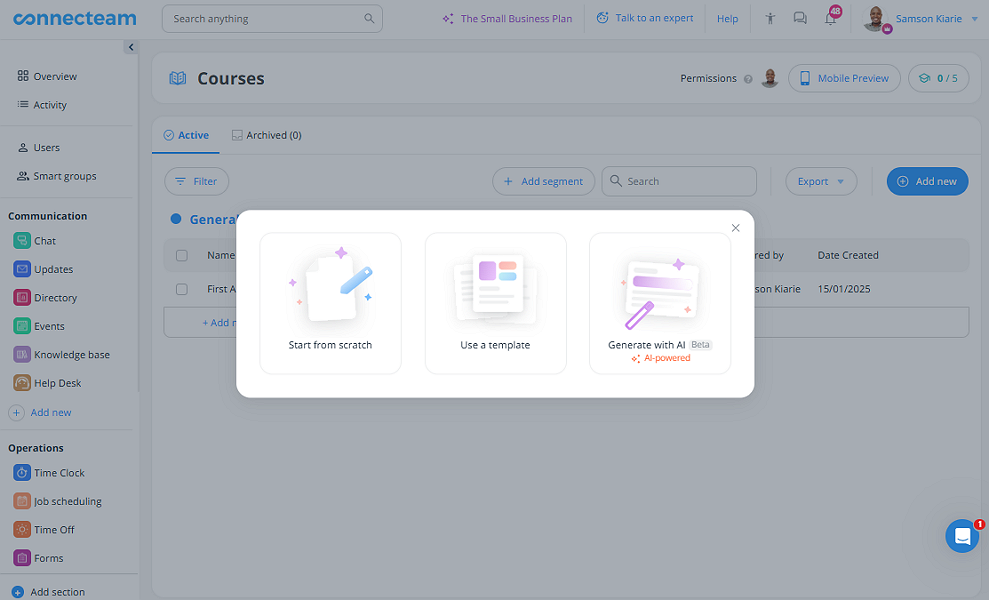
Both tools have AI course creators, but in my opinion, Connecteam’s is more powerful. It can generate complete, multi-section courses in seconds. This is helpful for companies looking to build end-to-end procedural courses and compliance training from scratch with minimal effort.
Trainual’s AI isn’t capable of creating complete courses. It can only flesh out the outlined bullet points, making it ideal for updating existing documents, policies, and SOPs.
On the other hand, Trainual has a slight edge because it includes a built-in screen recorder. It also allows you to map out processes using diagrams and flowcharts to easily explain complex flows and concepts. These features make Trainual ideal for creating focused training or standard operating procedures (SOPs).
Another perk is Trainual’s commenting and real-time collaboration. These features enable course creators to brainstorm and improve courses so that they meet standards and align with organizational needs.
Verdict: In my opinion, Trainual has a slight edge. Its screen recording, flowcharts, and collaboration tools make it better for building SOP-style training, while Connecteam stands out for fast AI-assisted course creation.
Onboarding and training management — Winner: Tie
Both platforms let you create step-by-step onboarding workflows, outlining the tasks and courses that new hires must complete. The intuitive workflows ensure new hires get a consistent and efficient onboarding experience. As a result, everyone receives the same essential knowledge and can start working quickly. That said, they have very different approaches to training.
Connecteam is built for deskless teams, so onboarding is designed to be quick, mobile, and always available. Employees can complete tasks and upload required documents right from their phones, without needing a computer. This makes it a strong fit for companies with employees who work in the field, such as those in construction, retail, manufacturing, hospitality, and healthcare.
With Trainual, new hires can complete training on smartphones, but can only upload documents through the desktop browser interface. This approach suits companies with knowledge workers who spend most of their work hours in front of a computer screen.
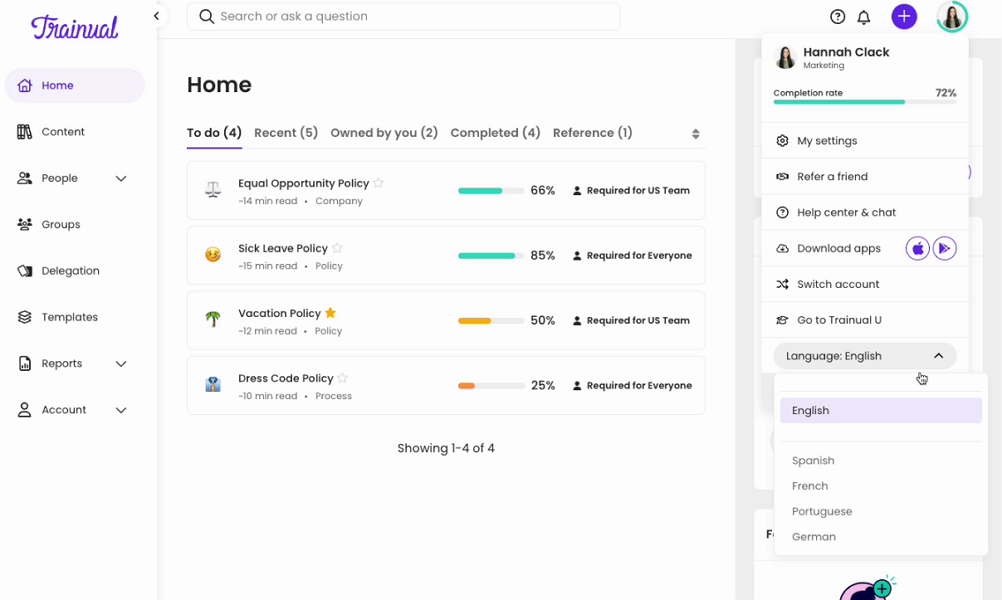
Beyond that, each platform has unique features that help improve learning effectiveness. Trainual lets users translate content into English, Spanish, German, French, or Portuguese to learn in a language they’re comfortable with. This isn’t the best selection of languages, but it gives Trainual a leg up on Connecteam, which lacks a similar feature.
Additionally, both platforms let you create role-based learning paths. Connecteam has an edge here with Smart Groups, which automatically update employees’ learning goals as their roles change. For example, if an employee is promoted, Connecteam automatically assigns relevant courses to them. In Trainual, admins must manually reassign content.
Verdict: Both platforms do a solid job with onboarding and training, but they shine in different ways. Trainual’s in-app translation is great for multilingual teams, while Connecteam’s Smart Groups make it easier to keep training aligned as roles change. Overall, it’s a tie in this category.
Training progress tracking — Winner: Connecteam
The best training platforms enable you not only to assign materials but also to track completion. Progress tracking is crucial when delays in completion can result in compliance violations, fines, or even business disruptions. Both Connecteam and Trainual check the right boxes, but each platform has different capabilities.
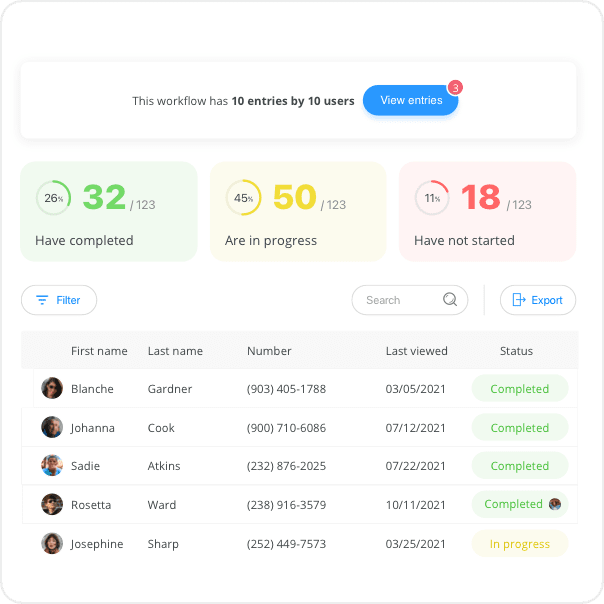
Connecteam’s centralized dashboard lets you track both overall and individual training progress. This makes it easy not only to see how the entire workforce is performing but also to spot users who are falling behind. You can also drill down into an in-depth breakdown of which sections a user has yet to complete. The insights ensure no one misses any section or time-sensitive course.
Trainual lets you track completion through progress bars with percentages. While these show where each employee stands, they don’t provide insights into which sections or parts they haven’t completed. As a result, you can’t give targeted coaching for individuals who are falling behind.
Verdict: Connecteam is the clear winner, thanks to its powerful course dashboard, which lets you drill down to the details that matter.
Document management — Winner: Connecteam
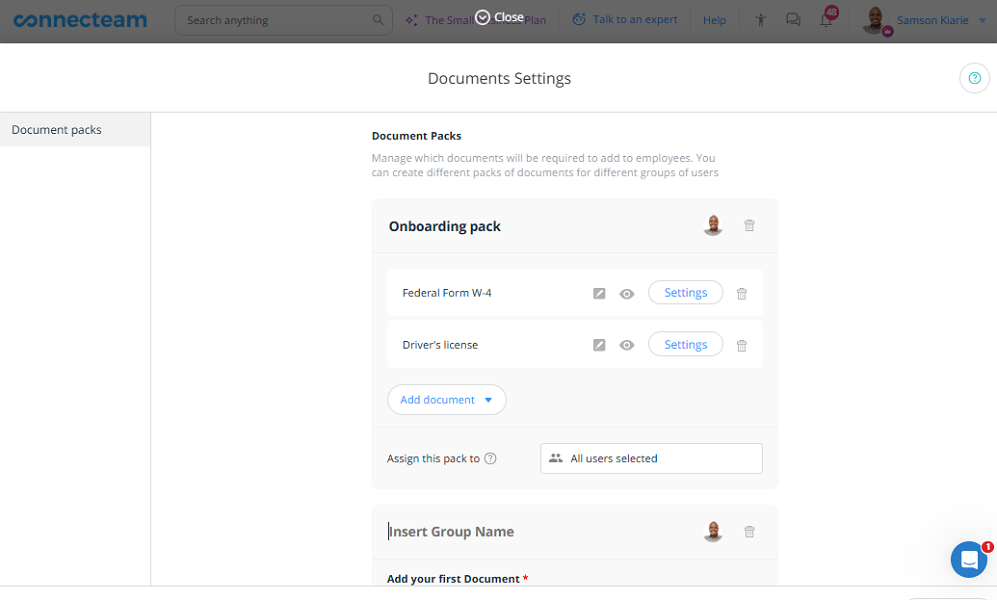
Besides onboarding and training management, Connecteam also helps you manage employee documents and certificates for compliance. You can set which documents or certificates every employee must upload as part of onboarding.
Once employees upload their certificates and other credentials, you can verify and approve them. Connecteam also lets you track expiry dates for documents that need to be renewed. This is particularly critical in industries where expired or fake credentials can result in fines or legal consequences.
One thing I like is that Connecteam lets you organize documents in packs. Think of packs like folders that allow you to bundle related documents in one place. They make it easier to store future documents and locate what you need without having to sift through clutter.
Connecteam constantly scans your document library for any certificates that are soon to expire. If it finds any, it reminds the employee via push notifications 30, 7, and 1 day before the expiration date.
In comparison, Trainual can store training documents, but it isn’t built for tracking documents for compliance purposes. If compliance docs matter, you’ll need a different system to manage them.
Verdict: Connecteam document management takes workforce compliance beyond regular training. It helps you ensure employees keep their certifications up-to-date, protecting your business from safety hazards, legal risks, and reputational damage.
Internal knowledge management — Winner: Trainual
Connecteam and Trainual both let you build a company knowledge base with onboarding and training materials, policies, procedures, troubleshooting guides, FAQs, and more. Creating knowledge base content in both is easy, whether you do it manually or with the help of AI. You can add texts and rich media to each material to make it engaging and effective for all users.
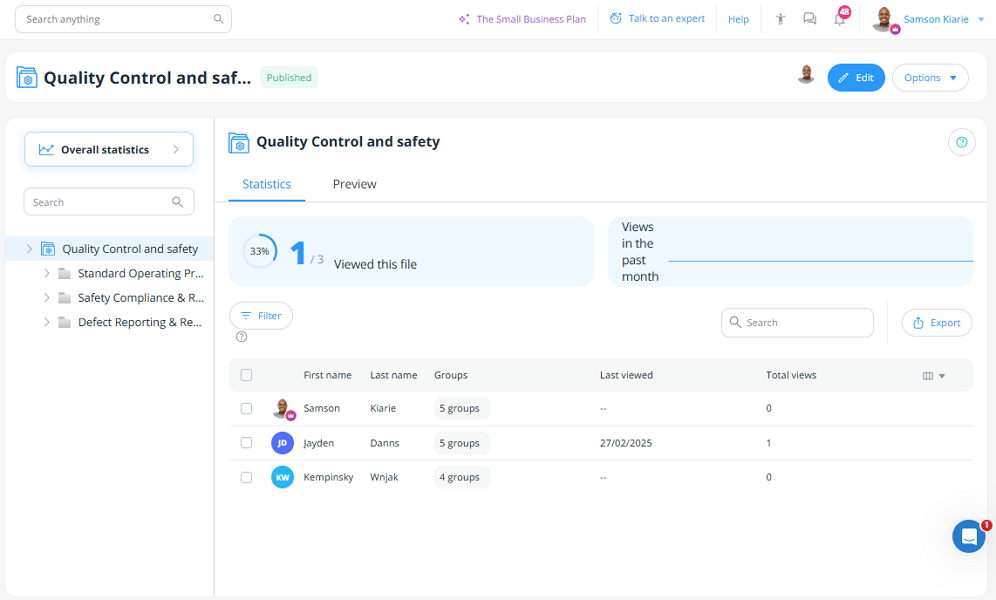
Even better, both platforms let you delegate content creation to subject matter experts. This ensures each resource is handled by people with the proper knowledge, making it accurate, credible, and trustworthy. Where Trainual pulls ahead is maintenance, as it allows you to set reminders that nudge subject matter experts to review content regularly, keeping it fresh and up-to-date.
The other difference is how each tool organizes information. Connecteam’s knowledge base lets you create designated sections for different departments or topics, each containing a well-organized folder hierarchy.
The folder system makes Connecteam ideal for organizing all company information, from policies and training materials to SOPs and how-tos.
Trainual, on the other hand, uses a subject-topic-steps approach, which is well-suited for employee handbooks, SOPs, or any other step-by-step resources.
Verdict: This is a close one. Both are strong for knowledge management, but Trainual gets the edge because it makes it easier to keep content reviewed and up to date.
Org chart and directory — Winner: Connecteam
An org chart provides a clear visual representation of the company’s roles and hierarchy, so employees know who to contact when they need something. It also helps managers plan for future hires, identify skills gaps, and balance workloads.
Both Connecteam and Trainual let you create comprehensive org charts, but Connecteam’s org chart maker gives you more control and flexibility, making it a better fit for fast-growing companies where hierarchies are constantly evolving.
To begin with, Connecteam lets you map workers not only by role but also by department. Besides showing who everyone reports to, departmental mapping enables you to pinpoint which team every employee belongs to. Trainual, by contrast, maps employees by role only, so it doesn’t show where each employee fits within the larger organization.
Additionally, Connecteam lets you adjust employees’ direct managers directly on the org chart. You only need to hover the cursor over a profile, click the three dots, and select “update direct manager.” In Trainual, you have to click “modify org chart” and scroll through the list to find the employee you want to modify, which can be time-consuming.
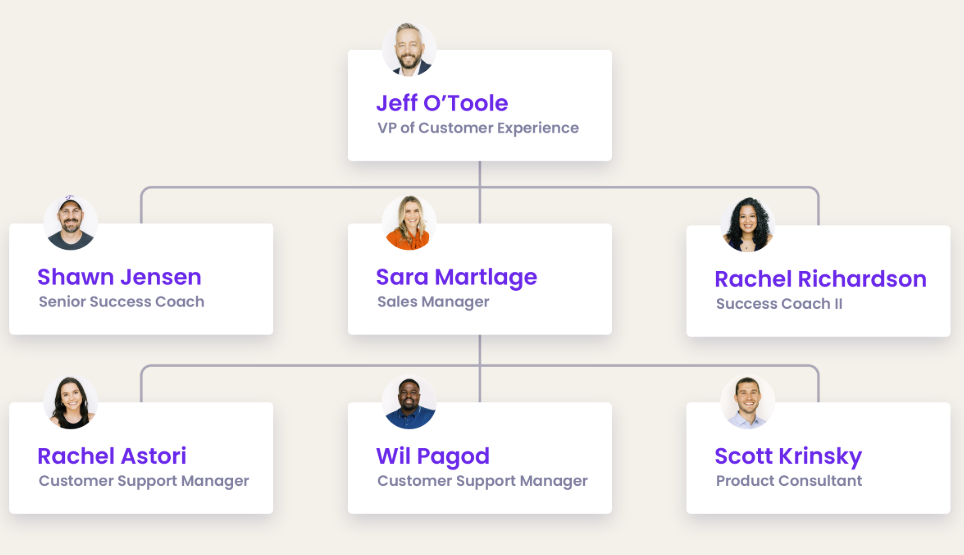
Finally, Trainual’s org chart is simply a visual diagram, while Connecteam’s version is a tool designed to improve communication and collaboration. For example, an employee can start a chat with their manager directly from the org chart. They only need to hover the cursor over the manager’s profile, click the three dots, and select “chat.”
Verdict: If you need an org chart, both Connecteam and Trainual check the right boxes. However, Connecteam has a slight edge, as it helps map employees by departments and start chats directly from the org chart.
Recognition and rewards — Winner: Connecteam
There’s no doubt that recognition and rewards fuel performance. One study found that 77.9% of employees are more productive when they are frequently recognized for their work. If you need an app to help you celebrate and reward workers for their performance and personal milestones, Connecteam’s reward and recognition fits the bill.
Connecteam lets you tailor recognition and rewards to your specific business needs. The platform has a large library of pre-made recognitions that let you celebrate and congratulate employees with only a few clicks. There are ready-made badges for team player, employee of the month, great leadership, kudos, and more.
You can also create personalized birthday and anniversary messages and configure Connecteam to automatically share them on an employee’s special day. Automation ensures that no employee is overlooked, even in large workforces.
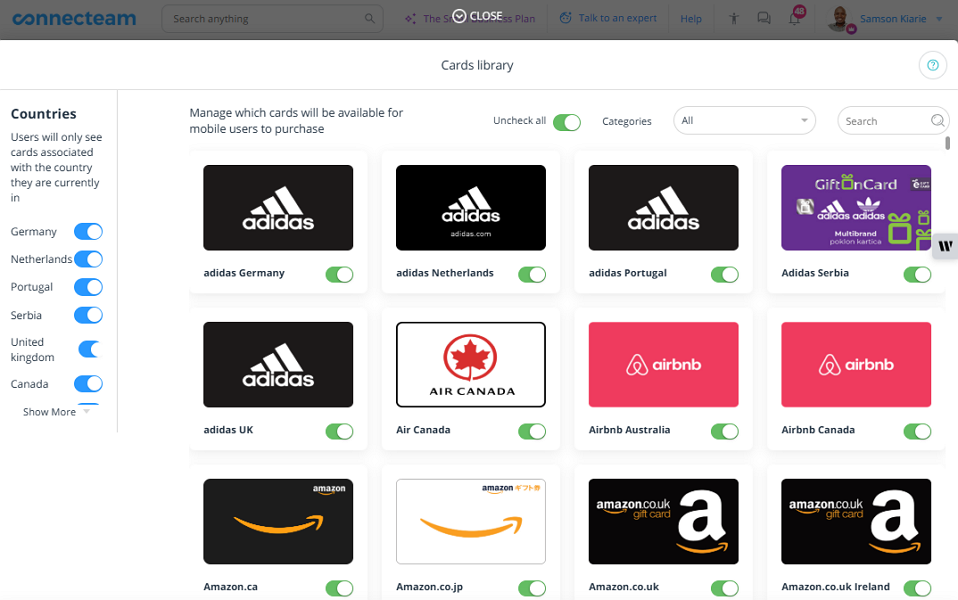
Even better, Connecteam lets you reward employees with tokens that they can turn into gift cards. What I really love is that employees can easily redeem these gift cards at popular outlets like Adidas, Apple, Amazon, and Airbnb. Redeemable tokens make rewards feel more tangible and are, hence, more effective at boosting employee morale.
Verdict: Connecteam is the clear winner because Trainual doesn’t offer a recognition and reward system.
Integrations — Winner: Trainual
When it comes to integrations, the number of software connections and the range of categories they cover are important factors. With that in mind, I found that Trainual has a slight edge over Connecteam.
As of writing, Trainual lists more native integrations than Connecteam, and its ecosystem spans more categories, including payroll, accounting, HRIS, communication, screen recording, and other workplace tools. Some of its integrations include:
- QuickBooks
- Gusto
- Paylocity
- Slack
- BamboHR
Connecteam, on the other hand, integrates mostly with POS, accounting, and payroll software. Some of its popular integrations include:
- ADP
- QuickBooks
- Xero
- Gusto
- BambooHR
Connecteam and Trainual support Zapier integration, which lets you connect both with many other tools in your tech stack. They also support API integrations, which help automate data flow between systems.
Verdict: Trainual takes the crown in this category simply because it has a broader set of native integrations across more types of tools.
User Ratings
Generally, both platforms have impressive ratings on popular review sites. On the surface, Trainual has slightly better ratings than Connecteam. However, remember that Connecteam was evaluated on multiple fronts, whereas Trainual was evaluated only on its training capabilities.
Connecteam
- ⭐ 4.6/5 on Capterra (4,688 reviews)
- ⭐ 4.6/5 on G2 Crowd (3,381 reviews)
Trainual
- ⭐ 4.8/5 on Capterra (497 reviews)
- ⭐4.7/5 on G2 Crowd (951 reviews)
*As of December 2025.
Security & Compliance
| Category | Connecteam | Trainual |
|---|---|---|
| Data Encryption | ✅ | ✅ |
| GDPR Compliant | ✅ | ✅ |
| HIPAA-Compliant | ✅ | ❌ |
| Certification | ✅ SOC 2 Type 2 ISO/IEC 27001 | SOC 2 Type 2 |
| MFA | ✅ | ✅ |
| Admin controls | ✅ Role-based access control | ✅ Role-based access control |
| Hosting Region | US / EU / Australia / Asia | US |
It’s clear from their security measures that neither Connecteam nor Trainual leaves data security and privacy to chance. Both provide best-in-class security to their users.
The big difference is HIPAA. Connecteam supports HIPAA compliance, while Trainual doesn’t. If you’re a US healthcare business (or you handle protected health information), that can be the deciding factor.
Setup and Onboarding
First-time users typically need less than 10 minutes to create a Connecteam account and set up the essential features. Additionally, Connecteam’s web and mobile interfaces are intuitive and user-friendly.
That said, because Connecteam covers a lot more than training, there can be a bit of a learning curve at first. The good news is that it comes with onboarding videos and guided tutorials to help you set things up.
Similarly, creating a Trainual account is also easy, but setting up the vital tools and settings isn’t that straightforward. Trainual provides a get-started guide with a list of setup tasks that you must complete to get your team up and running. The guide speeds up the setup process since you don’t have to switch between tabs to complete the configurations.
Support and Customer Service
| Support Type | Connecteam | Trainual |
|---|---|---|
| Live Chat | ✅ 24/7 | ✅ |
| Phone Support | ✅ | ❌ |
| Email Support | ✅ | ✅ |
| Community forum | ✅ | ❌ |
| Help Center | ✅ | ✅ |
When it comes to customer support, Connecteam has better options and faster response times. Whether you prefer learning from fellow users in the community forum or need instant answers through phone support, Connecteam has you covered. Even better, Connecteam’s live chat is available 24/7, so you can get help at any time, no matter where you are.
Trainual covers the core options (live chat, email, and a help center), but the support mix is more limited.
Both platforms offer paid onboarding support with a dedicated expert to guide your initial setup, but the pricing is very different. Trainual charges a one-time $1,000 implementation fee, while Connecteam’s paid support is $50 for 50 minutes.
🏆 Who Wins: Connecteam or Trainual?
If your team is mostly field, mobile, and frontline, Connecteam is the outright winner. Training is built for on-the-go work, so employees can complete onboarding and compliance training from their phones and at their own pace, without pulling everyone into a room.
Trainual isn’t built for mobile teams, and while employees can complete courses on their phones, some tasks (like document uploads) are easier in the web app. Where it shines is SOP-style training, with built-in screen recording, strong documentation tools, and a structured way to organize processes.
👉 The verdict: Pick Connecteam if you need employee onboarding, compliance training, scheduling, HR, PTO management, time tracking, and a location tracking tool to live together in one app. Pick Trainual if you need a stand-alone training platform to integrate with an existing human resource information system (HRIS).
Yes. Connecteam includes employee training plus workforce tools like time tracking, scheduling, PTO, and team communication, so you can manage training and day-to-day work in one app.
Yes. Connecteam is free for small teams of up to 10 employees through its Small Business plan, which includes access to all features on that plan.
Trainual says pricing starts at $249 per month for 10 seats when billed annually. Additional costs may apply, including a one-time $1,000 implementation fee.
Yes. Connecteam has a free plan for up to 10 users, and it also offers a free trial for paid plans. The free plan is a common starting point for very small teams testing onboarding and training.
Trainual does not offer a free plan. It does offer a 7-day free trial, but it is easiest to find during signup. Paid plans start at $249 per month for 10 seats, and there is a required one-time $1,000 implementation fee.
Connecteam is designed for quick, practical workflows, especially for deskless teams. It works well when you want training to live alongside daily tools like scheduling and communication, so employees do not have to jump between apps.
Trainual is easiest when your training is SOP-driven and you want a structured place to document and assign processes. It works well for teams that spend more time at a computer and want training tied closely to documentation.
Yes. Connecteam is an established platform with standard security protections like encryption and admin controls. It also lists formal security certifications, which can matter for regulated industries.
Yes. Trainual is an established platform with standard security measures and a SOC 2 Type 2 certification. It is designed for training and documentation and is commonly used by SMBs.
No, Trainual doesn’t offer employee tracking features. It focuses solely on streamlining onboarding and training processes.