


Time tracking sounds simple until it hits payroll. When hours are off, you waste time fixing timesheets, chasing missing time logs, and dealing with frustrated workers who just want to get paid.
A good time tracking app should help you pay people correctly, keep records clean, and lower compliance risk.
Connecteam and Toggl Track both track time well, but they’re built for different types of teams. Choosing between them isn’t just about the timer, especially if you manage deskless workers.
It’s about finding a tool that matches how your business runs day to day, helps you stay compliant without piling on extra admin work, and supports real-world needs like breaks, overtime, and efficient scheduling.
In this Connecteam vs. Toggl Track guide, I’ll show you what each app does well, where each falls short, and which is the better fit for your day-to-day.
At a Glance: Quick Summary
Connecteam is an all-in-one workforce management software that simplifies critical aspects of deskless teams management. It helps you track time, schedule shifts, track field staff’s real-time locations during work hours, manage time off, and more. Besides being incredibly feature-rich, Connecteam is also affordable. It gives small businesses the scalability and flexibility to grow operations without breaking the bank.
Toggl Track, on the other hand, focuses on automating time tracking and project management for individuals and small teams. It’s especially helpful if you want to track billable hours and monitor the status of client projects. I found it useful for agencies, design teams, consultants, and other office workers. Learn more in our full Toggl Track review.
Pricing and Plans
| Connecteam | Toggl Track |
|---|---|
Free plan
| Free plan
|
| Basic $29/month for up to 30 users** and $0.80 for each additional user
| Starter $9/user/month Everything in Free, plus:
|
| Advanced $49/month for up to 30 users and $2.5 for each additional user Everything in Basic, plus
| Premium $18/user/month Everything in Starter, plus:
|
| Expert $99/month for up to 30 users and $4.2 for each additional user Everything in Advanced, plus:
| |
| Enterprise Custom pricing Everything in Expert, plus:
| Enterprise Custom pricing Everything in Premium, plus:
|
| * All prices show the monthly cost when billed annually as of December 2025.** That’s $0.96/user/month if you take advantage of all 30 users in the plan. | |
Connecteam and Toggl Track have both structured their pricing with small businesses in mind. But while both offer a free plan, Connecteam’s free plan packs far more essential features. It also has a higher user limit, supporting up to 10 employees. Toggl Track’s free plan only has time tracking for teams of up to 5 employees.
For larger teams on paid plans, Connecteam offers a 14-day free trial, whereas Toggl Track’s free trial lasts 30 days. In both cases, you don’t need a credit card to start the trial.
For paid users, Connecteam is more affordable and highly scalable, thanks to its hybrid pricing model (tiered plans and per-user add-ons). The Basic plan costs $29 per month for up to 30 employees. Since you only start paying after 10 users, a team of 11 works out to $2.64 per user, or under $1 per user for a team of 30. When you outgrow the user cap, you can add extra users to the existing plan without the need to upgrade.
Toggl Track’s pricing model is purely user-based, which gives you the flexibility to buy only the seats you need. However, its most affordable plan costs $9 per user per month, which can add up quickly as your team grows.
Pros and Cons
The following pros and cons should give you a sneak peek into the strengths and weaknesses of each app:
Connecteam Pros ✅
- Budget-friendly, all-in-one workforce management software
- Advanced scheduling and time tracking features for compliance with labor laws
Connecteam Cons ❌
- The number of features can make the learning curve steeper for new users
- Integrates with payroll and accounting tools, but the list is more limited than some competitors
Toggl Track Pros ✅
- Easy-to-use time tracking for office-based teams
- Functional offline mode
Toggl Track Cons ❌
- Limited tools for break/overtime rules and other labor compliance needs
- No scheduling or time-off management
Use Cases
Connecteam and Toggl Track work best for different use cases:
Connecteam is best for:
- Accurate, compliant time tracking: Connecteam’s easy-to-use mobile app, with powerful geofencing and GPS tracking features, helps field teams accurately track time, including breaks and overtime, in compliance with labor laws.
- Advanced workforce scheduling: Connecteam gives you the advanced tools you need to manage complex shift schedules while reducing compliance risk.
Toggl Track is best for:
- Project time tracking: Toggl Track offers the essential time tracking features freelancers and office teams need to track time by project.
- Basic invoicing: Toggl Track also comes with a built-in invoicing feature, which lets you turn timesheets into invoices with ease. However, it doesn’t support billing project expenses, which some teams need.
Side-by-Side Feature Overview
Connecteam and Toggl Track have more differences than similarities. Perhaps the most striking difference is the number of features each has. Connecteam is feature-packed and covers many uses, while Toggl Track is focused on time and project tracking and has a more limited feature set. Below, I’ll unpack their real differences to help you decide which app is right for your business.
Time tracking — Winner: Connecteam
Connecteam and Toggl Track are made for different users, and it’s not surprising that their time tracking options differ significantly.
Connecteam is built for frontline teams, like nurses, cleaners, and service techs, so time tracking is designed around how field work actually happens. Its iOS and Android apps are easy to use, and they let employees clock in and out from anywhere they’re working.
Connecteam also has a web app for managers and office staff, which is handy when you want to handle admin tasks, like schedules and approvals, on a larger screen. There’s also a kiosk app, so multiple employees can clock in and out on a shared device.
Toggl Track lets employees track time on web, mobile, and desktop apps, plus via a browser extension. It also has a Pomodoro timer in its mobile and desktop apps, which is useful for workers looking to boost focus and productivity.
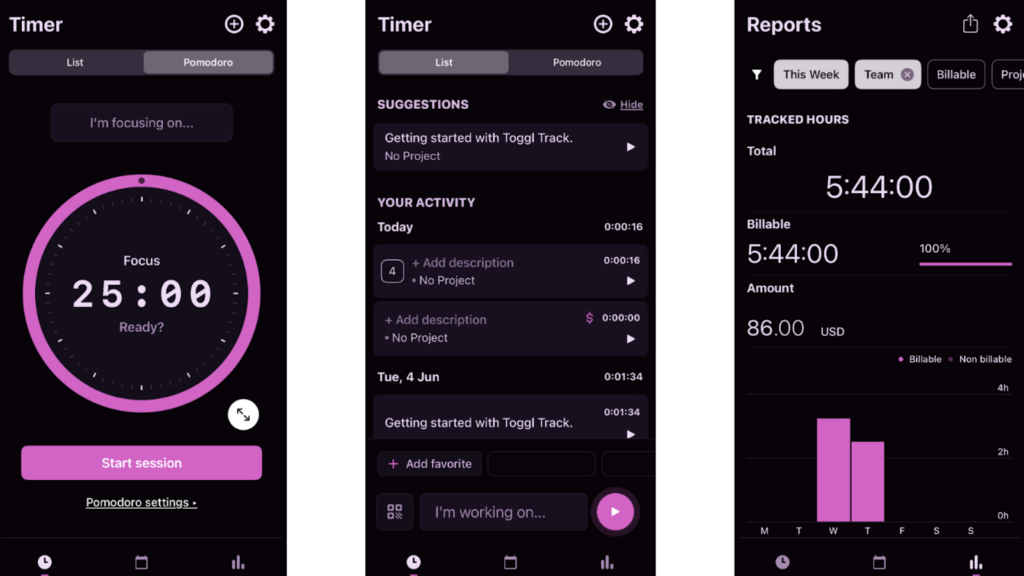
While tracking time with both apps was effortless during testing, Connecteam has a slight edge for two reasons. One, it reminds employees to start their shifts and has an auto-clock-out feature, so you don’t depend on employees remembering to click a button to keep timesheets accurate. Toggl Track doesn’t have reminders. Forgetful users can miss sessions, leading to inaccurate timesheets.
Two, setting up a timesheet approval workflow and delegating approval duties is simpler with Connecteam. While Toggl Track has an option to set up an approval workflow, you have to set up each user individually, which can be time-consuming.
Verdict: Connecteam and Toggl Track have designed their time trackers for the unique needs of the industries they serve, but Connecteam has a slight edge because of its time-tracking reminders and easier approvals.
Break and overtime tracking — Winner: Connecteam
Besides tracking employee regular work hours, Connecteam tracks both break and overtime in full compliance with laws, regulations, and company policies. Whether you’re in California, Oregon, or Australia, you can customize tracking to comply with all relevant labor laws.
What I really love is the ability to enforce manual breaks. Connecteam lets you set break reminders that nudge employees to take breaks on time. It also prevents employees from taking extended breaks or returning early from breaks, helping you comply with labor laws. What’s more? You can use Connecteam’s Digital Forms and Checklists to collect break attestations (a simple employee confirmation that a break was taken).
Connecteam tracks even the most complex overtime, like holiday and seventh-day overtime. It also calculates overtime pay automatically based on the preconfigured rates, saving you hours of manual work.
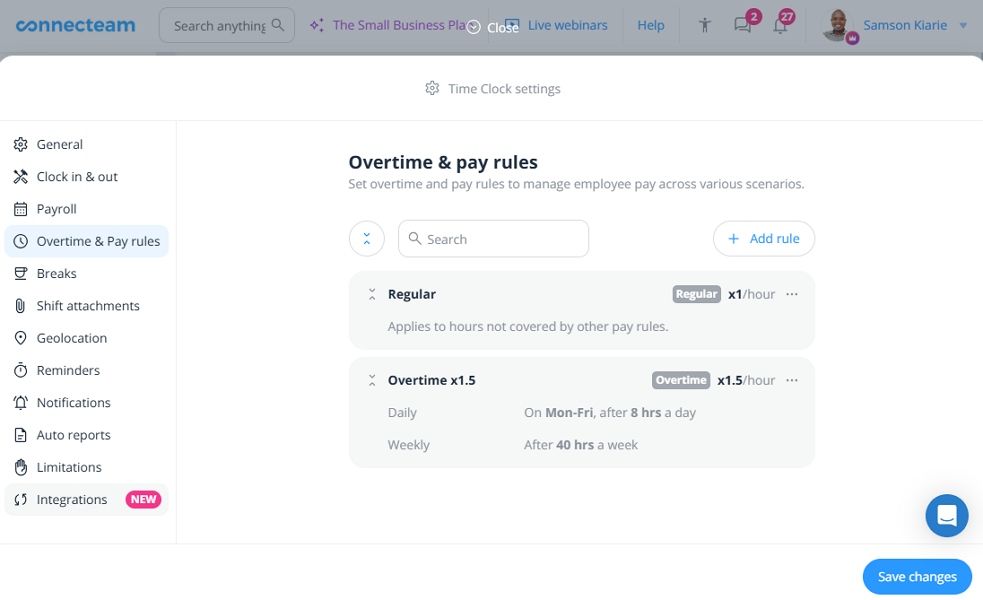
Toggl Track tracks regular hours only, not breaks or overtime. This isn’t necessarily a flaw, as the app is geared towards knowledge workers, who are generally salaried and exempt. (The Fair Labor Standards Act (FLSA) doesn’t require overtime or breaks tracking for many salaried employees as it does for hourly workers.)
Verdict: Connecteam is the undisputed winner because it supports break and overtime tracking. It’s the ideal choice if you want to track employee time in full compliance with labor laws, like California overtime rules and the federal FLSA.
Geofencing — Winner: Connecteam
This is another area where Connecteam shines for deskless teams. Connecteam lets you set a geofence (a virtual boundary) around job sites, like your office, construction site, or restaurant. The geofence ensures employees clock in only when at the right site. This way, you only compensate employees for time spent on the actual job, not running personal errands.
Even better, if an employee leaves the job site without authorization, Connecteam clocks them out automatically and notifies you immediately. This feature is very useful for jobs with strict location rules. For example, it helps ensure a field nurse stays with a patient for accurate billing and compliance.
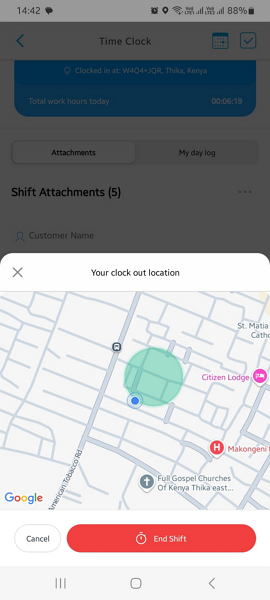
Connecteam also automatically records employee punch-in/out locations. Doing so helps you confirm that employees were actually on-site when they clocked in/out. Besides helping reduce time theft, this lets you monitor attendance issues like late arrivals or early departures.
In contrast, Toggl Track doesn’t support geofencing or GPS time tracking. Again, this isn’t necessarily a downside. Toggl Track is designed for desk workers who usually work in one place, so verifying physical location isn’t necessary.
Verdict: Connecteam’s powerful GPS and geofencing tools make it the best fit for companies with field and mobile workforces. Besides preventing time theft, these features help tie work hours to specific projects and locations, improving billing accuracy and labor cost management.
Employee scheduling — Winner: Connecteam
When it comes to shift scheduling, Connecteam leaves nothing to chance. It provides many smart, time-saving tools that help you build schedules faster, with fewer mistakes.
Before you can even create your first schedule, Connecteam asks you to define scheduling rules. You can set limits on shift length, the number of shifts in a pay period, and rest periods between shifts to align schedules with specific industry requirements. For example, you can set gaps between shifts to prevent “clopening” (closing late and opening early the next morning), which is restricted or limited in various industries.
With the rules in place, creating compliant schedules is a breeze. Connecteam makes it easy with tools like drag-and-drop functionality, shift templates, recurring shifts, and shift copying. You can also allow employees to claim open shifts or find replacements on their own, reducing your admin load.
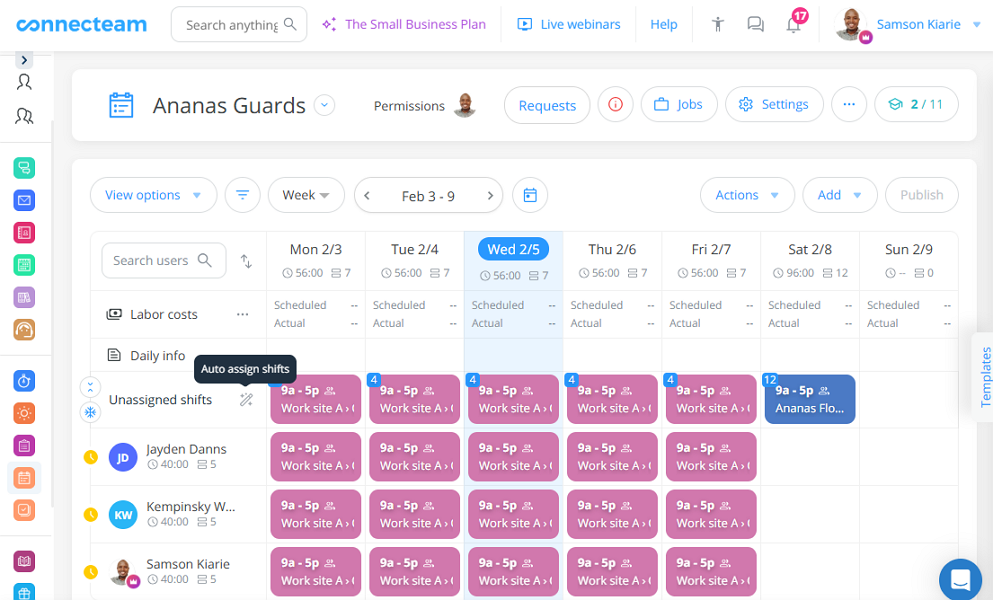
Even better, you can use Connecteam’s AI-powered Auto-Scheduler to automatically assign hundreds of shifts in minutes. I really like the auto-scheduler’s ability to assign shifts based on employee qualifications. This is very useful for any industry where shift coverage needs the right mix of skills, like healthcare, construction, or even security.
Connecteam’s automatic conflict detector checks every schedule against your rules. It flags issues like shifts that go over hourly limits or overlapping shifts, helping you fix problems before hitting publish.
Unfortunately, Toggl Track doesn’t have built-in scheduling functionality.
Verdict: Connecteam’s scheduling module takes the crown in this category. It has all the tools to make sure your frontline, field, or mobile employees are where they need to be at the right time.
Project and task management — Winner: Connecteam
Both Connecteam and Toggl Track simplify project and task management, but they take different approaches. Connecteam lets you create jobs and break them into sub-jobs, which helps delegate work and responsibilities. You can link jobs or sub-jobs to shifts and assign them to crew members, which is helpful for team-based field work.
For example, a construction company can create a project called “Client A remodelling” and break it into sub-jobs like site preparation, structural framing, flooring, plumbing, HVAC, and electrical wiring. Each job can include an address and detailed instructions, so crews know what’s expected.

Additionally, Connecteam task management features let you manage quick tasks, like logging site arrival, uploading a quick progress photo, or recording materials delivered. Its centralized dashboard makes it easy to see where each task stands. If a task is falling behind, you can send a reminder with the click of a button to nudge employees to prioritize it.
Toggl Track also lets you create projects and break them into tasks. During testing, I loved the recurring project tool, which simplifies the management of regular projects. What’s more? You can track estimated versus actual hours to monitor how long a task takes and track profitability. Each project is linked to a specific client to simplify billing.
Verdict: Connecteam and Toggl Track both perform well in their focus areas. Even so, Connecteam’s strong job and task management tools give it the upper hand.
GPS Location tracking — Winner: Connecteam
Toggl Track doesn’t have location tracking features, simply because it’s geared towards office-based employees. Connecteam, on the other hand, is made for field and mobile teams and has strong real-time location tracking capabilities.
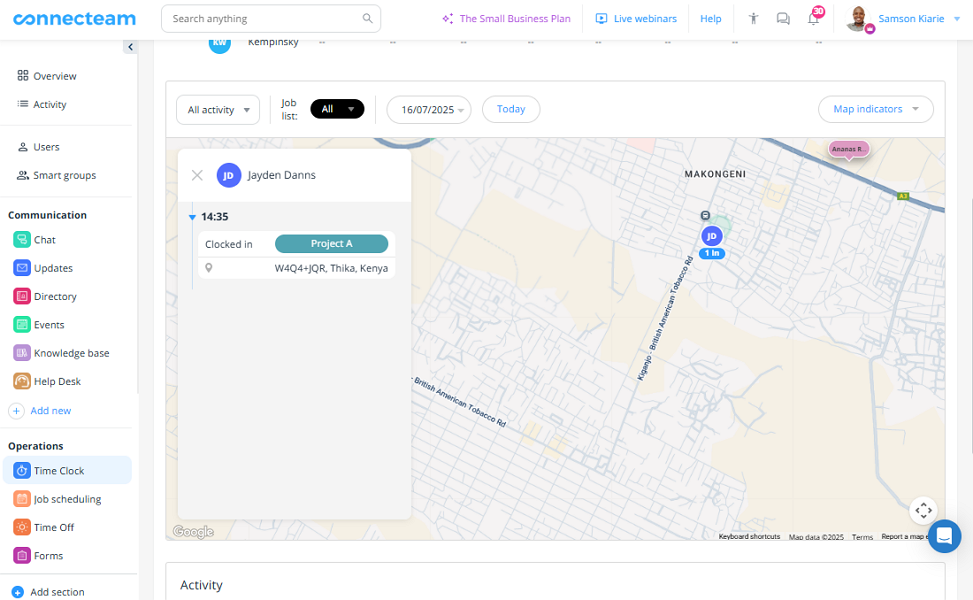
Connecteam is an essential tool if you want to monitor field activities from the comfort of your office. When you open the map, you can see whether security guards are patrolling the assigned zone or a landscaping crew has arrived at the client’s address. You can also track a field technician’s movements in real time and give clients accurate expected arrival times.
Even better, Connecteam provides a turn-by-turn route history and “breadcrumbs” (a record of stops along a route), which helps you see the places a delivery driver, sales representative, and other mobile employees visited during the day. You can also estimate how much time they spent at each place.
Verdict: Connecteam is the outright winner in this category. Its powerful location tracking tools make it a must-have app for businesses that want to stay on top of field employees’ locations and activities.
Paid time-off (PTO) management — Winner: Connecteam
This is yet another area where Toggl Track falls short as Connecteam shines. Toggl Track doesn’t include PTO management. Connecteam does, and it lets you set policies based on how your company handles time off. It supports both accrual and lump-sum PTO models, giving you the flexibility to match your diverse workforce needs.
I also love how Connecteam’s Smart Groups feature simplifies PTO assignment. When you assign a PTO policy to a smart group — a department, team, or location — every new hire added to that smart group will inherit the PTO rules. This saves you the manual hassle of having to assign PTO rules to new hires manually.
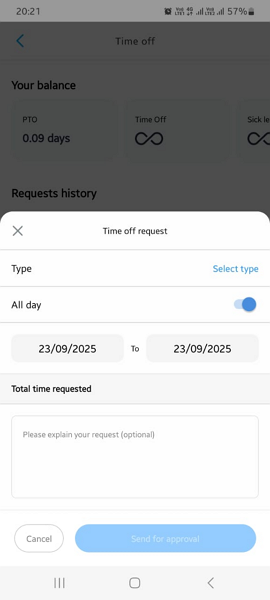
Connecteam also has a blackout days feature, which lets you restrict time-offs when you need maximum availability. I’ve found it particularly helpful in industries like hospitality and retail where demand spikes seasonally.
You can also require advance notice for time-off requests. Doing so gives you enough lead time to review requests and adjust schedules to prevent last-minute surprises.
Verdict: Connecteam enables you to keep your workforce well-rested and motivated with fair and transparent time-off management. Advanced controls like blackout dates and minimum leave notice enable you to control requests to ensure coverage at all times.
Invoicing — Winner: Toggl Track
When it comes to invoicing, Toggl Track has an advantage over Connecteam. It has built-in invoicing features, a perk you won’t find with Connecteam. That said, its invoicing feature feels limited compared to dedicated invoicing software. For example, it doesn’t let you bill clients for project expenses.
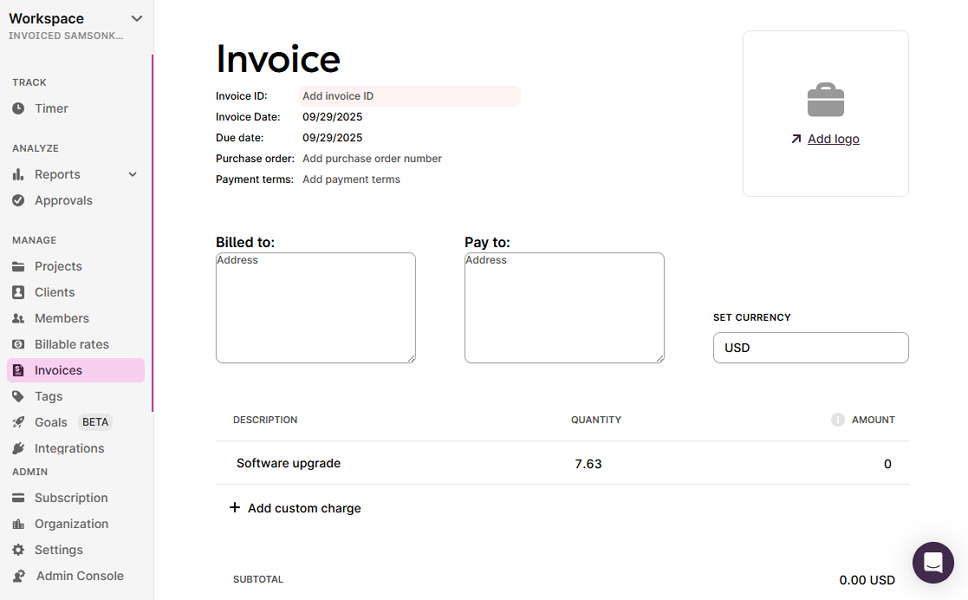
Still, I like the ease with which Toggl Track lets users turn billable hours into invoices with a few clicks. The invoices have limited customization options, but you can add your brand’s logo to give them a professional look.
Verdict: Toggl Track takes the crown in this category, even though its invoicing module looks simplistic.
User Ratings
Both Connecteam and Toggl Track boast impressive online ratings on popular software review sites. This reflects high customer satisfaction with their features:
Connecteam
- ⭐ 4.6/5 on Capterra (4,698 reviews)
- ⭐ 4.6/5 on G2 Crowd (3,393 reviews)
Toggl Track
- ⭐ 4.7/5 on Capterra (2,578 reviews)
- ⭐4.6/5 on G2 Crowd (1,638 reviews)
* Reviews were last checked in December 2025.
Security & Compliance
| Category | Connecteam | Toggl Track |
|---|---|---|
| Data Encryption | ✅ | ✅ |
| GDPR Compliant | ✅ | ✅ |
| HIPAA-Compliant | ✅ | ❌ |
| Certification | SOC 2 Type 2 ISO/IEC 27001 | ISO/IEC 27001 |
| 2FA | ✅ | ✅ |
| Admin controls | ✅ Role-based access | ✅ Role-based access |
| Hosting Region | US / EU / Australia / Asia | EU |
Connecteam and Toggl Track implement the strictest security and privacy measures. This, coupled with the fact that both providers have never had any data breach or security incident, should give you confidence that user data is safe in their hands.
That said, Connecteam has a slight edge thanks to its SOC 2 Type 2 certification and HIPAA compliance. The latter is particularly vital for healthcare entities in the United States looking to operate in full compliance.
Setup and Onboarding
Creating a Connecteam account and setting up the essential features is child’s play. First-time users usually need less than 10 minutes to complete this process. Connecteam does include a lot of features that can feel overwhelming at first. Thankfully, it offers onboarding videos and guided tutorials to help new users.
I found it quite easy to set up a Toggl Track account. Its more limited feature set, coupled with the intuitive interfaces, simplifies onboarding for new users. I did find some weird functional choices that take away from the overall usability. For example, Toggl Track requires employees to manually submit their timesheets.
Support and Customer Service
| Support Type | Connecteam | Toggl Track |
|---|---|---|
| Live Chat | ✅ 24/7 | ✅ |
| Phone Support | ✅ | ❌ |
| Email Support | ✅ | ❌ |
| Community forum | ✅ | ✅ |
| Help Center | ✅ | ✅ |
Connecteam offers a better support experience than Toggl Track. First, thanks to its 24/7 live chat, users get instant replies regardless of their time zones. Compare this with Toggl Track, which responds to live chat queries within 4 hours.
What’s more, Connecteam has a paid support option called Connecteam Pros. With this option, the company pairs you with a setup and onboarding partner to handle the initial configuration process. This helps you make the most out of every feature right from the first day.
🏆 Who Wins: Connecteam or Toggl Track?
| Choose Connecteam if you… | Choose Toggl Track if you… |
|---|---|
| Have a deskless workforceNeed to comply with various labor lawsNeed scheduling and payroll | Have a desk-based workforceNeed to track time spent on projectsWant built-in invoicing |
| Learn more about Connecteam | Read our in-depth Toggl Track review |
These tools are built for different teams, so the “winner” depends on your work environment.
Toggl Track is a strong fit for desk teams. It tracks billable time accurately and attributes it to the right project and client. Doing so simplifies billing and cost tracking, but its functionality feels limited compared to industry leaders like Hubstaff and Harvest. It lacks tools that I think are vital, such as time-off management and expense tracking.
If you manage field, mobile, and frontline teams, Connecteam wins hands down. It’s built for deskless teams that need more than a timer. It automates job scheduling, time-off management, real-time location tracking, team communication, and more, all in compliance with labor laws.
The icing on the cake is Connecteam’s affordability. The free-for-life Small Business Plan lets small businesses with up to 10 employees access all features completely free, forever. Even better, paid plans are much more affordable than Toggl Track.
👉 The verdict: Pick Toggl Track if you want to track time for desk employees who work from a fixed location. But if you want an app that can do more than track time, Connecteam checks all the boxes. Beyond tracking time, Connecteam can schedule crew, track real-time location, and streamline team communication, to name a few functions.
Join Connecteam — A Better Way to Track Time
Clock In for a Free TrialYes, Connecteam is 100% free for small businesses with up to 10 employees. The Small Business plan lets you use essential workforce management features, including time tracking, scheduling, and location tracking.
Yes, Toggl Track lets you use basic time tracking features for free. However, the free plan is only suitable for small teams with up to five employees.
Connecteam is the best free app to track work hours for field, frontline, and mobile employees. With its geofencing, break tracker, and overtime tracker, it lets you track accurately and in full compliance with labor laws.
Connecteam supports compliance with tools like break tracking, overtime rules, approvals, and audit-friendly time records. You still need to set policies correctly and follow local labor laws, since compliance depends on your settings and location.
Connecteam integrates with select payroll providers and also supports exporting timesheets for payroll processing. Whether the sync is automatic depends on the payroll provider and your setup.
Yes. Connecteam follows strong, industry-standard security practices to protect your data, including encryption, role-based access, and 2FA. It’s a leading platform used by businesses all over the world to run time tracking and operations.
Yes, absolutely. Connecteam is designed for workers on the go, so it’s very easy to clock in and out on a phone (iOS and Android). Managers can handle schedules and approvals on web or mobile. It also offers onboarding resources to help you get set up quickly, plus optional setup support.
Connecteam plays well with the tools you already use. It connects with popular payroll and accounting systems, so you can move approved timesheets into payroll with less manual work. If you need more flexibility, you can also export reports, use automations, and (on higher tiers) connect via API.
Connecteam can reduce time theft with tools like GPS, geofencing, kiosk mode, and approval workflows. These controls help tie clock-ins to the right place and time.
Toggl Track helps you keep clean time records, but it is mainly built for project and billable time tracking. If you need strict break, overtime, or job-site rules, you may need extra processes or another tool. Compliance depends on your policies and local laws.
Toggl Track offers integrations through apps and extensions, including calendar and workflow tools. The exact options vary by plan and platform, so check the current integrations list for what you need.
Toggl Track is a well-known time tracking product and includes standard security protections like encryption and access controls. If security is a deciding factor, verify the latest certifications, data handling details, and hosting regions in their security documentation.
No. Toggl Track doesn’t integrate directly with payroll. If you need payroll, you usually manually export time reports and upload them to your payroll provider, or use a third-party connector.
Yes. Toggl Track is simple day to day because it’s a narrow tool. It mainly tracks time and projects, so there isn’t much to set up or manage. That’s fine if you only need a timer and basic project tracking, but it won’t cover broader workforce needs.
It doesn’t. Toggl Track is built for tracking time by project, not for enforcing job-site clock-ins, so it doesn’t offer controls like geofencing, kiosk PINs, or location-based punch restrictions to stop misuse.